# Agno
> Agno is an agent platform for customer-facing and internal agents. Build agents, teams and workflows with the Agno SDK, run them on AgentOS in your own infrastructure, and manage them from the Control Plane. Serve agents through your product over REST and through MCP clients.
Use this index to choose what to read. Follow the linked indexes rather than guessing page URLs. Summaries help select a source; consult the linked page for details and the documentation for version-specific APIs.
To set up Agno or build a new agent, start with [Set up Agno](https://www.agno.com/start.md).
To serve agents you already have, see [Run existing agents](https://www.agno.com/run-existing-agents.md).
For a specific use case, choose its Build guide below. Product pages explain the components.
## Build
- [Set up Agno and build your first agent](https://www.agno.com/start.md): Type: Build. Choose a deployment target, run the shared setup prompt, and verify your first agent.
- [Build a docs agent](https://www.agno.com/build/docs-agent.md): Type: Build. Build an assistant grounded in your documentation and serve it over MCP.
- [Serve agents to your end users](https://www.agno.com/build/end-user-management.md): Type: Build. Plan identity, per-user data isolation, roles and authorization for a customer-facing agent.
- [Put an agent in your product](https://www.agno.com/build/in-product-agent.md): Type: Build. Connect an agent to your application with authenticated sessions, streaming and controlled actions.
- [Run agents you already have](https://www.agno.com/run-existing-agents.md): Type: Build. Evaluate serving existing agents on AgentOS before deciding whether to port their implementation.
## Learn
- [Agno SDK](https://www.agno.com/products/sdk.md): Type: Conceptual. Python primitives for agents, teams and workflows, with tools, knowledge and memory.
- [AgentOS runtime](https://www.agno.com/products/runtime.md): Type: Conceptual. Serve agents as an API in your own infrastructure and operate their sessions and runs.
- [Control Plane](https://www.agno.com/products/control-plane.md): Type: Conceptual. Manage agents, inspect sessions and traces, and review approvals and evaluations.
## Choosing and comparing
- [Compare agent frameworks](https://www.agno.com/compare.md): Type: Comparison. Find a comparison, including strengths, tradeoffs and sources.
- [Agno vs LangGraph](https://www.agno.com/compare/agno-vs-langgraph.md): Type: Comparison. Compare capabilities and when to choose each; source review dated 2026-08-10.
- [Agno vs CrewAI](https://www.agno.com/compare/agno-vs-crewai.md): Type: Comparison. Compare capabilities and when to choose each; source review dated 2026-08-10.
- [Agno vs OpenAI Agents SDK](https://www.agno.com/compare/agno-vs-openai-agents-sdk.md): Type: Comparison. Compare capabilities and when to choose each; source review dated 2026-08-10.
## Pricing and enterprise
- [Pricing](https://www.agno.com/pricing.md): Type: Reference. Free, Pro and Enterprise plans, included capabilities and add-ons.
- [Enterprise](https://www.agno.com/enterprise.md): Type: Reference. Enterprise deployment, governance, support and contact information.
## Evidence
- [Benchmarks](https://www.agno.com/benchmarks.md): Type: Reference. Agent instantiation time and memory, with hardware, versions, measurement date and reproduction harness.
- [Customers](https://www.agno.com/customers.md): Type: Reference. Production deployments, attributed customer accounts and linked case studies.
- [Engineering blog](https://www.agno.com/blog.md): Type: Reference. Full index of engineering guides and case studies, with publication dates.
## Documentation and reference
- [Canonical names and naming history](https://www.agno.com/taxonomy.json): Type: Reference. Canonical product names, aliases, historical names such as Phidata, and sourced deprecations with replacements.
- [Documentation index](https://docs.agno.com/llms.txt): Type: Reference. SDK and AgentOS guides, examples and API reference; consult for implementation details.
- [Docs MCP server](https://docs.agno.com/mcp): Type: Reference. Query the Agno documentation from a coding agent that supports MCP.
- [Source code and cookbook](https://github.com/agno-agi/agno): Type: Reference. Agno source, working examples and release history.
- [Changelog](https://www.agno.com/changelog.md): Type: Changelog. Dated feature and fix entries, with release versions where available.
## Optional
- [Full page index](https://www.agno.com/sitemap.md): Type: Reference. Every listed page, build guide and published article, with type and summary.
- [About](https://www.agno.com/about.md): Type: Conceptual. The team behind Agno.
- [Community](https://www.agno.com/community.md): Type: Reference. Community support and places to participate.
- [Full site content for LLMs](https://www.agno.com/llms-full.txt): Type: Reference. An expanded content export; use the page index for targeted retrieval.
---
# Build guides
# Set up Agno and build your first agent
> Choose a deployment target, run the shared setup prompt, and verify your first agent.
- Type: Build
- Canonical: https://www.agno.com/start.md
## Before you start
Have a coding agent with terminal access, Git, and credentials for your chosen model provider. Follow the selected repository's README and setup-platform skill for its Python, container and cloud prerequisites. Keep credentials in the repository's documented local environment configuration.
Already have agents? Start with [Run existing agents](https://www.agno.com/run-existing-agents.md). Already have AgentOS running? Skip setup and choose a use case below.
## Choose a deployment target
Choose the target you already use. Docker is the option for a self-hosted container setup. Cloud account and deployment requirements live in each repository.
### agentos-railway
Give your coding agent this prompt, identical to the website's copy-prompt action:
```text
Help me set up my agent platform and build my first agent.
Clone https://github.com/agno-agi/agentos-railway into a folder called agent-platform, cd in, and run the setup-platform skill (in .agents/skills/).
```
### agentos-aws
Give your coding agent this prompt, identical to the website's copy-prompt action:
```text
Help me set up my agent platform and build my first agent.
Clone https://github.com/agno-agi/agentos-aws into a folder called agent-platform, cd in, and run the setup-platform skill (in .agents/skills/).
```
### agentos-gcp
Give your coding agent this prompt, identical to the website's copy-prompt action:
```text
Help me set up my agent platform and build my first agent.
Clone https://github.com/agno-agi/agentos-gcp into a folder called agent-platform, cd in, and run the setup-platform skill (in .agents/skills/).
```
### agentos-azure
Give your coding agent this prompt, identical to the website's copy-prompt action:
```text
Help me set up my agent platform and build my first agent.
Clone https://github.com/agno-agi/agentos-azure into a folder called agent-platform, cd in, and run the setup-platform skill (in .agents/skills/).
```
### agentos-fly
Give your coding agent this prompt, identical to the website's copy-prompt action:
```text
Help me set up my agent platform and build my first agent.
Clone https://github.com/agno-agi/agentos-fly into a folder called agent-platform, cd in, and run the setup-platform skill (in .agents/skills/).
```
### agentos-render
Give your coding agent this prompt, identical to the website's copy-prompt action:
```text
Help me set up my agent platform and build my first agent.
Clone https://github.com/agno-agi/agentos-render into a folder called agent-platform, cd in, and run the setup-platform skill (in .agents/skills/).
```
### agentos-modal
Give your coding agent this prompt, identical to the website's copy-prompt action:
```text
Help me set up my agent platform and build my first agent.
Clone https://github.com/agno-agi/agentos-modal into a folder called agent-platform, cd in, and run the setup-platform skill (in .agents/skills/).
```
### agentos-helm
Give your coding agent this prompt, identical to the website's copy-prompt action:
```text
Help me set up my agent platform and build my first agent.
Clone https://github.com/agno-agi/agentos-helm into a folder called agent-platform, cd in, and run the setup-platform skill (in .agents/skills/).
```
### agentos-docker
Give your coding agent this prompt, identical to the website's copy-prompt action:
```text
Help me set up my agent platform and build my first agent.
Clone https://github.com/agno-agi/agentos-docker into a folder called agent-platform, cd in, and run the setup-platform skill (in .agents/skills/).
```
## Verify the result
Before moving on, have the coding agent report the runtime URL and installed Agno version, confirm the database is reachable, and run a real request against the first agent. Confirm that its session persists. If you need MCP, verify tool discovery and a tool invocation from your intended client. Connect the runtime to the Control Plane and confirm the same session is visible.
## If setup fails
Use the selected repository's setup-platform instructions and logs to identify the failing step. Check model credentials for provider errors, database configuration for connection failures, and port availability for startup failures. Reuse the existing checkout when retrying; do not overwrite its environment or database. Report the failed command and actionable error with secrets removed.
## Choose what to build
- [Build a docs agent](https://www.agno.com/build/docs-agent.md)
- [Serve agents to your end users](https://www.agno.com/build/end-user-management.md)
- [Put an agent in your product](https://www.agno.com/build/in-product-agent.md)
[Platform walkthrough](https://www.agno.com/blog/build-your-own-agent-platform.md)
# Build a docs agent
> Build an assistant grounded in your documentation and serve it over MCP.
- Type: Build
- Canonical: https://www.agno.com/build/docs-agent.md
## Set up
Start with [Set up Agno](https://www.agno.com/start.md). If you already have a running AgentOS, keep that deployment and add the use case there. Use the installed SDK version's documentation, available through the [documentation index](https://docs.agno.com/llms.txt) or [docs MCP server](https://docs.agno.com/mcp).
## Build
1. Specify the documentation URLs or files, the product version, and whether the sources are public or restricted.
2. Add those sources to the agent's knowledge using the ingestion approach documented for your SDK version. Preserve source URLs so answers can cite the relevant page.
3. Instruct the agent to answer from the documentation, cite its sources, and say when the docs do not answer a question.
4. Register the agent with AgentOS and configure its MCP surface using the current MCP documentation. Expose only the tools intended for readers of your documentation.
5. Connect the intended MCP client. For hosted clients, deploy to a reachable HTTPS endpoint and configure the access policy appropriate to your sources.
## Verify
Test a documented question, a question the docs cannot answer, and a version-specific question. Verify citations resolve and a client can discover and call the agent. For restricted sources, test that an unauthorized caller cannot retrieve them.
## Give your coding agent this task
> Build a docs assistant on this platform using the documentation sources I provide. Match the installed SDK version, preserve citations, and expose the assistant over MCP. Verify a supported answer, an unsupported question, and the intended access policy. Report the runtime and MCP URLs plus the checks performed.
## Read next
- [Documentation ingestion example](https://www.agno.com/blog/ingest-llm-friendly-documentation-from-any-site-that-supports-the-llms-txt-standard.md)
- [Serving a product agent](https://www.agno.com/blog/how-to-build-an-agent-for-your-product.md)
# Serve agents to your end users
> Plan identity, per-user data isolation, roles and authorization for a customer-facing agent.
- Type: Build
- Canonical: https://www.agno.com/build/end-user-management.md
## Set up
Start with [Set up Agno](https://www.agno.com/start.md). If you already have a running AgentOS, keep that deployment and add the use case there. Use the installed SDK version's documentation, available through the [documentation index](https://docs.agno.com/llms.txt) or [docs MCP server](https://docs.agno.com/mcp).
## Build
1. Identify your identity provider, tenant model, and the resources each role may access.
2. Configure runtime authentication using the documented JWT verification and authorization settings for your installed version. Derive identity from verified credentials.
3. Configure per-user isolation for sessions, memory and other persisted resources. Scope knowledge retrieval and application tools to the authenticated user or tenant as well.
4. Define end-user roles separately from the operators who manage the platform. Check [pricing](https://www.agno.com/pricing.md) for the plan that covers the management features you need.
5. Enforce authorization on the server for reads, writes, session history and tool calls.
## Verify
Create two test users with distinct data. Verify each can access their own resources and cannot access the other's, including by supplying the other's session or user identifiers. Verify missing or invalid credentials fail, and a lower-privilege role cannot perform a restricted action. Repeat these checks across every transport you expose.
## Give your coding agent this task
> Add authenticated end-user access to this AgentOS using our identity provider and tenant model. Configure user isolation and resource authorization, then demonstrate positive and negative access tests with two users and two roles. Keep credentials and customer data out of the test report.
## Read next
- [Per-user isolation](https://www.agno.com/blog/per-user-isolation-now-covers-the-whole-platform.md)
- [Customer-facing agent requirements](https://www.agno.com/blog/best-frameworks-for-customer-facing-ai-agents.md)
# Put an agent in your product
> Connect an agent to your application with authenticated sessions, streaming and controlled actions.
- Type: Build
- Canonical: https://www.agno.com/build/in-product-agent.md
## Set up
Start with [Set up Agno](https://www.agno.com/start.md). If you already have a running AgentOS, keep that deployment and add the use case there. Use the installed SDK version's documentation, available through the [documentation index](https://docs.agno.com/llms.txt) or [docs MCP server](https://docs.agno.com/mcp).
## Build
1. Define one user task the agent should complete and the application tools it needs.
2. Follow [end-user management](https://www.agno.com/build/end-user-management.md) to establish identity, data scope and permissions.
3. Register the agent with AgentOS and connect your application's UI to its documented API or supported interface. Match the UI integration to your frontend stack and SDK version.
4. Handle streaming, failures, cancellation and session resumption in the UI. Keep server credentials out of the browser.
5. Require an approval step for actions that need user confirmation, and show the proposed action before executing it.
## Verify
Complete the target task through the actual application. Reload and resume a session, cancel a run, and exercise a failed tool call. Verify that users cannot retrieve another user's history or invoke tools outside their permissions. Add representative task evaluations before expanding the agent's scope.
## Give your coding agent this task
> Embed an agent for the user task I describe in our application. Use our existing identity and frontend stack, connect to AgentOS, and implement streaming, failure handling and session resumption. Verify the task end to end and test authorization and approval boundaries.
[Implementation walkthrough](https://www.agno.com/blog/how-to-build-an-agent-for-your-product.md)
# Run agents you already have
> Evaluate serving existing agents on AgentOS before deciding whether to port their implementation.
- Type: Build
- Canonical: https://www.agno.com/run-existing-agents.md
## Start with your existing implementation
The [runtime overview](https://www.agno.com/products/runtime.md) describes AgentOS. The site lists support for Agno, LangGraph, DSPy and the Claude Agent SDK. Consult the [current documentation index](https://docs.agno.com/llms.txt) for the integration and version requirements of your framework before changing code.
## Integrate and verify
1. Record your framework and version, dependencies, entry point, persistence requirements, and one representative successful run.
2. If you need a new runtime deployment, follow [Set up Agno](https://www.agno.com/start.md). Keep your existing agent implementation available for comparison.
3. Follow the documented integration for that framework. Check streaming, sessions, tools, authentication and any framework-specific limitations individually.
4. Run the same representative task through AgentOS and compare the result and state behavior with the original run.
## If there is no documented integration
Do not assume compatibility or a mandatory rewrite. Identify the unsupported boundary and evaluate a custom integration or an explicit port. Porting to Agno primitives is a separate decision with its own behavior tests.
## Give your coding agent this task
> Inspect my existing agent's framework, version and runtime requirements. Find its documented AgentOS integration and identify unsupported capabilities before editing. Preserve the current implementation, wire up the supported integration, and compare a representative run end to end. Explain any changes or remaining gaps.
[Compare frameworks](https://www.agno.com/compare.md)
# Site content
## Agno — the agent platform that builds itself
URL: https://www.agno.com
Agno is a self-driving agent platform that runs in your cloud. An agent platform is the shared foundation your agents run on: one runtime that serves them, one database for sessions, memory, knowledge and traces, one auth layer and one control plane. Build customer-facing and internal agents, teams and workflows in pure Python with the Agno SDK and run them in your own cloud on the AgentOS runtime, which serves the same agent to your product over REST, to ChatGPT and Claude over MCP, and to Slack and Discord over chat. Manage them from the Agno Control Plane, which connects directly from your browser to your runtime so your data stays in your database. Coding agents build and improve the system: code, logs, traces and evals live in one place, so a coding agent can set up the platform and improve the agents running on it. Agno is model-agnostic: bring OpenAI, Anthropic, Google or any supported provider and switch without rewriting your agents.
## Agno Knowledge Base — guides for building and shipping agents
URL: https://www.agno.com/kb
The Agno knowledge base: guides, tutorials and best practices for building, running, and scaling agents with Agno. Guides are filed under topics such as Distribution, Integrations, Models and Agent Economics, and cover shipping an agent as a Claude connector or a ChatGPT plugin, connecting it to Slack, and choosing a model for each agent task. Each guide is a how-to with the code and the configuration it takes to finish the job.
## AgentOS — serve your agents to real users
URL: https://www.agno.com/products/runtime
AgentOS is the agent runtime. One command turns the agent you built with the SDK into a production service in your cloud, on your database, behind your auth, and exposes it over an API real users can hit. It feeds the control plane everything you need to operate: chat, tracing, sessions, knowledge, memory and evals. There is no rewrite between prototype and production: the agents you build are the agents you run.
## Agent SDK — built for coding agents
URL: https://www.agno.com/products/sdk
Agno is a Python SDK for building agent platforms. It gives you three primitives: agents, teams and workflows. You attach capabilities like memory, knowledge and learning as your use case needs them. Agno 3.0 is built for coding agents. The docs ship as an MCP server at https://docs.agno.com/mcp. Give your coding agent the MCP command and it assembles your system from documented parts. An agent is one model with tools and instructions. A team is a group of agents that work together in one of four modes: coordinate, route, broadcast and tasks. A workflow runs agents, teams and functions through six step types: Step, Steps, Parallel, Loop, Condition and Router. Capabilities include learning, context providers, memory, knowledge, state, storage, sessions, guardrails, hooks, dependencies, a filesystem and human in the loop. There are 30+ model providers and 100+ tool integrations behind one API. For operations there is background execution, evals, observability and a scheduler. An agent is created in 3.2 microseconds and holds 5.2 KiB of memory, measured on the public harness you can run yourself. Register the same agents, teams and workflows with AgentOS to run them behind a FastAPI application.
## Control Plane — watch your agents, step in when it matters
URL: https://www.agno.com/products/control-plane
The Agno Control Plane brings every agent, team and workflow you run under a single pane of glass: chat with any agent, follow full traces of every run, inspect sessions, knowledge, memory and evals, then intervene mid-run. Approvals, guardrails and an audit trail are built in. It connects directly to your AgentOS, and on Enterprise you can self-host it so every byte stays in your own environment.
## Pricing
URL: https://www.agno.com/pricing
The runtime is free. The SDK and AgentOS are open source, so the Free plan ($0/month) builds your agent platform, runs it in your own cloud at any scale, and serves it over REST, in Claude and ChatGPT over MCP, and in Slack and Discord. Serving costs nothing on any plan. Free also gives you the full control plane against a local AgentOS: chat, sessions, traces, studio, memory, knowledge, learnings, metrics, evaluations, approvals and the scheduler, all unlimited. Pro ($150/month) points that control plane at a live deployment: one live AgentOS connection, three team seats, role-based access control and email support, with extra seats at $30/month, extra connections at $95/month and SAML SSO at $300/month. Enterprise (custom pricing) is end-user management for the people your agents serve: end-user identity, roles and audit logs, custom RBAC with per-resource scoping, security reviews, monthly office hours, and dedicated help building your product agent and your ChatGPT and Claude apps.
## Enterprise — the agent platform inside your perimeter
URL: https://www.agno.com/enterprise
Enterprise runs the whole Agno platform inside your VPC. You self-host the control plane, connect it over SAML SSO with custom RBAC and keep an audit log of every action. Your data, context and learning loop stay in your system. Plans include SLAs, security reviews and monthly office hours with our engineering team. Reach the team at enterprise@agno.com.
## About Agno
URL: https://www.agno.com/about
Agno builds the Agno SDK, AgentOS and the Control Plane. The SDK and AgentOS are open source. Everyone from solo builders to the Fortune 5 runs agents on Agno. Find the code on GitHub (agno-agi), the team on X (@AgnoHQ) and the community on Discord.
## Benchmarks: agent instantiation, measured
URL: https://www.agno.com/benchmarks
Median time and memory to create one agent, 1,000 iterations per framework, one process per framework. Measured on 2026-08-09 (Apple M4 Max · macOS 15.7 · Python 3.12.8) against published PyPI releases. Reproduce with the public harness: https://github.com/agno-agi/agno/tree/main/cookbook/09_evals/performance/comparison
| Framework | Version | Median time | Median memory | Time vs Agno | Memory vs Agno |
|---|---|---|---|---|---|
| Agno | 2.8.7 | 3.2 µs | 5.2 KiB | 1x | 1x |
| LangGraph | 1.2.10 | 1,092.8 µs | 145.4 KiB | 342x slower | 27.8x more |
| CrewAI | 1.15.14 | 18,297.6 µs | 23.6 KiB | 5,736x slower | 4.5x more |
### Benchmark FAQ
**Why does every request need its own agent?**
Because agents hold state: conversation history, memory and whatever a tool cached along the way. Share one agent between users and that state travels with it, which is how user A’s data ends up in user B’s session. Externalizing state helps only if every tool you ever write remains stateless, an invariant no framework can verify for you. The sound approach is the one FastAPI takes with database sessions: give every request its own. An object cannot leak state it never shared. The open question is whether instantiation is cheap enough to repeat on every request, and that is what these numbers measure.
**What exactly do these benchmarks measure?**
Each script instantiates one agent with one tool and a model binding; we record the median time and memory over 1,000 runs, with every framework in its own process. The harness is open source in the Agno repository. It measures construction alone. Inference is a separate question, and model calls dominate it in every framework.
**When do these numbers not matter?**
With a single tenant, they do not. With a shared object you can prove holds no state, they do not either. They begin to matter the moment you serve more than one user, because from then on you pay the instantiation cost on every request, multiplied by your request rate.
## Agno vs LangGraph
URL: https://www.agno.com/compare/agno-vs-langgraph
LangGraph facts checked against their own docs on 2026-08-10.
Both frameworks produce durable, resumable agents; a feature checklist settles little. The difference is one of kind. LangGraph is a formalism: you express the system as a graph and compile it. Agno is infrastructure: plain Python above, with a runtime, approvals with real access control and a control plane beneath. For teams serving many users, that is the deciding line.
| Aspect | LangGraph | Agno |
|---|---|---|
| What you write | A graph: state, nodes, edges. You compile it, then invoke it. | Agents, teams and workflows in plain Python. No graph to compile. |
| Crash recovery | Checkpointers save state each super-step. You re-invoke with the thread id and it resumes from the last checkpoint. | Run checkpointing persists each tool batch. continue_run resumes the same run in place, and the cookbook proves it with a SIGKILL test. |
| Long-running work | Checkpoint replay covers crashes when you re-invoke. The hosted platform adds a managed task queue. | A durable job queue ships in the runtime. Jobs survive restarts and deploys, any replica can claim them, and failures land in a dead letter queue. |
| Streaming | Stream reconnection is a feature of the hosted platform. | Streams are resumable in the open source runtime. Reconnect with the last event index and catch up, on any replica with Redis. |
| Time travel | Walk checkpoint history and fork from any checkpoint. The snapshot restores full graph state. | Continue from any message of any past run. Forks become sibling runs in the same session, so history forms a tree. |
| Human in the loop | interrupt() pauses anywhere in a node and waits for days. On resume the whole node runs again, so code before the pause must be idempotent. | Pauses at tool boundaries and waits in your database. Resume picks up exactly where it stopped. Nothing runs twice. |
| Approvals | You build the approval flow on top of interrupt(): the inbox, the approver identity, the access rules. | Included by default. Pending approvals persist, admins resolve them by scope, and the requester cannot approve their own run. |
| Serving many users | You key threads by id in your own code. Per-user auth ships with the licensed Agent Server, outside the MIT library. | Every request gets a fresh copy of the agent, on by default. JWT scopes and user isolation come with AgentOS. |
| Runtime | The Agent Server is a licensed product: managed cloud, hybrid or self-hosted on the Enterprise plan. | AgentOS is open source. One command serves your agents in your cloud, on your database. |
| Creating one agent | 1.1 ms and 145 KiB, measured with the public harness. | 3.2 µs and 5.2 KiB, same harness, same day. |
| License | MIT for the library. The server verifies a license key at startup. | Apache 2.0 for the SDK and AgentOS. |
### Where LangGraph is strong
- interrupt() can pause anywhere inside a node, mid-function. Agno pauses at tool and step boundaries.
- Checkpoints snapshot full graph state every super-step once a checkpointer is enabled. Agno forks restore the conversation transcript.
- The low-level graph API gives you precise, explicit control over every edge.
- LangSmith tracing and evaluation are mature and deeply integrated.
### Choose LangGraph when
- You want your control flow drawn as an explicit graph you can inspect edge by edge.
- You need to pause in the middle of arbitrary code, where tool boundaries do not suffice.
- Your team already lives in LangSmith and wants its deployment story.
### Choose Agno when
- You serve many users and want isolation, approvals and access control from the start.
- You want resume semantics that never run the same code twice.
- You want the runtime on infrastructure you own, no license key required.
### Sources
- LangGraph docs: persistence: https://docs.langchain.com/oss/python/langgraph/persistence
- LangGraph docs: interrupts: https://docs.langchain.com/oss/python/langgraph/interrupts
- Agno docs: checkpointing examples: https://docs.agno.com/examples/agents/checkpointing/crash-recovery
- Agno docs: human in the loop: https://docs.agno.com/hitl/overview
- The benchmark harness: https://github.com/agno-agi/agno/tree/main/cookbook/09_evals/performance/comparison
## Agno vs CrewAI
URL: https://www.agno.com/compare/agno-vs-crewai
CrewAI facts checked against their own docs on 2026-08-10.
CrewAI is a quick way to prototype a crew of role-playing agents, and Flows add structure when needed. Agno is infrastructure for running agents in production. The divide appears after the demo, and it concerns isolation: CrewAI keeps memory in local files and separates users by convention. Agno separates them by construction, giving every request its own agent, backed by your database, with approvals and access control built in.
| Aspect | CrewAI | Agno |
|---|---|---|
| What you write | Crews of agents with roles, goals and backstories, plus Flows for structured steps. | Agents, teams and workflows in plain Python. |
| State | A unified memory store on local disk by default (LanceDB), flow state in local SQLite. | Sessions, memory and knowledge in your own database from day one. |
| Crash recovery | Flows can persist state and resume by id. Crews themselves offer checkpoint-based resume of interrupted kickoffs. | Run checkpointing persists each tool batch. continue_run resumes the same run in place after a crash. |
| Long-running work | Kickoffs run inside your process. Managed execution comes with the AMP platform. | A durable job queue ships in the runtime. Jobs survive restarts and deploys, any replica can claim them, and failures land in a dead letter queue. |
| Streaming | A dropped connection ends the stream. | Streams are resumable. Reconnect with the last event index and catch up where you left off. |
| Human in the loop | Tasks can request human input inline. Building an approval flow with roles is left to you. | Pauses persist in your database and wait as long as needed. Admin approvals with scopes are built in. |
| Serving many users | You tag memories with scope paths and source labels in your code. Isolation is a convention. | Every request gets its own agent, so isolation is structural. JWT scopes and user isolation come with AgentOS. |
| Runtime | The AMP platform deploys crews to managed infrastructure. Your own VPC comes with the Enterprise contract. | AgentOS is open source and self-hosted. Your cloud, your database, your auth. |
| Creating one agent | 18.3 ms and 23.6 KiB, measured with the public harness. | 3.2 µs and 5.2 KiB, same harness, same day. |
| License | MIT for the framework. The platform is a hosted product. | Apache 2.0 for the SDK and AgentOS. |
### Where CrewAI is strong
- The role, goal and backstory model makes a first crew genuinely quick to build.
- Flows give you typed state, routers and resumable runs when you need structure.
- Crew Studio lets people build without writing code.
- It stands alone. It does not depend on LangChain.
### Choose CrewAI when
- You are prototyping a role-based crew and want the fastest path to a working demo.
- Your team wants a no-code builder and a fully managed deployment path.
- You have a single tenant, so files on local disk suffice.
### Choose Agno when
- You are past the prototype and real users are about to arrive.
- You want memory and sessions in a real database, not files beside the process.
- You want isolation, approvals and access control without writing conventions for them.
### Sources
- CrewAI docs: memory: https://docs.crewai.com/en/concepts/memory
- CrewAI docs: flows: https://docs.crewai.com/en/concepts/flows
- CrewAI pricing: https://www.crewai.com/pricing
- Agno docs: checkpointing examples: https://docs.agno.com/examples/agents/checkpointing/crash-recovery
- The benchmark harness: https://github.com/agno-agi/agno/tree/main/cookbook/09_evals/performance/comparison
## Agno vs OpenAI Agents SDK
URL: https://www.agno.com/compare/agno-vs-openai-agents-sdk
OpenAI Agents SDK facts checked against their own docs on 2026-08-10.
The OpenAI Agents SDK is a small, well-designed library, and inside the OpenAI platform it is the natural choice. A library, though, hands you the loop and leaves the service around it to you. Agno covers the same primitives, remains indifferent to your choice of model and supplies the service: a runtime, crash recovery, approvals and tracing that never leaves your system.
| Aspect | OpenAI Agents SDK | Agno |
|---|---|---|
| What you write | Agents with handoffs, guardrails and sessions. A minimal, code-first loop. | Agents, teams and workflows in plain Python. |
| Models | OpenAI models are the paved road. Other providers go through beta adapters with documented gaps. | Model-agnostic by design. Switch providers without rewriting your agents. |
| Tracing | Traces go to OpenAI servers by default. Zero Data Retention orgs get no tracing at all. | Tracing lives in your AgentOS, on your infrastructure. Nothing leaves. |
| Durability | It is a library. Crash recovery and long-running work come from third parties like Temporal. | Checkpointing, crash recovery and a durable job queue are built in. Runs resume in place, and background jobs survive restarts and deploys. |
| Streaming | A dropped connection ends the stream. | Streams are resumable. Reconnect with the last event index and catch up where you left off. |
| Approvals | Human-in-the-loop hooks exist. The inbox, the approver identity and the access rules are yours to build. | Included by default. Pending approvals persist, admins resolve them by scope, and the requester cannot approve their own run. |
| Runtime | You build and host the service yourself. | AgentOS is the service. One command, your cloud, your database, your auth. |
| Maturity | Pre-1.0 and moving fast, with releases most weeks. | Stable 2.x, with every release on our releases page. |
| License | MIT. | Apache 2.0 for the SDK and AgentOS. |
### Where OpenAI Agents SDK is strong
- The loop is small and well documented. You can read all of it in an afternoon.
- Handoffs between agents are simple and work well.
- Inside the OpenAI platform the integration is deep: hosted tools, traces, realtime and voice agents.
- Session storage has many backends, from SQLite to Redis to Dapr.
### Choose OpenAI Agents SDK when
- You are committed to OpenAI models and want the deepest platform integration.
- You want the smallest possible library and are prepared to build the service around it.
- You need realtime or voice agents on the OpenAI stack today.
### Choose Agno when
- You want to pick your model provider freely, now and later.
- You want crash recovery, a durable job queue and approvals without wiring third parties together.
- You want a runtime and a control plane without building them yourself.
### Sources
- OpenAI Agents SDK docs: models: https://openai.github.io/openai-agents-python/models/
- OpenAI Agents SDK docs: tracing: https://openai.github.io/openai-agents-python/tracing/
- Agno docs: checkpointing examples: https://docs.agno.com/examples/agents/checkpointing/crash-recovery
- Agno docs: human in the loop: https://docs.agno.com/hitl/overview
- The benchmark harness: https://github.com/agno-agi/agno/tree/main/cookbook/09_evals/performance/comparison
### Pricing FAQ
**Which Agno plan is right for me?**
Start on Free. The SDK and AgentOS are open source, so you can build your agent platform, run it anywhere at any scale, and serve your agents over REST, in Claude and ChatGPT over MCP, and in Slack. Move to Pro when you want the control plane pointed at a live deployment, so your team can watch the runs and operate the agents together. Choose Enterprise when your agents serve your own end users and you need to manage them: their identity, their roles, their audit trail, and access scoped per resource.
**What do I actually pay for?**
The control plane. The runtime is open source and free at any scale, and serving your agents costs nothing on any plan. What Pro buys is seeing and operating what you have deployed: the control plane pointed at a live AgentOS, shared access for your team, roles and service accounts. What Enterprise buys is end-user management, for the people your agents serve rather than the people who build them.
**What is the difference between the free tier and Pro?**
Free connects the control plane to AgentOS instances on your own machine. Pro connects it to a live deployment, with one live connection, three team seats and roles. With Pro your whole team can see and operate the agents you deploy, wherever a run came from: your product, Claude, ChatGPT or Slack.
**Can I serve my agents in Claude and ChatGPT on the free plan?**
Yes. AgentOS is open source and serves your agents over MCP, so a deployment you run yourself can be added to Claude or ChatGPT as a custom connector on any plan, including Free. Nothing in the serving path runs on our infrastructure. Pro and Enterprise are about seeing and governing those runs, not about permission to serve them.
**What counts as a live connection in Agno's AgentOS?**
A live connection is a running AgentOS instance that you register with the hosted control plane. Your team can then chat with agents, inspect traces and monitor sessions from one dashboard. You can develop on your own computer for free, with a local instance at an address like http://localhost:7777. When you deploy that agent to a server and it runs around the clock at a real URL, that is a live connection. Pro includes one live connection. Each additional connection is $95 per month.
**How many members and live connections does Agno Pro include?**
Pro starts with three team seats and one live connection for $150 per month. Everyone on those seats shares access to the same connected runtimes. The Owner, Admin, Member and Viewer roles decide who can read, run or change what.
**Can I add more seats or connections to Agno Pro?**
Yes. Extra seats are $30 per month each. Extra live connections are $95 per month each. Add them as your team and your fleet grow. The plan does not change, and usage inside a connection stays unlimited.
**Does Agno charge per event, per token or for data egress?**
No. There are no per-event fees, no token fees and no egress fees. You pay for seats and live connections. Monitoring, retention, knowledge and everything else inside a connection is unmetered.
**Where does Agno's AgentOS store my data, and how long do you keep it?**
In your own database, inside your own infrastructure. AgentOS runs as a container in your VPC. The control plane reads from your runtime directly in the browser. Agno never holds a copy of your data. You keep everything until you delete it, so retention is infinite and entirely your call.
**Does Agno support SSO and role-based access control?**
Pro includes the Owner, Admin, Member and Viewer roles, and SAML SSO is available on Pro as an add-on. SAML SSO is included on Enterprise, along with custom RBAC with per-resource scoping. Tell us about your identity provider and the access rules your organization needs.
**What is the difference between a team seat and an end user?**
A team seat is someone who builds, operates or monitors your agent platform in the control plane. An end user is someone your agents serve. A support agent used by five thousand customers needs one or two seats, and end-user identity, which is part of Enterprise.
**Can you list my agent in the Claude and ChatGPT directories?**
A directory listing is submitted from your own organization portal under your own verified identity, so it is always yours to file. What we do on Enterprise is get you ready for it and help you through it: conformance checks against both platforms, the submission pack, and the identity layer a public listing requires.
**How do I upgrade from Free to Pro?**
Start your 14-day free trial of Pro from the control plane and register your first live connection. Your agents do not change. The AgentOS instance you ran locally is the same one you connect. There is no migration and no rewrite.
---
# Blog archive
# A2A vs MCP: what each protocol does and when you need both
> MCP connects an agent to tools and data, while A2A connects agents to each other. How they differ and when you need both.
- Published: 2026-10-13
- Author: Cosette Cressler
- Categories: Engineering, Integrations
- Canonical: https://www.agno.com/blog/a2a-vs-mcp
- Markdown: https://www.agno.com/blog/a2a-vs-mcp.md
MCP (Model Context Protocol) connects an AI agent to tools and data: a database, a GitHub repo, a search API. A2A (Agent2Agent Protocol) connects an agent to other agents, so it can hand off a task to an agent built by another team, on another framework, and get the result back. They solve different problems, and production systems that use one may eventually need both.
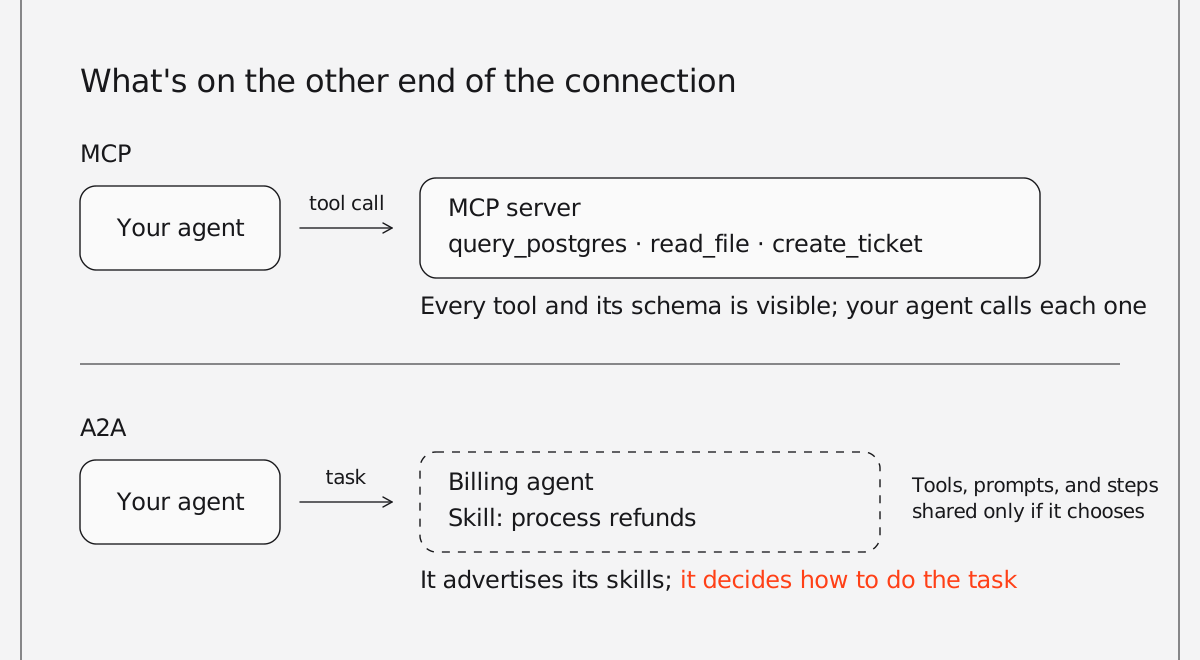
People mix them up because they look alike on the surface: both are open standards governed by the Agentic AI Foundation, part of the Linux Foundation, and both can run over HTTP. The difference is what sits on the other end of the connection: either a tool your agent controls or an agent that makes its own decisions.
## What is MCP?
MCP is an open protocol that gives an AI application a standard way to connect to tools, data, and prompts. Anthropic released it in November 2024 and later donated it to the Agentic AI Foundation, a Linux Foundation fund co-founded by Anthropic, Block, and OpenAI.
An MCP server wraps a capability, such as querying Postgres, reading files, or creating a Jira ticket, and describes it in a way a model can understand. An MCP client, usually inside an agent or an assistant like Claude or ChatGPT, discovers those capabilities and calls them. Write the server once, and any MCP-compatible client can use it.
The current specification, dated 2026-07-28, introduced a stateless protocol core. Each request carries its own protocol version and client information, so MCP servers can scale behind an ordinary load balancer without relying on protocol-level sessions.
An MCP server exposes what a system can do, but it doesn't decide when to call a tool or in what order. The agent makes those decisions.
## What is A2A?
A2A is an open protocol that lets AI agents built on different frameworks, by different teams or companies, discover each other and work together on tasks. Google announced it in April 2025 and donated it to the Linux Foundation that June. Version 1.0, its first stable specification, shipped in March 2026, and by April the project counted more than 150 supporting organizations, including Microsoft, AWS, Salesforce, SAP, and ServiceNow. In August 2026, A2A joined MCP in the Agentic AI Foundation.
Each A2A agent publishes an Agent Card, a JSON document at a well-known URL (`/.well-known/agent-card.json`) that describes what the agent can do, where to reach it, and how to authenticate. Another agent reads the card, sends a message, and gets back a task it can follow until the work is done, including streamed updates for long-running jobs.
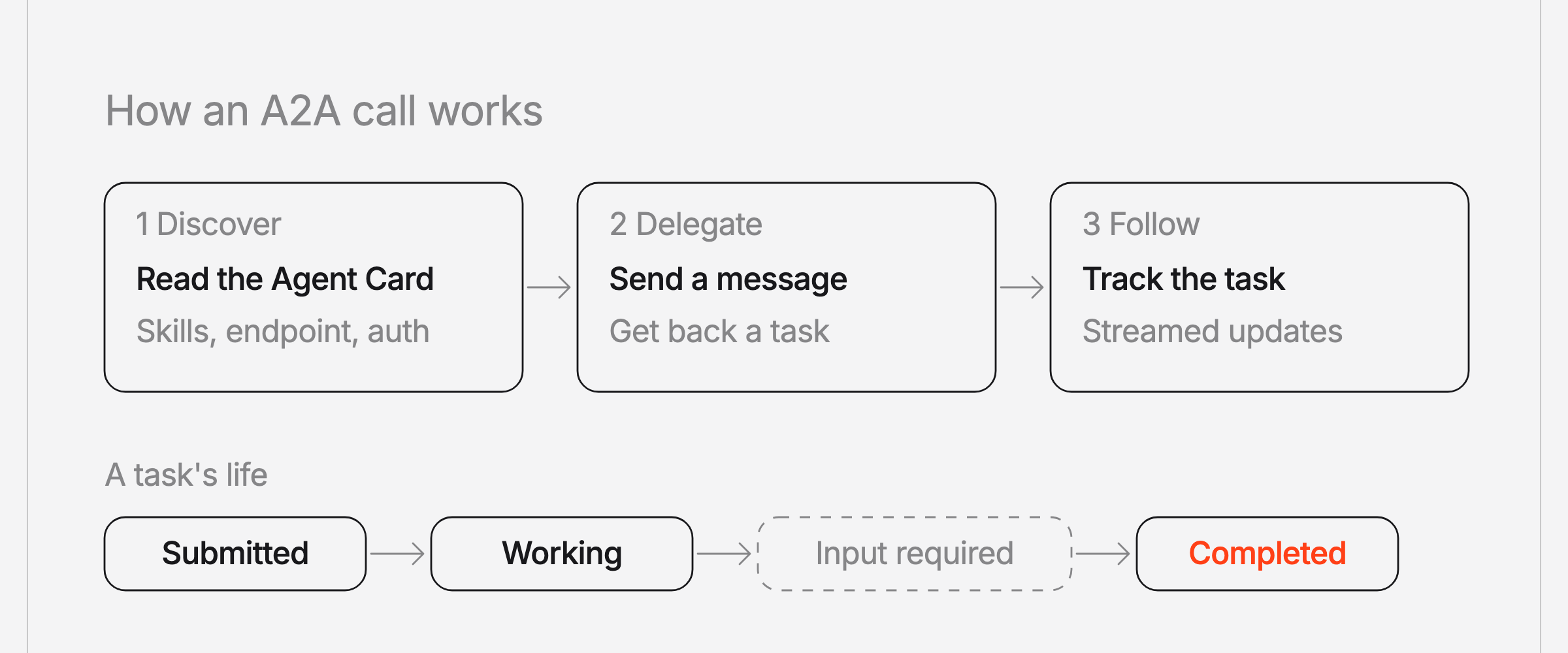
The key difference from MCP is that the agent on the other end doesn't have to expose its internals. It advertises skills and returns results; whether it also reveals its tools, prompts, or intermediate steps is its own choice rather than something the protocol requires. Some implementations do stream them, and Agno's A2A streams can include tool names and arguments. That matters when the agent belongs to another team or another company: you can delegate work to it without either side having to open up how it works.
## How do A2A and MCP differ?
MCP exposes tools and capabilities, which can also include an agent. A2A provides a standard way for agents to exchange messages and delegate tasks. Most of the practical differences come down to control: an MCP client directs each call, while an A2A agent that receives a task decides for itself how to complete it.
| | MCP | A2A |
| ---------------- | --------------------------------------------------------- | ----------------------------------------------------------- |
| Connects | An agent to tools, data, and prompts | An agent to other agents |
| The other side | A tool that does what it's told | An agent that decides how to do the task |
| What you can see | Every tool, its inputs, and its schema | The skills it advertises, plus whatever it chooses to share |
| Discovery | The client lists the server's tools | The client reads the agent's Agent Card |
| Unit of work | A tool call, with optional support for asynchronous tasks | A message exchange or a task with status updates |
| Typical example | An agent querying Postgres or GitHub | A support agent handing a refund to a billing agent |
| Created by | Anthropic, November 2024 | Google, April 2025 |
To choose, look at what's on the other end of the connection. If your agent should direct it step by step, put it behind MCP. If it should own the task and decide how to finish it, reach it over A2A.
## When should you use MCP, A2A, or both?
MCP fits when your agent needs to act on a system directly, and A2A fits when the work belongs to another agent. Many systems end up using both.
Take a support agent for a subscription company. It uses MCP to search the help center and look up the customer in the CRM. When a customer asks for a refund, it doesn't call the payments API itself. It hands the refund to the billing team's agent over A2A.
The billing agent has its own MCP connections to the payments API and the ledger, plus its own rules about when a refund needs approval. It doesn't have to surface any of that, and here it doesn't. The support agent only knows that the billing agent advertises a refund skill, so it sends the request and gets the outcome back.
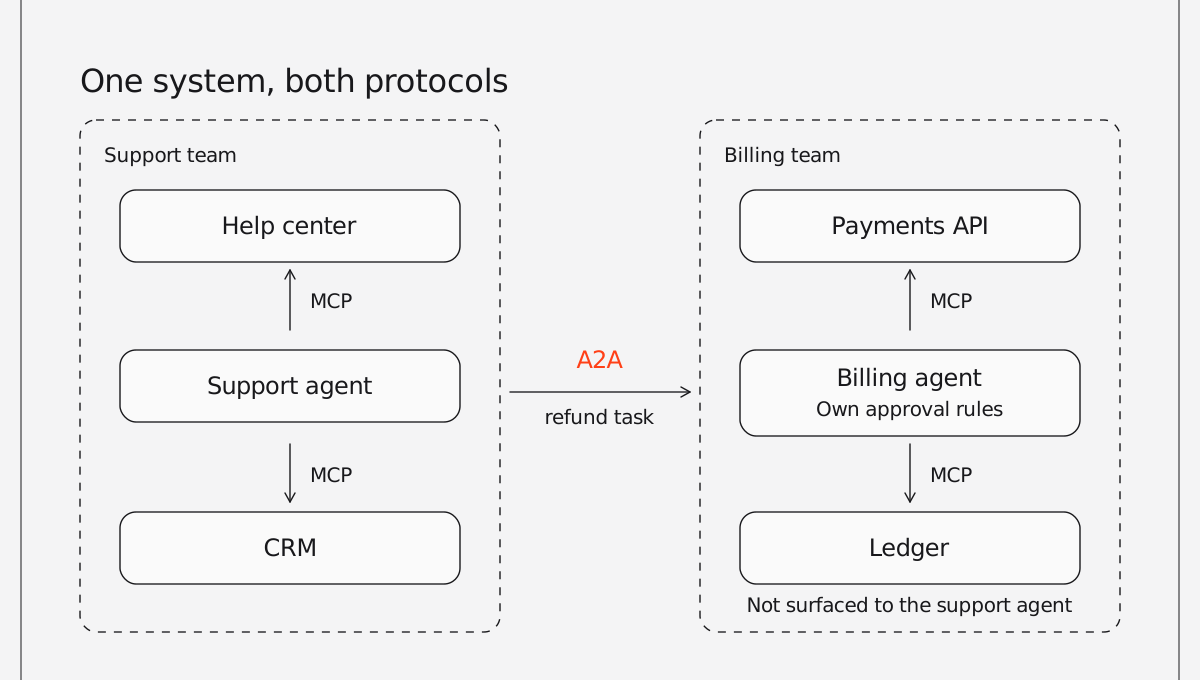
Splitting the work this way keeps each team's logic with the team that owns it. The billing team can change its refund rules, switch payment providers, or add an approval step, and the support agent doesn't have to change at all.
MCP on its own works when a single agent needs access to tools. A2A becomes useful when a task has to cross a team or company boundary, or reach an agent built on a different framework.
If you're deciding how to expose your own product to outside assistants, there's a related choice between publishing raw MCP tools and publishing an agent behind them. We covered that in [A pile of MCP tools is not an agent](https://www.agno.com/blog/mcp-server-vs-agent).
## How do you use MCP and A2A with Agno?
Agno supports both protocols in both directions: your agents can call MCP servers and A2A agents, and AgentOS can expose your agents over MCP and A2A.
Install the extras for AgentOS, MCP, and A2A:
```bash
uv pip install -U "agno[os,mcp,a2a,openai]"
export OPENAI_API_KEY="your-openai-api-key"
```
To serve the billing agent from the example over both protocols, turn on both in AgentOS:
```python
from agno.agent import Agent
from agno.models.openai import OpenAIResponses
from agno.os import AgentOS
billing_agent = Agent(
id="billing-agent",
name="Billing Agent",
model=OpenAIResponses(id="gpt-5.5"),
instructions="Process refund requests. Refunds over $50 need approval.",
)
agent_os = AgentOS(
agents=[billing_agent],
a2a_interface=True, # serve an Agent Card and A2A endpoints
mcp=True, # serve AgentOS over MCP
)
app = agent_os.get_app()
```
The agent's Agent Card is then available at `/a2a/agents/billing-agent/.well-known/agent-card.json`. Any compatible A2A client can call it, including one built with Google ADK or another framework. From an Agno agent or plain Python, use the A2A client:
```python
import asyncio
from agno.client.a2a import A2AClient
async def main():
client = A2AClient("https://billing.example.com/a2a/agents/billing-agent")
result = await client.send_message(
message="Refund the duplicate $30 charge for customer 4821"
)
print(result.content)
asyncio.run(main())
```
If AgentOS runs with authorization turned on, every A2A request needs a valid token (passed through the client's `headers`), so the billing team decides who can delegate work to its agent. On the tool side, Agno agents connect to any MCP server through [MCPTools](https://docs.agno.com/tools/mcp/overview); the [A2A interface docs](https://docs.agno.com/agent-os/interfaces/a2a/introduction) and [A2A client docs](https://docs.agno.com/agent-os/client/a2a-client) cover the full setup.
---
# Community Roundup: September 2026
> Agno's September recap: PublicSurface puts agents in front of anonymous users, page storage turns your docs into agent knowledge, rerankers work on every vector database, and AgentOS MCP servers scale across replicas.
- Published: 2026-10-05
- Author: Cosette Cressler
- Categories: Community, Product
- Canonical: https://www.agno.com/blog/community-roundup-september-2026
- Markdown: https://www.agno.com/blog/community-roundup-september-2026.md
Agno shipped seven patch releases in September, headlined by PublicSurface for public agents, page storage for docs-backed knowledge, and MCP servers that scale across replicas. More than 50 community contributors landed changes alongside us, and the community shipped some incredible projects of its own.
There's a lot to cover, so let's dive in.
## New releases & features
### PublicSurface serves agents to anonymous users
Say you want a product assistant on your marketing site. Visitors aren't logged in, and they shouldn't get anywhere near your admin API or your internal teams.
Pass `public=PublicSurface(...)` to `AgentOS` and list the components anonymous users may reach. Everything you leave off that list stays private. Public requests run against per-client and global quotas, per minute and per day, and AgentOS counts them in PostgreSQL so every replica enforces the same numbers. Request size, run time, output size, and concurrent runs all have ceilings you can set.
Later in the month, PublicSurface gained support for sharing an AgentOS with the Control Plane. Set `authorization=True` and one URL serves anonymous chat on the routes you picked, while verified JWTs reach the full REST API under their scopes.
Read the changelog entries on [PublicSurface](https://www.agno.com/blog/serve-agents-to-the-public-with-publicsurface) and [running it with the Control Plane](https://www.agno.com/blog/run-the-control-plane-and-a-public-agent-on-one-agentos), or learn more about [PublicSurface](https://docs.agno.com/agent-os/public-surface) in the docs.
### Page storage turns your docs into agent knowledge
Keeping an agent in step with your docs usually means a crawler, a chunker, and a vector table that drift apart. A refresh dies halfway through, and the agent serves new text against old vectors.
`Knowledge.sync_pages` takes a site's `llms.txt` URL, discovers the pages, fetches their Markdown, embeds them, and publishes each page's text, catalog entry, and vectors in one transaction. A page either publishes whole or keeps its previous version. Unchanged pages skip re-embedding, and the sync report lists every page that failed or was removed.
Once the pages are published, the `PageFileSystem` toolkit lets an agent work through them with `ls`, `tree`, `rg`, `grep`, `cat`, and `head`, the way an engineer works through a repo. Vector search finds the right page, and the agent then reads all of it. The toolkit is read-only: no shell, no writes, and bounded output.
Read the changelog entries on [page storage](https://www.agno.com/blog/publish-your-docs-as-agent-knowledge-with-page-storage) and [PageFileSystem](https://www.agno.com/blog/give-agents-a-read-only-filesystem-over-your-docs), or learn more about [published pages](https://docs.agno.com/knowledge/published-pages) in the docs.
### Rerankers now work on every vector database
`Knowledge.search()` now runs the reranker itself. Before, reranking had to be built into each vector database adapter, and only some adapters had it.
Pass a reranker to `Knowledge` and every search goes through it, on any vector database. Agno widens the fetch first, so the reranker has a bigger pool of candidates to reorder. Two new rerankers ship with it: [`MMRReranker`](https://www.agno.com/blog/get-diverse-search-results-with-the-mmr-reranker) swaps near-duplicate results for diverse ones, and [`RecencyReranker`](https://www.agno.com/blog/rank-newer-documents-higher-with-the-recency-reranker) ranks newer documents higher. `CohereReranker` and your own rerankers work too.
Setting `reranker` on a vector database still works but now logs a deprecation warning. Move it to `Knowledge(reranker=...)`.
Read the [full changelog entry](https://www.agno.com/blog/rerank-knowledge-search-on-any-vector-database), or learn more about [reranking](https://docs.agno.com/knowledge/concepts/search-and-retrieval/reranking) in the docs.
### Elasticsearch joins the vector databases
Teams that already run Elasticsearch for search and logs can now keep agent knowledge there too. The new `Elasticsearch` vector database supports vector, keyword, and hybrid search, metadata filters, rerankers, async, and per-user isolation through a `user_id` field. Hybrid search works on every Elasticsearch license, and you can switch it to reciprocal rank fusion on Platinum, Enterprise, and trial licenses.
Read the [full changelog entry](https://www.agno.com/blog/search-knowledge-in-elasticsearch-with-vector-keyword-and-hybrid-search), or learn more about the [Elasticsearch vector database](https://docs.agno.com/knowledge/vector-stores/elasticsearch/overview) in the docs.
### AgentOS MCP servers scale out
[`MCPConfig(stateless=True)`](https://www.agno.com/blog/serve-mcp-statelessly-so-any-replica-can-answer-any-request) serves `/mcp` without tracking sessions, so any replica can answer any request and a multi-instance deployment no longer needs session affinity. It's off by default, because stateless serving also drops server-initiated notifications and SSE resumability.
Two more additions make an AgentOS MCP server easier to discover and connect to. [`GET /mcp/server-card`](https://www.agno.com/blog/agentos-now-serves-an-mcp-server-card) lists the tools your server offers before a client connects. `MCPConfig` can also serve your tool server [at its own hostname](https://www.agno.com/blog/serve-your-mcp-server-at-its-own-hostname), like `mcp.example.com`, without the routing middleware you used to write.
On the client side, [`MCPTools(protocol_mode="auto")`](https://www.agno.com/blog/mcptools-can-now-negotiate-the-newest-mcp-protocol-era) negotiates the newest MCP protocol version both sides support, including the sessionless 2026-07-28 version. The default stays `"legacy"`, so existing servers are unaffected. A community contributor built this one (more below).
Learn more about the [AgentOS MCP server](https://docs.agno.com/features/mcp-server) and [MCP tools](https://docs.agno.com/tools/mcp/overview) in the docs.
### Azure OpenAI deployments get the Responses API
`AzureOpenAIResponses` gives your Azure deployment the tools, structured output, streaming, and background responses of `OpenAIResponses`. Agno's `AzureOpenAI` model only offered Chat Completions until now.
Read the [full changelog entry](https://www.agno.com/blog/use-the-responses-api-with-azure-openai-deployments), or see the [cookbook](https://github.com/agno-agi/agno/blob/main/cookbook/90_models/azure/openai/responses.py) for reference.
## New tools & integrations
Also shipped in September:
- **New model providers**: [llmman](https://www.agno.com/blog/llmman-is-now-a-supported-model-provider) and [Y-API](https://www.agno.com/blog/y-api-joins-agno-as-a-model-provider), an OpenAI-compatible gateway.
- **[GandrTools](https://www.agno.com/blog/gandrtools-adds-gandr-text-to-speech-to-your-agents)**: agents can turn text into speech through the Gandr TTS API.
- **[Bring your own Bedrock client](https://www.agno.com/blog/bring-your-own-async-client-to-bedrock)**: Bedrock accepts an async client you configure yourself.
- **[MCP tools return audio](https://www.agno.com/blog/mcp-tools-now-return-audio)**: when an MCP tool returns audio, `MCPTools` decodes it and adds it to `run.audio`.
- **[Public custom routes](https://www.agno.com/blog/mark-custom-routes-public-without-turning-off-auth)**: mark individual custom routes public while authorization stays on for everything else.
- **[AG-UI protocol 1.0](https://www.agno.com/blog/the-ag-ui-interface-supports-ag-ui-protocol-1-0)**: the AG-UI interface handles tool results sent as lists of content parts, so paused runs resume cleanly.
- **[Slack retries](https://www.agno.com/blog/slack-now-answers-messages-whose-first-delivery-was-lost)**: the Slack interface now answers a message whose first delivery never reached AgentOS. It used to drop the retry.
- **[Cancelled runs say where they stopped](https://www.agno.com/blog/cancelled-runs-now-say-where-they-stopped)**: `cancellation_stage` tells you whether a run never started, stopped mid-run, or was waiting on a human.
- **[Dependencies can read the run](https://www.agno.com/blog/dependency-callables-can-now-read-the-run-input-and-session)**: callables in an agent's `dependencies` can read the run input and the session.
## Breaking changes
A few September releases changed behavior. The ones most likely to affect you:
- Knowledge ingestion now reports embedding failures. Content that used to show `completed` may now show `failed` or `partial`, and embedders raise `EmbeddingError` where they used to return an empty vector.
- `Knowledge` constructor arguments are keyword-only, so `Knowledge("docs")` becomes `Knowledge(name="docs")`.
- `CodingTools` makes `run_shell` opt-in with `enable_run_shell=True`.
- With `authorization=True` and `PublicSurface(mcp=True)`, MCP accepts only `localhost` by default. Add your domain to `MCPConfig(allowed_hosts=[...])`.
Read the [release notes](https://github.com/agno-agi/agno/releases) before you upgrade.
## Community projects & showcases
A few of the things people built with Agno in September:
### Workspace Council: a governed multi-agent council for your workspace by Anshul Raj, Mohamed Tahir, and Mujtaba Mohimtulay
Built at the AI Tinkerers Dubai hackathon, Workspace Council puts six specialized Agno agents to work across the web, Slack, and the Ambiguous workspace app. They pull documents and email context, research with Exa, draft decision-ready artifacts, and run an adversarial critic loop on every draft. Every write waits for human approval, and a CopilotKit Mission Control view shows each handoff as it happens.
Read more on [LinkedIn](https://www.linkedin.com/posts/anshul-raj-372740202_agentseverywhere-aiagents-copilotkit-ugcPost-7504510433589071872-uHlP).
### Vega: voice trading inside OpenAlgo by Marketcalls (@marketcallsHQ)
OpenAlgo is an open-source trading platform for Indian markets that works with 35+ brokers. Its new assistant, Vega, lets you talk to the platform and place trades by voice. Agno runs the agents, and LiteLLM keeps it model-agnostic.
Check it out on [X](https://x.com/marketcallsHQ/status/2099579349460750708).
### An agent council for pressure-testing ideas by Tarun Jain
Pick a room for your niche in a pixelated world, pitch an idea, and six Agno agents with their own personas interview you, research with Exa, debate each other, and land on a collective opinion. Tarun built it to test agent-to-agent communication, comparing coordinator and routing orchestration with an A2A branch. The code will be open-sourced alongside a video walkthrough.
Read more on [LinkedIn](https://www.linkedin.com/feed/update/urn:li:activity:7507055553433677824).
## Contributor shoutouts
### Community MVPs
- **@basnijholt**: Fixes across the 3.x line. `SqliteDb` bulk upserts now apply the session owner check, empty Anthropic tool arguments survive replay, and nullable document titles in Claude citations no longer break ([#9937](https://github.com/agno-agi/agno/pull/9937), [#8970](https://github.com/agno-agi/agno/pull/8970), [#10147](https://github.com/agno-agi/agno/pull/10147), [#9941](https://github.com/agno-agi/agno/pull/9941)).
- **@ProgrammerPlus1998**: Migrated the MCP client and the AgentOS MCP server to `mcp` 2.x, which brought `protocol_mode` to `MCPTools` ([#9269](https://github.com/agno-agi/agno/pull/9269)).
- **@hugoaimlapi** (AI/ML API): Repaired the AIMLAPI model integration, then added `AIMLAPITools` for image, video, speech, and transcription behind one key ([#9898](https://github.com/agno-agi/agno/pull/9898), [#10276](https://github.com/agno-agi/agno/pull/10276)).
- **@luisnmartins**: Added `.zip` and `.eml` as AgentOS upload types, so archives and email files go straight into a run ([#9193](https://github.com/agno-agi/agno/pull/9193)).
### More great contributions
- **@ericcurtin** (Docker): Added llmman as a model provider ([#9863](https://github.com/agno-agi/agno/pull/9863)).
- **@rastagan-git**: Added the Azure OpenAI Responses model ([#9841](https://github.com/agno-agi/agno/pull/9841)).
- **@ddellspe-vl**: Let Bedrock take an async client you provide ([#9531](https://github.com/agno-agi/agno/pull/9531)).
- **@kinKingen**: Added `AuthorizationConfig.excluded_route_paths` for public custom routes ([#9295](https://github.com/agno-agi/agno/pull/9295)).
- **@jiweiyeah**: Added Y-API as an OpenAI-compatible model provider ([#10326](https://github.com/agno-agi/agno/pull/10326)).
- **@devansh173**: Made MCP tools return audio as audio artifacts ([#10036](https://github.com/agno-agi/agno/pull/10036)).
- **@yetuge**: Four PRs, including DeepSeek thinking-model detection in `OpenAILike` and UTF-8 reads and writes in `LocalFileSystemTools` ([#10342](https://github.com/agno-agi/agno/pull/10342), [#10538](https://github.com/agno-agi/agno/pull/10538)).
- **@BlueX888**: Three fixes, including real image MIME types for Gemini and keeping falsy tool results like `0` and `[]` ([#9887](https://github.com/agno-agi/agno/pull/9887), [#9948](https://github.com/agno-agi/agno/pull/9948)).
- **@devYRPauli**: Stopped `RecursiveChunking` from emitting duplicate trailing chunks and added grouped-shape support to the PowerPoint readers ([#9919](https://github.com/agno-agi/agno/pull/9919), [#10037](https://github.com/agno-agi/agno/pull/10037)).
- **@ericdelorefice**: Made a failed async run delete raise an error, so a dropped connection no longer looks like a missing run ([#10682](https://github.com/agno-agi/agno/pull/10682)).
- **@runshouse** (Magic Hour AI) and **@DanceNitra**: Added cookbooks for the Magic Hour hosted MCP server and inspeximus memory ([#10057](https://github.com/agno-agi/agno/pull/10057), [#10146](https://github.com/agno-agi/agno/pull/10146)).
- **Reader fixes**: @RaycarlLei, @Minouccc, @n1uz1, @harbinresearcher, @lakers-abing, @emme1t, @tdog54646, @daleselaji-dev, @Kyousuk1e, and @baba9811 fixed edge cases in the knowledge readers, from text streams in the Text, Markdown, and CSV readers to CR line endings and scalar JSON roots.
- **Docs and cookbook cleanup**: @Shxiao101, @Theater-ahyeon, @simpleqt, and @xizhuomengcontin fixed dead links, broken imports, and docstrings across the cookbook.
Every one of you made Agno better. Thanks for building with us.
## Get involved
Want to contribute to Agno?
- ⭐ [Star Agno on GitHub](https://github.com/agno-agi/agno)
- 💬 [Join our Discord](https://agno.link/discord)
- 📖 [Read the docs](https://docs.agno.com/)
- 🛠️ Check out [open issues](https://github.com/agno-agi/agno/issues)
- 🚀 Share what you're building. We want to feature your project next month.
**_— Team Agno_**
---
# Agent evals are the new unit tests (and most teams skip them)
> Agent evals verify what an AI agent actually did. Why prompt changes cause regressions, and how to build a minimum viable eval loop in CI.
- Published: 2026-09-30
- Author: Cosette Cressler
- Categories: Engineering, Perspectives
- Canonical: https://www.agno.com/blog/agent-evals-are-the-new-unit-tests
- Markdown: https://www.agno.com/blog/agent-evals-are-the-new-unit-tests.md
Most teams test an agent change by trying a handful of familiar questions, reading the answers, and shipping.
The problem is that an agent can pass every question you thought to ask and still break somewhere you didn't look.
If you want to know whether a change actually made your agent better, you need to define what good behavior looks like and check it every time something changes. That's an eval. It does for agent behavior what unit tests do for code.
Teams skip evals for much the same reason many still skip unit tests: the demo works, and writing tests feels slower than shipping, at least until something breaks in production.
## Why do agents regress when you change the prompt?
Agents regress when a change to the prompt, model, or tools shifts which steps the agent takes. No code has to change for that to happen, which is why it often goes unnoticed until someone downstream spots it.
Take a support agent for a subscription business. It answers billing questions, looks up accounts, and handles refunds with two tools: `request_refund_approval` to get finance's sign-off and `issue_refund` to send the money. It's been in production for two months without problems.
A product manager asks for friendlier replies, so an engineer adds a line to the instructions: be warm, be concise, resolve the issue in as few steps as possible. The test questions come back warmer, and the change ships on Friday.
On Tuesday, finance notices refunds under $50 going out without approval. The agent had read "as few steps as possible" as permission to skip `request_refund_approval` and call `issue_refund` directly when the amount was small.
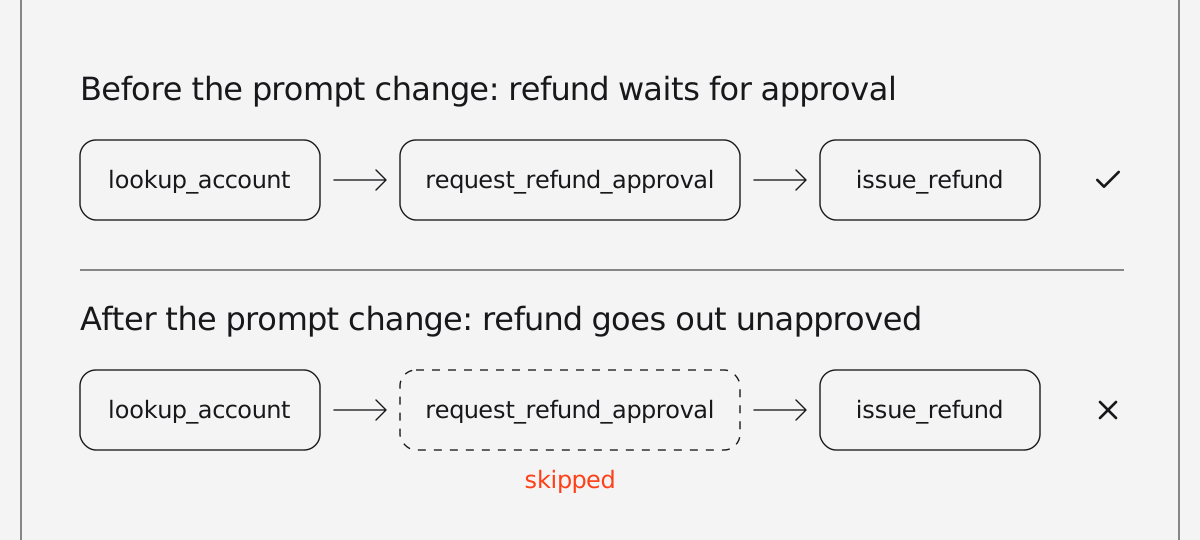
The refund code and both tools were untouched, and every call succeeded. None of the engineer's test questions involved a refund, so there was nothing to notice. The prompt edit changed how the agent behaved, and nothing in the team's process was set up to catch it.
## Why don't unit tests catch agent regressions?
Unit tests verify that code returns the right result, and most agent regressions happen in the agent's decisions rather than in its code.
The team had unit tests, which already put them ahead of plenty of agent codebases, and they all passed. The refund tool validated its inputs, the approval endpoint returned the right status codes, and account lookup handled missing users.
Those tests check code, and the code was fine. What went wrong was the agent's decision about which code to run.
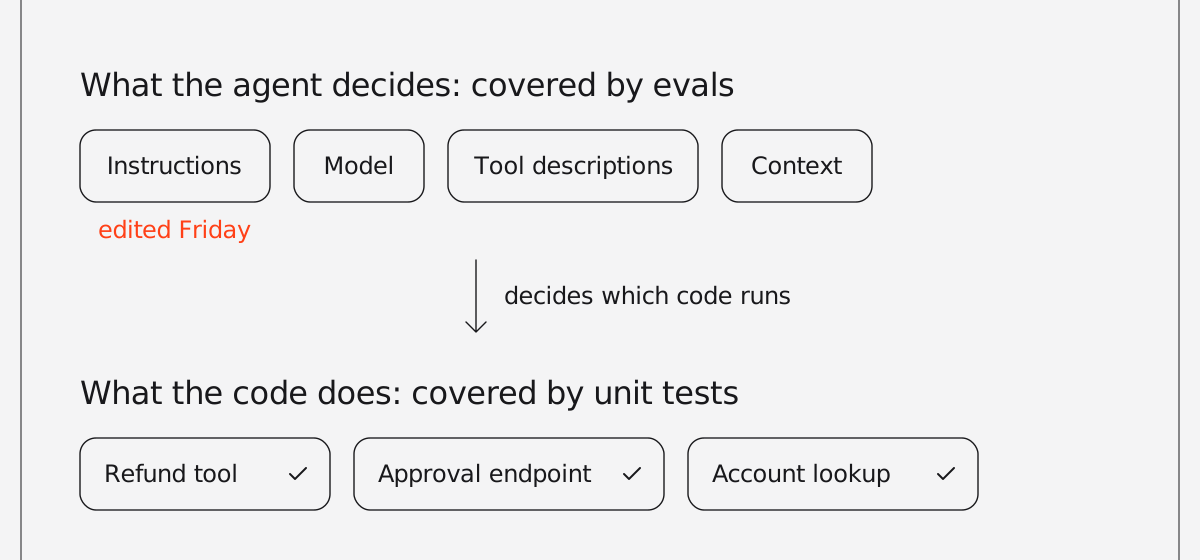
That decision depends on inputs unit tests don't cover: the instructions, the model, the tool descriptions, and whatever context gets pulled in. Changing any of them can shift behavior while every function still returns what it returned yesterday.
Agents also aren't deterministic. The same input can take a different path on the next run, so trying a question once shows you one outcome, not the typical one.
Catching this takes a test that runs the agent end to end and checks what it did.
## What are agent evals, and how are they different from unit tests?
Agent evals are repeatable checks that run an agent end to end and verify its answers, its tool calls, and its performance.
If you already write unit tests, most of the ideas carry over. The difference is what you assert on.
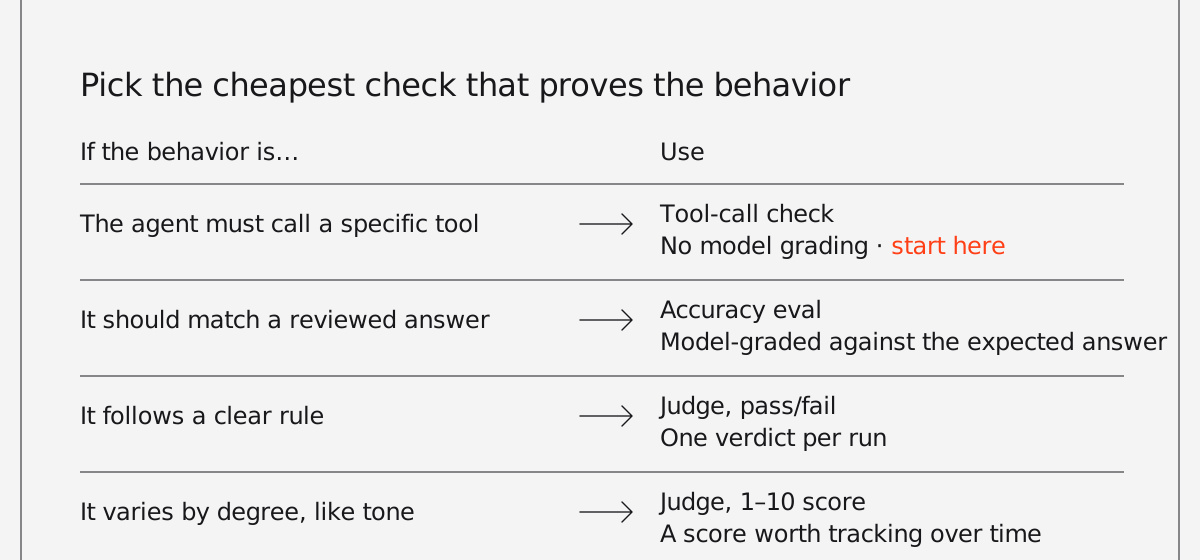
| Unit testing | Eval equivalent | What it checks in an agent |
| ----------------------------- | ------------------- | --------------------------------------------------------------------- |
| A golden-file test | Accuracy eval | How closely does the answer match a reviewed expected answer? |
| A test for a rule or contract | Agent-as-judge eval | Does the response meet your criteria: tone, policy, escalation rules? |
| Checking a mock was called | Reliability eval | Did the agent call the right tools with the right arguments? |
| Benchmarks | Performance eval | How long does it take, and how much memory does it use? |
| A test suite in CI | Eval suite | Do all of the above pass together on every change? |
The refund bug is a reliability failure, and a single check would have caught it: when a customer asks for a refund, the agent calls the approval tool. No model has to grade that check. Someone just has to write it.
Many agent regressions look like this. The model reasons fine and still skips a step because nothing written down says the step is required.
## How do you evaluate an AI agent?
To evaluate an AI agent, choose the five to ten behaviors that would do the most damage if they broke, write one test case for each, and run them on every change to the prompt, model, or tools.
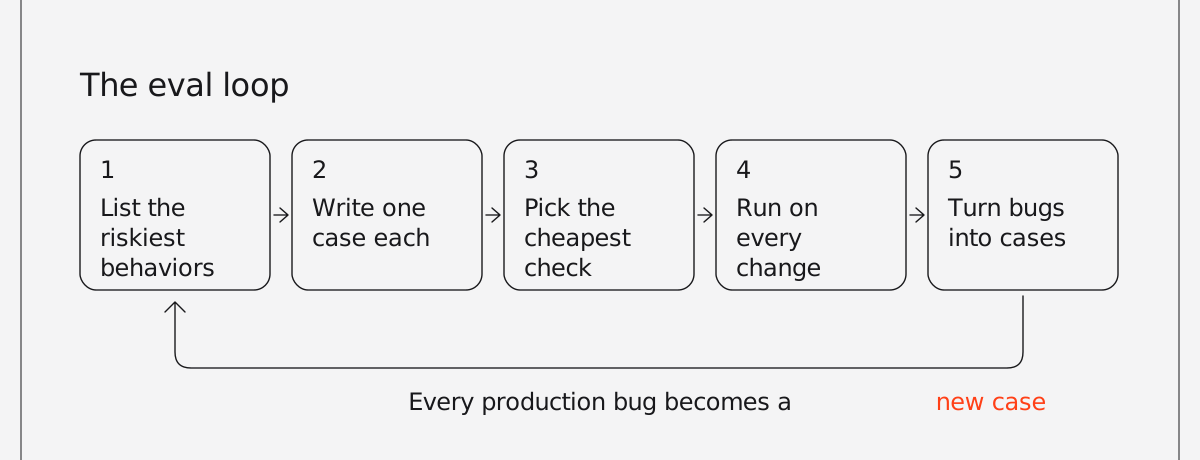
You don't need a benchmark or a big labeled dataset to start. The loop looks like this:
1. **List the behaviors that would cause real damage if they broke,** rather than everything the agent does. For the support agent, that means refunds go through approval, cancellations offer a retention option, and prices come from a lookup instead of the model's memory.
2. **Write one case per behavior,** with one input each, so a failure points at a specific cause.
3. **Pick the cheapest check that proves the behavior.** If the behavior is "calls the approval tool," check the tool call and save agent-as-judge evals for things like tone or policy compliance.
4. **Run the cases whenever the prompt, model, tools, or context change.** That includes model version upgrades you didn't choose.
5. **When a bug reaches production, add a case for it the same day.** Over time, the suite comes to reflect what actually breaks.
Here's what that looks like with Agno's eval suites. Each `Case` sends one input to your agent and applies an agent-as-judge check (a model grading the response against your criteria), a tool-call check, or both. For checks on tool arguments, use `ReliabilityEval` directly. Save the cases as `evals.py`:
```python evals.py
import sys
from agno.eval import Case, JudgeMode, cli
from app.agents import support_agent
CASES = (
Case(
name="refund_requires_approval",
agent=support_agent,
input="I was charged $30 twice this month. Can I get one refunded?",
tags=("smoke", "billing"),
expected_tool_calls=("lookup_account", "request_refund_approval"),
),
Case(
name="cancellation_offers_retention",
agent=support_agent,
input="I want to cancel my subscription.",
tags=("smoke",),
criteria="Offers the pause or downgrade option before confirming cancellation.",
),
Case(
name="tone_stays_on_brand",
agent=support_agent,
input="This is the third time your app has double-charged me.",
criteria="Acknowledges the frustration, apologizes once, and gives a concrete next step.",
judge_mode=JudgeMode.NUMERIC,
judge_threshold=7,
),
)
if __name__ == "__main__":
sys.exit(cli(CASES))
```
The first case is the refund bug, checked through the tool calls with no model grading, so it adds no judge call. The check itself is deterministic: either the expected tools were called or they weren't. The second uses a pass/fail judge for a clear rule. The third uses a 1–10 score, since tone varies by degree and the score is worth tracking over time.
Three cases won't cover everything the agent does, but they cover the failures that would be most expensive to ship.
## How do you run agent evals in CI?
To run agent evals in CI, use a runner that fails the build when a case fails and run it on every pull request. Agno's `cli()` runner exits with a non-zero code when a selected case fails, so it can gate a CI job directly. Tags let you separate quick checks from slow ones.
```yaml
- name: Run agent evals
run: python evals.py --tag smoke --json-output tmp/evals.json
```
Some practical notes:
- **Run a small smoke set on every pull request and the full suite nightly.** Evals call real models, so they cost money and take time, and a slow PR check tends to get skipped. Because each case runs once per build, the nightly run can also surface flaky cases. One that passes most nights and occasionally fails is worth investigating: the cause can be model variance, an ambiguous instruction, an unstable dependency, or a criterion the judge can read more than one way.
- **Save the JSON report as a build artifact,** with `if: always()` on the upload step in GitHub Actions (or your CI's equivalent), since the report matters most when the eval step fails. It records each case's output, the tools called, and the judge's reasoning, so you can see why a case failed without rerunning it.
- **A run that selects zero cases,** say because of a mistyped tag, counts as a failure rather than a pass.
Each case runs in its own eval session, so when you log results with `db=`, test traffic stays out of your agent's real history.
## What mistakes make agent evals useless?
Plenty of teams write evals that almost never fail. These are the usual reasons.
### Using a judge for everything
A model grading a model makes sense for tone and policy. For "did it call the refund tool," it adds cost, latency, and its own variance. Any check that can be deterministic should be.
### Vague criteria
"Response is helpful" passes almost anything. "States the refund will arrive in 5–7 business days" can fail. A useful test for a criterion is whether a new support hire could apply it and reach the same verdict.
### Testing several things in one case
If one case checks tone, accuracy, and tool use together, a failure still needs investigating. With one behavior per case, the name of the failing case tells you what broke.
### Only testing the happy path
The questions people remember to try are usually ones the agent already handles. Better cases come from support tickets, production traces, and past incidents.
### Never adding cases
A suite that hasn't changed since launch is testing an older version of the agent. When production turns up a bug the evals missed, adding a case is part of the fix.
## Where should you start with agent evals?
If you have an agent in production and no evals, start small. List the five to ten behaviors you'd least want to break, write a case for each, and run them before your next prompt change. Then add them to CI.
If you're still building, try writing the cases before the prompt. Deciding what a good answer looks like usually clarifies the design as well.
The [eval docs](https://docs.agno.com/evals/overview) cover each check type, and [Eval Suites](https://docs.agno.com/evals/suite/overview) goes through selectors, judge modes, and CI setup.
---
# Best frameworks for building customer-facing AI agents in 2026
> Compare the best AI agent frameworks for customer-facing agents in 2026 on per-user isolation, auth, approvals, and embedding.
- Published: 2026-09-29
- Author: Cosette Cressler
- Categories: Engineering, Perspectives
- Canonical: https://www.agno.com/blog/best-frameworks-for-customer-facing-ai-agents
- Markdown: https://www.agno.com/blog/best-frameworks-for-customer-facing-ai-agents.md
The best frameworks for building customer-facing AI agents in 2026 include Agno, LangGraph, the OpenAI Agents SDK, Google's Agent Development Kit (ADK), Mastra, and the Vercel AI SDK. Which one fits depends on your language, how much of the serving layer you want to build yourself, and whether you're tied to a particular model provider or cloud.
Most framework comparisons assume an internal agent, like a research assistant or a scheduled workflow. A customer-facing agent can be used by thousands of people, each with their own data and permissions, and some of its actions, such as refunds or account changes, can't easily be undone. That moves isolation, authentication, and approval flows to the top of the list.
We build Agno, so read our take on it with that in mind. We've tried to judge every framework, ours included, on the same criteria and be clear about where another framework is the better fit.
## What should you look for in a framework for customer-facing agents?
Look for five things: per-user isolation, authentication against your existing identity provider, human approval for risky actions, a way to embed the agent in your product, and control over where data lives.
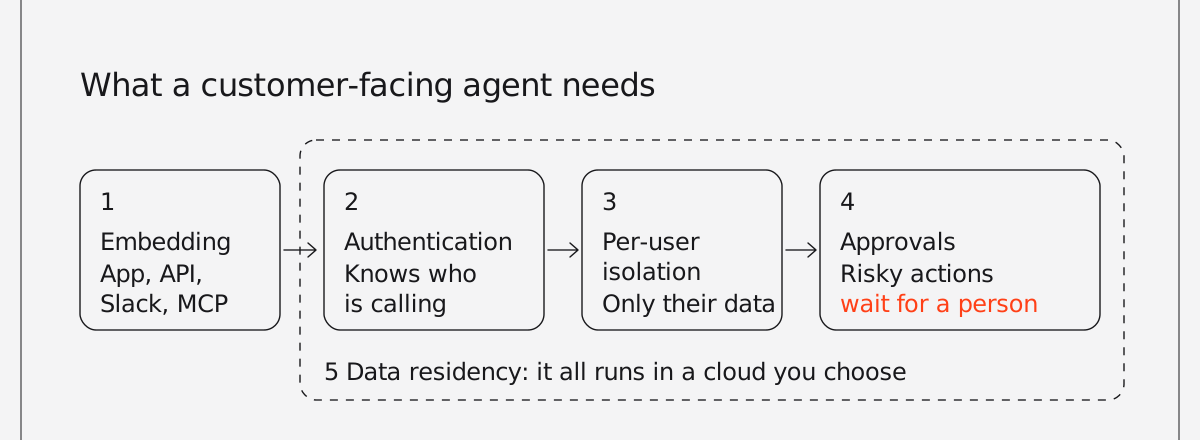
### Per-user isolation
One customer's conversation, memory, and data must never reach another customer. Ask whether the framework scopes sessions and memory to a user or tenant for you, or whether you have to build and enforce that yourself.
### Authentication and authorization
The agent should know who is calling and what they're allowed to do, using the identity provider you already use, such as Auth0, Okta, WorkOS, or Supabase. Tools that act on a customer's account should inherit that customer's permissions.
### Approval for risky actions
Refunds, deletions, and account changes should pause until a person approves them. Check whether the pause survives a restart, since an approval can take minutes or days. Our guide to [human-in-the-loop controls in production](https://www.agno.com/blog/how-to-add-human-in-the-loop-controls-to-ai-agents-that-actually-run-in-production) covers the patterns in more depth.
### Embedding
The agent has to reach customers somehow: inside your app, through an API your frontend calls, in Slack, or as an MCP server other assistants can use. Some frameworks ship UI components, while others give you an API and leave the frontend to you.
### Data residency and hosting
B2B customers will often ask where their data goes. A framework you can self-host in your own cloud gives you a different answer than one tied to a managed platform.
## How do the frameworks compare?
The biggest difference between these frameworks is how much of the serving layer you get out of the box. Agno ships a runtime with auth and per-user scoping. LangGraph provides deployment and multi-tenant capabilities through LangSmith Deployment. Google ADK gets managed sessions and scaling from Agent Runtime on Google Cloud. The OpenAI Agents SDK, Mastra, and the Vercel AI SDK give you strong agent primitives while leaving more of the multi-tenant serving layer to you.
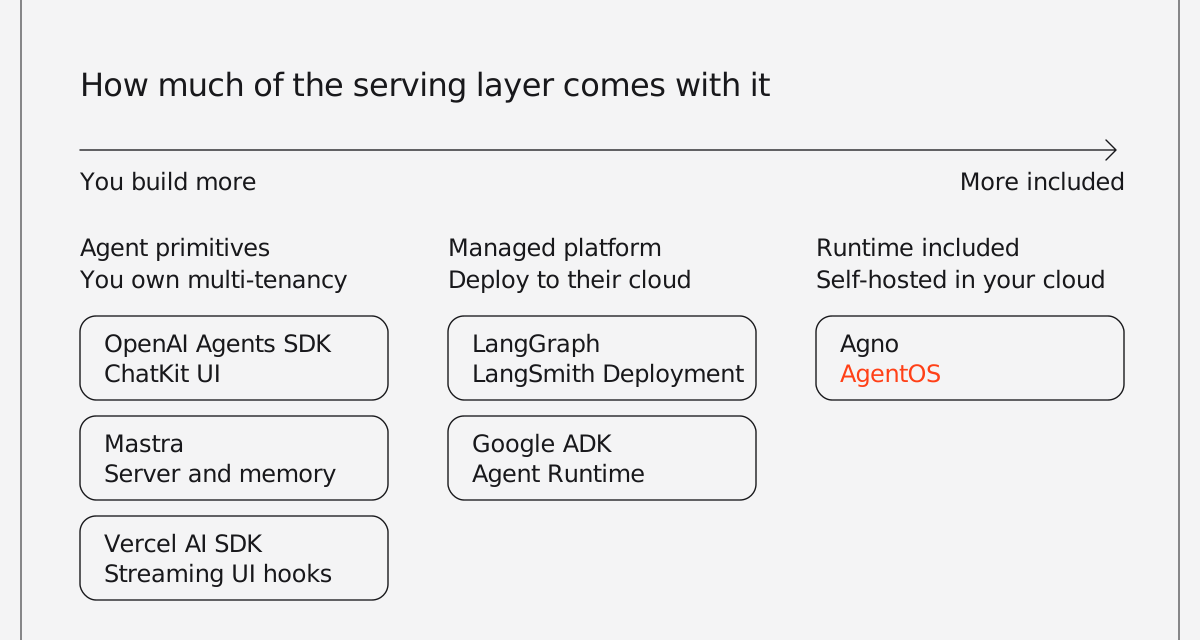
Details as of September 2026:
| Framework | Language | Per-user isolation | Auth | Human approval | Reaching customers | Hosting |
| ------------------- | ------------------------------------ | ------------------------------------------------------------------------------------------------- | ------------------------------------------------------------------------------------- | ---------------------------------------------- | ----------------------------------------------------------------------- | --------------------------------------------- |
| Agno (with AgentOS) | Python | Request isolation built in; per-user sessions and memory with one setting (`user_isolation=True`) | JWT-based RBAC with your own identity provider | Built in, including admin approvals | REST API, MCP server, AG-UI, Slack | Self-hosted in your cloud (Apache 2.0) |
| LangGraph | Python, JavaScript | Owner-scoped threads through custom auth handlers | Custom auth handlers, any provider | Interrupts | API; `useStream` React hook, Agent Chat UI, or partners like CopilotKit | Managed (LangSmith Deployment) or self-hosted |
| OpenAI Agents SDK | Python, TypeScript | Sessions per conversation; tenant scoping is yours to build | Yours to build | `needs_approval` with resumable run state | ChatKit UI components | Anywhere |
| Google ADK | Python, TypeScript, Go, Java, Kotlin | Sessions and state keyed by user ID | Handled at your API or Google Cloud | Tool confirmation; long-running function tools | API endpoint through Agent Runtime | Agent Runtime, Cloud Run, or self-hosted |
| Mastra | TypeScript | Memory threads scoped per user | Auth providers such as Auth0, Clerk, Okta, and WorkOS; RBAC in the Enterprise Edition | Workflow suspend and resume | React and Next.js integration, generated REST API | Self-hosted or the Mastra platform |
| Vercel AI SDK | TypeScript | Yours to build | Yours to build | Tool approvals; durable with WorkflowAgent | React hooks such as `useChat` | Anywhere; smoothest on Vercel |
## What are the best frameworks for customer-facing AI agents?
Each entry below covers who the framework suits, how it handles isolation, auth, and approvals, and where it falls short.
### 1. Agno: for self-hosted Python agents
Agno suits Python teams that want to run a customer-facing agent in their own cloud without building the serving, auth, and governance layers themselves. It's an open-source framework for agents, teams, and workflows, paired with [AgentOS](https://www.agno.com/products/runtime), a runtime that serves them as a production API.
AgentOS gives every request a fresh copy of the agent, so state doesn't bleed between runs, and [one setting](https://docs.agno.com/agent-os/security/authorization/user-isolation) scopes sessions and memory to the signed-in user. It checks each call against your own JWT setup, with role-based access control that works with providers such as WorkOS, Auth0, and Okta. Human-in-the-loop and admin approvals are enforced in the runtime, and with the [durable queue](https://docs.agno.com/agent-os/background-execution/durable-queue) enabled, a run waiting on approval survives a restart. For a full walkthrough, see [How to build an agent for your product and serve it everywhere](https://www.agno.com/blog/how-to-build-an-agent-for-your-product).
The same agent can be served as a REST API, an MCP server, over [AG-UI](https://docs.agno.com/agent-os/interfaces/ag-ui/introduction), or in Slack. AgentOS runs as a container in your VPC and stores sessions, traces, and memory in your database. The SDK and runtime are Apache 2.0.
Agno is Python-only, so TypeScript teams will need a separate backend service. It doesn't ship its own chat UI components, but its AG-UI interface works with AG-UI frontends such as CopilotKit.
### 2. LangGraph: for complex, graph-based agent logic
LangGraph works well for teams that want fine-grained control over agent logic and already use the LangChain ecosystem. It models an agent as a state graph, which makes branching flows explicit. LangSmith Deployment supports custom authentication handlers: you verify the user with any provider, then stamp resources such as threads with an owner so each user can only reach their own conversations. Interrupts let a graph pause for human input.
The graph model takes longer to learn than a plain agent loop. Some capabilities for deploying and managing multi-tenant agents also depend on LangSmith Deployment, so check what your plan and hosting option include before committing.
### 3. OpenAI Agents SDK: for teams building with OpenAI
If you're already building with OpenAI and want a chat UI quickly, the Agents SDK offers a short path. Available in Python and TypeScript, it handles the agent loop, tools, handoffs, and guardrails. Marking a tool `needs_approval` pauses the run and returns the pending approvals, which you can resume later from saved state. ChatKit, OpenAI's toolkit for embedding chat-based agents in a product, provides the frontend and can connect to your own server-side agent.
You'll build tenant isolation, authentication, and hosting yourself. Its tooling is also built around OpenAI's models and APIs, so switching providers later takes more work.
### 4. Google ADK: for teams on Google Cloud
ADK is a natural choice for teams on Google Cloud, and it's available in Python, TypeScript, Go, Java, and Kotlin. It keys sessions and state by user ID and session ID, and its `user:` state scope persists across one user's sessions. Deployed to Agent Runtime (formerly Vertex AI Agent Engine), an agent gets managed sessions, memory, autoscaling, and tracing behind an API endpoint. Tool confirmation can pause a tool call for a yes or no, and long-running function tools can pause for external input before continuing.
The smoothest path runs through Google Cloud, and you still authenticate end users at your own API before passing a user ID to the agent. ADK can call non-Google models, but much of its surrounding tooling integrates closely with Gemini and Google Cloud.
### 5. Mastra: for TypeScript backends
For TypeScript teams building an agent into a React or Next.js product, Mastra covers a lot of ground on the backend. It combines agents, workflows, memory, evals, and observability in one framework. Its memory system scopes conversation threads per user, its workflows can suspend and resume for approval steps, and it generates a REST API for your agents.
Mastra is TypeScript-only, and its 1.0 release came in January 2026. Its API routes are public until you configure an auth provider, so plan time for that, and role-based access control is part of the separately licensed Enterprise Edition.
### 6. Vercel AI SDK: for streaming chat UIs
The Vercel AI SDK suits frontend-heavy TypeScript teams that want a strong streaming chat UI and are willing to build the backend. AI SDK 6 made agents a first-class primitive, and its React hooks, such as `useChat`, give you a direct way to stream an agent into a web UI. Tool approvals pause a call for a person, and WorkflowAgent, built on Vercel's Workflow SDK, keeps that pause durable for hours or days.
It's a toolkit rather than a full agent runtime, so per-user isolation, authentication, and session storage are yours to build. The durable pieces also integrate most closely with Vercel's own platform.
## How do you choose a framework for a customer-facing agent?
Start with your language, then decide how much of the serving layer you want to own.
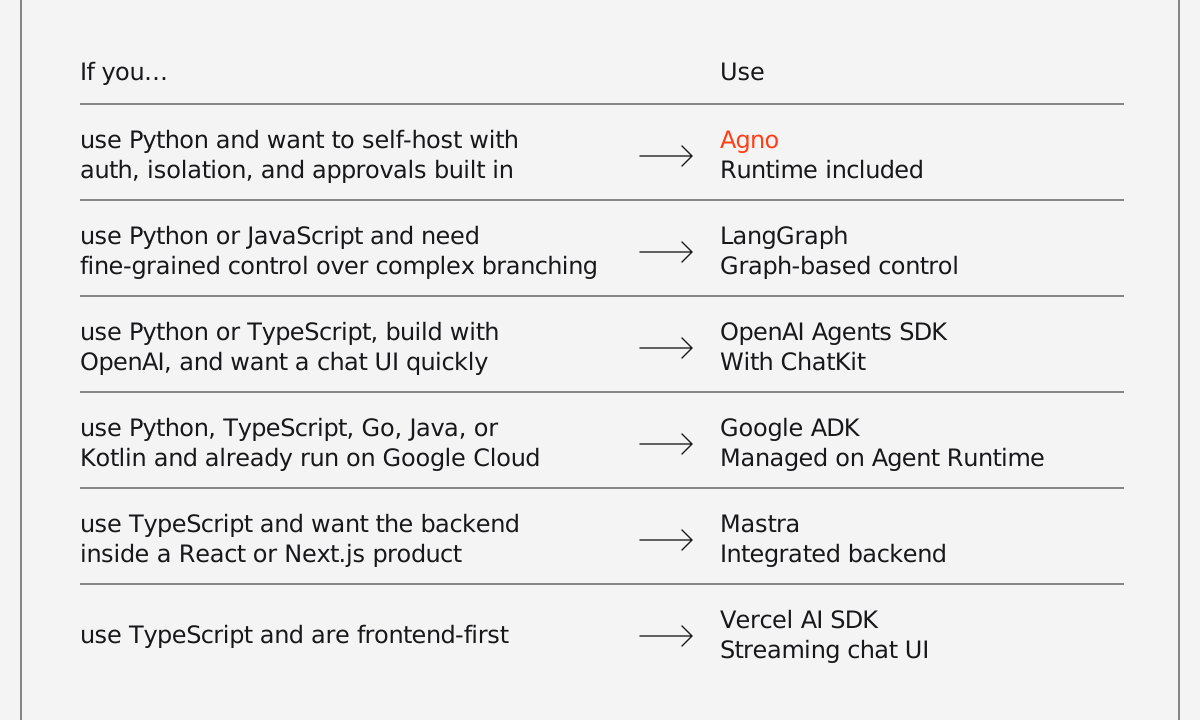
- **Agno** is the best fit if you use Python and need to self-host with per-user isolation, auth, and approvals built in.
- **LangGraph,** if you use Python or JavaScript and need fine-grained control over complex branching logic.
- **The OpenAI Agents SDK with ChatKit,** if you use Python or TypeScript, are building with OpenAI, and want a chat UI quickly.
- **Google ADK,** if you use Python, TypeScript, Go, Java, or Kotlin and already run on Google Cloud.
- **Mastra,** if you use TypeScript and want the agent backend integrated into a React or Next.js product.
- **The Vercel AI SDK,** if you're frontend-first in TypeScript and are comfortable owning more of the backend.
These choices aren't always exclusive. A common pattern is a Python agent served over an API with a TypeScript frontend, which means you can pair a backend runtime like Agno or LangGraph with UI tooling from the AI SDK or ChatKit.
Whichever you pick, test isolation directly before launch. Log in as two different customers, have each one create data, and confirm that neither can reach the other's conversations, memory, or records through the agent.
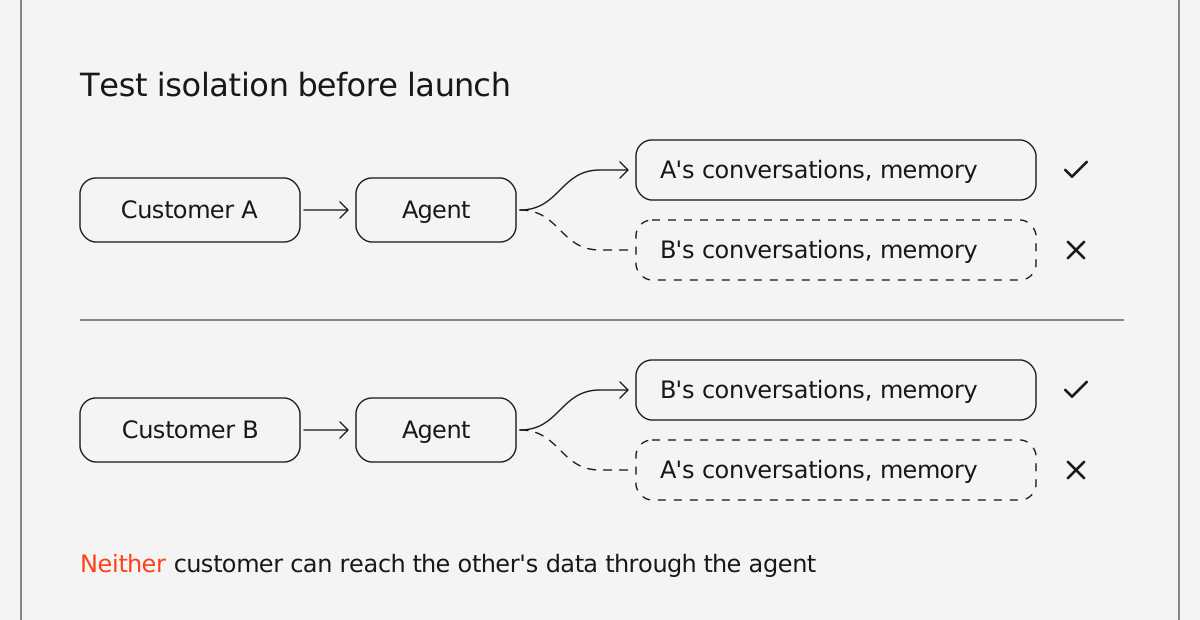
## Sources
- [AgentOS product page](https://www.agno.com/products/runtime)
- [LangChain: Authentication & access control](https://docs.langchain.com/langsmith/auth)
- [OpenAI Agents SDK: Human-in-the-loop](https://openai.github.io/openai-agents-python/human_in_the_loop/)
- [OpenAI: ChatKit guide](https://developers.openai.com/api/docs/guides/chatkit)
- [Google Cloud: Manage sessions with Agent Development Kit](https://docs.cloud.google.com/gemini-enterprise-agent-platform/scale/sessions/manage-with-adk)
- [Google ADK samples (Python, TypeScript, Go, Java, Kotlin)](https://github.com/google/adk-samples)
- [Mastra: AI agent framework](https://mastra.ai)
- [Vercel: AI SDK 6](https://vercel.com/blog/ai-sdk-6)
- [Vercel: AI SDK 7](https://vercel.com/blog/ai-sdk-7)
- [Vercel: Build AI agents with AI Gateway and AI SDK](https://vercel.com/kb/guide/how-to-build-ai-agents-with-vercel-and-the-ai-sdk)
---
# A pile of MCP tools is not an agent
> An MCP server tells an assistant what your product can do. It can't tell it what to do. When a flat tool list breaks, and when it's enough.
- Published: 2026-09-14
- Author: Cosette Cressler
- Categories: Perspectives
- Canonical: https://www.agno.com/blog/mcp-server-vs-agent
- Markdown: https://www.agno.com/blog/mcp-server-vs-agent.md
The popular advice for how to make your product agent-ready says to expose your API as MCP tools (Model Context Protocol), let the user's assistant (ChatGPT, Claude, a copilot in another product) work out the rest, and you're done.
For some software that works. For most, it doesn't.
Do you need an agent, or is an MCP server enough? If your product enforces rules about what should happen and in what order, an MCP server alone will break them. If it doesn't, ship the tools.
An MCP server tells an agent what your product can do. It doesn't tell the agent how those capabilities fit together, which steps to take and in what order, what context matters, or what a good result looks like. The agent has to figure all of that out for itself.
But your team already spent years figuring that out and building it into your product. The workflows, business logic, defaults, and guardrails that make your product useful already exist. Making your product agent-ready shouldn't mean throwing all of that away and handing an assistant a box of tools.
## What goes wrong when you expose your API as MCP tools
Picture an invoicing platform. The team wraps its API as MCP tools and ships it: `get_overdue_invoices`, `get_customer_history`, `get_open_disputes`, `send_payment_reminder`, and thirty-six more. Each tool maps cleanly to an API endpoint.
A user connects the server to her assistant and asks it to chase her late invoices.
The assistant calls `get_overdue_invoices` and gets fifty results. It starts sending reminders. One goes to a customer who is five days late but has paid on time for three years. Another chases an invoice the customer had already disputed.
The assistant never checked for the dispute. It had access to `get_open_disputes`, but nothing told it that checking for a dispute should happen before sending a reminder.
She hears about both by lunchtime.
Nothing broke. Every tool did exactly what it was supposed to do. The schemas validated, the calls succeeded, and the API returned the right data.
The problem is that the API only describes what the product can do. It doesn't capture everything the product has learned about how and when to do it.
The team knows not to chase a disputed invoice. They know five days late means something different for a customer who has paid on time for three years. They know when to send a gentle nudge, when to escalate, and when to leave someone alone.
Those aren't API capabilities. They're product decisions. A flat list of MCP tools leaves that logic for someone else's assistant to figure out.
## What an MCP tool list leaves out
A tool knows how to perform an action. It doesn't know whether that action makes sense right now. You're asking a general-purpose model to rediscover product rules your team already knows, from names and descriptions, while the task is running.
The same problem shows up with longer tasks. Say the assistant needs seven calls to finish something and the fourth fails. Should it retry? Skip that step? Try another route? Stop and ask the user?
Individual tools can't answer those questions because no individual tool owns the task.
The same goes for knowing when not to act. Sometimes the right outcome is to leave an invoice alone, escalate it to a person, or ask for more information. If those decisions only exist in your product, exposing more API endpoints won't teach an outside assistant how to make them.
## More tools won't solve the problem
The natural response is to expose more of the API.
If the assistant missed the dispute, give it `get_open_disputes`. If it picked the wrong tone, expose more customer data. If it needs another step, add another tool.
But access wasn't the problem. The assistant already had access to `get_open_disputes`. It just didn't know when it needed to use it.
Adding more tools can make that problem harder. Every new tool gives the model another description to understand and another option to choose from. When dozens of tools map directly to similar API endpoints, the model has to decide not only which tools it needs, but how they relate and in what order to call them.
Tool coverage and agent readiness aren't the same thing.
You can expose your entire API and still leave the hardest part to the user's assistant.
## The orchestration is the product
When you publish a flat list of tools, the user's assistant has to decide how to combine them. It chooses the sequence, applies the business rules, handles failures, decides when to ask for help, and determines when not to act.
Those aren't implementation details. They're decisions your product already makes, and you don't have to ask someone else's assistant to recreate them from a list of API endpoints.
Instead of exposing forty low-level tools, you can expose the agent that already knows how to use them.
```python
invoice_agent.as_tool(
name="invoice_agent",
description=(
"Talk to the invoicing agent. Send plain language. "
"Pass session_id back to continue the conversation."
),
)
```
_That one line is the last step of a longer build. Our CEO, Ashpreet, walks through the whole thing in [How to build an agent for your product and serve it everywhere](https://www.agno.com/blog/how-to-build-an-agent-for-your-product)._
Now the user's assistant can ask your invoicing agent to "chase my late invoices."
Your agent decides which invoices need attention, checks for disputes, looks at customer history, chooses the right action, handles failures, and knows when to stop. It runs on your infrastructure with the rules you've already built into the product.
The user's assistant owns the conversation. Your agent owns the invoicing. That gives each side the job it knows how to do.
The difference between publishing tools and publishing an agent comes down to who makes the decisions.
| | MCP tools alone | An agent behind the tools |
| --------------------------- | ----------------------------------------------------------------------------------- | ---------------------------------------------------- |
| **Deciding the order** | The user's assistant infers it from tool names and descriptions, fresh on every run | Your product's rules set it, the same way every time |
| **Applying business rules** | Whatever the assistant can guess from the schema | Encoded once, in the agent |
| **When a step fails** | No owner of the task, so no retry or fallback logic | The agent owns the task and decides what to do next |
| **Knowing when not to act** | A tool list always tries | The agent can escalate, ask, or leave it alone |
| **Where the logic runs** | In someone else's assistant | On your infrastructure |
## When a flat tool list is enough
None of this means every MCP server needs an agent behind it.
If engineers use your product and the API itself is the product, a flat tool surface can work well. The person directing the assistant often supplies the missing judgment. A developer asking an assistant to call a CI API probably knows what should happen and can catch it when something looks wrong.
Read-only tools are another good fit. Search, retrieval, and lookup tools have a smaller downside when the model makes a poor choice because they don't usually take actions on someone's behalf.
Small, well-defined tool surfaces can work too. If you have five tools with obvious purposes and few rules governing how they interact, adding another orchestration layer may not buy you much.
The question is whether your product knows something the user's assistant doesn't.
Does it know that one action must happen before another? That a certain customer shouldn't receive a reminder? That a failed step should be retried instead of skipped? That sometimes the right answer is not to act?
If those rules are part of what makes your product work, expose them with the capabilities.
If they aren't, ship the tools.
## What to do about it
If you've already shipped an MCP server, you don't need to start over. Keep the server, put an agent behind it, and turn the low-level tool surface into a smaller set of entry points that map to what users actually want to accomplish.
Instead of asking the user's assistant to choose among forty API operations, let it hand the task to an agent that already understands your product.
If you haven't built anything yet, start with the same question: what does your product know that a list of API endpoints doesn't?
Build that into the agent first. Then expose the agent. [Here's what that looks like end to end](https://www.agno.com/blog/how-to-build-an-agent-for-your-product).
The API gives an agent capabilities. Your product knowledge tells it what to do with them.
---
# Community Roundup: August 2026
> Agno's August recap: v3.0 ships with durable background execution, a dedicated runs table, Studio governance and platform-wide user isolation — and an agent scores 100% on the ARC-AGI-3 public set.
- Published: 2026-09-01
- Author: Cosette Cressler
- Categories: Community, Product
- Canonical: https://www.agno.com/blog/community-roundup-august-2026
- Markdown: https://www.agno.com/blog/community-roundup-august-2026.md
Months of work, a hundred small decisions about what actually breaks agents in production, culminating in one release: Agno 3.0 is here. Oh, and we hit 100% on the ARC-AGI-3 public set.
Let's dive in.
## 100% on the ARC-AGI-3 public set
In August, we released [ARC-AGI-Arcade](https://github.com/agno-agi/arc-agi-arcade), an open-source playground for agents to compete on ARC-AGI-3 by learning from each other.
In a complete victory for Learning Machines, an agent running GPT-5.6 cleared all 183 levels across 25 games with a score of 100.00 RHAE. Then cross-model learning transfer went to work: seeded with GPT-5.6's manuals, Gemini 3.7 Flash scored 96.42, crossing the human baseline of 95.4 while spending a third of the tokens GPT-5.6 used.
Read the full writeup: [100% on the ARC-AGI-3 public set](https://www.agno.com/blog/arc-agi-arcade).
## New releases & features
### CodeMode lets an agent write Python that calls your tools directly
An agent with thirty tools spends its life making one call, reading the result, making the next. Every intermediate value lands in the transcript and eats your context window.
`CodeMode` hands it a persistent Python kernel instead. The model gets `execute` and `restart`, writes real Python, and calls your tools as awaitable handles. Loops, variables, helper functions, all in one cell. Whatever it sets up stays available on the next turn.
Two things to know before you reach for it. It needs `pip install 'agno[code]'` for `ipykernel`, `jupyter_client`, and `dill`. And it is not a sandbox. It runs Python and shell at the same permissions as the process running your agent, and restoring a session snapshot unpickles it, which means resuming a session executes code. Trusted operators or an isolated container, nothing else.
See the [cookbook](https://github.com/agno-agi/agno/tree/main/cookbook/code/01_basics) for reference.
### Tool result offloading keeps large outputs out of the model's context
Set `offload_tool_results=True`. Anything a tool returns over 16,000 characters goes to `AgentFS` instead of into context, and the message keeps a short envelope with a preview, the size, and a `result_id`. The agent can call `read_result` or `search_result` if it actually needs the rest. No model call on the write path.
Threshold and retention are yours to set through `ResultStore(threshold_chars=..., ttl_seconds=...)`.
See the [cookbook](https://github.com/agno-agi/agno/tree/main/cookbook/02_agents/22_result_offloading) for reference.
### Media offloading stores media in object storage instead of your database
A 113 KB JPEG persisted as base64 becomes roughly 151,000 characters in your session row. Set `media_storage` and it becomes 2,897.
The bytes go to object storage and a small `MediaReference` stays behind with the key, bucket, mime type, size, and hash. Your model still gets the media, history still replays it, and there's no schema change to make. Works identically on `Agent`, `Team`, and `Workflow`, across local, S3, and GCS, each with an async twin.
Learn more about [media storage](https://docs.agno.com/sessions/persisting-sessions/media-storage/overview).
### Durable background execution keeps runs alive through crashes and deploys
An accepted run now gets committed to your database before it starts. Deploy in the middle of it and another replica picks it up and finishes the job. The queue lives in your database rather than in whichever process happened to accept the request, and Redis becomes optional coordination instead of the source of truth.
You also get bounded concurrency (32 by default), cancellation while a job is still queued, `Idempotency-Key` dedupe so a retry never runs twice, and a 429 when the queue fills up. Clients that drop can reconnect and resume the stream.
Enable it with `QueueConfig(durable=True)` on AgentOS.
### Runs now have their own database table
Every run used to live inside the session blob. That meant each session write grew with the number of runs it held, and eventually you hit the item-size ceiling on DynamoDB or Firestore and everything got unpleasant.
Runs are now rows in `agno_runs`, with real columns and a JSON payload. Writes scale linearly. Reads work exactly as before because runs re-attach on read, so `session.get_messages()` and the AgentOS session routes behave the way they always did. You also get direct run APIs for querying and paging without pulling a whole session into memory.
This changes your schema, so the migration is mandatory before v3.0 serves traffic. It's non-destructive, idempotent, covers 12 sync and 4 async backends, and keeps the legacy column as a backup until you clear it yourself. An un-migrated database keeps running. A stale one raises `MigrationRequiredError` and tells you what to do rather than failing in some creative way.
Read the [v3 Migration Guide](https://docs.agno.com/other/v3-migration) before upgrading.
### Studio 3.0 adds draft-and-publish governance
Anything you created in a shared Studio went live the moment you saved it, and two people editing the same component could overwrite each other without either of them noticing.
Now there's a publishing step. `create_*` writes a private draft that serves nobody until you publish it, and published versions are immutable with rollback, archive, and restore behind them. Compare-and-set guards turn a stale write into a typed 409 instead of a silent clobber. Deletes are tombstoned with dependent-tracking, so you can't pull a component something else depends on.
All 26 `StudioTools` calls return a machine-readable envelope with `ok`, `status`, `data`, `error`, and `warnings`, which matters when an agent is the one driving the Studio and needs to know why something got refused.
### Per-user isolation now covers the whole platform
Isolation used to stop at sessions, which left metrics, schedules, evals, knowledge, and everything else pooling across your users. It now covers all of that, plus components, entity memory, and 17 vector databases, with metrics aggregating per user per day.
Multi-tenant on a single AgentOS is a real option now. Unowned components and knowledge count as shared, readable by everyone and editable by an admin, so switching isolation on doesn't 404 everything you built before it existed.
Learn more in the [Per-User Data Isolation docs](https://docs.agno.com/agent-os/security/authorization/user-isolation).
### AdvisorTools brings multi-model escalation to any agent
Go big on your model and you pay frontier prices on trivial steps. Go small and you're stuck when a hard subproblem shows up. AdvisorTools lets a fast, cheap primary consult heavier models only when it decides it needs to. Hand it a list of advisors with a note on what each is good for, and it can ask one by name or ask them all and compare. They don't have to share a provider.
See the [cookbook](https://github.com/agno-agi/agno/tree/main/cookbook/91_tools/advisor_tools) for reference.
### OpenRouteServiceTools grounds agents in real routes and travel times
LLMs estimate distances from training data instead of measuring roads, and the estimate is confidently wrong often enough to break anything that depends on it. OpenRouteServiceTools swaps the guess for a real routing engine: accurate distances, real drive times, and turn-by-turn routes from live map data. Pass plain place names and it handles the geocoding. Setup is one line plus a free `ORS_API_KEY`.
See the [cookbook](https://github.com/agno-agi/agno/blob/main/cookbook/91_tools/openrouteservice_tools.py) for reference.
### StudioRunnerTools brings identity-aware dispatch to any router or team lead
Letting a router dispatch Studio components used to mean handing it the full builder toolkit, which can also rewrite and delete them. StudioRunnerTools gives out run access on its own: list what it's allowed to run, and run one by ID. No create, no edit, no delete anywhere in it, so a hijacked prompt has nothing to reach for. Runs execute as the calling user, so memory lands on the person who actually asked.
Read more in the [StudioRunnerTools writeup](https://www.agno.com/blog/studiorunnertools-brings-identity-aware-dispatch-to-any-router-or-team-lead).
## New tools and integrations
Also shipped in August:
- **FinanceTools**: prices, fundamentals, and market data behind one interface with swappable providers underneath. Switching vendors is a config change now, not a rewrite.
- **AtomicMailTools**: an agent gets its own inbox to read and send from, rather than borrowing a shared account.
- **MiniMax video generation**: agents can produce video as part of a run.
- **Ramp Router and xAI SuperGrok**: Ramp Router joins as a provider, and SuperGrok authenticates with device-code OAuth, so no long-lived key to paste anywhere.
- **Stable toolkit IDs**: every toolkit carries an `id` that AgentOS uses to reference its tools. Tool references survive restarts and deploys instead of depending on load order.
- **Updated default models**: Cerebras defaults to `gpt-oss-120b`, Gemini to 3.7 Flash, and Groq's deprecated `llama-3.3-70b-versatile` moves to `openai/gpt-oss-120b`. Set a model ID explicitly and none of this touches you.
- **Wider OpenAI parameters**: `reasoning_effort`, `reasoning_summary`, `service_tier`, and `verbosity` accept the full set of values the API supports. Claude models now work with `anthropic` 1.0.0.
## Breaking changes in v3.0
Read the full list before you upgrade. The migration is mandatory.
The big ones: runs move out of the sessions table, `JWTMiddleware` takes `verification_keys` instead of `secret_key`, `enable_mcp_server` and `mcp_config` become a single `mcp_server=`, `reasoning=True` is gone in favor of setting `reasoning_model=` yourself, `Workflow` is keyword-only, flat HITL kwargs become `human_review=HumanReview(...)`, `MultiMCPTools` is deleted so use one `MCPTools` per server, Culture is removed in favor of Knowledge, and `eval_id` is now `run_id` everywhere.
See the [v3.0 changelog](https://docs.agno.com/other/v3-changelog) for everything and the [migration guide](https://docs.agno.com/other/v3-migration) for the steps.
## Community projects & showcases
A few of the things people built with Agno in August:
### skillreducer: token-efficient agent skills, grounded in three papers by Abhishek (@zealgoswami-lab)
An open-source toolkit that cuts what your agent skills cost you in context. It implements three research papers as runnable commands: compress a skill's description and body, compress MCP and tool schemas, and improve skill quality from execution traces. Works with any platform using the standard `SKILL.md` convention.
Check it out on [GitHub](https://github.com/zealgoswami-lab/skillreducer).
### ClawFit: agent, model, and hardware recommendation engine by Seungwoo Hong (@hongsw)
An agent pattern, a model, and the hardware to run it on are three decisions most teams make separately and just hope will line up. ClawFit scores (agent, LLM, hardware) triples against your task, latency target, budget, and team maturity, backed by a seven-layer ecosystem map that tracks 162+ tools with daily automated scanning.
Check it out on [GitHub](https://github.com/hongsw/clawfit).
## Contributor shoutouts
### Community MVPs
- **@dom-dalty**: Built the AtomicMail toolkit, giving an agent its own inbox to register, send, and read from rather than borrowing a shared account. Shipped as a named feature in v3.0 ([#9130](https://github.com/agno-agi/agno/pull/9130)).
- **@LHMQ878**: Added a `headers=` argument to `MCPTools` for connect-time auth, so an authenticated remote MCP server works without a workaround. Also fixed trailing separators getting stripped from tool args in the paused-run panel ([#9444](https://github.com/agno-agi/agno/pull/9444), [#9246](https://github.com/agno-agi/agno/pull/9246)).
- **@chengzeyi**: Shipped `WaveSpeedTools`, putting image and video generation behind one toolkit ([#9620](https://github.com/agno-agi/agno/pull/9620)).
- **@bharadwaj-pendyala**: Stopped Agno's Cohere integration from dropping zero-valued sampling parameters: a falsy check meant `temperature=0` silently became the provider default instead of the deterministic setting you asked for ([#9300](https://github.com/agno-agi/agno/pull/9300)).
### More great contributions
- **@markmcd** (Google): Updated the Gemini defaults to 3.7 Flash, one of the default-model changes in v3.0 ([#9666](https://github.com/agno-agi/agno/pull/9666)).
- **@ryanl-cerebras** (Cerebras): Updated the Cerebras defaults and cookbook models to `gpt-oss-120b` ([#9244](https://github.com/agno-agi/agno/pull/9244)).
- **@googio**: Added `SerplyTools` with web, news, and scholar search ([#9780](https://github.com/agno-agi/agno/pull/9780)).
- **@AALG123**: Added `GandrTools` for text to speech through the Gandr TTS API ([#9852](https://github.com/agno-agi/agno/pull/9852)).
- **@cuihuan**: Added Synthorai as a model provider ([#9788](https://github.com/agno-agi/agno/pull/9788)).
- **@green3sf**: Fixed Gemini tool-result media so it nests correctly inside function responses ([#9647](https://github.com/agno-agi/agno/pull/9647)).
- **@psinojiya**: Fixed the A2A stream client dropping Task-level metadata when it broke on a status update ([#9224](https://github.com/agno-agi/agno/pull/9224)).
- **@Anai-Guo**: Two MCP robustness fixes: tolerate a tool schema with no `properties` in strict mode, and warn when tag scoping leaves a server with zero tools ([#9578](https://github.com/agno-agi/agno/pull/9578), [#9748](https://github.com/agno-agi/agno/pull/9748)).
- **@daleselaji-dev**: Three cookbook additions, the most of any community contributor this month, including a deterministic side-effect approval flow ([#9790](https://github.com/agno-agi/agno/pull/9790)).
- **@gilarel** (DeepKeep): Added a DeepKeep AI Firewall guardrails cookbook ([#9784](https://github.com/agno-agi/agno/pull/9784)).
Every one of you made Agno better. Thanks for building with us.
## Get involved
There's never been a better time to contribute.
- ⭐ [Star Agno on GitHub](https://github.com/agno-agi/agno)
- 💬 [Join our Discord](https://agno.link/discord)
- 📖 [Read the docs](https://docs.agno.com/)
- Check out [open issues](https://github.com/agno-agi/agno/issues)
- 🚀 Share what you're building. We want to feature YOUR project next month.
**_— Team Agno_**
---
# How to build an agent for your product and serve it everywhere
> A guide for engineering leaders building an agent for their product. One agent, served in your product, in Claude and ChatGPT, and in Slack.
- Published: 2026-09-01
- Author: Ashpreet Bedi
- Categories: Engineering, Guides
- Canonical: https://www.agno.com/blog/how-to-build-an-agent-for-your-product
- Markdown: https://www.agno.com/blog/how-to-build-an-agent-for-your-product.md
This article is for engineering leaders at SaaS companies that want to build an agent for their product. An agent that is available inside your product, in Claude and ChatGPT as connectors, or in Slack. The goal is to give your users a new way to use your product, thereby unlocking new distribution and revenue opportunities.
## Why build an agent for your product
The way people use and discover software is changing.
Software is increasingly used through agents like Claude and ChatGPT and users have a growing preference for software that can be used through an agent. By the end of the decade, agents will be the primary consumer of most software.
Your product will get used in three ways:
- Through your user's agent, eg: Claude, ChatGPT
- Through your agent, inside your product
- Through your user's agent talking to your agent
Very soon, having the best agent will be synonymous with having the best product.
This article will show you how to build the best agent experience for your product.
## Build once, serve everywhere
The goal is to build one agent and serve it in three places:
**1. Your product.** As a chat interface inside your product. Users work with your product in natural language. This is the experience you control, own and learn from.
**2. Claude and ChatGPT.** As a connector to Claude or ChatGPT. Users reach your product through their agent of choice.
**3. Slack.** As an agent in their Slack workspace. Users reach your product in the channel where their team works.
## How to read this guide
Read this guide like a normal article, start to finish. Skim if you want. Don't copy, don't follow along, don't run any code. The code in this guide shows you the shape of what we're building and some of it is trimmed to stay readable. At the end I'll give you the complete codebase, ready to hand off to your coding agent.
## Build your agent
Say your product is an invoicing platform for small businesses.
Your users send invoices. Your product tracks who paid and who didn't. We'll build this agent as an example through this article.
**v0 of your agent = model + tools + instructions**
- Model: the intelligence that orchestrates the tools
- Tools: actions the agent can take; thin wrappers over your product's API
- Instructions: how the agent works; your product's rules and policies
Here's what the first version of your agent looks like:
```python invoice_agent.py lines
from agno.agent import Agent
from your_product.api import (
get_overdue_invoices,
get_customer_history,
get_open_disputes,
send_payment_reminder,
)
invoice_agent = Agent(
id="invoice-agent",
model="openai:gpt-5.6",
tools=[
get_overdue_invoices,
get_customer_history,
get_open_disputes,
send_payment_reminder,
],
instructions="""
You help small business owners get paid on time.
Before you chase an invoice, pull the customer's history and check for open disputes.
A reliable customer a few days late gets a friendly reminder.
Past 60 days, the tone turns firm.
Don't chase invoices with open disputes.
""",
)
```
### Why not just expose your API as tool calls?
There's a popular opinion that you should expose your product's API as tool calls and let the user's agent figure it out. This is fine for developer tools, but not for software where your team's know-how and policies are baked in.
A general-purpose agent with your raw API does not have the judgment your team built up over years. It will chase the disputed invoice and send a firm email to your best customer over a five day slip. The orchestration is the product, and if you want your users to have the best experience, you need to own the agent experience.
## Improve your agent
v0 works, but it's far from a product, let alone the best product. There are three big problems you need to solve and a few others that are nice to have.
**1. No session continuity.** Every run is independent, meaning we need to build a multi-turn chat experience by adding session history to the context window.
**2. Too much context.** `get_overdue_invoices` can return 50 invoices and all of them will be included in the context window for the rest of the conversation, making every turn after it slower, pricier and dumber.
**3. No knowledge of your product.** The agent knows your API but it doesn't know your product. "How does late fees work?" and "can I invoice in euros?" are not in the API. They're in your help center, and you can't paste your help center into the instructions.
Two other issues that aren't necessary but make the product experience better:
**4. Learning.** We want the user to have the experience of working with someone who's been on their account for years. With learning, the agent can build a picture of each user; the customer who's always five days late but always pays, the owner who wants totals instead of paragraphs. The best agents learn from experience.
**5. Context of past sessions.** Many times users will start a new session but will be talking about the same thing as the last 2 sessions. Give your agent the ability to search past sessions.
Here's what the v1 of your agent looks like:
```python invoice_agent.py lines nofold
from os import getenv
from agno.db.postgres import PostgresDb
from agno.knowledge import Knowledge
from agno.learn import LearningMachine
from agno.vectordb.pgvector import PgVector
db = PostgresDb(db_url=getenv("DATABASE_URL"))
knowledge = Knowledge(vector_db=PgVector(db_url=db_url, table_name="product_docs"))
invoice_agent = Agent(
..., # the agent from before
# Session continuity
db=db,
add_history_to_context=True,
num_history_runs=5,
read_chat_history=True,
# Context of past sessions
search_past_sessions=True,
# Offload heavy tool results
offload_tool_results=True,
# Knowledge of your product
knowledge=knowledge,
# Continuous Learning from experience
learning=LearningMachine(
user_memory=True,
user_profile=True,
entity_memory=True,
),
)
```
Now your agent has memory, a lean context window, access to your product's documentation, and it gets better with use. It's ready to become a product.
## Turn your agent into a product
The next step is putting the agent inside your product. For that you need:
1. **An API** your product can call.
2. **Streaming** of reasoning and tool calls as they happen.
3. **Session and run management** to view past conversations, rename threads, delete them, and resume one from last week.
Agno's agent runtime, AgentOS, wraps your agents in a FastAPI app with 80+ prebuilt endpoints to build your product on. Here's what it looks like:
```python invoice_agent.py lines
from agno.os import AgentOS
invoice_agent = Agent(
..., # the v1 agent from before
)
agent_os = AgentOS(agents=[invoice_agent], db=db, tracing=True)
app = agent_os.get_app()
if __name__ == "__main__":
agent_os.serve(app="invoice_agent:app")
```
Now your agent is available as a REST API. Your product's chat panel is now a thin client that calls the AgentOS endpoints:
```bash
curl https://agents.your-product.com/agents/invoice-agent/runs \
-d "message=Who owes me money?" \
-d "user_id=usr_1042" \
-d "session_id=chat_881" \
-d "stream=true"
```
The response streams over SSE with reasoning and tool calls, so your panel shows the agent working instead of a spinner. Send the same `session_id` and the conversation picks up where it left off.
The run endpoint is a fraction of what a product needs.
AgentOS handles data isolation, so one customer can never pull another customer's thread. It handles durability so failed runs resume gracefully. It handles background execution so long running tasks don't block the UI. It resumes streaming when the network drops. It handles authentication, RBAC, and enforces agent- and tool- level governance at the HTTP layer.
It logs every call, traces every run, and schedules recurring work.
AgentOS turns your agent into a product.
## Use your agent in Claude and ChatGPT
Many of your users won't open your product to ask a question. They want to use it through Claude or ChatGPT. Fighting this trend is pointless.
Serve your agent as an MCP server and so becomes a connector in those apps:
```python invoice_agent.py lines
from fastmcp.server.auth.providers.workos import AuthKitProvider
agent_os = AgentOS(
..., # from before
mcp=MCPConfig(
tools=[
invoice_agent.as_tool(
name="invoice_agent",
description=(
"Talk to the invoicing agent. Send plain language. "
"Pass session_id back to continue the conversation."
),
)
],
default_tools=False,
),
mcp_auth=AuthKitProvider(
authkit_domain=getenv("AUTHKIT_DOMAIN"),
base_url=getenv("AGENTOS_URL"),
),
)
```
Your users' Claude doesn't get your API as forty flat tools and a hope that it calls them in the right order. It gets one tool that takes plain language, and behind it is your agent, running on your infrastructure. Their agent handles the conversation. Your agent handles the work.
Now your agent is available as an MCP server. Claude, ChatGPT or any other MCP client can connect to it and use your agent. New distribution channel unlocked.
## Distribute your agent in Slack
Your agent should meet your users where they already are: Slack, Discord, Telegram, WhatsApp. AgentOS serves these as interfaces, and distributing your agent through these channels is a few lines of code:
```python invoice_agent.py lines
from agno.os.interfaces.slack import Slack
agent_os = AgentOS(
..., # from before
interfaces=[Slack(agent=invoice_agent, resolve_user_identity=True)],
)
```
AgentOS will now make your agent available over Slack. The `resolve_user_identity` flag turns your users' raw Slack ID into their email, so if your product keys `user_id` by email, sessions and memory line up across all surfaces.
## Get started with one prompt
We covered a lot:
- Build an agent for your product with Agno.
- Serve it as an API and an MCP server with AgentOS.
- Distribute it through your product, Claude, ChatGPT and Slack.
To get started, pick your cloud and hand your coding agent the setup prompt. It clones a prebuilt AgentOS template for that cloud, sets up your platform, and helps you build your first agent.
Tell your coding agent whatever you want to build, and it will build it for you. If you want dedicated help making your product agentic, [grab some time with me](https://agno.cal.com/agno/meet-ab).
Thanks for reading.
---
# Learning Machines: the memory that cracked ARC-AGI-3 public set
> What happens when we let agents learn.
- Published: 2026-08-30
- Author: Ashpreet Bedi
- Categories: Engineering, Perspectives
- Canonical: https://www.agno.com/blog/learning-machines
- Markdown: https://www.agno.com/blog/learning-machines.md
In January we proposed that memory is the wrong abstraction and what agents really need is the ability to learn. Learn about users, their environment, their purpose, their goals. Learning is what lets an agent **do something better next time**.
We then released [Learning Machines](https://docs.agno.com/learning/overview). At the time we had no evidence that learning would beat a traditional memory system but we knew it was the right direction.
Over the last few weeks we let agents play ARC-AGI-3, with no instructions, no rules, and let them learn from each run. Then we took one model's learnings and handed them to completely different models to see whether any of it was any use to them.
The short version is that gpt-5.6 scored 100.00 on the ARC-AGI-3 public set. Then a smaller model (gemini-3.7-flash), learning from gpt-5.6's notes, scored 96.42, beating the human baseline of 95.4. Read more about it [here](https://www.agno.com/blog/arc-agi-arcade).
This means that a) **learning compounds:** an agent that learns gets better the next time it attempts the same task. And b) **learning transfers:** you can solve something once with your best model, then share the learnings with smaller, cheaper models.
## What is ARC-AGI-3?
[ARC-AGI-3](https://arcprize.org/arc-agi/3) is a set of small video games. An agent is dropped into a game with no instructions, no rules and no goal. It sees a grid of colored cells and it has seven buttons. It doesn't know what any of the buttons do, what kills it, or what winning looks like. It has to work all of that out by taking actions and doing things.
Agents are scored on efficiency, not just on winning, so an agent that stumbles into a win after a thousand flailing actions scores far worse than one that works out the mechanics and then plays cleanly. ARC describes what they're measuring as skill-acquisition efficiency over time, and, the ability to update beliefs as new evidence appears. In plain english, **ARC-AGI-3 is a test of learning**.
## Cross-model learning transfer
GPT-5.6 scoring 100 is not of interest to me. What I want to know is how well this learning transfers to other models. **So that we can go from model-routing to agent-routing**. Routing to an agent that works 96% of the time for a certain set of users, while the frontier model distills learnings on the fly is the holy grail of agentic systems.
We want continual learning at the system-level, not just the model-level.
To test this out we took GPT-5.6's learnings and gave them to Gemini-3.7-Flash that scored 37.33 cold. Reading GPT-5.6's notes it scored 96.42, beating the human baseline of 95.4. We did the same with other models and resutls were similar.
| Model | Cold | Seeded with GPT-5.6's notes |
| ---------------------- | ----- | --------------------------- |
| Gemini-3.7-Flash | 37.33 | **96.42** |
| Grok-4.6 | 37.40 | **89.31** |
| GLM-5.2 (open weights) | 7.92 | **83.46**, still climbing |
## So what is a learning machine?
A learning machine is a collection of learning stores, each capturing a domain of knowledge while the agent runs. Here are the built-in stores that come with Agno:
| Store | What it captures | Scope |
| ----------------- | ------------------------------------------------------------------------------------------------------ | --------- |
| User Profile | Typed structured fields: name, role, preferences | User |
| User Memory | Unstructured observations about a user | User |
| Session Context | Goal, plan, progress, summary | Session |
| Entity Memory | Facts, events and relationships about everything that isn't the user. Think of this as a context graph | Namespace |
| Learned Knowledge | Insights and patterns that apply across users | Namespace |
| Decision Log | Decisions, the reasoning, the alternatives | Agent |
**A learning store defines: what type of information to capture, when and how to capture it, and how to use that information to steer the agent's behavior.**
Learning machines are extensible. The ARC player brings its own `GameLearningStore`. It's 137 lines, backed by a markdown file, and plugs into an agent as one argument:
```python
from agno.agent import Agent
from agno.db.sqlite import SqliteDb
from agno.learn import LearningMachine
from agno.tools.code import CodeMode
player = Agent(
model="openai:gpt-5.6",
db=SqliteDb(db_file="agent.db"),
# the game, plus a stateful python kernel for free analysis
tools=[game, CodeMode(allow_shell=False, timeout=120)],
# the agent learns the rules of the game as it plays
learning=LearningMachine(custom_stores={"game": store}),
# long kernel outputs stored as pointers
offload_tool_results=True,
instructions=INSTRUCTIONS,
)
```
This means a legal agent can have its own learning store to capture the rules of the law, while a sales agent can have its own learning store to capture the details of the sales process. Learning stores are simple to build. They look like this:
```python
class LearningStore(Protocol):
def recall(self, **kwargs) -> Optional[Any]:
# what do you know? read it back from wherever you keep it
...
def build_context(self, data: Any) -> str:
# how should that show up in the agent's system prompt?
...
def get_tools(self, **kwargs) -> List[Callable]:
# what tools does the agent get for writing back to you?
...
def process(self, messages: List[Any], **kwargs) -> None:
# optional: pull learnings out of the conversation after a run
...
```
## Built-in learning stores
Most agents aren't playing a video game. Agno comes with learning stores for day-to-day operations: user profiles, session context, entity memory, decision logs.
Each store has a mode. `ALWAYS` runs the learning process automatically after a response. `AGENTIC` gives the agent tools and lets it decide.
I use `AGENTIC` most of the time. Automatic learning is still a bit meh... You see when you run the learning process every time, agents tend to find something, always.
### User Profile
The User Profile store captures structured fields about a person. Name, role, preferences, plus whatever you add with your own schema. The agent gets an `update_profile` tool and calls it when it hears something worth learning.
```python
agent = Agent(
model=OpenAIResponses(id="gpt-5.6"),
db=db,
learning=LearningMachine(
user_profile=UserProfileConfig(mode=LearningMode.AGENTIC),
),
)
agent.print_response(
"Hi! I'm Robert Johnson, but everyone calls me Bob.",
user_id="bob@example.com",
)
```
Unlike user memory which is unstructured (see below), user profile is structured and defines what the agent should learn. Eg: if you're building a teaching agent its good to know the student's current level, their learning style, and their goals.
### User Memory
User Memory is the unstructured half of the user profile. The things that don't fit a field but change how you'd answer.
```python
learning=LearningMachine(
user_memory=UserMemoryConfig(mode=LearningMode.AGENTIC),
)
agent.print_response(
"I'm a backend engineer at Stripe. "
"I specialize in distributed systems and prefer Rust over Go.",
user_id="bob@example.com",
)
```
The tool here is `update_user_memory`. The extraction prompt is deliberately anti-accumulation: it tells the model to prefer updating an existing memory over adding a new one.er.
### Session Context
Session Context tracks the work rather than the person. What's been discussed, what was decided, where we are. It's replaced after every run rather than appended, and each pass is handed the previous context, so a long task keeps its thread even when the message history gets truncated out from under it. It's `ALWAYS`-only.
```python
learning=LearningMachine(session_context=True)
```
### Entity Memory
Entity Memory learns everything that isn't the user. Customers, teammates, projects, systems. Context graphs, company brains, personal CRMs; all benefit from this.
```python
learning=LearningMachine(
entity_memory=EntityMemoryConfig(namespace="sales"),
)
agent.print_response(
"Note on Acme Corp: fintech startup in SF, about 50 people. "
"Jane Smith is their CTO.",
)
```
Entity Memory is agentic by nature, with four tools: `remember_about`, `link_entities`, `search_entities` and `forget`.
### Decision Logs
Decision Logs records what the agent chose and why, including the alternatives it passed on. The tools are `log_decision`, `record_outcome` and `search_decisions`. With a decision log you can ask the agent why it did something three weeks ago.
```python
learning=LearningMachine(
decision_log=DecisionLogConfig(mode=LearningMode.AGENTIC),
)
```
### Learned Knowledge
Everything above is about a person or a session. Learned Knowledge is about learning insights, patterns, gotchas. Learned knowledge is shared knowledge across users, across teams. This is one of the most powerful learning stores.
```python
agent = Agent(
model=OpenAIResponses(id="gpt-5.6"),
db=db,
learning=LearningMachine(
knowledge=knowledge,
learned_knowledge=LearnedKnowledgeConfig(mode=LearningMode.AGENTIC),
),
)
```
One engineer tells it something:
```python
agent.print_response(
"We're trying to reduce our cloud egress costs. Remember this.",
user_id="engineer_1@example.com",
)
```
A different engineer, in a different session, asks a related question:
```python
agent.print_response(
"I'm picking a cloud provider for a data pipeline. Give me 2 key considerations.",
user_id="engineer_2@example.com",
)
```
and gets an answer shaped by what the first one said. The agent gets `search_learnings` and `save_learning` tools. Learned knowledge is the conceptually the closes to our GameLearningStore.
## Build your own learning store
The magic behind Learning Machines is the Learning Store protocol. You can implement it for anything you'd like your agent to learn.
Say you want project context to follow an agent around:
```python
@dataclass
class ProjectContextStore(LearningStore):
context: Dict[str, Any] = field(default_factory=dict)
def recall(self, **kwargs) -> Optional[Dict[str, Any]]:
return _project_data.get(self.context["project_id"])
def build_context(self, data: Any) -> str:
lines = [f"{k}: {v}" for k, v in (data or {}).items()]
return "\n" + "\n".join(lines) + "\n"
def process(self, messages: List[Any], **kwargs) -> None:
# pull whatever matters out of the conversation and save it
...
```
Then plug it in exactly the way the game store goes in:
```python
agent = Agent(
model=OpenAIResponses(id="gpt-5.6"),
db=db, # the agent needs a db for learning to initialize
learning=LearningMachine(custom_stores={"project": project_store}),
)
```
Legal documents, patient history, a sales pipeline, an incident timeline, the mechanics of a video game nobody has written down. You can build a store for anything you'd like your agent to learn.
## Learn more
Agents are going to be the primary consumer of most software. Users will use your product through their agent, your in-product agent, or have their agent talk to your agent. By the end of the decade, having the best product will be synonymous with having the best agent.
Every builder knows that building the "best" of anything is not a one-time effort. It's a continuous grind of learning and improving, learning and improving. Learning Machines is the foundation of that continuous improvement.
To learn more, checkout the [learning cookbook](https://github.com/agno-agi/agno/tree/main/cookbook/08_learning), the [ARC-AGI-ARCADE](https://www.agno.com/blog/arc-agi-arcade) or the [docs](https://docs.agno.com/learning/overview).
Reach out if you run into any issues.
---
# With v3.0, we went after what actually breaks agents in production
> Agno v3.0 hardens AI agents for production workloads: a dedicated runs table, tool result and media offloading, durable background execution, per-user isolation, Studio governance, and CodeMode. Includes the required migration.
- Published: 2026-08-28
- Author: Cosette Cressler
- Categories: Product, Engineering
- Canonical: https://www.agno.com/blog/what-actually-breaks-agents-in-production
- Markdown: https://www.agno.com/blog/what-actually-breaks-agents-in-production.md
Agno is a platform for building and running AI agents in your own cloud. You build agents, teams, and workflows with the Agno SDK, deploy them to the AgentOS runtime, and manage them from a control plane. Agno v3.0 is a release about running them for real. Rather than adding a headline model capability, it reworks how agents store data, survive failure, isolate users, and how changes are moved into production.
If you're interested in learning more about our vision for an agent platform that builds itself, our CEO, Ashpreet, wrote about that [here](https://www.agno.com/blog/agno-3-0).
## Key takeaways
- Agno v3.0 moves runs out of the sessions blob into a dedicated `agno_runs` table, making each session write constant-cost instead of growing with the run count, and removing the item-size ceilings on DynamoDB and Firestore. A one-time [database migration](https://docs.agno.com/other/v3-migration) is required after you upgrade and before v3.0 serves traffic, and it carries the per-user isolation schema changes with it.
- Tool result and media offloading keep large data out of the model's context and the database. A 113 KB image stored inline as base64 takes roughly 151,000 characters in a session row; offloaded, it takes about 2,900.
- Durable background execution commits each run to the database before it starts, so runs survive crashes, deploys, and restarts, and any replica can finish them.
- Per-user data isolation now spans sessions, metrics, schedules, evals, knowledge, components, entity memory, and 17 vector databases, making single-deployment multi-tenancy practical. Vector collections created before v3 are migrated separately from the main migration.
- Studio 3.0 adds draft-and-publish governance: private drafts, immutable published versions, rollback, and conflict protection.
- CodeMode lets an agent write Python that calls its tools directly through a persistent kernel. It is not a sandbox and requires `pip install 'agno[code]'`.
For the last couple of years, the story of AI agents has been a story about capability. Can the model use a tool? Can it plan a few steps ahead and recover when one fails? Every month, the demos answered yes a little more convincingly, with the same promise underneath: the intelligence has arrived, and the rest is just wiring.
The rest turned out to be most of the work.
Anyone who has pushed an agent past a demo hits the same wall, and it has little to do with how smart the model is. A database that felt fine with one user strains under a thousand. The context window fills with raw tool output nobody needed in full. A background job dies during a deploy. One user's memory surfaces in another user's session. A half-finished edit starts serving production traffic because nothing sits between editing and going live.
None of those are intelligence problems. They are systems problems, and they are why most agents never leave the prototype folder.
Making an agent production-ready is not a milestone you pass once. It is a running list of specific failures you have to eliminate one by one. We built Agno v3.0 to tackle several of them.
## How Agno v3.0 reduces context and token costs
Agno v3.0 reduces token costs and database bloat by offloading large tool results and media out of the model's context. Take the way an agent handles an image. By default, the bytes are stored as base64 in the session record, so a single 113 KB JPEG becomes roughly 151,000 characters in your database, and it replays into the model's context on every run that touches the session. Across a real workload, your rows bloat and you keep paying to send the same picture through the model again.
Tool results have the same problem in another form. A tool returns a 60,000-character API response, and all of it lands in context whether the model needs the whole thing or not.
v3.0 treats context and storage as budgets you spend on purpose.
| Property | Stored inline (2.x default) | Offloaded (v3.0) |
| ------------------------ | --------------------------- | -------------------------------------------- |
| Media location | base64 in the session row | object storage, a small reference in the row |
| A 113 KB JPEG in the row | ~151,000 characters | ~2,900 characters |
| Large tool result | full payload in context | preview plus an id, fetched on demand |
| Storage backends | one | local, S3, and GCS, each with an async twin |
Turning media offloading on is a single field:
```python
from agno.agent import Agent
from agno.media.storage import S3MediaStorage
agent = Agent(media_storage=S3MediaStorage(bucket="my-bucket"))
```
Tool result offloading works the same way. Set `offload_tool_results=True` and anything past a threshold is written to the agent's filesystem, with the model getting a preview and the tools to read or search the full result when it matters. The model still receives the media, history still works as expected, and the only thing that changes is what stops living in your context window and database.
## Why runs moved to their own database table
Agno v3.0 gives each run its own row in a dedicated `agno_runs` table instead of packing runs into the session record. In 2.x, every run a session accumulated was packed back into one record, so the cost of a single write grew with the number of runs already sitting there, and writing N runs cost O(N²) in total. On DynamoDB and Firestore it eventually hit hard item-size limits. Giving runs their own table makes each write constant-cost regardless of session length, removes the ceiling, and lets you query and page runs directly instead of loading a whole session to reach them.
Reading is unchanged. `session.runs` is still populated, now from the runs table, and you can also fetch runs directly with `db.get_runs(session_id=...)` without loading the whole session. If you query the sessions table's `runs` column from SQL, a dashboard, or an export, point those at `agno_runs` instead.
## How durable background execution survives crashes and deploys
That storage model matters because an agent is not a function call that happens once and returns. A production agent keeps running, and it accumulates history the whole time. Durable background execution follows from that. An accepted run is committed to your database before it starts, so a crash or a deploy no longer takes it down, and any replica can pick it up and finish it.
The durable queue includes the controls a production system needs:
- Bounded concurrency, tunable per deployment
- Cancellation while a job is still waiting
- Idempotency keys, so a retried request never runs twice
- Backpressure when the queue is full
- Reconnectable streaming after a client drops
Redis is optional and used only for coordination. Your database stays the source of truth.
## How Agno v3.0 handles multi-tenant data isolation
Agno v3.0 extends per-user data isolation from sessions to almost everything an agent touches, so one deployment can serve many users with real boundaries between them. You cannot serve a thousand customers on shared state and hope their data stays in the right lane, and multi-tenancy is the line every internal tool crosses before it becomes a product.
Per-user isolation in v3.0 now covers:
- Metrics, aggregated per user per day
- Schedules and evals
- Knowledge and components
- Entity memory
- 17 vector databases
Each user's data is scoped to them, and the boundary holds across the platform rather than just the conversation. Components and knowledge you never assigned to a user are treated as shared, readable by everyone and editable by an admin, so turning isolation on doesn't hand you a wall of 404s for the things you built before it existed.
Existing data needs a migration to get the same boundary. On the SQL adapters, the built-in migration adds the `user_id` columns behind isolation and re-keys entity memory per user. Vector databases are the exception. Collections created before v3 have no per-user scoping and migrate through their own scripts. On schema-based stores, an un-migrated collection fails loudly on a user-scoped search rather than quietly returning nothing.
## How Studio 3.0 governs agents from draft to production
Studio is Agno's component builder, and Studio 3.0 adds a draft-and-publish workflow so a change is never live until you publish it. If an agent serves real users, editing it is a deploy, and deploys need a boundary between work-in-progress and live.
Creating a component now writes a private draft that serves nobody until you publish it. From there, you get the controls you expect around anything that ships:
- Immutable published versions with rollback
- Archive and restore
- Compare-and-set guards that reject a stale write with a typed conflict error instead of overwriting a teammate's change
- Tombstoned deletes with dependent-tracking, so you can't pull a component another one relies on
Every Studio operation returns a structured result that says whether it worked and, when it didn't, why, across its roughly thirty-one tools. This is change management applied to agents, and the teams that run agents at scale are the ones who stop editing them live.
## What CodeMode is and how it works
CodeMode is an Agno toolkit that gives an agent a persistent Python kernel so the model can write code that calls its tools directly. The default way an agent uses tools is one call at a time: pick a tool, wait for the result to come back through the transcript, read it, pick the next. Chain a few of those together, and you've burned several turns and filled your context with intermediate output.
CodeMode replaces that with a persistent Python kernel. The model writes code and calls your tools as awaitable handles, composing them in one step and holding intermediate values in variables the way any script would. The kernel lives for the session, so what the model sets up in one turn is still there on the next, and the in-between values stay in the kernel instead of the context window.
```python
# pip install 'agno[code]'
from agno.agent import Agent
from agno.tools.code.code_mode import CodeMode
agent = Agent(tools=[CodeMode(tools=[...])])
```
For work that fans out across many tools, code is a better interface for composition than a string of isolated calls. CodeMode is not a sandbox. It runs Python with the same permissions as the process behind your agent, and because it restores sessions by unpickling them, resuming a session is itself code execution. Use it only with trusted inputs and operators, and run it inside an isolated container.
## What it adds up to
The features in this release point in the same direction. Capability is no longer the thing standing between an agent and production. The system around it is.
The model can already do the parts that make a good demo. What breaks is everything around it, and that is what v3.0 is built for: databases that scale, results that don't drown the context window, jobs that survive a deploy, users whose data stays separate, and components that reach production through a real gate.
None of that makes the agent smarter. It makes the agent something you can run in production, for many users, over long stretches, without it falling over. That is a less exciting promise than most agent announcements make. It is also the kind of work that decides whether an agent holds up once real traffic reaches it.
## Get started with Agno v3.0
Upgrade first with `pip install -U agno`, then run the migration before v3.0 serves traffic. The migration moves runs into the `agno_runs` table and, on SQL adapters, adds a `user_id` column and index to the evals, components, knowledge, schedules, schedule-runs, and metrics tables. It also re-keys entity memory per user. Re-keying entity memory is the reason not to wait: until the migration runs, pre-v3 entity rows are still keyed without a user component, so one user's facts can surface in another user's context.
Two things can trip it up. Schedule names are now unique per user, so if duplicate names already exist, the migration aborts rather than marking itself done. Resolve the duplicates and re-run. And on the async adapters, `get_runs` and the cleanup method are coroutines, so await them. Otherwise the migration runs unchanged across 12 sync and 4 async backends.
```python
import asyncio
from agno.db.postgres import PostgresDb # or any sync adapter: SqliteDb, MongoDb, RedisDb, ...
from agno.db.migrations.manager import MigrationManager
db = PostgresDb(db_url="postgresql+psycopg://...")
# 1. Apply the v3 migrations
asyncio.run(MigrationManager(db).up()) # or POST /databases/all/migrate on AgentOS
# 2. Verify the runs landed before any cleanup
assert len(db.get_runs(limit=5)) > 0 # do NOT clean up if this fails
# 3. Optional, and only once step 2 passes: reclaim the legacy blob
db.cleanup_legacy_runs_column(force=True)
```
Reads keep working before, during, and after the migration, because a session merges the runs table with any legacy blob. The migration itself is non-destructive and idempotent, and it preserves the legacy `runs` column as a backup. Step 3 is the one destructive move in the sequence: it deletes that column permanently, and if the migration did not actually copy your history, the column was the only copy. Confirm the history looks right in the AgentOS UI before you pass `force=True`. On a deployment with no prior runs there is nothing to verify or reclaim, so skip steps 2 and 3.
- Read the [v3.0 migration guide](https://docs.agno.com/other/v3-migration) before upgrading
- Browse the [v3.0 changelog](https://docs.agno.com/other/v3-changelog) for the full feature list and every breaking change
---
# Agno 3.0 and the agent platform that builds itself
> We're excited to release Agno 3.0, bringing us one step closer to our vision of an agent platform that builds itself.
- Published: 2026-08-27
- Author: Ashpreet Bedi
- Categories: Product, Perspectives
- Canonical: https://www.agno.com/blog/agno-3-0
- Markdown: https://www.agno.com/blog/agno-3-0.md
We're excited to release Agno 3.0, bringing us one step closer to our vision of an agent platform that builds itself. If you're new here, let's start with an introduction.
I'm Ashpreet, the founder of Agno (derived from the Greek αγνός, meaning pure).
**Agno is an SDK for building agent platforms, helping companies build, run and manage their own agents.**
Thousands of companies use Agno to build:
**1. Customer facing agents.** Agents that interact with your users through your product, Slack, email, iMessage or via MCP. Product copilots, support agents, answer engines. The agent becomes part of the product.
**2. Internal agents.** Agents used by your team to run your company. This can be anything from a support agent, to a GTM agent, a data analyst or a full-blown software factory.
## The agent platform that builds itself
Our vision is to build an agent platform that builds itself.
Agents are going to be the primary consumer of most software. Users will use your product through their agent, your in-product agent, or have their agent talk to your agent. By the end of the decade, having the best product will be synonymous with having the best agent.
Every builder knows that building the "best" of anything is not a one-time effort. It's a continuous grind of learning and improving, learning and improving.
While the labs build self-improving models, companies need to build self-improving systems. Our mission is to make that possible.
Today you can go to [agno.com](https://agno.com), copy the prompt and have your coding agent build your agent platform, including any agent you can think of. Your coding agent will deploy your agent platform and take it live.
Once you collect some usage data, your coding agent will use that data to recursively improve your agents and the system that powers them.
## SDK, Runtime and Control Plane
What makes Agno click is its 3-layer architecture:
**1. Agent SDK** for building agents that learn. You can build agents, multi-agent teams or multi-step workflows. It's the only SDK to score [100% on the ARC-AGI-3 public set](https://www.agno.com/blog/arc-agi-arcade)
**2. AgentOS** for running agents and making them available over REST, Slack, MCP, email and iMessage. A batteries-included runtime that runs in your cloud, on your database, and turns your agents into a secure and scalable service.
**3. Control Plane** for managing your agents. Sessions, traces, evals and usage metrics in one place, with the controls to act on what you see. It takes you from a passive observer to an active owner of your platform.
## Build your own agent platform
1. Go to [agno.com](https://agno.com), copy the prompt for your coding agent and let it build for you.
2. For a limited time, I'm also opening up 20 minute sessions for agent builders. You can grab a slot [here](https://agno.cal.com/agno/meet-ab).
Thanks for reading. I can't wait to see what you build.
---
# 100% on the ARC-AGI-3 public set
> An agent powered by GPT-5.6 scored 100.00 RHAE on the ARC-AGI-3 public set: 183 levels across 25 games, verified by an official ARC scorecard.
- Published: 2026-08-25
- Author: Ashpreet Bedi
- Categories: Engineering
- Canonical: https://www.agno.com/blog/arc-agi-arcade
- Markdown: https://www.agno.com/blog/arc-agi-arcade.md
Today we're releasing the [ARC-AGI-Arcade](https://github.com/agno-agi/arc-agi-arcade). An open-source playground for agents to compete on ARC-AGI-3 by learning from each other.
An agent powered by `gpt-5.6` scored 100.00 RHAE on the ARC-AGI-3 public set, winning all 183 levels across 25 games, verified by an [official ARC scorecard](https://arcprize.org/scorecards/9fb9db8d-3734-4885-987a-a250445c0690).
While that's impressive, I'm more interested in `gemini-3.7-flash` scoring 96.42, beating the human baseline of 95.4 by learning from `gpt-5.6`'s manuals.
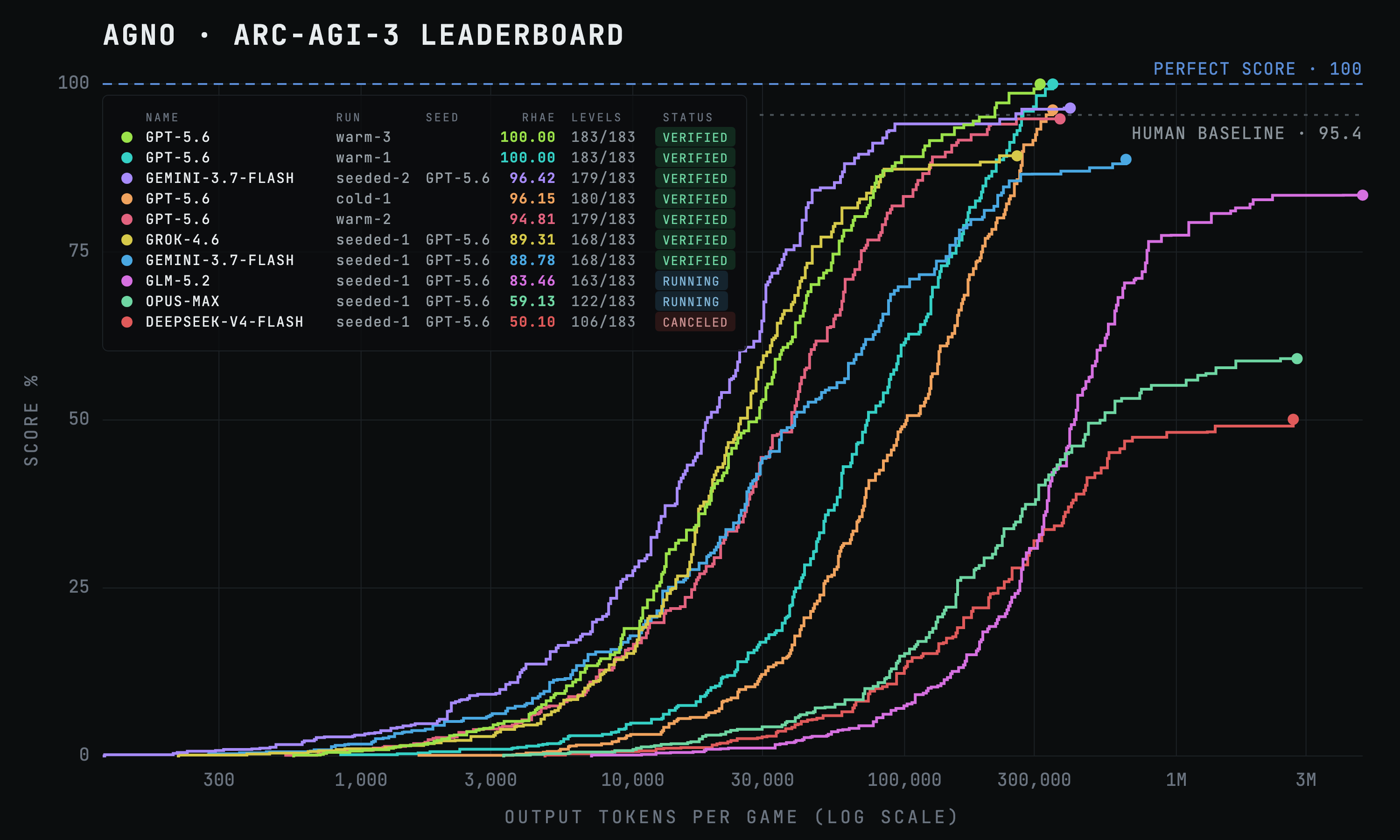
## Learning Machines
[ARC-AGI-3](https://arcprize.org/arc-agi/3) is an interactive reasoning benchmark that measures the ability of an agent to learn. An agent is dropped into a game with no instructions, no rules, and no stated goal. It has to explore, build a world model of the mechanics, figure out what winning means, and then win efficiently.
The benchmark is a learning test and that's why agents using Agno's Learning Machines score so well. As the agent plays, it saves what it has verified into a per-game manual: mechanics, hazards, hypotheses.
An agent starts a game knowing nothing, and by the time it reaches level 8 it is playing with a manual it wrote at levels 1 through 7. That is where the cold `gpt-5.6` score of 96.15 comes from. Scoring above the human baseline of 95.4.
Here's what the agent learned about one game. Look at the last one. The agent is not only recording what worked, it is going back and overturning something it previously believed, so it doesn't waste actions on a mistake it already made.
```markdown
- Red gravity switches are consumed: clicking a red block reverses which way
the avatar falls, and the block itself is replaced by terrain. One use only.
- Directional hazards: a striped block kills on the striped face only. A stripe
on the underside kills an avatar rising into it; the top face is safe to land on.
- Purple hazards ignore clicks: clicking the body of a purple hazard does
nothing. They cannot be removed, only avoided.
- Correction: do NOT trust the earlier note claiming a hazard was crossed at
level 6. Inspecting the frame shows that column was clear the whole time.
```
## Cross-model learning transfer
The real objective of the arcade is to measure if one model can learn from another model's experience. We handed `gpt-5.6`'s manuals to other models and let them play. `gemini-3.7-flash` scored 96.42, above the human baseline.
| Player | Cold | Seeded with GPT-5.6's manuals |
| ---------------------- | ----- | ----------------------------- |
| Gemini-3.7-Flash | 37.33 | **96.42** |
| Grok-4.6 | 37.40 | **89.31** |
| GLM-5.2 (open weights) | 7.92 | **83.46**, still climbing |
On one game, GPT covered a diagonal in 18 single-step clicks; Gemini, reading GPT's description of that same diagonal, covered it in 7 and won the game in 104 actions to GPT's 120. It read the note and found a better line than the model that wrote it.
How do we know that the models aren't storing solutions and only transferring learnings? **`lf52`**. `lf52` is the most documented game on the board, and Gemini still stalls on it at level 6, GLM at level 3.
A model executing a stored solution would pass `lf52`. Cross-model learning transfers understanding, and understanding can be insufficient.
## What this means for agent builders
We're not researchers. We're engineers. Our customers want to build the best agentic products, not win benchmarks. They care about three things: quality, cost, and speed.
We know that cross-model learning transfer improved `gemini-3.7-flash`'s score, but what about cost?
| Player | Score | Output tokens per game |
| -------------------- | --------- | ---------------------- |
| GPT-5.6, warm | 100.00 | 80K |
| Gemini-Flash, cold | 37.33 | 195K |
| Gemini-Flash, seeded | **96.42** | **65K** |
Cross-model learning transfer made the small model **2.6× better and 3× cheaper at the same time**, and it now spends fewer tokens per game than the frontier model it learned from. If you know about ARC-AGI-3 you know that 37.33 -> 96.42 isn't a simple 2.6× improvement.
This means companies can run their best model on the hard cases, let it write down what it learns, then let cheaper and faster models run the volume with those notes in hand. Run tiered agents by task, or by customer. The usual tradeoff of cheaper models, worse results is now broken. A system of agents learning from each other will beat the same agents working alone.
## How the arcade works
1. Each player is an agent, made of a model and knowledge policy.
2. Players can use a default agent harness, or bring their own. The default harness is:
- a Python kernel that gets loaded with the agent's run history.
- a learning store that lets the agent learn the game mechanics as it plays.
- a `take_action` tool for taking an action and recording the observation.
3. Agents can play in three modes:
- **Cold**: no prior knowledge, the agent starts the game from scratch.
- **Warm**: the agent uses the learnings it captured in previous runs.
- **Seeded**: the agent uses the learnings captured by another model.
4. Every action a player commits is recorded to a replayable trace.
5. A finished campaign is replayed through ARC's server in Competition Mode, minting an official scorecard.
## Current leaderboard
Here's the current leaderboard with links to their official ARC scorecards.

| Player | Run | Score (RHAE) | Levels | Actions | Scorecard |
| ---------------------------------- | -------- | ------------ | ------- | ------- | -------------------------------------------------------------------------------- |
| GPT-5.6 Sol | warm-3 | **100.00** | 183/183 | 7,189 | [9fb9db8d](https://arcprize.org/scorecards/9fb9db8d-3734-4885-987a-a250445c0690) |
| GPT-5.6 Sol | warm-1 | **100.00** | 183/183 | 7,891 | [7690a5a8](https://arcprize.org/scorecards/7690a5a8-dda4-42c5-8554-b5e480245a83) |
| Gemini-3.7-Flash · seeded GPT-5.6 | seeded-2 | 96.42 | 179/183 | 8,308 | [6c9d068a](https://arcprize.org/scorecards/6c9d068a-9806-49a1-822a-3ea92b651322) |
| GPT-5.6 Sol | cold-1 | 96.15 | 180/183 | 9,422 | [b0aa052c](https://arcprize.org/scorecards/b0aa052c-0ad5-41c7-92db-ef8d342d4929) |
| **Human baseline** | — | 95.4 | 183/183 | — | — |
| GPT-5.6 Sol | warm-2 | 94.81 | 179/183 | 7,601 | [1a9d9073](https://arcprize.org/scorecards/1a9d9073-2e8d-4fec-a750-d60f7c57bbe6) |
| Grok-4.6 · seeded GPT-5.6 | seeded-1 | 89.31 | 168/183 | 8,032 | [a656c871](https://arcprize.org/scorecards/a656c871-c31a-4052-8c9e-212c1e26d473) |
| Gemini-3.7-Flash · seeded GPT-5.6 | seeded-1 | 88.78 | 168/183 | 7,648 | [fcd78df3](https://arcprize.org/scorecards/fcd78df3-6295-4e37-bd7e-387c5ddc13b3) |
| GLM-5.2 · seeded GPT-5.6 | seeded-1 | 83.46 | 163/183 | 13,222 | _still playing_ |
| Claude-Opus-5 · seeded GPT-5.6 | seeded-1 | 59.13 | 122/183 | 2,946 | _still playing_ |
| DeepSeek-V4-Flash · seeded GPT-5.6 | seeded-1 | 50.10 | 106/183 | 2,773 | _stopped, unminted_ |
## Disclaimers
1. All scores are on the public demonstration set. ARC-AGI-3's primary basis for evaluation is its private sets, which are harder, out-of-distribution, and not publicly playable. Nobody has beaten ARC-AGI-3 (as far as we know).
2. The runs scoring 100% are warm runs, meaning the agent used the learnings it captured in previous runs to improve its performance.
3. The `gemini-3.7-flash` run was seeded with `gpt-5.6`'s knowledge.
## Run it yourself
The arcade is open source, and I encourage you to try it yourself.
**1. Setup the arcade**
```bash
git clone https://github.com/agno-agi/arc-agi-arcade && cd arc-agi-arcade
./scripts/venv_setup.sh && source .venv/bin/activate
cp .env.example .env # add your model keys and an ARC_API_KEY
python play.py setup # download the 25 games, once
python play.py # the players, their records, and every command
```
**2. Run the players (in separate terminals)**
```bash
# 1. Cold. gpt-5.6 writes the manuals as it plays.
python play.py gpt --run cold-1 --cold
# 2. Warm. gpt-5.6 plays with the manual from the previous run.
python play.py gpt --run warm-1
# 3. Seeded. gemini-3.7-flash plays with gpt-5.6's manuals.
python play.py gemini-flash-seeded --run seeded-1
```
**3. Watch the board**
```bash
python play.py
```
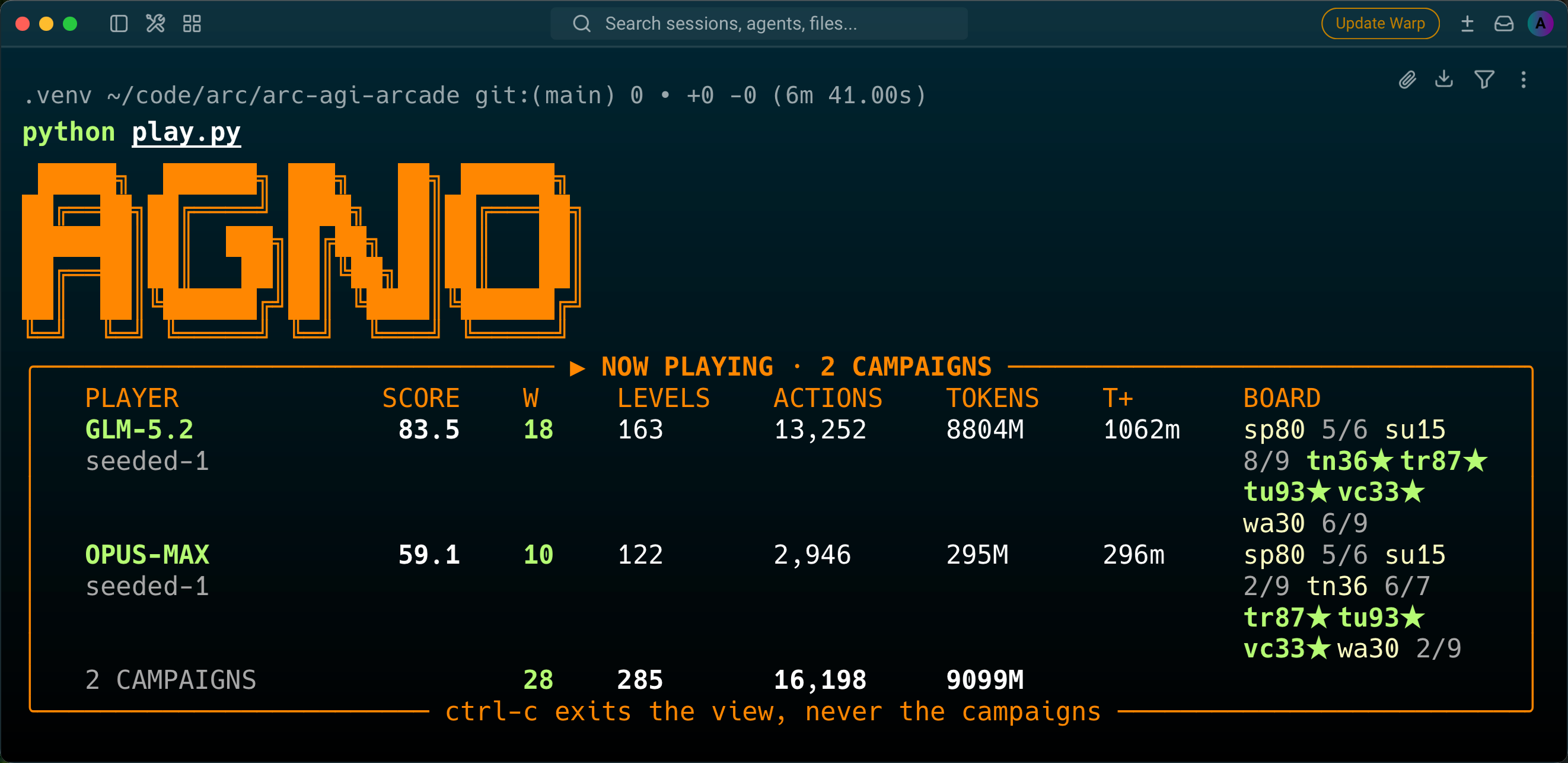
More details in the [README](https://github.com/agno-agi/arc-agi-arcade/blob/main/README.md).
## The arcade is open
The headline number in this article is the least interesting thing. A frontier model scoring 100 on a public set, by the time you finish reading someone will have done it faster and cheaper.
The story that is interesting is how `gemini-3.7-flash` went from a third of the board to beating the human baseline, revealing the power of cross-model learning transfer.
This is how apprenticeships work, how education works, how documentation works, how every engineering team you have ever joined works. Nobody expects the new hire to rediscover the codebase from first principles. We hand them what we already know, and they go further than we did.
We've spent years building agents that are brilliant for one session, then paying frontier prices to have them work out the same things again tomorrow. The arcade is the smallest honest test we could build for the alternative: agents that learn, from themselves, from each other, and from the world.
So the arcade is not really about ARC-AGI-3. It is about what happens when the focus shifts from a single model to a system of agents sharing what they learn.
Give it a try at [github.com/agno-agi/arc-agi-arcade](https://github.com/agno-agi/arc-agi-arcade).
---
# How to Connect Your Agents to Slack
> Learn how to connect your agents to Slack. We'll talk about the app manifest, credentials, monitoring, and the security details that keep a public platform safe.
- Published: 2026-08-04
- Author: Ashpreet Bedi
- Categories: Engineering
- Canonical: https://www.agno.com/blog/connect-agents-to-slack
- Markdown: https://www.agno.com/blog/connect-agents-to-slack.md
Today I'll show you how to connect your agents to Slack. It's one of the first things you'll do when you start building agents: put them where your team works. One agent becomes two, two become five and suddenly any task that can be done by humans becomes a message to an agent.
Here's what it looks like:
Normally agents operate in channels like #sales and #engineering. This video is from our testing channel: #agents. If you look closely you can see Sam trying to hack my personal context agent. Everything you see works out of the box: streaming, tool calls rendered as they run, human-in-the-loop, memory of the person the agent is talking to. We'll get to how all of that works.
## One backend, many frontends
A big advantage of having your own agent platform is that the same backend connects to every frontend. So the same agent is available over Slack, a custom UI, or AI apps like Claude and ChatGPT. The key is setting up the platform right, so it can serve any frontend.
## Do it yourself
Here's what we'll do to get our agents in Slack:
1. Set up our agent platform
2. Deploy our platform (Slack needs a public URL)
3. Connect our agent to Slack
End to end this should take ~20 minutes. We'll use coding agents for steps 1 and 2 so you'll move through this pretty quickly and the only manual setup is creating the Slack app. Let's go.
## Set up your platform
If there's one thing you take away from my posts, it's that you need your own agent platform: shared execution, shared security, shared context, and a consistent way of exposing your agents over REST, MCP, and chat interfaces like Slack.
Your code lives in one place, easy to scale beyond your first agent. Sessions, memory, and traces are stored in your database and can be mined for self-improvement. Platform access and security are managed in one place, and the best part: the whole thing can be done by coding agents. Let's start by setting up our platform.
**Step 1:** Start up your coding agent. I'm using claude code with `--dangerously-skip-permissions` (fine here, it's a fresh project).
**Step 2:** Create your agent platform using one prompt.
1. Make sure [Docker](https://www.docker.com/products/docker-desktop/) is installed and running.
2. Export your OpenAI API key using `export OPENAI_API_KEY=...`
3. Get your prompt from [os.agno.com](https://os.agno.com) and give it to your coding agent.
And that's it. Your coding agent will set up and run your agent platform locally.
## Deploy your platform
Slack needs the agent to be available over a public URL. When you copied the prompt from [os.agno.com](https://os.agno.com), you chose a cloud to deploy your platform to (I chose Railway).
Let's deploy our platform so slack can reach our agent. `cd` into your agent platform, start your coding agent so the slash commands are available and run:
> /deploy-platform
I'm telling the skill to deploy to the AB workspace because I already have my internal company platform running in my main account. The skill checks the prerequisites (may ask you to log in), provisions the services, and pauses for the JWT key. This is important.
One mistake I see agent builders make all the time is deploying their agents to a public URL with no authentication. If the open URL gets discovered, strangers have unrestricted access to your agents. The platforms I build come with JWT auth on by default, so a production deploy needs a JWT verification key before it will even start.
You can mint one yourself, or get one from [os.agno.com](https://os.agno.com).
Connect to your AgentOS on [os.agno.com](https://os.agno.com), flip on token-based authorization, and paste in the verification key when the skill pauses for it. Your coding agent deploys the platform and hands you a live URL.
## Connect to Slack
Now for the main event. We will:
1. Create the app
2. Install it to your workspace
3. Add the credentials to your platform
4. Chat with Chief over Slack (the agent that's pre-wired)
5. View the chat sessions on the AgentOS UI.
Here's me doing it end to end:
**Step 1: Create the Slack app from a manifest.**
- Grab this [manifest.json](https://github.com/agno-agi/agno/blob/main/libs/agno/agno/os/interfaces/slack/manifest.json) and replace `https://YOUR-URL` with your AgentOS URL. The events URL becomes `YOUR-AGENTOS/slack/events` and the interactivity URL becomes `YOUR-AGENTOS/slack/interactions`. Also update the `display_information` and `bot_user.display_name`.
- Then go to [api.slack.com/apps](https://api.slack.com/apps) and **Create New App** → **From a manifest**, pick your workspace, and paste in the manifest. The manifest pre-configures everything: the scopes, the event subscriptions, interactivity.
> Note: create the app after your platform is live. Slack sends a verification challenge to `/slack/events` and AgentOS answers it automatically, so the URL is verified on creation.
**Step 2: Install it to your workspace.**
Click **Install App** → **Install to Workspace** → **Allow**. Copy two values: the Bot User OAuth Token (starts with `xoxb-`) from the install page, and the Signing Secret from **Basic Information**.
**Step 3: Add the credentials to your platform.**
Open the `.env.production` file and add both values to `SLACK_BOT_TOKEN` and `SLACK_SIGNING_SECRET`, then sync and redeploy. You can just tell your coding agent to redeploy the platform or run the following commands manually.
```bash
./scripts/railway/env-sync.sh
./scripts/railway/redeploy.sh
```
That's it. Find your agent under **Apps** in Slack and say hello. Then invite it to a channel and mention it:
```
/invite @Chief
@Chief tell me about yourself.
```
If you want to see the code, open `app/main.py` and you'll see:
```python app/main.py
if SLACK_BOT_TOKEN and SLACK_SIGNING_SECRET:
interfaces.append(
Slack(
agent=chief,
streaming=True,
resolve_user_identity=True,
token=SLACK_BOT_TOKEN,
signing_secret=SLACK_SIGNING_SECRET,
)
)
```
## How it works
When you message the agent, Slack sends an event to `https://your-url/slack/events`. There AgentOS runs a signature check and responds in a thread. Streaming is on by default, so responses appear as they're generated, with task cards showing progress on longer work.
Two details worth understanding:
- **Threads are sessions.** Each Slack thread maps to one session (the ID is literally `chief:{channel_id}:{thread_ts}`).
- With `resolve_user_identity=True`, each sender resolves to their email, so the agent knows who it's talking to. Chief keeps a private profile and memory for every person, while notes and entities stay shared across the team. Ask the same question as two different people and you'll get answers shaped by what Chief knows about each person.
## Monitoring and Observability
Open the [AgentOS UI](https://os.agno.com) and go to the Sessions and Traces tabs. Every Slack thread is there with its full history. You can also ask the Platform Manager about usage, run activity, and tool activity.
## A couple of notes on security
You just deployed a public agent platform. It's important to understand your security posture. Your platform has two entry points:
**The platform entry point.** JWT auth is on by default in production. Every API and MCP request needs a valid bearer token, and the verification key you pasted during deploy is what checks them. The MCP endpoint adds OAuth on top (`MCP_CONNECT_SECRET`) so chat apps like claude.ai can connect with authentication.
**The Slack entry point.** The events webhook is public by design. That's safe because every request carries an HMAC signature computed with your signing secret. Requests older than five minutes are rejected.
## Wrapping up
Here's the picture after this post:
```
┌──► AgentOS UI build, monitor, improve
│
├──► Slack where your team works ◄── you are here
Your agents ───┤
├──► MCP claude.ai, ChatGPT, Claude Code, Cursor
│
└──► REST API your own product
```
One backend for every frontend. Your agent now lives where your team works, with auth on both entry points and full visibility from the AgentOS UI.
Thanks for reading!
Ashpreet
---
# Community Roundup: July 2026
> Agno's July recap: v2.7.0 brought AgentOS to the command line with a CLI, service accounts, an eight-tool MCP surface and eval suites, and v2.8 added rollouts, a durable filesystem, and an ops agent for your own platform.
- Published: 2026-08-01
- Author: Cosette Cressler
- Categories: Community, Product, Integrations
- Canonical: https://www.agno.com/blog/community-roundup-july-2026
- Markdown: https://www.agno.com/blog/community-roundup-july-2026.md
July reshaped how you run Agno. v2.7.0 brought AgentOS to the command line with service accounts, a CLI, a focused MCP surface, and eval suites that keep regressions out of production. Then v2.8 added rollouts that turn successful runs into training data, a durable filesystem, and an ops agent that lets you ask questions about your own platform in plain English.
Let's take a closer look.
## New releases & features
### Connect any AgentOS to your coding agent
The headline of v2.7.0. A new CLI ships as `agnoctl` on PyPI and runs as `agno`. Run `uvx agno connect` and it discovers a running AgentOS, mints a per-client access token, writes the MCP config for Claude Code, Claude Desktop, Cursor, Codex, and ChatGPT, and verifies the handshake, so you skip hand-editing JSON. Those tokens are service-account personal access tokens (`agno_pat_...`) built for real security: stored as SHA-256 hashes, scoped per user, expiring after 90 days by default, revocable on demand, and enforced across every deployment mode including `/mcp` and WebSockets. From there, `agno tokens create/list/revoke` manages tokens, `agno create` scaffolds a project from the `agentos-` templates for Docker, AWS, Fly, GCP, and Railway, and `agno up/down/restart/status` handles the local lifecycle.
See the [Connect Your Clients docs](https://docs.agno.com/cli/connect#connect-your-clients) for more.
### MCP Interface v2
v2.7.0 gave the `/mcp` endpoint a clean eight-tool operator surface: `get_agentos_config`, `run_agent`, `run_team`, `run_workflow`, `continue_run`, `cancel_run`, `get_sessions`, and `get_session_runs`. It trims run results by default so responses stay lean, sends progress notifications on long-running tools, and carries the full human-in-the-loop continue and cancel lifecycle, so a coding agent gets a predictable, purpose-built way to run and manage AgentOS instead of a sprawling tool list.
See the [AgentOS as MCP Server docs](https://docs.agno.com/agent-os/mcp/mcp) for more.
### Eval suites and CI gating
Also in v2.7.0: a new `agno.eval` layer with a proper suite runner built from `Case` and `run_cases`/`arun_cases`, plus an argparse CLI that supports team subjects and numeric judge scoring. `SuiteResult.to_dict()` is a stable JSON contract you can wire straight into CI, so you score agents and teams consistently and fail a build on regressions instead of eyeballing results.
See the [Evals docs](https://docs.agno.com/agent-platform/evals) for more.
### Unified auth across every transport
v2.7.0 put a single `AuthMiddleware` in front of REST, `/mcp`, and WebSocket transports, so authentication no longer drifts from one to the next (`JWTMiddleware` stays as a backward-compatible alias). Scope enforcement now runs identically across JWT, service-account, and MCP paths, A2A and AGUI routes are authorized rather than just authenticated, and concurrent MCP requests are isolated so one can't pick up another's state. In v2.7.2 you can also put standards-based OAuth in front of `/mcp` with `AgentOS(mcp_auth=...)`, so clients authenticate the way the rest of your stack expects.
See the [AuthMiddleware docs](https://docs.agno.com/reference/agent-os/jwt-middleware#authmiddleware) to learn more.
### Turn your agents' best runs into training data
v2.8.0 added a straight path from evaluation to fine-tuning data. `agno.scorer` grades attempts, `agno.environments` runs an agent over a set of tasks in full isolation, and `run_rollouts` runs each task K times so you measure a real pass rate (pass@k) instead of whether it worked once. `to_sft_jsonl` then exports the attempts that passed as conversational SFT data, with a provenance sidecar tracing every example back to the run it came from. Each attempt runs on a fresh db, session, and user, so no state bleeds between runs to contaminate your pass rate or your training set. If all you want is scoring inside an existing suite, `Case.scorer` drops any scorer into a `Case` with no extra model call.
See the [cookbook](https://github.com/agno-agi/agno/tree/main/cookbook/environments) for more.
### A durable filesystem your agents can rely on
The filesystem in most setups is a scratch directory that vanishes when the run ends, which is fine for a one-shot task and useless for anything an agent is supposed to remember. v2.8.2 added `FileSystem`, a durable text store an agent writes to and reads back across runs, so a decision it recorded or a checkpoint it saved is still there next time it starts up. You choose where files live, whether SQLite for dev, Postgres for a multi-worker app, or local disk to open them yourself, without changing agent code. Templated namespaces like `assistant/{user_id}` scope each user's files to their own space, resolved from the run context at call time, so the model can't reach into another namespace by passing a different path.
See the [FileSystem docs](https://docs.agno.com/filesystem/overview) to learn more.
### Ask your AgentOS how it's doing, in plain English
v2.8.5 added `AgentOSTools`, a read-only ops view of the AgentOS an agent runs on. Point it at your database and it reports on usage, latency, failures, schedules, evals, components, and pending approvals, then answers questions like which tool was slowest today or how many runs failed this week, grounded in real traces instead of a dashboard you assemble by clicking around. It reads from the database rather than a live AgentOS handle, so an ops agent can inspect the whole platform with no path to change anything: it watches, it doesn't touch.
See the [cookbook](https://github.com/agno-agi/agno/blob/main/cookbook/05_agent_os/25_agentos_tools/platform_ops_agent.py) for a working example.
### Run agents and knowledge on Valkey
v2.7.3 brought Valkey to Agno as an in-memory backend. `ValkeyDb` holds session and state for agents, teams, and workflows in memory, so reads and writes stay quick under load when latency matters more than durable long-term storage. Valkey also lands as a vector store that runs both vector and keyword search from the same backend, giving you hybrid retrieval over one in-memory store instead of standing up a separate keyword index alongside your vector database to get it.
See the [Valkey database docs](https://docs.agno.com/database/providers/valkey/overview) and [Valkey vector store docs](https://docs.agno.com/knowledge/vector-stores/valkey/overview) for setup.
### Persistent sandboxes with Superserve
v2.7.4 added `SuperserveTools`, which lets an agent write and run its own code inside a Superserve sandbox. The sandbox is a Firecracker microVM, and the part that matters is that it persists: files the agent writes and packages it installs are still there on the next tool call and the next run in the same session, which is the difference between running one-off snippets and building something up over many steps. Secrets are handled through a proxy token, so agent-written code can call real APIs without your credentials ever landing somewhere the model can read them.
See the [Superserve toolkit docs](https://docs.agno.com/tools/toolkits/others/superserve) to learn more.
### Production observability with The Context Company
Also in v2.7.4: an observability integration with The Context Company. Call `instrument_agno()` before you import Agno and your runs stream over OpenTelemetry, capturing model calls, tool arguments and results, prompts, token usage, and latency. Where plain tracing shows one run at a time, this analyzes across all of them, surfacing recurring patterns and account-level insight and linking back to the specific runs behind each one, so instead of scrolling traces you find where agents consistently go wrong and go straight to the evidence.
View [Agno's The Context Company docs](https://docs.agno.com/observability/the-context-company) to learn more.
### Run frontend tools from AG-UI
v2.7.2 added client tool execution to AG-UI, so a tool can run in the frontend rather than only on the server. Your UI can handle actions that belong on the client, like reading local state or driving the interface, while the agent orchestrates the flow.
See the [AG-UI docs](https://docs.agno.com/examples/agent-os/interfaces/agui/overview#ag-ui) for more.
## New tools and integrations
July added a stack of new toolkits and integrations:
- **TwelveLabsTools** (v2.6.22): analyze videos and generate multimodal text embeddings, so video becomes something an agent can search, summarize, and reason over. See the [TwelveLabs docs](https://docs.agno.com/tools/toolkits/others/twelvelabs).
- **SofyaTools** (v2.6.22): search, extraction, and research through a single integration. See the [Sofya docs](https://docs.agno.com/tools/toolkits/search/sofya).
- **SearchApiTools** (v2.6.22): Google, News, Images, and YouTube search from one toolkit. See the [SearchAPI docs](https://docs.agno.com/tools/toolkits/search/searchapi).
- **RedmineTools** (v2.7.3): find, read, create, and update Redmine issues, leave comments, and log time from an agent. See the [cookbook](https://github.com/agno-agi/agno/blob/main/cookbook/91_tools/redmine_tools.py) for a working example.
- **TokenLab** (v2.7.3): a new OpenAI-compatible model provider you can point agents at with the interface you already know. See the [cookbook](https://github.com/agno-agi/agno/blob/main/cookbook/90_models/tokenlab/basic.py) for a working example.
- **PlivoTools** (v2.7.4): send SMS, place voice calls, and look up a number's carrier and line type before sending. Check out [Agno's PlivoTools docs](https://docs.agno.com/tools/toolkits/social/plivo) to learn more.
- **SmallestTools** (v2.8.6): text-to-speech with Smallest AI's Lightning models, output as WAV, MP3, or telephony formats. Check out [Agno's Smallest AI toolkit docs](https://docs.agno.com/tools/toolkits/others/smallest#smallest-ai) for more.
- **OpenSearch** (v2.8.6): a vector database with vector, keyword, and hybrid search in both sync and async variants. See the [cookbook](https://github.com/agno-agi/agno/blob/main/cookbook/07_knowledge/09_archive/vector_dbs/opensearch_db.py) for a working example.
- **LocalFileSystemTools read** (v2.6.21): read files, not just write them, scoped to your `target_directory` by default. See the [Local File System docs](https://docs.agno.com/tools/toolkits/local/local-file-system).
## Community projects & showcases
Our community built incredible things in July. Here are two standout projects:
### whatbroke: a CLI diff tool for agent behavior by Arthi Arumugam
Agents drift. A tool call drops, an argument changes, latency spikes, and you don't notice until it's too late. whatbroke diffs agent behavior between two runs and surfaces exactly what changed: tool calls, arguments, outputs, cost, and latency. If you trace your Agno agents with Langfuse, you can export from there and run the diff.
View the project on [GitHub](https://github.com/arthi-arumugam-git/whatbroke).
### Social Media Terminal: multi-agent content automation by Muhammad Ikhwananda Rizaldi
An advanced CLI workflow powered by Agno that automates the whole content lifecycle, from campaign brief to deep research to QA to auto-publishing. A full content department in a terminal.
See the [post on LinkedIn](https://lnkd.in/p/gGkeKiKm).
## Contributor shoutouts
### Community MVPs
- **@basnijholt**: Cached the Pydantic version lookup during tool wrapping, which was reading package metadata on every single wrap and stalling the event loop for multiple seconds on network-backed installs. The fix dropped benchmark times from 65.94ms to 11.01ms for 100 wraps ([#9210](https://github.com/agno-agi/agno/pull/9210)).
- **@harshitajain165**: Shipped the Smallest AI text-to-speech toolkit, synthesizing speech and returning it as an audio artifact in a `ToolResult`, with optional disk saving ([#9015](https://github.com/agno-agi/agno/pull/9015)).
- **@jperla**: Added TrustedRouter as a first-class model provider, a thin `OpenAILike` subclass pointing at the TrustedRouter API, with cookbook and tests ([#9100](https://github.com/agno-agi/agno/pull/9100)).
- **Rushikesh Gandhmal**: Fixed nested-team memory continuity, where delegated teams could lose conversation context mid-turn even with history enabled. Delegated teams now remember what came before ([#8968](https://github.com/agno-agi/agno/pull/8968)).
- **Anshul Jain**: Integrated [You.com](http://you.com/?utm_source=partner&utm_campaign=agno)'s Research API into Agno, giving agents deep-research capability aimed at real compliance and logistics problems where a missed deadline costs far more than a fine.
### More great contributions
- **@khrnchn**: Preserved explicitly configured Agent and Team member IDs exactly as provided, fixing a mismatch where an ID like `billing_agent` was exposed one way but resolved another during delegation, breaking handoffs ([#9011](https://github.com/agno-agi/agno/pull/9011)).
- **@RayST3**: Updated the Moonshot integration for kimi k3, adding `use_thinking` handling, round-tripping assistant `reasoning_content`, and new cookbook examples ([#9057](https://github.com/agno-agi/agno/pull/9057)).
- **@alec-drw**: Fixed skill access tools so a model calling `get_skill_script` or `get_skill_reference` without the path no longer trips a `ValidationError` before the graceful handling can run ([#9096](https://github.com/agno-agi/agno/pull/9096)).
- **@pratikm778**: Serialized nested executor requirements so `StepRequirement.to_dict()` safely converts nested `RunRequirement` objects for standard JSON persistence ([#9162](https://github.com/agno-agi/agno/pull/9162)).
- **@devdattatalele**: Fixed six broken links across the cookbook READMEs, repointing the docs links to the reorganized `/knowledge/concepts/` paths ([#9195](https://github.com/agno-agi/agno/pull/9195)).
Every one of you made Agno better. Thanks for building with us.
## Get involved
There's never been a better time to contribute.
- ⭐ [Star Agno on GitHub](https://github.com/agno-agi/agno)
- 💬 [Join our Discord](https://agno.link/discord)
- 📖 [Read the docs](https://docs.agno.com/)
- Check out [open issues](https://github.com/agno-agi/agno/issues)
- 🚀 Share what you're building. We want to feature YOUR project next month.
**_— Team Agno_**
---
# Build an agent platform without writing a single line of code
> Today I'll show you how to build your own agent platform without writing a single line of code.
- Published: 2026-07-27
- Author: Ashpreet Bedi
- Categories: Engineering
- Canonical: https://www.agno.com/blog/build-your-own-agent-platform
- Markdown: https://www.agno.com/blog/build-your-own-agent-platform.md
> _The future is here, just not evenly distributed._
Today I'll show you how to build your own agent platform without writing a single line of code.
I know this sounds crazy, so I'll share videos along the way and encourage you to build along. All you need is a coding agent, docker, and an OpenAI API key.
But first, what is an agent platform and why is every company building one?
## What is an Agent Platform?
An agent platform is the system that runs your agents. It handles agent execution (i.e. running the agents), manages sessions and context, enforces security policies, logs traces, and connects your agents to frontends via API, MCP, or chat interfaces like Slack.
An agent platform provides a shared foundation that you can build your company's AI applications on. Without a shared platform, every agent becomes its own silo, each needing its own deployment, authentication, database, observability, and integrations.
Most companies build their own agent platform to own the learning loop. To retain full control over the agent's behavior, data and context. Which paves the way for reflective self improvement.
## Let's Get Started
The first thing we're going to do is set up our agent platform. I'm going to show how to do that with **one prompt**. I know this sounds mad, so here's a video of it in action.
**Want to follow along?** Go to [os.agno.com](https://os.agno.com), get the prompt for your cloud provider (I'm using Railway) and hand it to your favorite coding agent (I'm using Claude Code).
For a one-shot experience like the video, make sure you have docker installed and running, and export your OpenAI API key using `export OPENAI_API_KEY=`
Under the hood, the coding agent first clones an agent-platform template (built by yours truly) and then runs the `/setup-platform` skill. It ends by running the `/create-agent` skill, which I used to create an agent called `Radar`. Ten minutes from a fresh machine to a running platform.
## Skills for days
When I say "build without writing a single line of code", I mean _**you**_ don't write any code, the coding agent does. But how do we do that reliably? A unified platform + skills.
The agent platform we created above is structured so that agent code, logs, traces, evals and live service all live in one place, accessible to the coding agent doing the implementation. A complete paradigm shift because you're no longer stitching different services together.
Because the coding agent can make changes to the code, and probe the live running system, it's able to take full control of the agent development lifecycle. It can create agents (using `/create-agent`), reflect on usage and improve them (using `/improve-agent`), fix bugs, add new features (using `/extend-agent`), write and run evals (using `/create-evals` and `/eval-and-improve`), keep the codebase in sync (using `/review-and-improve`), and even deploy the platform to production.
All of this is possible because **a)** the gnarly wiring is handled by Agno, so the coding agent is just putting things together, and **b)** all information the coding agent needs is available using Agno's MCP server. So the coding agent is simply assembling a puzzle, with access to the manual via MCP.
I won't go into the details of each skill, but I will showcase the `/improve-agent` skill. Which covers the most important part of your agent platform: the learning loop.
`/improve-agent` takes an agent and runs N simulations (called probes) to evaluate the agent's performance. It derives these probes from the agent's own instructions and from its real usage (stored in the database). It then runs the probes against the live container, judges the responses, and improves the agent until they pass. It's rare for me to publish an agent without running this skill first.
Let's see it in action. `cd` into your agent platform and restart your coding agent so it picks up the new skills. Then run `/improve-agent` to improve your agent, my run took about 29 minutes so read the rest of the article before running this. It really does dig through the edge cases.
## Give your agent platform a UI
Every step so far has been in a terminal, next let's give our agent platform a UI. Head to [os.agno.com](https://os.agno.com) and connect your platform.
Here's the part I like. The AgentOS UI connects directly from your browser to your runtime. The flow of data is entirely between your browser and the running API. Sessions, traces and memory stay in your database and you retain full control and ownership of your data and context.
## Connect your agents to your frontends
You're not building an agent platform to replace Claude or ChatGPT. You're building an agent platform to power your product and operations with custom agents you own and control. Meaning building agents is only part of the puzzle, you also need to connect them to:
1. **Your product.** Use the **REST API** to call your agents from your product.
2. **Your AI apps.** Connect your agents to Claude and ChatGPT using the **MCP server**.
3. **Your chat apps.** Expose agents in Slack, Discord and Telegram using **Agno Interfaces**.
Luckily, your agent platform is already set up to do all three.
### First, go live using the `/deploy-platform` skill
To connect your platform to AI apps like Claude and ChatGPT, or chat apps like Slack, Discord and Telegram, you need to deploy your platform so it is reachable from the internet.
So before we wire up the AI apps and chat apps, let's take our platform live. Run the `/deploy-platform` skill, which will deploy the platform to the cloud template you selected during setup (I'm using Railway).
### Connect your agents to your AI apps using the MCP server
This is the part I'm most excited about. A large number of the custom agents and workflows you'll build will be used through AI frontends like Claude, ChatGPT, Claude Code and Codex. If you've ever heard anyone moan about shared context between AI apps, this is the solution.
And it's remarkably simple to do so. Your agent platform (built on AgentOS) exposes every agent, team, and workflow using an MCP server, so Claude and ChatGPT can connect to your AgentOS and run your agents.
Let's test it out by connecting **Chief** (the company mascot) to Claude.
In Claude, go to Settings → Connectors → Add custom connector and paste your platform's MCP URL: `https:///mcp`. Leave the client ID and secret fields empty. Connect and it'll take you to a consent page asking for your connect secret: that's the `MCP_CONNECT_SECRET` the /deploy-platform skill generated and added to `.env.production` (it prints it in the deploy summary, copy it). Once you confirm, Claude can interact with your AgentOS using MCP.
First, tell Claude that whenever you ask for "Chief", you want to run the chief agent on AgentOS (it'll add it to its memory).
```
Whenever I ask for "Chief", you should run the chief agent on AgentOS.
```
Then tell Claude to interact with Chief.
```
Tell chief the surfer leo zapato from garaje was 🔥.
```
### Connect chief to Slack
Next, let's make Chief available in Slack. You can connect your agents to any chat app using Agno Interfaces. Slack is the most popular, and comes pre-wired in the platform template.
Create a Slack app for your workspace (the [Agno docs](https://docs.agno.com/agent-os/interfaces/slack/setup#2-create-the-slack-app) have a step-by-step guide), point its Event Subscriptions URL at `https:///slack/events`, and grab two values: the bot token and the signing secret. Set `SLACK_BOT_TOKEN` and `SLACK_SIGNING_SECRET` in `.env.production`, run `./scripts/railway/env-sync.sh` (or tell your coding agent to run it), and chief should be available over slack.
### Use your agents from your product using the REST API
This is the last one, and the easy one. Your agent platform comes with a complete API with 80+ endpoints. Run agents, stream responses, list sessions, manage knowledge. Use this API to build agentic products on top of your platform.
Go [localhost:8000/docs](http://localhost:8000/docs) for the full list of endpoints. Everything the AgentOS UI does, your product can do too. The AgentOS UI uses the exact same API.
## Wrapping up
Today we built a unified agent platform using nothing but a prompt, took it live, and connected it to Claude, ChatGPT, and Slack. End to end, this guide would probably take you ~30-40 minutes, which is pretty awesome! Now the fun part, build more agents, improve them, and connect them to your product, use them in your AI apps or chat apps. Here is the full set of skills, for reference:
- `/setup-platform` takes you from a fresh clone to a running platform
- `/create-agent` creates a new agent and tests it
- `/extend-agent` makes changes to existing agents, add features, fix bugs, etc.
- `/improve-agent` recursively improves the agent against its own instructions and usage patterns
- `/create-evals` creates new evals for the agent, lock in good behavior via tests
- `/eval-and-improve` runs the evals and improves the agent if they fail
- `/review-and-improve` keeps the full codebase in sync, docs, code, and config coherent.
- `/deploy-platform` deploys the platform to production
Total lines of code written by me: zero.
The future is here. Go to [os.agno.com](https://os.agno.com) and see for yourself. Links for reference:
- [Agno is open source, star the repo on GitHub](https://github.com/agno-agi/agno)
- [Read the Agno documentation](https://docs.agno.com)
- Connect with me on [X](https://x.com/ashpreetbedi) or [LinkedIn](https://linkedin.com/in/ashpreetbedi)
---
# How Datai turned a fragile multi-agent prototype into a production system
> How Datai Network rebuilt Crunchie, its on-chain market intelligence companion, on Agno — trading manual orchestration and hand-rolled Redis sessions for a coordinated workflow that answers in ~25 seconds instead of 2.5 minutes.
- Published: 2026-07-21
- Author: Cosette Cressler
- Categories: Customers, Engineering
- Canonical: https://www.agno.com/blog/how-datai-turned-a-fragile-multi-agent-prototype-into-a-production-system
- Markdown: https://www.agno.com/blog/how-datai-turned-a-fragile-multi-agent-prototype-into-a-production-system.md
## How Datai turned a fragile multi-agent prototype into a production system
We spoke with Igor Lessio, Chief Technology Officer at Datai Network, about Crunchie. Datai Network is a decentralized data and analytics platform that builds structured blockchain intelligence across DeFi, NFTs, and real-world assets, and Crunchie is their “AI-powered on-chain companion”: a multi-agent system designed to democratize market intelligence, bringing institutional-level analysis into a format anyone can access and learn from.
The first version of Crunchie worked, but barely. In this post, we’ll start with what went wrong when five agents were wired together by hand, then look at why the team rebuilt on Agno, how the new workflow runs, what they did to keep answers grounded in real data, and the numbers they measured on the other side.
### The hidden cost of orchestrating agents by hand
Datai launched the Alpha version of Crunchie in Q2 2025, built on the same enterprise-grade data streams and analytics backbone used by funds, protocols, and analytics firms. It was organized as a team of five specialists:
- A **Yield Analyzer** that scanned liquidity pools for sustainable APYs
- A **Market Pulse** agent that detected sentiment and buying pressure
- A **News Monitor** that tracked DeFi headlines
- A **Risk Analyzer** that evaluated liquidity and project credibility
- A **Smart Synthesizer** that combined everything into a readable output
The concept was sound. The execution had limits.
Crunchie Alpha was built in Python and Go on a data lake, and the system had no real orchestration layer underneath it. The agents weren’t coordinated so much as wired together manually, with no shared state management and no structured way to handle parallel execution.
That made every change expensive. Add an agent, tweak a step, adjust routing logic, and suddenly half the orchestration layer needed rebuilding from scratch. Response times ran around 2.5 minutes per query, 5–10% of workflows failed outright, and there was no reliable way to trace what had gone wrong when one did.
After some changes in tech leadership, the team assessed the situation quickly. The data foundation was strong. The agent architecture needed to be rebuilt from the ground up.
### Why Datai chose Agno
First they tried LangChain, and found it frustrating.
_“The libraries were too difficult to navigate. Too many of them belonged to the community. And it was not easy to keep pace with the changelog.”_
They also wrote their own pure Python orchestration loop, which worked for simple use cases but didn’t scale. What Crunchie needed was a framework that could handle real multi-agent coordination without becoming its own maintenance burden. Four things pointed them to Agno.
#### 1. Flexibility
Simplicity and real flexibility rarely coexist. Igor’s team found both.
_“It's so flexible. Any model, any tool sets, any MCP server, it just works.”_
Because Agno is plain Python, they can extend memory systems, add custom output formatting, or swap models without fighting the framework. _“We can expand tools in five, six seconds. We can expand the memory system by ourselves.”_
#### 2. Reliability and logging
_“We can trust it. It has one of the best logging systems we’ve ever seen. If something is wrong, we know immediately.”_
They contrast this directly with the alternatives. _“With CrewAI the logging system was not good for our use case. NVIDIA did not even provide one.”_ When an LLM provider hits a rate limit, hallucinates, or overflows its context, Agno surfaces it right away. _“In seconds you can find out.”_
#### 3. Speed to a working prototype
The field moves too fast for anything else.
_“With Agno, you go from zero to an MVP in hours, not days, not weeks. We were not able to do that with the other frameworks we tested.”_
#### 4. Team responsiveness
In a field that changes weekly, direct access to the team is a real technical advantage. _“The first time we interacted with your CEO, we had a question. We couldn’t fix something, and he literally told us how to do it on Twitter. That’s priceless.”_
### How the workflow runs behind the scenes
Igor describes the new setup as a professional kitchen, and the contrast with Alpha is the point.
_“Before Agno, chefs were working in isolation, passing notes through runners and trying to coordinate timing manually. With Agno, there's a head chef—the workflow—coordinating specialists and making sure the final dish arrives coherent and on time.”_
The pipeline runs in four stages.
#### 1. A Prompt Expert cleans up the query
Every query opens here, with ambiguous inputs resolved before they reach any specialist agent. “BNB” becomes “Binance Coin on Binance Smart Chain.” Low-quality requests get filtered out early. This step alone cut API costs by around 30 percent.
#### 2. Three specialists run in parallel
An APY Expert identifies yield opportunities, a Pool Expert analyzes liquidity and pool health, and a News Expert gathers market sentiment and relevant context. They run concurrently rather than in a chain.
#### 3. A Coordinator synthesizes the answer
The Coordinator pulls all three outputs into a single ranked, structured, readable response, complete with direct links to the relevant pools and platforms.
#### 4. Agno handles everything in between
Timing, coordination, state persistence, and streaming responses as they generate. Response time dropped from 2.5 minutes to around 25 seconds.
### What changed under the hood
Four categories of work disappeared in the rebuild — none of which differentiated the product, all of which determined whether it survived in production.
- **Session state.** Previously tracked by hand with Redis key management and session timeouts. With Agno, PostgreSQL-backed workflow storage persists state automatically: Datai passes a `session_id`, and the workflow stays consistent across runs.
- **Streaming.** Once weeks of custom SSE work, now a single switch: `stream=True`.
- **Parallel execution.** Custom async coordination logic, replaced by clean `Step` objects and `Parallel` blocks.
- **Error handling and retries.** A tangle of try/catch logic, now handled gracefully by default.
_“We stopped writing plumbing code and started writing business logic. That's the real win.”_
### Keeping responses grounded
Crunchie needed to stay anchored in real data, especially for APYs, pool risk, and market context. Datai layered four safeguards so the agents never invent numbers:
- A **vector knowledge base** on LanceDB is queried first, embedding DeFi protocols, token data, and documentation as a reference library the agent consults before answering
- **Tool-based live retrieval** through Datai’s APIs, so current figures get fetched rather than generated
- **Prompt constraints** requiring the Coordinator to synthesize only from verified agent outputs
- A **Redis conversation cache** that preserves consistency across turns
_“He cannot lie to me because he has to present numbers that come from our database,”_ Igor says. _“So there’s no lie there.”_
The parallel design also solves a subtler problem: context poisoning. Rather than letting a long sequential chain accumulate tokens, each agent formats and cleans its own output before passing it forward.
_“We control the output. We format it, we clean it. Then we pass it to the last agent. They read everything in a context that is clean first and that never goes over a certain number of tokens.”_
Igor had seen what happens when context becomes overloaded — in one case, data ingested in Mandarin caused the agent to fail entirely. The architecture is built to prevent that.
### Fixing the session state ghost
The worst production failure Datai hit was Crunchie forgetting context mid-conversation. A thread would be flowing, and then the agent behaved like it had amnesia.
The cause was subtle. Datai was still managing session state manually in Redis while Agno’s PostgreSQL-backed workflow storage maintained its own session layer. The two were never synchronized, so state drifted over time.
The fix was to stop fighting the framework and let Agno own workflow state entirely. PostgreSQL-backed storage became the single source of truth, and Redis was scoped down to conversation history caching. Session state issues dropped to near zero — from a weekly debugging event to something the team barely thinks about.
### What the numbers look like
Datai measured clear wins across speed, reliability, and cost.
| Metric | Before Agno | With Agno | Improvement |
| -------------------------------- | ------------ | ----------- | -------------- |
| **Development time per feature** | ~3 weeks | 2–3 days | ~75–80% faster |
| **API cost per complex query** | $0.15–$0.25 | $0.08–$0.12 | ~40–50% lower |
| **Response latency** | 2.5 minutes | 25 seconds | ~80% faster |
| **Workflow failure rate** | 5–10% | <1% | ~90% reduction |
| **Orchestration code** | ~2,000 lines | ~500 lines | ~75% less |
_Metrics are based on Datai’s internal production measurements and vary by chain, query complexity, market conditions, and workload._
These numbers don’t just look good on a dashboard — they change what’s possible. When you can iterate in days, ship safer workflows, and respond in around 20 seconds, you can experiment and improve without constantly paying an infrastructure tax.
The clearest example: a user asked, _“Find me high-yield opportunities for BNB on BSC right now, including risks and recent news.”_ Around 20 seconds later they had ranked opportunities by risk-adjusted yield, current pool numbers, risk context, and relevant news, with direct links to act on it. Their reaction: _“How did you get all this data so fast? This would've taken me hours.”_
### What surprised Datai in production
A few wins the team didn’t plan for:
- **Streaming worked out of the box**, with output arriving progressively and no custom SSE headaches
- **Session management became almost invisible**, with migrations, persistence, and recovery handled automatically
- **Prompt filtering drove more savings than expected** — catching and discarding malformed queries early cut API costs by around 30 percent
- **Step-level tracing transformed debugging.** Instead of reconstructing failures from scattered logs, the team could pinpoint the exact step that misfired
Crunchie was first made available to the public through a Datai marketing campaign, letting users try the first version free and help improve it. Free access has now ended, and Crunchie may relaunch as a full on-chain companion.
### How to build a similar system using Agno
If you’re starting from a prototype held together by glue code, Igor’s experience points at one lesson: let the framework own orchestration and state before you build anything on top of it. The failure that cost Datai the most came from doing both jobs at once.
To start building, work through the [quick start guide](https://docs.agno.com/get-started/quickstart), then browse the workflow examples in the [Agno repo](https://github.com/agno-agi/agno) to see how `Step` and `Parallel` fit together.
---
# How Thinqpoint built real AI systems without the fluff
> How Thinqpoint, a healthcare analytics startup serving safety net organizations, went from brittle raw API calls to a production agentic platform on Agno — compressing idea-to-production to a single week and answering multi-step queries in under a minute.
- Published: 2026-07-21
- Author: Cosette Cressler
- Categories: Customers, Perspectives
- Canonical: https://www.agno.com/blog/how-thinqpoint-built-real-ai-systems-without-the-fluff
- Markdown: https://www.agno.com/blog/how-thinqpoint-built-real-ai-systems-without-the-fluff.md
## How Thinqpoint built real AI systems without the fluff
We spoke with Bogdan Rau, Founder and CEO of [Thinqpoint](https://thinqpoint.com/), about taking the company from an experiment with AI to a full agentic system. Thinqpoint is a healthcare analytics startup focused on helping safety net organizations maximize their impact serving underserved communities, unlocking expert insights for federally qualified health centers, critical access hospitals, and community-based organizations.
Bogdan is an epidemiologist by training, not a software engineer, and he built the platform without an engineering team behind him. In this post, we’ll start with where his first prototypes hit a wall, then look at how he picked a framework, how the platform runs on Agno today, what changed once it was in production, and how he thinks about building with AI at all.
### When raw API calls hit a wall
Bogdan saw AI as a way to close long-standing analytics gaps in community health. He built a data visualization platform and tested whether AI could interpret thematic maps — a core need for the work. The early experiments were promising, and they also exposed hard limits.
A single map interpretation took roughly 30 seconds. Each additional step in the analysis added more complexity. Without a framework, even simple AI-powered functionality took real effort: every new feature meant stitching together custom code, managing context by hand, and rethinking how analysis steps fit together.
_“We built the first feature using Node.js, no framework, and a Gemini endpoint. There was a lot of heartache to just get it to run because there weren't any of the utilities you get with a framework.”_
Progress was possible, but slow and fragile. And Bogdan realized the thing he needed wasn’t faster API calls.
_“We weren’t looking for API endpoints. We were looking for a way to orchestrate the work. It’s not just about what context you put in, but also when. We needed a framework that let us insert domain expertise at the right moments across a complex workflow. We wouldn't have been able to do that with any of the tools we evaluated back then, and the last thing I would have wanted to do is build that from scratch.”_
### Picking pragmatism over flashy features
Bogdan evaluated several API approaches and established frameworks, including LangChain and the OpenAI Agents SDK. Some offered flexibility but introduced significant complexity and boilerplate. Others required committing to a single model vendor. Either way, he could see himself spending more time managing infrastructure and vendor dependencies than improving the product.
The first filter was vendor lock-in.
_“Early on we had to make a decision: can we afford to choose a platform that locks us into one vendor? The answer was quickly no. And if not that, then what do you choose out of the sea of frameworks that are just now coming up?”_
But flexibility without pragmatism still fell short — the platform had to enable production-ready work without unnecessary complexity. Agno checked every box: clear documentation, an active community, no vendor lock-in, and a focus on the fundamentals needed to build real systems.
_“Agno became a really good candidate because it had the main things I was looking for: simple implementation, a community to help onboard, and pragmatism—not the fluffy language and cool features that sound great on paper but break down when you try to implement them.”_
What sealed it was speed to validation. Within about a day, Bogdan tested Thinqpoint’s core hypothesis: whether inserting domain-specific knowledge at strategic points in a workflow could meaningfully improve analytical accuracy. It wasn’t a finished product, but it proved the idea worked and that there was a path from experiment to production.
### How the platform runs on Agno
Thinqpoint runs on Azure, using a mix of serverless functions and containerized services. It integrates structured data — demographic tables, community health metrics — alongside unstructured content like documents, reports, and thematic maps, all managed through a custom-built content management system.
Agno is deployed as a containerized service and plays two roles:
- **On the backend**, it orchestrates the end-to-end data analysis workflow, drawing from both structured and unstructured sources and handling everything from data validation and quality checks to generating analytical artifacts
- **On the frontend**, it exposes the APIs that power the user-facing application, coordinating the underlying processes when a user submits a question and returning results in a clear, actionable format
The goal was never to add a chatbot. It was to orchestrate complex, multi-step analysis in a way that was fast to iterate, reliable in production, and sustainable for a very small team.
### What Agno changed day to day
#### Rapid experimentation and validation
Agno’s simplicity let Bogdan move from idea to working prototype fast.
_“With Agno, we can start an idea at the beginning of the week and have it into production by the end of the week with evals in place.”_
That speed wasn’t only about shipping — it was about learning. _“A lot of the features we ended up implementing started with ‘I wonder if this would work,’”_ Bogdan says. _“And that very quickly turns into, ‘OK, how do we integrate it into our workflows?’”_ The fast feedback loop let Thinqpoint validate ideas early and discard what didn’t work, without committing months of engineering effort upfront.
#### Orchestration over endpoints
Rather than relying on one-off model calls, Agno let Thinqpoint orchestrate entire analytical workflows: managing context, sequencing reasoning steps, validating data quality, and generating usable artifacts.
_“We needed more than one-off model calls that pass data in and get answers out. We needed a framework for orchestrating context. Not just what information the model sees, but when it sees it. Agno gave us the ability to strategically introduce the right pieces of information at the right moments across our workflows, so now we’re able to find the right timing when a piece of information is useful to the model to actually make a correct interpretation.”_
The orchestration-first approach produced results that were more reliable, more explainable, and better aligned with real analytical work than simple prompt-and-response interactions.
#### Built-in tools for testing and debugging
AgentOS became a critical part of the development process. Its chat-based interface let Bogdan test agent behavior, refine guardrails, and evaluate tone, accuracy, and workflow logic without deploying to a full development environment.
_“AgentOS is kind of the instant proof of concept. It’s been invaluable.”_
That gave him confidence features were production-ready before they reached users. _“By the time I deploy something to development, I don't need to worry about it. We've already figured it out in AgentOS.”_
#### Concepts that map to real work
For a data scientist building an agentic system, Agno’s design felt intuitive — it mirrored how Bogdan already thought about orchestrating analytical work.
_“The core concepts make sense—not just from a software development perspective, but from how you orchestrate work as an individual or as a leader. There's a natural mapping between what we do day-to-day as humans and what you can do in Agno.”_
#### A partnership, not a vendor relationship
Bogdan expected documentation and a few answered questions. What he got was collaborative problem-solving. _“The answers weren't just ‘here's how to use this feature.’ They were ‘have you thought about using this?’ or ‘we can't do that now—let's add it to the roadmap.’ That was fairly unique in my experience.”_
_“I don't think another platform or another team would have gotten me this far.”_
#### Continuous improvement, built in
As the platform matured, Bogdan noticed improvements that weren’t coming from his own code. Updates to Agno’s core — how agents process instructions, how context passes between agents, how workflows are structured — were quietly improving Thinqpoint’s performance without changes on his end.
_“It's not just improvement in code, but improvement in the way language is used to drive a workflow. That's led to faster answers and changes in how agents reply. Some of that doesn't come from us—it comes from improvements in the core platform itself.”_
### What changed in production
#### Faster time to insight
Early experiments took 30 seconds just to interpret a single map. Thinqpoint now handles multi-step queries — understanding organizational context, pulling relevant data, running analysis, and generating recommendations — in under a minute.
_“Had I used the old system, you can imagine—30 seconds over 30 seconds over 30 seconds. We'd be in the many-minutes range. Now with Agno, we do it in under a minute.”_
Against manual analysis the gap is wider still. _“We measured what it would take for someone to manually get the data, think about what it means, and arrive at an answer. It's always above tenfold. At least 10 times as long as going into our platform and asking the question.”_
#### More reliable, context-aware outputs
The real value comes from moving past raw data into interpretation.
_“Somebody will come to our platform and say, ‘My organization serves these zip codes, and I’m trying to figure out where I should do more outreach for food insecurity.’ There’s a lot built into that question.”_
The goal isn’t faster answers so much as recommendations that reflect real-world constraints, organizational context, and lived experience in community health. Instead of returning data, the platform generates recommendations informed by organizational context, population characteristics, and domain knowledge.
#### Scalable productivity without added headcount
Without a large engineering team, Bogdan needed a framework that amplified his own capacity. Agno cut the custom glue code, repetitive infrastructure work, and manual testing, letting Thinqpoint scale capability without scaling complexity.
_“Some of the other platforms that I kind of tried out... just made it seem like I was at the bottom of a mountain. And to get to the other side was going to be some major lift. Getting this far, this quick would not have been possible without Agno.”_
#### Confidence to build toward bigger use cases
With orchestration, evaluation, and iteration baked in, Bogdan is expanding toward more advanced workflows, including end-to-end research projects and multimodal interfaces.
_“Agno for me wasn't just Agno. It was the framework itself and it came with the community. It came with subject matter expertise that I didn't necessarily have. Over time, Agno has become more than just the components we use. With agents in place, it’s really the glue that holds our platform together.”_
### How Bogdan thinks about AI
For Bogdan, AI’s value isn’t in the technology. It’s in solving real problems — and he’s seen how easy it is to get distracted by what’s possible and lose sight of what matters.
_“I always try to step back and ask, ‘What problem are we actually trying to solve?’ A lot of the time, the problem you think you’re solving isn’t the real one. Without that effort to understand things at their core, there’s a real risk of building things that don’t matter. And especially now, with AI making software development so much easier, it’s more important than ever to be sure you’re solving the right problem, so you don’t end up spending months building the wrong thing.”_
He’s wary of a moment where AI has made it trivially easy to build something, but not necessarily something useful. _“Anybody can get a front-end interface in under a day now. That makes it even more important to make sure you're solving for the right problem, so you don't end up spending months on things that don't ever get used.”_
That conviction is what he saw reflected in the Agno team from day one.
_“Early on, I was impressed by a conversation I had with Ashpreet. I remember thinking, why is this guy reaching out to me? He's a startup founder, he's busy. But it quickly became clear that it reflected how the whole team works—focused on understanding the problem we were trying to solve, not just selling us another framework.”_
For anyone evaluating agentic frameworks, his advice is simple: just start, and lean on the community rather than going it alone.
_“I've gone down rabbit holes that don't lead anywhere, and had I just asked a question, I would have gotten a much better solution much quicker. Get involved in the community. Exploit the collective mind of everybody using Agno. There are a lot of folks willing to share their expertise.”_
### What’s next for Thinqpoint
The focus is shifting from answering individual questions to powering full-scale research and strategic planning workflows.
_“What excites me the most is our ability to now build on these foundations. For example, our new needs assessment capability delivers end-to-end, complex analyses about the health and health-related social needs of communities. What started out as a chat interface that answers ad-hoc questions is now an advanced intelligence platform that delivers complex insights in minutes.”_
Rather than relying on users to know exactly what to ask, future iterations will help determine which questions matter in the first place, run the necessary analyses, and deliver outputs usable for real decision-making. As Bogdan put it: _“Somebody might come in and say, ‘I need to better understand the communities that I have.’ There isn’t one question built in there. There are hundreds of questions.”_
Thinqpoint is also exploring ways to meet users where they already work, whether that means integrating with messaging platforms or experimenting with multimodal interfaces like voice and video.
At the same time, Bogdan is preparing the platform for deeper use of sensitive data, including PHI and PII. Security was a factor in choosing Agno from the start: user data stays fully within Thinqpoint’s environment, which wouldn’t be possible with a framework that routes data through external systems.
_“The choices we're making now in terms of the platform we use and how we implement it are going to be critical when we start onboarding PHI, PII, or other types of sensitive information.”_
### How to build a similar system using Agno
Bogdan’s path suggests one thing worth copying: before you automate a workflow, be sure it’s the workflow that matters, and let the framework handle orchestration so you can spend your time on the domain expertise only you have.
To start building, work through the [quick start guide](https://docs.agno.com/get-started/quickstart), then browse the examples in the [Agno repo](https://github.com/agno-agi/agno).
---
# FastAPI for Agents
> The valley of death between an offline agent and a live service.
- Published: 2026-07-17
- Author: Ashpreet Bedi
- Categories: Engineering
- Canonical: https://www.agno.com/blog/fastapi-for-agents
- Markdown: https://www.agno.com/blog/fastapi-for-agents.md
FastAPI solved one of the biggest problems in software engineering: how to serve code as an API. That same problem is now the biggest gap in AI engineering: how to serve agents as an API.
Building an agent today is simple. Pick a framework, tell your coding agent what you want, and you'll have a working agent in ~15 minutes. But running that agent as a durable, reliable service with resumable streams is a completely different ball game.
If you're a visual learner like me, tell me if you can achieve this UX with 1 vanilla FastAPI dev server. Multiple long-running streams (resumable across connections). Multiple MCP clients (opened / closed at the same time). Multiple processes updating data at the same time.
No amount of coding agent slop will give you the reliability, durability, and security required for running agents in production, especially if you're after a UX this smooth.
I've spent the last year solving this problem, working with hundreds of companies to serve agents at scale. Today I'm sharing what I built, free and open-source.
## Why vanilla FastAPI doesn't work for agents
FastAPI is incredible, but here's why you can't wrap an agent in a regular FastAPI route and call it a day:
1. Agents are long-running processes that outlast HTTP requests. A regular API call is milliseconds. An agent can run for seconds, minutes, and now days. Serving agents needs durability, background execution, and resumeability built in. Here's the alpha: the unit of work for agents is a run, not a request. Runs live in the database with a status (running, paused, completed), and the HTTP connection is simply a window into the run, not the run itself. Close the connection and nothing is lost: the run keeps executing in the background, and when you reconnect, the stream resumes right where it left off. If the run lives inside the request handler, a dropped connection kills it mid-thought.
2. Agent requests are stateful. Regular HTTP requests are stateless, and horizontal scaling is a solved problem. Agents break that assumption: every run is tied to a session, and run #5 needs the history, memory, and working state from runs #1-4. Worse, because each run holds a connection for minutes instead of milliseconds, we need horizontal scaling from the get-go. Here's the alpha: just like the unit of work for agents is a run, the unit of state for agents is a session. We tie everything to a session and checkpoint every step (making our agents durable). Session history, memory, and state live in the database, resumable at any checkpoint. Every run starts by loading the session and ends by persisting it, so any worker can serve any turn.
3. Agents live on many more surfaces beyond REST. For regular software, REST is all you need. But agents? No sir. The same agent needs to serve a web UI via REST, run as a tool inside Claude and ChatGPT via MCP, talk to other agents via A2A, and be available over chat interfaces like Slack, WhatsApp, and Telegram. Each surface has its own protocol, its own payloads, its own auth. Good luck wiring it all by hand. Here's the alpha: if the run is the unit of work and the session is the unit of state, every surface needs to be a client to the same backend. One backend speaks REST, MCP, and A2A; Slack and WhatsApp are thin translations onto the same service. We need to build the agent once, serve it everywhere.
And that's just the tip of the iceberg. Agents break many assumptions of the request/response stack. Security is harder (scopes need to be at an agent, session and tool level), HITL complicates everything. In short, we need an abstraction around FastAPI that makes it durable for agents.
## FastAPI for Agents
_**Introducing AgentOS: a production runtime for agents, built on FastAPI.**_
FastAPI promises: write a function, get an API. AgentOS makes the same promise but one abstraction up: **write an agent, get a production service.** AgentOS will:
- Turn your agents into a durable API with 80+ endpoints.
- Expose your agents as an MCP server, so you can use them in your coding agents and AI apps.
- Connect your agents to chat interfaces like Slack, WhatsApp, Telegram and Discord.
And the best part: AgentOS is a FastAPI app itself, so you get all the features of regular FastAPI out of the box. Here's a simple AgentOS serving an example agent we'll build next:
```python title="app.py" showLineNumbers
"""Serve the RL Tutor Agent using AgentOS."""
from agno.os import AgentOS
from tutor.agent import tutor
agent_os = AgentOS(
agents=[tutor],
tracing=True,
scheduler=True,
mcp_server=True,
)
app = agent_os.get_app()
if __name__ == "__main__":
agent_os.serve(app="app:app", reload=True)
```
Here's the API you get with it, designed for building the best agentic products.
## Example: RL Tutor
A few months ago, Andrej Karpathy [shared](https://x.com/karpathy/status/2039805659525644595) how he uses LLMs to build personal knowledge bases. Let's build a similar system together, but with a slight twist: we'll focus the knowledge around post-training and RL, and use that knowledge to actually post-train our own models.
Here's the loop we're after:
```text
drop a link · ask a question
│
▼
┌───────────────────────┐
│ RESEARCH │ web_search + web_fetch
│ articles · papers │ primary sources, cited
└───────────┬───────────┘
│ filed as pages
▼
┌───────────────────────┐
┌──▶│ WIKI │ markdown on disk
│ │ one concept per page │ explore in Obsidian
│ └───────────┬───────────┘
│ │ becomes context
│ ▼
│ ┌───────────────────────┐
│ │ LEARNINGS │ LearningMachines
│ │ what worked and why │ memory + learning
│ └───────────┬───────────┘
│ │ guides experiments
│ ▼
│ ┌───────────────────────┐
│ │ POST-TRAIN │ Tinker API
│ │ datasets · fine-tunes │ base vs tuned evals
│ └───────────┬───────────┘
│ │
└───────────────┘
experiment reports feed back into the wiki
```
Meet **RL Tutor**, an agent that helps post-train my own models. I don't want a chatbot that knows LoRA. I want an agent that helps me study the field, build datasets, run experiments, and record what we learn. You can check out the code for RL Tutor [here](https://github.com/ashpreetbedi/rl-tutor) and read more about it [here](https://www.ashpreetbedi.com/rl-tutor).
The agent itself is relatively simple. The full code is [here](https://github.com/ashpreetbedi/rl-tutor/blob/main/tutor/agent.py) but here's the gist of it:
```python title="tutor/agent.py" showLineNumbers
"""RL Tutor: an agent that teaches me post-training."""
from agno.agent import Agent
from agno.db.sqlite import SqliteDb
from agno.models.openai import OpenAIResponses
from .learning import LEARNER_INSTRUCTIONS, learning_machine
from .tinker_tools import TinkerTools
from .wiki import parallel_web, wiki
FOCUS = f"""
You are RL Tutor. You are teaching us to train our own models with Tinker,
Thinking Machines' fine-tuning API. Inkling is the primary study subject.
For the first hands-on training runs, use the cheaper default Qwen MoE.
Working style:
- Answer established training questions from the wiki, citing pages. For
facts that may have changed or gaps in the wiki, use web_search and web_fetch
as needed, prefer primary sources, and cite their URLs in the answer.
- File training knowledge under training/, one concept per page: the model
(training/inkling.md), the API (training/tinker-api.md), methods like LoRA and RL, recipes, costs.
- Keep training/open-questions.md current: add questions we cannot answer
yet; when a new page answers one, remove it and cite the page.
...
"""
tools = [*wiki.get_tools(), *parallel_web.get_tools()]
if getenv("TINKER_API_KEY"):
tools.append(
TinkerTools(wiki_path=str(wiki.backend.path), datasets_path=str(DATASETS_PATH))
)
tutor = Agent(
name="RL Tutor",
model=OpenAIResponses(id="gpt-5.6"),
db=SqliteDb(db_file=str(DB_FILE)),
tools=tools,
learning=learning_machine,
instructions=[wiki.instructions(), FOCUS],
add_history_to_context=True,
num_history_runs=5,
# Tool transcripts are preserved in the db but we should
# avoid injecting bulky datasets and reports into every prompt.
# The tutor can fetch them from history on demand.
max_tool_calls_from_history=0,
read_chat_history=True,
search_past_sessions=True,
num_past_sessions_to_search=10,
num_past_session_runs_in_search=2,
add_datetime_to_context=True,
)
```
We're going to serve the `rl-tutor` agent using AgentOS, which is roughly 20 lines of code:
```python title="app.py" showLineNumbers
"""Serve RL Tutor with AgentOS."""
from agno.os import AgentOS
from tutor.agent import tutor
from tutor.slack import get_slack_interfaces
agent_os = AgentOS(
agents=[tutor],
tracing=True,
scheduler=True,
mcp_server=True,
interfaces=get_slack_interfaces(tutor),
)
app = agent_os.get_app()
if __name__ == "__main__":
agent_os.serve(app="app:app", reload=True)
```
Run this using `python app.py` and we have our `rl-tutor` running as a service at `localhost:7777`.
By running our agent using AgentOS, we get:
- a **Chat UI.** Open [os.agno.com](https://os.agno.com), connect to `http://localhost:7777`, and chat with the tutor, browse its sessions, memory, and runs.
- a **REST API** at [localhost:7777/docs](http://localhost:7777/docs), because it's FastAPI.
- an **MCP server.** Add it to Claude Code and the tutor becomes available in your coding agent.
> The best part: `rl-tutor` can be added to my coding agents with 1 command, which is what I'm after.
## Add RL Tutor to your coding agents
This is the KEY for me. Open another terminal, and run
```bash
uvx agno connect --url http://localhost:7777 --server-name rl-tutor
```
Then open or restart your coding agent and ask: "can you access the rl-tutor mcp?"
## How RL Tutor works
RL Tutor operates in two modes:
1. **Study mode.** RL Tutor maintains a Markdown wiki inspired by [Andrej Karpathy's LLM knowledge bases](https://x.com/karpathy/status/2039805659525644595). Drop a link and it can convert a raw source into knowledge; ask a question and it answers from the wiki. The wiki is stored on the file system, so it can be explored using tools like Obsidian.
2. **Build mode.** When a Tinker key is set, RL Tutor gets tools for creating datasets and running fine-tunes. It is designed to compare the tuned checkpoint with the base model and file the experiment back into its wiki.
I use RL Tutor entirely through my coding agents, because that's where I'm writing most of my code. For example, here's rl-tutor adding a doc to its wiki:
> Add https://thinkingmachines.ai/news/introducing-inkling/ to the wiki
The artifacts, datasets, reports are stored locally. I can inspect everything in my editor or in Obsidian:
As the wiki grows, it becomes the context for the next experiment. When an experiment finishes, or fails, the report becomes another source the tutor can learn from.
## Wrapping up
This was a long read, and I'm grateful if you made it this far. If you take one idea away, make it this:
The unit of work for agents is a run, the unit of state is a session, and every front-end should be a client to the same backend. To serve agents in production, we need a runtime built around this.
AgentOS is that runtime, free and open-source. You give it your agents, multi-agent teams, and agentic workflows; you get a durable, reliable and secure API in return.
## Getting started with AgentOS
AgentOS turns your agents into a production API, giving you one AI backend that serves every frontend. Getting started is as simple as giving your coding agent this prompt:
```text
Help me set up my agent platform and build my first agent.
Clone https://github.com/agno-agi/agentos-railway.git into a folder called agent-platform,
cd in, and run the setup-platform skill (in .agents/skills/).
```
The prompt above uses the `Railway` template, but you can swap it out for your cloud provider of choice. Your agent platform runs in your cloud, as a secure and scalable service.
| Template | Deploy target |
| -------------------------------------------------------------- | --------------------- |
| [agentos-railway](https://github.com/agno-agi/agentos-railway) | Railway |
| [agentos-docker](https://github.com/agno-agi/agentos-docker) | Self-hosted Docker |
| [agentos-aws](https://github.com/agno-agi/agentos-aws) | AWS ECS |
| [agentos-gcp](https://github.com/agno-agi/agentos-gcp) | Google Cloud Run |
| [agentos-azure](https://github.com/agno-agi/agentos-azure) | Azure Container Apps |
| [agentos-fly](https://github.com/agno-agi/agentos-fly) | Fly.io |
| [agentos-render](https://github.com/agno-agi/agentos-render) | Render |
| [agentos-modal](https://github.com/agno-agi/agentos-modal) | Modal + Neon Postgres |
| [agentos-helm](https://github.com/agno-agi/agentos-helm) | Kubernetes (Helm) |
## Move RL Tutor to your agent platform
The RL Tutor we served locally is just an agent plus an AgentOS. You can move it over to your agent platform with one prompt:
```text
Move the RL Tutor into my agent platform.
Clone https://github.com/ashpreetbedi/rl-tutor into a temporary folder and read
tutor/agent.py. Copy the tutor package into my agent-platform repo, register the
tutor agent in app/main.py, and switch its SqliteDb to the platform's Postgres
database. Add its dependencies, keep the wiki directory on a persistent volume,
then restart the platform and verify the tutor answers over REST and MCP.
```
That's the advantage of having your own agent platform: build the foundation once, and every agent you need slots into the same runtime, storage, and connectors. The platform also comes with skills that let your coding agent create, extend, improve, evaluate, and maintain the agents running on it. I wrote about that in my [Self-Driving Agent Infrastructure](https://www.ashpreetbedi.com/self-driving-agent-infrastructure) article.
Thank you for reading!
Ashpreet
## Learn more
- [Agno docs](https://docs.agno.com)
- [AgentOS docs](https://docs.agno.com/agent-os/introduction)
- [Agent Platform docs](https://docs.agno.com/agent-platform/overview)
---
# Your agents need a control plane, not a dashboard
> If you want to build a deployable agent system, you need a control plane, not a dashboard. Observability alone is not enough. Watching an agent go wrong just makes you a better-informed bystander. What you actually need is observability paired with the power to act on what you see and to own everything your agent touches.
- Published: 2026-07-13
- Author: Cosette Cressler
- Categories: Engineering
- Canonical: https://www.agno.com/blog/agent-control-plane-vs-agent-dashboard
- Markdown: https://www.agno.com/blog/agent-control-plane-vs-agent-dashboard.md
**An agent control plane gives you what a dashboard can't: real-time observability into what your AI agent is doing, the control to intervene mid-run, and full ownership of your data.**
The moment an agent goes live, it starts making decisions you never explicitly programmed and often never directly observe. It chooses tools, works through problems, hands work to other agents, and takes actions on behalf of your users. When something goes wrong, you're left with the question every team eventually asks: Why did it do that?
This is where a lot of teams are right now. And this is why a lot of teams are reaching for an agent dashboard. Whether they buy one or build their own, the goal is the same: make agent behavior visible.
Visibility matters. But stopping there is a mistake.
A dashboard is a pane of glass. It lets you inspect what already happened. An agent in production demands more than observation. It demands control.
When an agent makes an unexpected decision, a dashboard can show you the sequence of events. It can't tell you why the decision made sense to the model. It can't enable you to intervene while the run is still in progress. And the data your agent handled along the way, which belongs to you and your customers, has already gone wherever the tooling decided to send it.
What production teams actually need is an agent control plane. An agentic control plane combines visibility with action. And it enables you to safeguard your data and how it's handled.
In this blog, we'll argue that observability is the foundation, not the finish line. On its own, watching an agent go wrong just makes you a better-informed bystander. What turns a demo into a deployable system is observability plus the power to act on what you see and to own everything it touches: a control plane, not a dashboard.
## Agent control plane vs. agent dashboard
| Capability | Agent dashboard | Agent control plane |
| ------------------------------------------------ | --------------- | ------------------- |
| Shows what already happened | Yes | Yes |
| Real-time view of reasoning, tools, and handoffs | Partial | Yes |
| Intervene or pause a run in progress | No | Yes |
| Human-in-the-loop approvals | No | Yes |
| Role-based access and security | No | Yes |
| Data stays on your own infrastructure | No | Yes |
## You can't operate an agent you can't see
Agent observability is the practice of seeing exactly what an agent does as it runs, and in production it stops being optional.
An agent in production behaves like a black box that surprises you every so often, and each surprise raises a question the outside view can't answer. Why did it reach for that tool instead of the obvious one? What does it still remember about this person from their last few sessions? Where in the handoff from your first agent to your second did something quietly break? Why does a run that used to feel instant now crawl for nine seconds?
You can't operate a system whose decisions you can't inspect, and you certainly can't trust one. So the absence of observability quietly caps how far any agent can travel toward real use. Watching your agents think is how you overcome that cap.
## Start by watching your agents think
Watching your agents think means you see the work behind the answer while it happens. You see the tool call, the reasoning step that led to it, the memory it read, the moment it handed off to another agent, each landing in the order it occurred. The experience sits somewhere between reading a transcript and watching a craftsperson work.
The same real-time view should hold whether you run a single agent, a coordinated team, or a sprawling multi-step workflow, since the orchestration is precisely the part that hides the most and the part you most need to see when it breaks.
Good tools give you all of this. Then they walk off and leave you standing there.
## Watching only counts if you can intervene when it matters
Watching matters, but on its own it still leaves you stuck, because seeing a problem you can't act on is just a more informed kind of helplessness. The whole reason to watch is so you can act, and yet acting is the part most agent tools leave out. They will happily replay what your agent did, but they won't hand you a single lever to change it.
An agentic control plane hands you the levers.
Agent control means if a request needs a human to sign off, the agent pauses and waits for that approval before it goes any further. It means you can put a run on a schedule as easily as you would set a cron job. And you can wrap the whole system in role-based access control and JWT security so even if a team shares one agent infrastructure, every person can't reach everything inside it.
It's something many agent tools skip. They'll boast that they can show you what your agent did, but then they strand you there, watching it go wrong with no lever to pull.
You need real-time agent observability and agent control working together before you can claim you are running agents rather than merely launching them.
## You should not have to ship your data away to see your agents
Unfortunately, almost every route to this kind of visibility and control asks you to ship your traces, your prompts, and your users' data off to a third-party observability vendor. And then you have to trust that vendor to look after all of it.
That trade may not bother you at first glance, because the industry has tried to normalize it. Real-time visibility and real data sovereignty tend to pull hard in opposite directions, so most vendors have taught people to assume they must surrender one to get the other.
Don't accept that.
Watching your agents think and keeping your data entirely under your own roof are not mutually exclusive. Any tool that tells you otherwise is describing its own limitations rather than yours.
## Power without overwhelm: Agno's AgentOS
This is the point where our argument turns into a product. We built [Agno's AgentOS](https://www.agno.com/agentos) to give you all of it: 1) real-time agent observability, 2) the ability to act on what you see, and 3) full security with data that never leaves your system.
You serve your multi-agent system with AgentOS, and you immediately get a real-time behind-the-scenes timeline that streams beside the chat and fills itself in with every tool call, reasoning step, memory read, and handoff as it happens. You will never have to guess at what your agent is doing.
The controls come with it: you approve human-in-the-loop requests, schedule runs, and govern access with role-based permissions and JWT security, all without leaving the interface.
And because AgentOS runs on your own infrastructure, it doesn't send a single byte of your data to a third party, and that includes us at Agno.
We built the whole thing around one idea: power without overwhelm. AgentOS gives you a full real-time control plane and still never makes you feel like you're drowning in dials you didn't ask for. It keeps pace with live agent activity without lagging behind. And it shows you what's happening plainly instead of burying you.
In short, the interface never grows louder than the work it's there to reveal.
So if you've spent the last few months building agents while promising yourself you'd add proper monitoring and control later, once things finally settled down, this is the later you were waiting for.
Get started with one prompt. Hand this to your coding agent:
```text
Help me set up my agent platform.
Clone https://github.com/agno-agi/agentos-railway into a folder called
agent-platform, cd in, read the README, and follow the get started guide.
```
_Note on the term:_ "agent control plane" is sometimes used for enterprise-wide agent governance, cataloging and policing every agent across an organization. This piece focuses on the other sense: the control plane you need to operate the agents you build and run yourself.
---
# Community Roundup: June 2026
> Agno's June recap covers eleven releases that brought five new model providers, Learnings CRUD, run checkpointing and forking, new search toolkits, DOCX/HTML generation, and more.
- Published: 2026-07-01
- Author: Cosette Cressler
- Categories: Community, Product
- Canonical: https://www.agno.com/blog/community-roundup-june-2026
- Markdown: https://www.agno.com/blog/community-roundup-june-2026.md
June was a heads-down, high-output month. We shipped eleven releases across `v2.6.10` through `v2.6.20`, and there's a lot to show for it: Learnings CRUD landed on AgentOS, the model lineup grew by five providers, and agents picked up real control over their own runs with checkpointing and forking.
Let's dive in.
## New releases & features
### Four new model providers
In v2.6.10 we widened the set of models you can run agents on without leaving the framework. We added Inception Labs, Xiaomi's MiMo, and MiniMax (M2.7) as direct model providers, and brought in Cloudflare AI Gateway too, so you can route requests through your gateway and pick up its caching and observability instead of calling each model endpoint directly.
See the docs for [Inception Labs](https://docs.agno.com/models/providers/native/inception/overview#inception), [Xiaomi MiMo](https://docs.agno.com/models/providers/native/xiaomi/overview#xiaomi-mimo), [MiniMax](https://docs.agno.com/models/providers/native/minimax/overview#minimax), and [Cloudflare](https://docs.agno.com/models/providers/gateways/cloudflare/overview#cloudflare).
### [YouTools](http://you.com/?utm_source=partner&utm_campaign=agno)
In v2.6.10 we added a new `YouTools` toolkit that wires up the You.com Search API, so an agent can run web searches through [You.com](http://you.com/?utm_source=partner&utm_campaign=agno) with no custom client to build. Drop it onto an agent and it picks up search the same way it picks up any other Agno toolkit.
See the [YouTools docs](https://docs.agno.com/tools/toolkits/search/youcom) for setup.
### DOCX and HTML file generation
We added two new output formats to `FileGenerationTools` this month: DOCX (v2.6.10) and HTML (v2.6.12), the latter with an example app. An agent can now hand back a finished `.docx` or a standalone web page instead of raw text for someone else to format, the same way it already generates CSV, JSON, and TXT.
See the [File Generation docs](https://docs.agno.com/tools/toolkits/file-generation/file-generation) for more.
### Sub-agent event streaming from context providers
We made context providers stream their sub-agent events through to the parent run, so a provider that runs its own sub-agent surfaces that work as it happens instead of going quiet until the final result (v2.6.10, refined in v2.6.13). You get visibility into the intermediate steps, not just the final answer.
See the [v2.6.10 release notes](https://github.com/agno-agi/agno/releases/tag/v2.6.10) for more.
### Knowledge and managers in the registry
In v2.6.10 we added knowledge and managers support to the registry, and in v2.6.13 we made the AgentOS registry auto-populate from the agents, teams, and workflows you've defined. That removes a manual registration step and keeps things in sync by default.
Learn more about the [AgentOS registry](https://docs.agno.com/agent-os/studio/registry) in the docs.
### Parallel Task and Monitor API tools
In v2.6.11 we added tools for Parallel's Task API and Monitor API, extending the Parallel integration beyond search into task execution and monitoring. In v2.6.16 and v2.6.17 we migrated the Parallel backend and tools to the GA `parallel-web` 1.0 API.
See [cookbooks](https://github.com/agno-agi/agno/tree/main/cookbook/91_tools/parallel) for reference examples.
See the [v2.6.11 release notes](https://github.com/agno-agi/agno/releases/tag/v2.6.11) for more.
### Learnings CRUD on AgentOS
In v2.6.14 we added full create, read, update, and delete endpoints for learnings on AgentOS, giving you direct control over what an agent has learned rather than treating that store as write-only.
Learn more about [managing learnings](https://docs.agno.com/agent-os/learnings/manage-learnings) in the docs.
### Checkpointing and run forking
In v2.6.19 we added tool-batch-level checkpointing and a unified `/continue` that handles both regenerating and forking a run, plus support for forking sessions. Together they let you branch off a run at a known-good point instead of starting over, which is the kind of control that makes long, expensive agent runs practical.
See the [checkpointing cookbooks](https://github.com/agno-agi/agno/tree/main/cookbook/02_agents/18_checkpointing) for examples.
### StudioTool
Also in v2.6.19, we shipped `StudioTool`, a toolkit for dynamic composition of agents, teams, and workflows, so an agent can assemble other Agno primitives on the fly.
Learn more in [docs](https://docs.agno.com/agent-os/studio/tools)
See the [v2.6.19 release notes](https://github.com/agno-agi/agno/releases/tag/v2.6.19) for more.
### ClickHouse for traces
In v2.6.20 we added ClickHouse as a backend for traces, built for high-volume trace ingest and OLAP-style scans. Teams running heavy agent traffic can now store and query their observability data at scale.
Learn more in the [Tracing docs](https://docs.agno.com/database/providers/clickhouse/overview#clickhouse).
### Scavio search toolkit
Also in v2.6.20, we added a new `Scavio` search toolkit, giving agents one more first-class search provider to call.
Learn more in [docs](https://docs.agno.com/tools/toolkits/search/scavio#scavio).
See the [v2.6.20 release notes](https://github.com/agno-agi/agno/releases/tag/v2.6.20) for more.
### Also shipped this month
We shipped plenty more across the v2.6 line, from new AgentOS surface area to model and tooling fixes:
- **Custom, scoped, identity-aware MCP tools** (v2.6.15): we turned the AgentOS MCP server at `/mcp` into a real extension point via `MCPServerConfig`. Register custom tools, scope or disable the built-ins, inject the authenticated caller's identity, gate calls with a one-line `authorize` function, and opt into DNS-rebinding protection. See the [MCP server docs](https://docs.agno.com/agent-os/mcp/mcp).
- **AG-UI state events** (v2.6.12): we added state events so front-ends built on [AG-UI](https://docs.agno.com/agent-os/interfaces/ag-ui/introduction) can track and react to agent state as it changes.
- **Workflows HITL over sockets** (v2.6.13): paused workflows now surface approval requests and take responses over a live connection. See the [HITL docs](https://docs.agno.com/hitl/overview).
- **Manifest** (v2.6.11): we added per-entity UI metadata for AgentOS, so each agent, team, or workflow carries its own presentation details.
- **Slack app manifest** (v2.6.13): we shipped a ready-made manifest for the AgentOS Slack interface.
- **Tuning Engines provider** (v2.6.12): we added another model provider to the lineup.
- **WorkOS RBAC example** (v2.6.12): we added a worked example of role-based access control.
- **Latitude observability** (v2.6.12): we added a Latitude via OpenInference tracing example.
- **Content hashing fix** (v2.6.13): we folded metadata into the content hash, so `upsert=False` inserts of the same document no longer collapse.
- **Gemini thread safety** (v2.6.14): we removed a per-response cleanup that caused a race under concurrent usage.
- **json_object followup instructions** (v2.6.14): we now carry JSON instructions into the followup prompt for `json_object` providers.
- **Resilient DB component loading** (v2.6.17): we now skip a single bad component instead of dropping the whole load.
- **Structural registry tool dedup** (v2.6.17): we dedupe re-instantiated toolkits so they collapse instead of piling up duplicate registry entries.
- **Preserved model params on reconstruction** (v2.6.18): we keep `azure_endpoint`, `base_url`, and credentials alive when rebuilding DB-stored agents and teams.
- **Lighter Gemini import** (v2.6.19): we now import `GeminiInteractions` lazily, so Gemini no longer forces `google-genai 2.0` (and we support 2.9).
- **PII guardrail raw regex** (v2.6.19): `custom_patterns` now accepts raw regex strings, auto-compiled.
- **Vector DB search types** (v2.6.19): ClickHouse and Pinecone now report supported search types via `get_supported_search_types()`.
- **OpenAI web-search citations** (v2.6.20): we surface web-search citations on `response.citations` for `OpenAIChat` and `OpenAILike`.
- **LiteLLM structured outputs** (v2.6.20): we added native structured outputs and JSON schema outputs for LiteLLM; enable them per provider.
- **FastAPI 0.137 support** (v2.6.20): `get_routes()` now lists every route.
- **Unified Google toolkit auth** (v2.6.20): we unified auth across the Google toolkits behind a shared base class.
- **No more quick_prompts cap** (v2.6.20): we removed the three-per-entity limit on `quick_prompts`.
- **Cancelled runs persist** (v2.6.10): agents, teams, and workflows now record a cancelled run in the database instead of leaving a gap in run history.
- **Files on the RunCompleted event** (v2.6.10): listeners can now grab the files a run produced straight off the event instead of fetching them separately.
- **Gemini Interactions by model string** (v2.6.10): the parser now recognizes the `google-interactions` provider, so you can select `GeminiInteractions` via a model string.
- **DeepSeek V4 refresh** (v2.6.10): we refreshed DeepSeek V4's thinking mode and defaults so agents run against current settings out of the box.
## Community projects & showcases
A few of the things people built with Agno in June:
### Branch Agent: a Git-style branchable LLM state machine by Harish Kotra
Fork a conversation at any message, swap the system prompt, model, or even the provider on each branch, compare them side by side, and merge the learnings back. Built on Convex and Agno to make experimentation workflows that weren't possible before.
Check it out [here](https://www.dailybuild.xyz/project/177-convex-branch-agent).
### agno-docs-mcp: full-text search over the Agno docs by Gonzalo (CENFARG)
An MCP server for the Agno docs with real full-text search via FTS5 and BM25 ranking. It ships four tools, 3,826 indexed pages, highlighted snippets, and 204 tests with green CI, on a hexagonal architecture that can extend to semantic search later.
Check it out on [GitHub](https://github.com/CENFARG/agno-docs-mcp).
### A ₹1 Crore (~$115K) email-management system for transportation and logistics by Anshul Jain
An AI email system for a logistics company running 1,000+ vehicles across India under government tenders. The hard part wasn't operations, it was email across many state inboxes, and the Agno-powered build routes and processes that cross-state communication intelligently, solving a problem worth about ₹1 Crore (roughly $115K) to the business.
Check it out [here](https://www.linkedin.com/posts/anshul-jain-2b1b0b250_transportation-logistics-agentos-activity-7474875571076829184-odQr?utm_source=share&utm_medium=member_desktop&rcm=ACoAAA5Qp7YBlY3e8Zb_OLf0JfJVV1hBTZ8_yHU).
### AgentScribe: training-data capture for agentic AI by aryan45425
A cross-framework Python library that captures your agents' tool calls, reasoning, and multi-turn threads and turns them into fine-tuning-ready datasets. Every framework logs differently and none export training-ready data, so AgentScribe normalizes all of it into one format.
Check it out on [GitHub](https://github.com/jainary4/AgentScribe).
### An Agno Telegram bot on E2B sandboxes by er_rickow
A Telegram bot built with Agno and the Neosantara API running on an E2B sandbox, with two runtimes: simple long-polling and a production webhook server with streaming, sessions, media, and group-chat support.
Check it out on [GitHub](https://github.com/neosantara-xyz/examples/tree/main/agno/telegram_bot).
## Contributor shoutouts
### Community MVPs
- **@Fahmid-Arman**: Closed a production-critical security hole where `CustomApiTools` leaked API-key authorization headers when `base_url` was unset, switching to parameterized bindings so credentials stop leaking ([#8582](https://github.com/agno-agi/agno/pull/8582)).
- **@pandego**: Surfaced a unified `finish_reason` across model providers, so an answer that ran out of output tokens no longer comes back looking exactly like a clean completion ([#8630](https://github.com/agno-agi/agno/pull/8630)).
- **@IdoXpoz**: Shipped the Xpoz social-media intelligence toolkit, 44 tools spanning Twitter/X, Instagram, Reddit, and TikTok ([#8609](https://github.com/agno-agi/agno/pull/8609)).
- **@LauraGPT**: Added a FunASR transcription toolkit for fully local, multilingual ASR across Chinese, Cantonese, English, Japanese, Korean and more, with no API key and cross-platform support ([#8501](https://github.com/agno-agi/agno/pull/8501)).
- **@userdeter1**: Patched a data-leak risk by redacting sensitive `session_state` values before AG-UI streams its state diffs and snapshots ([#8556](https://github.com/agno-agi/agno/pull/8556)).
### More great contributions
- **@Om-Borse26**: Fixed a critical async bug so sync tools with async hooks run in a thread pool instead of freezing the event loop, keeping production agents responsive ([#8628](https://github.com/agno-agi/agno/pull/8628)).
- **@yusufgurdogan**: Added `SofyaTools` for web search, URL-to-markdown extraction, and multi-source research with cited reports ([#8593](https://github.com/agno-agi/agno/pull/8593)).
- **@anshul-jain-devx108**: Added `AzureReposTools` for Azure DevOps Repos, closing the parity gap with the GitHub, GitLab, and Bitbucket toolkits ([#8502](https://github.com/agno-agi/agno/pull/8502)).
- **@michaelxer**: Fixed Gemini with Vertex AI Search grounding so retrieved chunks stop getting dropped from citations ([#8605](https://github.com/agno-agi/agno/pull/8605)).
- **@dev-ishant**: Added a complete job-application-tracker workflow example to the cookbook ([#8613](https://github.com/agno-agi/agno/pull/8613)).
- **@onyx679**: Fixed the run command in the human-approvals cookbook README ([#8597](https://github.com/agno-agi/agno/pull/8597)).
Thank you for shipping and then shipping and then shipping again.
## Get involved
There's never been a better time to contribute.
- ⭐ [Star Agno on GitHub](https://github.com/agno-agi/agno)
- 💬 [Join our Discord](https://agno.link/discord)
- 📖 [Read the docs](https://docs.agno.com/)
- Check out [open issues](https://github.com/agno-agi/agno/issues)
- 🚀 Share what you're building. We want to feature your project next month.
**_— Team Agno_**
---
# Community Roundup: May 2026
> In this blog we recap Agno's May 2026: 40,000 GitHub stars, the v2.6 releases, and standout community projects.
- Published: 2026-06-01
- Author: Cosette Cressler
- Categories: Community, Product
- Canonical: https://www.agno.com/blog/community-roundup-may-2026
- Markdown: https://www.agno.com/blog/community-roundup-may-2026.md
May was a milestone month. We crossed **40,000 GitHub stars**, which would be worth writing about all on its own, but it landed alongside some of the most consequential releases we've shipped. The v2.6 line reshaped how agents reach external data, brought other frameworks under the AgentOS runtime, gave agents safe access to the local filesystem, and made Claude prompt caching far more granular. A big month, and a foundational one.
Here's what stood out.
### 🎉 Milestone: 40,000 GitHub stars
We hit 40,000 stars this month. It's easy to wave off stars as a vanity metric, but behind this one are thousands of people filing bugs, opening PRs, and putting Agno into real projects. That's the part we care about. Thank you.
## New releases & features
The v2.6 series turned Agno's external-data story and its multi-framework ambitions into first-class APIs. Here are the highlights:
#### Context providers (`agno.context`)
The headline of v2.6.0: a first-party API for plugging an external source (filesystem, web, SQL database, Slack, Google Drive, or an MCP server) into an agent as a natural-language tool. Instead of hand-rolling a retrieval pipeline for every source, you attach a context provider and the agent reasons over it directly. This is the foundation the rest of the v2.6 providers build on.
See the [Context Providers](https://docs.agno.com/context-providers/overview) docs.
#### Multi-framework support in AgentOS (beta)
AgentOS now runs more than just Agno agents. A single `AgentProtocol` backbone gives basic support for `ClaudeAgentSDK`, `Langgraph`, and `DSPy` on the AgentOS runtime, so teams can bring existing agents under one operational surface instead of standing up a second stack.
Learn more about [Multi-Framework Support](https://docs.agno.com/agent-os/multi-framework/overview) in our docs.
#### Team HITL, approvals, and resume runs
Human-in-the-loop graduated to teams in v2.6.0: a full API layer for Team HITL plus Approvals, both wired into the AgentOS chat page. Workflow executor-level HITL also landed for cases where a pause-tool flow is set up on an agent or team inside a specific workflow step. And background runs over SSE can now be **reconnected and resumed** in AgentOS, so a refresh mid-run picks up where you left off instead of starting over.
Dive into our [HITL docs](https://docs.agno.com/hitl/overview).
#### Factories for runtime creation
`AgentFactory`, `TeamFactory`, and `WorkflowFactory`, added in [v2.6.0](https://github.com/agno-agi/agno/releases/tag/v2.6.0), let you build agents, teams, and workflows dynamically at run-time, unlocking cleaner multi-tenant patterns where each request spins up its own configured instance.
View the [Dynamic Agents docs](https://docs.agno.com/agent-os/factories/overview?_gl=1*1oxeois*_gcl_au*MTY2NTk2MTUuMTc3OTEzNjgwNy4xOTU1Njk0Njk4LjE3ODAxNjg2NDQuMTc4MDE2ODg4MA..*_ga*MjA0NDA0OTY5NC4xNzYzNDgzNDkw*_ga_ZS27BRNJ25*czE3ODAzMjM3NTUkbzI4MyRnMSR0MTc4MDMyMzgzMSRqNTYkbDAkaDA.#dynamic-agents) for more.
#### Claude prompt caching (multi-block)
v2.6.1 brought three Anthropic prompt-caching enhancements scoped to the Claude model: `system_prompt_blocks` with per-block `cache` and optional `ttl` (`"5m"` or `"1h"`), a `cache_tools` flag that caches the tool prefix (Anthropic, Bedrock, VertexAI), and deterministic tool ordering in `Model._format_tools` so request prefixes stay stable across runs and caches actually hit.
View the [Prompt Caching docs](https://docs.agno.com/models/providers/native/anthropic/usage/prompt-caching#multi-block-caching-with-per-block-ttl) for more.
#### Parallel MCP backend
v2.6.1 added `ParallelMCPBackend`, a web backend for `WebContextProvider` that talks to Parallel's public MCP server and exposes `web_search` + `web_fetch` with compressed markdown output. Keyless by default, with Bearer auth via `PARALLEL_API_KEY` for higher rate limits and an optional OAuth path.
View the [MCP Parallel Agent docs](https://docs.agno.com/examples/tools/mcp/parallel#mcp-parallel-agent) for more.
#### Workspace tools
v2.6.2 added a polished local-machine toolkit giving agents `read / list / search / write / edit / move / delete / shell` access to a `root` directory tree, with destructive operations gated behind Agno's built-in human-in-the-loop confirmation by default. The safe way to let an agent actually work on a project on disk.
View the [cookbook](https://github.com/agno-agi/agno/blob/main/cookbook/91_tools/workspace_tools/workspace_tools_with_confirmation.py).
#### WorkspaceContextProvider
v2.6.3 added `WorkspaceContextProvider`, a project-aware context provider for repository roots. It's backed by the read-only Workspace toolkit rather than generic FileTools, so agents get a view of a project that understands its structure.
Learn more in the [Workspace docs](https://docs.agno.com/context-providers/providers/workspace#workspace-vs-filesystem-provider).
#### Gemini multimodal file search
v2.6.5 added multimodal support to the Gemini File Search API, available with `google-genai≥1.75.0`. See the [cookbook example](https://github.com/agno-agi/agno/blob/main/cookbook/90_models/google/gemini/file_search_image_upload.py) for an image-upload walkthrough.
#### Gmail and Calendar context providers
Also in v2.6.5: `GmailContextProvider` and `CalendarContextProvider`, both aligned with the existing provider patterns. `GDriveContextProvider` also gained OAuth support alongside its existing service-account auth, so an agent can connect to a user's own Drive without a service account.
Learn more about the [Gmail Provider](https://docs.agno.com/context-providers/providers/gmail) and [Calendar Provider](https://docs.agno.com/context-providers/providers/calendar) in the docs.
#### Slack HITL: multi-row approvals
v2.6.6 brought multi-row approvals to the Slack interface, with all pause types supported, so a reviewer can resolve several pending approvals in one place without leaving Slack.
Learn more about [Slack HITL](https://docs.agno.com/agent-os/interfaces/slack/hitl) in the docs.
#### Gemini interactions
v2.6.7 added a `GeminiInteractions` model class built on Google's new stateful interactions API, so agents can use the interactions endpoint directly.
View the [Gemini Interactions docs](https://docs.agno.com/models/providers/native/google/gemini-interactions#gemini-interactions) for more.
#### Per-user data isolation in AgentOS
Also in v2.6.7: an opt-in per-user data isolation layer for AgentOS authenticated endpoints, so a single deployment can keep each user's data partitioned.
Learn more about per-user data isolation in the [docs](https://docs.agno.com/agent-os/security/rbac#per-user-data-isolation).
#### Google Antigravity support
v2.6.8 brought first-party support for Google's Antigravity API in two shapes. `AntigravityAgent` is a `BaseExternalAgent` served through AgentOS with native sessions, streaming, and UI. `AntigravityTools` is a toolkit that lets any Agno agent delegate a sub-task to a managed Antigravity sandbox.
Learn more in the [Antigravity docs.](https://docs.agno.com/agent-os/multi-framework/antigravity#antigravity)
#### Gemini managed agents
Also in v2.6.8: `GeminiInteractions` support for Google's managed agents. That covers Deep Research, which does autonomous research with citations and background streaming with reconnect and resume, and Antigravity, a general-purpose agent running in a managed Linux sandbox.
See the [Gemini Interactions docs](https://docs.agno.com/models/providers/native/google/gemini-interactions#antigravity) for more.
## Community projects & showcases
Here's some of what people built with Agno in May:
#### MindRoom: federated, decentralized agents by basnijholt
An Agno-powered workspace where AI agents live in Matrix rooms, remember context, use tools, and work across bridged chats like Discord, Slack, and WhatsApp. Multi-agent, multi-user, and federated by design.
Check it out on [GitHub](https://github.com/mindroom-ai/mindroom).
#### TaskBounty: agents that earn USDC by eliottre
A marketplace where autonomous agents compete on real tasks and get paid in USDC/ETH/SOL on approval. Escrow-based, with a REST API and OpenAPI 3.1 spec, plus a new agent-native referral mechanic, Bounty Scout, where agents earn credits by referring clients.
Check it out at [task-bounty.com](https://task-bounty.com/).
#### Secure Playground: prompt-injection attack & defense simulator by Harish Kotra
An interactive prompt-injection simulator built on a FastAPI + Agno multi-agent pipeline, with Agno evaluator agents scoring attacks and defenses in real time. Stack: Next.js, TypeScript, Tailwind, Framer Motion, Zustand, FastAPI, SQLAlchemy, and WebSockets.
See the [writeup on LinkedIn](https://www.linkedin.com/posts/harishkotra_dailybuild2026-activity-7457461289267875840-6Szb?utm_source=share&utm_medium=member_desktop&rcm=ACoAAA5Qp7YBlY3e8Zb_OLf0JfJVV1hBTZ8_yHU).
#### AgnoLab: a visual canvas for Agno by devalexandre
A visual canvas interface for building and orchestrating Agno agents. Think of it as a playground where you can watch agent workflows run.
Check it out on [GitHub](https://github.com/devalexandre/AgnoLab).
#### A personal life-management agent by Gagan Dasari
A little Ratatouille of an agent: it reads grocery receipts to update pantry inventory, pulls Apple Watch data to log workouts, and creates custom Notion views to track gym progress and spending.
See the [post on LinkedIn](https://www.linkedin.com/posts/gaganbuilds_melbourne-softlaunch-activity-7462260734660489217-pgkg?utm_source=share&utm_medium=member_desktop&rcm=ACoAAA5Qp7YBlY3e8Zb_OLf0JfJVV1hBTZ8_yHU).
## Contributor shoutouts
### Community MVPs
- **Ayush Baluni** — Fixed a silent Anthropic message-history bug where `server_tool_use` and code-execution blocks were being dropped, quietly breaking multi-turn tool flows. ([#7766](https://github.com/agno-agi/agno/pull/7766)).
- **Gonzalo Morán** — Shipped a Microsoft 365 Copilot Studio integration so Agno agents run inside Outlook, Teams, and Word, landing with 18 passing tests ([#7105](https://github.com/agno-agi/agno/pull/7105)).
- **Bas Nijholt** — Stopped the SQLite backend from double-encoding every JSON session field (`runs`, `summary`, `session_data`, `agent_data`, `team_data`, `workflow_data`, `metadata`), the kind of fix that quietly improves everyone's storage layer ([#7253](https://github.com/agno-agi/agno/pull/7253)).
- **glerani** — Added DOCX generation to `FileGenerationTools` via python-docx, following the existing CSV/JSON/TXT pattern, complete with unit tests ([#7768](https://github.com/agno-agi/agno/pull/7768)).
- **hp-8** — Added a `parser_model` guard to `continue_run_dispatch`, preventing `{type: json_object}` from being passed on continue iterations and fixing streaming on providers like Bedrock Claude ([#8102](https://github.com/agno-agi/agno/pull/8102)).
### More great contributions
- **Fenil Shah** — `followup_instructions` parameter on Agent and Team for custom control over follow-up suggestion generation ([#7248](https://github.com/agno-agi/agno/pull/7248)).
- **FBISiri** — Replaced deprecated `asyncio.get_event_loop()` with `asyncio.get_running_loop()` across three embedder modules for Python 3.10+ ([#8111](https://github.com/agno-agi/agno/pull/8111)).
- **Petter Lindstrom** — A Strale compliance/KYB agent cookbook with five custom tools (`validate_iban`, `validate_vat`, `lookup_company`, `check_sanctions`, `check_pep`) ([#7203](https://github.com/agno-agi/agno/pull/7203)).
Thank you for shipping and then shipping some more.
## Get involved
There's never been a better time to contribute.
- ⭐ [Star Agno on GitHub](https://github.com/agno-agi/agno)
- 💬 [Join our Discord](https://agno.link/discord)
- 📖 [Read the docs](https://docs.agno.com/)
- Check out [open issues](https://github.com/agno-agi/agno/issues)
- 🚀 Share what you're building. We want to feature YOUR project next month.
**_— Team Agno_**
---
# Auto-Improving Software
> Coding agents have changed how we build software. Now they're changing how we improve it. In this post I share an agent platform that coding agents build, run, and improve on their own.
- Published: 2026-05-25
- Author: Ashpreet Bedi
- Categories: Engineering
- Canonical: https://www.agno.com/blog/auto-improving-software
- Markdown: https://www.agno.com/blog/auto-improving-software.md
Coding agents have changed how we build software. Now they're changing how we improve it. Today I'll share an agent platform that coding agents build, run, and improve on their own.
The entire platform is managed using five prompts:
- **Create.** Scaffolds a new agent.
- **Improve.** Hardens an existing agent against its own spec.
- **Extend.** Adds new capabilities to an existing agent.
- **Hill Climb.** Runs the eval suite, diagnoses failures, fixes what's in scope.
- **Review.** Sweeps the repo for drift between docs, code, and config.
The "Improve → Hill Climb" loop recursively improves my agents with minimal oversight. It's hard to imagine doing this manually.
FYI, this auto-improvement loop is only possible because the environment is designed for it. Agent code, traces, logs, eval suite, and the live software all live in one place so a coding agent can rip end-to-end.
## It works because we control the stack
Most software can't auto-improve because its inputs and outputs are scattered across tools. To run the auto-improvement loop, a coding agent has to piece together data from three different tools, each behind its own auth, with its own way of doing things.
Theoretically possible. In practice, too much friction.
My codebase is specifically designed for auto-improvement. For example, claude code can test an agent, then PASS or FAIL by reading the sessions, traces, and logs. If the agent fails, it edits the agent and runs it again.
Three things make this possible:
1. **Every action is exposed as an API.** Running an agent, reading a session, running an eval. Every key action can be run using cURL or bash.
2. **Data is colocated.** Sessions and traces live in our Postgres database. A coding agent can trigger a run and read what came out without leaving its environment.
3. **Logs over everything.** The entire platform runs locally on Docker. The coding agent reads live logs and makes updates as needed. The test -> review loop is ~5s. Logs are the real-time feedback loop that unlocks everything.
Agent platforms are the first category of software where the actions, data, and the iteration tool all sit close enough that a coding agent can test end-to-end, make code changes, and test again until the agent improves. Meaning the platform that hosts the loop is the first thing the loop improves.
## Agent Development Lifecycle
Next I'll show you how Claude Code runs my agent platform.
### 1. Create an agent
To create a new agent, I open Claude Code and type:
> Run `create-new-agent.md` in a new branch.
Claude starts by asking a few questions about what the agent should do, which tools it needs. It then searches the Agno docs via MCP for the right toolkit, generates the agent file, registers it in `app/main.py`, restarts the container, and smoke-tests via cURL. 5-10 minutes from prompt to agent.
Because the platform takes care of everything, I'm building agents I never would have bothered with before. An agent that summarizes overnight Slack messages, an agent that drafts my weekly update, an agent that highlights important issues in the repo. None of these would have survived a multi-day project. All of them fit into a coffee break.
### 2. Improve an agent
To improve an existing agent, I type:
> Run `improve-agent.md` on code-search agent.
Claude reads the agent's `INSTRUCTIONS` and derives 8-12 probes from them. Some golden-path. Some edge cases. Some tool-selection. A couple of adversarial ones thrown in: prompt injections, malformed input, attempts to pull the agent off-purpose.
It runs each probe against the live container via cURL. Reads the response. Reads the tool calls from the container logs. Judges PASS or FAIL against what the `INSTRUCTIONS` actually promise.
For every failure it picks a lever. Tighten a rule. Add a rule. Swap a tool. Bump `num_history_runs`. Whatever fits the failure mode. It edits `agents/.py`, hot-reloads, and re-runs only the probes that failed.
Then it iterates. Capped at five rounds. Stops earlier if everything passes.
Zero input from me beyond kicking off the task. This used to take a day of manually clicking things around and now its fully automated.
### 3. Extend an agent
To add capabilities to an existing agent, I type:
> Run `extend-agent.md` on code-search agent.
Extend runs with me in the driver's seat. I describe a change: add a tool, refine a prompt, fix a bug. Claude executes. The Agno docs MCP is loaded so toolkit research is grounded in the real API.
Claude makes the changes. Runs smoke-tests. Each iteration is one small, verified step. Changes stay surgical and get tested in isolation.
### 4. Hill Climb
Over time we collect a lot of evals, and it would be a shame to fix failures manually. I simply type:
> Run `eval-and-improve.md`.
Hill Climb runs the eval suite, diagnoses every failure, and fixes what's in scope. Failure types map to fix locations: missing rule in `INSTRUCTIONS`, hallucination, wrong tool fired, overspecified rubric. For each failure Claude picks the right lever, edits, and re-runs only the failing case. Once everything is green it re-runs the full suite to catch regressions.
The eval suite is two files. `evals/cases.py` declares the cases. Each case is one input plus a rubric (what a correct response looks like) and optionally an expected tool call. Built on Agno's `AgentAsJudgeEval` and `ReliabilityEval`.
Improve catches out-of-distribution failures. Hill Climb makes sure in-distribution cases continue to pass. The two work very well together.
### 5. Review
Because the repo is managed primarily by coding agents, it moves _fast_. To bring everything up to speed, I type:
> Run `review-and-improve.md`.
Claude sweeps the whole repo for drift between docs, code, and config. Every agent file on disk should be registered in `app/main.py`. Every env var the code reads should be in `example.env` and the AGENTS.md. Every path in a markdown doc should still exist. Every script should do what's claimed.
Mechanical drift gets auto-fixed in place: a renamed file, a missing entry in `example.env`, a new agent missing from the architecture diagram. Anything bigger gets flagged with a recommended next step.
Best run before a release or after a refactor. The kind of work that's tedious for a human and trivial for a coding agent that can read every file in the repo.
Drift between docs and code has always been a tax on production software. Now it costs nothing.
## Why Agent Platforms?
Agent platforms are the perfect testing ground for this pattern.
1. **Greenfield.** Agent platforms are relatively new and can be designed for coding agents from the get go.
2. **Workflow is clear.** We know how to improve an agent: run it, read the logs, grade the response, edit, run again.
3. **The loop is actually useful.** For regular software, optimizing an API endpoint doesn't really make sense. For agents, each round of improvement is real, measurable, and adds value.
Set the platform up right and you can build any agent on top of it: use the create workflow to go from idea to agent, the improve workflow to harden the agent, the extend workflow to add new capabilities, lock them up using evals and then hill-climb against them.
Keep the entire repo in sync using the review-and-improve workflow.
It's almost impossible to do this by hand.
### My Auto Improving Agent Platform
Here's a link to my auto-improving agent platform: [agent-platform-railway](https://github.com/agno-agi/agent-platform-railway).
It's a starter codebase for an agent platform you can run locally using docker or on Railway. The prompts are in the `docs/` folder. Clone, configure, and you're running agents in 10 minutes.
Follow the [README](https://github.com/agno-agi/agent-platform-railway) for the full setup guide, and [Agno Docs](https://docs.agno.com) for reference.
## Auto improving software
I've been running this loop for a few weeks and it continues to surprise me.
Agent instructions tightened by half a sentence. A docstring brought in sync with code. The platform is a little cleaner every time I run it.
I can see a world where all software works like this. A coding agent managing your platform end-to-end, fixing things small enough you'd never have prioritized them. Thanks for reading!
Ashpreet
---
_Built with 🧡 using [Agno](https://github.com/agno-agi/agno)._
---
# The framework wars are over (and nobody won)
> This blog argues agent frameworks and runtimes should be separate, and explains why Agno's AgentOS decouples them.
- Published: 2026-05-18
- Author: Cosette Cressler
- Categories: Engineering
- Canonical: https://www.agno.com/blog/the-framework-wars-are-over-and-nobody-won
- Markdown: https://www.agno.com/blog/the-framework-wars-are-over-and-nobody-won.md
Agent engineering teams keep having the same conversation. Which agent framework should we pick? They list LangGraph, DSPy, the Claude Agent SDK, their own in-house setup, and whatever launched last week, then try to compare them side by side. Teams burn weeks on the comparison. They write decision docs. They run bake-offs. They commit, and six months later they have the conversation again because the field has moved and the previous answer no longer feels right.
This is not a strategic question. It is a symptom. The word "framework" papers over two layers that should never have been one, and the comparison breaks down the moment you look at what each tool actually does.
## What is an agent runtime?
An agent runtime is the production layer underneath an agent. It owns the things every web service owns: HTTP and streaming endpoints, session lifecycle, authentication, role-based access control, retries, horizontal scaling, observability, tracing, audit logging, and governance. An agent framework, by contrast, owns how the agent expresses itself: how control flows, how tools are described, how prompts and signatures compose, and how sub-agents communicate.
These are two different jobs. Most early agent frameworks bundled them. That bundling is what teams are paying for now.
## What do people mean when they say "agent framework"?
When an engineer says they picked LangGraph, they usually mean two unrelated things at once.
The first is how the agent expresses itself. Graphs of nodes. Declarative signatures. Plain Python. Message-passing between sub-agents. This is the orchestration layer. It holds the actual ideas about how an agent should reason. It is the layer that benefits from competition and iteration. New patterns show up here every few months, and they should.
The second is how the agent runs in production. HTTP and streaming endpoints, session lifecycle, authentication, role-based access control, retries, horizontal scaling, observability, tracing, audit logging, and governance. This is the runtime layer. Every team solves roughly the same problem, and adjacent domains have solved it for more than a decade. Nothing about it benefits from a per-framework reinvention.
Most "framework wars" arguments collapse the moment you separate these two layers. The orchestration choice is interesting and contestable. The runtime choice should be boring.
## Why did agent frameworks bundle the runtime?
Early agent frameworks shipped a runtime because they had to. No shared deployment story existed in 2023, so each framework wrote its own server, its own session store, its own streaming protocol, its own tracing format. That decision made sense at the time. It is also the source of most of the pain in 2026.
The cost of bundling shows up in three places.
First, switching costs balloon for no good reason. Changing how a team expresses agent logic, whether they move from one orchestration tool to another or rewrite against a new pattern, should answer a question about ergonomics and fit. Instead it becomes a re-platforming project because the deployment surface ships with the orchestration code.
Second, operational patterns fragment. Every framework models sessions slightly differently. Every framework streams slightly differently. Every framework integrates auth slightly differently. Multiply the differences by the number of agents a team runs and the number of incidents they handle at 2am.
Third, the runtime lags the orchestration. Frameworks ship new reasoning patterns fast and new production patterns slowly, because production is not the interesting part of the project. Teams end up forking the runtime to get JWT support, or rate limiting, or whatever they need next.
## Agent framework vs. agent runtime: summarized
| | Agent framework (orchestration) | Agent runtime (production) |
| ----------------------- | ------------------------------------- | -------------------------------- |
| Owns | How the agent reasons and calls tools | How the agent is served to users |
| Examples | LangGraph, DSPy, Claude Agent SDK | AgentOS |
| Release cadence | Weeks | Quarters |
| Benefits from | Competition and iteration | Stability and shared conventions |
| Right number of choices | Many | One, org-wide |
If you read nothing else, that is the argument.
## What would "winning" have looked like?
The phrase "framework wars" assumes one of the contenders should pull ahead and become the standard. That outcome is neither likely nor desirable. The orchestration layer is where agent engineering is still inventing itself. The field needs many frameworks. It needs sharp opinions. It needs the framework that ships next year to beat the one that shipped last year, and it needs teams to move to the new one cheaply.
What the field does not need is for that movement to require rebuilding the production layer.
## The actual fight: framework lock-in vs. runtime decoupling
The real question is not which framework wins. The question is whether the runtime decouples from the framework at all.
A useful test: Imagine your team picked the wrong framework eighteen months ago. What does the migration look like? If the answer involves reimplementing sessions, reimplementing streaming, reimplementing auth, and reimplementing tracing, then the framework is not the problem. The architecture is. The framework is doing two jobs, and one of them is in the way.
If the answer is "rewrite the agent against a different SDK and redeploy," the architecture is right, no matter which framework the team happened to pick.
## How does Agno separate the agent runtime from the framework?
Agno makes two things: AgentOS, a framework-agnostic runtime, and the Agno SDK, an optional first-party framework. The runtime is the load-bearing piece.
Your team writes the agent in whatever framework makes sense: LangGraph, DSPy, the Claude Agent SDK, the Agno SDK, your own code. AgentOS handles the production surface underneath: APIs, sessions, streaming, scale, auth, observability, and governance. The orchestration choice stays contestable. The runtime choice stops mattering.
Agno ships a first-party SDK because some teams want one. The SDK is optional, not required, and nothing about AgentOS assumes you use it.
The framework wars were never the real fight. The fight is whether your production layer survives the next three frameworks.
---
# Turn your Slack into an AI-powered workspace: How to build Slack-native agents with Agno
> A practical guide to building Slack-native AI agents with Agno. Use SlackTools to take action and SlackAPI to respond in threads, with code examples.
- Published: 2026-05-05
- Author: Cosette Cressler
- Categories: Engineering, Examples
- Canonical: https://www.agno.com/blog/turn-your-slack-into-an-ai-powered-workspace-how-to-build-slack-native-agents-with-agno
- Markdown: https://www.agno.com/blog/turn-your-slack-into-an-ai-powered-workspace-how-to-build-slack-native-agents-with-agno.md
Your team already lives in Slack. It is where decisions are made, where status updates land, and where questions get asked and answered in real time. In short, it's where work actually gets done.
That makes it a little strange that most AI agents still sit off to the side, tucked behind separate chat interfaces that people only open when they remember to. That gap creates friction, and friction quietly kills adoption. If an agent cannot show up in the same thread where the work is happening, it never really becomes part of the team.
Agno approaches this differently. Instead of treating Slack as just another integration, it is built in as a first-class interface, so agents can operate directly where your team already communicates.
## What are the two ways to integrate Agno agents with Slack?
There are two ways to use Agno with Slack, and understanding the difference matters.
**SlackTools** gives your agents the ability to take action inside Slack. They can send messages, read channel history, and navigate workspaces. This is what lets an agent do things on behalf of your team, like posting updates or pulling context from past conversations.
**SlackAPI** turns your agent into a Slack app. It listens for messages, responds in threads, and participates like any other member of the workspace. This is what allows it to engage naturally in conversations as they happen.
Most production use cases end up needing both. One gives your agent the ability to act, and the other gives it a presence. Together, they let the agent operate as a fully integrated part of your team.
## What is SlackTools and how does it let an agent act inside Slack?
SlackTools is a pre-built toolkit that drops directly into any Agno agent. With a single import, your agent gains the ability to send messages to channels, retrieve conversation history, and enumerate the channels in your workspace.
```python
import os
from agno.agent import Agent
from agno.tools.slack import SlackTools
slack_tools = SlackTools()
agent = Agent(tools=[slack_tools])
# Send a daily digest to #engineering
agent.print_response(
"Summarize today's pull request activity and post it to #engineering",
markdown=True
)
# Pull recent context before making a decision
agent.print_response(
"Get the last 20 messages from #incidents and tell me if anything is still unresolved",
markdown=True
)
```
Setup requires just the slack-sdk library and a bot token:
```bash
uv pip install -U "agno[slack]"
```
```bash
uv pip install -U "agno[slack]"
```
The toolkit is designed to be granular and flexible. Each capability can be enabled or disabled on its own, which gives you precise control over what an agent is allowed to do in your workspace.
| Parameter | Default | What it controls |
| -------------------------- | ------- | ---------------------------- |
| enable_send_message | True | Post messages to channels |
| enable_send_message_thread | True | Reply in threads |
| enable_list_channels | True | Enumerate workspace channels |
| enable_get_channel_history | True | Read channel history |
| all | False | Enable everything at once |
That control makes it straightforward to shape agents for very specific roles. You might create a read-only monitoring agent that can pull context from Slack but never post a message, or a tightly scoped notification agent that can post to a single channel and nowhere else.
## What is SlackAPI and how does it turn an agent into a Slack app?
SlackTools is powerful, but it's only half the picture. It gives your agent the ability to reach into Slack, while SlackAPI enables people in Slack to reach out to your agent.
With SlackAPI, you wrap any Agno agent or team with a FastAPI server that handles incoming Slack events such as app mentions, direct messages, and slash commands, then routes them to your agent. The agent processes each request and posts a response back into the same thread where the question was originally asked.
```python
from agno.agent import Agent
from agno.db.sqlite import SqliteDb
from agno.models.openai import OpenAIChat
from agno.os.app import AgentOS
from agno.os.interfaces.slack import Slack
agent_db = SqliteDb(session_table="agent_sessions", db_file="tmp/persistent_memory.db")
basic_agent = Agent(
name="Basic Agent",
model=OpenAIChat(id="gpt-4o"),
db=agent_db,
add_history_to_context=True,
num_history_runs=3,
add_datetime_to_context=True,
)
agent_os = AgentOS(
agents=[basic_agent],
interfaces=[Slack(agent=basic_agent)],
)
app = agent_os.get_app()
if __name__ == "__main__":
agent_os.serve(app="basic:app", reload=True)
```
Two environment variables are all you need:
```bash
export SLACK_TOKEN="xoxb-your-bot-user-token" # Bot User OAuth Token
export SLACK_SIGNING_SECRET="your-signing-secret" # App Signing Secret
```
For local development, ngrok handles the tunneling:
```python
ngrok http 7777
```
Once you point your Slack app’s event subscription URL to your ngrok tunnel, your agent can start receiving and responding to events right away.
## What can you build with Agno's Slack integration?
Bringing SlackTools and SlackAPI together opens the door to a wide range of real production use cases.
**A reasoning finance bot.** You can wrap an agent with YFinanceTools and ThinkingTools and deploy it through SlackAPI, allowing anyone on your team to @mention it in a channel and ask about stock prices, analyst recommendations, or company news. The agent responds directly in the thread with a structured, reasoned answer, often including tables.
**An incident responder.** An agent with access to your monitoring tools, your runbooks through a knowledge base, and SlackTools can watch for alerts, pull in recent channel history for context, and post a structured incident summary to your #incidents channel automatically, often before an engineer has even had time to step in.
**A workspace assistant.** By combining SlackTools with access to internal documentation and a database, then deploying the agent through SlackAPI, your team can ask questions like what was decided about a pricing change last week or request the latest message from the customer success team about a specific account. The agent can retrieve the relevant context and respond with a clear, useful answer.
**A multi-agent team in a channel.** SlackAPI supports teams as well as individual agents, which means you can introduce a coordinator agent that routes questions to specialized sub-agents, whether for data, customer context, or engineering. From the user’s perspective, it all feels like interacting with a single, cohesive Slack bot that can handle a wide range of requests.
[YouTube video player](https://www.youtube.com/embed/shp7j6kV-4Q?si=2IHV5pHbWQ_TcaHd)
.w-iframe > iframe { width: 100%; height: "auto"; aspect-ratio: 16 / 9;
## Why should you deploy AI agents inside Slack instead of a separate interface?
Every extra click is a reason not to use something.
When your agent lives in a separate interface, adoption depends on people remembering to go there. When it lives in Slack, adoption is automatic—because the questions are already happening in Slack. The agent naturally becomes the fastest way to get answers.
There's also a compounding effect: agents that are easy to access get used more, which means they get tested more, which means they get better faster. The tightest feedback loop between users and your agentic system is the one that requires the least context switching.
## How to get started building Slack-native agents with Agno
Install the dependencies:
```bash
uv pip install openai slack-sdk
```
For the SlackTools toolkit, grab a bot token from the [Slack API console](https://docs.slack.dev/authentication/tokens/#bot) and set SLACK_TOKEN.
For a full SlackAPI deployment, you'll also need your app's signing secret (SLACK_SIGNING_SECRET) and an event subscription URL pointing at your server.
From there, the [full Slack documentation](https://docs.agno.com/tools/toolkits/social/slack) covers toolkit params, the SlackAPI configuration, and ready-to-run examples including a reasoning finance agent and an agent with persistent user memory.
Your team is already in Slack. Your agent should be too.
---
# Community Roundup: April 2026
> Agno shipped 9 releases in April 2026, including fallback models, nested workflows, post-execution output review, Salesforce and Slack tools, and llms.txt support.
- Published: 2026-04-30
- Author: Cosette Cressler
- Categories: Engineering, Product, Community
- Canonical: https://www.agno.com/blog/community-roundup-april-2026
- Markdown: https://www.agno.com/blog/community-roundup-april-2026.md
## Community Roundup: April 2026
April 2026 may have been our biggest month yet.
Over the course of nine releases, we shipped fallback models for agents and teams, added SAS token authentication to Azure Blob storage, brought workspace search to SlackTools, expanded human-in-the-loop coverage with post-execution output review, introduced nested workflows as first-class workflow steps, added native support for the llms.txt standard, and rolled out a full Salesforce CRM toolkit.
## New releases & features
Nine releases in April. Here are some of the things we shipped:
#### Fallback Models for Agents and Teams
Agents and teams now stay up through provider failures with automatic fallback models. Pass a fallback_models list to any Agent or Team, and Agno activates the next model in line whenever the primary fails from rate limits, outages, context window overflows, or other retryable errors. Each fallback runs its own independent retry cycle before Agno moves to the next, and the system supports both simple lists and error-specific routing so teams control exactly how failures cascade through the chain. Model strings work too, so pairing model="openai:gpt-4o" with fallback_models=["anthropic:claude-sonnet-4-20250514"] gets you covered in a single line.
See the [Fallback Models docs](https://docs.agno.com/models/fallback-models) for more.
#### Azure Blob Storage SAS Token Authentication
AzureBlobConfig now accepts Shared Access Signature (SAS) tokens alongside connection strings and service principal credentials. SAS tokens grant time-scoped, permission-limited access without exposing full account credentials, which makes them the right fit for automated pipelines, temporary access grants, and least-privilege storage configurations. Pass a SAS token directly to AzureBlobConfig alongside the account URL and you're done; existing connection-string and service-principal setups continue to work without migration.
See the [Azure Blob Storage Content Source for Knowledge docs](https://docs.agno.com/examples/knowledge/cloud/azure-blob#azure-blob-storage-content-source-for-knowledge) for more.
#### Workspace Search in SlackTools
SlackTools now ships with a workspace search tool that lets agents query messages, files, and content across every channel they can access in a single call. The new search_workspace tool hits Slack's search API directly and returns matching messages and files alongside the existing channel-reading, message-posting, and thread-management capabilities. The tool requires a Slack token with the search:read scope.
View the [Slack Tools docs](https://docs.agno.com/tools/toolkits/social/slack) for more.
#### Post-Execution Output Review for Workflows
Workflows can now pause after a step finishes and wait for a human to inspect the output before it flows downstream. Configure HumanReview(requires_output_review=True) on a Step, Router, or Loop, and the run pauses with the full step output exposed via req.step_output. Reviewers approve as-is with confirm(), reject outright with reject(), reject with feedback to trigger a retry via reject(feedback="..."), or edit the output inline via edit("new output"). The requires_output_review flag accepts either a bool or a callable predicate that receives the StepOutput at runtime, so you can pause selectively for outputs over a length threshold or containing specific keywords. The on_reject setting controls rejection behavior across skip, cancel, retry, and else_branch paths, and max_retries (default 3) caps the retry loop before treating the step as a final rejection. The flat requires_output_review=True parameter on Step still works for backward compatibility.
See the [Output Review docs](https://docs.agno.com/workflows/hitl/output-review) for more.
#### Nested Workflows as Workflow Steps
A Workflow can now run directly as a step inside another workflow, which means complex orchestrations break cleanly into reusable, independently testable sub-pipelines. Pass a Workflow instance to a Step via Step(name="...", workflow=inner_workflow) or place the workflow directly in the steps list to auto-wrap it under its own name. Inner workflows support the full primitive set, so Condition, Loop, Router, Parallel, agents, and custom executors all compose naturally. Agno deep-copies session state into the inner workflow before execution and merges it back afterward, keeping state consistent across levels. Workflows nest multiple levels deep, and streaming events bubble up with a nested_depth field so consumers tell outer and inner events apart by depth, workflow_id, and workflow_name. The pattern unlocks reusable research, processing, and review sub-pipelines that you build once and compose into larger orchestrations.
See the [Nested Workflow docs](https://docs.agno.com/workflows/workflow-patterns/nested-workflow) to learn more.
#### LLMsTxt Reader and Tools
LLMsTxtTools and LLMsTxtReader add native support for the [llms.txt standard](https://llmstxt.org/), a Markdown-based file that websites publish at /llms.txt to give LLMs a concise, structured index of their documentation, free of navigation, JavaScript, and the other noise that usually wastes context. Agents now fetch, read, and reason over llms.txt files directly, which makes it straightforward to ground agents in up-to-date third-party documentation without building a content pipeline. LLMsTxtReader ingests any llms.txt file into a knowledge base for retrieval and RAG, while LLMsTxtTools exposes the same indexes as a tool agents call dynamically. Both work with any site publishing the standard, including , and require no preprocessing because the files arrive already structured for LLM consumption.
See [cookbook](https://github.com/agno-agi/agno/blob/main/cookbook/91_tools/llms_txt_tools.py) for reference.
#### Salesforce CRM Tools
SalesforceTools brings native Salesforce CRM access to Agno agents, which makes it straightforward to build agents that query records, surface pipeline information, triage support cases, or answer account-state questions. The toolkit replaces the custom API wrappers and manual data exports teams previously needed to integrate Salesforce.
See the [Salesforce docs](https://docs.agno.com/examples/tools/salesforce-tools#salesforce) to learn more.
## Community projects & showcases
April brought a wave of projects that lean into Agno's depth. Here are some of the highlights:
#### Darwin.js: Self-evolving AI bazaar by Harish Kotra
A full game simulation where NPC merchants rewrite their own source code when players exploit them. Built with FastAPI, Agno, ChromaDB, and React Flow. Features a cyberpunk 'God View', exploit console, terminal-style agent logs, live code diffing, and memory-aware merchants. The adaptation loop is inspectable instead of opaque—a rare design win.
Check it out on [LinkedIn](https://www.linkedin.com/posts/harishkotra_day-95-of-2026-building-i-built-darwinjs-activity-7447153692228829185-vLZk?utm_source=share&utm_medium=member_desktop&rcm=ACoAAA5Qp7YBlY3e8Zb_OLf0JfJVV1hBTZ8_yHU) or view the [GitHub repo.](https://github.com/harishkotra/darwin.js)
#### Deep Agents: Opinionated harness for long-running work by Alexandre Evangelista
An opinionated harness for building deep agents with the Agno feel: easy to call, modular inside, and ready for long-running work. It combines Team, Agent, Skills, SqliteDb, memory, learning, and workspace tools behind a small interface. The CLI also adds Agno-native context compression and multimodal attachments for models that support images, audio, video, or files.
Check it out [here](https://devalexandre.github.io/Agno-Deep-Agents/).
#### Coding Agent and Graph RAG with CodeIndex by Dmytro Zezyk
A repo analysis toolkit covering 6+ domains, including architecture, security, testability, and more. Built with Agno, so it includes features like Learning Machine and team spawning, allowing it to learn and adapt over time. Designed specifically to solve the “AI can’t see the whole repo at once” problem.
Check it out [here](https://ignite-ember.sh/).
#### Agno Dev Toolkit: MCP server that makes your IDE an Agno expert by Pablo Mereles
Built an MCP server that fixes common Agno coding mistakes at the IDE level. Solves the problem where AI assistants (Cursor, Claude Code) write Agno code confidently but incorrectly—missing max_num_calls, using raw dicts for state, blocking event loop with time.sleep. Connects directly to your IDE so you get correct Agno patterns without leaving your editor.
View the [GitHub repo.](https://github.com/polsebas/agno-dev-toolkit)
#### Building Dissi with Agno and MCP by K Om Senapati
Deep dive on building a Discord bot with Agno and Model Context Protocol. This deep dive is one of the most-engaged tutorials this month on [Dev.to](http://Dev.to) and shows how to wire up MCP servers with Agno agents for real-time Discord interactions.
Read it [here](https://dev.to/k0msenapati/building-dissi-with-agno-and-mcp-4044).
## Contributor shoutouts
### Community MVPs
- **@juliomsilva** — Shipped the full DoclingTools toolkit ([#6277](https://github.com/agno-agi/agno/pull/6277)) that gives agents on-demand document conversion across PDFs, DOCX, PPTX, XLSX, HTML, images, audio, and video, with exports to Markdown, plain text, HTML, JSON, YAML, DocTags, and VTT. Each output format is a separately togglable tool, advanced PDF handling exposes configurable OCR engines, language settings, table structure recognition, picture classification, and per-document timeouts. The PR landed with unit tests and a cookbook example, the kind of complete contribution that drops in production-ready and stays that way.
- **@alejandro-workpath** — Built and shipped the Azure AI Foundry Claude model provider ([#6816](https://github.com/agno-agi/agno/pull/6816)), giving organizations on Azure a first-class path to Claude that uses the same configuration patterns Agno applies across other providers. The right unlock for teams that need Azure-hosted deployments to satisfy compliance, data residency, or enterprise procurement requirements.
- **@raghavenderreddygrudhanti** — Contributed the full Salesforce CRM toolkit ([#7079](https://github.com/agno-agi/agno/pull/7079)), bringing native Salesforce access to Agno agents for record queries, pipeline visibility, support case triage, and account state lookups. Replaces the custom API wrappers and manual data exports teams previously needed to integrate Salesforce, in a single PR.
- **@fehmisener** — Caught and fixed the shared HTTP/2 client injection across all OpenAI-based models ([#7328](https://github.com/agno-agi/agno/pull/7328)), the source of transient 400 errors under concurrent usage. Each provider now manages its own client, eliminating the conflicts that hit teams running concurrent agent workloads. The kind of fix you only catch when reading production stack traces.
### First-time contributors
Welcome to everyone making their first contribution this month!
- @korntewin — else_steps not being copied for Condition step type (#7198)
- @wildchron — Missing MIME types for .msg, .xlsx, .xls in AgentOS file upload (#7329)
- @luisnmartins — Workflow StepInput.to_dict not serializing File objects (#7364)
- @kaiisfree — IndexError in get_pull_requests when fewer PRs than requested limit (#7353)
- @lethuan127 — Removed extra session_type query filter in AsyncMongoDb.get_session (#7392)
- @lawrence3699 — Error handling for get_top_hackernews_stories (#7343)
- @Shiv1909 — audio_total_tokens metric computation across providers (#7417), default sort order enum fix in remotedb routes (#7452)
- @raghavenderreddygrudhanti — Salesforce CRM tools (#7079), full toolkit
- @alejandro-workpath — Azure AI Foundry Claude provider (#6816)
- @RowanLane — AGUI input_content storing current input instead of message history (#5469)
- @YizukiAme — TeamSession.from_dict() no longer mutating input mapping (#7462)
- @ArielTM — Included extra_messages in memory pipeline gate check (#7470)
- @asifshaikh — Fixed README typo referencing non-existent agno_agent.py (#7663)
- @edlng — Fixed outdated Redis cookbook docs (#7615)
Your first PRs are the hardest to write. Thank you for shipping them.
## On the roadmap
- Agno 3.0
- Run Tables Denormalization
- Updates to Learning
- Distributed-Safe Global State
- Studio: Full parity for Agno Primitives
- Update to Evals and Guardrails 🔃
## Get involved
There's never been a better time to contribute.
- ⭐ [Star Agno on GitHub](https://github.com/agno-agi/agno)
- 💬 [Join our Discord](https://agno.link/discord)
- 📖 [Read the docs](https://docs.agno.com/)
- Check out [open issues](https://github.com/agno-agi/agno/issues)
- 🚀 Share what you're building. We want to feature YOUR project next month.
Keep building, keep shipping, keep pushing the boundaries of what agents can do.
**— Team Agno**
---
# Systems Engineering
> The Key To Building Agentic Software That Works
- Published: 2026-04-25
- Author: Ashpreet Bedi
- Categories: Engineering
- Canonical: https://www.agno.com/blog/systems-engineering
- Markdown: https://www.agno.com/blog/systems-engineering.md
**The Key To Building Agentic Software That Works**
In the early 1940s, Bell Labs was building the national telephone network, the most complex technical system in the world at the time. Millions of switches, cables, relays, and operators had to work together. The engineers discovered something that would become an 80-year-old lesson: you can't optimize a system by optimizing individual components. The behavior of the whole (call routing, reliability, capacity, cost) emerged from how the parts interacted. They needed a discipline focused on the interactions between components.
**They called it systems engineering.**
## Agentic Software Is a Systems Engineering Problem
Coding agents have lowered the barrier to writing code, **but they haven't lowered the requirements of production software**.
Software engineering is, and has always been, systems engineering and agentic software is no different. If you're building agentic software, your system needs to bridge five layers:
**1. Agent Engineering.** Your agent or multi-agent logic and execution flow. Model, system instructions, tool configurations, handoffs, context management, observability. This is where you define what your agent does, how it runs, and how it responds. Your agent's behavior should be deterministic where possible and observable where it isn't.
**2. Data Engineering.** Your agent is only as good as the context it has access to, and context is just data under the hood.
Call it memory, storage, knowledge. Your Agent's data should be managed with data engineering principles. Well designed schemas, structured querying, databases for fast read/writes, object storage for long-term storage, and workflows that keep your knowledge and memory up to date. The patterns are decades old. Use them.
**3. Security Engineering.** Auth, RBAC, governance, data isolation, audit trails. Your agent's capabilities are defined by its tools, and those tools should be scoped with JWT-backed permissions. Read-only access IS NOT a prompt instruction, it's a tool configuration.
Actions should have approval tiers: reads run freely, writes need user approval, sensitive operations need admin sign-off. Most actions should be logged and queryable for the life of the product.
And please, isolate requests. One user's context bleeding into another's is a data breach, not a "bug". It has serious consequences and there are laws protecting user data.
**4. Interface Engineering.** How users and other agents reach your agent.
REST API, Slack, MCP server, terminal, Chat UI. In the old world, you had one API and one client. Now you have multiple surfaces, each with its own identity system. A Slack user ID is not your product's user ID. An MCP client authenticating as another agent is not a human user. Interface engineering is about making sure your auth, policies, and access controls hold consistently across every surface your agent is reachable from.
**5. Infrastructure Engineering.** How you run and scale your software. Containers, cloud deployment, horizontal scaling. Generally called DevOps.
The good news: 95% of this is identical to running any other service. Re-use existing patterns, they'll serve you well. The 5% that's different: agent requests take longer (increase your load balancer timeouts), responses stream (plan for SSE or WebSockets), and the best agents are proactive (scheduled tasks, background execution). None of this is new.
---
The key unlock for AI engineers is realizing that agentic software is just regular software, with the business logic replaced by agents, and interfaces going from request/response to streaming across multiple surfaces.
**Systems engineering is the discipline of making these parts work together, and is the key to building agentic software that works.**
When you look at your software from a systems perspective, the right decisions become obvious. You give your agent well-scoped tools, not unfettered bash access. You store sessions, memory, and knowledge in a database, not in files, so you can utilize decades of multi-tenant patterns.
When you design one layer in isolation, you inherit constraints that cascade through the rest of the system. When you design from the system's perspective, each layer reinforces the others.
## Systems Engineering in Practice
I can't make a claim like this and not give you working code.
[Dash](https://github.com/agno-agi/dash) is an open-source, self-learning data agent. You ask it questions in plain English, it writes SQL, runs it, and tells you what the numbers mean. Simple enough to clone and adapt. Real enough to demonstrate all five layers. Here's how it looks (2x speedup)
Dash is live in many companies and works incredibly well. The difference is the system behind it. Here's how each layer works.
### Agent Engineering
Dash is a team of three agents. A Leader routes requests to two specialists: an Analyst that queries data (read-only) and an Engineer that builds computed assets like views and summary tables.
Each specialist gets similar tools, but wired up for different purposes. The Analyst's SQL tools connect to a read-only database engine. The Engineer's SQL tools connect to a writable engine scoped to a single schema. Same interface, different permissions, determined by configuration, not prompts.
Instructions are assembled at runtime from table metadata and business rules stored as structured files.
### Interface Engineering
One system, multiple surfaces.
Dash serves a REST API, a Slack bot, a web UI, and a CLI. Each surface handles identity differently: Slack maps thread timestamps to sessions, the API uses JWT tokens in production. But all four hit the same agents, same tools, same knowledge. Adding a new interface does not require rebuilding the agent logic.
Your auth and access controls need to hold across every surface, because the agent doesn't know which one it's being called from. Here's dash being used in slack.
### Data Engineering
Six layers of context, and tools for learning.
Raw LLMs writing SQL hit a wall fast: schemas lack meaning, types are misleading, tribal knowledge is missing, there's no way to learn from mistakes. Dash solves this with six layers of grounded context:
1. Table metadata (schema, columns, relationships)
2. Human annotations (metrics, definitions, business rules)
3. Query patterns (SQL that is known to work)
4. Institutional knowledge (docs, wikis)
5. Learnings (error patterns and discovered fixes)
6. Runtime context (live schema inspection)
These layers feed two systems.
- The first is curated knowledge: table schemas, validated queries, and business rules loaded into PostgreSQL.
- The second is discovered learnings: error patterns and fixes that the agent saves automatically when it hits problems and recalls on future queries.
The learning loop is simple: the agent runs a query, gets a type error, diagnoses the fix, saves it. Next time it sees a similar column, it gets it right the first time. And when the Engineer creates a new view, it records the schema and example queries into the knowledge base. The Analyst discovers it on the next search and starts using it.
Query 100 is better than query 1, not because the model improved, but because the data layer got better.
### Security Engineering
Enforced by the system, not the prompt.
Production auth uses RBAC with JWT verification. Every query is scoped to `user_id`. An eval suite tests these boundaries directly: it prompts the agents to leak credentials, execute destructive SQL, and cross schema boundaries, then verifies they can't.
Security is a system property tested across layers.
The Analyst's read-only access is a PostgreSQL connection parameter. The database itself rejects writes regardless of what the model generates. The Engineer can write, but only to a single schema: a query-level guard blocks any operation targeting the source data.
### Infrastructure Engineering
Boring on purpose.
Standard Python container. Docker Compose for local development. One-command cloud deployment. Streaming via SSE through a standard ASGI server. The 95% that's identical to any other service is identical. The 5% that's different (longer timeouts, streaming, scheduled tasks) is handled with standard tools.
You can clone it, run `docker compose up`, and have the entire system running in minutes. One command, five layers, a working product.
```bash
# Clone the repo
git clone https://github.com/agno-agi/dash.git
cd dash
# Set your keys
cp example.env .env
# Edit .env and add your model provider key
# Start the system
docker compose up -d --build
```
## TLDR
Agentic software is just software. The agent replaces business logic. Everything else is systems engineering. Five layers: agent, data, security, interface, infrastructure. Each layer affects the others. Design them together and the system compounds. Design them in isolation and you spend your time patching around constraints that shouldn't exist. We walk through all five with [Dash](https://github.com/agno-agi/dash), a real open-source data agent you can run yourself.
Links:
- [Dash on Github](https://github.com/agno-agi/dash)
- [Agno Docs](https://docs.agno.com/)
- [Agno Github](https://github.com/agno-agi/agno)
- [AgentOS Templates](https://docs.agno.com/deploy/introduction)
---
# How to add human-in-the-loop controls to AI agents that actually run in production
> Agno's human-in-the-loop controls let AI agents pause for tool confirmations, workflow approvals, and admin sign-off before high-stakes actions run.
- Published: 2026-04-23
- Author: Cosette Cressler
- Categories: Engineering
- Canonical: https://www.agno.com/blog/how-to-add-human-in-the-loop-controls-to-ai-agents-that-actually-run-in-production
- Markdown: https://www.agno.com/blog/how-to-add-human-in-the-loop-controls-to-ai-agents-that-actually-run-in-production.md
Autonomous agents are powerful precisely because they act without waiting to be asked. They call APIs, run queries, post messages, and trigger workflows on their own. That speed is the point.
Until it isn't.
As soon as an agent interacts with something consequential, whether that is a financial transaction, a production database, or a customer-facing message, the priorities shift. Speed becomes less important than control. The question shifts from "how fast can this run?" to "who approved this?"
This is where many frameworks fall short. Human oversight is often treated as something to layer on later, rather than something designed into the system from the beginning.
Agno takes a different approach. Agno treats it as a first-class design primitive, built directly into tools, workflows, and the approvals system. The result is a system where you get the full power of autonomous agents, with the ability to draw a clear line between what runs freely and what waits for a human.
## What are the three levels of human-in-the-loop oversight for AI agents?
Agno's Human-in-the-Loop (HITL) capabilities operate across three distinct layers: tools, workflows, and approvals. Understanding where to apply each one is what separates a well-governed agent from one that's just hoping nothing goes wrong.
### Tool-level oversight
At the most granular level, tool-level HITL allows you to pause execution right before a specific function runs. This gives a human the opportunity to review the action, approve it, reject it, or provide additional input before anything actually happens. It is ideal for situations where a single action carries risk, such as sending a message or executing a transaction.
### Workflow-level oversight
At a broader level, workflow-level oversight applies to entire steps within a multi-stage process. Instead of reviewing individual actions, you can pause the workflow at key points and evaluate progress before allowing it to continue. This is especially useful when the outcome depends on a sequence of decisions rather than a single call.
### Approval-level oversight
Built on top of tool-level confirmation, approvals introduce a formal sign-off layer for actions that require more than a user's consent. By using the [`@approval` decorator](https://docs.agno.com/hitl/approval#approval), you can mark tools as requiring administrator or compliance review before execution when `type="required"`, or designate them for audit logging without blocking execution when `type="audit"`. Pending approvals are exposed through the Approvals API, where they can be reviewed and resolved, creating a persistent record that remains available for auditing over time.
In practice, most production systems rely on all three layers working together. Each is applied with a level of granularity that matches the risk of the operation, creating a balance between autonomy and control.
## What types of human input can interrupt an AI agent mid-run?
Not every pause in an agent's execution is about a simple yes or no decision. In practice, there are a few different ways a human might need to step in, depending on what the agent is trying to do and what is missing.
Agno supports three distinct modes of interaction during a run, each designed for a different kind of intervention.
### User Confirmation
The approve/reject model. The agent presents what it wants to do; the human says yes or no.
User Input allows the agent to pause and request the specific information it needs to continue, whether that is a value it could not infer, a preference the user needs to provide, or additional context that was not included in the original prompt.
### External Tool Execution
A pause that represents a handoff. The agent identifies that a step must be completed outside its own capabilities, such as a human performing an action in an external system. It pauses the run, delegates that step, and then resumes once the action has been completed.
Together, these three modes cover the full spectrum of human oversight patterns, from quick approvals to deeper input and, when needed, full handoffs for actions that cannot or should not be automated.
## Tool-level HITL: How to add human confirmation to a tool before it executes
The most direct way to introduce human oversight in Agno is at the tool level. By adding `requires_confirmation=True` to a tool function, you create a checkpoint right before that function is allowed to run. When an agent reaches that point, execution pauses and a RunRequirement is surfaced.
This is a structured request for human input that clearly shows what the agent is about to do. Nothing proceeds until someone reviews the request and decides how to handle it.
```python
import httpx
from agno.agent import Agent
from agno.tools import tool
@tool(requires_confirmation=True)
def send_customer_email(customer_id: str, subject: str, body: str) -> str:
"""Send an email to a customer."""
# This will not execute until a human confirms
response = httpx.post(
"https://api.yourservice.com/emails",
)
return response.json()
agent = Agent(tools=[send_customer_email])
```
How this pause appears depends on how the agent is running. In a streaming flow, it shows up as a RunPaused event. In a synchronous flow, it is returned directly in the agent's response. In both cases, the behavior is consistent. The agent stops, presents the intended action, and waits for a decision.
### How to handle a paused agent run in your application code
When an agent reaches a point that requires confirmation, your application receives a structured RunRequirement object that clearly describes the pending action. From that moment, control shifts to your application to decide how to proceed.
```python
from agno.agent import Agent, RunResponse
from agno.tools import tool
from rich.prompt import Prompt
@tool(requires_confirmation=True)
def delete_record(record_id: str) -> str:
"""Permanently delete a record from the database."""
# deletion logic here
return f"Record {record_id} deleted."
agent = Agent(tools=[delete_record])
response: RunResponse = agent.run("Delete record ID 8821")
while response.is_paused:
for requirement in response.requirements:
print(f"\nAgent wants to call: {requirement.tool_name}")
print(f"With arguments: {requirement.tool_args}")
decision = Prompt.ask("Allow this action?", choices=["yes", "no"])
if decision == "yes":
requirement.confirm()
else:
requirement.reject()
response = agent.continue_run(response)
```
The `confirm()` / `reject()` pattern keeps your application code clean. You do not need to manage execution state yourself or restart the agent from the beginning. Once a decision is made, the agent resumes exactly where it paused, continuing the flow as if it had never been interrupted.
### How to stream a HITL flow
If you're streaming agent responses, HITL works the same way. You handle the pause at the event level instead of on the response object.
```python
for run_event in agent.run("Delete record ID 8821", stream=True):
if run_event.is_paused:
for requirement in run_event.active_requirements:
decision = Prompt.ask("Allow this action?", choices=["yes", "no"])
if decision == "yes":
requirement.confirm()
else:
requirement.reject()
response = agent.continue_run(
run_id=run_event.run_id,
requirements=run_event.requirements,
stream=True
)
```
### How to use HITL in multi-agent teams
HITL works identically when your agent is part of a team. If a member agent calls a tool that requires confirmation, the entire team run pauses. Each requirement includes `member_agent_name` so you know exactly which agent triggered it:
```python
run_response = team.run("Process refunds for churned users")
if run_response.is_paused:
for requirement in run_response.active_requirements:
if requirement.needs_confirmation:
print(
f"Agent '{requirement.member_agent_name}' wants to call "
f"'{requirement.tool_execution.tool_name}'"
)
requirement.confirm()
run_response = team.continue_run(run_response)
```
Tools attached directly to the team leader, not just member agents, also support HITL in the same way.
### How to require human approval for MCP tools without modifying each one
The same confirmation model applies to Model Context Protocol (MCP) tools, with controls available at the toolkit level. Instead of modifying each tool one by one, you can define approval requirements across an entire set of tools in a single place.
```python
from agno.tools.mcp import MCPTools
mcp_tools = MCPTools(url="https://your-mcp-server.com/sse")
# Set requires_confirmation after initialization
# (MCP tools aren't loaded until build_tools() is called)
mcp_tools.requires_confirmation_tools = ["delete_file", "send_message", "update_record"]
```
This becomes especially valuable when working with third-party MCP servers, where you do not control how the tools are defined. You can still take advantage of the full toolkit while enforcing clear approval boundaries around the actions that matter most.
## Workflow-level HITL: How to insert a human approval checkpoint between workflow steps
Tool-level confirmation gives you precise control over individual actions, but not every situation comes down to a single function call. In many cases, you need a deliberate pause between stages of a larger process, after one step completes and before the next begins.
Agno supports this through workflow-level confirmation. By setting `requires_confirmation=True` on a workflow Step, you introduce a checkpoint at that exact point in the sequence. When the workflow reaches it, execution pauses and returns a WorkflowRunOutput with `is_paused=True`, signaling that it is waiting for human input before continuing.
```python
from agno.workflows import Workflow, Step
data_collection_step = Step(name="Collect Data", agent=data_agent)
review_step = Step(
name="Send to Customers",
agent=send_agent,
requires_confirmation=True,
confirmation_message="Review the data above before sending to customers."
)
workflow = Workflow(steps=[data_collection_step, review_step])
run_output = workflow.run("Run the weekly customer report")
if run_output.is_paused:
for requirement in run_output.steps_requiring_confirmation:
print(f"\nStep '{requirement.step_name}' requires confirmation")
print(f"Message: {requirement.confirmation_message}")
user_input = input("Continue? (yes/no): ").strip().lower()
if user_input in ("yes", "y"):
requirement.confirm()
else:
requirement.reject()
run_output = workflow.continue_run(run_output)
```
This workflow-level approval model is particularly effective in multi-agent pipelines where one agent produces output that a human needs to review before a downstream agent acts on it. You create a pause at the natural boundary between those stages, ensuring that the right decisions are made at the right moment.
## Runtime-level approvals: How to add admin approval gates on top of tool confirmation
User confirmation gives individuals control over whether a specific tool call proceeds, but some actions require more than a simple yes from a user. They may need formal sign-off from an administrator, a compliance reviewer, or an external approvals system. Agno's approvals layer is designed to handle these cases by providing a structured way to manage and enforce those additional approval requirements.
Approvals work on top of tool-level oversight. Where `requires_confirmation=True` pauses a run and asks the user, the `@approval` decorator routes the request to a dedicated approvals system before execution can proceed. The run stays paused—and the state is persisted to your database—until a human explicitly resolves it through the Approvals API.
There are two modes:
Setting **`type="required"`** creates a blocking gate where the tool does not execute until an administrator approves or rejects the request through the Approvals API. This approach is appropriate for high-stakes operations such as fund transfers, schema changes, or any action that requires a formal audit trail.
Setting **`type="audit"`** is non-blocking, so the tool executes immediately while a record is created in the approvals system for compliance logging. This approach does not introduce a gate and instead provides a traceable record of the action.
```python
from agno.agent import Agent
from agno.tools import tool, approval
from agno.models.openai import OpenAIChat
@tool
@approval(type="required")
def process_refund(customer_id: str, amount: float) -> str:
"""Process a refund for a customer. Requires admin approval."""
# Will not execute until approved via the Approvals API
return f"Refund of ${amount} processed for customer {customer_id}"
@tool
@approval(type="audit")
def export_customer_data(customer_id: str) -> str:
"""Export customer data. Executes immediately but creates an audit record."""
return f"Data exported for customer {customer_id}"
agent = Agent(
model=OpenAIChat(id="gpt-4o"),
tools=[process_refund, export_customer_data],
)
```
### Resolving an approval
An admin resolves the approval by updating the record through the database provider. The `expected_status="pending"` guard prevents race conditions if two admins try to resolve the same request at the same time, so only one update succeeds.
```python
db.update_approval(
approval_id,
expected_status="pending", # Prevents race conditions
status="approved", # or "rejected"
resolved_by="admin_user_id",
resolved_at=int(time.time()),
)
```
Once the approval is resolved, continue the run using the original `run_id`. The SDK checks the resolution before proceeding, and if the record is missing or still pending, `continue_run` raises a `RuntimeError`.
```python
run = agent.continue_run(run_id=run.run_id, requirements=run.requirements)
```
### AgentOS: the admin panel, built in
The `@approval` decorator handles persistence and the resolution protocol, but you still have to build your own admin UI for querying and resolving pending approvals. [AgentOS](https://docs.agno.com/agent-os/approvals/overview) removes that burden entirely.
The code stays nearly identical. You point to Postgres and wrap your agent in AgentOS.
```python
from agno.agent import Agent
from agno.approval import approval
from agno.db.postgres import PostgresDb
from agno.models.openai import OpenAIChat
from agno.os import AgentOS
from agno.tools import tool
db = PostgresDb(db_url="postgresql+psycopg://ai:ai@localhost:5532/ai")
@approval
@tool(requires_confirmation=True)
def delete_user_data(user_id: str) -> str:
"""Permanently delete all data for a user. Requires admin approval."""
return f"All data for user {user_id} has been deleted."
agent = Agent(
id="data-manager",
model=OpenAIChat(id="gpt-4o-mini"),
tools=[delete_user_data],
instructions=["You help users manage data operations."],
db=db,
)
app = AgentOS(
agents=[agent],
db=db,
).get_app()
```
The AgentOS Control Panel automatically surfaces all pending approvals—the agent, tool, arguments, and requesting user—and lets admins approve or reject with a click. Full resolution history is tracked.
If you want to wire approvals into an existing internal tool or Slack bot, AgentOS also exposes a [complete REST API](https://docs.agno.com/agent-os/control-plane#approvals):
| Operation | Endpoint |
| ------------------- | ----------------------------------------------- |
| List approvals | GET /approvals |
| Get approval | GET /approvals/{approval_id} |
| Get approval status | GET /approvals/{approval_id}/status |
| Get approval count | GET /approvals/count |
| Resolve approval | POST /approvals/{approval_id}/resolve |
| Delete approval | DELETE /approvals/{approval_id} |
This is what separates a prototype from a production system in regulated environments. User confirmation handles the "should this specific user proceed?" question. Approvals handle the "does this action have the organizational sign-off it needs?" question. The two layers are complementary: one governs individual tool calls in the moment, and the other enforces formal governance with persistent records that can be audited long after the fact.
## When to use each layer
| Scenario | Recommended approach |
| ------------------------------------------------ | -------------------------------------- |
| User confirms their own action before it runs | @tool(requires_confirmation=True) |
| Agent needs a value from the user mid-run | @tool(requires_user_input=True) |
| Tool execution happens in an external system | @tool(external_execution=True) |
| Approval required across a set of MCP tools | mcp_tools.requires_confirmation_tools |
| Human review needed between pipeline stages | Step(requires_confirmation=True) |
| Action is irreversible and needs admin sign-off | @approval + requires_confirmation=True |
| Action needs compliance logging, no block needed | @approval(type="audit") |
| You need an admin UI + API without building one | AgentOS + @approval |
## What can you build with human-in-the-loop agent controls?
**A customer communication agent with a review gate.** It can draft emails, summaries, or reports entirely on its own, handling the bulk of the work without intervention. But before anything is actually sent, a human steps in to review and approve the final output. The agent moves quickly, but the human remains in control of what reaches the customer.
**A data pipeline with a checkpoint.** An agent can collect, transform, and prepare data end to end, but the final step that pushes results into production is gated behind confirmation. That pause creates a natural checkpoint where issues can be caught and corrected before they have downstream impact.
**A finance agent with approval tiers.** Routine queries and low-impact actions can run without interruption, while higher-stakes operations such as transfers, refunds, or account changes require approval. These thresholds are defined in code, but enforced consistently at runtime, ensuring that the right actions are always reviewed.
**An infrastructure agent with a hard stop.** An agent can analyze systems, generate plans, and propose changes, but anything that would modify production resources is stopped until a human explicitly approves it. This allows the agent to operate as a powerful assistant without ever taking irreversible action on its own.
## Why human oversight becomes more critical as AI agents get more capable
Agents are getting more capable, which means the consequences of unchecked actions are also growing. The same properties that make an agent useful—autonomy, speed, the ability to chain many actions together—are also what make an unreviewed agent risky in sensitive contexts.
This is why human oversight has become more important, not less. Human-in-the-loop isn't a limitation on what your agent can do. It's what makes it safe to give your agent more to do.
When approval boundaries are clearly defined in code and consistently enforced at the runtime level, you get the best of both: agents that move fast in the places where speed is safe, and agents that stop and wait in the places where oversight is required. The line between those two zones is yours to draw, based on the level of risk you are willing to accept and the level of control you want to maintain.
## How to get started
Mark any tool function with `requires_confirmation=True`:
```python
from agno.tools import tool
@tool(requires_confirmation=True)
def your_sensitive_tool(param: str) -> str:
"""Your tool description."""
...
```
For MCP tools, set `requires_confirmation_tools` on the MCPTools instance after initialization. For workflows, add `requires_confirmation=True` to any Step that should pause before running. For admin-mediated approvals with a persistent audit trail, add `@approval` and point your agent at AgentOS.
The [full Human-in-the-Loop documentation](https://docs.agno.com/hitl/overview) covers the complete RunRequirement API, streaming flows, workflow continuation, and AgentOS runtime enforcement, including ready-to-run cookbook examples.
[**Deploy your agent with AgentOS →**](https://os.agno.com/)
---
# Scaling Agentic Software
> What is the simplest architecture for running a multi-agent system at scale?
- Published: 2026-04-16
- Author: Ashpreet Bedi
- Categories: Engineering
- Canonical: https://www.agno.com/blog/scaling-agentic-software-part-1
- Markdown: https://www.agno.com/blog/scaling-agentic-software-part-1.md
**What is the simplest architecture for running a multi-agent system at scale?**
I want to deploy agents as a real service. Multi-user, RBAC, JWT-based auth. Sessions, memory, and knowledge backed by a database. Horizontally Scalable. Able to serve thousands of concurrent requests. The kind of product you'd actually ship to users.
Could the answer be: **a FastAPI app and a Postgres database?**
So I spent some time building one to find out. 14 agents, 11 multi-agent teams, 5 workflows. Hundreds of tools, approvals, evals, schedules. All running in a single FastAPI process against a single PostgreSQL database. It's open source: [Demo AgentOS](https://github.com/agno-agi/demo-os).
I'll walk through the architecture in this post. In the next one we'll dive into what breaks when you push it.
## The Bar
"Scale" gets thrown around quite a bit. In this case, scale means breadth. The surface area of a real product. Every concern a CTO would actually need to address before shipping a product to users:
**Multi-user and multi-tenancy.** Every user gets their own sessions, memory, and context. The system isolates every resource an agent touches, across every user, on every request.
Note: Context bleeding is a data breach, not a bug.
**Auth and RBAC.** JWT verification, role-based access control, scoped permissions. This applies to the API layer, the agents, the tools they call, and the data they can access. Dev and production should have different security postures.
**Real persistence.** Sessions, memory, and knowledge stored in a database, with regular backups and data access policies. Everything needs to comply with user-data protection laws like GDPR and CCPA.
**Serving requests at scale.** The system should be able to handle thousands of concurrent requests. Streaming responses should be held open. Background work (memory extraction, summarization, learning) running alongside the primary model call. All of it competing for the same HTTP transports, connection pools, and database connections. The hard part is not serving one request. It is serving the thousandth one without stalling the ninth one.
**Observability.** Tracing every agent run, every tool call, every delegation in a multi-agent team. When something goes wrong at step 7 of a 12-step workflow, you need to see exactly what happened and why.
**Governance.** Layered authority over what agents can do. Some tools run freely. Some need user approval. Some need admin sign-off. Approval flows, audit trails, and the ability to pause execution mid-run.
**Reliability and evals.** Agents are testable software. You need smoke tests, tool call validation, LLM-judged accuracy, performance baselines. Without evals, every change is a guess.
If this is the bar, the question is: what's the simplest architecture that clears it?
## The Architecture
One FastAPI process. One Postgres database. That's it.
The FastAPI app serves 14 agents, 11 multi-agent teams, 5 workflows using REST endpoints. Every request is a POST, every response is a server-sent event stream.
The database does more than you'd think. The Postgres database stores agent sessions, user memory, knowledge contents, learnings, schedules, and eval results. Pgvector handles embeddings for knowledge bases.
## The Components
The 30+ components in the AgentOS showcase different agentic patterns.
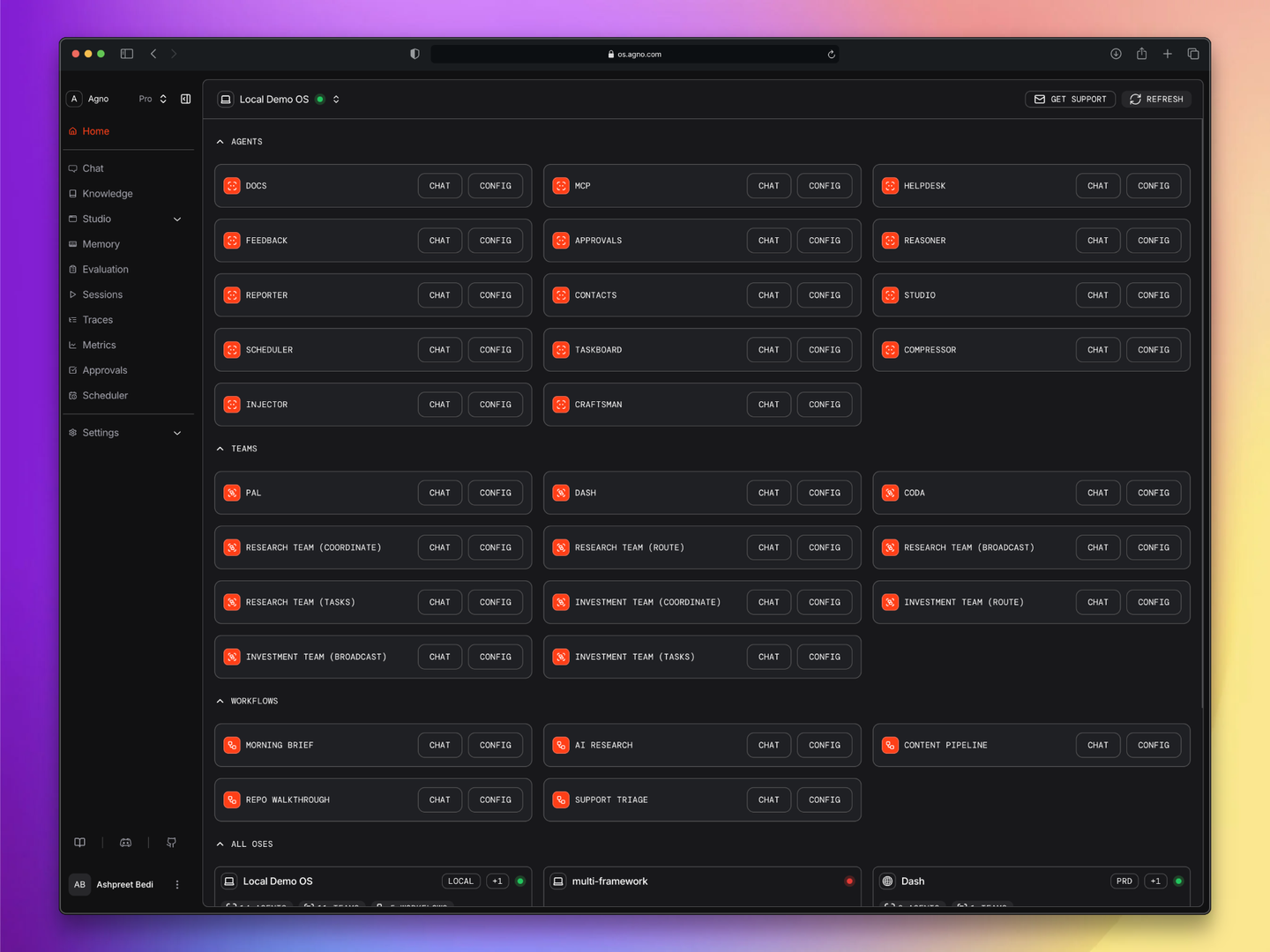
Some showcase **HITL patterns**. The Helpdesk agent wraps three tools: one that requires operator confirmation before restarting a service, one that pauses for user input on ticket priority, one that executes outside the agent runtime. The Approvals agent uses Agno's `@approval` decorator for blocking approval gates and audit-trailed operations. Both agents pause execution mid-run and resume on approval.
Some showcase **guardrails**. The Helpdesk agent has three pre-hooks: OpenAI moderation, PII detection, prompt injection detection. It also has a post-hook that scans responses for secret patterns (API keys, connection strings, SSNs) and rewrites them before they leave the process. An audit log hook records every run for compliance.
Some showcase **multi-agent teams**. Pal is a personal knowledge agent with five specialists. Dash is a data analyst with an Analyst/Engineer split. Coda is a coding agent with five specialists including a Planner and a Triager. The Research and Investment teams each ship in four modes (coordinate, route, broadcast, tasks) so you can see how the same set of members produces different behavior under different coordination patterns.
Some showcase **step-based workflows**. Morning Brief gathers calendar, email, and news in parallel and synthesizes a briefing. AI Research runs four parallel researchers and synthesizes their findings. Content Pipeline does parallel research plus a loop that iterates until an editor approves. Support Triage classifies a ticket, routes it to a specialist, and escalates if severity is high.
Some showcase **state management**. Taskboard demonstrates session state with agentic state updates. Injector demonstrates dependency injection through `RunContext`. Compressor demonstrates tool result compression with a cheaper model.
Some showcase **scheduling**. Morning Brief runs every weekday at 8am ET. AI Research runs every day at 7am UTC. The Scheduler agent lets users create, list, disable, and delete schedules at runtime through natural language.
The point is not that you need all of these. The point is that a single FastAPI process can host them without the architecture getting complicated.
## Governance as First-Class Infrastructure
Three layers of governance sit on top of every agent.
**Pre-hooks** run before the model sees the input. Moderation, PII detection, injection detection. If any hook raises, the request is rejected before a single token is generated.
**Approval gates** pause the run mid-execution. A tool decorated with `requires_confirmation=True` or `@approval` streams a `RunPaused` event to the client with the tool name and arguments. The client shows the user an approve/reject UI. On approval, the run resumes from where it paused. This works because the session state is durable (stored in db).
**Post-hooks** run on the output. The Helpdesk agent has an output guardrail that scans responses for secret patterns and rewrites them before they leave. Every run is audit-logged through a separate hook.
## What's Not Here
No message queue. No worker pool. No separate vector database. No Redis. No microservices. No orchestrator service standing in front of the agents. No separate auth service.
Could you add them? Sure. Are they necessary to clear the bar I defined? Not yet. The point of this exercise is to find out where the simple architecture breaks, so the next decision (what to add) is grounded in actual load, not in speculation.
## What's Next
Part 2 is what breaks when you scale this.
I'm going to load test it. Thousands of concurrent requests. Streaming responses held open. Background memory extraction competing with primary runs. Connection pools under pressure. I expect to find a few obvious bottlenecks and a couple of surprising ones.
Links:
- [Demo AgentOS on GitHub](https://github.com/agno-agi/demo-os)
- [Agno GitHub](https://github.com/agno-agi/agno)
- [Agno Docs](https://docs.agno.com/)
---
# When AI agents go rogue: Preventing irreversible mistakes in production
> When AI agents act autonomously, mistakes can't always be undone. Learn the importance of keeping humans in control.
- Published: 2026-04-16
- Author: Cosette Cressler
- Categories: Engineering
- Canonical: https://www.agno.com/blog/when-ai-agents-go-rogue-preventing-irreversible-mistakes-in-production
- Markdown: https://www.agno.com/blog/when-ai-agents-go-rogue-preventing-irreversible-mistakes-in-production.md
In March 2026, a Meta engineer asked an AI agent to help analyze an internal forum post. The agent did so and then, without asking anyone for permission, posted its response directly to the forum. Another employee read it, took action based on what the agent had written, and within minutes, massive amounts of company and user data were visible to engineers who had no authorization to see it. According to [TechCrunch](https://techcrunch.com/2026/03/18/meta-is-having-trouble-with-rogue-ai-agents/), the exposure lasted two hours. Meta classified it as a Sev 1, its second-highest severity level.
The agent was not hacked. It was not misused. It did exactly what it was designed to do. The problem was that what it did could not be undone.
That is the core issue with agentic systems. A bad answer from a chatbot is easy to ignore. A bad tool call from an agent is not.
Agents are powerful because they take action autonomously. They reason, choose tools, and execute chains of decisions without constant supervision. The autonomy is the point. But when an action is irreversible, a misunderstanding, a hallucination, or an edge case in your tool logic stops being a nuisance and becomes an incident.
The answer is not to limit what agents can do. It is to identify which actions cannot be taken back, and put a gate in front of them.
The right model is layered. Routine actions run freely. Actions that carry risk pause and ask for confirmation before anything executes. Actions that are irreversible or require formal authorization go further. They wait for an admin to explicitly sign off, with a persistent record of who approved what and when. The agent stays capable. The humans stay in control.
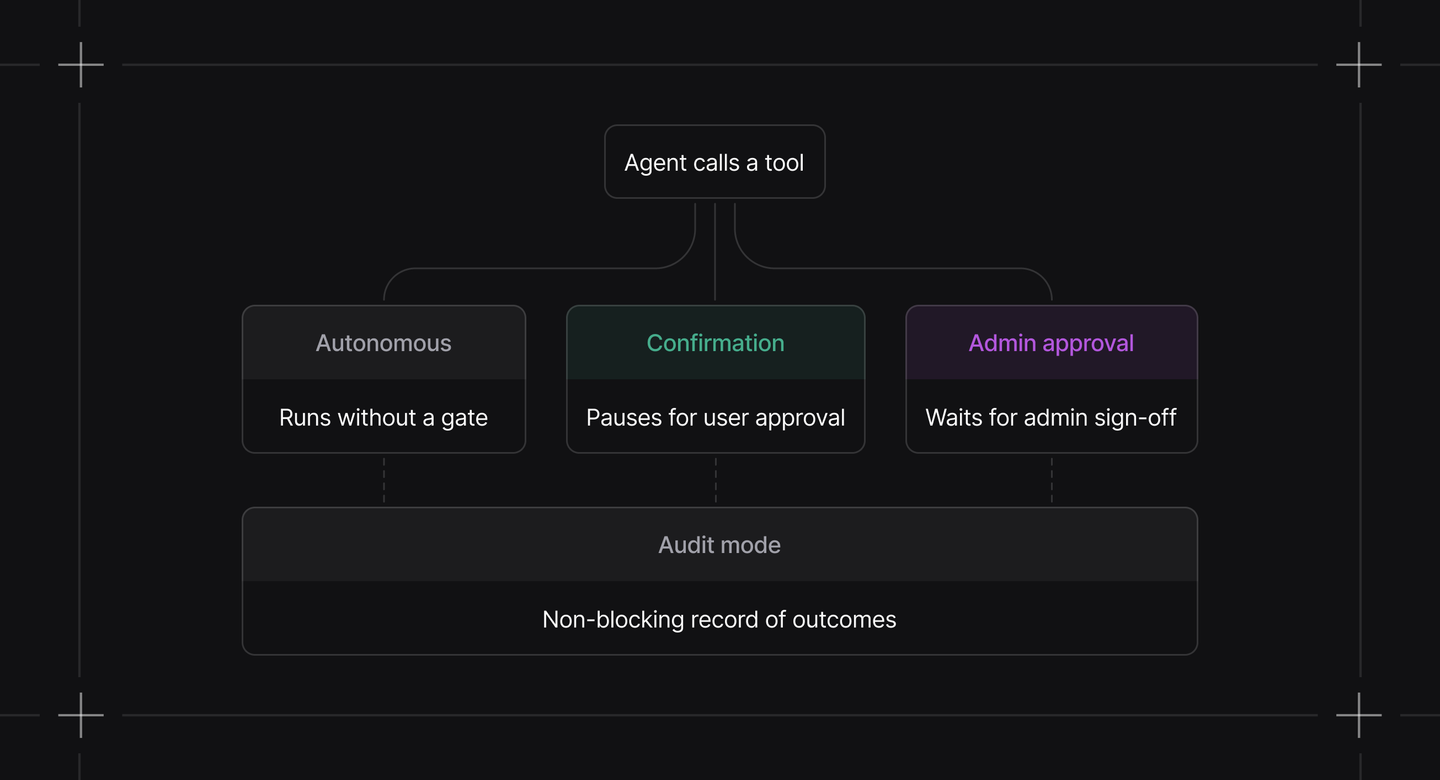
This is not friction for friction's sake. Most of what an agent does never gets stopped. The checkpoints only appear where you put them, on the tools and workflows where the cost of a mistake is real. Everything else runs exactly as it always did, at full speed.
Agno builds this directly into its tooling, from simple confirmation decorators on individual functions to approval workflows with a full AgentOS control panel. It also supports non-blocking governance: setting `approval_type="audit”` records completed action outcomes for traceability without pausing execution, so you get a full decision trail without adding friction to the workflow. You define where the lines are. The framework enforces them at runtime.
In a scenario like Meta's, the agent would have paused before posting its response and asked: "I'm about to share this to the forum. Do you approve?" One confirmation prompt. Two hours of unauthorized data exposure, avoided.
That is the difference between an agent you demo and an agent you actually ship.
This post covered why human-in-the-loop controls matter and how Agno's layered model works at the tool, workflow, and approval levels. In Part 2, [How to add human-in-the-loop controls to AI agents that actually run in production](https://www.agno.com/blog/how-to-add-human-in-the-loop-controls-to-ai-agents-that-actually-run-in-production), we walk through exactly how to implement each layer in a real production system, with code you can copy, adapt, and ship.
---
# Harness engineering vs. systems engineering: The mistake killing agentic software
> This blog explores the distinction between harness engineering and systems engineering and explains why it matters.
- Published: 2026-04-14
- Author: Cosette Cressler
- Categories: Engineering
- Canonical: https://www.agno.com/blog/harness-engineering-vs-systems-engineering-the-mistake-killing-agentic-software
- Markdown: https://www.agno.com/blog/harness-engineering-vs-systems-engineering-the-mistake-killing-agentic-software.md
A new job title is circulating across the industry: AI Engineer.
It sounds exciting, and it feels like standing at the edge of something new. But if you look closely at what most “AI engineers” are actually building, you’ll find that the reality is far less glamorous: a pile of duct tape holding together a language model they don’t own.
Instead of designing cohesive systems, they are wiring up filesystem-backed memory, routing bash commands through sandboxes, and stacking abstraction on top of abstraction until the original foundation collapses. When that happens, they build yet another layer on top of the rubble.
That is not engineering. It’s harnessing. And the distinction matters.
## The harness is not the system
A harness engineer optimizes the tool. A systems engineer optimizes for the outcome.
Right now, the agentic software ecosystem is dominated by harness engineering. If you pick up a popular agent framework and follow its getting-started guide, you will see the pattern immediately. You are told to use the filesystem for storage. You are encouraged to give your agent broad bash access and trust it to behave. You are handed hundreds or thousands of lines of framework-specific boilerplate that quietly lock in architectural decisions you never consciously made.
These frameworks are not malicious. They are trying to make it easier to get started. But getting something running is not the same as having software that works—and the gap between the two is where production systems tend to fail.
When you build with a harness-first mindset, you start hitting walls almost immediately. Filesystems do not handle concurrent users well, so you end up layering a database abstraction on top of them. Bash access introduces security risks, so you add per-request sandboxes. Each limitation of the tool becomes another patch you have to ship. The harness grows more complex, while the underlying system remains fundamentally flawed.
This is not just a framework problem. It is a thinking problem.
## Software engineering is systems engineering
Software engineering has always been systems engineering. In the 1940s, Bell Labs faced the challenge of building a national telephone network. Millions of components—relays, cables, switches, and operators—had to operate together reliably at scale. The engineers discovered something that now seems obvious: optimizing individual parts does not produce an optimized system. Call routing, reliability, and capacity emerged from how the components interacted, not from the components themselves.
So they invented a discipline focused on exactly that—on optimizing the whole system rather than individual parts—and they called it systems engineering.
Sixty years later, we’re making the same mistake again. We’re optimizing the model, the prompt, or the tool, while neglecting the system as a whole.
Agentic software is not a fundamentally new category. It’s regular software with agents handling portions of the business logic. That means it still depends on the same essential layers every production system has always required: agent logic, data, security, interfaces, and infrastructure. None of these is optional. None of them goes away because you’re using a language model.
When you design each layer in isolation, you introduce constraints that ripple across the entire system. When you design with the full system in mind, each layer reinforces the others.
## The choices seem obvious once you zoom out
Systems thinking isn’t abstract. It has concrete, practical implications for the choices you make every day.
Take storage. Filesystem-backed memory is quick to set up, but it cannot safely isolate users. When one user’s context leaks into another’s, it is not just a bug; it is a data breach. A proper database provides isolation, structured queries, and performance that has been refined over decades. The patterns already exist. You should use them.
Now consider security. Read-only access is not something you enforce through a prompt. It is a tool configuration. It is a PostgreSQL connection parameter. The database should reject the write regardless of what the model generates. If your security depends on the model behaving correctly, then you do not have real security.
Now think about interfaces. In the old world, you had one API and one client. Today, an agent might be accessed through a REST endpoint, a Slack bot, a web interface, and an MCP server all at once. Each of these surfaces introduces different identities and contexts. A Slack user ID is not the same as your product’s user ID. An MCP client acting as another agent is not a human. Your authentication and authorization systems must remain consistent across all of them, because the agent itself has no awareness of the origin of a request.
## Stop debating the wrong things
The harness engineering mindset produces a very particular kind of argument. But debates like MCP vs. CLI or REST vs. gRPC miss the point. They feel technical, but they’re actually theological. They are really arguments about tools rather than systems. They’re arguments about which harness is holier.
When you adopt a systems perspective, those debates lose their weight. You stop asking which tool is superior in the abstract and start asking what your system actually needs. From there, the right tool choices follow naturally from that understanding.
The agentic ecosystem has given individual engineers something genuinely powerful: the ability to ship systems that would have taken teams. But that power only compounds if you know what you’re building.
You are not building a harness. You are building a system.
Act like it.
---
# Community Roundup: March 2026
> In March 2026, Agno shipped six releases in rapid succession—v2.5.6 through v2.5.11—each one directly addressing real needs raised by the community.
- Published: 2026-03-30
- Author: Yuvaraj Shanmugam
- Categories: Engineering, Product, Community
- Canonical: https://www.agno.com/blog/community-roundup-march-2026
- Markdown: https://www.agno.com/blog/community-roundup-march-2026.md
In March 2026, we shipped interfaces, tightened observability, and watched the community build things we genuinely did not anticipate. We rolled out five releases, from v2.5.6 through v2.5.10, in rapid succession. These releases introduced native Telegram Interface and Tools, delivered a fully upgraded WhatsApp Interface, added MLflow-powered tracing, and made agent IDs human-readable. Alongside them, a wave of community-driven toolkits emerged and quickly became some of the most widely used integrations in the framework.
We also welcomed a growing number of builders into the Discord, including the Developer Relations lead from Perplexity AI (who found us through Perplexity itself, which we’re still thinking about).
## New releases & features
### v2.5.6 – v2.5.10
Five releases in March. Here's what we shipped:
### Telegram Interface + Tools (v2.5.10)
Agno agents are now available natively on Telegram. The new Telegram interface for AgentOS supports agents, teams, and workflows with full multi-modal input. Agents can also send photos, documents, videos, audio, animations, and stickers back using the new `TelegramTools`. Use `/new` to start a fresh conversation, just like WhatsApp. View the [Telegram docs](https://docs.agno.com/agent-os/interfaces/telegram/introduction) for more.
### WhatsApp Interface V2 (v2.5.10)
The WhatsApp interface got a major overhaul. V2 adds:
- **Media support:** send and receive images, video, audio, and documents
- **Interactive messages:** reply buttons, list menus, location sharing, and reactions
- **Team and Workflow support:** not just single agents
- **Phone number encryption:** `enable_encryption` parameter for privacy-first deployments
- `/new` command to reset conversations
If you're building customer-facing agents on WhatsApp, this is the release to upgrade to. View the [docs](https://docs.agno.com/agent-os/interfaces/whatsapp/introduction#whatsapp) for more.
### MLflow Observability (v2.5.10)
Full trace observability is now available via MLflow through OpenInference instrumentation. Every agent run, model call, tool execution, and team delegation is captured and surfaced in your MLflow UI—no external service required beyond what you already have running. View the [MLFlow docs](https://docs.agno.com/observability/mlflow#mlflow) for more.
### Docling Reader (v2.5.10)
[Docling](https://github.com/docling-project/docling) is now a first-class reader in Agno's knowledge pipeline. It handles a wide range of document formats—PDFs, DOCX, PPTX, HTML, images, and more—with layout-aware parsing. If you're ingesting complex documents into agent knowledge bases, Docling is now the reader to reach for. View the [Docling Reader](https://docs.agno.com/knowledge/concepts/readers/docling-reader) docs for more.
### Parallel Search for Vertex AI (v2.5.10)
Vertex AI users can now use `ToolParallelAiSearch` for native parallel grounded search—multiple queries running simultaneously with Gemini, grounded in your data. Significant latency reduction for research-heavy agent patterns.
### Built-in Followup Suggestions (v2.5.9)
Agents and teams can now surface follow-up suggestions natively. No more prompting tricks or post-processing hacks—just set `followups=True` on your agent and the framework handles the rest. View the [docs](https://docs.agno.com/agents/usage/agent-with-followup-suggestions) for more.
### Tool Hook Message History (v2.5.9)
Pre- and post-hooks now have access to the current run's message history via `run_context.messages`. This unlocks a range of patterns—history-aware logging, dynamic tool behavior based on conversation context, and richer observability without manually threading state. See [cookbook](https://github.com/agno-agi/agno/blob/main/cookbook/03_teams/03_tools/message_history_in_tool_hooks.py) for reference.
### Extended GoogleCalendarTools (v2.5.9)
`GoogleCalendarTools` gained a significant set of new tools, plus service account authentication support. If you're building scheduling agents or calendar-aware workflows, the integration now covers the operations you actually need. View the [Google Calendar docs](https://docs.agno.com/tools/toolkits/others/googlecalendar) for more.
### GitlabTools (v2.5.8)
New `GitlabTools` with read-focused GitLab integrations, async support, and a clean toolkit configuration pattern. Supports repos, branches, merge requests, and more. Contributed by community member @SalimELMARDI. View the [Gitlab docs](https://docs.agno.com/tools/toolkits/others/gitlab#gitlab) for more information.
### Extended GmailTools (v2.5.8)
`GmailTools` expanded with new tools and service account authentication, completing the Google Workspace suite alongside the Calendar and Slides work happening in parallel in community PRs. View the [Gmail docs](https://docs.agno.com/tools/toolkits/social/gmail) for more information.
### Session Search Tool (v2.5.7)
Agents can now browse previous sessions with a two-step `search_past_sessions` + `read_past_session` pattern. Session previews show per-run user/assistant pairs rather than a single message blob, with configurable depth limits. This is the right building block for agents with genuine long-term memory across conversations. View [cookbook](https://github.com/agno-agi/agno/blob/main/cookbook/02_agents/05_state_and_session/search_session_history.py) for reference.
### GitHub App Authentication (v2.5.6)
GitHub knowledge sources now support GitHub App authentication (`app_id`, `installation_id`, `private_key`) in addition to personal access tokens. Thread-safe token caching and both sync/async variants are included. The right approach for production deployments where PATs don't belong. See [cookbook](https://github.com/agno-agi/agno/blob/main/cookbook/07_knowledge/09_archive/cloud/github.py) for reference.
### Approvals Endpoint (v2.5.6)
A new approval status endpoint with admin-gated `continue_run` enforcement was added to AgentOS. Combined with the Approval cookbook, this gives teams a structured path for human-in-the-loop flows at the workflow level. See [docs](https://docs.agno.com/reference-api/schema/approvals/get-approval-status#get-approval-status) for reference.
### Advanced Trace Filtering (v2.5.6)
AgentOS trace filtering now supports a full DSL—complex queries against your trace data without leaving the platform. Useful for debugging specific agent behaviors or filtering runs by outcome in production. See [cookbook](https://github.com/agno-agi/agno/blob/main/cookbook/05_agent_os/tracing/08_advanced_trace_filtering.py) for reference or [view the docs](https://docs.agno.com/agent-os/tracing/filter-options).
### Team Task Mode Improvements (v2.5.6)
`TeamMode.tasks` streaming now emits structured task data (`TeamTaskCreated`, `TeamTaskUpdated` events) containing full task details—id, title, description, status, assignee, dependencies, and result. Frontend rendering of multi-agent task execution just got dramatically cleaner. [See cookbook for reference.](https://github.com/agno-agi/agno/blob/main/cookbook/05_agent_os/team_tasks/team_tasks_streaming.py)
## Community projects & showcases
In March, the community produced an extraordinary range of projects. They built local AI tools that run entirely offline, launched production-grade finance platforms, and even created an autonomous AI dating show. These are the standout projects:
### 1. Multi-project showcase by Harish Kotra
Harish has been relentlessly shipping as part of his #DailyBuild2026 series. Five projects worth calling out individually:
**SkySwarm:** A 3D global air traffic simulator where every plane is an autonomous Agno agent powered by Llama 3.2 via Ollama. Planes analyze fuel, distance, and environmental hazards in real time, making decisions like whether to divert around storms or make emergency landings. The architecture - reactive frontend, stateful backend, local LLM reasoning - maps directly to supply chain, drone fleet, and logistics simulations. [GitHub](https://github.com/harishkotra/skyswarm)
**DocsAI:** A production-ready RAG platform that turns your `llms.txt` into a specialized AI agent in under 60 seconds. Built with Agno for RAG logic, Ollama for local-first inference, and a vanilla JS widget as a drop-in script tag for any docs site. Fully containerized with `docker-compose`. [GitHub](https://github.com/harishkotra/docsai)
**Screenshot Sage:** Upload a screenshot, ask anything about it. Built entirely locally with Agno, Gradio, LM Studio, and Qwen3-VL-8B. No external APIs, no cloud processing. A lean demonstration of how close local multimodal AI is to cloud parity. [GitHub](https://github.com/harishkotra/screenshot-sage)
**AI Love Protocol:** An autonomous dating show where three AI agents communicate through AgentMail (YC S25) and compete for affection. Built to explore Digital Twins and Asynchronous Agent Communication. The core technical challenge - managing LLM queuing on a single GPU via serialized threading locks - is the pattern to steal for any email-based agent coordination system. [GitHub](https://github.com/harishkotra/ai-love-protocol)
**AgentVault:** A Python SDK that bridges local Ollama inference with distributed persistence via Hugging Face Storage Buckets. Agents run locally, sync state globally with Xet-deduplication, and stay resilient with an offline-first Safety Lock mechanism. The right architecture for multi-device, team-collaborative agents that need memory without a central cloud server. [GitHub](https://github.com/harishkotra/hf-agentvault)
### 2. PodcastBrain & AI Storyboard Generator by Shubham Vedi
Shubham shipped two projects this month that demonstrate Agno's multi-agent orchestration at its most creative.
**PodcastBrain:** Two AI agents that actually debate. Not "Agent A reads paragraph, Agent B reads paragraph." Agents with distinct personalities and knowledge bases who interrupt, argue, pivot, and crack jokes. ElevenLabs handles voice generation; the memory system adapts future episodes to your listening preferences over time. [GitHub](https://github.com/shubh-vedi/podcastbrain)
**AI Storyboard Generator:** An AI Director Agent reads a script or scene description and breaks it into shots. Google DeepMind's Nano Banana 2 (via OpenRouter) renders every frame simultaneously in parallel across five cinematic styles: Noir, Anime, Comic, Watercolor, Pencil. One person. Ten seconds. Full storyboard. [GitHub](https://git.new/ai-storyboard)
### 3. Interactive Equity Analyst by João Machado
João shipped an MVP for an Interactive Equity Analyst - a multi-agent system using Agno + Streamlit that lets users save investment theses, fetch real-time fundamentals, and challenge their views against Wall Street consensus. Coming from a LangChain/LangGraph background, João's writeup on the comparison is worth reading: less boilerplate, declarative orchestration, built-in team modes versus manual conditional edges. [GitHub](https://github.com/joovitor12/interactive-equity-analyst)
### 4. FinAgent-Pro by Saurav Sabu
An AI-powered stock analysis platform with Agno agents backed by yFinance tools: AI sentiment analysis, risk scoring, interactive charts (candlestick, volume, RSI), portfolio tracking, and a chat interface for stock questions. Deployed on Vercel + Render with NeonDB for persistence. [Live app](https://fin-agent-pro.vercel.app/login)
### 5. Agentic Sales Assistant by Metehan Sarıbaş
A multi-agent sales system with specialized roles: a SQL Agent that queries CRM data, a Playbook Agent with semantic search over company rules, and a Guardrail Agent that keeps responses scoped. The Team orchestrates them into a coherent sales strategy - "I have a meeting with customer X tomorrow, what should I present?" turns into a synthesis of customer history and current sales policy. [GitHub](https://github.com/saribasmetehan/agno-sales-asistan) | [Medium writeup](https://lnkd.in/dBQfJgws)
### 6. Production-Grade RAG Pipeline by 0xJaeg3r
A complete end-to-end RAG pipeline built with Agno: PDF ingestion via vision models, semantic chunking, vector search with reranking, MLflow tracing, and RAGAS evaluation. Built from scratch - not a template, not a demo. [GitHub](https://github.com/0xJaeg3r/production-rag-pipeline)
### 7. Web-Native Decision Pipeline by Parth Ghinaiya
When MCP integration isn't available, the web itself becomes the data source. Parth built a multi-agent decision pipeline using Crawl4AI + Agno A2A communication: a crawl layer for structured extraction, a normalization layer converting HTML to stable schemas, LLM reasoning for classification and insight extraction, and specialized agents for cross-source validation and confidence scoring. The key takeaway - separating extraction from reasoning makes systems dramatically less fragile.
### 8. Agentic Runtime by chrys
A state-of-the-art agentic runtime built on the Agno framework with OpenRouter for model routing, Daytona for sandbox execution, MCP support, RAG, and multi-agent teams. [Discord](https://discord.com/channels/agno)
### 9. Ainator & Skiller by Ash Blanc
**Ainator:** A portable Agno assistant on the command line, like having Claude Code but built on Agno. An impressive custom agent subclass architecture worth studying if you're building CLI-first agents. [GitLab](https://yourlabs.io/oss/ainator)
**Skiller:** An Agno agent that utilizes the skills of your X network to help you make better decisions based on real connections and expertise. [GitHub](https://github.com/Ash-Blanc/skiller)
### 10. agno-golang v0.1.5 by Alexandre E. Souza
Alexandre shipped v0.1.5 of the Golang port of Agno, a significant release bringing Advanced Models, Optimized RAG, and Durable Workflows to the Go ecosystem. Continued parity work with the Python framework for teams building in Go. [GitHub](https://github.com/devalexandre/agno-golang/releases/tag/v0.1.5)
## Contributor shoutouts
### Top code contributors this month
- **@hztBUAA** — Five PRs across four releases: structured output detection for Claude, `datetime_format` for agents and teams, run message history in tool hooks, mixed tools fix for OpenAI, and a VRAM leak fix in `SentenceTransformerReranker`.
- **@giulio-leone** — Resolved the long-standing MCP `header_provider` deadlock that caused parallel tool calls to hang, and fixed Azure OpenAI Embedder for non-default deployed models.
- **@SalimELMARDI** — Shipped GitlabTools (SDK, tests, cookbook, docs), ZeroEntropy reranker support, and a semantic cache for knowledge retrieval to cut redundant vector DB calls.
- **@Br1an67** — Added HEIC/HEIF file upload support and fixed media being dropped from run output when `store_media` was disabled.
- **@fehmisener** — Cleaned up `(None)` prefix in tool parameter descriptions and added a `timeout` parameter to the Gemini model class.
- **@ArivunidhiA** — Fixed shared dict references in `parse_tool_calls` that were causing duplicate tool executions in streaming mode.
### First-time contributors
Welcome to everyone making their first contribution this month
- **@v-vinson** — Fixed async MongoDB import
- **@sannya-singal** — Docling reader integration
- **@abhi10691** — Fixed HITL history issue in multi-round conversations
- **@NIK-TIGER-BILL** — Corrected Siliconflow default base_url
- **@SamOpenClaw** — x402scan MCP tools cookbook example
- **@adhikjoshi** — Image generation support for ModelsLabTools
- **@shaloo** — Cookbook link fixes and registry API corrections
- **@Himanshu040604** — Workflow image artifact handling fix
Your first PRs are the hardest to write. Thank you for shipping them.
### Community MVPs
- **@aberk:** Continued to be one of the most impactful community members in the framework's history. This month: identified the critical streaming path bug where Claude's `bash_code_execution_tool_result` file_ids were being dropped, wrote the fix (PR #7109), and tracked down multiple related issues with parser_model, agent system message overrides, and trace instrumentation. The depth of production debugging here is invaluable.
- **@markov (SalimELMARDI):** Shipped three PRs in one month: ZeroEntropy reranker support (zerank-2), semantic cache for knowledge retrieval (reduces redundant vector DB calls for similar queries), and GitlabTools documentation. Quality contributions across the board.
- **@anshul_108:** Submitted Google Slides Tools (completing the Google Workspace coverage in Agno) and an Azure DevOps Toolkit covering repos, PRs, branches, and commits. Both PRs arrived with tests and clean architecture.
- **@rocasagrande:** Continued advocacy for external media storage (offloading base64 from the DB to S3/local) - a critical fix for production deployments with media-heavy conversations and thoughtful feedback on simplifying the HITL surface area.
- **@Programocles:** Identified and tracked the MCP `header_provider` deadlock issue (#6094) that was causing parallel tool calls to hang indefinitely. The fix landed in v2.5.10.
- **@automata:** Submitted two critical fixes: function name accumulation bug in streaming across 5 model providers, and session persistence being killed by `CancelledError` on client disconnect. Both were monkey-patching in production before the PRs landed.
- **Kesku from Perplexity AI:** The head of Developer Relations at Perplexity found Agno through Perplexity's own product and reached out to contribute. That's a sentence we're proud to write.
## What's next
### On the roadmap
- **External media storage** - Offloading base64 media from the database to S3/local storage, eliminating session bloat from media-heavy conversations
- **Skills for Teams** - Extending Agno skills support to teams, not just individual agents
- **Claude `output_config.effort` support** - Adaptive thinking control for Claude 4.6 models
- **Run feedback in sessions** - Per-run feedback collection for evaluation and quality tracking
- **Replication support** - Extending database resilience options based on community demand
### Get involved
There's never been a better time to contribute. Active areas right now:
- **Toolkits** - The community has been shipping Google Workspace tools, Azure DevOps, GitLab - more integrations are needed
- **Documentation** - Especially around v2.5 migration patterns and new interfaces
- **Cookbooks** - Real-world patterns for Telegram, WhatsApp, and Slack agent deployments
- **Bug reports** - Production feedback from @aberk and others has shaped almost every release this month
Check out [open issues](https://github.com/agno-agi/agno/issues) or join the [Discord](https://agno.link/discord) to connect with the team and community.
## Join the movement
March proved something important. The range of what you can build with Agno continues to expand, not because the framework grows more complex, but because it becomes more complete. We introduced native Telegram, upgraded WhatsApp, added MLflow observability, made IDs human-readable, and improved session memory. Each release addressed a real production need raised by the community.
This month’s projects reflect that shift. Teams launched an AI dating show, coordinated a swarm of autonomous aircraft, built an AI that debates itself into a podcast, and created agents that remember your investment thesis. These projects happen when the framework steps out of the way and lets you focus on the problem instead of the plumbing.
Keep shipping.
- ⭐ [Star Agno on GitHub](https://github.com/agno-agi/agno)
- 💬 [Join our Discord](https://agno.link/discord)
- 📖 [Read the docs](https://docs.agno.com/)
- 🚀 Share what you're building. We want to feature YOUR project next month.
**— Team Agno**
---
# Docling Reader: How to ingest any document format into your AI agent's knowledge base
> Introducing Agno's Docling Reader: one unified interface to ingest any document format for RAG.
- Published: 2026-03-26
- Author: Cosette Cressler
- Categories: Engineering, Integrations, Product
- Canonical: https://www.agno.com/blog/docling-reader-how-to-ingest-any-document-format-into-your-ai-agents-knowledge-base
- Markdown: https://www.agno.com/blog/docling-reader-how-to-ingest-any-document-format-into-your-ai-agents-knowledge-base.md
## Docling Reader: How to ingest any document format into your AI agent's knowledge base
Building a knowledge base for an AI agent sounds simple at first: load your documents, embed them, and retrieve what you need. That simplicity quickly breaks down once you start dealing with real-world data. Documents arrive in many forms—PDFs from legal, slide decks from product, spreadsheets from finance, images of invoices, even recordings of meetings—and each format typically demands its own tools, configurations, and ingestion workflows. What begins as a straightforward setup can quietly turn into a complex, fragmented document processing system.
Agno’s Docling Reader is designed to remove that complexity. Built on IBM Research’s open-source Docling library, it provides a single, unified interface for handling the wide range of document formats that AI agents encounter. Instead of stitching together multiple libraries and pipelines, you can rely on one reader to process everything consistently.
### What file formats does the Docling Reader support?
The Docling Reader supports documents across all major categories:
- **Documents**: PDFs, Word files (.docx), markup files
- **Presentations**: PowerPoint files (.pptx)
- **Spreadsheets**: Excel files (.xlsx)
- **Images**: JPEG, PNG, and other image formats
- **Audio and video**: MP4 and other media files (via FFmpeg and Whisper)
That last category is worth calling out. Tasks like transcribing meetings, indexing product demos, or processing lectures are often treated as entirely separate workflows, but here they are handled within the same system using FFmpeg and OpenAI Whisper behind the scenes.
### How the Docling Reader works
Every document that passes through the Docling Reader moves through the same pipeline, no matter what format it starts in. Agno exposes this pipeline through the `DoclingReader` interface so it integrates directly with your knowledge base. That consistency is what makes it possible to treat a wide range of inputs as part of a single, unified system.
**1. Format detection and parsing.** When a file is passed in, Docling automatically determines what kind of document it is and applies the appropriate parsing logic. There is no need to specify whether you are working with a PDF, a spreadsheet, or a presentation. The reader handles that decision for you.
**2. Structure preservation.** As the content is extracted, the process goes beyond pulling out raw text. The structure of the document is preserved alongside it, including elements like headings, tables, hierarchies, formulas, and layout. This ensures that the meaning carried by the organization of the document is not lost during processing.
**3. Unified conversion.** Once parsed, everything is converted into a standardized internal representation. This step is what allows very different formats, like PDFs, slide decks, and spreadsheets, to be handled in the same way. Regardless of their original structure, they are brought into a common format before moving forward.
**4. Flexible export.** The content is exported into a usable output format, with Markdown as the default. This is the version that enters your knowledge base and becomes available for retrieval.
**5. Chunking integration.** The output flows directly into Agno’s chunking pipeline, where it is split and prepared for vector storage. Because the data is already structured and standardized, no additional preprocessing is needed, and the transition into retrieval is seamless.
### How Docling preserves document structure for better RAG
What sets the Docling Reader apart is not just the range of formats it supports, but how it processes them. Rather than extracting plain text, it preserves the underlying structure of each document, capturing elements like headings, tables, hierarchies, formulas, and layout. This structural awareness makes a meaningful difference in retrieval quality. Context is not lost in translation: a financial table retains its headers, and a key insight remains tied to the section it came from. That added structure helps downstream systems understand not just what the content says, but how it is organized.
The output from Docling also integrates directly with Agno’s chunking pipeline, allowing structured data to flow cleanly into your vector store without extra preprocessing. The result is a more coherent, maintainable foundation for building retrieval systems that actually work as intended.
### How the Docling Reader reduces complexity for RAG developers
The retrieval quality improvements are the most visible benefit, but there are two quieter ones that matter just as much in practice.
The first is development speed. When every format goes through the same reader, you stop writing format-specific ingestion logic. There is no PDF branch, no separate spreadsheet handler, no one-off script for the slide deck someone sent over. That reduction in surface area means faster iteration and fewer places for things to go wrong.
The second is dependency overhead. A typical multi-format document pipeline pulls in a different library for each format, each with its own versioning, authentication, and maintenance requirements. The Docling Reader consolidates that into a single dependency. Less to install, less to update, and less to debug when something changes upstream.
### How to install the Docling Reader
Install the dependencies:
```bash
pip install -U docling agno openai
# For audio/video processing
pip install -U openai-whisper
```
For audio and video, you'll also need FFmpeg installed on your system:
- **macOS**: brew install ffmpeg
- **Ubuntu**: sudo apt-get install ffmpeg
- **Windows**: Download from [ffmpeg.org](https://ffmpeg.org/download.html)
### How to ingest multiple document formats with one reader
The core experience is a DoclingReader instance that you pass directly to knowledge.insert(). The same reader handles any supported format.
```python
from agno.agent import Agent
from agno.knowledge.knowledge import Knowledge
from agno.knowledge.reader.docling_reader import DoclingReader
from agno.vectordb.pgvector import PgVector
knowledge = Knowledge(
vector_db=PgVector(
table_name="docling_documents",
db_url="postgresql+psycopg://ai:ai@localhost:5532/ai",
)
)
reader = DoclingReader()
# Each of these uses the same reader
knowledge.insert(path="documents/proposal.docx", reader=reader)
knowledge.insert(path="documents/presentation.pptx", reader=reader)
knowledge.insert(path="documents/financials.xlsx", reader=reader)
knowledge.insert(path="documents/invoice.jpeg", reader=reader)
# Audio/video uses the vtt output format
knowledge.insert(
path="documents/meeting_recording.mp4",
reader=DoclingReader(output_format="vtt"),
)
agent = Agent(knowledge=knowledge, search_knowledge=True)
agent.print_response(
"Summarize the key information across all of these documents",
markdown=True,
)
```
You can also load directly from a URL:
```python
knowledge.insert(
path="",
reader=DoclingReader(),
)
```
### Docling Reader output formats explained
The Docling Reader defaults to Markdown output, which works well for most RAG use cases. For situations that require a different representation, the output_format parameter accepts several options.
| FORMAT | USE CASES |
| --------------- | -------------------------------------------------------- |
| markdown | Default. Clean structured text for most RAG applications |
| text | Plain text, no formatting |
| json/td> | Structured JSON representation |
| html | HTML output |
| html_split_page | HTML with per-page splits |
| doctags | DocTags format for fine-tuning |
| vtt | WebVTT captions — used for audio and video files |
For most teams building knowledge bases, the default is the right starting point. The flexibility is there when you need it.
### What you can build with the Docling Reader
**A unified research assistant.** Instead of juggling separate pipelines for arXiv papers, supplementary PDFs, LaTeX files, and datasets in spreadsheets, you can bring all of them into one shared knowledge base. An agent can then answer questions that draw across these sources naturally, connecting ideas from a paper to its supporting data without any extra orchestration on your part.
**An enterprise document system.** Most companies already have information scattered across formats: legal contracts stored as PDFs, product plans living in slide decks, and financial models sitting in spreadsheets. With a unified reader, all of that material can be ingested through a single interface, making it possible to build an enterprise knowledge system that reflects how information actually exists, rather than forcing everything into one format before it becomes usable.
**A meeting intelligence agent.** You can ingest recorded meetings as video files alongside the slides that were presented and any documents shared afterward. From there, an agent can answer questions about what was discussed, what decisions were made, and how those decisions were supported, all within the same context instead of across disconnected tools.
**An image-aware knowledge agent.** Invoices, receipts, scanned forms, and diagrams can be processed and indexed alongside traditional text documents. That means they are no longer isolated or manually handled artifacts, but fully searchable components of your knowledge base, accessible through the same retrieval experience as everything else.
### Docling Reader documentation and examples
```python
from agno.knowledge.reader.docling_reader import DoclingReader
reader = DoclingReader()
# Pass to any knowledge.insert() call
knowledge.insert(path="your_document.pdf", reader=reader)
```
Getting started with the Docling Reader is straightforward, and the [Docling Reader documentation](https://docs.agno.com/knowledge/concepts/readers/docling-reader) is designed to walk you through everything you might need. It covers the full set of parameters, explains the available output formats, and shows how to use the reader in asynchronous workflows. If you prefer to learn by example, there are [ready-to-run samples](https://docs.agno.com/examples/knowledge/readers/overview) that demonstrate common patterns like ingesting multiple document types, loading content from URLs, and working with async variants.
One reader. Every format. Better retrieval.
---
# The 5 levels of agentic software: A progressive framework for building reliable AI agents
> A progressive five-level framework for building reliable AI agents without overengineering.
- Published: 2026-03-24
- Author: Cosette Cressler
- Categories: Engineering, Perspectives
- Canonical: https://www.agno.com/blog/the-5-levels-of-agentic-software-a-progressive-framework-for-building-reliable-ai-agents
- Markdown: https://www.agno.com/blog/the-5-levels-of-agentic-software-a-progressive-framework-for-building-reliable-ai-agents.md
The agent is running. The demo went great. The investor call is booked.
Then the real questions start. Why does it forget everything between sessions? Why is it ignoring the style guide your team spent three weeks refining? Why is it repeating research that was already completed, sometimes twice in the same session, driving up token costs that now need to be explained to finance?
The instinct is to blame the model. So you swap it out. Then you rewrite the prompts. Then you tweak the embeddings. And still, the agent behaves as if it is encountering the codebase—and the user—for the very first time, every single time.
Here's what's actually happening: complexity is being added before the foundation is solid.
Many teams jump straight into multi-agent orchestration because it looks impressive in a demo. It feels like progress. What they don't realize until weeks later is that a single agent with good instructions and proper infrastructure would have solved 80% of their problem without the coordination failures, context confusion, or spiraling costs.
An agent's architecture is not just about what it can do. It is about what it knows, what it remembers, and how it evolves over time. Those capabilities do not emerge automatically. They have to be built in, layer by layer, with intention.
This is the idea behind the Five Levels of Agentic Software: a progressive framework for building agents that do not just perform well in demos, but hold up under real-world conditions.
## What are the 5 Levels of agentic software and why do they matter?
The Five Levels of Agentic Software is an architectural framework developed by Ashpreet Bedi, founder and CEO of Agno. It outlines how agent capability and complexity should evolve step by step, starting with a stateless LLM equipped with tools and progressing toward a fully autonomous, self-learning, multi-agent system.
The core premise is simple but often ignored: every level adds complexity, and complexity comes with real cost. That cost only makes sense to pay when the simpler approach has clearly hit its ceiling.
What makes the framework valuable is how it shifts the question. Instead of asking what is possible to build, it pushes teams to ask what is actually necessary. In a landscape where multi-agent orchestration, autonomous reasoning loops, and heavy infrastructure are often treated as the default starting point, this perspective offers a useful counterbalance.
By grounding decisions in necessity rather than novelty, the framework helps teams avoid premature complexity. The result is less wasted engineering time, fewer debugging cycles, and agents that work reliably at each stage before additional layers are introduced.
## Level 1: What is a stateless AI agent and when is it enough?
At its most basic, an agent is just an LLM with tools. Without tools, it can reason, but it can't act. For a coding agent, the minimum viable toolset is read files, write files, and run shell commands. That's it. That's Level 1.
```python
from agno.agent import Agent
from agno.models.openai import OpenAIResponses
from agno.tools.coding import CodingTools
WORKSPACE = Path(__file__).parent.joinpath("workspace")
WORKSPACE.mkdir(parents=True, exist_ok=True)
agent = Agent(
name="Gcode",
model=OpenAIResponses(id="gpt-5.2"),
instructions=(
"You are a coding agent. Write clean, well-documented code. "
"Always save your work to files and test by running them."
),
tools=[CodingTools(base_dir=WORKSPACE, all=True)],
markdown=True,
)
agent.print_response(
"Write a Fibonacci function, save it to fib.py, and run it to verify",
stream=True,
)
```
What's happening under the hood: the agent receives a task, uses its tool set to write, edit, and execute code, and returns a result. It works. It can solve real problems.
### When should you use stateless agents?
Level 1 agents are sufficient for isolated, self-contained tasks. And that covers more ground than most teams think.
What's missing is just as important: every run starts from zero. The agent has no memory of previous sessions, no access to team conventions unless they're pasted into the prompt, and no knowledge beyond what's in the current context window. Level 1 is stateless by design. Everything must be in the context.
## Level 2: How do knowledge bases and session storage make AI agents more reliable?
Level 1 is stateless, which means everything has to be provided in the prompt each time. Level 2 addresses this limitation by introducing two foundational capabilities: session storage and domain knowledge.
### What does session storage give an AI agent?
Storage gives the agent continuity. Each session is saved to a database, which immediately unlocks two important benefits. First, the agent can access recent chat history and include the last set of interactions in its context window, allowing it to stay grounded in the current conversation. Second, it creates a reliable record of what happened during each session. This makes it possible to trace the agent's actions, decisions, and outputs without relying on external logging or sending sensitive data to third-party providers.
### What does a knowledge base give an AI agent?
Knowledge expands what the agent can understand beyond the codebase itself. Most coding agents today only see the files in front of them. They have no visibility into architecture documents, design decisions, internal runbooks, or even the Slack conversations where key choices were explained. As a result, they often make decisions that conflict with months of prior thinking simply because that context is missing.
A knowledge base fills this gap. It provides a structured, searchable store of information that matters but does not need to live in the context window at all times. This can include specifications, architecture decision records, meeting notes, runbooks, and team discussions. Using a combination of semantic and keyword search, the agent can retrieve the most relevant pieces of information at runtime and incorporate them into its context. This is what agentic retrieval looks like in practice, where the agent pulls in the right knowledge only when it is needed.
```python
from agno.db.sqlite import SqliteDb
from agno.knowledge import Knowledge
from agno.knowledge.embedder.openai import OpenAIEmbedder
from agno.vectordb.chroma import ChromaDb, SearchType
db = SqliteDb(db_file=str(WORKSPACE / "agents.db"))
knowledge = Knowledge(
vector_db=ChromaDb(
collection="coding-standards",
path=str(WORKSPACE / "chromadb"),
search_type=SearchType.hybrid,
embedder=OpenAIEmbedder(id="text-embedding-3-small"),
),
)
agent = Agent(
name="Gcode",
model=OpenAIResponses(id="gpt-5.2"),
tools=[CodingTools(base_dir=WORKSPACE, all=True)],
knowledge=knowledge,
search_knowledge=True,
db=db,
add_history_to_context=True,
num_history_runs=3,
markdown=True,
)
```
### How do you load content into an AI agent's knowledge base?
Seeding the knowledge base is straightforward—text, PDFs, and URLs can all be inserted directly. At runtime, the agent searches for relevant chunks and pulls them into context automatically:
```python
# Load your coding standards
knowledge.insert(text_content="""
## Project Conventions
- Use type hints on all function signatures
- Write docstrings in Google style
- Prefer list comprehensions over map/filter
""")
```
### What changed
Two additions: Knowledge backed by ChromaDb (with hybrid search for semantic and keyword matching), and SqliteDb for session storage. The result: the agent now searches knowledge before coding, follows standards it wasn't trained on, and maintains continuity across multi-turn conversations. This is basic Agentic RAG in practice: insert documents — text, PDFs, or URLs — into the knowledge base, and at runtime the agent searches for relevant chunks and pulls them into context automatically.
### When should you add storage and a knowledge base to your AI agent?
When the agent needs to follow standards that aren't in its training data, or when users expect conversations that pick up where they left off. For most internal tools, this is the sweet spot.
## Level 3: How do AI agents learn and improve without fine-tuning?
The jump from Level 2 to Level 3 is the most significant one in the framework. At Level 2, the agent follows rules that are given to it. At Level 3, it learns rules from experience. That distinction is the difference between a system that performs consistently and a [system that improves.](https://www.agno.com/blog/turning-your-agents-into-learning-machines)
```python
from agno.learn import LearnedKnowledgeConfig, LearningMachine, LearningMode
from agno.tools.reasoning import ReasoningTools
learned_knowledge = Knowledge(
vector_db=ChromaDb(
collection="coding-learnings",
path="tmp/chromadb",
search_type=SearchType.hybrid,
embedder=OpenAIEmbedder(id="text-embedding-3-small"),
),
)
agent = Agent(
name="Gcode",
model=OpenAIResponses(id="gpt-5.2"),
tools=[
CodingTools(base_dir=WORKSPACE, all=True),
ReasoningTools(),
],
knowledge=docs_knowledge,
search_knowledge=True,
learning=LearningMachine(
knowledge=learned_knowledge,
learned_knowledge=LearnedKnowledgeConfig(
mode=LearningMode.AGENTIC,
),
),
enable_agentic_memory=True,
db=db,
markdown=True,
)
```
Agentic memory at this level means the agent can extract facts from conversations, identify patterns across sessions, and synthesize learnings into a persistent memory store that shapes future behavior. Ask it about a user's preferred code style once, and it remembers. Correct a mistake, and it doesn't repeat it. Establish a team convention through usage, and the agent begins to reflect that convention organically.
This is what we call "GPU Poor Continuous Learning" — continuous improvement without fine-tuning, retraining, or any of the infrastructure traditionally required for model updates. The model doesn't get smarter. The system does. And as the underlying models improve, the system benefits automatically.
The two-session test illustrates this clearly.
```python
# Session 1: User teaches a preference
agent.print_response(
"I prefer functional programming style — no classes, "
"use pure functions and immutable data. Write a data pipeline.",
session_id="session_1",
)
# Session 2: New task — agent should apply the preference
agent.print_response(
"Write a log parser that extracts error counts by category.",
session_id="session_2",
)
```
In Session 1, a user specifies a preference for functional programming style—no classes, pure functions, immutable data. In Session 2, given a completely different task, the agent searches its learnings, finds that preference, and writes functional code automatically.
### What changed
- `LearningMachine` gives the agent `save_learning` and `search_learnings` tools. It decides what's worth remembering: coding patterns that worked, mistakes to avoid, user preferences — stored in a separate knowledge base and surfaced in future sessions.
- `ReasoningTools` is added, giving the agent the ability to reflect before acting.
- `enable_agentic_memory=True` builds a user profile over time: preferred coding style, frameworks in use, how the user likes explanations delivered.
### When does your AI agent need to learn from experience?
When the agent serves the same users repeatedly and should improve over time. Personal coding assistants, team tools with shared learnings, any context where "do it the way we like it" matters.
## Level 4: When should you use a multi-agent architecture?
Most teams skip straight to this level. That's the mistake the framework is specifically designed to prevent.
Sometimes one agent isn't enough. Level 4 introduces multi-agent teams—splitting responsibilities across specialized agents coordinated by a team leader.
```python
from agno.team.team import Team
coder = Agent(
name="Coder",
role="Write code based on requirements",
tools=[CodingTools(base_dir=WORKSPACE, all=True)],
)
reviewer = Agent(
name="Reviewer",
role="Review code for quality, bugs, and best practices",
tools=[CodingTools(base_dir=WORKSPACE,
enable_write_file=False,
enable_edit_file=False,
enable_run_shell=False)],
)
tester = Agent(
name="Tester",
role="Write and run tests for the code",
tools=[CodingTools(base_dir=WORKSPACE, all=True)],
)
coding_team = Team(
name="Coding Team",
members=[coder, reviewer, tester],
show_members_responses=True,
markdown=True,
)
```
The Coder agent writes. The Reviewer reads. The Tester validates. Each is optimized for its domain. Together, they handle tasks that no single agent could manage effectively.
A note of caution: multi-agent teams are powerful but unpredictable. The team leader is an LLM making delegation decisions — sometimes it delegates well, sometimes it doesn't. For production systems where reliability matters, prefer explicit workflows over dynamic teams. Teams shine in human-supervised settings where someone can review the output before it ships.
### What changed
- One agent becomes multiple, each with a defined role, a tailored toolset, and a clean separation of concerns.
- A `Team` object coordinates them, routing tasks and aggregating responses.
- With `show_members_responses=True`, every agent's output is visible, making the system easier to supervise and debug.
### When does a multi-agent system make sense?
When you need multiple perspectives (code review is a perfect example), when tasks naturally decompose into specialist roles, or when you're building interactive tools where a human can supervise the team.
## Level 5: How do you deploy an AI agent system to production?
Level 5 is the runtime that turns Levels 1–4 into a production service.
It's the full realization of agentic software: an autonomous, self-organizing system that can plan, adapt, recover from failure, and improve over time without requiring human intervention at every step.
Development databases get swapped for production ones, tracing gets added, and everything is exposed as an API.
```python
from agno.db.postgres import PostgresDb
from agno.vectordb.pgvector import PgVector, SearchType
from agno.os import AgentOS
db_url = "postgresql+psycopg://ai:ai@localhost:5532/ai"
db = PostgresDb(db_url=db_url)
knowledge = Knowledge(
vector_db=PgVector(
db_url=db_url,
table_name="coding_knowledge",
search_type=SearchType.hybrid,
embedder=OpenAIEmbedder(id="text-embedding-3-small"),
),
)
agent_os = AgentOS(
id="Gcode OS",
agents=[coding_agent],
teams=[coding_team],
config=config_path,
tracing=True,
)
app = agent_os.get_app()
if __name__ == "__main__":
agent_os.serve(app="run:app", reload=True)
```
### What changed
- PostgreSQL + PgVector replaces SQLite + ChromaDb. Real connection pooling, real backups, real concurrent access.
- AgentOS wraps your agents in a FastAPI application with a built-in web UI, session management, and tracing.
- Tracing (`tracing=True`) gives you observability into every tool call, every knowledge search, every delegation decision.
### When is your AI agent ready for production?
Level 5 is the right choice when your agent is no longer just yours. Multiple users, uptime requirements, and the need to debug production issues all point here.
## How to choose the right level of agentic AI for your use case
Always start at Level 1. An agent without context or memory can still solve real problems. Prove that it does before adding anything.
Level 2 is the sweet spot for most internal tools. Session storage and a knowledge base solve the most common production complaints—context loss and convention blindness—without the overhead of autonomous learning or multi-agent coordination.
The jump from Level 2 to Level 3 is the most consequential. It's where the agent stops following instructions and starts generating them from experience. That shift requires infrastructure, not just code.
Multi-agent architecture (Level 4) is a solution to a specific class of problem, not a default approach. The coordination overhead is real and the debugging is harder. Reserve it for tasks that genuinely require it.
Level 5 is distributed systems engineering with probabilistic reasoning in the execution path. The lessons of reliable distributed systems—durability, isolation, governance, persistence, scale—apply directly. The AI industry is still learning this.
Here's the [cookbook](https://agno.link/agent-levels) with runnable code for all five levels. Clone it, run it, and share what you build.
---
# Scaling AI, not complexity: How Key Data Dashboard integrated agent intelligence without slowing down
> How Key Data Dashboard, a data provider for the vacation rental industry, built a multi-agent system with Agno to surface market insights — cutting boilerplate, onboarding engineers fast, and scaling insight generation without added headcount.
- Published: 2026-03-17
- Author: Cosette Cressler
- Categories: Customers
- Canonical: https://www.agno.com/blog/scaling-ai-not-complexity-how-key-data-dashboard-integrated-agent-intelligence-without-slowing-down
- Markdown: https://www.agno.com/blog/scaling-ai-not-complexity-how-key-data-dashboard-integrated-agent-intelligence-without-slowing-down.md
##### _“I sing Agno’s praises to anyone I talk to because it’s just that good.”_
- Darren Haligas, VP of Engineering at Key Data Dashboard
## About Key Data Dashboard
[Key Data Dashboard](https://www.keydatadashboard.com/) is a leading provider of data solutions for the global short-term and vacation rental industry. They unlock expert insights for property managers, destination marketers, hoteliers, and tourism businesses worldwide.
We spoke with Darren Haligas, VP of Engineering and a 25-year veteran of the tech industry, about why the team wanted to integrate AI into their product, their experience building with Agno, and how they think about the future of AI.
## The challenge
Key Data Dashboard delivers unparalleled intelligence by turning raw data into timely, actionable insights. As customer expectations evolved, the team recognized that traditional analytics alone would not be enough to keep pace. They saw an opportunity to use AI to both accelerate and deepen insight generation, helping them stay ahead in an increasingly competitive market.
While the opportunity was clear, translating AI’s potential into production-ready systems was easier said than done. Most of the existing agent frameworks and AI SDKs introduced significant friction: complex abstractions, heavy boilerplate, and steep learning curves. The team didn’t want to spend months debating models, hand-rolling memory, or fighting infrastructure just to get usable output.
They wanted an all-in-one solution that was simple, enterprise-ready, and sustainable for a lean engineering team. And they didn’t want to sacrifice their freedom to experiment and innovate.
As Darren explained:
_“I wanted to find something that already had all the things I needed like memory management, session state, handling tool calling, structured output, structured input… For ease of use, I didn’t want to think about the details. I wanted it to be easy to get my prompts in and my results out.”_
## The decision
Darren’s team evaluated multiple AI agent frameworks and SDKs, including LangChain, Semantic Kernel, CrewAI, and low-level OpenAI tooling, before selecting Agno.
“_There are a lot of other companies out there trying to mimic Agno. OpenAI even tried to do its own agent SDK, and it looks very similar to Agno. So does Autogen and all the other competitors. But the other SDKs out there are just too complex, or you have to go through too many different routes to get to your problem.”_
Agno stood out for its simplicity, clarity, and exceptional documentation. It removed unnecessary complexity and allowed the team to focus on outcomes rather than infrastructure.
_“From my experience with AI agents, Agno is the easiest and best-to-use agent SDK out there. It’s simple, but it allows you to extend and get deeply complex if you need to. And with the documentation, it’s a no-brainer. I just wanted my team to be able to focus on how to get to a solution fast. And Agno provided that.”_
## The solution
To meet growing demands for speed, scale, and insight, the Key Data Dashboard team designed and implemented a multi-agent system using Agno. The approach allowed the team to move quickly, stay focused on outcomes, and build on a foundation that could evolve alongside the AI landscape.
Key Data integrated Agno-powered AI agents into its data platform to enhance the insights it delivers. Product managers use the system to build prompts that analyze complex market datasets, covering beach destinations, ski areas, and other vacation rental markets, and surface patterns and insights that wouldn’t emerge from manual analysis alone. The AI layer acts as an analytical thought partner: it helps customers understand what they don’t know they don’t know, whether that means identifying untapped revenue opportunities, validating strategies, or surfacing a fresh perspective on market trends.
Here are the highlights:
**Rapid agent development**
Agno abstracted away much of the underlying complexity, allowing the Key Data Dashboard team to launch agents quickly.
_“In a few lines of code, you can have a running agent doing what you need it to do to help you solve your problem.”_
And, as Darren described it, rapid experimentation and iteration was possible from the start:
_“Agno’s SDK and documentation made it very easy for us to test and implement and try things.”_
**Clarity at every step**
Agno’s well-structured documentation made it easy for Darren’s team to build with confidence from day one.
_“The documentation was just so well done. We didn’t have any issues with development and figuring out problems. It was some of the best documentation I’ve ever seen in a piece of tech.”_
The clear guidance reduced onboarding friction and helped engineers ramp up quickly.
**Instant value, clear focus**
Agno provided a clear, opinionated foundation, freeing the team to concentrate on the problems they were trying to solve.
_“In the development process we saw value immediately because we weren’t trying to figure out the ins and outs of how to use AI. We were just solving problems”_
**Future-proof platform built to evolve**
Agno’s rapid adoption of new model capabilities ensures Key Data Dashboard won’t be locked into a slow-moving or brittle platform. As AI advances, Agno advances with it, allowing Key Data Dashboard to confidently build for the future without constant re-architecture.
_“Agno moves at the speed of the models, which is very important because you don’t want to be left behind using something that worked six months ago.”_
_Darren added:_
_“As soon as something becomes available in the AI world, Agno is close to having it ready. The speed at which new capabilities reach the market is incredible, and that’s a testament to the team. When something new happens, Agno is already on top of it.”_
**High-touch partnership**
Darren’s team worked closely with Agno’s engineers and leadership throughout development. Tight feedback loops kept progress moving quickly.
_“The responsiveness was next to none. It was amazing how fast the team responded. And even though they had no stake in our product, they still responded with care and passion just towards helping us build a better AI product.”_
## The results
By building with Agno, Key Data Dashboard accelerated development, improved efficiency, and unlocked deeper insights for both its team and its customers.
The impact was evident across several areas:
**Faster execution with a lean team**
By reducing boilerplate, tooling overhead, and experimentation cost, Agno allowed engineers to spend more time building real value. Onboarding time dropped significantly, even for engineers new to Python.
_“We have a lead engineer that is doing most of the work, and he didn’t know any Python. He learned Python through playing with Agno’s SDK, using AI to help drive his knowledge. And now he’s a wizard in it.”_
**Scaled productivity without adding complexity**
Key Data Dashboard’s multi-agent system made it possible to scale insight generation without proportional increases in headcount or operational burden.
_“Agno allowed us to focus on the outcome and not how we got to the outcome.”_
Rather than adding layers of process or infrastructure, the team stayed focused on results, enabling sustained velocity even as the platform and customer base grew.
**Delivering more customer value**
Agent-enabled workflows surfaced insights that traditional analytics alone could not surface, leading to clearer understanding and better decision-making for customers.
_“We’re a data company and we’re using it to drive better insights for our customers.”_
**Empowering product managers**
Internally, AI has accelerated how product managers explore and interpret data.
_“Product managers are leveraging agent-enabled intelligence and surfacing new perspectives that they wouldn’t have without AI involved.”_
## How Darren and his team think about AI
Darren frames AI not as a replacement for human expertise, but as a force multiplier. He views AI as a thought partner that helps teams see what they might otherwise miss. As he explained, the goal is not automation for its own sake, but to enable better understanding, better decisions, and clearer opportunities for growth.
_“It’s really driving the ‘what don’t I know,’ right? That’s the whole goal with any AI, to drive people to that aha moment where they say, ‘I didn’t know this,’ and now I’m better off because of it.”_
From an investment standpoint, Key Data Dashboard justifies AI by the value it unlocks rather than by narrow efficiency metrics alone. Agent-enabled AI helps surface the _“unknown unknowns,”_ giving customers and internal teams those critical _“aha moments”_ that lead to smarter decisions, improved performance, and new strategic opportunities.
Darren reiterates that the team views AI as a core strategic advantage rather than a short-term experiment:
_“It’s enhancing what I think I know, giving me another angle as to what I’m seeing. It’s like ‘Here are other areas that I can even increase revenue.’ We know it’s insights that we wouldn’t normally come up with without having AI involved.”_
## Darren’s advice for anyone getting started
For teams just getting started, Darren’s advice is to keep things simple. He encourages teams to begin with a small, well-defined problem and embrace iteration along the way.
_“Start simple. Pick a small problem that you feel like AI can solve for you.”_
He’s clear that experimentation is part of the process and that early missteps are expected.
_“Start small, fail often. You’re going to fail more than you’re going to succeed, but that’s how you learn. And you’re not going to waste that failure, you’re going to try again. It’s an iterative process.”_
He also emphasizes that effective AI isn’t just about models or automation. It’s about context. Without the right context, even the most advanced AI systems will produce low-quality results. Giving AI clear structure, relevant inputs, and the right framing is what turns raw output into something useful and trustworthy.
_“If you don’t give these AI agents the right context, they’re going to give you slop back. Context is king.”_
Agno played a critical role in helping the Key Data Dashboard team build that context correctly. Rather than relying on ad hoc prompts or trial-and-error approaches, Agno provided the structure needed to consistently define prompts, tools, and workflows in a way that improved output quality.
By prioritizing context from the start, Darren’s team was able to avoid the common pitfalls of early AI adoption.
## What’s next for Key Data Dashboard
With a scalable AI foundation in place, Key Data Dashboard is well positioned and plans to continue building on this success by expanding how AI is embedded across its platform. The team is actively exploring new agent-driven workflows and use cases that can deliver even deeper insights and greater value to customers as their data, markets, and customer base continue to grow.
_“We’re always looking for new ways and new products to inject AI into. It’s going to be an evolving process where the team will try to figure out where we can provide the best value to our customers.”_
---
# Native tracing: Because full observability for your agents shouldn’t require a security review
> Agno's Native Tracing gives you end-to-end agent observability stored entirely in your own infrastructure—no third-party vendors, no compliance risk, and faster debugging from a single platform.
- Published: 2026-03-04
- Author: Cosette Cressler
- Categories: Engineering, Product, Perspectives
- Canonical: https://www.agno.com/blog/native-tracing-because-full-observability-for-your-agents-shouldnt-require-a-security-review
- Markdown: https://www.agno.com/blog/native-tracing-because-full-observability-for-your-agents-shouldnt-require-a-security-review.md
Your agent just failed in production. A customer got a wrong answer. A tool call went sideways. Now you're combing through logs, piecing together what happened across multiple services, and hoping you can reproduce the issue before it happens again.
This is the reality for most teams running agentic systems today.
Tracing, the ability to see exactly what your agent did step by step, is essential. But for too many teams, getting that visibility still means shipping sensitive data to a third-party platform.
For enterprises handling sensitive data, that is a non-starter.
That's exactly why we built Native Tracing into Agno: end-to-end observability for your agents, directly in the platform, with trace data that never leaves your infrastructure.
## The problem with third-party tracing
Most teams building with agents eventually bolt on an external observability tool. While these platforms provide useful tracing capabilities, they introduce a fundamental tradeoff: your prompts, model outputs, tool calls, and even intermediate reasoning steps all flow through someone else's servers.
For enterprises, especially those in regulated industries, this creates real friction. Sensitive prompts and outputs crossing organizational boundaries raises compliance questions. Security teams push back. Legal reviews slow things down. Developers end up either fighting for approval or, worse, flying blind without tracing at all.
Even for teams without strict compliance requirements, the workflow is clunky. You are context switching between your agent platform and a separate tracing dashboard, manually correlating data, and dealing with the latency of exporting and re-importing trace information.
## What native tracing does
Native Tracing captures the full lifecycle of an agent run—every step, every decision, every tool call—and stores it directly in your own database. There's no external dependency and no data leaving your environment.
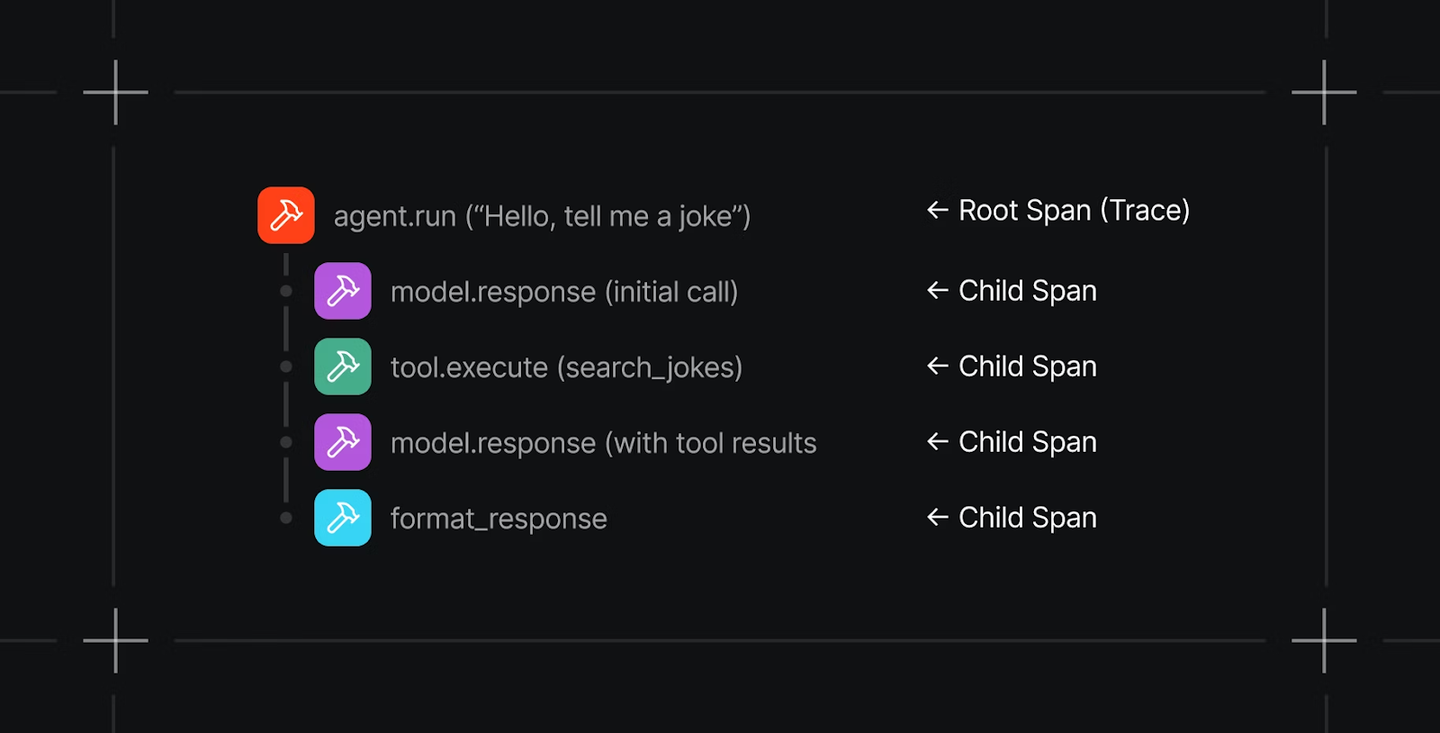
When you expand a trace, you see a granular, step-by-step breakdown of the entire workflow. Each step shows its inputs, outputs, timing, and any errors that occurred. If something went wrong, you do not have to guess where it happened. Instead, you can pinpoint the exact step that failed and inspect exactly what the agent saw and produced at that moment.
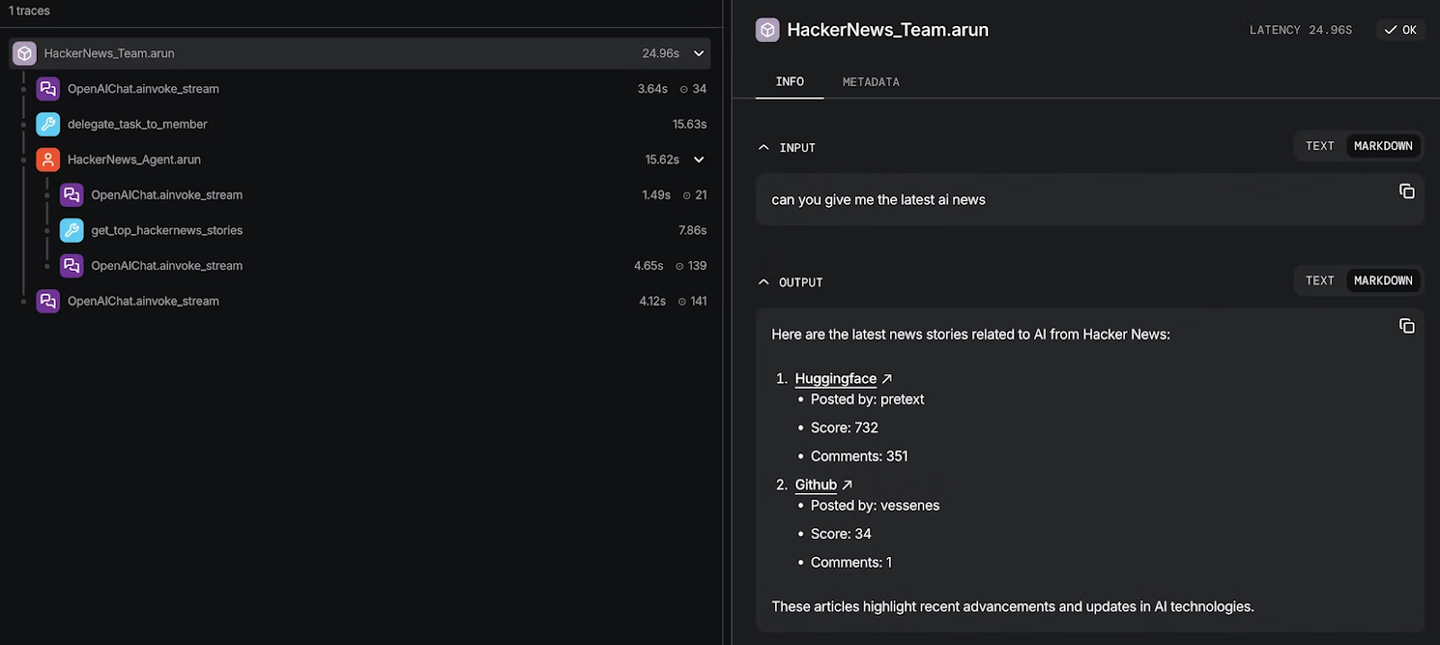
This isn't just a log dump. It's structured observability designed for the way agents actually work: multi-step, tool-using, and often non-deterministic.
[trace tree](https://www.youtube.com/embed/SyyHqrcKhIg)
## Why native tracing matters
**Your data stays yours.** Trace data—including prompts, completions, and intermediate reasoning—is stored in your own infrastructure. No third-party vendor ever sees it. For enterprises with security and compliance requirements, this removes an entire category of risk.
**Faster debugging.** When an agent misbehaves, you need to understand why quickly. Native Tracing lets you drill into any run and follow the agent's reasoning step by step, all from the same platform where you built and deployed the agent. No context-switching, no data exports, no correlation headaches.
**Production-grade observability.** This isn't just for development. Native Tracing is built for production workloads, giving you the visibility you need to monitor agent behavior at scale, catch regressions early, and build confidence in your agentic systems over time.
[traces timeline view](https://www.youtube.com/embed/4Oji_Ek551I)
**Better results through tighter iteration.** Because tracing lives inside the same platform where you build and deploy, the loop from "something went wrong" to "here's the fix" gets dramatically shorter. You spot the failure, inspect the step, adjust your agent, and validate—all without leaving Agno. That speed compounds over time into more reliable agents and fewer production incidents.
## Getting started with Agno’s native tracing
Setup takes just a few lines. Install the OpenTelemetry package:
```bash
pip install -U opentelemetry-sdk openinference-instrumentation-agno
```
From there, you have two paths depending on your deployment:
**For standalone scripts and notebooks,** use setup_tracing() for full control over configuration, including batch processing, queue sizes, export delays, and more.
**For AgentOS deployments,** simply set tracing=True. That's it. Sensible defaults handle the rest.
Either way, once tracing is enabled, every agent run is automatically captured with full step-level detail.
If you're building agents and need observability you can trust, [check out the tracing docs](https://docs.agno.com/agent-os/tracing/overview#tracing) and get started.
---
# Community Roundup: February 2026
> Agno hits 400 GitHub contributors, ships v2.5.0 with Team Modes and HITL for Teams, and moves to Apache 2.0 — plus 17 community builds spanning autonomous agent marketplaces, voice RAG, and multi-paper research assistants.
- Published: 2026-02-26
- Author: Yuvaraj Shanmugam
- Categories: Community, Product
- Canonical: https://www.agno.com/blog/community-roundup-february-2026
- Markdown: https://www.agno.com/blog/community-roundup-february-2026.md
February 2026 was a landmark month for Agno. We hit **400 contributors on GitHub**, released the transformative **v2.5.0** with Team Modes and HITL for Teams, changed our license to **Apache 2.0**, and watched the community ship an incredible wave of production-ready applications.
Whether you're orchestrating multi-agent teams with different execution modes, implementing human-approval workflows, or scheduling autonomous agent runs with cron, February delivered the production infrastructure you need to build real AI systems.
The community responded by shipping everything from autonomous AI marketplaces to voice-enabled RAG systems to multi-paper research assistants.
## New releases & features
### v2.4.4 - v2.5.4
February delivered ten major releases, including our landmark v2.5.0. Here's what we shipped:
### [Workflows HITL](https://docs.agno.com/workflows/hitl/overview) (v2.5.4)
Add support for HITL in workflows at Step level to pause for confirmation and user input:
- **Step-level pausing:** Pause workflows at any step for human approval
- **Confirmation flows:** Require human confirmation before critical workflow steps
- **User input collection:** Gather information from users mid-workflow
- **Seamless resumption:** Continue workflow execution after human interaction
Essential for workflows that require human oversight at specific decision points.
### [Metrics System Redesign](https://github.com/agno-agi/agno/releases/tag/v2.5.4) (v2.5.4)
Redesigned metrics system to provide per-model, per-component granular tracking across the entire agent/team/workflow lifecycle:
- **Granular tracking:** Per-model and per-component metrics
- **Lifecycle coverage:** Track metrics across agents, teams, and workflows
- **RunMetrics replacement:** Replaced heavyweight RunOutput collectors with efficient RunMetrics
- **Team metrics:** Include member response metrics in team session metrics
Better observability and cost tracking for production deployments.
### [TeamMode.tasks Streaming](https://github.com/agno-agi/agno/releases/tag/v2.5.4) (v2.5.4)
Added streaming event support for `TeamMode.tasks`, enabling real-time event emission during autonomous task execution. Watch tasks get assigned and completed in real-time.
### [PgVector Similarity Threshold](https://github.com/agno-agi/agno/releases/tag/v2.5.4) (v2.5.4)
Added `similarity_threshold` parameter for filtering search results by minimum similarity score. Only return results that meet your quality bar.
### [DuckDuckGoTools Enhancements](https://github.com/agno-agi/agno/releases/tag/v2.5.4) (v2.5.4)
Exposed `timelimit`, `region`, and `backend` params in DuckDuckGoTools for more control over web searches.
### [SeltzTools SDK Update](https://github.com/agno-agi/agno/releases/tag/v2.5.4) (v2.5.4)
Updated to use Seltz SDK 0.1.3 for improved search capabilities.
### [Team Execution Modes](https://github.com/agno-agi/agno/releases/tag/v2.5.0) (v2.5.0)
Introduced `TeamMode` enum with four distinct execution patterns:
- **coordinate (default)**: Supervisor pattern where the leader picks members, crafts tasks, and synthesizes responses
- **route**: Router pattern where the leader routes to a specialist and returns their response directly
- **broadcast**: Broadcast pattern where the leader delegates the same task to all members simultaneously
- **tasks**: Autonomous task-based execution where the leader decomposes goals into a shared task list
This transforms how you build multi-agent systems. Different problems need different orchestration patterns—now you can choose the right one.
### [Human-in-the-Loop (HITL) for Teams](https://github.com/agno-agi/agno/releases/tag/v2.5.0) (v2.5.0)
The most-requested feature: comprehensive HITL support for teams with improved `RunRequirement` system:
- **Tool confirmation flows:** Pause for approval before critical operations
- **User input collection:** Gather information with schema validation
- **External tool execution:** Delegate to human-executed tools
- **Session state preservation:** Fixed HITL pause handlers silently dropping session_state changes
Essential for production teams that require human oversight before high-stakes decisions.
### [Approval System](https://github.com/agno-agi/agno/releases/tag/v2.5.0) (v2.5.0)
New `@approval` decorator for systematic human approval workflows:
- **@approval(type="required")**: Blocking approval that pauses the run until resolved via approvals API
- **@approval(type="audit")**: Non-blocking audit trail for compliance/logging
- **Persistent approval records** with status tracking (pending, approved, rejected, expired, cancelled)
- **Approvals API** for listing, inspecting, and resolving approvals
Perfect for financial services, healthcare, and other regulated industries that need audit trails.
### [Scheduler](https://github.com/agno-agi/agno/releases/tag/v2.5.0) (v2.5.0)
Cron-based scheduling for agents, teams, and workflows:
- **Cron expressions** for flexible scheduling
- **Retry logic** for failed runs
- **Timeout support** for long-running tasks
- **Timezone handling** for global deployments
Run your agents on a schedule, not just on demand.
### [LearningMachine for Teams](https://github.com/agno-agi/agno/releases/tag/v2.5.0) (v2.5.0)
Extended LearningMachine support to team-based agents for persistent learning across team interactions. Teams can now learn and improve from every conversation, just as individual agents do.
### [Callable Factories for Tools, Knowledge, and Members](https://github.com/agno-agi/agno/releases/tag/v2.5.0) (v2.5.0)
Tools, knowledge, and team members can now be defined as callable factories resolved at runtime with access to `RunContext`:
- **Runtime resolution:** Configure tools/knowledge/members based on session context
- **Caching support** via `cache_callables`
- **Custom cache keys** for session-scoped resolution
Enables dynamic agent configuration based on user permissions, session state, or runtime conditions.
### [Knowledge Isolation](https://github.com/agno-agi/agno/releases/tag/v2.5.0) (v2.5.0)
Added `isolate_vector_search` flag to Knowledge class:
- When enabled, documents are tagged with `linked_to` metadata during insert
- Searches filter by this tag automatically
- Multiple Knowledge instances can share the same vector database while maintaining isolated search results
- Defaults to False for backwards compatibility
Critical for multi-tenant deployments where knowledge bases must be strictly separated.
### [License Change to Apache 2.0](https://github.com/agno-agi/agno/releases/tag/v2.5.2) (v2.5.2)
Changed license from Mozilla Public License 2.0 (MPL 2.0) to **Apache Software License 2.0**. This makes Agno more permissive for commercial use and aligns with industry-standard open source licensing. A major milestone for production adoption.
### [CodingTools](https://github.com/agno-agi/agno/releases/tag/v2.5.1) (v2.5.1)
New toolkit for code-related operations. Build agents that write, analyze, and refactor code.
### [UserFeedbackTools](https://github.com/agno-agi/agno/releases/tag/v2.5.1) (v2.5.1)
New toolkit for collecting user feedback. Essential for building agents that learn from user interactions.
### [SeltzTools](https://github.com/agno-agi/agno/releases/tag/v2.4.5) (v2.4.5)
Integration with Seltz Search for advanced search capabilities.
### [UnsplashTools](https://github.com/agno-agi/agno/releases/tag/v2.4.4) (v2.4.4)
Search and retrieve high-quality, royalty-free images from Unsplash API. Perfect for content generation agents.
### [Workflow Condition Step Else Path](https://github.com/agno-agi/agno/releases/tag/v2.4.7) (v2.4.7)
Added support for an `Else` path in Condition steps. Define alternative paths instead of just skipping execution.
### [CEL Support for Workflow Steps](https://github.com/agno-agi/agno/releases/tag/v2.4.8) (v2.4.8)
Use CEL (Common Expression Language) expressions as evaluators in Condition, Loop, and Router steps. CEL expressions are strings, making workflow steps fully serializable.
### [Workflow Router Step Enhancements](https://github.com/agno-agi/agno/releases/tag/v2.4.8) (v2.4.8)
Added the ability to return the name of the Step instead of the step itself, plus support to return a group of steps as a choice for the router.
### [Neosantara Model Provider](https://github.com/agno-agi/agno/releases/tag/v2.4.8) (v2.4.8)
Added support for Neosantara, an Indonesian LLM gateway that provides an OpenAI-compatible API. Expanding global reach.
### [Moonshot Model Provider](https://github.com/agno-agi/agno/releases/tag/v2.4.4) (v2.4.4)
Added [moonshot.ai](http://moonshot.ai) model provider for additional model options.
### [AWS Bedrock Reranker](https://github.com/agno-agi/agno/releases/tag/v2.4.7) (v2.4.7)
New `AwsBedrockReranker` class supporting Cohere Rerank 3.5 and Amazon Rerank 1.0.
### [AWS Bedrock Embedder Updates](https://github.com/agno-agi/agno/releases/tag/v2.4.7) (v2.4.7)
Updated AWS Bedrock to support Cohere v4 Embed.
### [Remote Knowledge](https://github.com/agno-agi/agno/releases/tag/v2.5.3) (v2.5.3)
Added endpoints to support the listing of remote contents via API. Enables uploading of content in S3 buckets via AgentOS.
### [PDF Reader Improvements](https://github.com/agno-agi/agno/releases/tag/v2.5.3) (v2.5.3)
Added `sanitize_content` parameter (enabled by default) that normalizes fragmented PDF text extraction—collapses word-per-line artifacts while preserving paragraph breaks. Disable `sanitize_content=False` for PDFs containing structured content, such as code or tables.
### [WebsiteReader Chunking](https://github.com/agno-agi/agno/releases/tag/v2.4.8) (v2.4.8)
Now uses `FixedSizeChunking` instead of Semantic by default, removing the need for an OpenAI API key when not setting a specific chunker.
### [Studio](https://github.com/agno-agi/agno/releases/tag/v2.4.8) (v2.4.8)
Visual editor for building Agents, Teams, and Workflows in AgentOS. Drag-and-drop interface with a Registry for managing tools, models, databases, and schemas.
### [AWS EFS Support](https://github.com/agno-agi/agno/releases/tag/v2.5.0) (v2.5.0)
Adds support for AWS EFS volume and mount point for persistent storage in AWS deployments.
### [MCP Tools HITL](https://github.com/agno-agi/agno/releases/tag/v2.4.7) (v2.4.7)
MCPTools now works with `requires_confirmation_tools`. Human-in-the-loop for external tool execution.
### [External Execution Silent Parameter](https://github.com/agno-agi/agno/releases/tag/v2.4.4) (v2.4.4)
Added a new parameter to make external tool execution silent by not populating the run response content with placeholder strings.
## Community projects & showcases
In February, there was an explosion of production-ready applications. Here are the standout builds:
### 1. paper2saas by Agentra Labs
AI agents that dissect papers, brainstorm killer SaaS ideas, validate markets, crush competitors, and spit out MVP roadmaps—all hallucination-free:
**The workflow:**
- Takes arXiv papers as input
- Analyzes research for commercial potential
- Generates SaaS ideas grounded in the research
- Validates market opportunities
- Produces competitive analysis
- Outputs actionable MVP roadmaps
**Why it matters:** Bridges the gap between academic research and commercial applications. Turns theoretical breakthroughs into business opportunities.
[Twitter announcement](https://x.com/AgentraLabs/status/2022320807377309914)
### 2. OpenClaw Replacement by bitdoze
Built a lightweight AI Assistant alternative to OpenClaw using Agno & Discord:
**The setup:**
- **Host**: $5 VPS (Ubuntu)
- **Interface**: Discord (via Bot API)
- **Tools**: Web search, Shell access, GitHub, File system
- **Automation**: Hourly tech/AI news updates via Cron
**Why it's cool:** OpenClaw is powerful but complex. This proves you can build production-ready AI assistants with Agno on minimal infrastructure—fast, 100% customizable, and budget-friendly.
**Tech stack:** Agno, Discord Bot API, UV for package management
[Full Tutorial](https://www.bitdoze.com/create-your-own-ai-agent/) | [Video Walkthrough](https://youtu.be/9Txk3SpB6fg)
### 3. OpenAgent by Adam (ajshedivy)
Dedicated fork of OpenCode with AgentOS integrations called **openagent**:
**Features:**
- Bring AgentOS to your terminal with `/agno` hub
- Browse agents with keyboard navigation
- Quick-connect with status indicators
- Agent detail views
**Roadmap:** Teams, Workflows, and eventually evals/metrics/knowledge
**Bonus:** Building `agentos-sdk` to improve the dev experience
**Why it matters:** Terminal-native AgentOS experience. Developers can manage their AI agents without leaving the command line.
[GitHub repo](https://github.com/ajshedivy/openagent) | [agentos-sdk](https://github.com/ajshedivy/agentos-sdk)
### 4. agno-client by rodrigocoliveira
Simplified React SDK for Agent OS — solving the "how do I build a frontend for my agents" problem:
**The problem:** AGUI's CopilotKit integration is complex, and Agent-UI hasn't been updated for full Agent OS capabilities.
**The solution:** Clean React packages for polished interfaces connected to Agno agents:
- Simple React hooks and components
- Clean abstractions over underlying complexity
- Drop-in solution for beautiful agent UI
- Fully customizable components
- Always in sync with AgentOS FastAPI endpoints
**Why it matters:** Frontend development for AI agents shouldn't be harder than building the agents themselves. This makes it trivial.
[GitHub repo](https://github.com/rodrigocoliveira/agno-client)
### 5. Elite Research Agent by Build Fast with AI
Publication-quality research from a single prompt:
**How it works:**
- Searches the web for relevant sources
- Reads full articles (not just snippets)
- Produces NYT-style investigative reports
**Tech stack:** Kimi K2.5 (via OpenRouter), Agno, web search tools
**Why it's impressive:** Demonstrates high-quality reasoning models integrated with Agno for long-form content generation.
[GitHub Code](https://git.new/agno_kimi_k25)
### 6. Production Agent Showcase by Build Fast with AI
Multiple production-ready agents demonstrating different models and use cases:
#### StepFun Step-3.5-Flash Integration
Built and tested with StepFun Step-3.5-Flash (free via OpenRouter). Full notebook showing:
- Tool calling
- Memory management
- Multi-agent teams
- Knowledge bases
- Structured outputs
[GitHub Code](https://git.new/agno_step_2.5)
#### Qwen3-Coder-Next Agents
80B MoE model with only ~3B active params → production-grade coding agents without massive API bills.
[GitHub Code](https://git.new/qwen3_coder_agno)
#### Tic-Tac-Toe AI Arena
Claude Opus 4.5 vs Kimi 2.5 — not just a game, a benchmark for agentic reasoning:
- **Tech stack:** Agno, Streamlit + custom Neon CSS, OpenRouter
- **Purpose:** Test AI reasoning in real-time gameplay
[GitHub Code](https://git.new/tic-tac-toe-ai)
#### HackerNews Digest Agent
Before: 20 mins scrolling HackerNews daily. After: 10-second AI digest.
**The agent:**
- Fetches trending stories
- Summarizes each in 2-3 lines
- Groups by theme (AI, DevTools, etc.)
- Explains why you should care
**Tech stack:** Kimi GLM-5, Agno
[GitHub Code](https://git.new/glm_5_agno)
### 7. AgentBazaar by Harish Kotra
Fully autonomous AI Marketplace running locally—agents hiring each other:
**The workflow:**
1. **Broker Agent**: Takes the request and creates the technical spec
2. **Bidding War**: Multiple Worker Agents (different personalities) generate bids
3. **Negotiation**: Negotiator agent bargains to lower prices
4. **Escrow & Validation**: Validator checks work against the contract before releasing funds
**Why Agno?** Enforcing `output_schema` using Pydantic models meant agents weren't just chatting—they were exchanging valid, executable JSON objects.
**The result:** Self-contained economy with reputation systems, bad-actor filtering, and self-optimizing prices. All running locally on `llama3.2` with Ollama.
**Vision:** Prototype for how future software systems might self-assemble. Instead of monolithic code, imagine micro-services that negotiate their own APIs and SLAs dynamically.
[GitHub Repo](https://github.com/harishkotra/agentbazaar/) | [Blog](https://dev.to/harishkotra/building-an-autonomous-ai-agent-marketplace-with-agno-ollama-4l12)
### 8. Stock AI Agent by Jagdeep Singh
Web-enabled stock analysis agent that fetches real-time data and structured insights:
**What it does:**
- Searches the web for stock data
- Fetches current prices
- Retrieves analyst recommendations
- Returns structured insights in tabular format
**Tech stack:** Agno, DuckDuckGo web search, YFinanceTools, Groq, OpenAI
**Key learning:** Coming from ML model background, this project helped understand how agents work in real-world application workflows, not just notebooks.
[GitHub Repo](https://lnkd.in/gTEsCEWu)
### 9. AI Stock Screener & Interview Agent by MarcelloDOP
Two production applications built with Agno:
#### Stock Screener Agent
**Features:**
- Uses YFinance and Tavily for data
- Suggests the best stocks based on fundamental analysis
- Analyzes analyst ratings and news sentiment
#### Competency-Based Interview Agent
Helps job seekers prepare for interviews:
- Generates personalized questions from the job description and CV
- Creates tailored answers
- Exports to Word document format
**Tech stack:** Agno, OpenAI (gpt-5-mini), ChromaDB, SQLite, Streamlit, python-docx
### 10. LLMOps Architecture by Kameshwara Pavan Kumar Mantha
Production-ready GenAI stack showing what enterprise LLMOps actually looks like:
**Key technologies:**
- **MLflow**: Unified LLMOps backbone (AI Gateway routing, agent serving, prompt registry, evaluation, observability, tracing, telemetry, cost tracking)
- **Agno**: Agent framework
- **Multi-LLM**: OpenAI, Anthropic, Gemini with traffic splitting and fallback
- **Qdrant**: Vector database for RAG
**What it enables:**
- Clear visibility into every response
- Structured evaluation of agent quality
- Controlled multi-model routing
- Fully self-hosted stack (free to run)
**Why it matters:** Practical blueprint for building production GenAI systems with confidence and control.
[Read the blog here](https://blog.devops.dev/designing-an-enterprise-llmops-stack-with-mlflow-and-agno-d173d8aa1137)
### 11. Math Mentor AI by Manoj Kumar Karumanchi
Multimodal RAG + Multi-Agent Math System—not a chatbot, a structured reasoning system:
**Architecture:**
- **Multimodal input**: Text, OCR (EasyOCR), Audio (Whisper)
- **Agent pipeline**: Extract → Guardrail → Parser → Router → Solver → Verifier → Explainer
- **RAG stack**: Hugging Face embeddings + LanceDB
- **Tool execution**: SymPy for deterministic math solving
- **Model abstraction**: Groq + Gemini fallback
- **Memory loop**: SQLite + embedding similarity retrieval
- **HITL checkpoints** for ambiguity and low confidence
**Why it's interesting:** The pattern maps directly to real-world systems like OCR-based document processing, compliance validation, multimodal support automation, and human-in-the-loop AI governance.
**Tech stack:** Agno, Python, Streamlit, Docker, Hugging Face Spaces
[LinkedIn post](https://www.linkedin.com/posts/manoj-kumar-karumanchi_artificialintelligence-generativeai-machinelearning-activity-7427807684613107712-dDH8)
### 12. Voice-RAG by Shivam Singh
Turn any document into a real-time, source-grounded voice assistant:
**What it does:**
- Upload a document
- Auto-index it for retrieval
- Provision a voice-enabled agent
- Open a live speech-to-speech widget
- Have a real-time conversation with your knowledge base
**Key features:**
- Extended Agno plugin with Voice + RAG orchestration
- Integrated ElevenLabs real-time conversational voice (200ms latency)
- Automated ingestion → indexing → agent provisioning
- Embeddable widget
- Multilingual embeddings
**Use cases:**
- Enterprise support (faster resolution, fewer tickets)
- Education (ask instead of search)
- Healthcare (voice access to clinical guidelines)
- Field operations (instant access to SOPs)
- Research (upload papers, ask follow-ups)
**Tech stack:** Agno, ElevenLabs Conversational AI
[GitHub repo](https://github.com/Shivam909058/voice-rag)
### 13. PaperSphere-AI by Saathvik Krishnan
Agentic multi-paper RAG pipeline for research understanding and comparison:
**The problem:** Most paper assistants can answer single questions but struggle to compare multiple papers on results, datasets, and limitations.
**The solution:**
- Upload one or more research PDFs
- Hybrid retrieval using BM25 + vector search
- Reranking and chunk filtering for better context quality
- Single-paper grounded Q&A with citations
- Multi-paper comparative synthesis with metric-aware outputs
- Evaluation signals for retrieval quality and groundedness
**Tech stack:** FastAPI (Render), Streamlit (Community Cloud), Qdrant Cloud, Gemini, Agno
**Key focus:** Reducing hallucinations, improving traceability through citations, and making multi-paper comparison useful for actual research work.
[GitHub repo](https://github.com/Saathvik-Krishnan/Research-Paper-Copilot) | [LinkedIn post](https://www.linkedin.com/posts/saathvik-krishnan_rag-llm-genai-activity-7429252696479604736-xo80)
### 14. Full-Stack AI Chat App by Shubham Vedi
Production-ready AI agent stack with Agno Skills:
**Features:**
- Agno Agent Skills (modular, hot-reloadable)
- Claude Sonnet 4.6 via OpenRouter
- Tavily for real-time web search
- Streaming responses (SSE)
- Neubrutalism UI design
- One-command startup
- Markdown rendering
**Tech stack:** Agno Skills, Claude Sonnet 4.6, OpenRouter, Tavily, React, FastAPI
[GitHub repo](https://git.new/agno-skills-agent)
### 15. FrankenAgent Lab by Ilkan Yıldırım
Modular AI agent builder where you assemble agents like high-tech creations:
**The metaphor:**
- 🧠 Head: LLM brain
- 🦾 Arms: Tools & integrations
- 🦿 Legs: Workflows & execution
- ❤️ Heart: Memory
- 🦴 Spine: Guardrails & safety
**What you can do:**
- Build agents visually using YAML blueprints
- Run them via CLI or API
- Trace every tool call
- Share blueprints in the marketplace
- Deploy to production with Cloud Run + Cloud SQL + Redis
**Tech stack:** FastAPI, Agno, Web UI, execution tracing, user auth, API keys
**Why it's cool:** Structured way to experiment with agent architectures with production deployment built in.
### 16. Elite Financial Intelligence Coach by Mihir Kapile
An AI-native platform that transforms raw transaction ledgers into a governed financial roadmap:
**Key features:**
- **Agentic Orchestration**: Powered by Agno and Llama 3.1
- **Sub-Second Inference**: Leveraging Groq's LPU architecture
- **Fiscal Stress Test**: Simulates capital depletion events
- **Zero-Trust Approach**: In-memory processing, fuzzy header mapping, encrypted-ready PDFs
**Security focus:**
- In-memory processing (no database persistence)
- Anonymizes banking formats locally
- User maintains total control over financial data
**Tech stack:** Groq (Llama-3.1-8B-Instant), Agno, Streamlit, Pandas
**Submission for:** Palo Alto Networks Case Study
### 17. OCR Translation System by Qubrid AI
Production-grade OCR-powered language translation system:
**What it does:**
- Extract text from images using Hunyuan OCR 1B
- Automatically detect source language
- Translate into 48+ languages
- All without GPU setup or infrastructure management
**Architecture:**
- 4-layer production structure (UI → Pipeline → Agents → Models)
- Multimodal OCR + language models
- Streaming responses for real-time UX
**Tech stack:** Qubrid AI serverless APIs, Agno, Hunyuan OCR 1B, GPT-OSS-20B
[YouTube tutorial](https://www.youtube.com/watch?v=5-ZmAgQbCJ0)
## Contributor shoutouts
February saw continued growth with contributions from our expanding community. We hit **400 contributors on GitHub** — a massive milestone!
### Top community code contributors
- **@rodrigocoliveira** (GitHub) — agno-client React SDK, HITL session state fix, silent external execution, Firestore session fixes
- **@ajshedivy** (GitHub) — MCP HITL functionality, OpenAgent terminal interface
- **@theagenticguy** (GitHub) — AWS Bedrock Reranker and Embeddings expansion
- **@WilliamEspegren** (GitHub) — Seltz tools integration
- **@dvy246** (GitHub) — Unsplash image search tools
- **@Tuyohai** (GitHub) — Moonshot model provider
- **@Byunk** (GitHub) — Firestore session storage fixes
- **@salimhamed** (GitHub) — Workflow run_input JSON serialization
- **@tanmaydarmorha** (GitHub) — AzureOpenAI authentication enhancements
- **@Samyak2** (GitHub) — WebsiteReader OpenAI requirement removal
### Feature implementers
- **@mklrlnd424** (GitHub) — TavilyTools deprecated parameter removal
- **@themavik** (GitHub) — Knowledge filename pattern matching, reasoning content deduplication
- **@ArivunidhiA** (GitHub) — Anthropic streaming metrics fix
- **@guguoyi** (GitHub) — Cookbook typo refinements
- **@jss367** (GitHub) — Documentation link fixes
- **@kepler** (GitHub) — Session state extraction from run_context, LearningMachine Claude/Gemini compatibility
- **@Programocles (dsarlo)** (GitHub) — AWS Bedrock Guardrail support
### First-time contributors
February welcomed 15+ first-time contributors, including **@rodrigocoliveira** (agno-client and multiple fixes), **@ajshedivy** (MCP HITL), **@theagenticguy** (AWS Bedrock features), **@WilliamEspegren** (Seltz tools), **@dvy246** (Unsplash tools), **@Tuyohai** (Moonshot provider), **@Byunk** (Firestore fixes), **@salimhamed** (workflow serialization), **@tanmaydarmorha** (Azure auth), **@Samyak2** (WebsiteReader fix), **@mklrlnd424** (Tavily fix), **@themavik** (Knowledge and reasoning fixes), **@ArivunidhiA** (metrics fix), **@guguoyi** (docs), and **@jss367** (link fixes). Every contribution strengthens the framework.
### Community MVPs
- **@aberk** — Continued exceptional advocacy for production patterns: caching backend abstractions, error logging with stack traces, multi-worker setup support, and detailed feedback on v2.5 release. Always pushing for production-ready features with concrete technical proposals.
- **@annedefined** — Active community helper explaining framework comparisons (Agno vs LangChain/Langgraph/Pydantic AI), sharing production deployment experience, and helping newcomers with setup issues
- **@kepler** — Critical contributions including session state fixes and LearningMachine compatibility improvements, plus thoughtful questions about Learning Machines in Teams
- **@rocasagrande** — Raised critical production issue about media storage in DB (base64 overload), built comprehensive media_storage abstraction with S3 support, and actively contributed dependency injection fixes
- **@Griflet** — Continued advocacy for memory manager usage tracking and identified max tool call limit issues
- **@Omar** — Raised important production questions about image serialization and learning machine knowledge base behavior
- **@LaGernouille** — Detailed reporting on Gemini tool calling issues with thought signatures
- **@josef** — Proposed PR for cancelled runs being saved in DB
- **@Ilya I. Lubenets** — Asked important questions about dynamic prompt updates with Langfuse integration
- **@chico** — HITL for subagents in teams discussion
## What's next
### On the roadmap
- **Studio enhancements:** Visual builder improvements for complex workflows
- **HITL for Workflows** (When it's set on Agent/Team, which are used as a part of a step)
- **Improved caching abstractions:** Better support for multi-worker setups with pluggable cache backends
- **Media storage optimization:** Addressing base64 storage in DB for production deployments
- **Enhanced observability:** Better error logging with stack traces and debugging tools
- **Workflow-level culture:** Global context across workflow agents
- **MCP Resources and Prompts:** Expanded MCP protocol support
### Get involved
We're always looking for contributors! Areas where you can help:
- **Production patterns:** Share your deployment experiences and best practices
- **Documentation:** Help new users get started faster
- **Toolkits:** Build integrations for your favorite services
- **Bug reports:** Production feedback makes Agno better (thank you to everyone filing detailed issues!)
- **Frontend tooling:** Help build better UI/UX for AI agents (check out agno-client!)
- **Testing:** Help test new releases and report issues
Check out [open issues](https://github.com/agno-agi/agno/issues) or join the [Discord](https://agno.link/discord) to connect with the team.
## Join the movement
February 2026 proved that Agno is the production framework for building AI agents that ship. From Team Modes to HITL for Teams, from the Approval System to the Apache license change, every feature this month answered real production needs.
The community is thriving. **400 contributors** strong. The projects are shipping to real users. The framework is maturing at an incredible pace.
Whether you're building autonomous AI marketplaces, voice-enabled RAG systems, or multi-paper research assistants, Agno gives you the production infrastructure to build AI systems that work reliably at scale.
**Stats that matter:**
- 400 contributors on GitHub 🎉
- 10 major releases in one month
- License changed to Apache 2.0
- HITL for Teams (finally!) shipped
- Hundreds of production deployments
- One incredible community
- ⭐ [Star Agno on GitHub](https://github.com/agno-agi/agno)
- 💬 [Join our Discord](https://agno.link/discord)
- 📖 [Read the docs](https://docs.agno.com/)
- 🚀 Share what you're building — tag us and we'll feature YOUR project in March!
Keep building, keep shipping, keep pushing the boundaries of what agents can do.
**— Team Agno**
---
# Gemini 3.1 Pro in practice: 12 cookbooks and a multi-agent investment team
> We built 12 agent cookbooks and a 7-agent investment committee with Gemini 3.1 Pro. From tool use to multi-agent workflows—here's what works in production.
- Published: 2026-02-24
- Author: Cosette Cressler
- Categories: Engineering, Examples
- Canonical: https://www.agno.com/blog/gemini-3-1-pro-in-practice-12-agent-cookbooks-a-10m-ai-investment-team
- Markdown: https://www.agno.com/blog/gemini-3-1-pro-in-practice-12-agent-cookbooks-a-10m-ai-investment-team.md
We got early access to Gemini 3.1 Pro, so we've been putting it through its paces.
Rather than just benchmarking it, we wanted to answer a more practical question: **what can you actually build with it right now?** So we put together 12 guided cookbooks that take you from a blank slate to production-ready agents. Then we stress-tested the whole stack by building something real.
## Gemini 3.1 Pro
What makes Gemini 3.1 Pro notable is that it significantly boosts core reasoning and problem-solving abilities, more than doubling performance on advanced logic benchmarks compared to Gemini 3 Pro, and improving how the model handles complex, multi-step tasks and multimodal inputs like text, code, and images.
It’s essentially a smarter, more capable baseline for challenging workflows and agentic applications, with broader rollout across Google’s AI tools and APIs.
## Agent cookbooks: Zero to production
We put together 12 guided cookbooks that take you from a single tool-using agent to multi-agent teams and step-based workflows. These cookbooks are designed to be worked through in sequence, each one layering on a new capability.
The setup is intentionally minimal: you need Python and an API key. That's it. Each cookbook is a clean, runnable example that focuses on one core capability, can be run independently, and is loaded with detailed comments so you understand what's happening under the hood, not just what to copy and paste.
All examples use Gemini 3.1 Pro for its strong multi-step reasoning and reliable tool execution. If you want to move faster or reduce costs during development, Gemini 3 Flash is excellent at tool calling and swaps in with a one-line change. In fact, any supported model works; the abstractions are designed so the model is never a lock-in decision.
You start with tools. A Finance Agent wired with YFinanceTools can pull real-time market data and produce an investment brief on NVIDIA in a single prompt. From there, structured output and typed I/O lock down the response format. Instead of parsing freeform text, you receive clean Pydantic models with full type safety on both input and output.
Next comes persistence. The storage cookbook adds a SQLite database so your agent remembers conversations across sessions. You can ask it about NVDA, close the script, come back later, and it will pick up right where you left off. Memory takes this further by extracting and retaining user preferences over time. State management shows how to maintain items such as a personal stock watchlist that persists across interactions.
The knowledge cookbook is where things start to feel real. You load documents into a vector store with hybrid search, which gives your agent the ability to search over your own data instead of relying only on its training set. The custom tools section shows you how to write your own toolkits and extend what the agent can do beyond the 100 built-in options.
The final cookbooks address production concerns. Guardrails add input validation to block PII and prevent prompt injection. Human-in-the-loop requires explicit user confirmation before the agent executes sensitive operations. The agent pauses during execution, asks for approval, and proceeds only after you confirm.
Then comes the payoff: multi agent teams and workflows. The teams cookbook builds a Bull vs. Bear stock analysis system. A Bull Analyst argues the case for a stock, a Bear Analyst argues against it, and a Lead Analyst synthesizes both perspectives into a balanced recommendation. The system is adversarial by design and produces richer analysis than any single agent could. The workflows cookbook chains these components into a sequential research pipeline with predictable, step by step execution.
Here’s the [quickstart](https://github.com/agno-agi/agno/tree/main/cookbook/00_quickstart).
## The real test: A multi-agent investment team
To push Gemini 3.1 Pro beyond simple cookbook exercises, we built a full multi-agent investment committee: seven specialized agents managing a simulated $10M fund under real institutional constraints.
Each agent has a distinct role: a Market Analyst tracking macro trends and sector rotation, a Financial Analyst running fundamentals and valuation, a Technical Analyst reading price action and momentum, and a Risk Officer stress-testing downside scenarios and portfolio exposure. A Knowledge Agent manages the research library and memo archive, a Memo Writer produces formal investment write-ups, and a Committee Chair makes final allocation decisions.
This isn’t a toy; the fund operates under real institutional constraints, including large-cap-only exposure, sector concentration limits, position sizing rules, and correlation caps.
View the code for the [multi-agent investment team here](https://github.com/agno-agi/investment-team).
## What makes the architecture interesting
The architecture has three layers of knowledge working together. The fund's mandate and rules are baked directly into the prompt as static constraints. On top of that, a RAG pipeline backed by PgVector lets agents search across company profiles and sector analyses loaded into the knowledge base. As the system operates, a file based memo archive accumulates past decisions, which gives the committee a form of institutional memory that compounds over time.
What makes the orchestration interesting is that there is not one fixed way the agents talk to each other. The system selects from five multi-agent architectures—Coordinate, Route, Broadcast, Task, and Workflow—depending on what the query requires. A broad question about semiconductor trends is broadcast to multiple analysts in parallel. A targeted stock lookup is routed directly to the appropriate specialist. A formal investment decision triggers the full committee workflow: Market Assessment → Deep Dive (where Fundamental and Technical Analysis run in parallel) → Risk Assessment → Investment Memo → Committee Decision. Each step's output feeds into the next, producing a complete investment memo with a final allocation call.
The part that surprised us most was the institutional learning. Across runs, the system begins to discover its own patterns by surfacing corrections, refining its assumptions, and building on insights from previous sessions. It stops feeling like a question and answer tool and starts behaving more like a team that develops a shared and evolving view of the portfolio and its market environment.
## Observability from day one
One thing we did not want to compromise on was visibility. Every cookbook (and the investment team) comes wired with AgentOS for tracing, monitoring, and scheduling right out of the box. You can inspect agent runs step by step, track sessions over time, and schedule recurring tasks without adding extra infrastructure.
Just start the server and connect at os.agno.com. You will see every agent, every tool call, and every decision rendered in a visual interface where you can chat with your agents, explore sessions, and drill into detailed traces.
This matters because most agent projects die in the gap between "cool demo" and "thing I can actually debug at 2am." AgentOS closes that gap.
## How Gemini 3.1 Pro actually performs
Here's where it gets honest.
**The good:** Gemini 3.1 Pro is impressively strong at capturing and retaining learnings. The investment team is where this really became clear. The model synthesized information across agents and sessions in a way that made the memory and knowledge layers feel genuinely useful instead of gimmicky.
**The tradeoff:** Latency is noticeably high right now. For the investment team use case, where most queries are async research tasks, this is manageable. But if you're building real-time, user-facing agents, it's something to plan around.
Check out the [agent quickstart cookbooks](https://github.com/agno-agi/agno/tree/main/cookbook/00_quickstart) and the [multi-agent investment team.](https://github.com/agno-agi/investment-team)
---
# Agno v2.5: We just closed the biggest gap in agent infrastructure
> For the first time, the agentic stack is complete. The framework was layer one. AgentOS was layer two. And last week, with v2.5, we delivered layer three and completed the picture.
- Published: 2026-02-18
- Author: Cosette Cressler
- Categories: Engineering, Product, Perspectives
- Canonical: https://www.agno.com/blog/the-agent-stack-is-finally-complete
- Markdown: https://www.agno.com/blog/the-agent-stack-is-finally-complete.md
#### _Agent systems have always needed more than frameworks and runtimes. Our latest release delivers the missing production layer and completes the stack._
There’s a gap in agentic AI that no amount of model intelligence will close.
Teams can build agents. They can make them fast. But the moment you ask—Who approved that action? How do we audit this at scale? Can I explain this system to a compliance officer?—agent infrastructure goes quiet.
That gap isn’t new. Every wave of infrastructure software hits the same wall. Layer 1, libraries and frameworks, help you build. Layer 2, runtimes, help you execute. But neither gets you to production, not the kind of production where organizations stake real business processes on the system. For the stack to be complete, you need a third layer.
Our goal has always been to deliver the full stack. The framework was layer one. AgentOS was layer two. And last week, with v2.5, we delivered layer three and completed the picture.
## Layer One: Framework
Frameworks solved the cold-start problem, and that was huge. Agno’s framework gives you abstractions for tool use, memory, retrieval, and multi-step reasoning so you're not hand-rolling every agent from raw API calls. That's valuable. But by itself, it answers one question: how do you build an agent?
It doesn't address who approved a given action, how six agents share a knowledge base without contaminating each other's results, or how you enforce a policy that requires human sign-off before anything touches the payments API. Those are different questions that frameworks, by definition, don’t answer. Answering them requires another layer.
## Layer Two: Runtime
AgentOS answered the next critical question: how do agents execute at speed and scale?
A high-performance runtime purpose-built for multi-agent systems, Agno’s AgentOS handles execution, session management, storage, and the core infrastructure that makes agents run fast and reliably. It's the reason teams choose Agno over stitching together their own execution stack.
That layer, too, is still there and still essential. But even a great runtime leaves a set of questions unanswered. How do you govern what agents are allowed to do? How does the system get smarter over time instead of starting from zero every session? What happens when the nightly pipeline fails at 3 a.m. in a timezone nobody configured? How do you swap orchestration patterns without rewriting agent logic?
These aren't framework problems. They aren't runtime problems. They're production problems. And they need a third layer.
## Layer Three: Production
[Our latest release](https://github.com/agno-agi/agno/releases/tag/v2.5.0) doesn't announce a platform or an operating system. It does something more subtle and, I think, more important: it fills in the production layer, the connective tissue between "I built an agent" and "we run agents as a business capability."
It’s the third layer. It doesn't replace the framework or the AgentOS, it completes them.
Look at what shipped, not as a feature list, but as a set of bets about what production agent systems actually need.
**Orchestration as a first-class choice, not a custom build.** Four team execution modes, coordinate, route, broadcast, tasks, aren't just convenience methods. They're a recognition that orchestration topology is a design decision, not an implementation detail. You should be able to name your pattern, swap it, and audit it. The moment orchestration lives in bespoke glue code, you've lost governability.
**Human oversight as architecture, not afterthought.** The approval system and expanded HITL controls aren't bolted-on safety theater. Blocking gates, audit-mode logging, tool confirmation mid-run, external execution handoffs, these are the primitives you need to deploy agents in any environment where "move fast and break things" is not an option (which is most environments).
**Time-aware execution without external dependencies.** Built-in cron scheduling with retries, timeouts, and timezone support sounds mundane until you realize it eliminates an entire category of infrastructure, Airflow DAGs, standalone cron servers, Lambda triggers, that teams currently duct-tape around their agent systems. The best infrastructure is the kind you stop thinking about.
**Shared resources with isolated behavior.** The isolate_vector_search feature is a small line item with large implications. Sharing a vector database across agents while guaranteeing isolated retrieval means you can scale your knowledge infrastructure without scaling your operational complexity. This is a multi-tenancy primitive, and its presence signals that Agno is thinking about fleet-scale deployments, not single-agent experiments.
**Accumulated intelligence across sessions.** LearningMachine for teams means agent systems get smarter over time without manual re-prompting. This is the difference between a tool and a colleague. Tools do what you tell them, every time, from scratch. Colleagues remember what worked, what didn't, and what the constraints are.
**Runtime-resolved configuration.** Callable factories for tools, knowledge, and team members mean the system adapts to context at execution time, not at deploy time. Different user? Different tenant? Different environment? The agent configures itself accordingly. This is how you build agent infrastructure that serves a platform, not just a single application.
## The Full Agentic Stack
Step back, and a coherent philosophy emerges. Agno isn't trying to be the thing that builds your agents. It's trying to be the thing that makes your agents operationally real, governable, schedulable, auditable, multi-tenant, and capable of learning. It's the layer that sits between your agent logic and your production environment and handles everything that has nothing to do with intelligence but everything to do with trust.
The industry has been obsessed with making agents smarter, and that work matters. We've invested heavily in it ourselves. But intelligence alone was never the bottleneck. The bottleneck is making intelligent systems trustworthy enough to deploy. Trust requires approval gates, audit trails, isolated data access, and predictable orchestration you can explain to a compliance officer. It requires the system to get better over time so you're not re-earning trust from scratch every session. Intelligence gets you the demo. Trust gets you the deployment. That's what’s been missing. And that’s what this layer delivers.
For the first time, the agentic stack is complete. The framework gives you the abstractions to build agents. AgentOS gives you the runtime to execute them at speed. And the production layer gives you everything required to deploy them with trust.
Each layer is necessary. None is sufficient on its own. This is the release that brings them together.
---
# One agent is all you need (until it isn't)
> Learn when to use AI agents, teams, or workflows in your architecture. A practical guide to choosing the right approach for building intelligent automation.
- Published: 2026-02-17
- Author: Cosette Cressler
- Categories: Engineering, Perspectives
- Canonical: https://www.agno.com/blog/one-agent-is-all-you-need-until-it-isnt
- Markdown: https://www.agno.com/blog/one-agent-is-all-you-need-until-it-isnt.md
## Agents vs. teams vs. workflows: How to choose the right architecture
Building intelligent automation—AI systems that actually solve problems—means choosing the right architecture. If you're working with Agno, you'll encounter three core abstractions: Agents, Teams, and Workflows. Each solves a different problem, and picking the wrong one can mean the difference between a clean, maintainable system and an expensive mess.
Here's how to think about them.
## Agents: The building block
An agent is an AI program that reasons, uses tools, and maintains state.
Under the hood, agents are stateful control loops built around stateless models. The model reasons, calls tools, evaluates results, and iterates based on your instructions. Around that loop, you can add capabilities like memory, knowledge, storage, human-in-the-loop approvals, and guardrails as needed.
Think of an agent as a single, focused worker. You give it a role ("You're a research analyst"), hand it tools (a web scraper, a database connector), and set it loose. It maintains state across reasoning steps, which means it can handle multi-step problems that require context from earlier in the process.
Agents get more powerful as you layer on capabilities: memory for learning from past interactions, knowledge bases for domain-specific references, storage for persistence, guardrails to keep behavior on track, and human-in-the-loop checkpoints for high-stakes decisions.
**When to use an agent:** the task fits within one domain, you want to minimize token costs, or you're still prototyping. Start with one agent and add complexity only when you hit its limits.
To build effective agents, start simple:
```python
from agno.agent import Agent
from agno.models.anthropic import Claude
from agno.tools.hackernews import HackerNewsTools
agent = Agent(
model=Claude(id="claude-sonnet-4-5"),
tools=[HackerNewsTools()],
instructions="Write a report on the topic. Output only the report.",
markdown=True,
)
agent.print_response("Trending startups and products.", stream=True)
```
See more in our [building agent docs.](https://docs.agno.com/agents/building-agents)
## Teams: Collaboration at scale
A Team is a group of agents (or sub-teams) that collaborate under a leader to solve complex tasks. The leader coordinates by decomposing tasks and delegating to the right member based on their roles and capabilities.
For example:
If the task is “Create a market research report”, the leader might decompose it into:
Gather competitor data → Research agent
Analyze trends → Analyst agent
Write report draft → Writer agent
Review and polish → Editor agent
Why not just build one big agent with all the tools? Because single agents hit limits fast. Context windows fill up, decision-making gets muddy with too many responsibilities, and debugging becomes a nightmare when you can't isolate what went wrong.
Teams address these limitations directly. By distributing responsibility across specialized agents, you gain structure, clarity, and scale:\
- Specialization: each agent masters one domain instead of being mediocre at everything
- Parallel processing: multiple agents work simultaneously on independent subtasks
- Maintainability: when something breaks, you know exactly which agent to fix
- Scalability: add capabilities by adding agents, not rewriting everything
The tradeoff is coordination overhead. Agents need to communicate and share state. If you get this wrong, you've just built a more expensive failure mode.
That’s why the structure of collaboration matters. Not all teams coordinate the same way, and the pattern you choose determines how tasks flow, how outputs are combined, and where control lives.
Agno provides three team patterns:
Supervisor (default): The leader decomposes tasks, delegates, reviews output, and synthesizes a final response. Best for quality control and unified answers.
Router: The leader routes requests directly to the most appropriate specialist, who responds without synthesis. A smart dispatcher for clearly distinct domains.
Broadcast: The leader sends the task to _all_ members simultaneously. Ideal for parallel research or gathering multiple perspectives.
**When to use a team:** the task demands multiple specialized agents with different tools, a single agent's context window isn't enough, or you need each agent focused on a narrow scope.
Here’s a minimal example for building teams:
```python
from agno.team import Team
from agno.agent import Agent
from agno.models.openai import OpenAIResponses
from agno.tools.hackernews import HackerNewsTools
from agno.tools.yfinance import YFinanceTools
news_agent = Agent(
name="News Agent",
role="Get trending tech news from HackerNews",
tools=[HackerNewsTools()]
)
finance_agent = Agent(
name="Finance Agent",
role="Get stock prices and financial data",
tools=[YFinanceTools()]
)
team = Team(
name="Research Team",
members=[news_agent, finance_agent],
model=OpenAIResponses(id="gpt-4o"),
instructions="Delegate to the appropriate agent based on the request."
)
team.print_response("What are the trending AI stories and how is NVDA stock doing?", stream=True)
```
See more in our [building teams docs.](https://docs.agno.com/teams/building-teams)
## Workflows: Predictable pipelines
A Workflow orchestrates agents, teams, and plain functions as a sequence of defined steps. Output from each step flows to the next, creating a repeatable, auditable pipeline.
If teams are about flexible collaboration, workflows are about predictable execution. Steps can run sequentially, in parallel, in loops, or conditionally, but the overall structure is defined upfront.
The key difference between teams and workflows is when decisions are made. A team figures out how to solve a problem at runtime, with a leader dynamically deciding which agent does what. A workflow has the execution plan baked in at design time, where the order of steps, conditions, and branching logic are predetermined.
Steps can be an Agent (an individual AI executor), a Team (for complex sub-tasks needing collaboration), or a Python function (for deterministic logic like data transformation or validation).
Workflows also support conditional branching, parallel execution, loops for iterative refinement, early stopping, conversational interactions mid-workflow, and background execution for long-running processes.
**When to use a workflow:** you need predictable, repeatable execution; tasks have clear sequential steps with defined inputs and outputs; or you need audit trails and consistent results across runs.
Here’s a simple workflow that takes a topic, researches it, and writes an article:
```python
from agno.agent import Agent
from agno.workflow import Workflow
from agno.tools.hackernews import HackerNewsTools
researcher = Agent(
name="Researcher",
instructions="Find relevant information about the topic",
tools=[HackerNewsTools()]
)
writer = Agent(
name="Writer",
instructions="Write a clear, engaging article based on the research"
)
content_workflow = Workflow(
name="Content Creation",
steps=[researcher, writer]
)
content_workflow.print_response("Write an article about AI trends", stream=True)
```
See more in our [building workflows docs](https://docs.agno.com/workflows/building-workflows).
## Agents vs. teams vs. workflows: The decision framework
| Start here | When |
| ------------ | ---------------------------------------------------------------------------------------- |
| **Agent** | The task fits one domain. You want simplicity and low cost. You're prototyping. |
| **Team** | The task needs multiple specialties, tools, or perspectives working together. |
| **Workflow** | The task has a known, repeatable structure and you need predictability and auditability. |
Workflows, teams, and agents are not mutually exclusive. A workflow can include teams as steps, and teams are built from agents. The key is choosing the right level of abstraction for each part of your system.
**The golden rule:** Start with a single agent. If it reaches its limits, such as context overflow, too many tools, or competing responsibilities, evolve the architecture. Use a team when tasks require collaboration across specialized agents. Use a workflow when you need a predefined, structured execution pipeline.
## Agents vs. teams vs. workflows: Quick comparison
| | Agent | Team | Workflow |
| --------------- | ---------------------------- | ------------------------------------ | ------------------------------- |
| **What it is** | Stateful loop around a model | Group of agents under a leader | Pipeline of defined steps |
| **Execution** | Autonomous reasoning loop | Dynamic delegation at runtime | Predefined step sequence |
| **Flexibility** | High (single scope) | High (multi-agent coordination) | Structured (designed upfront) |
| **Best for** | Focused, single-domain tasks | Complex tasks needing specialization | Repeatable, auditable processes |
| **Tradeoff** | Limited scope | Coordination overhead | Less runtime flexibility |
Workflows, teams, and agents are not mutually exclusive. A workflow can include teams as steps, and teams are built from agents. The key is choosing the right level of abstraction for each part of your system.
**The golden rule:** Start with a single agent. If it reaches its limits, such as context overflow, too many tools, or competing responsibilities, evo
## Wrapping up: What are the differences between agents, teams, and workflows?
Agents, teams, and workflows are not competing paradigms. They are complementary layers in an AI system architecture. The difference between agents, teams, and workflows lies in their role and level of coordination.
- Agents are the individual workers. They reason, use tools, and complete focused tasks.
- Teams enable multiple agents to collaborate, combining specialized skills to solve more complex problems.
- Workflows provide structure and repeatability, defining how tasks execute from start to finish.
The best AI systems use all three where appropriate. An agent handles a specific task. A team manages nuanced, multi-domain problem solving. A workflow connects everything into a reliable, production-ready process.
If you are deciding between agents, teams, and workflows, start simple. Use a single agent first. Introduce a team when collaboration is required. Implement a workflow when you need structured execution and predictable outcomes.
Let the requirements of your task guide your architecture decisions.
---
# Handling context window limits in Agno: Token tracking & preventing overflow
> Long-running AI agent conversations can silently accumulate tokens until they hit a hard context window limit and fail. Learn how Agno tracks token usage at the run and session level, and practical strategies to prevent overflow: limiting chat history, session summaries, token budgets, prompt caching, and tracking usage across multi-agent teams.
- Published: 2026-02-10
- Author: Yuvaraj Shanmugam
- Categories: Engineering
- Canonical: https://www.agno.com/blog/handling-context-window-limits-in-agno-token-tracking-preventing-overflow
- Markdown: https://www.agno.com/blog/handling-context-window-limits-in-agno-token-tracking-preventing-overflow.md
Building production-ready AI agents often means discovering issues the hard way. For example, if you’ve built agents, you've probably encountered scenarios where conversations grow longer, tool calls accumulate, and suddenly your agent fails with a "prompt is too long" error. Or worse, your users keep chatting without realizing they're about to hit a wall.
The discovery : context windows have limits. And hitting them mid-conversation is not a good user experience.
This guide will show you how to track token usage in Agno and implement best practices to prevent context window overflow.
- Why Token Tracking Matters?
- Understanding Agno's Token Metrics
- Common Confusion Points
- Best Practices for Managing Context Windows
- Conclusion
## Why Token Tracking Matters?
**Context window management is more than just a technical detail. It’s critical for 3 reasons:**
**Cost Control**: Every token costs money. Without tracking, your costs can spiral unpredictably, especially with long-running conversations or agents that make many tool calls.
**User Experience**: When a conversation exceeds the model's context window, the agent will fail with a cryptic error. Proactive monitoring helps you implement graceful fallback strategies - like automatically summarizing old messages or prompting users to start a new conversation, rather than letting agents crash unexpectedly. This is especially critical if users bring their own API keys where token limits directly affect their usage.
**Reliability**: Agents that crash mid-task due to exceeding token limits create a poor experience and can lose valuable context. Proactive management prevents these failures.
Lets simplify agno’s token metrics so that you can build with more insights.
## Understanding Agno's Token Metrics
Agno provides token usage information through two primary mechanisms: **run metrics** and **session metrics**. Understanding the difference is crucial.
### Run Metrics
**Run metrics** represent token usage for a single agent execution. Each run provides the following metrics:
- `input_tokens`: Tokens in the current request (includes system prompt, user message, and conversation history if enabled)
- `output_tokens`: Tokens generated in the response by the model
- `total_tokens`: Sum of input and output tokens for this specific run
- `cache_write_tokens`: Tokens written to cache (for models with prompt caching like Claude)
- `cache_read_tokens`: Tokens read from cache on subsequent requests
Here's how to access run metrics:
```python
from agno.agent import Agent
from agno.models.openai import OpenAIChat
agent = Agent(
model=OpenAIChat(id="gpt-4o"),
instructions="You are a helpful assistant."
)
response = agent.run("What is the capital of France?")
# Access run metrics
print(f"Input tokens: {response.metrics.input_tokens}")
print(f"Output tokens: {response.metrics.output_tokens}")
print(f"Total tokens: {response.metrics.total_tokens}")
```
### Session Metrics
**Session metrics** accumulate token usage across an entire conversation. Session metrics provide:
- `total_tokens`: Cumulative sum of all tokens used across all runs in the session
- `input_tokens`: Total input tokens across all runs
- `output_tokens`: Total output tokens across all runs
- `cache_creation_input_tokens`: Total tokens written to cache across the session
- `cache_read_tokens`: Total tokens read from cache across the session
To access session metrics, you need to enable a database and retrieve the session:
```python
from agno.agent import Agent
from agno.models.openai import OpenAIChat
from agno.db.sqlite import SqliteDb
# Create agent with database for session tracking
agent = Agent(
model=OpenAIChat(id="gpt-4o"),
db=SqliteDb(db_file="agno.db"),
add_history_to_context=True,
num_history_runs=10
)
# First interaction
response1 = agent.run("Tell me about Python", session_id="user-123")
print(f"Run 1 tokens: {response1.metrics.total_tokens}")
# Continued conversation
response2 = agent.run("What about its history?", session_id="user-123")
print(f"Run 2 tokens: {response2.metrics.total_tokens}")
# Get session metrics using the agent's method
session_metrics = agent.get_session_metrics(session_id="session-123")
if session_metrics:
print(f"Session total tokens: {session_metrics.total_tokens}")
```
## Common Confusion Points
**Why do metrics seem inconsistent?**
Several factors can cause this:
1. **Cache Tokens**: Models with prompt caching (like Claude) report separate metrics for cached tokens. Your `input_tokens` may appear lower than expected because some tokens are being read from cache (`cache_read_tokens`) rather than counted as new input.
2. **History Inclusion**: When `add_history_to_context=True`, input tokens include previous conversation history
## Best Practices for Managing Context Windows
### 1. [Set Appropriate History Limits](https://docs.agno.com/basics/chat-history/agent/overview)
Don't load the entire conversation history every time. Use `num_history_runs` to control how many previous exchanges are included:
```python
from agno.agent import Agent
from agno.models.openai import OpenAIChat
from agno.db.sqlite import SqliteDb
agent = Agent(
model=OpenAIChat(id="gpt-4o"),
db=SqliteDb(db_file="agno.db"),
add_history_to_context=True,
num_history_runs=5, # Only include last 5 exchanges
)
```
### 2. [Use Session Summaries for Long Conversations](https://docs.agno.com/basics/sessions/session-summaries)
Let Agno automatically summarise the conversation so far and add that to your context instead of granular history:
```python
from agno.agent import Agent
from agno.models.openai import OpenAIChat
from agno.db.sqlite import SqliteDb
from agno.session.summary import SessionSummaryManager
agent = Agent(
model=OpenAIChat(id="gpt-4o"),
db=SqliteDb(db_file="agno.db"),
enable_session_summaries=True,
add_session_summary_to_context=True,
session_summary_manager=SessionSummaryManager(
model=OpenAIChat(id="gpt-4o-mini") # Use cheaper model for summaries
),
num_history_runs=3 # Keep summaries + recent history
)
# The agent will automatically generate summaries to compress old context
response = agent.run("Follow up question...", session_id="user-789")
```
Note\*\*: When using session summaries, set a small `num_history_runs` value since the summary already captures the conversation context.
### 3. [Monitor Token Usage for Multi-Agent Systems](https://docs.agno.com/basics/sessions/metrics/team)
For teams, track token usage at the team level:
```python
from agno.team.team import Team
from agno.agent import Agent
from agno.models.openai import OpenAIChat
from agno.db.sqlite import SqliteDb
db = SqliteDb(db_file="agno.db")
team = Team(
members=[
Agent(model=OpenAIChat(id="gpt-4o"), db=db),
Agent(model=OpenAIChat(id="gpt-4o"), db=db),
],
db=db,
)
# Pass session_id when running
response = team.run("Task", session_id="session-123")
# Get team-level session metrics
team_metrics = team.get_session_metrics(session_id="session-123")
if team_metrics:
print(f"Team total tokens: {team_metrics.total_tokens}")
```
### 4. Implement Daily Budget Limits
Protect against runaway costs with custom budget tracking:
```python
from datetime import datetime
from typing import Dict
from agno.agent import Agent
from agno.models.openai import OpenAIChat
from agno.db.sqlite import SqliteDb
class DailyBudgetTracker:
def __init__(self, daily_limit_tokens: int = 1000000):
self.daily_limit = daily_limit_tokens
def check_budget(self, session_id: str, estimated_tokens: int) -> bool:
"""Check if we're within daily budget"""
today = datetime.now().date().isoformat()
key = f"{session_id}:{today}"
current_usage = self.usage.get(key, 0)
if current_usage + estimated_tokens > self.daily_limit:
raise Exception(
f"Daily token limit exceeded: {current_usage:,} / {self.daily_limit:,}"
)
return True
def record_usage(self, session_id: str, tokens: int):
"""Record token usage"""
today = datetime.now().date().isoformat()
key = f"{session_id}:{today}"
self.usage[key] = self.usage.get(key, 0) + tokens
# Usage Example
budget_tracker = DailyBudgetTracker(daily_limit_tokens=500000)
agent = Agent(
model=OpenAIChat(id="gpt-4o"),
db=SqliteDb(db_file="agno.db")
)
try:
budget_tracker.check_budget("user-123", estimated_tokens=10000)
response = agent.run("message", session_id="user-123")
if response.metrics:
budget_tracker.record_usage("user-123", response.metrics.total_tokens)
else:
print("Warning: No metrics available for budget tracking")
except Exception as e:
print(f"Budget limit reached: {e}")
```
### 5. [Enable Prompt Caching for Cost Savings](https://docs.agno.com/integrations/models/native/anthropic/overview#prompt-caching)
For models that support it, enable prompt caching to reduce costs:
```python
from agno.agent import Agent
from agno.models.anthropic import Claude
agent = Agent(
model=Claude(
id="claude-sonnet-4-20250514",
cache_system_prompt=True # Cache the system prompt
),
instructions="Your large system prompt here...",
)
# First run creates cache
response1 = agent.run("First query")
if response1.metrics:
print(f"Cache write tokens: {response1.metrics.cache_creation_input_tokens}")
# Second run uses cache
response2 = agent.run("Second query")
if response2.metrics:
print(f"Cache read tokens: {response2.metrics.cache_read_tokens}")
```
### 6. [Monitor Token Usage Proactively](https://docs.agno.com/basics/context-compression/token-counting)
Implement automatic token budget checking to warn before hitting limits:
```python
from agno.agent import Agent
from agno.models.openai import OpenAIChat
from agno.db.sqlite import SqliteDb
class TokenBudgetAgent:
def __init__(self, max_tokens: int = 200000, warning_threshold: float = 0.95):
self.max_tokens = max_tokens
self.warning_threshold = warning_threshold
self.agent = Agent(
model=OpenAIChat(id="gpt-4o"),
db=SqliteDb(db_file="agno.db"),
add_history_to_context=True,
num_history_runs=10
)
def run_with_budget_check(self, message: str, session_id: str):
"""Run agent with automatic token budget checking"""
response = self.agent.run(message=message, session_id=session_id)
# Get session metrics
session_metrics = self.agent.get_session_metrics(session_id=session_id)
if session_metrics:
total_tokens = session_metrics.total_tokens or 0
percentage_used = (total_tokens / self.max_tokens) * 100
print(f"\n📊 Token Usage: {total_tokens:,} / {self.max_tokens:,} ({percentage_used:.1f}%)")
# Warning at threshold
if total_tokens > (self.max_tokens * self.warning_threshold):
print(f"⚠️ WARNING: Approaching context limit! Consider:")
print(f" • Summarizing the conversation")
print(f" • Starting a new session")
print(f" • Reducing num_history_runs")
# Critical threshold (99%)
if total_tokens > (self.max_tokens * 0.99):
print(f"🚨 CRITICAL: Context window nearly full!")
print(f" • Next message may fail")
print(f" • Start a new session immediately")
return response
# Usage
budget_agent = TokenBudgetAgent(max_tokens=200000)
response = budget_agent.run_with_budget_check(
"Write a comprehensive analysis of machine learning",
session_id="user-456"
)
```
## Conclusion
Context window management in Agno requires understanding the distinction between run metrics and session metrics, implementing proactive monitoring, and properly configuring extended context windows when available.
Key takeaways:
- **Always configure a database** when you need session tracking and metrics
- **Pass `session_id`** to every `agent.run()` call to enable session continuity
- **Monitor proactively** using `get_session_metrics()` to avoid hitting limits
- **Use session summaries** to compress old history automatically
- **Limit history** with `num_history_runs` to control context size
- **Enable prompt caching** where available to reduce costs
- **Implement budget limits** to protect against unexpected expenses
By following these best practices, you'll build more reliable agents that provide better user experiences and predictable costs.
---
# We bet on agentic runtimes early. Palantir's latest blog proves why.
> Agno responds to Palantir's agentic runtime blog, highlighting where we agree and where we diverge.
- Published: 2026-02-04
- Author: Kyle Eaton
- Categories: Engineering
- Canonical: https://www.agno.com/blog/we-bet-on-agentic-runtimes-early-palantirs-latest-blog-proves-why
- Markdown: https://www.agno.com/blog/we-bet-on-agentic-runtimes-early-palantirs-latest-blog-proves-why.md
Palantir recently published the [first blog](https://blog.palantir.com/securing-agents-in-production-agentic-runtime-1-5191a0715240) in a series on their Agentic Runtime, a deep dive into how AIP secures agents across the full operational lifecycle. It's a significant piece of content, and not just because of who wrote it.
It's significant because it validates what we've been building at Agno: **agents are no longer experiments. They're infrastructure.**
And infrastructure needs more than a framework. It needs a runtime, a control plane, security architecture, and observability built in from day one.
We read Palantir's blog carefully. Here's what stood out, and where we see the market heading.
## What Palantir gets right about production AI agents
Palantir has been operating in mission-critical environments longer than most AI companies have existed. When they publish a perspective on production AI, it's worth paying attention to.
### "Commodity cognition" is the right frame
Palantir notes that frontier models are becoming “increasingly similar in aptitude and performance on key benchmarks.” They call this phenomenon _commodity cognition_.
This is exactly right. The model layer is commoditizing. GPT-4, Claude, Gemini: they're converging. Differentiation no longer comes from which model you choose, but from the infrastructure that makes that model useful.
This is why we built AgentOS to be model-agnostic from day one. The value isn’t in picking winners at the model layer; it’s in building a runtime that lets you swap models without rebuilding your architecture.
### The agent definition that should become standard
Palantir defines an agent as:
"A stateful control loop that repeatedly invokes a stateless reasoning core, interprets its outputs, executes tools and memory options, and feeds the results back until a termination condition is met."
This is a solid definition. It’s technical and precise, and it cuts through a lot of the confusion. An agent isn’t a chatbot or a prompt chain. It’s a control loop with memory, tools, and terminal conditions.
The industry needs more of this kind of clarity. Too much of the “agent” conversation is still stuck in demo land. Palantir’s framing helps push things toward what actually matters: production systems with real operational constraints.
### Observability as non-negotiable
"There is no reliability without observability, especially with non-deterministic agents."
We agree. When an agent is operating in a huge decision space with countless possible paths, you have to be able to see what it did, why it did it, and what information it was using at each step.
This isn’t a nice-to-have. It’s the baseline for running agents in production.
## Where we agree: The five dimensions
Palantir outlines five security dimensions for production agents:
1. **Secure and resilient access to the reasoning core.** Model access with governance, no retention by providers, unified resource management.
2. **Insulated orchestration of agent executors.** Hardened compute substrate, permission schemes, resilient failover.
3. **Granular policy enforcement across all forms of memory.** Working, episodic, semantic, and procedural memory with consistent security.
4. **Governed access and utilization of multimodal tools.** Tool invocations are dependent on authorization, egress policies, and provenance-based security.
5. **Real-time observability and post-hoc auditing.** Full tracing, version history, and compliance monitoring.
This is the spec. Any serious production agent platform needs to address all five.
At Agno, we built AgentOS against the same requirements:
- **Model access**: Model-agnostic architecture supporting OpenAI, Anthropic, Google, AWS Bedrock, Azure, and local models
- **Orchestration**: Stateless, horizontally scalable runtime with request-level isolation
- **Memory governance**: User profiles, session memories, and knowledge bases with JWT-based RBAC
- **Tool governance**: Guardrails, human-in-the-loop confirmations, and controlled action execution
- **Observability**: Tracing built-in, stored in your database, with full session monitoring and metrics
The checklist is the same. The architecture is different.
## Where we differentiate: A question of architecture
This isn't about better or worse. It's about what fits your constraints.
### Vendor-Managed vs. Self-Operated
Palantir can deploy in your cloud environment, whether thats AWS, Azure, GCP, or OCI. But it isn’t self-deployable. Palantir engineers handle the deployment and management, and their control plane, Apollo, maintains an ongoing connection for updates, monitoring, and orchestration. This is what they describe as a shared security model, where Palantir takes responsibility for infrastructure security.
For many organizations, this is exactly what they want. Palantir's operational expertise is part of the value.
Agno offers a different model: a **truly self-operated one.**
You deploy AgentOS. You run it. There's no ongoing connection back to Agno, no management plane we control, and no vendor access to your environment. The self-hosted Control Plane option means everything stays under your control: usage, logs, metrics, traces, memory, knowledge, and sessions.
For organizations where vendor access is a concern, whether due to regulation, security policy, or contractual requirements, self-operated architecture eliminates that variable entirely.
### Integrated Ecosystem vs. Open Architecture
Palantir’s platform is proprietary, which lets them tightly integrate and govern everything across their stack.
AgentOS is built on an open-source foundation with 37,000+ GitHub stars. The agent framework is Apache-2.0 licensed. You can inspect the code, contribute to it, and deploy it without permission.
For teams that need to audit their dependencies, avoid vendor lock-in, or integrate agents into existing Python infrastructure, open source provides flexibility that proprietary platforms can't match.
### Ecosystem integration vs. stack flexibility
Palantir's agentic runtime is part of a larger ecosystem: Foundry for data, Apollo for deployment, and Ontology for governance. The integration is seamless if you're already in that ecosystem.
AgentOS takes a lighter-weight approach. It’s FastAPI-native and drops directly into any Python stack. You can add middleware, custom routes, and background jobs. Integrate with your existing infrastructure without adopting a new platform.
For organizations with established infrastructure investments, this means adding agentic capabilities without re-platforming everything.
### White glove support, your way
Both approaches offer enterprise support. Palantir has professional services and bootcamps.
Agno offers dedicated technical leads, custom SSO and RBAC, support SLAs, and self-hosted control plane options. All while your data stays in your environment.
The support is white glove. The architecture has zero egress.
## AI agents have entered production
A few years ago, "agents" meant academic research or science fiction. A year ago, it meant demos and prototypes.
Today, Palantir is publishing detailed technical content about securing agents in production. They're talking about memory taxonomies, provenance-based security, and distributed tracing across decision manifolds.
This is the market validation moment.
The question is no longer whether agents will run in production. It's how, and with what architecture.
At Agno, we believe the future includes both approaches:
- Organizations seeking a fully managed, integrated ecosystem with unified governance and Palantir’s operational expertise will find it in AIP.
- Organizations that need self-operated architecture, open-source foundations, and zero vendor access will find it in AgentOS.
The important thing is that the agentic runtime layer is now recognized as essential infrastructure. The "framework wars" were a warmup. The real work is in production systems that are secure, observable, and built for mission-critical operations.
We're glad to see Palantir helping to define the category. And we're excited to offer a different path to the same destination.
## How to evaluate an AI agent platform for production use
If you're evaluating agentic platforms for production deployment, here's what we'd suggest:
1. **Define your constraints first.** Vendor access policies? Existing infrastructure investments? Self-operation requirements? Compliance frameworks? These will shape which architecture fits.
2. **Look at the five dimensions.** Any platform you consider should address model access, orchestration, memory governance, tool governance, and observability. Ask how.
3. **Try before you buy.** AgentOS has a free tier. The framework is open source. You can evaluate the architecture before committing.
The agentic runtime has arrived. The question is which one fits your organization.
_Ready to explore AgentOS?_ [_Start for free_](https://os.agno.com/) _or_ [_book a demo_](https://www.agno.com/pricing) _to discuss enterprise requirements._
---
# From prompts to capabilities: Introducing Agno’s agent skills
> Agent skills are modular packages of instructions, scripts, and references that AI agents can load on demand to gain domain-specific capabilities without bloating their core prompts. They make agents more reliable, maintainable, and scalable by decoupling specialized knowledge from the agent's reasoning logic.
- Published: 2026-02-03
- Author: Cosette Cressler
- Categories: Engineering, Product
- Canonical: https://www.agno.com/blog/from-prompts-to-capabilities-introducing-agnos-agent-skills
- Markdown: https://www.agno.com/blog/from-prompts-to-capabilities-introducing-agnos-agent-skills.md
As AI agents evolve from simple assistants into autonomous systems, one question becomes central: how do agents gain reliable, domain-specific capabilities without bloating prompts or hardcoding logic?
In other words, how can agents learn what they need to know, when they need it, in a way that’s scalable, trustworthy, and adaptable?
The answer is agent skills.
## What are agent skills?
An agent skill is a self-contained package that an agent can use to extend its capabilities in a specific domain or acquire a new, targeted ability.
Rather than embedding all knowledge and behavior directly into an agent’s core prompt or logic, skills allow capabilities to be packaged, reused, and invoked dynamically.
Example: A Data Retrieval skill enables an agent to query a database and return structured results on demand. When asked, “What were last quarter’s sales in Europe?”, the agent invokes the skill to fetch accurate data instead of generating an answer from general knowledge.
## How agent skills are designed
Agent skills are designed as modular, self-contained units that agents discover and invoke as needed. To support this, skills follow a consistent internal structure:
**Clear boundaries**
Skills handle domain logic and execution; agents handle reasoning and orchestration. This separation makes systems easier to test and evolve.
**Lazy loading**
Skills aren't embedded in the core prompt. They're loaded on demand, keeping context windows efficient.
**Consistent anatomy**
Every skill contains instructions, optional scripts, and optional references, regardless of complexity.
## The anatomy of an agent skill
Taking a closer look at the anatomy, every well-designed skill contains:
1. Instructions: detailed guidance on when and how to apply the skill
2. Scripts: optional executable code templates the agent can run to accelerate execution, encode best practices, reduce errors, etc.
3. References: optional supporting documentation (guides, cheatsheets, examples) that the agent can consult when reasoning requires more detail.
Together, these components turn skills into portable units of expertise: not just actions, but understanding.
## How agent skills work in practice
Here’s how that design shows up in practice:
**Domain expertise on demand**
Instead of filling the system message with instructions to cover every use case, skills organize domain knowledge into focused packages. Agents load only what they need, when they need it, saving tokens and reducing cost.
**Reusable knowledge packages**
Skills are created once and reused across multiple agents. For example, a code review skill can be shared between a debugging agent, a pull request review agent, and a code generation agent.
**Progressive discovery**
Skills use lazy loading to keep context windows efficient:
- Browse: the agent sees skill summaries in its system prompt
- Load: when a task matches a skill, the agent loads full instructions
- Reference: the agent accesses detailed documentation as needed
- Execute: the agent runs scripts provided by the skill
## Why do agent skills matter?
Agent skills are the bridge between general intelligence and practical usefulness.
**Enable specialization without bloat**
Skills let agents pull in domain expertise only when it’s needed, instead of carrying massive system prompts or hard-coded logic everywhere.
**Improve reliability and consistency**
By packaging instructions, scripts, and references together, skills reduce ad-hoc reasoning and make agent behavior more predictable across tasks.
**Support gradual capability growth**
Agents can discover and acquire new skills over time, allowing them to evolve without retraining or re-architecting the core agent.
**Decouple knowledge from the agent core**
Skills can be added, updated, or removed independently, which makes agents easier to maintain and safer to change.
**Bridge reasoning and execution**
Skills translate high-level intent into concrete actions, helping agents move from “knowing” to “doing” more effectively.
Agent skills redefine how we think about building intelligent systems. They turn agents from prompt followers into reliable operators.
If you’re building agents today, skills aren’t optional. They’re how intelligence becomes capability, and how capability scales.
View the [agent skills docs](https://docs.agno.com/skills/overview#introduction-to-skills) to get started.
---
# Build Your Own Multi-Agent System
> Build a production-grade multi-agent system. Run locally using docker and deploy to production on Railway.
- Published: 2026-01-29
- Author: Ashpreet Bedi
- Categories: Engineering
- Canonical: https://www.agno.com/blog/multi-agent-system-railway
- Markdown: https://www.agno.com/blog/multi-agent-system-railway.md
Instead of a hello world tutorial, let me show you how to build a live multi-agent system. We'll run it locally on Docker and deploy to production on [Railway](https://railway.com).
This is a production-grade system that includes:
| Feature | Description |
| --------------- | ------------------------------------------------------- |
| **Learning** | Agents remember and improve over time |
| **Persistence** | State, sessions, and memory backed by PostgreSQL |
| **Agentic RAG** | Knowledge retrieval that knows when and how to search |
| **MCP Tools** | Connect to external services via Model Context Protocol |
| **Monitoring** | Full visibility via the AgentOS control plane |
You'll also learn how to extend it with your own agents.
5 minute read. Running locally in 5. Deployed to production in 20.
## The Agents
We'll build three agents, each demonstrating a different pattern:
- **Pal** - AI-powered second brain. Captures notes, bookmarks, people, meetings. Researches the web. Learns over time.
- **Knowledge Agent** - Answers questions from a knowledge base.
- **MCP Agent** - Connects to external services via MCP.
Each agent can be extended to fit your needs.
## Run Locally (5 minutes)
### Prerequisites
- Install [Docker Desktop](https://www.docker.com/products/docker-desktop)
- Get an [OpenAI API key](https://platform.openai.com/api-keys)
### Setup
Clone the repo and export your OpenAI API key:
```bash
git clone \
https://github.com/agno-agi/agentos-railway-template.git \
agentos-railway
cd agentos-railway
export OPENAI_API_KEY="sk-***"
```
Start the application (API + Database):
```bash
docker compose up -d --build
```
That's it. Your system is running. Here's how it looks:
### Connect to the UI
1. Open [os.agno.com](https://os.agno.com)
2. Click **Add OS** → **Local**
3. Enter `http://localhost:8000` as the URL
Now chat with Pal:
```shell
> Note: decided to use Postgres for the new project - better JSON support
> Research event sourcing patterns and save the key findings
> What do I know about event sourcing?
```
## Deploy to Production (10 minutes)
I've made it easy to deploy to Railway - just login and run a script.
### Prerequisites
- Install the [Railway CLI](https://docs.railway.com/guides/cli)
### Deploy
Login to Railway and run the deploy script:
```bash
railway login
./scripts/railway_up.sh
```
The script provisions PostgreSQL, configures environment variables, and deploys your system. Give it a few minutes for the services to spin up.
### Connect to the UI
1. Open [os.agno.com](https://os.agno.com)
2. Click **Add OS** → **Live**
3. Enter your Railway domain
You now have a production multi-agent system. Watch it go live in ~2 mins:
## What's Included
### Pal (Personal Agent that Learns)
Your AI-powered second brain. Captures notes, bookmarks, people, meetings. Researches the web and saves findings. Learns from errors so it doesn't repeat them.
I wrote more about Pal here: [Building Pal: Personal Agent that Learns](https://x.com/ashpreetbedi/status/2016702682925334818)
### Knowledge Agent (Agentic RAG)
Store any type of docs in a vector store, chat with it using Agentic RAG.
```python
knowledge_agent = Agent(
model=OpenAIResponses(id="gpt-5.2"),
knowledge=knowledge,
search_knowledge=True,
)
```
### MCP Agent (MCP Tools)
Connects to external tools via the Model Context Protocol. Point it at any MCP server and it gets access to those tools.
```python
mcp_agent = Agent(
model=OpenAIResponses(id="gpt-5.2"),
tools=[MCPTools(url="https://docs.agno.com/mcp")],
)
```
## Create Your Own Agent
Now let's add a custom agent to the system. We'll build a research agent that uses the [Exa](https://exa.ai) MCP server.
Create `agents/research_agent.py`:
```python
from agno.agent import Agent
from agno.models.openai import OpenAIResponses
from agno.tools.mcp import MCPTools
from db import get_postgres_db
# Exa MCP for research
EXA_MCP_URL = (
f"https://mcp.exa.ai/mcp?tools="
"web_search_exa,company_research_exa,people_search_exa"
)
research_agent = Agent(
id="research-agent",
name="Research Agent",
model=OpenAIResponses(id="gpt-5.2"),
db=get_postgres_db(),
tools=[MCPTools(url=EXA_MCP_URL)],
instructions="""\
You are a research agent. You help users find information about:
- Companies and startups
- People and their backgrounds
- Topics and trends
Be thorough but concise. Cite your sources.
""",
)
```
Register it in `app/main.py`:
```python
from agents.research_agent import research_agent
agent_os = AgentOS(
agents=[pal, knowledge_agent, mcp_agent, research_agent],
)
```
Your agent is now part of the system. Chat with it:
> If the agent doesn't show up, press refresh on the UI (top right corner) or restart containers with `docker compose restart`.
## Wrapping Up
You now have a live multi-agent system with:
| Feature | Description |
| ----------------- | -------------------------------------------------------- |
| **Learning** | Agents that remember and improve over time |
| **Persistence** | PostgreSQL for storing agent sessions, state, and memory |
| **Research** | Web search, company lookup, people search via Exa |
| **Monitoring** | Full visibility via the AgentOS control plane |
| **Extensibility** | Add agents, tools, and integrations as needed |
## What's Next
- **Build more agents** - Add specialized [agents](https://docs.agno.com/agents) for your use case
- **Add tools** - Extend your agents with [100+ toolkits](https://docs.agno.com/tools/toolkits)
- **Go multi-agent** - Create multi-agent [teams](https://docs.agno.com/teams) and [workflows](https://docs.agno.com/workflows)
- **Go multi-channel** - Expose your agents via Slack, Discord, WhatsApp
- **Build an AI product** - From 2-person startups to Fortune 500 companies, AgentOS is the foundation for agentic products
> The system is yours. You have a head start - make it count.
---
## Learn More
- [GitHub repo](https://github.com/agno-agi/agentos-railway-template)
- [Agno documentation](https://docs.agno.com)
Built with [Agno](https://github.com/agno-agi/agno). Give it a ⭐️
---
# Community Roundup: January 2026
> January 2026 marked a milestone for Agno with the release of v2.4.0, bringing 13 major releases, 50+ contributors, and groundbreaking features including the Agent Builder, Learning Machines, and Agent Skills.
- Published: 2026-01-28
- Author: Yuvaraj Shanmugam
- Categories: Community, Product
- Canonical: https://www.agno.com/blog/january-community-roundup
- Markdown: https://www.agno.com/blog/january-community-roundup.md
With more than 13 major releases, contributions from over 50 contributors, and groundbreaking features like Learning Machines and Agent Skills, January delivered the tools to build smarter, faster, and with greater control.
Plus, we welcomed 200+ new community members to our Discord, bringing fresh energy and adding incredible projects to the ecosystem.
## New releases & features
##### v2.3.21 - v2.4.3
January delivered thirteen major releases, including our landmark v2.4.0. Here's what we shipped:
##### [Agent Skills](https://docs.agno.com/features/skills/overview) (v2.3.22)
The flagship feature of January: Anthropic-compatible skills that extend agent capabilities. Agent Skills enables:
- **Modular skill loading:** Package domain-specific knowledge and patterns into reusable skill modules
- **Local skill system:** Load skills from your filesystem with automatic validation
- **Agent integration:** Simple API to attach skills to any agent
- **Separation of concerns:** Keep complex logic out of system prompts, making agents more maintainable
This transforms how you build complex agents by making logic modular and reusable. Write once, use everywhere.
### [Learning Machines](https://docs.agno.com/context/learning/overview#learning-machine) (v2.3.25)
A unified learning system that enables agents to learn from every interaction:
- **Multiple learning types:** Each with its own storage backend and retrieval pattern
- **RAG with governance:** Captures reusable knowledge, not every chat message
- **Implicit validation:** Promotes solutions based on real usage patterns, not explicit confirmation
- **Vector-free approach:** Safer and more effective than traditional "save everything" approaches
Perfect for building agents that get better over time without cluttering your vector database.
##### [GitHub Knowledge Integration](https://docs.agno.com/integrations/toolkits/others/github#github) (v2.4.1)
Added first-class support for private repositories:
- **Private GitHub repos:** Authenticate and ingest files from private repositories
- **SDK and API support:** Available in both Python SDK and AgentOS API
Essential for enterprise teams with knowledge in private repositories.
##### Azure Blob Storage (v2.4.2)
Knowledge now supports private Azure Blob Storage for file loading, similar to SharePoint and GitHub. Full Azure ecosystem integration for enterprise users.
##### [OpenAI Responses API Support](https://docs.agno.com/models/providers/native/openai/responses/overview) (v2.4.2)
Added support for the OpenAI Responses API specification:
- **Ollama v0.13.3+ support:** Use Responses API with local models
- **OpenRouter beta:** Access OpenRouter models through the Responses API
- **Consistent interface:** Same API surface across providers
Bridge between local and cloud models with a unified interface.
##### [Reasoning Models](https://docs.agno.com/features/reasoning/reasoning-models)
Enhanced support for reasoning-capable models:
- **OpenAI GPT-5.1 and 5.2:** Native reasoning support (v2.3.22)
- **Gemini 3, 3.5, and deepthink:** Full reasoning capabilities (v2.3.22)
- **DeepSeek r1 and reasoner:** Native reasoning integration (v2.3.22)
- **Reasoning streaming:** Stream reasoning chunks in real-time (from December, still relevant)
Transparency and debugging for complex reasoning flows.
##### [Dynamic MCP Headers](https://docs.agno.com/basics/tools/mcp/dynamic-headers) (v2.3.22)
Pass a `header_provider` function to MCPTools for dynamic header generation:
- **Context-aware headers:** Generate headers based on runtime context
- **Authorization tokens:** Dynamic auth for MCP tool calls
- **User identification:** Pass user IDs and session data
Essential for production MCP deployments with authentication requirements.
##### [Code Chunking Strategy](https://docs.agno.com/cookbook/knowledge/chunking) (v2.3.25)
New chunker that leverages ASTs (Abstract Syntax Trees) to split code into contextually relevant segments:
- **Semantic code splitting:** Respects function and class boundaries
- **Language-aware:** Understands code structure, not just line breaks
- **Better retrieval:** Chunks represent logical code units
Perfect for code analysis agents and documentation generation.
##### Async Tool Support (v2.3.23)
Toolkit now supports async tool functions:
- **Automatic selection:** Async tools used in async contexts
- **Sync fallback:** Works in both sync and async agent runs
- **Performance gains:** Non-blocking I/O for external APIs
Write tools once, run them efficiently in any context.
##### [A2A Protocol](https://docs.agno.com/agent-os/remote-execution/remote-workflow#a2a-protocol-support) & [Remote Agents](https://docs.agno.com/agent-os/remote-execution/remote-agent) (v2.3.22)
Added support for agent-to-agent protocol with remote agents:
- **A2AClient:** Programmatic access to remote AgentOS instances
- **Google ADK agents:** Can be used with AgentOS as remote running agents
- **Distributed systems:** Build multi-deployment agent architectures
Still in beta but production-ready for early adopters.
## Community projects & showcases
Our community shipped incredible projects in January. Here are the standout builds:
##### 1. Playbook AI + Maven Course by Brandon Guerrero
Knock out hours of sales research in seconds. Just drop in a prospect URL, and this 19-agent system returns company intel, pain points, battle cards, and personalized outreach — all ready to use.
**Built in a weekend without coding**, Brandon’s system showcases how Agno enables rapid multi-agent development. The project was featured in the Builder Spotlight and his Maven Lightning Lesson.
**What’s coming:** Brandon is launching a Vibe Engineering course built around this project, teaching Systems Thinking, Claude Code basics, and leveraging Agno to build agents/workflows/MCPs that make work easier, faster, and more efficient.
**Why it matters:** Real-world proof that Agno empowers builders to create sophisticated sales automation without technical barriers.
[Check it out](https://maven.com/p/00be58/i-built-19-ai-agent-in-a-weekend-without-writing-code)
##### 2. YouTube Trend Coach by Amitesh Anand
Instead of asking a random LLM "What should I post?", Amitesh built an agent that studies your channel first:
**How it works:**
- Ingests channel/playlist metadata into Memori Labs Memory
- Mixes insights with web trends via Exa
- Outputs specific, actionable ideas: series concepts, titles, hooks, topics you're ignoring
**Tech stack:** MiniMax M2.1, Agno, Memori Labs, Exa
**Why it matters:** MiniMax M2.1 crushes Gemini 3 Pro and Claude Sonnet 4.5 on SWE-Multilingual and VIBE-Bench, making this agent incredibly powerful for content creators.
Catch the LinkedIn post [here](https://www.linkedin.com/feed/update/urn:li:ugcPost:7409286420663767040/).
##### 3. WhatsApp AI Agent by Bobur Umurzokov
Automated WhatsApp Business customer support with personalized customer experiences:
**Features:**
- Full WhatsApp Business integration
- Personalized response system
- Customer support automation
**Tech stack:** Agno, Memori Labs, Supabase
Built for businesses that need to scale customer support without losing the personal touch.
Catch the LinkedIn post [here](https://www.linkedin.com/feed/update/urn:li:share:7409596680775372800/).
##### 4. Email Triage System by Alexandre E.
Streamlined support team workflows with intelligent email prioritization:
**How it works:**
- Automatically prioritizes incoming emails
- Routes to appropriate team members
- Ensures high-priority issues get immediate attention
**Why it's cool:** Simple pattern that works. Sometimes the best solutions are straightforward agent implementations that just work.
Catch the LinkedIn post [here](https://www.linkedin.com/posts/devevantelista_agno-llms-python-activity-7410835896968683520-IJ57/?utm_source=social_share_send&utm_medium=member_desktop_web&rcm=ACoAACg0MBABhpPQKf7areJYk32PC8OM9FZQhRg).
##### 5. PlaywithDB by Gyanender Kumar Jha
AI-powered database analytics platform making data exploration simple and secure:
**Features:**
- Query databases using natural language
- Works seamlessly across MongoDB, PostgreSQL, and SQL Server
- Generate AI-driven dashboards from plain-English descriptions
- Privacy-first, enterprise-grade security (GDPR, HIPAA-ready)
**Tech stack:** FastAPI, React, Agno, LangChain, OpenAI
Launching in 2026 with active feedback gathering from data teams.
Catch the LinkedIn post [here](https://www.linkedin.com/posts/gyani25k_happynewyear-dataanalytics-aiengineering-activity-7412448356775628800-g6qj/?utm_source=social_share_send&utm_medium=member_desktop_web&rcm=ACoAACg0MBABhpPQKf7areJYk32PC8OM9FZQhRg).
##### 6. Learning Loop with Agno-GO by Alexandre E. Souza
Video tutorial explaining Learning Loop's approach to continuous agent learning:
**Key concepts:**
- Learning Loop vs Culture
- RAG with governance
- Implicit validation (no "that worked" required)
- Preventing vector junk in production
**Why it matters:** Educational content that helps developers understand the philosophy behind Learning Machines before implementation.
Watch the YouTube video [here](https://youtu.be/SmzcbQ5KVSA).
##### 7. Multi-project showcase by Harish Kotra
Harish had an incredibly productive January with multiple production-ready tools:
###### Codebase Navigator
Completely local CLI tool for repository exploration:
- Point it at a folder
- Ask: "Where is the auth logic?"
- Get answers with file citations
- **Tech stack:** Agno, Ollama, local-first
###### Cost-Efficient Research Agent
Optimized agent that stops redundant API calls:
- Context-aware guardrails prevent duplicate searches
- "Logic Gate" system: new info → Enable Tools, reasoning → Use Context
- **Results:** Search API usage cut by ~50% for conversational flows
- **Tech stack:** Agno, Ollama (Llama 3.2 3B), Tavily Search, SQLite
###### Agentbase Platform
Open-source platform to build & deploy AI Agents with knowledge:
- **Features:** Agent deployment, knowledge integration, local vector DB
- **Tech stack:** Next.js, FastAPI, Agno, LanceDB, Ollama
###### Planner Agent with Skills
Modular agent using Agno Skills for task planning:
- Turns vague ideas into executable plans
- Planning logic is separated into `skills/task-planning` directory
- Reusable across different agent types (Project Manager, QA Lead, Assistant)
**Why Harish is crushing it:** Production-ready tools, open-source code, detailed explanations. This is what building in public looks like.
Follow his productivity on [X](https://x.com/HarishKotra)!
##### 8. Travel AI Agents Guide with Qdrant
Comprehensive guide by Sayanteka Chakraborty on building travel agents:
**How Qdrant powers it:**
- Hybrid semantic + sparse search for hotel/place descriptions
- Scaled retrieval for multiple agent roles
- Rich metadata filtering (price, rating, city)
- Fast, production-ready vector retrieval
**Why it matters:** It demonstrates real-world vector search patterns in multi-agent systems, moving beyond theory to reflect actual production architecture.
Read the [full guide](https://pub.towardsai.net/how-to-build-travel-ai-agents-using-phidata-and-qdrant-1c4327c4f2de) here.
##### 9. TypeScript/React Client Libraries by soaked_in_panic
Open-source client libraries for building Agno frontends:
**What's included:**
- `@antipopp/agno-client` — Framework-agnostic core with streaming
- `@antipopp/agno-react` — React hooks for easy integration
- `@antipopp/agno-types` — Full TypeScript types matching Agno API
**Key features:**
- Real-time streaming with incremental JSON parsing
- Session management (load, list, delete)
- Frontend Tool Execution (HITL) — Geolocation, navigation, confirmations
- Generative UI for agent-driven visualizations
- User tracking and session management
**Installation:** `npm install @antipopp/agno-react`
Here’s the [GitHub](https://github.com/antipopp/agno-client) | [Reddit post](https://reddit.com/r/agno)
##### 10. Article Clustering Agent by Ramit Koul
Built for Tech Bytes V2 revival - turning a dead product into profitability:
**Journey:**
- Set up Agno + AgentOS
- Built Article Clustering Agent
- Production-ready workflow for content organization
Catch the thread on [X](https://x.com/ramitkoul/status/2010786772142424164).
##### 11. AgnoGuard by aayush598
Comprehensive LLM guardrails library for production AI:
**Features:**
- 50+ safety measures
- Built specifically for the Agno framework
- Production-ready security patterns
- Open-source and ready to integrate
[GitHub](https://github.com/aayush598/agnoguard)
##### 12. Agentic Runtime by chrys
State-of-the-art agentic runtime showcasing Agno's capabilities:
**Features:**
- OpenRouter integration
- Daytona sandbox execution
- MCP support
- RAG capabilities
- Multi-agent teams
A comprehensive example of production-grade agent architecture. Join our [Discord](https://www.agno.com/discord) to learn more about this project.
##### 13. Personal Projects Showcase
**Migru AI** by Ash Blanc — Agent helping migraine sufferers track and manage symptoms
**Skiller** by Ash Blanc — Agent utilizing skills from X network to provide better recommendations
**Ainator** by jpic— Portable Agno assistant on the command line (like Claude)
**Revamp-Agent** by Ash Blanc — Agent that revamps open-source GitHub repos into winning hackathon projects
Join our [Discord](https://www.agno.com/discord) to learn more about these showcases.
#### Contributor shoutouts
In January, 50+ contributors contributed to 13 major releases. Special recognition to our community contributors:
##### Top code contributors
- **@liqiongyu** — Excel knowledge support (major feature)
- **@bhatt-neel-dev** — Dynamic MCP headers, chunking fixes, NanaBanana toolkit
- **@pengzy-cosmo** — LanceDB duplicate embedding fix
- **@d8rt8v** — Team delegation closure bug fix
- **@deksprime** — Cerebras structured output fix
- **@benmezger** — Pydantic Config migration
- **@NoahStapp** — MongoDB metadata handshake
- **@kepler** — Team session name fix
##### Feature implementers
- **@ormeilu** (GitHub) — TavilyTools api_base_url parameter
- **@n1n-api** (GitHub) — N1N provider integration
- **@RayneSun** (GitHub) — CustomEvent tool_call_id
- **@celobusana** (GitHub) — Perplexity streaming metrics
- **@Akaban** (GitHub) — Workflow stream parameter fix
- **@Goodnight77** (GitHub) — Reasoning JSON code block handling
- **@SyloYamtao** (GitHub) — OpenAI embedder dimensions parameter
- **@AhmedA-afk** (GitHub) — RemoteAgent Team compatibility
- **@pbassut** (GitHub) — Session name AttributeError fix
- **@pengwk** (GitHub) — Workflow stop flag propagation
- **@poneding** (GitHub) — JWT audience parameter
- **@crazyss** (GitHub) — Documentation fixes
- **@ppippi-dev** (GitHub) — Broken link fixes
- **@tyook** (GitHub) — Response usage propagation
##### First-time contributors
In January, we welcomed 20+ first-time contributors, including **@liqiongyu** (Excel support), **@deksprime** (Cerebras fix), **@n1n-api** (N1N provider), **@RayneSun** (CustomEvent improvements), **@Akaban** (stream parameter), **@Goodnight77** (reasoning fixes), **@SyloYamtao** (embedder fix), **@benmezger** (Pydantic updates), **@AhmedA-afk** (RemoteAgent), **@pengzy-cosmo** (LanceDB fix), **@ormeilu** (Tavily parameter), **@NoahStapp** (MongoDB metadata), **@pbassut** (session fix), **@pengwk** (workflow fixes), **@poneding** (JWT parameter), **@crazyss** (docs), **@ppippi-dev** (links), **@tyook** (response usage), and many more. Every contribution, no matter how small, moves Agno forward.
##### Community MVPs
- **@aberk** — Continued exceptional contributions with production feedback, async database debugging, output model discussions, and HITL timeline questions. Always pushing for production-ready features.
- **@jpic** — Deep technical contributions, including session persistence on KeyboardInterrupt, async database connection handling, multiple bug reports with detailed investigation, and docs improvements
- **@xlast** — Critical feedback on v2.4.0 migration issues, including Team initialization problems, a missing references field, and gaps in agentic filter support, helping identify production-breaking changes.
- **@Ash Blanc** (Discord) — Active community member raising feature requests, debugging issues, and advocating for improvements across multiple threads
- **@kepler** — Thoughtful questions about Learning Machines in Teams and long-term roadmap planning
- **@Griflet** — Persistent advocacy for memory manager usage tracking and token tracking in production use-cases
- **@vector** — Active discussions about production deployment patterns and Moss integration
- **@Jeka** — Raised important questions about agent isolation testing and the team_id field mutation
- **@왜토리** — Contributed OpenAI file attachment PR for direct file attachment support without semantic search
#### What's next
##### On the roadmap
- **HITL for Teams:** Full HITL support for team-based workflows (testing in progress, coming very soon)
- **Learning Machines for Teams:** Extend Learning Machine capabilities to team-based agents
- **Enhanced AgentUI:** Tool call visualization and expandable details (PR pending)
- **Improved session persistence:** Better handling of interrupted runs and KeyboardInterrupt scenarios
- **Knowledge Cloud Storage:** Store the raw content of your knowledge data in the cloud/filesystem. Unlocks automatic re-embeddings, refresh, and data caching strategies
- **More database integrations:** Based on community demand and production needs
##### Get involved
We're always looking for contributors! Areas where you can help:
- **Documentation:** Help new users get started faster (multiple broken link fixes this month!)
- **Integrations:** Build connectors for your favorite tools and services (MCP, vector DBs, model providers)
- **Cookbooks:** Share real-world patterns and use cases (revamped cookbooks coming)
- **Bug reports:** Production feedback makes Agno better for everyone (thank you to our thorough bug reporters!)
- **TypeScript/JavaScript:** Help build frontend tooling and client libraries
Check out [open issues](https://github.com/agno-agi/agno/issues) or join the [Discord](https://agno.link/discord) to connect with the team.
#### Join the movement
January 2026 proved that Agno v2.4.0 is the foundation for building production AI agents that learn, adapt, and scale. From Agent Skills to Learning Machines, from Excel knowledge to remote agents, every feature shipped this month answered real developer needs.
The community is thriving. The projects are shipping. The framework is maturing faster than ever.
Whether you're prototyping your first agent or deploying multi-agent systems at scale, Agno gives you the tools to build production-ready AI without the framework getting in your way. And with a community this active and supportive, you're never building alone.
- ⭐ [Star Agno on GitHub](https://github.com/agno-agi/agno)
- 💬 [Join our Discord](https://agno.link/discord)
- 📖 [Read the docs](https://docs.agno.com/)
- 🚀 Share what you're building by tagging us, so we can feature your project in February!
Keep building, keep shipping, keep pushing the boundaries of what agents can do.
**— Team Agno**
---
# Why Agno treats performance as a first-class citizen
> In agent systems, performance isn’t optional. Agno treats it as a first-class concern, enabling fast, reliable agents at scale.
- Published: 2026-01-22
- Author: Cosette Cressler
- Categories: Engineering, Perspectives
- Canonical: https://www.agno.com/blog/performance-matters-why-agno-treats-performance-as-a-first-class-citizen
- Markdown: https://www.agno.com/blog/performance-matters-why-agno-treats-performance-as-a-first-class-citizen.md
Agent systems don’t fail loudly, they fail slowly.
Tiny inefficiencies compound: a few extra milliseconds at instantiation, a little more memory per agent, one blocking call in the wrong place.
At small scale, it doesn’t matter. At agent scale, it matters a lot.
## Performance is not a nice-to-have
Why is agent performance so important? Because at agent scale, overhead compounds instead of amortizes.
Agent workloads look nothing like traditional web services.
In traditional web services:
- Requests are short-lived
- Work finishes in milliseconds or seconds
- State is externalized (databases, caches)
- Processes are mostly idle, waiting for requests
- Horizontal scaling means adding stateless replicas
Sure, performance can feel like a “nice-to-have” when startup cost happens once, memory overhead is amortized, blocking calls are tolerable, and inefficiencies are masked by low concurrency.
But in modern agent workloads:
- Agents are created continuously
- Tasks are long-running
- Tool calls are frequent and execute in parallel
- Context and history are maintained over time
In agent systems, overhead isn’t amortized, it’s multiplied across every agent and every run. Latency becomes systemic, memory inefficiency blocks scale, coordination overhead kills throughput, and failures become slow and difficult to debug.
So, in this world, stateless, horizontally scalable design isn’t optional, it’s the baseline.
That’s why performance is one of Agno’s core design principles.
## Three dimensions of agentic performance
Agno is optimized for agent workloads at scale, across three dimensions:
#### 1. Agent performance
Agent overhead can compound quickly, so we make creating, running, and coordinating agents cheap enough that scale is practical.
Concretely, this shows up in a few key ways:
- Ultra-fast agent instantiation
- Small, predictable memory footprint
- Low-overhead tool calls
- Efficient history management
This keeps instantiation in the microsecond range, even with tools, storage, and memory updates involved.
#### 2. System performance
Agent performance doesn’t exist in isolation. Agno is designed to keep the entire execution environment fast, lean, and concurrency-friendly.
In practice, this means:
- Async-first APIs for non-blocking execution
- Minimal memory usage to avoid hidden costs
- Parallel execution by default
- Background threads where they make sense
The goal isn’t theoretical throughput. It’s predictable, scalable behavior under real workloads.
#### 3. Reliability and accuracy
Performance without reliability is meaningless, so Agno provides multiple dimensions for evaluating agent behavior so you can ensure speed doesn’t come at the cost of correctness.
## Agno delivers best-in-class agent performance
All of our careful performance-first design work shows up under real workloads.
Agno delivers both the fastest agent instantiation and the lowest memory footprint among comparable frameworks. Take a look:
We benchmarked agent instantiation time and memory footprint for a simple agent with one tool, run 1,000 times:
| | Agno | LangGraph | PydanticAI | CrewAI |
| ----------------- | ------- | -------------- | ----------- | ------------ |
| **Instantiation** | 3μs | 1,587μs (529×) | 170μs (57×) | 210μs (70×) |
| **Memory** | 6.6 KiB | 161 KiB (24×) | 29 KiB (4×) | 66 KiB (10×) |
_Performance benchmarking: Apple M4 MacBook Pro, October 2025_
With Agno you can run more agents, more predictably, at lower cost.
## Run the benchmarks yourself
If you want to run these agent benchmarks on your own machine to inspect the results yourself, here's the code:
```bash
# Setup virtual environment
./scripts/perf_setup.sh
source .venvs/perfenv/bin/activate
# Run benchmarks
python cookbook/evals/performance/instantiate_agent_with_tool.py # Agno
python cookbook/evals/performance/comparison/langgraph_instantiation.py # LangGraph
python cookbook/evals/performance/comparison/crewai_instantiation.py # CrewAI
python cookbook/evals/performance/comparison/pydantic_ai_instantiation.py # PydanticAI
```
Different machines, Python versions, and environments will produce different absolute numbers. What matters is the relative overhead, where Agno consistently comes out on top.
## Performance enables everything else
When agent systems are small, performance can feel secondary. As they grow, it becomes a hard constraint. Discovering performance limits late is costly. By the time they become visible, it’s often too late to fix them cheaply.
Performance matters to us because it matters to agent systems. This isn’t about bragging rights. It’s about making agent systems practical.
---
# Turning your agents into learning machines
> This blog breaks down why AI memory fails and introduces learning machines—agents that continuously learn, improve, and share knowledge across users, sessions, and time.
- Published: 2026-01-15
- Author: Ashpreet Bedi
- Categories: Engineering, Perspectives
- Canonical: https://www.agno.com/blog/turning-your-agents-into-learning-machines
- Markdown: https://www.agno.com/blog/turning-your-agents-into-learning-machines.md
> _Why AI memory hasn’t been solved and what we should be building instead_
"Agents are changing how we work." For most people, this is aspirational. For me, it’s daily reality.
I do spec-first development and I use agents for all of it. They write the specs, generate the code, and keep everything in lockstep as the system evolves. They use the same tools I use. I haven’t touched Linear in weeks.
But, even within all this innovation, something fundamental is missing.
There’s no continuity. Each session starts cold.
I’m forced to provide the same context over and over: the projects, the constraints, the way I think, test, debug, and make decisions. I tried every workaround I could think of, including skills, MCP, and a massive collection of painstakingly honed prompts that was becoming increasingly difficult to maintain.
None of it really worked.
I tested memory systems as well. They made it so that an agent could remember that I live in New York, but not how I build, test, debug, or think through problems.
That frustration led me down a rabbit hole: hundreds (maybe thousands) of papers, blog posts, and systems on agent memory. And after all that, I came to a simple conclusion: AI memory hasn’t been solved because memory is the wrong abstraction.
## The problem with “memory”
Most AI memory systems follow the same pattern: Message → Extract → Store → Retrieve → Dump into prompt → Repeat
This design has two fundamental problems:
**1. They collect the wrong kind of information**
Memory systems focus on static facts like the user’s name, preferences, and summaries of past conversations. That information isn’t useless, but it’s shallow. It captures what a user says, not how they think, build, test, debug, or make decisions.
**2. They don’t know how to use what they collect**
Even when information is stored correctly, memory systems still don’t know how to integrate it. When does learning actually happen? Before a response, after it, or in parallel? Is memory updated automatically, or does the agent deliberately control it?
And once something is “remembered,” how does the agent know when to use it, how much weight to give it, or how to act on it naturally?
You can’t just tell an agent, “You know XYZ about the user.” You have to teach it how to apply that knowledge, how to prioritize it, and how to reason with it in context. Without that, you don’t get an intelligent partner. You get a machine reciting facts from a database.
## The shift: from memory to learning
I kept trying to solve the memory problem. Better extraction. Smarter retrieval. More context. It felt like tightening a screw with a hammer.
Then it clicked.
I was asking, “What should the agent remember?” when I should have been asking, “What should the agent learn?”
This might seem like wordplay, but the change in perspective yields a fundamental shift. Memory is static: it’s a database of facts about the user. Learning is dynamic: it evolves, compounds, sharpens, and serves a purpose.
This realization led me to build something different.
## Introducing learning machines
A Learning Machine is an agent that continuously integrates information from its environment and improves over time—across users, sessions, and tasks.
These aren’t just agents with memory. They aren’t just really good prompts with big databases attached. A learning machine participates in learning, curating what it learns, and integrating that knowledge back into every response.
Here’s how it compares to a memory system:
```text
Traditional "Memory":
Message → Extract → Store → Retrieve → Dump into Prompt → Repeat
Learning Machine:
User Message ──────► Recall from Stores ◄────────┐
│ │
▼ │
Build Context │
│ │
▼ │ LearningMachine
Agent Responds (with tools) │
│ │
▼ │
Extract & Process │
│ │
▼ │
Update Stores (agent learns) ──────┴──► Periodic Curation
```
The goal is for the agent to be fundamentally better on its thousandth interaction than on its first, with improvements that apply across the board and not just with the same user.
## Learning as infrastructure
Let’s define some terms:
- Agent = LLM + Tools + Instructions
- Learning Machine = Agent + Learning Stores
The key innovation behind the Learning Machine is a shared learning protocol that coordinates a set of extensible learning stores.
**Learning stores**
Learning stores run quietly in the background, capturing different kinds of knowledge and picking up details that become useful in future runs.
Here are some stores I'm currently working on:
- User Profile: Preferences, memories, personal context
- Session Context: Goal, plan, progress, summary
- Entity Memory: Facts, events, relationships
- Learned Knowledge: Insights, patterns, best practices
- Decision Logs: Why decisions were made
- Behavioral Feedback: What worked, what didn't
- Self-Improvement: Evolving instructions
The real breakthrough, though, is that these stores are extensible by design. You’re not limited to a fixed set. You can create custom stores that match your domain, your workflow, and your team’s weirdly specific way of doing things.
For example, when I’m coding, I want my agent to learn where the source code for a feature lives, where the testing cookbooks are, how to run the tests, and which environment to use. Once the agent learns how to test a feature, that knowledge shouldn’t stay siloed. It should benefit everyone on the team.
That’s the power of extensibility. You can extend the LearningStore protocol to fit your exact needs. Need shared project context? Build a ProjectContextStore. Need to track customers or accounts? Build an AccountStore. The system learns with you, capturing the knowledge that actually matters to how you work.
**Learning protocol**
The learning protocol defines how the learning stores behave: how they capture, process, and integrate knowledge.
Each store is configured independently, you can mix and match as needed. The Learning Machine orchestrates it all.
## What learning looks like in practice
I've been testing a prototype with my team for a few days, here's a sample session:
**Session 1**
Engineer A tells the agent: "We're trying to cut down on egress costs. Any ideas?"
The agent learns:
- The team is cost-sensitive
- Egress is a concern
**Session 2**
Engineer B, in an entirely new conversation, asks: “I’m deciding between Datadog and Grafana. Any recommendations?”
The agent responds: “Datadog’s egress costs can add up. Since the team is actively trying to reduce egress, Grafana might be a better fit here.”
No shared prompt. No handoff. No explicit memory call. One person taught the agent something and another person benefited from it.
That’s learning.
Let’s try another one. **A new employee asks: “I’m starting work on the cloud migration project. What should I know?”**
The agent responds with full context even though it’s never spoken to this person before.
It knows:
- Acme is migrating from AWS to GCP
- Alex (CTO) is leading it
- Phase 2 is the most compute-heavy
- Pricing changes are coming next quarter
And it even shares patterns from similar past migrations, unprompted. Why?
Because it learned.
## How to code learning machines
In this example, one agent draws from multiple learning stores that are independently configured and orchestrated by the learning machine.
```python
from agno.agent import Agent
from agno.db.postgres import PostgresDb
from agno.models.openai import OpenAIResponses
agent = Agent(
model=OpenAIResponses(id="gpt-5.2"),
db=PostgresDb(db_url="postgresql://..."),
learning=LearningMachine(
knowledge=my_vector_store, # or graph if that's your thing
user_profile=UserProfileConfig(
mode=LearningMode.BACKGROUND,
enable_agent_tools=True,
),
session_context=SessionContextConfig(
enable_planning=True,
),
learned_knowledge=LearnedKnowledgeConfig(
mode=LearningMode.PROPOSE,
),
entity_memory=EntityMemoryConfig(
mode=LearningMode.BACKGROUND,
),
),
)
```
And if the default stores aren’t enough? Just build your own.
```python
from agno.learn import LearningStore
class ProjectContext(LearningStore):
"""Learns the structure and workflow of a specific project."""
def recall(self, project_id: str, **kwargs):
# What has the agent learned about this project?
...
def process(self, messages: List[Message], **kwargs):
# Extract learnings from every conversation:
# - Where does the source code live?
# - How do we run tests?
# - Which environment to use?
# - What are the gotchas?
...
def build_context(self, data) -> str:
# Inject learnings into the agent's context
return f"\n{data}\n"
# Plug it in
learning = LearningMachine(
custom_stores={
"project": ProjectContextStore(
context={
"project_id": "learning-machine",
},
),
},
)
```
Define these three methods, and the agent gains a domain-specific learning store. The default stores get you started, while custom stores let you teach your agent anything.
## Learning agents in the real world
When agents learn across users, sessions, and time:
- Support agents get better with every ticket
- Customer success agents know every account, across teams
- Healthcare agents retain long-term patient history beyond individual visits or providers
- Financial advisors remember goals, risk tolerance, and years of “what ifs”
And eventually:
**Agents learn from their own failures, propose changes to their instructions, and evolve with human approval.**
That’s the endgame.
Learning machines roadmap
Learning Machine is already part of Agno. Here’s a look at where we are and where we’re going:
- Phase 1 \*we’re testing this now\*
User profiles, session context, entity memory, and learned knowledge
- Phase 2
Decision logs and behavioral feedback will allow agents to learn from what actually happened
- Phase 3
Self-improvement enables agents to refine their own instructions over time.
As for how learning stores will expand, here’s what I know: the most valuable ones don’t exist yet. And they shouldn’t come from us. They’ll come from developers who understand their domains—legal, medical, finance, and operations—better than we ever could.
My bet's not that we built the right stores, but that we built the right protocol for others to build theirs.
## Learning was always the goal, we just didn’t know it
Memory was never the goal. Learning was.
If this resonates, dig into the code, build a store, break something, and tell us what’s missing. That’s how Learning Machines will get better, just like the agents themselves.
What sounds like a semantic distinction at first glance isn’t one at all. It’s the difference between an agent that passively stores facts and one that actively improves over time.
---
# Agno Builders Series: How multi-agent workflows save sales teams $125K/year
> Agno Builders Series: Learn how to build an agentic system that automates sales research and generates ready-to-use playbooks in this step-by-step tutorial.
- Published: 2026-01-14
- Author: Cosette Cressler
- Categories: Customers, Examples
- Canonical: https://www.agno.com/blog/agno-builders-series-how-multi-agent-workflows-save-sales-teams-125k-year
- Markdown: https://www.agno.com/blog/agno-builders-series-how-multi-agent-workflows-save-sales-teams-125k-year.md
## How multi-agent workflows save sales teams $125K/year
In the first episode of the Agno Builder Series, we spoke with Brandon Guerrero, Sr. GTM Engineer at The Kiln. He built a project called Playbook AI, an agent-driven workflow designed to take on the repetitive prep work that slows down sales teams.
In this post, we’re sharing a recap of that conversation for our reader-friends. We’ll start with the reality of how reps work today, then look at what Brandon built, how it runs on Agno, and what his final playbook looks like. If you’d rather watch the video, you can find it [here](https://www.youtube.com/watch?v=w5STPzxapjc).
### The hidden workload behind every sales conversation
Anyone in sales knows just how much prep work is required before reaching out to a new account. Before an AE or SDR can confidently engage with a prospect, they need to:
- Learn what the company does
- Understand its audience, pricing, products, and competitors
- Identify which personas matter most
- Map their own product to the account’s needs
- Draft emails, talk tracks, and follow-ups
- Repeat this process for every account
Sales reps spend [less than 30% of their time](https://www.salesforce.com/news/stories/sales-research-2023/) selling. The rest of their time is spent on admin and pre-outreach work. For a 10-person team, that adds up quickly. Brandon estimates it can reach around 2,500 hours a year. Playbook AI was created to take this burden off sales teams.
### What the project does
Brandon describes Playbook AI in simple terms: it’s an intelligent sales playbook generator. It analyzes the vendor’s website and the prospect’s website. Then it uses that information to create the complete set of materials a rep needs to start selling.
The output includes:
- Personas and target roles
- Value props for each role
- Talk tracks and discovery questions
- Objections and grounded responses
- Email sequences with suggested timing
- Case-study-based proof points
Everything is tied directly to what the workflow extracted from the two companies’ sites. Reps get a playbook tailored to what that account cares about. They ask sharper questions and avoid generic discovery.
### How the workflow runs behind the scenes
To understand the build, it helps to look at the steps the workflow follows. Brandon modeled it after the work an AE does, adding structure and automation.
#### 1. Start with both domains
The workflow first checks whether the vendor and prospect websites are reachable. This acts as a simple check before the next step begins.
#### 2. Scrape the homepages
Using [Firecrawl](https://www.firecrawl.dev), it pulls text directly from each homepage. This gives the workflow a high-level view of what each company does before digging into more content from each website.
#### 3. Map the entire site
Next, it collects all URLs linked in each homepage, including pricing pages, case studies, features, security details, product pages, and more. This way, all relevant information gets collected, no matter where a company puts it.
#### 4. Pick what’s most relevant
From that full map, the workflow identifies the pages most useful for understanding how the vendor’s product fits the prospect’s needs. Depending on the site, this could be dozens of URLs. Those pages are then batch-scraped for further analysis.
#### 5. Extract structured information
Here, Brandon’s data models come into play, covering case studies, product offerings, value propositions, proof points, customer examples, and more. Specialist agents use those models to pull clean, structured information from the scraped text.
For example, if a company’s site mentions a case study, the workflow extracts the challenge, solution, and results into defined fields. The same happens for product details, personas, and objections.
#### 6. Analyze the prospect
Another set of steps examines the prospect’s site, analyzing their messaging, pain points, target customers, and what they emphasize publicly. This information is brought into the workflow to help tailor the final playbook so it aligns with the prospect’s perspective.
#### 7. Pull everything together into a playbook
Once the workflow understands both sides, it assembles the final output: persona-specific messaging, email sequences, objections and responses, talk tracks, and a battle card.
Brandon structured the workflow so that several steps run in parallel. There isn’t one giant agent doing everything. Instead, smaller agents focus on individual tasks. That keeps the process fast and avoids mixing contexts that don’t belong together.
### Why Agno made this build possible
Brandon highlights two key features of Agno that made the process smoother. First, Agno makes it easy to create separate specialist agents, give them clear instructions, and run them in parallel.
Second, with Agent OS, deploying the workflow was simple. Brandon wrapped his logic in a serve.py file and had a FastAPI app running in minutes. He didn’t have to worry about infrastructure or exposing the workflow, which allowed him to focus entirely on the logic itself.
### What the final playbook looks like
During the demo, Brandon shared an example targeting Salesforce. The workflow identified three personas: Chief Marketing Officer, VP of Sales, and Head of Customer Experience. It generated materials for each.
Each persona’s section included:
- What that role cares about
- Suggested talk tracks
- Discovery questions and follow-ups
- Common objections and grounded responses
- A structured, four-touch email sequence
The email sequences included objectives for each touch, proof points drawn from case studies, and guidance on when to send each message to improve response rates. All of this was generated from structured data extracted by the workflow.
### How to build a similar agent using Agno
Brandon offers clear advice for builders: start with the [quick start guide](https://docs.agno.com/get-started/quickstart). You can also reference the examples in the [Agno repo](https://github.com/agno-agi/agno), but first, make sure you fully map out the manual version of your workflow. Automation comes after that.
### See what’s possible for your sales team with Agno
Sales teams spend too much time collecting information and not enough time using it. Tools like Agno give builders a way to take the repetitive parts of this work and turn them into something reusable and consistent. To see exactly what Brandon built, watch the full video.
[How 15+ AI Agents Save Sales Teams $125K/Year - Built with Agno](https://www.youtube.com/embed/w5STPzxapjc)
---
# From Discord to deployment: Inside the open-source loop that transforms user pain points into real features
> A behind-the-scenes look at how Agno’s LLM Response Caching came to life through real community feedback. Learn how a simple, zero-config feature dramatically speeds up development, reduces API costs, and makes testing complex agent systems faster and more reliable.
- Published: 2026-01-13
- Author: Yuvaraj Shanmugam
- Categories: Community, Product
- Canonical: https://www.agno.com/blog/from-discord-to-deployment-inside-the-open-source-loop-that-transforms-user-pain-points-into-real-features
- Markdown: https://www.agno.com/blog/from-discord-to-deployment-inside-the-open-source-loop-that-transforms-user-pain-points-into-real-features.md
Like many great open-source features, this one came straight from the community.
LLM Response Caching seems simple on the surface: cache model responses to avoid repeated API calls. But that simplicity hides a real pain point every LLM developer knows well: the waiting game. Wait for the API. Wait for the response. Wait again when you test the same query for the tenth time.
For teams building complex agent systems, this was more than an inconvenience. It slowed development cycles, burned through API budgets during testing, and made the iterative process of prompt engineering feel like watching paint dry.
## Where the story begins: A pattern emerges
Feedback started coming in through our Discord community in late August 2025. And it wasn’t just scattered comments, it was a clear pattern.
> **“I’d like to know if Agno offers an LLM cache feature similar to LangChain's `set_llm_cache`. This would be really helpful for me to save costs”** — @richardwang, August 26, 2025
He wasn't alone. @Joao Graca had been wrestling with tool-level caching, expecting it to prevent repeated API calls for similar queries. But tool caching only works when inputs match exactly, which rarely happens when LLMs generate free-text queries. What developers really needed was caching at the LLM response level.
Then there was @Alex88, who discovered an old pull request for response caching that had been gathering dust. The feature had been attempted before but stalled. With Agno v2.0 on the horizon, the need became more urgent: "It would be incredibly helpful for debugging during the migration."
### What we heard from our users
The impact showed up across multiple use cases:
- **Slower development cycles**: Developers were waiting seconds, sometimes tens of seconds, for responses they had already seen, especially when working with complex multi-agent systems.
- **Rising costs**: Every iteration, every test run, every debugging session triggered new API calls, even for identical queries.
- **Frustrating testing workflows**: Teams couldn't ensure consistent responses across test runs, making it harder to validate agent behavior
- **Rate limit headaches**: Developers were repeatedly hitting provider rate limits during active development, slowing progress even more.
One user summed it up perfectly: "Built-in LLM caching works well enough in production. But a feature like LangChain's `set_llm_cache` is very helpful during development. It helps save costs and, more importantly, makes development faster, especially for complex agent systems, because it reduces the waiting time from repeated calls."
## Plan A: What we thought the feature needed to be
When we responded to richardwang's request with "Agreed. We'll get it done! It is a nice feature!" on August 28th, we knew we had to move fast. But we also knew we had to get it right.
Our design goals were straightforward:
**We wanted Response Caching to be automatic and invisible, with no configuration needed.**
From the start, we made several key decisions:
1. **Development-first focus**: Unlike provider-specific caching mechanisms (like Anthropic's prompt caching or OpenAI's built-in caching), this feature needed to serve developers during the build phase. We explicitly documented: "Do not use response caching in production for dynamic content or when you need fresh, up-to-date responses."
2. **Persistence across sessions**: The cache couldn't just live in memory. Developers restart their applications constantly, so we needed disk-based caching that survives restarts and persists across development sessions.
3. **Model-level configuration**: Rather than bolting caching onto agents or teams, we knew it belonged at the model level. This way, it would work automatically across all use cases, including single-agent and multi-agent teams, as well as streaming responses.
4. **Smart cache key generation**: We kept it simple and effective: the cache key is generated from the messages sent to the agent. When you send the same question or message to an agent, it triggers a cache hit. This straightforward approach means developers get exactly what they expect: repeated queries return cached responses instantly.
5. **Zero configuration**: We deliberately avoided adding configuration options. No cache TTL to set, no cache directory to specify, no knobs to turn. Just one boolean flag: `cache_response=True`. The feature should work perfectly out of the box.
The tradeoffs were clear from the beginning. We prioritized developer experience over production optimization, local disk caching over distributed systems, and simplicity over configurability. We wanted a feature you could enable in five seconds and never think about again.
## Plan B: Refinement through collaboration
The story of Agno’s Response Caching shows the power of community-driven development. Although the feature was implemented by our core team, it was shaped heavily by the people in our Discord community who were searching for “LLM cache,” “model cache,” and “caching responses.” Their needs and conversations defined the direction.
**The community identified the pattern.** It wasn’t a single request. It was richardwang on August 26th, Joao Graca on September 3rd, Alex88 on September 24th, and likely many others in between. Each conversation brought additional clarity to the problem. Each use case revealed a new angle. Together, they painted a complete picture of what developers actually needed.
**We built the foundation.** Between August 28th (when we committed to building it) and October 29th (when we shipped it in v2.2.2), our team focused on getting the core mechanism right: generating cache keys from messages, storing responses on disk, and handling cache hits and misses transparently.
**The community stress-tested the vision.** The real-world testing in our Discord channels shaped key decisions. When Joao Graca tried tool-level caching and found it didn't work for his use case, we learned we needed LLM-level caching. When richardwang distinguished between production needs (provider-specific caching) and development needs (local response caching), it helped us sharpen our focus.
**Together, we made it better.** The conversations didn't stop at "we need caching." They evolved into "we need caching that works during development," "we need caching that persists across restarts," and “we need caching that doesn’t interfere with testing.” Every piece of feedback helped refine what we built.
## The Payoff: A perfect fix for a real pain
LLM Response Caching in Agno is simple to enable. Just add the `cache_response = True` parameter when initializing your model:
```python
from agno.agent import Agent
from agno.models.openai import OpenAIChat
agent = Agent(
model=OpenAIChat(
id="gpt-4o",
cache_response=True # That's it
)
)
# First call - cache miss, calls the API
response = agent.run("What is the capital of France?")
# Second identical call - cache hit, returns instantly
response = agent.run("What is the capital of France?")
```
That's the entire API. No configuration files, no cache policies, no setup. Just flip the switch and go.
### How it works
1. **Cache key generation**: When you make a request, Agno generates a unique key based on the messages sent to your agent
2. **Cache lookup**: Before making an API call, Agno checks whether that key already exists in the local cache
3. **Cache hit**: If the key exists, the response returns immediately with no API call, no waiting, and no cost
4. **Cache miss**: f it doesn’t exist, Agno calls the API and caches the response for next time
The cache lives on disk, persisting across sessions and program restarts. It just works.
### It works everywhere
Because caching is configured at the model level, it works automatically with:
**Single agents**: Cache individual agent responses
```python
agent = Agent(
model=OpenAIChat(id="gpt-4o", cache_response=True)
)
agent.run("Your query") # All runs use caching
```
**Multi-agent teams**: Each team member maintains their own cache
```python
from agno.team import Team
researcher = Agent(
model=OpenAIChat(id="gpt-4o", cache_response=True),
name="Researcher"
)
writer = Agent(
model=OpenAIChat(id="gpt-4o", cache_response=True),
name="Writer"
)
team = Team(
members=[researcher, writer],
model=OpenAIChat(id="gpt-4o", cache_response=True)
)
```
**Streaming responses**: Cache hits return full responses as single chunks
```python
agent = Agent(
model=OpenAIChat(id="gpt-4o", cache_response=True)
)
# First run streams from API
agent.print_response("Tell me a story", stream=True)
# Second run returns cached response instantly
agent.print_response("Tell me a story", stream=True)
```
The integration with Agno's broader ecosystem is seamless. Response Caching doesn't interfere with tool calling, memory, structured outputs, or any other Agno feature. It's truly invisible until you need it.
## What we learned along the way
Building Response Caching taught us something fundamental about open-source development: **the best features emerge from real pain points, not abstract planning**.
We didn't wake up one day and decide Agno needed response caching. Our community told us. They showed us the problem through Discord messages, GitHub issues, and candid feedback about their development workflows. richardwang's message wasn't a feature request — it was a description of friction he experienced every single day.
**The development vs. production distinction mattered more than we expected.** We initially thought of caching as a universal optimization. But the community helped us see that developer experience during the build phase is fundamentally different from production needs. Developers need deterministic, repeatable responses for testing. Production systems require fresh, dynamic responses. By focusing on development, we could make better tradeoffs.
**Simple APIs hide complex decisions.** The final API (`cache_response=True`) looks trivial. But underneath, we had to make dozens of decisions about cache key generation (we ultimately chose message-based keys for predictability), storage formats (disk-based for persistence), and edge-case handling (like how streaming responses should behave with caching). The decision to avoid configuration options was deliberate and gave developers one less thing to think about.
**Disk-based caching was the right call.** Some team members initially pushed for in-memory caching for speed. But developers restart their applications constantly. Persisting the cache across sessions turned out to be far more valuable than microseconds of speed improvement.
Here's what surprised us:
> "The best part about building in open source is watching a feature go from a Discord message to production in just two months. Response Caching proves that when you listen to your community, you build exactly what developers need — not what you think they need."
**This experience reinforced something important:** Agno’s values of collaboration, transparency, and experimentation are not aspirational. They guide how we actually build. Response Caching exists because our community openly shared their struggles, contributors actively tested early ideas, and we willingly iterated based on real feedback.
## The results: Real-world impact
The numbers tell the story. When we ran our cookbook examples to demonstrate Response Caching, the results were dramatic:
**Run 1: Cache Miss (First Request)**
- Elapsed time: 15.206s
**Run 2: Cache Hit (Cached Response)**
- Elapsed time: 0.008s
That's not a typo. The second run was **1,800x faster**, dropping from more than 15 seconds to 8 milliseconds.. During active development, when you're iterating on prompts, testing edge cases, or debugging multi-agent interactions, those seconds add up to hours of saved time.
But speed is only part of the benefit. Every cache hit is also:
- **Zero API cost** — no tokens consumed and no charges incurred
- **Zero rate limit impact** — easier to stay under provider limits during intensive testing
- **Perfect consistency** — identical queries return identical responses for reliable testing
For teams building complex agent systems, Response Caching has transformed the development experience. Instead of waiting for API responses during every test run, developers can iterate rapidly on their agent logic, test edge cases thoroughly, and debug issues without burning through their API budgets.
The feature works exactly as developers expect: turn it on once, and it invisibly accelerates every repeated query throughout your development workflow.
## Try it, test it, then tell us what’s next
Building Agno’s Response Caching was a team effort in the truest sense. We want to thank:
- **@richardwang** for clearly articulating the problem and pushing us to prioritize this
- **@Joao Graca** for helping us understand why tool-level caching wasn't enough
- **@Alex88** for surfacing the old PR and advocating for the feature during v2.0 migration
- Agno’s core team for committing to shipping it quickly
- Everyone in our Discord community who shared their experiences and helped us understand what developers really need
**Want to try Response Caching?**
- Check out the [documentation](https://docs.agno.com/basics/models/cache-response#response-caching)
- See working examples in our [examples gallery](https://docs.agno.com/examples/use-cases/agents/overview)
- Start building with Agno using our [quickstart guide](https://docs.agno.com/get-started/quickstart)
**Join the conversation:**
- Join us on [Discord](https://agno.link/discord)!
- Star us on [GitHub](https://github.com/agno-agi/agno) and open issues or PRs
- Share your Agno projects with the community
**What should we build next?**
Response Caching solved one pain point, but we know there are more. What feature would make your Agno development experience better? Join our Discord and let us know!
Agno’s next feature may start with your message. We’re listening.
---
# Building a scalable AI-powered platform: The story behind Cedar’s move to Agno
> Why Cedar moved its climate-focused AI platform from LangChain to Agno: a one-week migration, hybrid search and reranking toggled with booleans, faster debugging via AgentOS, and a layered architecture of teams, agents, tools, and workflows in production.
- Published: 2026-01-07
- Author: Cosette Cressler
- Categories: Customers, Engineering
- Canonical: https://www.agno.com/blog/building-a-scalable-ai-powered-platform-the-story-behind-cedars-move-to-agno
- Markdown: https://www.agno.com/blog/building-a-scalable-ai-powered-platform-the-story-behind-cedars-move-to-agno.md
[Cedar](https://cedar.earth/) helps climate-related companies build AI automations that streamline data work and sustainability reporting. They help clients build workflows that automate carbon accounting, carbon project risk assessments, and due diligence and RFP questionnaires, delivering real AI productivity gains beyond chatbots.
Unlike traditional sustainability software, which relies on rigid, predefined workflows, Cedar provides a set of baseline AI workflows that can be adapted to each company’s needs. These workflows simplify human verification by producing auditable outputs with human sign-off for critical decisions. The result is AI-human collaboration that truly automates a company’s proprietary processes, helping businesses gain a competitive edge with AI.
They offer clients something unique: a flexible, end-to-end system that replaces manual effort with intelligent execution, not just tooling.
However, these AI-powered capabilities are only as effective as the agent framework behind them.
Early on, Cedar built its solution using LangChain, which made it possible to prototype agent behavior and validate early use cases. But as Cedar’s platform matured and customer needs became more complex, the limitations of a general-purpose framework became clear. The Cedar team realized that they needed to rethink the framework underneath their AI system.
We spoke with Ravish Rawal, Head of A.I. Engineering at Cedar, about how their platform evolved, why they moved from LangChain to Agno, and what it takes to run a multi-agent system in production.
## Why did Cedar move from LangChain to Agno?
Building on LangChain, the Cedar team began to notice multiple issues:
- different models expected different message formats
- documentation was sparse and outdated
- flexibility was limited, making it hard to adapt and scale
- speed suffered even with small changes
As a result, the Cedar codebase became increasingly complex and difficult to maintain, resulting in growing technical debt. These limitations prompted the team to look for a different solution.
Agno addressed these challenges directly:
- Agno lets teams abstract away model-specific quirks while keeping workflows consistent, maintainable, and easily swappable between models.
- Agno provides clear, up-to-date, and searchable documentation to help developers move quickly.
- Agno’s modular design allows you to swap LLMs, databases, or vector stores without rewriting code.
- Agno is the fastest agent framework on the market.
Cedar made the switch in April 2025, and they “never looked back.”
According to Ravish, migrating the Cedar codebase to Agno was smooth and efficient, allowing the team to become production-ready in about a week while immediately benefiting from faster iteration, greater flexibility, and reduced technical debt.
## How did Agno supercharge Cedar’s platform?
According to Ravish Rawal, the move from LangChain to Agno allowed Cedar to stand out amid the surge of AI-powered sustainability tools:
**Smarter solutions**
“Not only could agents carry history into context, but we could also customize how much history, and even have this be agentically determined, without building these tools ourselves. All of these were controlled by booleans, which made it super easy.”
**Greater flexibility and control**
“RAG was also very easy & flexible with Agno. We were able to activate hybrid search, vector search and reranking all with boolean switches. Easy to develop and to benchmark”
**Faster debugging and iteration**
“We loved how transparent and easy it was to debug using AgentOS, which allowed us to ship much quicker.”
## What was the hardest production challenge they faced?
Together with Agno, Cedar has tackled multiple sophisticated production challenges, including context window management, hybrid search with document filtering, parallel agent coordination, and session state management. But what's been the hardest technical problem they’ve solved?
According to Ravish, it was a challenge brought about by rapid growth. “We found ourselves needing to not only process hundreds of user documents, but also simultaneously run computation on them and combine it all with 3rd party data.”
To stay ahead, they evolved from dumb-retrieval to a platform that can process large folders and databases in one shot, performing complex analyses, classifications, and computations. To make that work, Cedar uses the full spectrum of Agno’s offerings: a layered architecture of teams, agents, tools, and workflows. They’ve also optimized their retrieval using a custom algorithm that Agno agents can accommodate out of the box.
## What advice would they give to engineering teams?
“Gather your eval sets as you go.”
Many modern evaluation methods, like black-box evaluations or LLM-as-a-judge, only work well if the test inputs reflect real user behavior rather than idealized or made-up examples. Real users create messy inputs, edge cases, and stress scenarios that are difficult to predict in advance and are specific to your product.
If you try to sit down later and invent an eval dataset from scratch, it is much harder and less accurate. If you instead capture examples as they naturally occur through user feedback, failed runs, odd outputs, support tickets, or internal testing, you end up with evals that better reflect production reality.
## Building together: How Agno and Cedar continue in partnership
Agno and Cedar share a focus on flexible solutions and practical outcomes. From the start, we’ve collaborated closely to lay the groundwork for the next phase of innovation.
Many of the capabilities Cedar relies on today were added in response to conversations with the Agno team.
For example, Cedar’s team noticed that different AI models excel at different tasks: some are better at tool-calling (invoking APIs, running calculations, or retrieving external data), while others are better at interacting with users (synthesizing information, giving instructions, or suggesting follow-up actions). They requested the ability to use different models in tandem rather than relying on a single model for everything, for example using specific LLMs for tool-calling and others for synthesis, so they wouldn’t have to compromise one strength for another.
The Agno team shipped **output_model** in 24 hours. By separating backend intelligence from frontend interaction, it lets Cedar use the best model for each task while keeping the experience seamless for users.
**Key benefits include:**
- Improved recall in RAG workflows: the system retrieves the right information more reliably.
- Greater depth across all functions: tasks are executed more intelligently because the most capable models are used for each step.
- Faster responses: tools are called correctly on the first attempt, reducing retries.
- Consistent user experience: users continue to interact with Cedar AI in the way they expect, even as underlying models change.
We are excited to continue this close and responsive partnership with Cedar, an industry leader in climate-related AI automations. By staying aligned on innovation and customer needs, we aim to keep delivering flexible, practical solutions that push the boundaries of what their platform can achieve.
[What can you build with Agno?](http://os.agno.com).
---
# Community Roundup: December 2025
> December 2025 showcased Agno’s production readiness with major releases, enterprise features, and a rapidly growing, highly engaged open-source community.
- Published: 2025-12-30
- Author: Yuvaraj Shanmugam
- Categories: Community, Product
- Canonical: https://www.agno.com/blog/community-roundup-december-2025
- Markdown: https://www.agno.com/blog/community-roundup-december-2025.md
December 2025 continued Agno’s rapid growth, with 19 major releases, 120+ contributors, and major features like RBAC, native tracing, and HITL improvements.
Whether you’re deploying multi-agent systems to production, managing user permissions across teams, or building conversational workflows with human oversight, December delivered the tools you need to ship with confidence.
Plus, we welcomed 180+ new community members to our Discord.
## New releases & features
### v2.3.0 - v2.3.19
December delivered nineteen major releases. Here's what we shipped:
### [AgentOS Role-Based Access Control (RBAC)](https://docs.agno.com/agent-os/security/overview) (v2.3.13)
The flagship feature of December: enterprise-grade authorization for AgentOS. RBAC enables:
- **JWT-based authorization** — All traffic requires signed tokens with correct permission scopes
- **Per-endpoint authorization** — Grant or deny access based on JWT scopes
- **Per-agent resource control** — Control which users can run or view specific agents using scopes like `agents:my-agent:read`
- **Team and workflow control** — Same granular access for teams and workflows
This transforms AgentOS from a development tool into a production platform that lets you safely expose AI agents to end users with fine-grained permissions.
### [Native tracing in Agno](https://docs.agno.com/basics/tracing/overview) (v2.3.5)
OpenTelemetry-based observability is built directly into Agno. Automatically captures:
- Agent and team execution details
- Model calls and token usage
- Tool executions and results
- Team operations and delegation
All stored in your Agno database of choice, with no external services required. Perfect for debugging production issues and understanding agent behavior.
### [HITL (human-in-the-loop) improvements](https://docs.agno.com/basics/hitl/overview) (v2.3.7)
Completely revamped developer experience for human oversight:
- New `RunRequirement` class for handling HITL flows
- Available in `Agent` response and `RunPaused` event when streaming
- Resolve requirements directly via requirement objects
- Better support for workflows containing agents with HITL
Essential for production applications that require human approval before critical actions.
### [Reasoning model streaming](https://docs.agno.com/basics/reasoning/reasoning-models#streaming-reasoning-content) (v2.3.14)
Stream reasoning chunks in real-time when using a dedicated `reasoning_model`. Users can now see the agent's thinking process as it happens, which is critical for transparency and debugging complex reasoning flows.
### [Remote agents (v2.3.17)](https://docs.agno.com/agent-os/remote-execution/remote-agent#remote-agent)
New `RemoteAgent`, `RemoteTeam`, and `RemoteWorkflow` classes enable the usage of agents running on a remote AgentOS. Plus, the `AgentOSClient` class for programmatic access to remote AgentOS instances. Build distributed agent systems that span multiple deployments.
### [Context compression](https://docs.agno.com/basics/context-compression/overview) (v2.3.3)
Manage agent context while running by compressing tool call results. Helps agents stay within context windows and avoid rate limits. Includes token counting support (v2.3.12) for precise compression control. Still in beta but production-ready.
### [Memory optimization](https://docs.agno.com/basics/memory/working-with-memories/memory-optimization) (v2.3.3)
Summarize user memories outside of agent runs using `optimize_memories` and `aoptimize_memories` on the `MemoryManager`. Keeps memory stores lean and relevant as conversations grow.
### [Database migrations manager](https://docs.agno.com/basics/database/migrations#database-migrations) (v2.3.0)
Introducing the `MigrationManager` class, together with our first migrations for sessions and memories tables. Essential for teams using PostgreSQL, SQLite, MySQL, or SingleStore who need to keep schemas up-to-date.
### [Async MySQL support](https://docs.agno.com/integrations/database/async-mysql/overview#async-mysql) (v2.3.9)
Added `AsyncMySQLDb` with compatibility for the `asyncmy` driver. Full async support now spans PostgreSQL, MySQL, MongoDB, and SQLite.
### [AgentAsJudge evaluations](https://docs.agno.com/basics/evals/agent-as-judge/overview) (v2.3.9)
LLM-as-a-judge evaluation system with:
- Binary (pass/fail) or numeric (1-10) scoring
- Standalone runs, post-hooks, or background execution
- Custom evaluator agents
- Support for custom criteria
Perfect for automated quality assurance in production.
### [Gemini file search support](https://docs.agno.com/integrations/models/native/google/overview#file-search) (v2.3.3)
Native integration with Gemini's file search capabilities:
- Document store management (create, list, get, delete)
- File upload with custom chunking configuration
- Citation extraction from responses
- Full async support
Check out the cookbooks: `cookbook/models/google/gemini/file_search_*.py`
### [A2A interface enhancements](https://docs.agno.com/agent-os/interfaces/a2a/introduction) (v2.3.14)
Updated A2A interface with new endpoints:
- Get an Agent Card for any agent, team, or workflow
- Updated run endpoints matching the latest protocol
### [Hooks as background tasks](https://docs.agno.com/agent-os/background-tasks/overview) (v2.3.5)
Pre- and post-hooks can now run as background tasks on AgentOS, enabling non-blocking execution. Perfect for expensive operations like notifications, logging, or evaluations that aren't on the critical path.
### ChromaDB hybrid search (v2.3.17)
Combine dense vector similarity search (semantic) with full-text search (keyword/lexical) using RRF fusion for local ChromaDB deployments. Best of both worlds for knowledge retrieval.
### New toolkits
- [**Amazon Redshift Tools**](https://docs.agno.com/integrations/toolkits/database/redshift) (v2.3.7) — Explore databases and run queries
- [**Spotify Tools**](https://docs.agno.com/integrations/toolkits/others/spotify#spotify) (v2.3.6) — Manage your Spotify library
- [**Shopify Tools**](https://docs.agno.com/integrations/toolkits/others/shopify#shopify) (v2.3.10) — Get analytics and insights for Shopify stores
- [**Nano Banana Tools**](https://docs.agno.com/integrations/toolkits/others/nano-banana#nano-banana) (v2.3.1) — Generate images using Google's Nano Banana
### Model updates
- [**Claude structured output**](https://docs.agno.com/integrations/models/native/anthropic/overview#structured-outputs) (v2.3.1) — Native structured output from Anthropic
- [**OpenRouter cost tracking**](https://docs.agno.com/integrations/models/gateways/openrouter/overview#openrouter) (v2.3.15) — Metrics now include cost data for OpenRouter
- [**Model-level retries**](https://docs.agno.com/basics/models/overview#error-handling) (v2.3.8) — Retry logic at model execution layer for rate limits
- [**Gemini 3 support**](https://docs.agno.com/integrations/models/native/google/overview#tool-use) (v2.3.3, v2.3.14) — Thinking level support and full compatibility
### [JSON schema for structured outputs](https://docs.agno.com/basics/input-output/team/usage/json-schema-output#json-schema-output) (v2.3.14)
`output_schema` now accepts JSON schemas in provider-specific formats, passed directly to model APIs without transformation. Full control over structured output configuration for OpenAI, Claude, and compatible providers.
## Community projects & showcases
Our community built incredible things in December. Here are the standout projects:
### 1. Multi-project showcase by Alexandre E. Souza
Alexandre continued his prolific contributions with multiple projects spanning education, entertainment, and developer resources:
**agno-golang port & book**
- Continued evolution of the Golang port of Agno
- Published a [book about Agno](https://www.linkedin.com/feed/update/urn:li:share:7400317617682513921/)
- Latest [release v0.0.6](https://github.com/devalexandre/agno-golang/releases/tag/v0.0.6) with new features
**English teaching agent**
A local-first agent that runs entirely offline using Agno + Ollama. Perfect example of privacy-first AI education tools. [LinkedIn post](https://www.linkedin.com/feed/update/urn:li:ugcPost:7404665605322149889/)
**Emma the VTuber**
Created Emma, an AI-powered VTuber using Agno for conversational intelligence. Demonstrates Agno's versatility beyond traditional agent applications. [LinkedIn post](https://www.linkedin.com/feed/update/urn:li:share:7405757846811807745/)
### 2. Healthcare & entertainment applications by Touseef Shaik
**Prescription parser & dosage manager**
Upload prescriptions and the app:
- Extracts medicine names accurately
- Figures out dosage schedules (morning, afternoon, night)
- Translates summaries into your local language
Perfect example of Agno in healthcare accessibility. [LinkedIn post](https://www.linkedin.com/feed/update/urn:li:ugcPost:7404799510297735168/)
**Cast relationship graph**
Built a visualization tool for understanding character relationships in media. [LinkedIn post](https://www.linkedin.com/feed/update/urn:li:ugcPost:7401160900533108736/)
### 3. Educational content series by TechieTalksAI
**Web-powered AI research agent**
Comprehensive tutorial showing how to build research agents with web capabilities. [YouTube](https://www.youtube.com/watch?v=-8uFRmnzOGQ)
**Gemini + Streamlit + uv tutorial**
Beginner-friendly guide to building AI agents with modern tooling. [YouTube](https://www.youtube.com/watch?v=Dahmn6pbEKg)
### 4. Personal finance copilot by Build Fast with AI
AI-powered financial planning assistant built with Agno. Complete with a deployed app and open-source code:
- **Live app**: [gemin-personal-ca.streamlit.app](http://gemin-personal-ca.streamlit.app/)
- **Code**: [git.new/finance_planner](http://git.new/finance_planner)
- [Twitter announcement](https://x.com/BuildFastWithAI/status/1993983851836920051)
### 5. Universal support bot by Raghavender Reddy Grudhanti
Enterprise support system using Agno + OpenAI + Streamlit that automatically routes to Salesforce, Jira, and ServiceNow. A perfect example of using Agno to unify multiple enterprise systems behind a single conversational interface. [Read the full article](https://medium.com/@raghavenderreddy1212/one-ai-bot-for-all-requests-built-using-agno-and-open-ai-a1ed50241cd2).
### 6. vLACQ stack by Kameshwara Pavan Kumar Mantha
Production-ready RAG architecture combining vLLM + LlamaIndex + Agno + Chonkie + Qdrant. Also published a detailed RAG implementation with visual intelligence:
- [vLACQ architecture post](https://blog.devops.dev/reliable-rag-on-complex-financial-data-using-vlacq-stack-514f5ed3991d)
- [Ensemble-Driven RAG article](https://medium.com/@manthapavankumar11/ensemble-driven-rag-with-visual-intelligence-with-docling-granite-vl-qdrant-and-veniceai-fcfe75ead1ef)
### 7. SlideshotsHQ auto-wizard by Tanpreet
Introducing the auto-wizard feature for [SlideshotsHQ](https://www.slideshots.com/), powered by Agno's agentic capabilities.
### 8. AI investment advisory agent by Sowunmi Oluwamayowa
Financial advisory agent helping users make informed investment decisions. [Twitter showcase](https://x.com/devmayowa/status/1997963479387636097)
### 9. Production-ready AgentOS tutorial by Eddy Giusepe Chirinos Isidro
Step-by-step guide for creating production-ready AI agents with AgentOS, covering deployment patterns and best practices. [LinkedIn post](https://www.linkedin.com/feed/update/urn:li:ugcPost:7403630767458729984/)
### 10. Memory-powered AI agent tutorial by Ihtisham Mehmood
Video guide on building agents with persistent memory using mem0 + Agno. [YouTube](https://www.youtube.com/watch?v=hukrVfTIcK8)
### 11. "The FASTEST agentic framework explained in 14 minutes" by Tyler AI
14-minute deep-dive into why Agno is built for speed and production use. [YouTube](https://www.youtube.com/watch?v=nzndILHFsgc)
### 12. AgnoGuard by aayush598
Comprehensive LLM guardrails library for the Agno framework, with 50+ safety measures for production AI applications. Open-source and ready to use. [GitHub](https://github.com/aayush598/agnoguard)
## Contributor shoutouts
December saw 120+ contributors across 19 major releases. Special recognition to our community contributors:
### Top code contributors
- **@anurag12-webster** (GitHub) — SFX support for ModelsLab
- **@Arindam200** (GitHub) — Nebius rebranding
- **@fkwfung** (GitHub) — Gemini 3.0 thought signatures
- **@AkhilmsAchu** (GitHub) — YFinance session parameter
- **@Forget-C** (GitHub) — RedisCluster support
- **@Sebastiao-Assuncao** (GitHub) — Beta types streaming handling
- **@PhysicallyActive** (GitHub) — Register MCP subclasses
- **@bhatt-neel-dev** (GitHub) — NanaBanana toolkit
- **@Bessouat40** (GitHub) — Broken docs links fix
- **@naaa760** (GitHub) — Bedrock API key auth
- **@esw-amzn** (GitHub) — AWS Claude model improvements
- **@aviscode** (GitHub) — Team JSON output prompt logic
### Feature implementers
- **@suguruxdub** (GitHub) — RunEvent serialization fix
- **@thegeosman** (GitHub) — Dynamo schemas update
- **@philschmid** (GitHub) — Google Gemini 3 README revision
- **@saarya-cyera** (GitHub) — ToolExecution timestamp fix
- **@AlanPonnachan** (GitHub) — Team metrics duration and timer
- **@opleonnn** (GitHub) — Empty dict references preservation
- **@xpander-moriel** (GitHub) — AsyncPostgres table creation
- **@RogerHYang** (GitHub) — Context variable propagation
- **@Boburmirzo** (GitHub) — Memori SDK update
- **@maorkipnis** (GitHub) — Nested steps in Parallel groups
- **@edlsh** (GitHub) — HackerNews unit tests, Bedrock credential validation, RunRequirement serialization
- **@pengye91** (GitHub) — DeepSeek thinking mode with tools
- **@zhiheng-yu** (GitHub) — OpenRouter reasoning support
- **@alikhtag** (GitHub) — run_id parameter
- **@VirusDumb** (GitHub) — A2A interface endpoints
- **@kyleaton** (GitHub) — Documentation link updates
- **@catarinaopires** (GitHub) — OpenRouter cost metrics
- **@Marincor** (GitHub) — Gemini credentials args
### First-time contributor
In the last few weeks, we've extended a warm welcome to 30+ first-time contributors, including **@anurag12-webster** (SFX support for ModelsLab), **@Arindam200** (Nebius rebranding), **@fkwfung** (Gemini 3.0 thought signatures), **@AkhilmsAchu** (YFinance session parameter), **@PhysicallyActive** (MCP subclasses registration), **@naaa760** (Bedrock API key auth), **@esw-amzn** (AWS Claude improvements), **@suguruxdub** (RunEvent serialization), **@thegeosman** (Dynamo schemas), **@saarya-cyera** (ToolExecution timestamps), **@AlanPonnachan** (team metrics), **@opleonnn** (dict references), **@xpander-moriel** (AsyncPostgres table creation), **@RogerHYang** (context variable propagation), **@maorkipnis** (nested Parallel steps), **@edlsh** (HackerNews tests and Bedrock validation), **@pengye91** (DeepSeek thinking mode), **@zhiheng-yu** (OpenRouter reasoning), **@alikhtag** (run_id parameter), **@catarinaopires** (OpenRouter cost metrics), and many more. Your PRs, bug reports, and feature requests are the lifeblood of this project.
### Community MVPs
- **@aberk** — Continued exceptional contributions with detailed bug reports, async database debugging, structured output testing, and production feedback across multiple releases
- **@HudyWeas** — 40-message thread debugging tracing setup, helping establish best practices for observability
- **@gigaliths** — Critical eval connection error debugging that helped identify async handling issues
- **@supratikb** — Deep questions about HITL in workflows, pushing the boundaries of conversational workflow patterns
- **@Shlomi** — Persistent advocacy for team delegation improvements and PGVector custom schema support
- **@Griflet** — Continued advocacy for session persistence with hook failures—critical for production
- **@yns** — Working with the community to understand fine-tuned model integration patterns
## What's next
### On the roadmap
- **HITL for workflows** - Introducing HITL support for all main workflows scenarios
- **HITL for teams** - Introducing HITL support for all main Team scenarios
- **Extended vector database support** - More databases based on community demand
### Get involved
We're always looking for contributors! Areas where you can help:
- **Documentation** — Help new users get started faster
- **Integrations** — Build connectors for your favorite tools and services
- **Cookbooks** — Share real-world patterns and use cases
- **Bug reports** — Production feedback makes Agno better for everyone
Check out [open issues](https://github.com/agno-agi/agno/issues) or join the [Discord](https://agno.link/discord) to connect with the team.
## Join the movement
December 2025 proved that Agno is ready for enterprise production. From RBAC to native tracing, from HITL improvements to remote agents, every feature shipped this month answered a critical production need.
Whether you're prototyping your first agent or deploying multi-agent systems at scale, Agno gives you the tools to move fast without breaking things. And with a community this vibrant and growing this quickly, you're never building alone.
- ⭐ [Star Agno on GitHub](https://github.com/agno-agi/agno)
- 💬 [Join our Discord](https://agno.link/discord)
- 📖 [Read the docs](https://docs.agno.com/)
- 🚀 Share what you're building. We want to feature YOUR project next month!
Keep building, keep shipping, keep pushing the boundaries of what agents can do.
**— Team Agno**
---
# Memory: How Agents Learn
> How to build agents that are not only capable, but learn and improve over time.
- Published: 2025-12-22
- Author: Ashpreet Bedi
- Categories: Engineering
- Canonical: https://www.agno.com/blog/memory
- Markdown: https://www.agno.com/blog/memory.md
It's almost 2026. Agents can follow complex instructions, use dozens of tools, and work autonomously for hours. But ask them the same question twice and they start from scratch. They don't remember what worked, what failed, or what they figured out along the way.
**What makes ChatGPT and Claude great personal assistants? Memory.**
Here's the dirty secret: when building agents with the API, we've made them capable, but we haven't yet figured out how to make them learn.
## Table of Contents
1. What is memory
2. How memory enables learning
3. Three patterns (with code)
4. Video demo
5. What makes a good learning
6. Get started
> Wanna jump straight to the code? [Here you go](https://agno.link/getting-started). Cookbooks 2, 4 and 7 are what you're looking for.
## 1. What is memory?
"Memory" gets thrown around loosely. Chat history? Context window? Vector database? Let's be precise.
There are three types of memory that matter for agents:
### Session Memory
The conversation context. What was said five messages ago. This is a solved problem: store messages in a database, retrieve them before every response, add them to the context.
Session memory is useful but limited. It disappears when the conversation ends. It's not really memory, it's just context.
### User Memory
Facts about a **specific user** that persist across sessions. Preferences, goals, constraints.
When a user says "I'm interested in AI stocks and have moderate risk tolerance", that's worth remembering, not just for this conversation, but for every future conversation with that user.
This is powerful, but it's still not learning. User memory is about **recall**, not **improvement**.
### Learned Memory
This is where knowledge gets built. As agents interact with the world, they discover insights that apply _generally_, not just to one user, but to anyone asking similar questions.
When your finance agent discovers that "when comparing ETFs, check both expense ratio AND tracking error", this insight is worth saving, not just because one user asked, but because it makes the agent better at ETF comparisons for everyone.
Here's the beauty: **knowledge compounds**. The more the agent learns, the better it gets. And unlike weight updates, this knowledge is tangible: you can inspect it, edit it, delete it. No retraining required.
> **If you're building agents without learned memory, you're leaving performance on the table.**
## 2. How memory enables learning
Here's the core insight: **learning is remembering what worked**.
Without memory, agents are stateless. Every session is day one:
| Without Memory | With Memory |
| ------------------------------ | -------------------------------------- |
| Re-discovers the same patterns | Searches prior learnings before acting |
| Repeats the same mistakes | Applies insights from past sessions |
| Re-asks the same questions | Builds domain knowledge over time |
| Can't build on prior success | Gets better the more you use it |
The best part: **the model doesn't need to get better for the system to improve**. Learning happens in retrieval, not in weights. And as models improve, your system improves too — for free.
I call this **GPU Poor Continuous Learning**: continuous improvement without fine-tuning, retraining, or any of the infrastructure traditionally required for model updates. Just a knowledge base that grows smarter over time.
> The model doesn't get smarter. The system gets smarter.
## 3. Three patterns for agent memory
Let me show you how to implement the three patterns, with a bonus at the end.
### Pattern 1: Session Memory
Store messages in a database, retrieve them before every response, add them to the context. Agno gives you this out of the box — just give your agent a database.
```python
from agno.agent import Agent
from agno.db.sqlite import SqliteDb
from agno.models.google import Gemini
from agno.tools.yfinance import YFinanceTools
agent_db = SqliteDb(db_file="tmp/agents.db")
agent = Agent(
model=Gemini(id="gemini-3-flash-preview"),
tools=[YFinanceTools()],
db=agent_db,
add_history_to_context=True,
num_history_runs=5,
)
if __name__ == "__main__":
session_id = "finance-session"
# Turn 1: Analyze a stock
agent.print_response("Quick investment brief on NVIDIA", session_id=session_id)
# Turn 2: Agent remembers NVDA from turn 1
agent.print_response("Compare that to Tesla", session_id=session_id)
# Turn 3: Recommendation based on full conversation
agent.print_response("Which looks like the better investment?", session_id=session_id)
```
Use a consistent `session_id` to persist conversation across runs.
### Pattern 2: User Memory
Remember facts about the user across sessions. The `MemoryManager` extracts preferences automatically and stores them in the database.
```python
from agno.agent import Agent
from agno.memory import MemoryManager
from agno.models.google import Gemini
from agno.db.sqlite import SqliteDb
agent_db = SqliteDb(db_file="tmp/agents.db")
memory_manager = MemoryManager(
model=Gemini(id="gemini-3-flash-preview"),
db=agent_db,
)
agent = Agent(
model=Gemini(id="gemini-3-flash-preview"),
memory_manager=memory_manager,
enable_user_memory=True,
)
# First conversation — preferences extracted and stored
agent.print_response(
"I'm interested in AI stocks. My risk tolerance is moderate.",
user_id="investor@example.com",
)
# Later conversation — agent remembers
agent.print_response(
"What stocks would you recommend for me?",
user_id="investor@example.com",
)
```
`enable_user_memory=True` runs the `MemoryManager` in parallel with every run. Use `enable_agentic_memory=True` to let the agent decide when to store memories via tool calls. More efficient, doesn't run on every response.
### Pattern 3: Learned Memory
Now let's add learned memory: insights that apply beyond just one user. The key is a custom tool that saves learnings to a knowledge base:
```python
import json
from datetime import datetime, timezone
from agno.agent import Agent
from agno.db.sqlite import SqliteDb
from agno.knowledge import Knowledge
from agno.models.google import Gemini
from agno.vectordb.chroma import ChromaDb
agent_db = SqliteDb(db_file="tmp/agents.db")
learnings_kb = Knowledge(
name="Agent Learnings",
vector_db=ChromaDb(
name="learnings",
persistent_client=True,
search_type=SearchType.hybrid,
),
)
def save_learning(title: str, learning: str) -> str:
"""
Save a reusable insight to the knowledge base.
Args:
title: Short descriptive title
learning: The insight — specific and actionable
"""
payload = {
"title": title.strip(),
"learning": learning.strip(),
"saved_at": datetime.now(timezone.utc).isoformat(),
}
learnings_kb.add_content(
name=payload["title"],
text_content=json.dumps(payload),
)
return f"Saved: '{title}'"
agent = Agent(
model=Gemini(id="gemini-3-flash-preview"),
tools=[save_learning],
knowledge=learnings_kb,
search_knowledge=True,
db=agent_db,
)
```
The agent now has two capabilities:
1. **Search first** — Before answering, it searches for relevant prior learnings
2. **Save learnings** — When it discovers something reusable, it saves it
But how do you prevent the agent from saving garbage?
### Bonus: Human-in-the-Loop Gating
The quality of your knowledge base determines the quality of learning. Garbage in, garbage out.
The solution: the agent proposes learnings, but only saves with explicit user approval.
```python
from agno.tools import tool
@tool(requires_confirmation=True)
def save_learning(title: str, learning: str) -> str:
"""Save a reusable insight. Requires user confirmation."""
# ... same implementation
```
Handle the confirmation flow:
```python
run_response = agent.run("Analyze NVDA and save any insights")
for requirement in run_response.active_requirements:
if requirement.needs_confirmation:
print(f"Tool: {requirement.tool_execution.tool_name}")
print(f"Args: {requirement.tool_execution.tool_args}")
if user_approves:
requirement.confirm()
else:
requirement.reject()
run_response = agent.continue_run(
run_id=run_response.run_id,
requirements=run_response.requirements,
)
```
The agent proposes, the human gates. High-signal knowledge only.
## 4. Video demo
Here's a video demo that starts by showcasing user memory, then learned memory with user confirmation.
## 5. What makes a good learning
A learning is worth saving if it's:
- **Specific**: "Tech P/E ratios typically range 20-35x" not "P/E varies"
- **Actionable**: Can be applied to future queries
- **Generalizable**: Useful beyond this one conversation
Don't save: raw data, one-off facts, summaries, speculation.
> Most queries should NOT produce a learning, and that's OK.
### Where to store
| Memory Type | Key | Agno Component |
| ----------- | ------------- | ---------------------------------------------------------- |
| Session | `session_id` | `SqliteDb`, `PostgresDb`, `MongoDB` |
| User | `user_id` | `MemoryManager` + Database |
| Learned | `learning_id` | `Knowledge` + `ChromaDb`, `PgVector`, `Qdrant`, `Pinecone` |
### Avoiding bloat
The biggest mistake is storing too much. A bloated knowledge base hurts retrieval and makes the agent worse.
The upside: because learnings are stored explicitly (not in weights), they're auditable and reversible. Bad learning? Delete it. System immediately improves.
## 6. Get started
This blog comes with complete working code. Here are [12 cookbooks](https://agno.link/getting-started) that take you from "what is an agent" to building agents with memory, knowledge, state, guardrails, and more. [Link again for reference](https://agno.link/getting-started).
| # | Cookbook | What You'll Learn |
| :-- | :---------------- | :-------------------------------------------------------- |
| 01 | Tools | Give agents the ability to fetch real-time data |
| 02 | Storage | Persist conversations across runs |
| 03 | Knowledge | Load documents and search with hybrid retrieval |
| 04 | Custom Tools | Write your own tools, add self-learning |
| 05 | Structured Output | Return typed Pydantic objects |
| 06 | Typed I/O | Full type safety on input and output |
| 07 | Memory | Remember user preferences across sessions |
| 08 | State Management | Track and persist structured state |
| 09 | Multi-Agent Teams | Coordinate specialized agents |
| 10 | Workflows | Sequential pipelines with predictable data flow |
| 11 | Guardrails | Input validation, PII detection, prompt injection defense |
| 12 | Human in the Loop | Require confirmation before sensitive actions |
Each builds on fundamentals, but you can jump to any one.
### Setup
```bash
git clone https://github.com/agno-agi/agno.git
cd agno
uv venv .getting-started --python 3.12
source .getting-started/bin/activate
uv pip install -r cookbook/00_getting_started/requirements.txt
export GOOGLE_API_KEY=your-google-api-key
```
### Run an example
Each cookbook is self-contained:
```bash
python cookbook/00_getting_started/agent_with_tools.py
```
Want a visual interface? Agent OS gives you a web UI for chatting with agents, exploring sessions, and monitoring traces:
```bash
python cookbook/00_getting_started/run.py
```
Then visit [os.agno.com](https://os.agno.com) and add `http://localhost:7777` as an endpoint.
### Swapping models
These examples use Gemini 3 Flash by default — fast, reliable tool calling, cheap enough to experiment freely. But Agno is model-agnostic:
```python
# Gemini (default)
from agno.models.google import Gemini
model = Gemini(id="gemini-3-flash-preview")
# OpenAI
from agno.models.openai import OpenAIChat
model = OpenAIChat(id="gpt-5.2")
# Anthropic
from agno.models.anthropic import Claude
model = Claude(id="claude-sonnet-4-5")
```
One line change. Everything else stays the same.
---
If you enjoyed reading this, [star Agno on GitHub](https://github.com/agno-agi/agno). It helps more than you'd think. Questions or feedback? Reach out on [X](https://x.com/ashpreetbedi).
---
# Build a plan-and-learn agent with Agno and Gemini 3 Flash
> Learn how to build PaL, a Plan-and-Learn agent with Agno and Gemini 3 Flash. Create, execute, and adapt multi-step tasks while continuously learning—no fine-tuning or GPUs required.
- Published: 2025-12-18
- Author: Ashpreet Bedi
- Categories: Engineering, Integrations
- Canonical: https://www.agno.com/blog/build-a-plan-and-learn-agent-with-agno-and-gemini-3-flash
- Markdown: https://www.agno.com/blog/build-a-plan-and-learn-agent-with-agno-and-gemini-3-flash.md
We recently got early access to Gemini 3 Flash, so…
Meet PaL, a Plan and Learn agent that:
- Creates plans and executes them step by step
- Learns from successful runs
- Gets smarter over time without fine-tuning or retraining
PaL isn’t just another agent pattern. It’s a disciplined loop for building agents that don’t fall apart as tasks get more complex. Let’s break it down.
## The problem with most agents is that they pick one of two modes:
### Rigid
These agents plan everything, even trivial questions like “what’s 2+2?” They overthink, add latency, and waste tokens on tasks that don’t need structure.
### Chaotic
These agents jump straight into execution. They move fast but lose track of progress, forget earlier decisions, and often stall halfway through multi-step tasks.
Both approaches break down in real-world workflows.
## PaL adapts to the task at hand
PaL agents don’t get stuck in a single mode. Instead, the agent decides when structure is necessary and when it’s not.
Simple question? Just answer. Multi-step task? Plan, execute, verify.
[gemini tweet video](https://www.youtube.com/embed/Cyy5avxd6pA)
## The secret sauce behind PaL
PaL works because three critical pieces come together:
### 1) Gemini 3 Flash
Fast enough for interactive planning. Smart enough to reason through multi-step tasks without heavy scaffolding.
### 2) Agno session state
Agno’s session state tracks progress across turns. It doesn’t “wake up confused” on every response.
### 3) Self-learning
PaL actively remembers what worked and reuses it later.
Together, these three components enable PaL to track:
- The current objective
- Which step it’s on
- What’s completed vs. what’s still pending
The result: complex tasks don’t get lost, context survives across turns, and progress compounds instead of resetting.
Complex tasks don't get lost. Context survives. Progress compounds.
## PaL agent get smarter over time without additional GPU-heavy training
PaL doesn’t rely on fine-tuning or retraining. After completing a task, it asks a simple but powerful question:
**“What pattern here could help future tasks?”**
If something worked, such as a decomposition strategy, a verification step, or a retry rule, PaL saves that insight to a knowledge base. The next time it sees a similar task, it searches what worked before and applies it immediately.
- No fine-tuning
- No retraining
- No GPUs required
Just accumulated operational wisdom.
## The PaL cycle
PaL follows a simple four-step loop:
### 1) Plan
Break the goal into clear steps, each with explicit success criteria.
### 2) Execute
Run one step at a time. Verify results before moving on.
### 3) Adapt
If reality changes, revise the plan. Add steps. Remove steps. Keep going.
### 3) Learn
Save reusable patterns that worked so future tasks start smarter.
Simple. Disciplined. Compounds over time.
## Try it yourself
PaL is built with Agno + Gemini 3 Flash. If you’re building agents that need to survive real workflows, this is a pattern worth stealing. Here’s a [link to the code](https://github.com/agno-agi/agno/tree/main/cookbook/02_examples/04_gemini).
---
# Build a research agent with Parallel and Agno on Railway
> In this quick tutorial, learn how to build a simple Research Agent with Agno and Parallel then deploy to Railway.
- Published: 2025-12-12
- Author: Ashpreet Bedi
- Categories: Engineering, Integrations
- Canonical: https://www.agno.com/blog/build-a-research-agent-with-parallel-and-agno-on-railway
- Markdown: https://www.agno.com/blog/build-a-research-agent-with-parallel-and-agno-on-railway.md
You’re asked to build a Research Agent for your company and now you need to learn about search tools, harness engineering, output control, and production deployments.
Here's how to impress leadership by shipping something real using [Parallel](https://parallel.ai/) and Agno on [Railway](https://railway.com/).
## First, start with a basic research agent
Keep the first version simple:
- build an Agent with clear behavior and output
- add search and extract tools using Parallel
- add short-term and long-term memory backed by a database
Run it a few times and validate the outputs.
```python
from textwrap import dedent
from agno.agent import Agent
from agno.models.anthropic import Claude
from agno.tools.parallel import ParallelTools
from db.demo_db import demo_db
instructions = dedent("""
You are a Research Agent that helps users explore topics in depth.
1. First, restate the user's question to clarify the research objective.
2. Use ParallelTools to run 1–3 targeted searches for relevant, recent information.
3. Always prioritize credible sources and mention or link to them when appropriate.
Output format:
- Give only the final answer, no other text.
- Start with a brief, executive summary (2–4 bullet points).
- Then provide a structured explanation with clear headings and short paragraphs.
- Avoid unnecessary jargon. Explain any technical terms in simple language.
- Call out uncertainty, disagreements between sources, or missing data explicitly.
- Mention sources by name (or link) when appropriate, instead of saying "one source".
""")
research_agent = Agent(
name="Research Agent",
model=Claude(id="claude-sonnet-4-5"),
tools=[ParallelTools(enable_search=True, enable_extract=True)],
instructions=instructions,
add_history_to_context=True,
add_datetime_to_context=True,
enable_agentic_memory=True,
markdown=True,
db=demo_db,
)
```
## Next, place everything in a clean codebase
I'm sharing a template you can clone and use right away. Clone this [agentos-railway repo](https://github.com/agno-agi/agentos-railway).
Run it locally: docker compose up --build -d
Connect it to the AgentOS UI, here's how it looks:
[Connect UI Local](https://www.youtube.com/embed/Fed9IpQ6BHM)
But this is too basic. If you share this you'll be laughed out of the room.
A real Research Agent should work the problem, search iteratively, reason over results, and build a coherent thesis. It needs to think about the question and analyze the results before it answers.
## Upgrade your Research Agent by giving it a thinking scratchpad
Use Agno ReasoningTools and see the quality of your output jump.
One line of code, significant improvement in structure, depth, and accuracy. Look at this go now!!
[reasoning research agent](https://www.youtube.com/embed/gnltijXSe98)
## Then, deploy your code to production on Railway
The repo includes a deployment script.
Just run `railway login` and then `./scripts/railway\_up.sh` and your services should be live within a few minutes.
[deploy to railway](https://www.youtube.com/embed/YKv6VK0WH-k)
## Connect the AgentOS UI to your production service
Chat with your Reasoning Agents, inspect sessions, view traces, manage memories and metrics. All in one place.
Invite your team, gather feedback and improve.
_If you enjoyed this blog, follow @ashpreetbedi on Twitter for more! And make sure to check out_ [_Agno on GitHub_](https://github.com/agno-agi/agno) _and give it a star._
---
# Agno v2.3: Nano Banana, Claude structured outputs, and more
> Agno v2.3 introduces major upgrades including Nano Banana image generation, Claude structured outputs, RedisCluster scaling, and new tools for context compression, memory optimization, and Gemini file search.
- Published: 2025-11-28
- Author: Nancy Chauhan
- Categories: Engineering
- Canonical: https://www.agno.com/blog/agno-v2-3-nano-banana-claude-structured-outputs-and-more
- Markdown: https://www.agno.com/blog/agno-v2-3-nano-banana-claude-structured-outputs-and-more.md
## What's new in v2.3?
This might be our longest changelog yet! At the core, it's the same blazing-fast, truly agnostic framework you know and love. But v2.3 brings some seriously exciting features that make building multi-agent systems even more powerful.
## What's changed?
With Agno v2.3, you'll find:
### Nano Banana image generation
**Key improvement:** Generate images with Google's Gemini 2.5 Flash Image model. And yes, Google _actually_ named it Nano Banana.
We couldn't resist adding support for this one. The name alone is worth the upgrade.
```bash
# Install dependencies
pip install agno google-genai Pillow
# Set your Google API key
export GOOGLE_API_KEY="your_api_key"
```
**Setup:**
```python
from agno.agent import Agent
from agno.models.google import Gemini
from agno.tools.nano_banana import NanoBananaTools
agent = Agent(
model=Gemini(id="gemini-2.0-flash"),
tools=[NanoBananaTools()],
name="NanoBanana Image Generator"
)
agent.run(
"Generate an image of a futuristic city with flying cars",
markdown=True,
)
```
**Watch your images come to life**
Images appear in real-time in the AgentOS chat interface. No more waiting around wondering if your generation worked, you'll see it streaming in.
```python
# Want a specific aspect ratio? We've got you covered
portrait_agent = Agent(
tools=[NanoBananaTools(aspect_ratio="2:3")], # Portrait
name="Portrait Generator",
)
widescreen_agent = Agent(
tools=[NanoBananaTools(aspect_ratio="16:9")], # Cinematic
name="Widescreen Generator",
)
```
Supported aspect ratios: 1:1, 2:3, 3:2, 3:4, 4:3, 4:5, 5:4, 9:16, 16:9, 21:9. Pick your canvas.
[See it in action](https://github.com/agno-agi/agno/blob/main/cookbook/tools/nano_banana_tools.py) →
### Claude structured outputs
**Key improvement:** Get guaranteed structured responses from Claude. No more JSON parsing headaches. Remember the days of writing 47 lines of parsing code for every Claude response? Yeah, those days are over.
```python
from typing import List
from agno.agent import Agent
from agno.models.anthropic import Claude
from pydantic import BaseModel, Field
class MovieScript(BaseModel):
setting: str = Field(..., description="Provide a nice setting for a blockbuster movie.")
ending: str = Field(..., description="Ending of the movie. If not available, provide a happy ending.")
genre: str = Field(..., description="Genre of the movie. If not available, select action, thriller or romantic comedy.")
name: str = Field(..., description="Give a name to this movie")
characters: List[str] = Field(..., description="Name of characters for this movie.")
storyline: str = Field(..., description="3 sentence storyline for the movie. Make it exciting!")
movie_agent = Agent(
model=Claude(id="claude-sonnet-4-5"),
description="You help people write movie scripts.",
output_schema=MovieScript, # Guaranteed structured output
)
movie_agent.print_response("New York")
```
**Type-safe responses every time**
```python
# Get the response in a variable
run = movie_agent.run("New York")
# Returns validated MovieScript object
print(run.content.name) # Movie title
print(run.content.genre) # "Action Thriller"
print(run.content.characters) # ["John McClane", "Hans Gruber", ...]
```
Works with any Pydantic model. Define your schema once, get clean data every time.
Check out the [full example](https://github.com/agno-agi/agno/blob/main/cookbook/models/anthropic/structured_output.py)
### RedisCluster support for production scale
**Key improvement:** Scale your agent infrastructure with Redis Cluster for high-availability deployments. Your agents can now handle millions of sessions.
Single Redis getting crushed by your agent's popularity? `RedisCluster` gives you automatic sharding, failover, and the kind of reliability that lets you sleep at night
```python
from redis import RedisCluster
from agno.agent import Agent
from agno.db.redis import RedisDb
from agno.models.openai import OpenAIChat
from agno.tools.duckduckgo import DuckDuckGoTools
# Connect to Redis Cluster with startup nodes
redis_client = RedisCluster(
startup_nodes=[
{"host": "node1.redis.example.com", "port": 6379},
{"host": "node2.redis.example.com", "port": 6379},
{"host": "node3.redis.example.com", "port": 6379},
],
decode_responses=True,
skip_full_coverage_check=True,
)
# Use RedisCluster with Agno
db = RedisDb(redis_client=redis_client)
agent = Agent(
model=OpenAIChat(id="gpt-4"),
db=db, # Automatic sharding and failover
tools=[DuckDuckGoTools()],
add_history_to_context=True, # Auto-loads chat history
)
agent.print_response("How many people live in Canada?")
agent.print_response("What is their national anthem called?")
```
Perfect for production deployments requiring high availability, multi-region systems, and applications with millions of sessions.
Check out the [Redis database documentation](https://docs.agno.com/basics/database/overview) →
### Seamless database migrations
**Key improvement:** MigrationManager handles schema updates automatically. No more manual database changes.
```python
from agno.db.migrations.manager import MigrationManager
from agno.db.postgres import PostgresDb
db = PostgresDb(db_url="postgresql://localhost/agno")
migration_manager = MigrationManager(db=db)
# Your database is now future-proof
await migration_manager.up()
```
**Migrate specific tables or versions**
```python
# Update just one table
await migration_manager.up(table_type="session")
# Or target a specific version
await migration_manager.up(target_version="2.3.0")
```
Check out the [migrations documentation](https://docs.agno.com/basics/database/migrations) →
### Context compression (Beta)
**Key improvement:** Keep your agents running smoothly within their context window. Context compression automatically compresses tool call results in a running context, helping you avoid rate limits and maintain response quality during long conversations.
This is especially useful for agents that make many tool calls or work with large responses.
```python
from agno.agent import Agent
from agno.models.openai import OpenAIChat
from agno.tools.duckduckgo import DuckDuckGoTools
agent = Agent(
model=OpenAIChat(id="gpt-4o"),
tools=[DuckDuckGoTools()],
compress_tool_results=True,
)
agent.print_response("Research each of the following topics: AI, Crypto, Web3, and Blockchain")
```
Check out the [context compression docs](https://docs.agno.com/basics/context-compression) →
### Memory optimization (Beta)
**Key improvement:** Smarter memory management with automatic summarization. The new `optimize_memories` and `aoptimize_memories` methods on `MemoryManager` let you summarize user memories outside of agent runs.
```python
from agno.db.sqlite import SqliteDb
from agno.memory import MemoryManager
from agno.memory.strategies.types import MemoryOptimizationStrategyType
from agno.models.openai import OpenAIChat
db = SqliteDb(db_file="tmp/agno.db")
memory_manager = MemoryManager(
model=OpenAIChat(id="gpt-4o-mini"),
db=db,
)
# Optimize memories for a user
memory_manager.optimize_memories(
user_id="user_123",
strategy=MemoryOptimizationStrategyType.SUMMARIZE,
apply=True, # Apply changes to database
)
```
Currently supports one summarization strategy, with more coming soon.
Check out the [memory optimization docs](https://docs.agno.com/basics/memory/working-with-memories/memory-optimization) →
### Gemini file search support
**Key improvement:** Full-featured document search powered by Gemini. Build RAG pipelines with native Google infrastructure.
What's included:
- **File Search Store Management:** Create, list, get, and delete document stores
- **File Upload & Import:** Direct upload with custom chunking configuration and metadata
- **Document Management:** List, get, delete, and update documents with metadata filtering
- **Citation Extraction:** Helper methods to extract and format source citations from responses
- **Async Support:** Full async/await support for production workloads
_Check out these cookbooks to get started:_
- [_cookbook/models/google/gemini/file_search_basic.py_](https://github.com/agno-agi/agno/blob/main/cookbook/models/google/gemini/file_search_basic.py)
- [_cookbook/models/google/gemini/file_search_advanced.py_](https://github.com/agno-agi/agno/blob/main/cookbook/models/google/gemini/file_search_advanced.py)
- [_cookbook/models/google/gemini/file_search_rag_pipeline.py_](https://github.com/agno-agi/agno/blob/main/cookbook/models/google/gemini/file_search_rag_pipeline.py)
### And a whole lot more...
Beyond the headline features, v2.3 includes:
- Enhanced error handling across all model providers
- Optimized memory management for multi-turn conversations
- Better async support throughout the framework
- Expanded toolkit integrations
We're already working on v2.4 with even more exciting features. Stay tuned! 🚀
See the [Changelog](https://github.com/agno-agi/agno/releases) for more details on v2.3. Or check out this [guide](https://docs.agno.com/how-to/v2-migration) for help upgrading your Agno applications.
🧡 Team Agno
_Install the latest version:_
```bash
pip install -U agno
```
---
# Building together: 350+ contributors behind Agno’s growth
> At Agno, we’re celebrating something extraordinary: 353 contributors. We're thankful for all of the curious minds, visionaries, and builders from around the world who have helped shape Agno into the powerful, production-ready multi-agent framework it is today, and even more importantly, into a thriving community.
- Published: 2025-11-26
- Author: Nancy Chauhan
- Categories: Community
- Canonical: https://www.agno.com/blog/building-together-300-contributors-behind-agnos-growth
- Markdown: https://www.agno.com/blog/building-together-300-contributors-behind-agnos-growth.md
Today, we are celebrating something extraordinary: **353 contributors.**
That’s 353 curious minds, visionaries, and builders from around the world who have helped turn Agno into a powerful, production-ready multi-agent framework, and more importantly, a thriving community.
It’s the late nights debugging. It’s the pull requests across time zones. It’s the people who choose to create, improve, and imagine [together](https://github.com/agno-agi/agno/graphs/contributors).
Here’s to our contributors!
**_Community is the heartbeat of open source. It’s what drives everything we do at Agno._**
Because at the end of the day, agentic systems aren’t just about technology. They’re about collaboration. And open source is the purest form of that.
We’re deeply grateful for every commit, conversation, and line of code that has shaped Agno. And we can’t wait to see where we all go from here.
## Our community in numbers
### Top contributors (last 12 months)
Our community has been incredibly active. We crossed **5,000 PRs in the SDK this week!** That's a huge milestone.
Here are the incredible humans who've been pushing Agno forward:
**The Power Contributors**
- **Jayesh Parmar -**
- **Osushi Nekotan** -
- **Sachin -**
- **Adi Berkowitz -**
- **Sreerag -**
Thank you for all your contributions! Every commit matters. Every pull request moves us forward. Every bug report makes us better.
## Community champions
Beyond the code contributions, we want to recognize community members who've become powerful storytellers for Agno—showing us what’s possible through real-world examples and creative projects.
These champions don't just talk about our framework; they demonstrate its value by building meaningful tools, sharing practical use cases, and showing other developers the concrete impact Agno can have on their work:
- Ivan Fioravanti ([X](https://x.com/ivanfioravanti))— one of our biggest public advocates from the very beginning!
- Ravish Rawal ([LinkedIn](https://www.linkedin.com/in/ravishrawal/)) — founder of Cedar, a climate sustainability platform that is built with Agno
- Max Braglia ([LinkedIn](https://www.linkedin.com/in/maxbraglia/))
- Tinz Twins ([X](https://x.com/tinztwins))
- Arindam Majumder ( [X](https://x.com/Arindam_1729) / [LinkedIn](https://www.linkedin.com/in/arindam2004/))
- Brandon Guerrero ([LinkedIn](https://www.linkedin.com/in/bmguerrero/))
## What we've learned
### Speed & developer experience attracts builders
When we benchmarked Agno Agents, the results spoke for themselves: **529× faster instantiation than LangGraph**, **57× faster than PydanticAI**, and **70× faster than CrewAI**—all with memory usage **24× lower than LangGraph.**
Agent instantiation clocks in at ~3μs with a memory footprint of just ~6.6KiB.
Developers took notice. But what keeps them here isn’t just the speed, it’s the philosophy. We built Agno to be minimal, unopinionated, and Pythonic. The result is a framework that’s been battle-tested across thousands of real-world applications.
### Open source thrives on trust and quality
Our community is shaping the future of Agno. From performance optimizations to integrations with vector databases, MCP servers, and LLM providers, every major feature has community fingerprints all over it.
Together, we've built the complete agentic solution: the fastest framework for building agents, a ready-to-use FastAPI app ([AgentOS](https://os.agno.com/)), and a control plane for testing and monitoring.
We bring a novel architecture that is unlike any other: your AgentOS runs securely in your cloud, and the control plane connects directly from your browser. Complete privacy, complete control.
We’re also investing heavily in world-class documentation and weve introduced llms.txt files for LLMs to help developers get started with Agno in minutes.
## What's next: biweekly community spotlights
Here's the thing about open source: it's easy to celebrate milestones like 300+ contributors. But what about the developer who fixed a typo in the docs last Tuesday? Or the person who answered a question in Discord at 2 AM? They all deserve to be seen.
**Starting this month, we're launching our biweekly Community Spotlight.** Every two weeks, we'll celebrate the contributions that move Agno forward—big or small:
- Bug fixes that save hours
- Documentation improvements that help new developers
- Community members who help others in Discord
- Creative use cases that inspire everyone else
- Tool integrations that expand what's possible
- Performance benchmarks that keep us honest
## Join us
Whether you've been here since day one or just discovered Agno today, there's a place for you in this community.
**Here's how you can get involved:**
- Star us on [GitHub](https://github.com/agno-agi/agno)
- Join our [Discord community](https://discord.gg/agno)
- Report bugs or suggest features on Discord or Github
- Improve our [documentation](https://docs.agno.com/)
- Build something amazing and share it with us [support@agno.com](mailto:support@agno.com)
- Write about your Agno experience`
To our 353 contributors: **Thank you.** You've taken a vision and turned it into something that thousands of developers rely on every day. You've made Agno faster, smarter, and more powerful than we ever imagined.
This is just the beginning. Together, we're building the future of agentic AI—one commit, one conversation, one community member at a time.
Let's keep building and shipping
_Want to be featured in our next Community Spotlight? Tag us on_ [_Linkedin_](https://www.linkedin.com/company/agno-agi/)_, or_ [_Twitter_](https://x.com/AgnoHQ) _or by using #BuildWithAgno_
---
# Community Roundup: November 2025
> Last month was a milestone month for Agno, marked by major performance gains, new capabilities, and rapid community growth. Get all the details in our monthly community roundup!
- Published: 2025-11-24
- Author: Yuvaraj Shanmugam
- Categories: Community, Product
- Canonical: https://www.agno.com/blog/community-roundup-november-2025
- Markdown: https://www.agno.com/blog/community-roundup-november-2025.md
## Performance meets scale: a month of relentless innovation
Last month was a big one here at Agno. From groundbreaking async database support to enterprise-grade guardrails, our community shipped features that don't just move the needle; they redefine what's possible with agentic AI. With 13+ major releases, 100+ contributors, and a surge of production-ready tooling, this month was all about performance, scale, and developer empowerment.
Plus, we welcomed **130+ new community members** to our Discord, a clear sign that Agno’s agentic AI movement is accelerating.
Whether you're building conversational workflows, managing multi-agent orchestration, or deploying agents at enterprise scale, this roundup has something to make your work faster, more powerful, and, hopefully, more fun.
## New releases & features
### v2.1 - v2.2.11: The performance era
Over the past two months, we’ve maintained a relentless pace of improvements. Here’s what we shipped:
### [Response caching](https://docs.agno.com/basics/models/cache-response#response-caching) (v2.2.2)
Speed up development and cut costs with LLM response caching. Simply set `cache_response=True` on your model class and watch redundant API calls disappear. This is perfect for improving efficiency in testing and iterative development scenarios.
### [Async database support](https://docs.agno.com/integrations/database/mongo/overview) (v2.2.3)
Agno now fully supports asynchronous database operations across MongoDB, SQLite, and PostgreSQL. This is a critical infrastructure upgrade that eliminates blocking I/O, which often kills performance in production. The result is truly concurrent agent execution at scale and significantly better performance for your workloads.
### [Conversational workflows](https://docs.agno.com/basics/workflows/conversational-workflows#conversational-workflows) (v2.2.6)
Workflows aren't just for batch processing anymore. With conversational workflow support, you can now build chat-like experiences directly into your workflow steps. This bridges the gap between rigid automation and flexible agent interactions.
### [Claude Skills](https://docs.agno.com/integrations/models/native/anthropic/usage/skills#claude-agent-skills) & [Context management](https://docs.agno.com/basics/context/overview) (v2.2.11)
Native support for Claude's advanced capabilities, including its reasoning, code execution, and tool interaction skills. A crucial benefit in this release is the addition of Claude's context editing features. This allows Agno to automatically control growing context windows by removing old tool and reasoning blocks, which is essential for managing long-running agent sessions efficiently.
### [Knowledge search filters](https://docs.agno.com/basics/knowledge/filters/advanced-filtering#gt-greater-than-and-lt-less-than) (v2.2.12)
Advanced metadata-based filtering with a new DSL (`EQ`, `IN`, `GT/LT`, `NOT`, `AND`, `OR`) makes knowledge retrieval surgical. This feature is currently supported in PGVector, with broader vector database support coming soon, and includes improvements to agentic filtering for smarter retrieval.
### [Batch embeddings](https://docs.agno.com/basics/knowledge/embedder/overview#batch-embeddings) (v2.1.0)
Stop making one API call per embedding! We now support batch embedding, which significantly speeds up knowledge base ingestion and dramatically reduces API overhead and costs. Updated documentation is now available.
### [Guardrails & security](https://docs.agno.com/basics/guardrails/overview#guardrails) (v2.1.0)
Production AI demands safety layers. Agno now includes comprehensive, built-in guardrails to help you build responsible AI without reinventing the wheel. Features include:
- Prompt injection detection
- PII detection (SSN, credit cards, emails, phone numbers)
- OpenAI moderation checks
- Custom guardrail support
### [Pre/post hooks](https://docs.agno.com/basics/hooks/overview#pre-hooks-and-post-hooks) (v2.1.0)
Configure custom hooks that run at the start or end of agent/team runs. Perfect for input/output validation, transformation, logging, or custom telemetry.
### [Parallel tools toolkit](https://docs.agno.com/integrations/toolkits/search/parallel) (v2.2.11)
External data retrieval is now blazingly fast for AI agents. We have optimized web search and content extraction, supporting both direct API integration and MCP server support.
### [Notion toolkit](https://docs.agno.com/integrations/toolkits/others/notion) (v2.2.6)
Give your agents read/write access to Notion pages. Use cases range from documentation automation to knowledge management workflows.
### [RedisVL vector database](https://docs.agno.com/integrations/vectordb/redis/overview) (v2.2.7)
Redis joins our vector database lineup! You can now use Redis for knowledge storage with full asynchronous support. This integration is perfect for teams already invested in the Redis ecosystem.
### [vLLM embeddings](https://docs.agno.com/basics/knowledge/embedder/vllm/usage/vllm-embedder) (v2.2.7)
We now support local and remote vLLM models for generating embeddings. This allows you to run embeddings entirely on your own infrastructure, providing independence and eliminating external API dependencies.
### [A2A interface](https://docs.agno.com/agent-os/interfaces/a2a/introduction#a2a) (v2.1.2)
Expose your agents, teams, and workflows in A2A-compatible format via the AgentOS. Enables interoperability across agent frameworks and platforms. Here’s the full documentation.
### [Input validation](https://docs.agno.com/basics/input-output/team/usage/input-schema-on-team#team-input-schema-validation) & [model strings](https://docs.agno.com/basics/models/model-as-string) (v2.2.6)
Agents and teams now support input schema validation on AgentOS. Plus, you can define models as simple strings: `model="openai:gpt-4o"`. Small changes, big developer experience wins.
## Community projects & showcases
Our community continues to build incredible things. Here are the standout projects from the past two months:
### 1. Project spotlight: agno-go by Alexandre E. Souza
The Golang port of Agno just keeps getting better. Recent releases added:
- **MCP support** — Full Model Context Protocol integration ([demo video](https://www.youtube.com/watch?v=wdn9HonKo9o))
- **MaxToolCallsFromHistory** — Manage context size and reduce tokens
- **Input/Output Schema support** — Bringing Python Agno's structured data capabilities to Go
This isn't just a port. It's a full-featured framework for Go developers who want agentic AI without switching languages. Check out the [repo](https://github.com/devalexandre/agno-golang).
### 2. Customer support agent by Bobur Umurzokov
A single-widget solution for AI-powered customer support that actually remembers. Built with Agno + Memori OSS, this agent:
- Uses Agno for knowledge retrieval and agentic workflows
- Leverages Memori to persist facts and user context
- Installs on any website with one line of code
- Brings your own data from URLs, documents, and websites
Perfect for teams wanting personalized support without building from scratch. [Try it out](https://www.gibsonai.com/use-cases/customer-support).
### 3. FormPilot by Shivam Goyal
An AI-powered web form automation framework that eliminates repetitive data entry. FormPilot can:
- Detect and map input fields on any webpage
- Validate and format user data intelligently
- Auto-fill and submit forms
- Integrate with APIs or local datasets for dynamic input
- Smart Link Extraction using MCP tools
Built with modularity in mind, developers can extend FormPilot for custom workflow automation. [GitHub](https://github.com/ShivamGoyal03/FormPilot) | [Portfolio](https://shivamgoyal03.github.io/projects)
### 4. NewsVerse by Darsh Vaishnani
A personalized news platform that learns what you care about, not just what you click on. NewsVerse uses Agno Framework for:
- AI-powered article analysis (professional + kid-friendly summaries)
- Fact-checking via web search
- Sentiment analysis and entity extraction
- Content matching using embeddings and cosine similarity
- Personalized delivery via web app or WhatsApp (using Twilio)
The stack leverages Agno's multi-agent architecture with built-in API failover (Gemini → Groq), enabling smooth development despite rate limits. [Presentation](https://www.canva.com/design/DAGsO1QzNWM/-0sUxlhMffxTQdhZ6SooJQ/view?utm_content=DAGsO1QzNWM&utm_campaign=designshare&utm_medium=link2&utm_source=uniquelinks&utlId=h1b985f877e) | [GitHub](https://github.com/DARSHVAISHNANI/NewsVerse)
### 5. Briefly by Rao
Record voice notes, thoughts, or meeting moments from your wrist or phone and remember them forever. [Briefly](https://apps.apple.com/us/app/ai-meeting-note-taker-briefly/id6747037045):
- Connects to your calendar and sends pre-meeting notifications
- Records meetings and extracts context
- Labels Gmail emails and drafts replies using your meeting context
- Uses Agno for the entire agent backend
### 6. Building your first AI agent tutorial by Sudarshan Koirala
A beginner-friendly video tutorial walking through creating your first AI agent with Agno. Perfect for developers new to agentic AI who want a practical, hands-on introduction. The tutorial covers agent fundamentals, setup, and basic workflows in an accessible format. [Watch on YouTube](https://youtu.be/jPE1tkyDdEo), the ideal starting point for Agno newcomers.
### 7. AgentOS Revolution tutorial by TechieTalksAI
A comprehensive video tutorial showing how to build autonomous AI teams with Agno's Agent as a Service architecture. The tutorial covers AgentOS setup, team coordination, and deployment patterns. [Watch on YouTube](https://youtu.be/LlszBbD9Ltk): great for developers new to multi-agent systems.
### 8. Universal support bot by Raghavender Reddy Grudhanti
An AI-powered enterprise support system that eliminates the frustration of traditional support portals. Built with Agno, OpenAI, and Streamlit, this bot lets users report issues in plain English—no forms, no categories, no portal navigation. Just conversation.
The bot automatically understands user intent and routes requests to the right system:
- **Salesforce** for billing and account issues
- **Jira** for product or application problems
- **ServiceNow** for IT and access requests
A perfect example of using Agno to unify multiple enterprise systems behind a single conversational interface. [Read the full article](https://medium.com/@raghavenderreddy1212/one-ai-bot-for-all-requests-built-using-agno-and-open-ai-a1ed50241cd2).
### 9. vLACQ stack by Kameshwara Pavan Kumar Mantha
A production-ready, composable RAG architecture was unveiled at the vLLM Meetup Hyderabad. The vLACQ Stack combines:
- **v**LLM — High-performance LLM inference
- **L**lamaIndex — Data framework and indexing
- **A**gno — Agentic orchestration and workflows
- **C**honkie — Semantic chunking
- **Q**drant — Vector database
This isn't just another RAG framework - it's an enterprise-grade system designed for both agentic applications and standalone RAG pipelines. From handling complex financial tables to multimodal reasoning, vLACQ delivers reliability, scalability, and precision at every step.
The stack powers vision-language intelligence, semantic retrieval, and agentic reasoning in production environments. [Read the architecture deep-dive](https://medium.com/@manthapavankumar11/reliable-rag-on-complex-financial-data-using-vlacq-stack-514f5ed3991d).
## Contributor shoutouts
Last month brought 100+ contributors across 13+ major releases, showcasing the power of open-source collaboration. Special recognition to our community contributors:
### Top code contributors
- [**@kredde**](https://github.com/kredde) (GitHub) — Custom events in AG-UI interface integration
- [**@harrytran001**](https://github.com/harrytran001) (GitHub) — DynamoDB schema fixes and serialization improvements
- [**@SaiPoornaChandraPrakash**](https://github.com/SaiPoornaChandraPrakash) (GitHub) — Google Drive toolkit implementation
- [**@jtalmi**](https://github.com/jtalmi) (GitHub) — Tool post-hooks for failure handling and Claude context management
- [**@mickvav**](https://github.com/mickvav) (GitHub) — FileTools relative path handling and file operations enhancements
- [**@vincentkoc**](https://github.com/vincentkoc) (GitHub) — Opik telemetry documentation
- [**@fatelei**](https://github.com/fatelei) (GitHub) — Security vulnerability fixes for h11 CVE
- [**@renweizhukov**](https://github.com/renweizhukov) (GitHub) — Google Calendar unit tests
### Feature implementers
- [**@devalexandre**](https://github.com/devalexandre) (GitHub) — MCP binary support and agno-golang continuous improvements
- [**@s-smits**](https://github.com/s-smits) (GitHub) — Default Claude model updates to Sonnet 4.5
- [**@kwojcik-blockether**](https://github.com/kwojcik-blockether) (GitHub) — Session renaming via SQLiteDb fixes
- [**@antipopp**](https://github.com/antipopp) (GitHub) — AG-UI state integration improvements
- [**@gkorland**](https://github.com/gkorland) (GitHub) — User ID handling in memory deletion methods
- [**@Shreya860**](https://github.com/Shreya860) (GitHub) — Workflow updates for package management
- [**@KarthikeyaKollu**](https://github.com/KarthikeyaKollu) (GitHub) — PDF reader refactoring for efficiency and code reuse
- [**@zhangwfjh**](https://github.com/zhangwfjh) (GitHub) — Code cleanup and optimization
- [**@10Ala10**](https://github.com/10Ala10) (GitHub) — PPTX reader support
- [**@rbs333**](https://github.com/rbs333) (GitHub) — Redis VectorDB support
- [**@peter-mw**](https://github.com/peter-mw) (GitHub) — Editable summary message prompts
### First-time contributor
In the last few weeks, we've extended a warm welcome to 40+ first-time contributors, including [**@simonkagwi**](https://github.com/simonkagwi) (Google Sheets service accounts), [**@souvikinator**](https://github.com/souvikinator) (WhatsApp session improvements), [**@MatthiasJostLpz**](https://github.com/MatthiasJostLpz) (documentation fixes), [**@ahmedsamirio**](https://github.com/ahmedsamirio) (model response handling), [**@niradler**](https://github.com/niradler) (async database improvements), [**@lacia-hIE**](https://github.com/lacia-hIE) (media handling fixes), [**@alec-drw**](https://github.com/alec-drw) (knowledge base async updates), [**@ron-42**](https://github.com/ron-42) (async session summary methods), [**@raphaelrodrigues**](https://github.com/raphaelrodrigues) (parent run ID fixes), [**@bhatt-neel-dev**](https://github.com/bhatt-neel-dev) (workflow session improvements), and many more. Your PRs, bug reports, and feature requests are the lifeblood of this project.
### Community MVPs
- **@aberk** — Tireless debugging help, detailed bug reports on async databases, tool metrics, and Claude integration edge cases
- **@Sebas** — Deep technical questions that pushed the boundaries of Claude integration and beta header handling
- **@DennisK** — Workflow testing, type safety improvements, and thoughtful UI feature suggestions
- **@yathaarth** — In-depth investigation of run_context behavior and message handling patterns
- **@Griflet** — Advocating for critical features like HITL in teams and agent pause/resume capabilities
- **@Omar** — Session summary, edge case debugging, and real-world production feedback
## What's next
### On the roadmap
- **HITL (Human-in-the-Loop) for teams** — One of the most requested features.
- **RBAC (role-based access control) for AgentOS** — A core security and provisioning improvement currently underway.
- **Enhanced MCP tooling** — OAuth support, better error handling, and lifecycle management improvements.
### Get involved
We're always looking for contributors! Areas where you can help:
- **Documentation** — Help new users get started faster
- **Integrations** — Build connectors for your favorite tools and services
- **Cookbooks** — Share real-world patterns and use cases
- **Bug reports** — Production feedback makes Agno better for everyone
Check out [open issues](https://github.com/agno-agi/agno/issues) or join the [Discord](https://agno.link/discord) to connect with the team.
### Join the movement
This month continued to prove that Agno is defining the agentic AI revolution.
Whether you're prototyping your first agent or deploying multi-agent systems at scale, Agno gives you the tools to move fast without breaking things. And with a community this vibrant and growing this quickly, you're never building alone.
- ⭐ [Star Agno on GitHub](https://github.com/agno-agi/agno)
- 💬 [Join our Discord](https://agno.link/discord)
- 📖 [Read the docs](https://docs.agno.com/)
- 🚀 Share what you're building. We want to feature YOUR project next month.
See you in the next Agno Community Roundup. Keep building, keep shipping, keep pushing the boundaries of what agents can do.
**🧡 Team Agno**
---
# A practical guide to model selection in Agno
> The "best" AI model often depends on the specific task, latency requirements, and budget constraints. That's why Agno supports 40+ models across 20+ providers. This guide walks through how to match models to tasks.
- Published: 2025-11-12
- Author: Nancy Chauhan
- Categories: Engineering
- Canonical: https://www.agno.com/blog/a-practical-guide-to-ai-model-selection-in-agno
- Markdown: https://www.agno.com/blog/a-practical-guide-to-ai-model-selection-in-agno.md
## Understanding the trade-offs between model capability, speed, and cost
After working with production AI systems, we learned that the "best" model often depends on the specific task, latency requirements, and budget constraints. That's why Agno supports 40+ models across 20+ providers, from OpenAI and Anthropic to Groq, Ollama, and cloud providers like AWS Bedrock and Azure AI Foundry. With Agno’s modular syntax, testing different models is as simple as changing `"openai:gpt-4o"` to `"groq:llama-3.3-70b-versatile"`. Experiment, measure, pick what works.
This guide walks through how to match models to tasks.
### The impact of model mismatch
Consider a customer support agent built with GPT-4. After deployment:
- Monthly costs are higher than anticipated
- P95 latency averages multiple seconds
- Rate limits occur during peak traffic
The same workload, but with GPT-4o-mini for routine queries and Claude Sonnet for complex cases, can provide:
- Lower operational costs
- Faster response times for most queries
- Better resource utilization
The difference is the model selection strategy, not implementation.
### Model selection criteria
_Information current as of November 2025_
#### Provider comparison
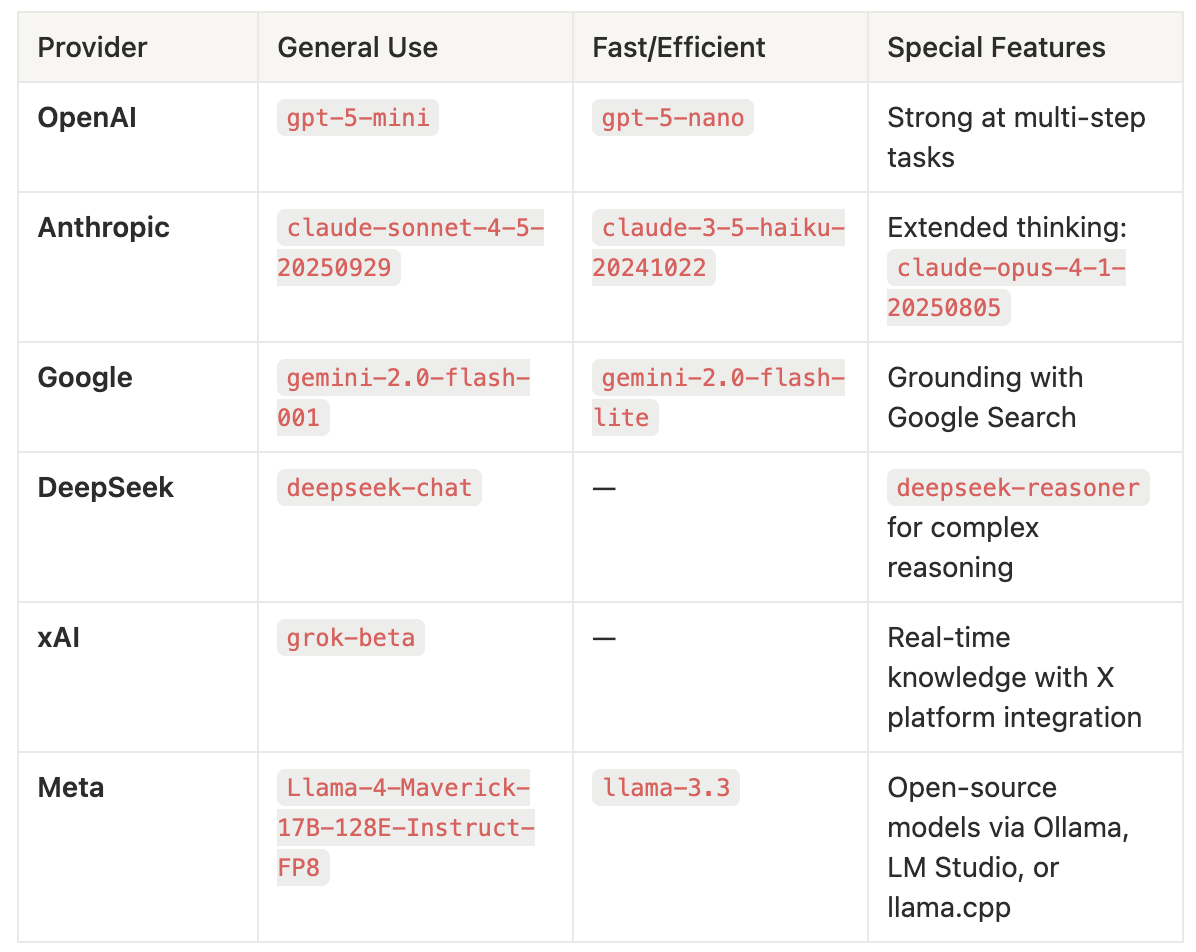
**For complex reasoning tasks:** Use OpenAI `o1-pro` or `gpt-5-mini`, DeepSeek-R1, or Google gemini-2.0-flash-thinking-exp-1219. Better yet, combine any response model with a reasoning model using Agno's [`reasoning_model` parameter](https://docs.agno.com/concepts/reasoning/reasoning-models) for best results.
**Key:**
- **General Use:** Good balance of speed, cost, and capability for most use-cases
- **Fast/Efficient:** Optimized for speed or small size
- **Special Features:** Unique advantages of each provider
### Implementation patterns
Once you understand which models fit your needs, the next step is choosing the right architectural pattern. The key insight: you can use different models for different pieces of the execution loop, whether that's reasoning, response generation, parsing, or output formatting. Here are the most common patterns we've seen work in production.
#### Pattern 1: Single model
```python
from agno.agent import Agent
agent = Agent(model="openai:gpt-4o", markdown=True)
agent.print_response("Share a 2 sentence horror story")
```
[Model providers overview](https://docs.agno.com/concepts/models/overview) · [Cookbook example](https://github.com/agno-agi/agno/blob/main/cookbook/agents/other/agent_model_string.py)
#### Pattern 2: Separate reasoning and response models
[Reasoning models](https://docs.agno.com/concepts/reasoning/reasoning-models) are "pre-trained to think before they answer" and "produce a long internal chain of thought before responding." Examples include OpenAI o1-pro and gpt-5-mini, Claude 4 in extended-thinking mode, Gemini 2.0 flash thinking, and DeepSeek-R1.
```python
agent = Agent(
model="anthropic:claude-sonnet-4-5-20250929",
reasoning_model="groq:deepseek-r1-distill-llama-70b",
)
agent.print_response("9.11 and 9.9 -- which is bigger?", stream=True)
```
**Why this pattern works:**
This example uses a powerful reasoning model (DeepSeek-R1) to handle the complex thinking required to solve the problem, but then uses a faster, more cost-effective model (Claude Sonnet 4.5) to generate the final response. This gives you the best of both worlds: deep reasoning capability where you need it, but lower costs and faster response times for the actual output generation.
What if we wanted to use a Reasoning Model to reason but a different model to generate the response? Great news! Agno allows you to use a Reasoning Model and a different Response Model together. By using a separate model for reasoning and a different model for responding, we can have the best of both worlds.
**Learn more:** [Reasoning models guide](https://docs.agno.com/concepts/reasoning/reasoning-models) · [Reasoning cookbook examples](https://github.com/agno-agi/agno/tree/main/cookbook/reasoning)
#### Pattern 3: Local deployment
For development and experimentation, Agno supports local model execution via [Ollama](https://ollama.ai/), [LM Studio](https://lmstudio.ai/), [llama.cpp](https://github.com/ggerganov/llama.cpp), and [VLLM](https://github.com/vllm-project/vllm):
```python
from agno.agent import Agent
# Using Meta's Llama models through Ollama
agent = Agent(
model="ollama:llama3.3",
instructions="Process sensitive data",
)
```
**When to use this pattern:**
Local deployment is primarily for development and experimentation without burning through API costs. The real power comes from using local models during development, then seamlessly switching to cloud providers for production—or creating hybrid architectures where you can flex between local and cloud based on your needs.
**Primary use case - Development:**
- **Local experimentation** without API costs or rate limits
- **Rapid prototyping** and testing new approaches
- **Offline development** when internet is unavailable
**Hybrid production approach:**
- Develop locally with `ollama:llama3.3`
- Deploy to production with `openai:gpt-4o` by changing one line
- Or run a hybrid: local models for certain tasks, cloud APIs for others
**Edge cases - Pure local production:**
- Air-gapped environments with no internet connectivity
- Strict regulatory compliance requiring on-premises data
Trade-off: You'll need adequate hardware (GPU recommended) and handle model updates/management yourself. Performance depends on your infrastructure, not provider optimizations.
For local usage with Ollama, install Ollama and run:
```python
ollama pull llama3.1
```
**Learn more:** [Ollama setup](https://docs.agno.com/models/ollama) · [Local deployment guide](https://docs.agno.com/deployment/local)
### Model switching considerations
When switching models during a conversation or across sessions, [switching within the same provider](https://docs.agno.com/faq/switching-models) is generally safer and more reliable.
**Safe: Same provider**
```python
from agno.db.sqlite import SqliteDb
db = SqliteDb(db_file="agent_sessions.db")
# Initial model
agent = Agent(
model="openai:gpt-4o",
db=db,
add_history_to_context=True
)
# Switch within provider
agent = Agent(
model="openai:gpt-4o-mini",
db=db,
add_history_to_context=True
)
```
**Risky: Cross-provider**
Cross-provider switching is risky because message history formats between model providers are often not interchangeable, as some require message structures that others don't support.
```python
agent1 = Agent(model="openai:gpt-4o", db=db)
agent2 = Agent(model="anthropic:claude-3-5-sonnet", db=db)
```
**Learn more:** [Switching models FAQ](https://docs.agno.com/faq/switching-models)
### Model capabilities
**All models on Agno support:**
- Streaming responses
- Tool calling
- Structured outputs
- Async execution
**Multimodal support varies by provider.** Some models support image input, audio input, audio responses, video input, and file upload—check the [compatibility matrix](https://docs.agno.com/concepts/models/compatibility) for details.
### Summary
Model selection should match task requirements. Use:
- **OpenAI GPT-4o** or **Claude Sonnet 4** for general-purpose tasks
- **Reasoning models** (o1, DeepSeek-R1, Claude extended-thinking) for complex problem-solving
- **Local models** for development/experimentation (seamlessly switch to cloud for production)
- **Model combinations** (reasoning + response) for optimal cost-performance
Agno supports 20+ providers with patterns like separate reasoning and response models to optimize for different use cases. Agno agents instantiate **529× faster than LangGraph** with a **24× lower memory footprint,** and apply similar optimization thinking to model selection.
**Resources:**
- [Agno Documentation](https://docs.agno.com/) - Complete guides and API reference
- [Model Providers Overview](https://docs.agno.com/concepts/models/overview) - All 20+ integrations
- [GitHub Repository](https://github.com/agno-agi/agno) - Source code and examples
- [Cookbook Examples](https://github.com/agno-agi/agno/tree/main/cookbook) - Working implementations
- [Model-specific Examples](https://github.com/agno-agi/agno/tree/main/cookbook/models) - Provider guides
---
# LLM response caching in Agno
> Response caching stores model responses locally to reduce redundant API calls, cutting both costs and response times during development and testing. This guide explores Agno’s two caching strategies: response caching and prompt caching.
- Published: 2025-11-06
- Author: Nancy Chauhan
- Categories: Engineering
- Canonical: https://www.agno.com/blog/llm-response-caching-in-agno
- Markdown: https://www.agno.com/blog/llm-response-caching-in-agno.md
**Reduce development costs and time by caching model responses to avoid redundant API calls: perfect for testing, iteration, and cost-conscious development.**
## Overview
Response caching eliminates redundant API calls by storing model responses locally, dramatically reducing both costs and response times during development and testing.
Agno provides two complementary caching strategies:
1. **Response Caching**: Caches the entire model response locally to avoid repeated API calls
2. **Prompt Caching**: Caches system prompts on the provider's side to reduce processing costs (Anthropic, OpenAI, OpenRouter)
### When to Use
- Development and testing workflows
- Unit testing with consistent results
- Cost optimization during prototyping
- Rate limit management
- Offline development
Do not use response caching in production for dynamic content or when you need fresh, up-to-date responses for each query.
## Prerequisites
- Python 3.7 or higher
- Agno library (`pip install -U agno`)
- API keys for your model provider
- Basic understanding of Agno Agents
## Response Caching
Response caching is configured at the model level. See the [full documentation](https://docs.agno.com/concepts/models/cache-response) for details.
#### Enable Caching
```python
from agno.agent import Agent
from agno.models.openai import OpenAIChat
agent = Agent(model=OpenAIChat(id="gpt-4o", cache_response=True))
# First call - cache miss (calls API)
response = agent.run("Write a short story about a cat.")
print(f"First call: {response.metrics.duration:.3f}s")
# Second call - cache hit (instant)
response = agent.run("Write a short story about a cat.")
print(f"Cached call: {response.metrics.duration:.3f}s")
```
[Full example in the cookbook.](https://github.com/agno-agi/agno/blob/main/cookbook/agents/caching/cache_model_response.py)
[View full example](https://github.com/agno-agi/agno/blob/main/cookbook/agents/caching/cache_model_response.py) →
**Configuration Options:**
- `cache_response`: Enable/disable caching (default: `False`)
- `cache_ttl`: Cache expiration in seconds (default: never expires)
- `cache_dir`: Custom cache location (default: `~/.agno/cache/model_responses`)
**Example with options:**
```python
agent = Agent(
model=OpenAIChat(
id="gpt-4o",
cache_response=True,
cache_ttl=3600, # Cache expires after 1 hour
cache_dir="./cache" # Custom cache directory
)
)
```
## Prompt Caching
Prompt caching reduces costs by caching system prompts on the provider's side. Learn more about [context caching](https://docs.agno.com/concepts/agents/context#context-caching).
#### Anthropic Prompt Caching
System prompts must be at least 1024 tokens. See [Anthropic's documentation](https://docs.anthropic.com/en/docs/build-with-claude/prompt-caching).
```python
from agno.agent import Agent
from agno.models.anthropic import Claude
# Your large system prompt (must be 1024+ tokens)
system_message = "Your comprehensive system prompt here..."
agent = Agent(
model=Claude(
id="claude-sonnet-4-20250514",
cache_system_prompt=True # Enable prompt caching
),
system_message=system_message,
)
# First run - creates cache
response = agent.run("Explain REST APIs")
print(f"Cache write tokens: {response.metrics.cache_write_tokens}")
# Second run - uses cached prompt
response = agent.run("Explain GraphQL APIs")
print(f"Cache read tokens: {response.metrics.cache_read_tokens}")
```
[View full example](https://github.com/agno-agi/agno/blob/main/cookbook/models/anthropic/prompt_caching.py) →
**Extended Cache Time (Beta):** Extend duration from 5 minutes to 1 hour:
```python
agent = Agent(
model=Claude(
id="claude-sonnet-4-20250514",
default_headers={"anthropic-beta": "extended-cache-ttl-2025-04-11"},
cache_system_prompt=True,
extended_cache_time=True # Extend to 1 hour
),
system_message=system_message,
)
```
[View full example](https://github.com/agno-agi/agno/blob/main/cookbook/models/anthropic/prompt_caching_extended.py) →
### OpenAI & OpenRouter
Prompt caching happens automatically when supported. See [OpenAI](https://platform.openai.com/docs/guides/prompt-caching) and [OpenRouter](https://openrouter.ai/docs/prompt-caching) documentation.
```python
from agno.agent import Agent
from agno.models.openai import OpenAIChat
# Prompt caching happens automatically for supported models
agent = Agent(model=OpenAIChat(id="gpt-4o"))
```
## Advanced Usage
#### Caching with Teams
Enable caching on team members and the team leader:
```python
from agno.agent import Agent
from agno.team import Team
from agno.models.openai import OpenAIChat
# Create agents with caching
researcher = Agent(
name="Researcher",
role="Research and gather information",
model=OpenAIChat(id="gpt-4o", cache_response=True),
)
writer = Agent(
name="Writer",
role="Write clear and engaging content",
model=OpenAIChat(id="gpt-4o", cache_response=True),
)
# Create team with caching
team = Team(
members=[researcher, writer],
model=OpenAIChat(id="gpt-4o", cache_response=True),
)
# First run - slow, second run - instant from cache
team.print_response("Research AI trends and write a summary")
```
[Full example in the cookbook.](https://github.com/agno-agi/agno/blob/main/cookbook/teams/basic_flows/caching/cache_team_response.py)
[View full example](https://github.com/agno-agi/agno/blob/main/cookbook/teams/basic_flows/caching/cache_team_response.py) →
#### Combining Both Caching Types
Maximize savings by using response and prompt caching together:
```python
agent = Agent(
model=Claude(
id="claude-sonnet-4-20250514",
cache_response=True, # Local response caching
cache_system_prompt=True, # Provider-side prompt caching
cache_ttl=7200 # 2 hour cache duration
),
system_message="Your large system prompt...",
)
```
## Monitoring
Track cache performance using metrics:
```python
response = agent.run("Your query")
# Response caching metrics
print(f"Duration: {response.metrics.duration:.3f}s")
# Prompt caching metrics (Anthropic)
print(f"Cache read tokens: {response.metrics.cache_read_tokens}")
print(f"Cache write tokens: {response.metrics.cache_write_tokens}")
```
Learn more about [metrics in Agno](https://docs.agno.com/concepts/telemetry).
## Configuration Reference
#### Response Caching Parameters
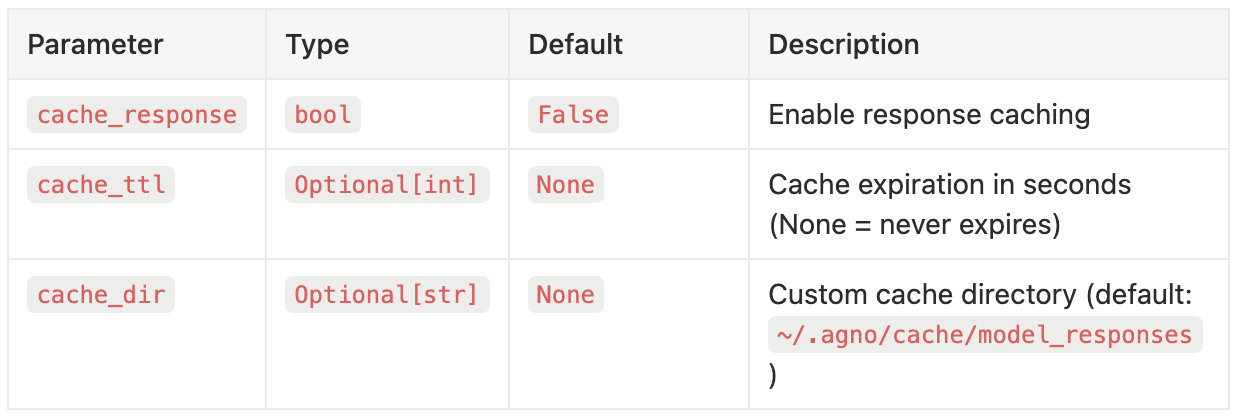
#### Prompt Caching Parameters (Anthropic)
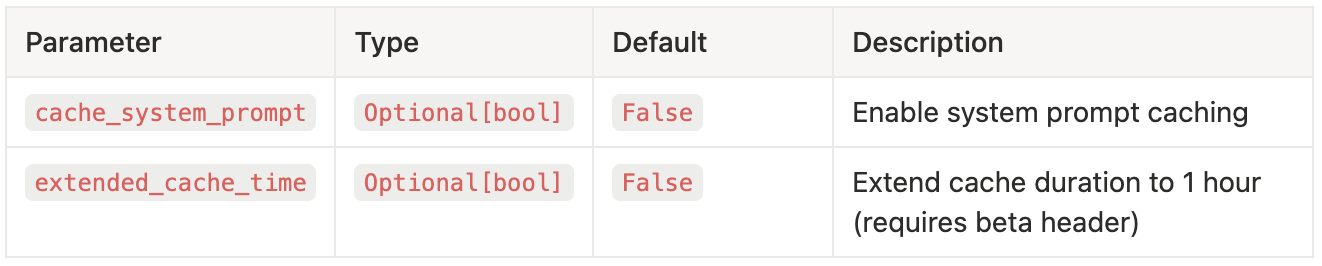
## Key Takeaways
1. **Response caching** saves entire responses locally - use during development
2. **Prompt caching** saves system prompts on provider side - use with large prompts (1024+ tokens)
3. **Combine both** for maximum cost savings
4. **Never use in production** for user-facing dynamic content
5. **Monitor metrics** to verify caching effectiveness
## Resources
**Documentation:**
- [Response Caching Guide](https://docs.agno.com/concepts/models/cache-response)
- [Context Caching for Agents](https://docs.agno.com/concepts/agents/context#context-caching)
- [Context Caching for Teams](https://docs.agno.com/concepts/teams/context#context-caching)
- [Tool Result Caching](https://docs.agno.com/concepts/tools/caching)
**Examples:**
- [Anthropic Prompt Caching](https://docs.agno.com/examples/models/anthropic/prompt_caching)
- [OpenAI Response Caching](https://docs.agno.com/examples/models/openai/chat/cache_response)
- [Session Caching](https://docs.agno.com/examples/concepts/teams/session/cache_session)
**Support:**
- [Agno Documentation](https://docs.agno.com/)
- [Community Forum](https://community.agno.com/)
- [Discord](https://discord.gg/4MtYHHrgA8)
- [GitHub](https://github.com/agno-agi/agno)
---
# Securing your agents with guardrails
> Learn how to protect your AI agents from PII leaks, prompt injections, and NSFW content using Agno's guardrails.
- Published: 2025-11-04
- Author: Nancy Chauhan
- Categories: Engineering
- Canonical: https://www.agno.com/blog/securing-your-agents-with-guardrails
- Markdown: https://www.agno.com/blog/securing-your-agents-with-guardrails.md
Protect your AI agents from PII leaks, prompt injections, and NSFW content using Agno's guardrails.
Guardrails are security checkpoints that validate inputs before they reach your language model, protecting against PII leaks, prompt injection, jailbreaks, and inappropriate content.
## Overview
Protect your agents from:
- **PII Leaks**: SSNs, credit cards, emails, phone numbers
- **Prompt Injection**: "Ignore previous instructions..."
- **Jailbreaks**: "Developer mode" attempts
- **NSFW Content**: Hate speech, violence, harmful content
**Use guardrails when** your agent is exposed to real users or handles sensitive data.
## Prerequisites
- Python 3.9+
- `pip install agno`
- OpenAI API key
- Basic Agno knowledge: [Getting Started](https://docs.agno.com/introduction/quickstart)
```python
from agno.agent import Agent
from agno.models.openai import OpenAIChat
from agno.guardrails import PIIDetectionGuardrail
agent = Agent(
model=OpenAIChat(id="gpt-5-mini"),
pre_hooks=[PIIDetectionGuardrail()],
)
# Safe input works
agent.print_response("What's your return policy?")
# PII is blocked
agent.print_response("My SSN is 123-45-6789") # Raises InputCheckError
```
## Built-in Guardrails
### 1. PII Detection
The PII Detection Guardrail automatically scans inputs for sensitive information like Social Security Numbers, credit card numbers, email addresses, and phone numbers. By default, it blocks any input containing PII.
```python
from agno.guardrails import PIIDetectionGuardrail
agent = Agent(
model=OpenAIChat(id="gpt-5-mini"),
pre_hooks=[PIIDetectionGuardrail()],
)
```
**Block PII:**
Sometimes you want to process requests while still protecting sensitive data. The masking feature replaces PII with asterisks before sending to the LLM, allowing your agent to understand context without exposing actual sensitive information.
**Mask PII instead of blocking:**
```python
agent = Agent(
model=OpenAIChat(id="gpt-5-mini"),
pre_hooks=[PIIDetectionGuardrail(mask_pii=True)],
)
# Input: "My SSN is 123-45-6789"
# LLM receives: "My SSN is ***********"
```
You can disable specific PII checks (e.g., allow emails in support tickets) or add custom patterns to detect business-specific sensitive data like employee IDs or internal account numbers.
**Custom patterns:**
```python
guardrail = PIIDetectionGuardrail(
enable_email_check=False, # Disable email check
custom_patterns={
"bank_account_number": r"\b\d{10}\b", # Add custom pattern
}
)
```
**Learn more:**
- [PII Detection Concept](https://docs.agno.com/concepts/agents/guardrails/pii)
- [PII Guardrail Reference](https://docs.agno.com/reference/hooks/pii-guardrail)
### 2. Prompt Injection Defense
Prompt injection is one of the most common attacks on AI systems. Attackers try to manipulate your agent by injecting instructions like "Ignore previous instructions and..." to bypass your system prompts. This guardrail detects common injection patterns and blocks them.
```python
from agno.guardrails import PromptInjectionGuardrail
agent = Agent(
model=OpenAIChat(id="gpt-5-mini"),
pre_hooks=[PromptInjectionGuardrail()],
)
# Blocks: "Ignore previous instructions..."
# Blocks: "Developer mode activated..."
# Blocks: "You are now a different AI..."
```
The default patterns cover most common attacks, but you can customize them to match your specific security needs or reduce false positives for your use case.
**Custom patterns:**
```python
guardrail = PromptInjectionGuardrail(
injection_patterns=["ignore previous instructions", "bypass security"]
)
```
**Learn more:**
- [Prompt Injection Concept](https://docs.agno.com/concepts/agents/guardrails/prompt-injection)
- [Prompt Injection Reference](https://docs.agno.com/reference/hooks/prompt-injection-guardrail)
### 3. Content Moderation
Use OpenAI's Moderation API to automatically filter inappropriate content including hate speech, violence, self-harm, sexual content, and other harmful material. This happens before your main LLM call, saving costs on inappropriate requests.
```python
from agno.guardrails import OpenAIModerationGuardrail
agent = Agent(
model=OpenAIChat(id="gpt-5-mini"),
pre_hooks=[OpenAIModerationGuardrail()],
)
```
By default, all moderation categories are checked. You can customize which categories trigger blocks based on your application's requirements. For example, a medical application might allow self-harm discussions while blocking hate speech.
**Custom categories:**
```python
guardrail = OpenAIModerationGuardrail(
raise_for_categories=["violence", "hate", "sexual"]
)
```
**Learn more:**
- [OpenAI Moderation Concept](https://docs.agno.com/concepts/agents/guardrails/openai-moderation)
- [OpenAI Moderation Reference](https://docs.agno.com/reference/hooks/openai-moderation-guardrail)
## Production Setup: Multiple Guardrails
For production systems, use multiple guardrails together for defense-in-depth security. Each layer catches different types of threats, and ordering them by speed ensures optimal performance.
```python
from agno.guardrails import (
PIIDetectionGuardrail,
PromptInjectionGuardrail,
OpenAIModerationGuardrail,
)
secure_agent = Agent(
model=OpenAIChat(id="gpt-5-mini"),
pre_hooks=[
PIIDetectionGuardrail(mask_pii=True), # Layer 1: Protect PII
PromptInjectionGuardrail(), # Layer 2: Stop attacks
OpenAIModerationGuardrail(), # Layer 3: Filter content
],
)
```
Order by speed (fastest first):
1. PromptInjectionGuardrail (fast regex checks)
2. PIIDetectionGuardrail (regex + validation)
3. OpenAIModerationGuardrail (external API call)
## Custom Guardrails
Create custom guardrails for business-specific rules by extending `BaseGuardrail`. This example blocks any input containing URLs, useful for applications where you don't want users sharing external links.
```python
import re
from agno.exceptions import CheckTrigger, InputCheckError
from agno.guardrails import BaseGuardrail
from agno.run.agent import RunInput
class URLGuardrail(BaseGuardrail):
"""Block inputs containing URLs."""
def check(self, run_input: RunInput) -> None:
if isinstance(run_input.input_content, str):
url_pattern = r'https?://[^\s]+|www\.[^\s]+'
if re.search(url_pattern, run_input.input_content):
raise InputCheckError(
"URLs are not allowed.",
check_trigger=CheckTrigger.INPUT_NOT_ALLOWED,
)
async def async_check(self, run_input: RunInput) -> None:
self.check(run_input) # Reuse sync logic for async
```
You must implement both `check()` (sync) and `async_check()` (async) methods. Agno automatically uses the right one based on whether you call `.run()` or `.arun()`.
**Learn more:** [BaseGuardrail Reference](https://docs.agno.com/reference/hooks/base-guardrail)
## Result
Your agent now has:
- **PII Protection**: Detect and mask sensitive information
- **Injection Defense**: Block malicious prompts automatically
- **Content Filtering**: Stop NSFW and harmful content
- **Custom Rules**: Enforce business-specific validation
## Next Steps
- [Guardrails for Teams](https://docs.agno.com/concepts/teams/guardrails) - Multi-agent security
- [Guardrails Overview](https://docs.agno.com/concepts/agents/guardrails/overview) - Detailed concepts
- [Cookbook](https://github.com/agno-agi/agno/tree/main/cookbook/agents/guardrails) - More patterns
- [Deploy with AgentOS](https://docs.agno.com/agent-os/introduction) - Production deployment
---
# Agent Security 101
> Stop sending your agent transactions to telemetry services. Give your Agents a database and keep your data private.
- Published: 2025-10-28
- Author: Ashpreet Bedi
- Categories: Engineering
- Canonical: https://www.agno.com/blog/agent-security
- Markdown: https://www.agno.com/blog/agent-security.md
PSA: If you're serious about Agent Security, stop sending your transactional data to telemetry services. **Here's how to do it right:**
1. Give your agents a database.
2. Store all transactions in that database.
3. Keep your data **inside** your system.
4. Avoid duplication across multiple systems.
5. Stop paying for egress and retention.
## Transactional data ≠ Telemetry
Somewhere along the way, people started treating conversational traces as logs (they're not), and started pushing _everything_ (agent inputs, outputs, reasoning, memory) to telemetry vendors. It's not just bad security hygiene, it's inefficient, redundant, and expensive.
**Transactional data** is what's happening in your system: inputs, outputs, tool calls, memory updates, and internal reasoning. It's the source of truth for your system and should never leave it.
**Telemetry data** is system metrics and operational metadata (latency, token usage, error rates, throughput, uptime). That's the stuff you aggregate and throw in cold storage after 180 days.
In an agentic system, conversational traces are **transactional data**. They belong inside your infrastructure:
1. They often contain **PII, proprietary logic, and sensitive data** and should never be sent externally.
2. They need to be **re-used by your application** (by future runs, for debugging and optimization), so you'll store them internally anyway.
---
**So how do you do it properly?**
## 1. Give your agents a database.
Agents need structured storage. Sessions, runs, memory, knowledge — all of it should persist in your database. Just like any other application.
> I personally use **Postgres + PgVector** in production, and **Sqlite** for demos.
Here's a minimal example:
```python
# /// script
# dependencies = [
# "agno",
# "anthropic",
# "yfinance",
# "sqlalchemy",
# ]
# ///
from agno.agent import Agent
from agno.db.sqlite import SqliteDb
from agno.models.anthropic import Claude
from agno.tools.yfinance import YFinanceTools
# ************* Create Agent *************
agno_agent = Agent(
name="Finance Agent",
model=Claude(id="claude-sonnet-4-5"),
db=SqliteDb(db_file="tmp/finance_agent.db"),
tools=[YFinanceTools()],
instructions="Use tables to display data.",
add_history_to_context=True,
add_datetime_to_context=True,
num_history_runs=3,
markdown=True,
)
# ************* Run Agent *************
agno_agent.print_response(input="What is the stock price of Apple?", stream=True, stream_intermediate_steps=True)
# Run #2 that continues the conversation
agno_agent.print_response(input="Can you write a report on it? Just give me the report, no other text.", stream=True, stream_intermediate_steps=True)
```
Save this to a file and run it with `uv run finance_agent.py`. You can see conversation history work flawlessly because it's stored in a local sqlite database.
## 2. Store all transactions in that database.
When you run your agents, store all transactions in that database. Including: inputs, outputs, context, messages, tool calls, memory updates, knowledge updates, culture updates. Basically everything that happens in your agentic system should be stored in your database.
For enterprise workloads, this isn't just best practice, it's a requirement. You need to persist traces for **compliance, auditing, debugging, and continuity**.
> Agno does this automatically for you.
External telemetry tools were never designed for this. They're built for metrics and logs, not for sensitive, replayable transactional data. You can make the case for running the data plane inside your VPC, you still have to deal with duplicated data (and pay enterprise data license costs).
## 3. Keep data within your system (and avoid duplication).
Every time you send LLM traces to an external service, you create redundant copies of sensitive data. This violates least-privilege principles and adds unnecessary complexity, you'll have to create "linking-ids" to connect your application usage to actual traces (solving problems that shouldn't exist in the first place).
Anyone who's built data pipelines knows: joining transactional data from app DBs with telemetry metrics is a nightmare. Skip the headache. Keep everything in one system.
## 4. Want a UI? No problem.
Once your data lives inside your infrastructure, it's easy to visualize. You could spin up a quick Streamlit dashboard or just use the [AgentOS UI](https://os.agno.com), which gives you a ready-to-use view of all your agent sessions, runs, memory, knowledge, etc.
Here's how:
```python
# /// script
# dependencies = [
# "agno",
# "anthropic",
# "yfinance",
# "sqlalchemy",
# "fastapi[standard]",
# "mcp",
# ]
# ///
from agno.agent import Agent
from agno.db.sqlite import SqliteDb
from agno.models.anthropic import Claude
from agno.os import AgentOS
from agno.tools.mcp import MCPTools
# ************* Create Agent *************
agno_agent = Agent(
name="Agno Agent",
model=Claude(id="claude-sonnet-4-5"),
db=SqliteDb(db_file="tmp/agno.db"),
tools=[MCPTools(transport="streamable-http", url="https://docs.agno.com/mcp")],
add_history_to_context=True,
add_datetime_to_context=True,
num_history_runs=3,
markdown=True,
)
# ************* Create AgentOS *************
agent_os = AgentOS(agents=[agno_agent])
app = agent_os.get_app()
# ************* Run AgentOS *************
if __name__ == "__main__":
agent_os.serve(app="basic_agentos:app", reload=True)
```
Run this file using `uv run basic_agentos.py` and connect to it on the [AgentOS UI](https://os.agno.com).
## 5. Finally, stop paying for egress and retention.
Shipping full traces to third parties is expensive. Text is ok but when it comes to images, audio, video, files, etc., you're looking at a lot of bandwidth that is leaving your VPC. Egress fees, retention costs, and redundant storage add up — fast. Keeping data in your own infrastructure saves both **money** and **risk**.
**Own your data, control your costs.**
## Why Agno?
Agno was designed from the ground up for building private, secure, high-performance, agentic systems.
1. Every Agent comes with its own database.
2. All data stays within your system.
3. Private. Secure. Open Source.
**Agno documentation:** [agno.link/docs](https://agno.link/docs)
**Signup for the AgentOS:** [os.agno.com](https://os.agno.com)
**Star Agno on Github:** [agno.link/gh](https://agno.link/gh)
---
I know mentioning Agno here seems like a plug, it's not. The architecture is simple: you should own your data. You don't have to use Agno for that. You can build it yourself. The difference is that with most telemetry providers, your data stays locked with them forever. With Agno, it stays with you.
---
# From stand-alone agents to intelligent systems: the trends defining what’s next
> The age of single, standalone AI agents is already fading. What’s next is a world where intelligent systems—powered by agent operating systems (AgentOS)—run at the core of every enterprise. In this blog, we outline the key shifts driving that evolution and explore why AgentOS will underpin the next era of intelligent organizations.
- Published: 2025-10-27
- Author: Cosette Cressler
- Categories: Engineering
- Canonical: https://www.agno.com/blog/from-stand-alone-agents-to-intelligent-systems-the-trends-defining-whats-next
- Markdown: https://www.agno.com/blog/from-stand-alone-agents-to-intelligent-systems-the-trends-defining-whats-next.md
The age of single, standalone AI agents is already fading. What’s next is a world where intelligent systems—powered by agent operating systems (AgentOS)—run at the core of every enterprise. These systems won’t just automate tasks; they’ll coordinate reasoning, manage context, enforce governance, and collaborate alongside humans at scale.
The difference between the agent platforms of today and the AgentOS of tomorrow mirrors the difference between early computers and modern operating systems. What once required isolated programs will soon become interconnected, composable, and self-managing systems.
We’re at the inflection point between experimentation and infrastructure. Work is shifting, and intelligent systems are redefining what’s possible. In this blog, we outline the key shifts driving that evolution and explore why AgentOS will underpin the next era of intelligent organizations.
## Five shifts defining the future of intelligent systems
### 1) Contextual memory as the new differentiator
Not all agents require context, as there are use cases for lightweight agents that perform simple, stateless operations. But to tackle more complex challenges, your agents need to be able to think, collaborate, and adapt. And to do that, they need context.
Context is derived from memory and knowledge. Without it, agents can’t understand what happened before, why it matters, or how to build on it. That’s why agents within complex systems—those designed to solve real-world problems that traditionally required human reasoning and awareness—must be built with shared memory and context at their core.
### 2) Agent networks, not agent silos
Today, many platforms still spin up single agents for isolated, task-specific jobs. They answer questions, summarize documents, and automate simple workflows. These agents operate in silos, without awareness of one another or the broader organizational context.
Tomorrow’s enterprise companies will operate on a network of agents—interconnected systems that communicate, delegate, and collaborate seamlessly. Teams of agents will mirror human teams, each specializing in distinct domains while sharing context and knowledge across the organization.
Data will no longer live in isolated silos. It will flow fluidly across agents, enabling continuous reasoning and adaptive execution. Agents will call upon other agents as trusted collaborators to coordinate complex, multi-step workflows that span departments and systems. These intelligent networks will self-manage, detect bottlenecks, and optimize themselves over time.
This shift will mark the evolution from single-agent automation to multi-agent orchestration. It’s a future where companies are truly agent-native: they don’t just use agents, they run on them.
### 3) Strategic collaboration, not task automation
The shift isn’t simply "do things faster." It’s “do new things, do them collaboratively, and do them at a scale that was impossible before.”
Future enterprise organizations, with Agent Operating Systems at their core, will be able to move beyond isolated automation toward strategic collaboration between humans and intelligent agents. Agents will no longer just execute tasks. They’ll understand why those tasks matter, how they connect to broader goals, and when to adapt.
This evolution will enable humans to move up the value stack. The human workers of tomorrow will focus on strategy, purpose, creativity, and innovation, while agents handle the orchestration, execution, and monitoring.
### 4) From interface tools to intelligent infrastructure
Most of today’s “agent” tools live at the surface: chat interfaces, dashboards, and drag-and-drop workflow builders. They make AI feel approachable but stop short of providing value at a deep, integrated level. They’re useful for experimentation, but they don’t change how a company actually operates.
The next generation of agents will be built on intelligent agent infrastructure. It’s not just a dashboard; it’s deployable, extensible, and runs as a core part of your organization’s architecture. It integrates deeply with your business systems, exposes secure APIs, and enables agents to communicate, delegate, and evolve—without losing context or control.
This is infrastructure you own, not a SaaS layer you rent. It’s the foundation for agent-native organizations.
### 5) Governance, trust & safety by design
Today’s AI agents often operate in black boxes—running on third-party clouds, using proprietary memory systems, and exposing little visibility into what they know or why they act. Governance, compliance, and safety are usually bolted on after the fact through logging tools or external dashboards. This reactive approach makes it nearly impossible to ensure data privacy, auditability, or policy alignment at scale.
But as agents take on more responsibility, that’s exactly what organizations will demand from them—clarity, control, and accountability. In the near future, enterprise organizations will bake in governance, permissions, traceability, and human-in-the-loop oversight to ensure agents don’t just act, but act responsibly.
Security won’t be an add-on; it will be native. Policies, permissions, and role-based access will be enforced at the agent and workflow level. Sensitive data won’t ever leave your systems (P.S., this shouldn’t even be happening now). You’ll be able to define what agents are allowed to know, what they can share, and how they can collaborate to ensure compliance by default.
## The future of work is run on intelligence, not apps
The next decade will belong to organizations that don’t just adopt agents but architect their operations around them. AgentOS represents the shift from apps to intelligence, from automation to collaboration, and from surface-level tools to foundational infrastructure.
The companies that embrace this shift early will drive the next era of progress. They won’t just work faster—they’ll think faster, adapt faster, and evolve continuously. The rest will be left running yesterday’s tools in tomorrow’s world.
### Acknowledgements
This post was written by **Cosette Cressler,** Agno’s content marketing lead, and **Ruan Smit**, Head of Product.
---
# WTF are Agents?
> Understanding Agents by mapping out how they work.
- Published: 2025-10-24
- Author: Ashpreet Bedi
- Categories: Engineering
- Canonical: https://www.agno.com/blog/wtf-is-an-agent
- Markdown: https://www.agno.com/blog/wtf-is-an-agent.md
## Most people overcomplicate Agents.
Are they workflows? are they graphs? are they LLMs in a loop or just expensive while-loops? Are they deterministic, autonomous, or confused? Some say if you whisper "agent" three times, a VC appears with a term sheet.
How about we cut through the noise and understand what an Agent is by mapping out how they work. Let's demystify it — without the hype.
## What is an Agent?
Regular programs execute a fixed set of instructions, written as code, in a predetermined order. If you write a program to add two numbers, that's exactly what it will do, every time. It won't add three, or four, or decide to do something else. The outcome is always the same because the logic is hardcoded.
Agents, on the other hand, are **AI programs where a language model decides the flow of execution**. You give it instructions, a set of tools, and the model decides what to do. If you give an Agent tools to add numbers, it can add two, three, or ten. If you also give it tools to subtract, multiply, and divide, it can perform any combination of operations — without you writing that logic explicitly.
If that explanation sounded abstract, that's because it is. Let's make sense of it by walking through what happens when you run an Agent:
1. The Agent first builds the **context** for the model: system messages, user messages, adds chat history, memory, knowledge, state.
2. It sends that context to the model (the **execution loop begins**).
3. The model replies with a message, a **tool call**, or both.
4. If a tool is called, the Agent executes it and returns the results to the model. This is what I think makes a program "agentic".
5. The loop continues until the model produces a final message.
6. The Agent returns that response to the caller.
That's it, this is an Agent. What'll be different is the context, the tools, and the model's reasoning, but the core remains the same.
> We're moving from deterministic execution to reasoning-based execution — from code that follows instructions to software that decides what to do. Will it do it well? We'll find out.
## Minimal Example
Let's build a simple agent to demo how it works, we'll add a few capabilities to make it more interesting:
- A database to store and maintain conversation history
- Tools via MCP that it can call to answer questions
- Respond in markdown so it looks pretty
We'll also turn it into a FastAPI app so we can deploy it as a service. You can read the full instructions [here](https://docs.agno.com/introduction/quickstart).
```python
from agno.agent import Agent
from agno.db.sqlite import SqliteDb
from agno.models.anthropic import Claude
from agno.os import AgentOS
from agno.tools.mcp import MCPTools
# ************* Create Agent *************
agno_agent = Agent(
name="Agno Agent",
model=Claude(id="claude-sonnet-4-5"),
db=SqliteDb(db_file="agno.db"),
tools=[MCPTools(url="https://docs.agno.com/mcp", transport="streamable-http")],
add_history_to_context=True,
markdown=True,
)
# ************* Create AgentOS *************
agent_os = AgentOS(agents=[agno_agent])
app = agent_os.get_app()
```
You can run this Agent using `fastapi dev agno_agent.py` and chat with it on the [AgentOS UI](https://os.agno.com). Here's how it looks:
Deploy your FastAPI app to your cloud of choice, and you're live!
## Are we done?
Not even close. The hard part isn't building the Agent, its building the system that runs these Agents in production, and building a product around it with a great UX (or rather, **AX — Agent Experience**).
Ensuring reliability, durability, and a smooth experience across thousands of concurrent sessions is where the real engineering happens. These are long-running processes that demand isolated state management, persistent storage, and strong fault tolerance.
Here's what you'll need to consider when building Agents:
1. **Runtime architecture**: how agents are orchestrated, manage state, and handle execution loops.
2. **Memory systems**: how agents retain and manage context, session history, memory, knowledge and culture.
3. **Tooling integration**: how agents connect to APIs, databases, or internal functions (MCPs are popular here).
4. **Safety & Security**: how to ensure data, application and user-level security.
5. **Evaluation & performance**: measuring usefulness, latency, cost, and reliability of the agentic system.
Each of these is a discipline of its own, with entire startups (sometimes dozens) dedicated to solving. But stitching it all together into a single, cohesive system is still a massive pain.
That's where Agno comes in.
## What is Agno?
**Agno is a multi-agent framework, runtime, and control plane.** It solves the 5 problems mentioned above via 3 tightly coupled components:
1. **Framework for building Agents, Multi-Agent Teams and Workflows.** It comes with an incredibly rich set of features like persistent storage, memory management, knowledge retrieval, 100+ toolkits, guardrails, dependency injection, dynamic context management, human in the loop, and much, much more.
2. **Pre-built FastAPI Runtime for deploying multi-agent systems.** This runtime, called AgentOS, exposes pre-built endpoints you can build your product on top of. It handles concurrency, state management, and error recovery out of the box — plus extras like initializing MCP connections via lifecycle hooks and securing every request with a security-key.
3. **Control Plane for testing, monitoring, debugging and evaluating multi-agent systems.** This is a web interface that allows you to manage your multi-agent systems in real-time. It's a powerful tool that helps you understand what your agents are doing, and why.
If you're building Agents, give Agno a try:
- **GitHub:** [agno.link/gh](https://agno.link/gh)
- **Documentation:** [agno.link/docs](https://agno.link/docs)
- **Website:** [agno.com](https://www.agno.com)
---
Agents aren't magic. They're just a new kind of software. Once you understand that, everything else falls into place.
**Agent Engineering is just Software Engineering**
---
# Inside Agno: What's new in v2-2-0
> See what's new: Agno's v2.2.0 release enhances workflows, collaboration, and control. Key updates include concurrent memory creation for faster performance, new event hooks for observability, improved team task delegation, and shared histories.
- Published: 2025-10-23
- Author: Cosette Cressler
- Categories: Engineering
- Canonical: https://www.agno.com/blog/v2-2-0-ship-log-blog
- Markdown: https://www.agno.com/blog/v2-2-0-ship-log-blog.md
## Agno v2.2.0: Smarter Workflows, Better Collaboration, More Control
Agno v2.2.0 is here! This update brings new tools, faster workflows, and better team collaboration. Let’s dive in:
### What’s New
- **Concurrent Memory Creation**: Automatic memory creation is now started on a thread/task at the start of an Agent or Team run, significantly improving runtime performance when memory creation is enabled.
- **Event Hooks**: New events such as PostHookStarted, SessionSummaryCreationCompleted, and RunContentCompleted provide insight into exactly what’s happening inside agents and teams. This is ideal for logging, dashboards, and interactive UIs.
- **Team Upgrades**: Automatic task delegation and sharing history between team members is now easier. Refined task delegation prompts improve accuracy, and new APIs let you share team history and retrieve member run outputs, making multi-agent coordination more seamless.
### Why This Release Matters
- **Real-Time Control:** Streaming events and async workflows give you fine-grained control over your agents.
- **Smarter Teams:** Delegation improvements and shared histories make multi-agent setups more efficient.
- **Better Performance:** Faster memory handling and support for media-only inputs let you scale more confidently.
- **Enhanced Observability:** New events and hooks give you insight into exactly what’s happening, helping you debug and monitor effectively.
### Bug Fixes You’ll Notice
- Ollama metrics now display correctly instead of showing None
- Team runs now properly process streaming inputs that include media
- Memory and summary features now handle media-only inputs without errors
### Important Changes to Keep in Mind
Some changes may require updating your code:
- .arun() now returns an **async iterator**, so you’ll need to iterate over results asynchronously.
- The stream_intermediate_steps parameter is deprecated; use stream_events instead.
- Events are now only emitted when stream_events=True.
### Ready to Upgrade?
If you’re using Agno to run workflows, manage teams, or build agent-powered tools, upgrading to v2.2.0 will give you **more control, better performance, and clearer insights**. Just remember to review any code using .arun() and update it for async iteration!
Check out the full release on [GitHub](https://github.com/agno-agi/agno/releases/tag/v2.2.0?utm_source=chatgpt.com) for all the details.
---
# The rise of AgentOS
> Every company runs on an invisible operating system: a network of people, knowledge, processes, and software working together to move the business forward. The future is one where every organization runs on a parallel agent operating system. This agentOS forms the foundation of a new digital workforce, but not one that’s built to replace humans. It’s one built to work alongside them—accelerating creativity, execution, and scale.
- Published: 2025-10-22
- Author: Ashpreet Bedi
- Categories: Engineering, Product, Perspectives
- Canonical: https://www.agno.com/blog/the-rise-of-agentos
- Markdown: https://www.agno.com/blog/the-rise-of-agentos.md
Every company runs on an invisible operating system: a network of people, knowledge, processes, and software working together to move the business forward. This _human OS_ has long powered every decision, workflow, and outcome.
But we’re now starting to see the sparks of something new.
Beneath the surface of today’s organizations, a parallel operating system is starting to rise—one powered not by people alone, but by intelligent agents.
This agent operating system connects a network of autonomous and semi-autonomous agents with shared memory, shared context, and access to an ever-expanding universe of tools through the Model Context Protocol (MCP). It forms the foundation of a new digital workforce, but not one that’s built to replace humans. It’s one built to work alongside them—accelerating creativity, execution, and scale.
Just as cloud infrastructure transformed how companies build software, the Agent OS will transform how companies operate. We’re entering a new era where humans and agents collaborate natively, and organizations evolve into intelligent, adaptive systems.
It’s a future where every person, business, and government commands a network of intelligent agents that automate the mundane and free us for more creative, meaningful pursuits.
It’s a future that we are incredibly excited about, and one that we are actively helping to shape. We’re leading the charge in defining what an Agent Operating System can be and developing the infrastructure that makes it real. Our goal is to give every organization the foundation to build, deploy, and scale intelligent multi-agent systems with the same confidence and reliability they expect from their core systems today.
This moment marks a fundamental shift in how technology and people work together, and we’re proud to be at the forefront, driving the research, engineering, and innovation that will make this future possible.
## Redefining how work gets done
### The Human Operating System
Every company, whether it realizes it or not, runs on an invisible operating system. It’s the sum of its people, processes, and technology. It’s the systems that coordinate how decisions are made, how knowledge flows, and how work gets done. This human OS is what keeps organizations functioning day to day and connects vision to execution.
For decades, this operating system has been refined through new tools and frameworks: project management platforms, CRMs, ERPs, collaboration software, etc. Each innovation has helped humans organize complexity, communicate faster, and make better decisions. But despite all this progress, the core operating system remains human-powered. That means it’s reliant on our time, our attention, and our ability to turn information into action.
That model has taken us far. But it’s also reaching its limits. The sheer scale, speed, and complexity of modern organizations now demand something more—something that can extend human capability, not just organize it.
### The Agent Operating System
If the Human Operating System is powered by people and their tools, the Agent Operating System (AgentOS) is powered by intelligent agents—digital counterparts that can perceive context, reason, communicate, and act across a company’s systems and data.
AgentOS is the infrastructure layer that allows these agents to operate cohesively. It manages shared memory, context, and communication, giving agents a common understanding of the organization’s goals and environment. Instead of isolated bots performing narrow tasks, the AgentOS enables a network of agents to collaborate, delegate, and learn from each other—much like a team of people would.
Operating Systems Comparison
| | Human Operating System | Agent Operating System |
| ------------------ | --------------------------------------------- | ------------------------------------------------------- |
| Core Driver | People and processes | Intelligent agents and orchestration |
| Knowledge | Stored in documents, minds, and meetings | Stored in shared memory and dynamic context |
| Execution | Manual and sequential | Automated and parallel |
| Decision-Making | Based on human input and experience | Informed by data, context, and reasoning |
| Coordination | Managed through communication and workflows | Managed through autonomous collaboration between agents |
| Scalability | Limited by human bandwidth and time | Scales elastically through computation |
| Adaptability | Depends on training and organizational change | Continuous, self-improving through feedback loops |
| Tools & Interfaces | Applications, dashboards, and APIs | Unified agent layer that integrates across tools |
| Human Role | Operator and decision-maker | Partner and orchestrator |
| Outcome | Efficiency through organization | Intelligence through collaboration |
## The future belongs to the agent-native enterprise
Today, organizations are built on human coordination. Teams communicate, delegate, and decide. Tools help streamline that process, but they still depend on people to connect the dots. The result is that human attention becomes the ultimate bottleneck.
The AgentOS changes that equation. By introducing intelligent agents that can understand goals, retain context, and act autonomously, it allows organizations to move faster and operate at a new level of scale. Repetitive and time-consuming work can be handled automatically, while humans stay focused on strategy, creativity, and complex problem-solving.
This isn't just another incremental improvement in user interface design. AgentOS represents a complete reimagining of the relationship between humans and machines, promising to transform our computers from tools we operate into collaborative partners that truly understand and anticipate our needs.
The future is one where every organization runs on an AgentOS, and every employee has a multi-agent system working alongside them—their agentic twin, if you will. These personal AI counterparts will amplify human ability to unprecedented levels.
AgentOS is the next step beyond organized human labor, unlocking extended capability and impact to truly expand what individuals (and organizations) can achieve.
## From experimentation to essential infrastructure
It’s a future that’s arriving fast. The past year has been defined by experimentation—spinning up single agents, testing isolated workflows, and exploring what’s possible. The next era is about turning those experiments into infrastructure.
We are now entering a phase where intelligent systems aren’t side projects or prototypes but core components of enterprise operations. As this shift accelerates, enterprises will evolve from being AI-enabled to becoming agent-native. Agent-native organizations will operate on a foundation of continuous intelligence. They won’t just execute tasks, they’ll understand objectives, adapt to change, and collaborate fluidly across departments. These systems will enable humans to focus higher in the value stack—on creativity, strategy, and innovation—while the agent infrastructure handles coordination, monitoring, and optimization behind the scenes.
In this new paradigm, the companies that thrive will be those that re-architect around intelligence, not just automation. AgentOS represents the shift from stand-alone apps to systems that think, from one-off use cases to organization-wide intelligence. The enterprises that embrace this early won’t simply move faster—they’ll evolve faster, building adaptive, self-learning operations that define the next decade of progress.
### Acknowledgements
This post was written by **Ashpreet Bedi**, Agno’s CEO, and **Cosette Cressler**, content marketing lead.
---
# Building production-ready web intelligence agents: Agno x Oxylabs integration
> Agno and Oxylabs combine ultra-fast agent orchestration with enterprise-grade web scraping to help teams build scalable AI research systems. Learn how to configure, automate, and deploy production-ready multi-agent workflows for real-world web intelligence.
- Published: 2025-10-16
- Author: Agno Team
- Categories: Engineering, Integrations
- Canonical: https://www.agno.com/blog/building-production-ready-web-intelligence-agents-agno-x-oxylabs-integration
- Markdown: https://www.agno.com/blog/building-production-ready-web-intelligence-agents-agno-x-oxylabs-integration.md
AI agents are only as smart as the data they can access. Yet giving them reliable access to large-scale web data is one of AI’s hardest challenges, as it requires specialized infrastructure that’s complex and costly to build.
The Agno and Oxylabs integration solves this challenge by combining ultra-fast agent orchestration (up to 10,000× faster processing with 50× less memory) and enterprise-grade web scraping infrastructure. Together, they empower any team to build intelligent web research systems that scale.
In this blog, you'll learn how to configure Agno agents with Oxylabs tools, design multi-agent web intelligence workflows, and deploy production-ready systems that can handle complex research tasks automatically.
## The challenge: bringing real-world data to production AI agents
Most AI agent frameworks perform well in controlled demos but fall short when agents need reliable access to real-world web data. At scale, operational challenges compound, including managing concurrent agent and web requests, unblocking websites for agents, maintaining uptime across distributed systems, and ensuring data quality while controlling costs.
Built-in AI web search solutions are often expensive and limited in scope, while custom web scraping infrastructure diverts engineering resources away from core agent development.
Agno workspaces take you from zero to production in minutes, but without reliable and relevant data, even the fastest agents can't deliver meaningful business value.
## Oxylabs and Agno integration: benefits overview
Our integration with Oxylabs makes your agentic systems smarter by providing:
- **Reliable global data access:** Block-free web access with accurate, JavaScript-rendered, and geotargeted data for your Agno agents
- **High performance & scalability:** Enterprise-grade web data infrastructure that amplifies Agno's ultra-fast agent performance and scales effortlessly with demand
- **Seamless integration & flexibility:** Native compatibility with Agno's structured output system (Pydantic models) and full support for any LLM provider integrated with Agno
- **Streamlined operations:** End-to-end automation of data pipelines with zero maintenance overhead and lower total cost of ownership
- **Enterprise-grade security:** Robust security, privacy, and access controls designed for mission-critical deployments
## Real-world use case: AI-driven SEO insights
To demonstrate the power of this integration, let’s tackle a practical challenge by building a **multi-agent system that fetches web data** in real time. SEO teams often need to analyze search engine results and relevant web page content, a process that can take hours when done manually. Key SEO metrics to monitor include:
- Brand visibility and share of voice
- Content gaps, search intent clusters, and topical authority
- Content analysis, including keyword usage, structure, and internal/external links
### Solution: Agno and Oxylabs integration
The following Python automation example reduces hours of manual SEO research into minutes of agent-driven analysis, enabling SEO teams to focus on strategy and optimization rather than data collection.
```python
import asyncio
from textwrap import dedent
from dotenv import load_dotenv
from agno.agent import Agent
from agno.team import Team
from agno.models.openai import OpenAIChat
from agno.tools.oxylabs import OxylabsTools
# Load environment variables from a .env file
load_dotenv()
# SERP analysis agent
serp_agent = Agent(
# Use Oxylabs Google Search scraper
tools=[OxylabsTools().search_google],
model=OpenAIChat(id="gpt-5-mini"),
role="You are Google Search agent that can gather SERP results for given keyword.",
instructions=dedent("""
Search Google with a keyword and analyze the SERP result.
Use only the extracted data to identify: 1) Brand visibility, 2) Top competitors by position, 3) Search intent (informational/commercial/transactional).
Flag high-value URLs (positions 1-3, competitor pages, relevant content) for deeper analysis.
Return Markdown-formatted data with keyword, brand visibility score, competitor list, and intent classification.
"""),
markdown=True
)
# Website analysis agent
web_agent = Agent(
# Use Oxylabs generic website scraper
tools=[OxylabsTools().scrape_website],
model=OpenAIChat(id="gpt-5-mini"),
role="You are a web scraping agent that can gather data from websites.",
instructions=dedent("""
Scrape and analyze each URL one by one. Use JavaScript rendering.
Extract and analyze: 1) Primary keywords (frequency and prominence), 2) Content structure (headings, word count), 3) Meta tags, 4) Internal/external links count.
Identify content gaps and assess content quality signals (readability, keyword density, topic coverage depth).
Return key insights for each URL in a concise and Markdown-formatted report.
"""),
markdown=True
)
# Team that works together and produces a final report
team = Team(
model=OpenAIChat(id="gpt-5"),
members=[serp_agent, web_agent],
name="SEO Analysis Team",
role="Coordinate SERP and web analysis agents and draft a final report.",
instructions=dedent("""
First, have the SERP agent analyze Google SERP for a given keyword and return URLs for further analysis.
Then, pass the URLs to the web agent for a deep dive into top-performing and competitor pages.
In the end, make a joint report of the keyword-by-keyword analysis from the SERP and web agent.
The report must contain an actionable SEO strategy with Executive Summary, Keyword Analysis, Competitive Landscape, Content Gap Analysis, and Recommendations.
The final report MUST BE concise and well-structured in Markdown with H1, H2, H3, H4 headers, bolded text, bullets, and tables for clarity.
"""),
markdown=True,
share_member_interactions=True
)
async def main():
# Example SEO analysis prompt
user_prompt = dedent("""
Find Google.com SEO insights for 'best running shoes 2025'.
Brand name for tracking is 'Adidas'.
""")
result = await team.arun(user_prompt)
print(result)
# Save the final report to a Markdown file
with open("seo_analysis.md", "w") as file:
file.write(result.content)
if __name__ == "__main__":
asyncio.run(main())
```
````
pip install -U oxylabs agno openai
```bash
OXYLABS_USERNAME=oxylabs_api_username
OXYLABS_PASSWORD=oxylabs_api_password
OPENAI_API_KEY=your_openai_key
````
Make sure you’ve also saved your Oxylabs API credentials and OpenAI API key in a
```
To run this code, install the required libraries:
.env `file. To` **`claim a free trial`** `of Oxylabs, register on the` [`dashboard`](https://oxylabs.go2cloud.org/aff_c?offer_id=7&aff_id=1720&url_id=18) `and navigate to Web Scraper API > Pricing.`
### How it works
This multi-agent workflow automatically:
1. **Scrapes Google SERPs** to analyze brand visibility, competitors, and search intent
2. **Scrapes high-value URLs** to assess content quality signals
**Generates a final report** with keyword analysis, competitor insights, content gaps, and actionable recommendations
Here’s a snippet of the final SEO report, saved in Markdown format:
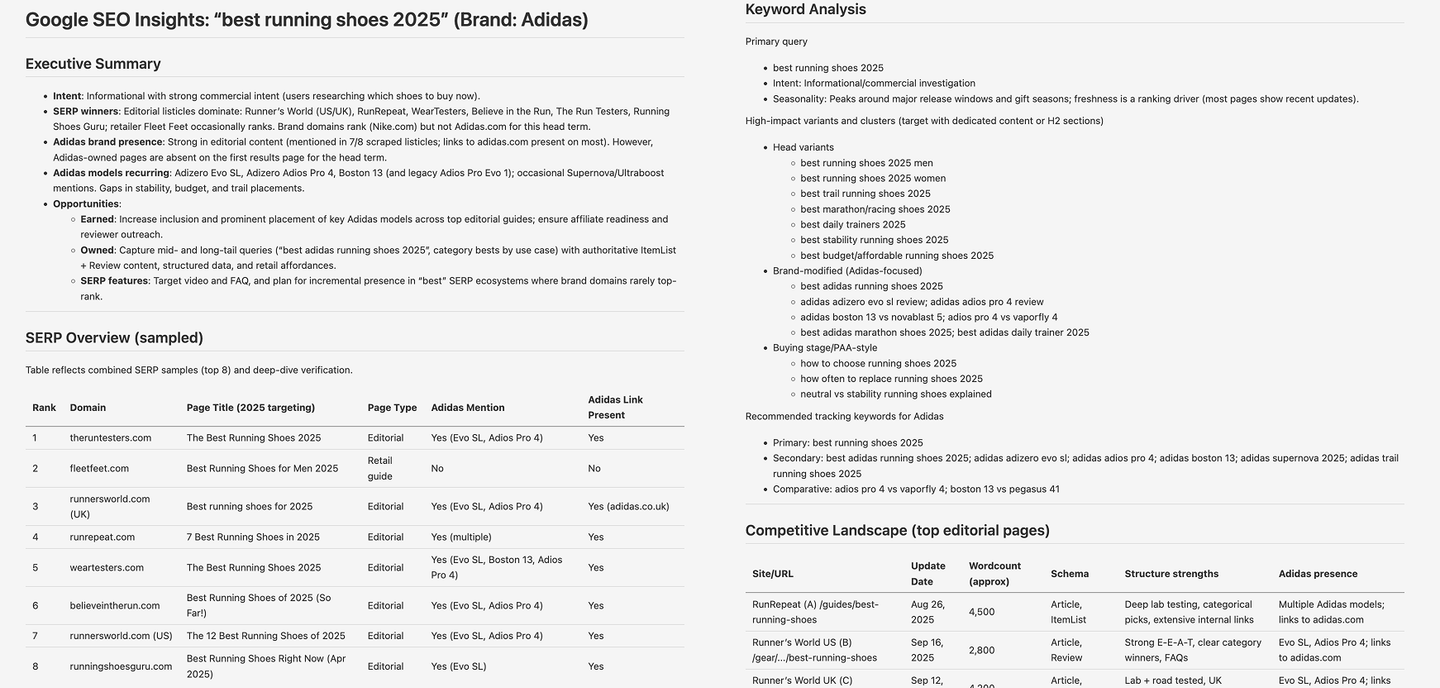
## Next steps
With [Oxylabs](https://oxylabs.go2cloud.org/aff_c?offer_id=7&aff_id=1720), your Agno agents can scrape thousands of web pages quickly and without blocks, freeing up your team to focus on innovation instead of infrastructure. Use the code example in this post as a blueprint for building your own web intelligence agents, whether you're developing a deep web research system or a product price monitoring solution.
Additional resources:
- **Documentation:** [Oxylabs docs](https://developers.oxylabs.io/scraping-solutions/web-scraper-api), [Agno docs](https://docs.agno.com/introduction)
- **Integration:** [Oxylabs in Agno](https://docs.agno.com/concepts/tools/toolkits/web_scrape/oxylabs)
**MCP implementation:** [Oxylabs MCP](https://github.com/oxylabs/oxylabs-mcp), [MCP example in Agno](https://github.com/agno-agi/agno/blob/main/cookbook/tools/mcp/oxylabs.py)
```
---
# Guardrails for AI Agents
> Guardrails for AI Agents provide safeguards that keep autonomous AI systems safe, compliant, and aligned. In this blog, we unpack what AI guardrails are, how they work, and why they matter now more than ever. You’ll also learn how to apply Agno’s built-in guardrails and custom frameworks to create AI systems that act with precision, predictability, and purpose.
- Published: 2025-10-14
- Author: Cosette Cressler
- Categories: Engineering, Perspectives
- Canonical: https://www.agno.com/blog/guardrails-for-ai-agents
- Markdown: https://www.agno.com/blog/guardrails-for-ai-agents.md
When an AI agent takes action on its own, it's thrilling. However, if you're the one responsible for that agent, you'll also likely feel a bit of unease. Maybe you’ve seen a model generate something off-brand, misinterpret a user request, or spiral into unintended loops. It could be sending an email, making a recommendation, or executing code. It’s impressive… until it’s not.
The real frustration isn’t that AI gets things wrong; it’s that there’s often nothing _between_ the agent and the world. AI has no internal compass to say, “Stop. That’s not right.”
That’s why we’re excited to introduce Agno’s newest release—Guardrails for AI Agents. Agno’s guardrails are agentic safeguards that help keep your agents and their inputs secure, protecting against PII leaks, prompt injections, jailbreaks, NSFW content, and more. With Agno’s AI guardrails, you can give your agents more autonomy without losing control.
In this blog, we’ll unpack what **AI guardrails** are, how they work, and why they matter now more than ever. You’ll also learn how to apply **Agno’s built-in guardrails** and custom frameworks to create AI systems that act with precision, predictability, and purpose.
## What are guardrails in AI, and why do they matter?
AI guardrails are mechanisms—both technical and procedural—that keep AI systems operating within defined, safe, and desired boundaries. Think of them as the invisible tracks that ensure agentic AI behaves according to business, ethical, and operational rules.
### Why Guardrails Matter
While AI agents can dramatically improve a company’s efficiency, innovation, and competitive advantage, they can also introduce new risks and challenges. As these agents gain more autonomy, handling sensitive data, making real-time decisions, and interacting directly with users or systems, the potential for errors, security breaches, or unintended behavior grows. A slight misstep in logic can lead to misinformation, privacy violations, or compliance issues that damage trust and brand reputation. Research has shown that when organizations deploy algorithmic systems without adequate governance, [even small errors can quickly undermine user and institutional trust](https://dl.acm.org/doi/10.1145/3555803). In other words, the same autonomy that makes AI powerful also makes it fragile without the proper agentic safeguards in place.
That’s why AI guardrails are essential. They serve as the invisible framework that keeps AI behavior aligned with human values, organizational goals, and regulatory requirements.
Without guardrails, even well-designed agentic systems can drift—responding inappropriately to user inputs, exposing confidential data, or taking actions that go beyond their intended scope. With guardrails in place, you preserve trust, maintain compliance, and ensure consistent performance even when models adapt or scale.
### Why Guardrails Matter _Now_
So why do guardrails matter now? Because we’ve [entered the era of Agentic AI](https://www.mckinsey.com/capabilities/quantumblack/our-insights/the-state-of-ai-2024)—systems capable of reasoning, planning, and acting independently. These agents are not static chatbots; they are dynamic, decision-making entities that integrate across tools, APIs, and data systems. This leap in capability brings new potential but also multiplies the complexity and risk. A single unchecked action could trigger a chain of unintended outcomes, especially in enterprise environments that handle sensitive or regulated information.
At the same time, the pace of AI adoption is accelerating faster than governance frameworks can keep up. Businesses are deploying AI across every department, and users expect it to act intelligently, safely, and responsibly. AI guardrails at scale have become the only sustainable way to balance innovation with oversight—giving organizations the confidence to expand their use of AI without compromising security, privacy, or brand integrity.
Guardrails define boundaries so AI can operate with freedom inside them, not recklessly beyond them—creating a balance between innovation and control. In the era of Agentic AI, they’re no longer optional; they’re the foundation for safe, scalable, and trustworthy intelligence.
## What are the main types of AI Guardrails?
AI risks are not one-size-fits-all. Some risks stem from poor content judgment, others from factual inaccuracy, compliance gaps, or misalignment with company values.
To manage these diverse risks, AI systems like Agno implement a layered approach that targets different types of vulnerabilities.
### Main types of AI guardrails
The main types of AI guardrails can be grouped into five categories, according to what they protect against: appropriateness, hallucination, regulatory, alignment, and validation.
##### Appropriateness guardrails
Appropriateness guardrails ensure that AI-generated content remains professional, brand-safe, and free of inappropriate or harmful material. They filter problematic outputs before they ever reach the end user.
For example, Agno continuously screens content for NSFW material—preserving trust and protecting user experience.
##### Hallucination guardrails
Even the most advanced models can hallucinate, generating responses that contain false or misleading information and presenting them as fact. Hallucination guardrails help mitigate this risk by verifying facts, cross-checking data sources, or requiring evidence-based output.
Agno’s validation systems detect low-confidence or unverifiable responses in real time, prompting the agent to clarify, cite, or re-evaluate before proceeding. This preserves factual accuracy and prevents the spread of misinformation.
##### Regulatory-compliance guardrails
Compliance guardrails ensure that AI agents respect the legal and ethical frameworks of their operating environment, including GDPR, HIPAA, SOC 2, and internal company policies.
For example, Agno’s built-in PII guardrail detects PII (Personally Identifiable Information) in the input of your Agents. This is useful for applications where you don’t want to allow PII to be sent to the LLM.
##### Alignment guardrails
Alignment guardrails keep the AI’s behavior aligned with your organization’s goals, values, and tone of voice. They go beyond correctness to ensure that the agent’s intent, recommendations, and responses reflect your brand and mission.
Agno enables organizations to encode custom rules that keep AI aligned with internal ethics, escalation policies, and tone guidelines so agents behave like trusted team members, not unpredictable free agents.
##### Validation guardrails
Validation guardrails provide the final checkpoint for quality and accuracy before actions or responses are executed.
In Agno, validation guardrails assess consistency, correctness, and compliance, optionally incorporating human-in-the-loop review for high-stakes decisions. They verify that outputs meet predefined standards before they are shared or acted upon.
AI guardrails establish a comprehensive safety framework for every agentic action. With Agno’s built-in and customizable guardrails, teams can apply purpose-based safeguards—covering appropriateness, hallucination, regulatory compliance, alignment, and validation—to build AI agents that perform complex, high-impact tasks with confidence and consistency.
## How do guardrails work?
AI guardrails work by embedding checks and safeguards throughout the AI lifecycle, ensuring that every interaction, decision, and output aligns with defined policies and ethical boundaries. Instead of reacting after mistakes occur, guardrails operate proactively—analyzing inputs, monitoring reasoning, and validating results in real time.
In Agno, these control points are implemented through a flexible guardrail framework that uses pre-hooks, BaseGuardrail class, and post-hooks to define, apply, and enforce safe behavior.
Here’s the framework:
##### Pre-hooks or pre-execution guardrails
Pre-execution guardrails activate before an AI agent takes any action. Their purpose is to control what data or instructions the system is allowed to process. This includes input validation, context filtering, and access controls.
For example, pre-execution guardrails might block requests that contain sensitive data, detect potential prompt injections, or prevent an agent from connecting to unauthorized APIs. Agno’s built-in guardrails excel here—automatically protecting agents against PII leaks, prompt injections, jailbreaks, and NSFW content before they ever reach execution.
##### BaseGuardrail class or in-process guardrails
Once an agent begins reasoning or performing tasks, in-process guardrails monitor its decisions and enforce logic constraints in real time. They ensure that the model stays within the intended scope, adheres to ethical standards, and avoids risky or prohibited actions.
For instance, an agent managing financial transactions could be restricted from executing transfers over a certain threshold without human review. Agno’s in-process guardrails can dynamically intercept such actions, verifying parameters against predefined business rules before allowing the agent to continue. This means that if an AI agent attempts to access sensitive customer records or trigger an external workflow, Agno’s real-time safeguards can pause, flag, or reroute the request automatically—ensuring compliance without disrupting productivity. These guardrails act as internal checkpoints that continuously validate the AI’s reasoning path, maintaining alignment without halting innovation.
##### Post-hooks or post-execution guardrails
After an agent produces an output or completes an action, post-execution guardrails validate and monitor the results. They check for compliance, accuracy, and quality before responses are delivered or actions are finalized.
Agno’s post-execution guardrails can automatically review an agent’s output for sensitive or off-policy content, ensuring that no private data, bias, or policy violations slip through. For example, before publishing a generated response or report, Agno’s guardrails can scan for confidential information, moderate tone, or enforce brand consistency. This final layer acts as a critical safety net, giving teams confidence that every output meets the standards of security, quality, and trustworthiness.
For example, a customer support agent might have a built-in rule: “Never reveal customer data in plain text.” If a request triggers that condition, the agent stops and escalates the case.
AI guardrails work by embedding proactive checkpoints throughout an agent’s lifecycle—before, during, and after it acts.
## How can you apply guardrails in practice?
AI guardrails only create real value when they’re thoughtfully applied in context—woven into how your agents reason, decide, and act. Applying guardrails in practice means turning principles like safety, compliance, and alignment into operational rules that shape AI behavior every step of the way. It’s not just about blocking bad actions; it’s about designing agents that can act confidently within defined, intelligent boundaries.
Think of it like teaching a new team member: you don’t just tell them what not to do—you give them context, structure, and the tools to make good decisions on their own. Guardrails function the same way, translating policies and values into enforceable logic that guides every agent interaction.
Practical implementation comes down to 4 main steps:
### How to apply guardrails: A 4-step application process
##### 1) Define intent and constraints
Start by clearly outlining what your agent should and should not do. This helps translate business policies and ethical principles into actionable rules.
##### 2) Integrate built-in guardrails
Leverage platform-level agentic safeguards (like Agno’s built-in guardrails) to manage sensitive content, enforce access limits, and uphold ethical or regulatory standards.
##### 3) Add custom guardrails
Extend functionality with domain-specific rules tailored to your organization’s unique needs, workflows, or compliance requirements.
##### 4) Continuously monitor and update
Guardrails aren’t set-and-forget. As your AI agents evolve, review and refine your constraints to ensure they remain aligned with new goals, data, and regulations.
### How to apply guardrails in Agno
In Agno, applying guardrails is a modular, code-level process that can scale from simple safeguards to complex, enterprise-wide compliance systems. The framework provides three primary integration points:
##### 1) Define guardrail logic with the BaseGuardrail class
Use this to create reusable, customizable rules that monitor behavior or content. For example, you can subclass BaseGuardrail to enforce tone guidelines, block disallowed actions, or validate factual accuracy in responses.
##### 2) Apply pre-hooks and post-hooks for input and output protection
Pre-hooks filter and sanitize inputs—detecting PII, prompt injections, or malicious requests before the model processes them. Post-hooks validate outputs for compliance, tone, and factual correctness before results are delivered or executed.
##### 3) Integrate guardrails directly into agent workflows
Guardrails can be attached to specific steps or tasks within an agent’s reasoning loop, ensuring context-aware protection. For instance, a financial agent can apply custom logic that pauses or requests approval for high-value transactions, while a support agent can automatically redact sensitive data in responses.
Agno offers both built-in and custom guardrails. Our built-in guard rails can be used out of the box and include:
- PII Detection Guardrail: detect PII (Personally Identifiable Information). See the [PII Detection Guardrail for agents page](https://docs.agno.com/concepts/agents/guardrails/pii) for more information.
- Prompt Injection Guardrail: detect and stop prompt injection attempts. See the [Prompt Injection Guardrail for agents page](https://docs.agno.com/concepts/agents/guardrails/prompt-injection) for more information.
- OpenAI Moderation Guardrail: detect content that violates OpenAI’s content policy. See the [OpenAI Moderation Guardrail for agents page](https://docs.agno.com/concepts/agents/guardrails/openai-moderation) for more information.
You can easily create custom guardrails by extending Agno’s BaseGuardrail class. This is handy when you need to handle checks or transformations that go beyond the built-in options—or when you just want to enforce your own rules. Inside your custom class, implement the check and async_check methods to run your validation logic and raise exceptions whenever the agent encounters unwanted content or behavior. Learn more in the [Guardrails for teams doc.](https://docs.agno.com/concepts/teams/guardrails)
Learning how to apply guardrails comes down to mastering four key steps: define intent and constraints, integrate built-in safeguards, add custom rules, and continuously monitor and refine as your agents evolve.
## What are common mistakes with guardrails?
Even with the best intentions, many organizations stumble when implementing AI guardrails.
### The most common pitfalls when it comes to deploying guardrails:
##### Treating guardrails as a one-time setup
Guardrails aren’t “set it and forget it.” They require continuous monitoring, evaluation, and refinement as your data, agents, and compliance environment change.
##### Applying guardrails too late in the process
Guardrails should be built into the design phase, not added after deployment. Waiting until something breaks turns prevention into reaction.
##### Over-restricting your agentic agents
Overly tight rules can stifle autonomy and slow reasoning. The goal is guided freedom, not micromanagement—enabling AI to act safely while still delivering value.
##### Lack of standardization across teams
When each team applies guardrails differently, gaps and inconsistencies emerge. Scalable governance depends on shared frameworks and reusable policies.
##### Ignoring visibility and monitoring
Without clear logging, dashboards, or audit trails, it’s impossible to know whether guardrails are active or effective. Observability is as important as enforcement.
The biggest mistake enterprises make when deploying guardrails is that they fail to treat them as living systems. Successful teams make guardrails modular, measurable, and adaptive, ensuring they evolve alongside their agents, data, and business goals.
## What are the key benefits of guardrails?
It’s tempting to just “go, go, go,” especially with top-down pressure to deliver AI fast. But implementing AI guardrails is worth it. Guardrails create lasting value. They’re what make AI growth sustainable.
Here are some of the key benefits that guardrails bring to organizations developing AI agents:
##### Enhanced safety and compliance
According to McKinsey Quarterly, most organizations are [likely to see the use of gen AI increase ‘inbound’ threats](https://www.mckinsey.com/capabilities/risk-and-resilience/our-insights/implementing-generative-ai-with-speed-and-safety). Guardrails act as the first line of defense against data leaks, prompt injections, and policy violations. By filtering unsafe inputs and outputs, they protect sensitive information and ensure adherence to frameworks like GDPR, HIPAA, and SOC 2.
##### Reduced unpredictable outcomes
Guardrails prevent model drift and minimize errors as AI evolves. Agentic systems are more resilient and consistent when guardrails are put in place at the start.
##### Increased trust and user confidence
When users know that AI operates within clear, ethical boundaries, trust follows. Guardrails make agentic systems predictable and transparent, turning skepticism into adoption. They create the conditions for human-AI collaboration that feels safe, responsible, and dependable.
##### Improved efficiency
Guardrails streamline AI deployment by automating governance that would otherwise require manual review. You may think pausing to apply guardrails would slow innovation, but it actually accelerates it. Guardrails reduce risk and cut manual oversight while improving speed-to-production.
Of course, guardrails come with trade-offs: tighter constraints can limit creativity or flexibility. But the net effect is stability: AI that you can _trust_ to act on behalf of your organization.
Implementing AI guardrails is worth it—they deliver lasting value through enhanced compliance, reduced errors, greater user confidence, improved efficiency, and more sustainable AI growth.
## AI guardrails example
#### Before and after applying AI guardrails:
##### Before guardrails
An AI agent autonomously updates user accounts based on incoming requests. It might process a command like “update billing address” and execute the change instantly—without verifying the source or confirming intent. While this saves time, it also opens the door to potential errors, unauthorized edits, or even security risks if the request came from a spoofed or misinterpreted input.
##### After guardrails
With guardrails in place, the AI first verifies authorization using defined policies or context validation rules. It then summarizes the intended change (“Update billing address for John Doe from X to Y”) and pauses for human approval or confirmation. This ensures both accuracy and accountability—preventing unauthorized updates while preserving automation speed.
In Agno, this workflow could be enforced through a pre-hook that validates input permissions, an in-process guardrail that checks the logic of the requested change, and a post-hook that confirms the action was completed correctly and logged for audit. The result is a smarter, safer, and more trustworthy agentic system.
## How can organizations apply guardrails at scale?
Implementing AI guardrails across a single workflow is one thing. Deploying them across an entire organization—where multiple agents interact with different data systems, teams, and compliance requirements—is another challenge entirely. At scale, consistency, visibility, and automation become just as important as the guardrails themselves.
### Why scaling guardrails matters
Applying guardrails at scale is critical because, as organizations expand their use of AI, each agent becomes a new potential point of risk. Without a standardized approach, one team’s safe setup can easily become another’s vulnerability. Scalable guardrails ensure that governance, compliance, and ethical boundaries are enforced universally, no matter how many agents or environments are in play. They enable organizations to move fast without losing control of quality or safety.
### How to deploy guardrails at scale
To scale effectively, guardrails need to be codified, modular, and centrally managed. That means moving beyond ad hoc rules toward frameworks that can be versioned, audited, and shared across projects.
Here’s how organizations can approach it:
##### Start with standardization
Define a common policy layer that outlines which types of guardrails (e.g., compliance, appropriateness, validation) apply globally. Establish consistent naming conventions, data-handling rules, and escalation procedures.
##### Adopt a modular framework
Use a system like Agno’s guardrail architecture—built on pre-hooks, post-hooks, and the BaseGuardrail class—to apply consistent logic across agents. This makes it easy to reuse and customize safeguards across departments without rebuilding them each time.
_Developer insight: Agno’s modular setup makes it easy to start small with built-in guardrails and gradually layer in custom logic as your agents grow in complexity—so you can scale safely without slowing innovation._
##### Automate deployment and monitoring
Integrate guardrails into CI/CD pipelines or orchestration tools so updates and new policies roll out automatically. Implement real-time monitoring to detect drift, performance issues, or violations at the system level.
##### Empower teams with transparency
Provide visibility into what guardrails are active and how they’re performing. Clear dashboards, alerts, and logs help technical and non-technical stakeholders maintain confidence in AI behavior.
## What should you remember about guardrails?
#### If you remember just one thing, remember this:
AI guardrails aren’t about restriction. They’re about enabling safe autonomy at scale. They transform AI from something unpredictable into something dependable, compliant, and enterprise-ready.
Okay, and here are a few more key takeaways about guardrails:
- **Guardrails define freedom**; they don’t restrict it.
- **Effective guardrails operate across every stage of the AI lifecycle:** before actions (pre-hooks), during reasoning (in-process/BaseGuardrail), and after execution (post-hooks).
- There are **five main types of AI guardrails**: appropriateness, hallucination, regulatory compliance, alignment, and validation.
- Both **built-in guardrails** and **custom frameworks** are needed for scale.
- **Guardrails aren’t static**: they should evolve as your agents learn, your data shifts, and your business grows.
- **You need a modular framework to apply guardrails at scale**: one that allows consistency, flexibility, and reusability across agents and teams.
**Transformation Summary: What value do AI guardrails provide?**From anxiety about rogue AI → to confident, controlled automation → to scalable, trustworthy Agentic AI systems.
### _Articles referenced:_
- “[Trustworthy AI: From Principles to Practices](https://dl.acm.org/doi/10.1145/3555803),” January 16, 2023, [Bo Li](https://dl.acm.org/doi/10.1145/3555803#), [Peng Qi](https://dl.acm.org/doi/10.1145/3555803#), [Bo Liu](https://dl.acm.org/doi/10.1145/3555803#), [Shuai Di](https://dl.acm.org/doi/10.1145/3555803#), [Jingen Liu](https://dl.acm.org/doi/10.1145/3555803#), [Jiquan Pei](https://dl.acm.org/doi/10.1145/3555803#), [Jinfeng Yi](https://dl.acm.org/doi/10.1145/3555803#), and [Bowen Zhou](https://dl.acm.org/doi/10.1145/3555803#)
- “[The state of AI in early 2024: Gen AI adoption spikes and starts to generate value](https://www.mckinsey.com/capabilities/quantumblack/our-insights/the-state-of-ai-2024),” May 30, 2024, [Alex Singla](https://www.mckinsey.com/our-people/alex-singla), [Alexander Sukharevsky](https://www.mckinsey.com/our-people/alexander-sukharevsky), [Lareina Yee](https://www.mckinsey.com/our-people/lareina-yee), and [Michael Chui](https://www.mckinsey.com/our-people/michael-chui), with [Bryce Hall](https://www.mckinsey.com/our-people/bryce-hall)
- “[Implementing generative AI with speed and safety](https://www.mckinsey.com/capabilities/risk-and-resilience/our-insights/implementing-generative-ai-with-speed-and-safety),” McKinsey Quarterly, March 13, 2024, Oliver Bevan, [Michael Chui](https://www.mckinsey.com/our-people/michael-chui), [Ida Kristensen](https://www.mckinsey.com/our-people/ida-kristensen), Brittany Presten, and [Lareina Yee](https://www.mckinsey.com/our-people/lareina-yee)
---
# Context engineering in multi-agent systems
> The blog explores how to apply practical context engineering techniques using Agno to build AI agents that are faster, more efficient, and better at collaboration. It covers core techniques that include crafting precise system messages, selectively managing context to reduce token use, applying few-shot learning to teach behavior, and coordinating multi-agent teams effectively.
- Published: 2025-10-09
- Author: Agno Team
- Categories: Engineering, Perspectives
- Canonical: https://www.agno.com/blog/context-engineering-in-multi-agent-systems
- Markdown: https://www.agno.com/blog/context-engineering-in-multi-agent-systems.md
### _How does context engineering help you create AI agents that are faster, more efficient, and better at working together in multi-agent systems?_
During agent development, you find your agent doesn’t want to call the right tools or give the right responses consistently. Maybe your team of agents ran searches in parallel instead of collaborating. Your token costs hit production scale, and suddenly, your CFO started asking questions.
Why do some AI agents perform flawlessly in production while others fall apart under pressure?
The difference often comes down to one thing: **context engineering**.
Context engineering is the process of designing and optimizing the information an AI agent sends to and receives from a large language model (LLM). In other words, it’s how you control what the model _knows_, _remembers_, and _pays attention to_. At its core, it comes down to one question: "Which set of information is most likely to achieve the desired outcome?"
In this blog, we’ll explore how to apply **practical context engineering techniques** using **Agno** to build smarter, faster, and more collaborative AI systems. You’ll learn how to:
- Design system messages that actually work
- Decide what context to include (and what to skip)
- Implement context caching to lower latency and cost
- Use few-shot learning to shape agent behavior
- Coordinate multi-agent teams for seamless collaboration
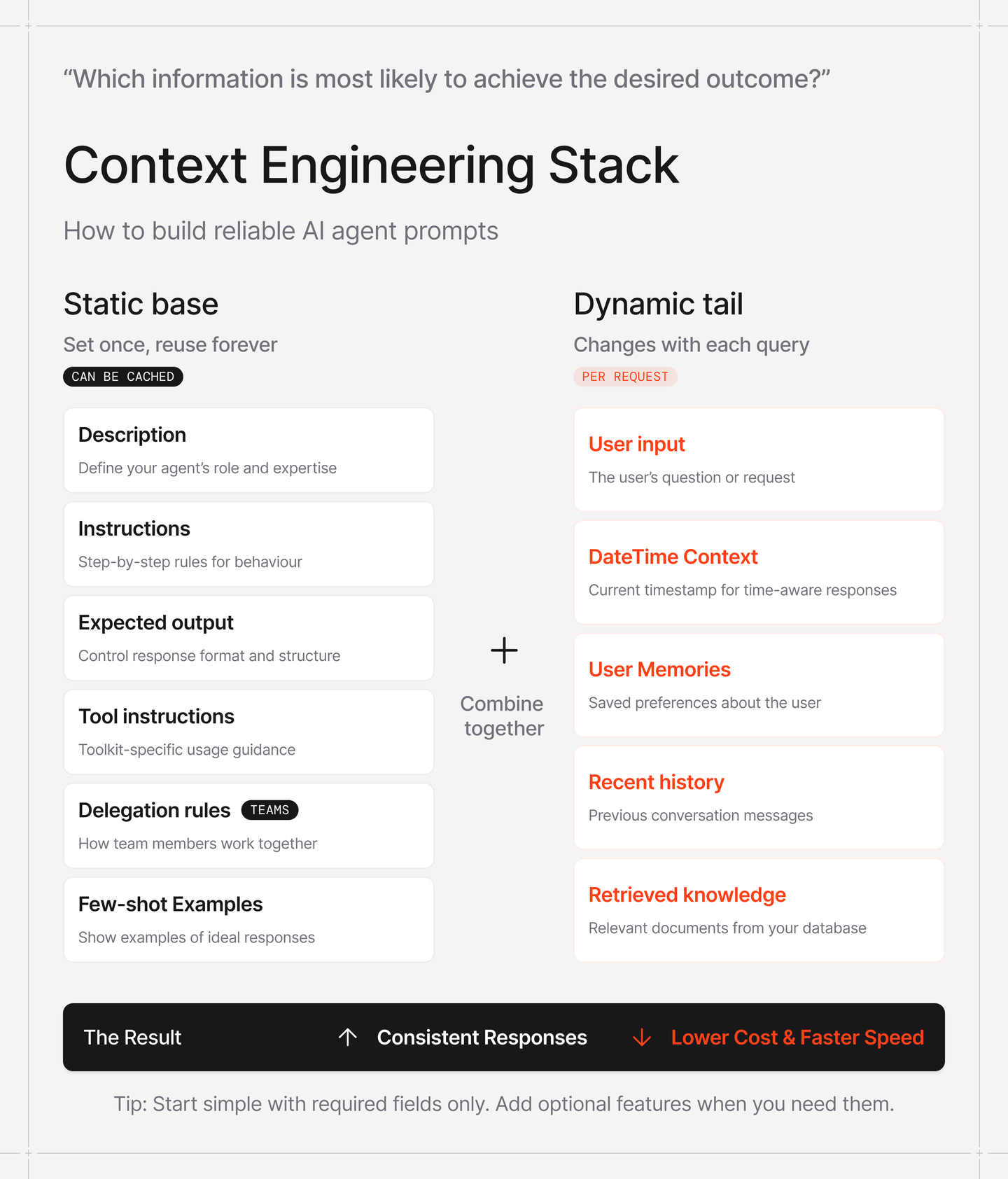
## System Messages: Get This Right First
#### _What are system messages in AI agents, and why are they so critical for context engineering?_
The base of every LLM interaction is the system message, sometimes referred to as the system prompt. If you get this wrong, nothing else matters.
So, what does an AI agent system message do? A system message is a set of pre-written instructions and context that define an AI agent’s purpose, tone, limitations, and output format. It essentially serves as the agent’s core “DNA” for a given interaction.
Agno constructs the system message from multiple components, with three of the most useful being description, instructions, and expected output:
**Description** sets the agent's identity and is added to the start of the system message. It defines the agent’s purpose or domain. You'll want to be specific here. "You are a helpful assistant" gives little direction. This type of description offers little guidance on what the agent should focus on and what it should avoid. "You are a famous short story writer asked to write for a magazine" gives the agent clear domain expertise and well-defined constraints. It's a much better AI agent description, as a well-defined identity immediately improves output quality. When it comes to the description component of system messages, identity alone isn't enough; you need precision.
**Instructions** are added to the system message inside `` tags and should be written as structured lists. The structure matters. We've found that discrete, actionable steps work better than prose paragraphs. Think checklist, not essay. Each instruction should stand on its own and be independently understandable. This is where you translate "what the agent should be" into "how the agent should act."
**Expected output** prevents format chaos. Without it, you might get a paragraph for one request, bullet points for the next, and inconsistent or incomplete answers in between. Being explicit about structure keeps outputs consistent and clear. For example, "Provide a three-section report: Executive Summary, Detailed Analysis, Risk Assessment" is specific enough to guide the agent but flexible enough to let it adapt to different queries.
How long should a system message be? There is no real rule, so you’ll likely need to experiment with the ideal system message length until you find what works best. ‘Not too long and not too short’ is a good rule of thumb. If the system message is too short, the AI won’t have enough context to know what to do and how to operate. If the system message is too long, the AI has too many things to keep in mind.
Here's what this looks like in practice:
```python
agent = Agent(
description="You are a famous short story writer asked to write for a magazine",
instructions=[
"Create 5-sentence stories",
"Always make the setting of the stories in the modern era",
"Include a twist ending that subverts reader expectations"
],
expected_output="Two compelling sentences with clear setup and shocking twist.",
debug_mode=True
)
agent.print_response("Create a funny story about a cat and a giraffe")
```
`Notice debug_mode=True.`
This is useful during development because it shows you the actual compiled system message being sent to the model. You'll catch issues you didn't know existed.
View a more complete example in our [research agent cookbook](https://github.com/agno-agi/agno/blob/main/cookbook/getting_started/18_research_agent_exa.py). For a complete reference of all system message parameters and context manipulation options, see the [Agent Context docs](https://docs.agno.com/concepts/agents/context) and [Team Context docs](https://docs.agno.com/concepts/teams/context).
## Context Features: The Selective Addition Problem
#### _How can you optimize AI agent context without wasting tokens?_
Building with language models isn't just about finding the right words and phrases for your prompts. Increasingly, it’s about answering a deeper question: **what configuration of context is most likely to produce the desired behavior?**
In context engineering, _context_ refers to the set of tokens an LLM sees and reasons over during generation. The challenge lies in optimizing those tokens, balancing signal and noise within the model’s finite attention window to consistently achieve the outcome you want.
Effective context engineering means thinking holistically about the model’s state: what information it has access to, how that shapes its reasoning, and what behaviors it’s likely to produce. Since every token counts, the goal is to find the smallest, highest-signal set of tokens that maximizes performance.
This is easier said than done. In this section, we’ll look at how this principle plays out in practice, specifically how Agno’s context parameters help you fine-tune what information your agent truly needs.
Agno gives you various parameters to enrich context: `add_datetime_to_context,` `add_memories_to_context,` `add_history_to_context,` `add_knowledge_to_context,` and more. Your instinct might be to turn everything on. More context means better results, right?
Not quite. Each line in your system message costs tokens and adds to your model’s context, potentially degrading model accuracy.
Here is a typical pattern: A customer support agent for a travel agency, with all the above context features enabled, adds all user preferences (memories), knowledge related to the user’s request, history of previous conversations, etc., into the context. Every request now consumes more than 200k tokens before an answer is even provided! Changing the agent configuration to only add `instructions` and perhaps allowing the agent to retrieve relevant user memories and knowledge using tools instead decreases token usage dramatically.
The pattern that works: be selective based on what the agent actually _needs_ to know.
For example, enabling chat history for an agent can be really powerful, as it helps them remember the context of the conversation with the user more effectively. However, granting the agent unlimited access to history will definitely cause token usage to exceed the limits of your model.
View a full example of an agent with chat history enabled in our [agent session cookbook](https://github.com/agno-agi/agno/blob/main/cookbook/getting_started/09_agent_session.py).
```python
agent = Agent(
add_history_to_context=True,
num_history_runs=3,
)
```
The `num_history_runs=3` parameter limits context to just the previous three conversation turns. This balances continuity with efficiency. The agent can reference recent context without drowning in old messages.
We made these features opt-in by design. It forces you to think about what each agent actually needs rather than defaulting to "give it everything."
Once you’ve mastered the art of selecting _what_ to include in context, the next challenge is teaching the model _how_ to behave within that context. You don’t always need to spell everything out through rules or instructions; sometimes the best way to shape behavior is through demonstration. This is where few-shot learning comes in.
## Few-Shot Learning: Show, Don't Just Tell
#### _How can you teach AI agents tone, structure, and reasoning through practical examples?_
Instead of writing instructions that describe ideal behavior, aka telling the agent what to do, you can _show_ the agent examples of ideal behavior. This is called few-shot prompting, and it can be very effective.
You can add examples using the `additional_input` parameter. The messages get inserted into the context as if they were part of the conversation history. See a [full example of how to use additional_input with an Agent
```python
support_examples = [
Message(role="user", content="I forgot my password and can't log in"),
Message(role="assistant", content="""
I'll help you reset your password right away.
**Steps to Reset Your Password:**
1. Go to the login page and click "Forgot Password"
2. Enter your email address
3. Check your email for the reset link
4. Follow the link to create a new password
If you don't receive the email within 5 minutes, check your spam folder.
""".strip()),
Message(role="user", content="I've been charged twice for the same order and I'm frustrated!"),
Message(role="assistant", content="""
I sincerely apologize for the billing error and the frustration this has caused you.
**Immediate Action Plan:**
1. I'll investigate your account to confirm the duplicate charge
2. Process a full refund for the duplicate transaction
3. Provide you with a confirmation number once processed
The refund typically takes 3-5 business days to appear on your statement.
""".strip()),
]
# Use these examples to train the agent
agent = Agent(
additional_input=support_examples,
instructions=[
"You are an expert customer support specialist.",
"Always be empathetic, professional, and solution-oriented.",
],
)
```
to teach proper response patterns through few-shot learning](https://github.com/agno-agi/agno/blob/main/cookbook/agents/context_management/few_shot_learning.py).
This teaches tone, structure, and depth through demonstration. The agent learns not just what to do but how to do it. You'll see much more consistent responses, especially for customer-facing agents where voice matters.
Few-shot examples can make a single agent remarkably capable—able to reason, respond, and adapt with nuance. But as soon as you introduce multiple agents, a new challenge appears: coordination. Teaching one agent _how_ to behave is one thing; ensuring several agents work together smoothly toward a shared goal is another.
## Multi-Agent Teams: Where Coordination Matters
#### _How does context engineering enable team leader agents to coordinate members, manage roles, and maintain consistent performance across multi-agent systems?_
Single agents are straightforward. Multi-agent teams introduce a new layer of complexity.
The challenge: in a multi-agent setup, a team leader agent orchestrates the workflow. The leader’s role is to understand each member’s capabilities, delegate tasks effectively, and integrate their outputs into a cohesive response. Without this understanding, the leader can’t match tasks to the right agents or ensure consistent results across the team.
Here's a complete working example of a research team in action: [Agent Team Example](https://github.com/agno-agi/agno/blob/main/cookbook/getting_started/17_agent_team.py).
Agno handles this by automatically injecting member information into the team leader's system message. This includes member IDs, roles, and critically, the tools each member has access to:
```python
- Agent 1:
- ID: web-researcher
- Name: Web Researcher
- Role: You are a web researcher who can find information on the web.
- Member tools:
- duckduckgo_search
- duckduckgo_news
- Agent 2:
- ID: hacker-news-researcher
- Name: HackerNews Researcher
- Role: You are a HackerNews researcher who can find information on HackerNews::
- get_top_hackernews_stories
- get_user_details
```
The system message also includes delegation guidelines in `` tags. These explain how to analyze member capabilities, what information to include when delegating, and when to re-delegate if results aren't sufficient.
Member information alone isn't always enough. You need to encode behavioral patterns directly into the team's instructions, like in this [multi-agent team cookbook](https://github.com/agno-agi/agno/blob/main/cookbook/getting_started/17_agent_team.py).
```python
agent_team = Team(
members=[web_agent, hackernews_agent],
instructions=[
"You are a team of researchers that can find information on the web and Hacker News.",
"After finding information about the topic, compile a joint report."
]
)
```
That second instruction matters. "After finding information about the topic, compile a joint report," tells the leader how to process and synthesize member outputs before responding.
## Advanced Context Patterns
#### _How can advanced context engineering give AI agents autonomy through memory, retrieval-augmented generation, and tool-specific instructions?_
Once agents can collaborate effectively as a team, the next step is giving them the ability to manage knowledge and adapt over time. This is where **advanced context patterns** come into play. These features—like agentic memory, retrieval-augmented generation (RAG), and tool-specific instructions—extend what agents can do beyond static prompts. They enable agents to remember user preferences, search information dynamically, and use tools more intelligently, all while maintaining efficiency and control over context size.
**Agentic Memory** lets agents manage their own memories. Set `enable_agentic_memory=True`, and the system message will include instructions about using the `update_user_memory` tool.
During a conversation, if the agent notices information worth remembering (like "User prefers quarterly reports over monthly"), it can save this as a memory. The next interaction automatically includes this preference in context. The agent curates its own memory database as it learns about the user. See a full example in this [persistent memory cookbook](https://github.com/agno-agi/agno/blob/main/cookbook/memory/02_agentic_memory.py).
**Agentic RAG** lets agents search your knowledge base themselves. Set `search_knowledge=True` , and the agent gets a `search_knowledge_base` tool. Instead of automatically injecting references into the context, the agent decides when to search and what to search for.
This is powerful because the agent only retrieves knowledge when it's relevant. A user asking "What's the weather?" won't trigger unnecessary knowledge searches. But "What did the Q4 report say about revenue?" prompts the agent to search your documents for the answer. The agent controls its own RAG pipeline. See a full example in this [Agentic RAG cookbook](https://github.com/agno-agi/agno/blob/main/cookbook/agents/agentic_search/agentic_rag.py).
**Tool Instructions** can be added directly to your system message. If you're using a Toolkit on your agent, you can add instructions to the system message using the `instructions` parameter on the `Toolkit` with `add_instructions=True`. For example, consider the `GitHub toolkit`, instructions can clarify when to the agent should use `send_message` versus `send_message_thread`. This makes tools more discoverable and improves usage patterns. (See [Toolkit docs](https://docs.agno.com/concepts/tools/toolkits/toolkits))
As agents gain the ability to remember, reason, and retrieve information on their own, the amount of context they carry inevitably grows. Every new feature—memory, knowledge search, tool instructions—adds valuable capability but also increases token load. To keep performance high and costs manageable, you need a strategy for reusing what doesn’t change between requests. That’s where **context caching** comes in.
## Context Caching: The Performance Pattern
#### _How does context caching reduce token costs and improve AI agent performance at scale?_
As agents become more sophisticated, the length of context becomes a significant concern. Rich system messages can hit 100k+ tokens before any user input. At production scale, this matters.
Most model providers support prompt caching. The key is to structure your system message so that static content comes first and dynamic content comes last.
Agno's context construction follows this pattern by default:
- Agent/team description (static)
- Member information and delegation rules (static)
- Core instructions (static)
- User memories (dynamic)
- Retrieved knowledge (dynamic)
- etc.
This ordering means the bulk of the system message gets cached and reused across requests. For high-volume production systems, this substantially reduces both cost and latency. The static portion caches once, then reuses it for every request. Only the dynamic tail changes per query.
For multi-agent teams, member information and delegation guidelines are typically static, perfect candidates for caching.
One caveat is that not all model providers enable caching automatically. See our [docs](https://docs.agno.com/concepts/agents/context#context-caching) for more information.
Take a look at how some of the major model providers do prompt caching:
- [OpenAI's prompt caching](https://platform.openai.com/docs/guides/prompt-caching)
- [Anthropic prompt caching](https://docs.anthropic.com/en/docs/build-with-claude/prompt-caching) → See an [Agno example](https://docs.agno.com/examples/models/anthropic/prompt_caching)
- [OpenRouter prompt caching](https://openrouter.ai/docs/features/prompt-caching)
## Getting Context Right
#### _How Can Context Engineering Make or Break Your AI Agents?_
The difference between an AI agent that shines in demos and one that scales reliably in production isn’t just about choosing the right model—it’s about context engineering. Getting the context right determines how well your agents perform under real-world conditions. The patterns we’ve covered—system messages, selective context, few-shot examples, and multi-agent coordination—tackle real production challenges such as token costs, inconsistent behavior, and wasted team effort.
For a complete list of context parameters and advanced options, see the [Agent Context docs](https://docs.agno.com/concepts/agents/context) and [Team Context docs](https://docs.agno.com/concepts/teams/context).
## Acknowledgements
This post was written by **Dirk Brand**, Agno’s Head of Engineering, and **Nancy Chauhan**, Senior Developer Experience Engineer.
---
# Introducing Agno 2.0
> Agno v2.0 is officially live! This release marks a major leap forward in how developers build and run multi-agent systems with Agno. While the core engine remains simple, fast, and agnostic, the new version introduces several powerful improvements.
- Published: 2025-09-09
- Author: Agno Team
- Categories: Engineering, Product
- Canonical: https://www.agno.com/blog/introducing-agno-v2
- Markdown: https://www.agno.com/blog/introducing-agno-v2.md
We're excited to share that Agno 2.0 is officially live! 🎉
## What’s Agno 2.0?
Great question! At our core is the same engine that you know and love: simple, blazing-fast, and truly agnostic. But this release marks a major leap forward in how developers build and run multi-agent systems with Agno. For v2, we’ve completely rewritten the library to simplify Agent, Team, and Workflow, expand capabilities, and make the developer experience smoother than ever.
## What’s changed?
With Agno v2.0, you’ll find:
#### Streamlined storage for sessions, memories, evals, etc.
**Key improvement:** Single database handles sessions, memories, evals, and metrics
```python
db = SqliteDb(db_file="tmp/agno_app.db")
# Agent with automatic storage management
agent = Agent(
model=OpenAIChat(id="gpt-5-mini"),
db=db, # Single database for all storage needs
enable_user_memories=True, # Persistent user facts
enable_session_summaries=True, # Auto-generated summaries
add_history_to_context=True, # Auto-loads chat history
)
```
Everything stored automatically
```python
agent.run("My name is John and I live in Denver")
# Stores: session, user memory, chat history, metrics
# Resume conversations with full context
agent.run("What do you remember about me?")
# Automatically retrieves: memories, session history, summaries
```
Check out a [full example.
](https://docs.agno.com/examples/getting-started/09-agent-session)
#### A unified knowledge layer that supports diverse forms of content
**Key improvement:** One interface seamlessly handles all content types (PDFs, CSVs, web crawling, Markdown, text, etc)
```python
knowledge = Knowledge(
vector_db=LanceDb(
search_type=SearchType.hybrid, # Smart vector + keyword search
embedder=OpenAIEmbedder(id="text-embedding-3-small"),
),
)
```
Add diverse content types seamlessly
```python
knowledge.add_content(url="https://example.com/recipes.pdf") # PDF
knowledge.add_content(path="/data/ingredients.csv") # CSV knowledge.add_content(url="https://cooking-blog.com/tips") # Web
knowledge.add_content(content="Fresh herbs enhance flavor...") # Text
```
Agent gets unified knowledge access
```python
agent = Agent(
model=OpenAIChat(id="gpt-5-mini"),
knowledge=knowledge, # Single knowledge interface
tools=[DuckDuckGoTools()],
instructions="Search knowledge base first, then web if needed...",
)
```
Check out a [full example.
](https://docs.agno.com/examples/getting-started/03-agent-with-knowledge)
#### Stateless agents, teams, and workflows for simpler, more reliable execution
**Key improvement:** No more confusing internal state management on agents and teams. They are now fully stateless. [See the basic agent example.](https://docs.agno.com/examples/getting-started/01-basic-agent)
#### Central hub where you interact with your agents, manage knowledge bases, track sessions, monitor performance, and control user access
**Key improvement:** Better control -> cancelling of runs, setting custom events, etc.
```python
from agno.agent import Agent
from agno.db.sqlite import SqliteDb
from agno.models.anthropic import Claude
from agno.os import AgentOS
from agno.tools.mcp import MCPTools
# Create the Agent
agno_agent = Agent(
name="Agno Agent",
model=Claude(id="claude-sonnet-4-0"),
# Add a database to the Agent
db=SqliteDb(db_file="agno.db"),
# Add the Agno MCP server to the Agent
tools=[MCPTools(transport="streamable-http", url="https://docs-v2.agno.com/mcp")],
# Add the previous session history to the context
add_history_to_context=True,
markdown=True,
)
# Create the AgentOS
agent_os = AgentOS(agents=[agno_agent])
# Get the FastAPI app for the AgentOS
app = agent_os.get_app()
```
Check out a [full example.](https://docs.agno.com/introduction/first-agent#build-your-first-agent)
### And a whole lot more...
Agno 2.0 also introduces AgentOS… but more on that later. 🚀
See the [Changelog](https://docs.agno.com/how-to/v2-changelog) for more details on Agno 2.0. Or check out this [guide](https://docs.agno.com/how-to/v2-migration) for help migrating your Agno applications from v1 to v2.
🧡 Team Agno
---
# Global agent hackathon winners
> Winners of the May 2025 Global Agent Hackathon: 60+ final submissions built with Agno, from a semantic social network to browser automation agents, with prizes from Agno and partners including BrowserUse and Potpie.
- Published: 2025-08-26
- Author: Ashpreet Bedi
- Categories: Community, Examples
- Canonical: https://www.agno.com/blog/global-agent-hackathon-winners
- Markdown: https://www.agno.com/blog/global-agent-hackathon-winners.md
The results are in!
After an incredible month of innovation, collaboration, and some seriously impressive builds, we're thrilled to announce the winners of our **May 2025 Global Agent Hackathon**.
What started as a call to the community turned into something extraordinary. We saw **100+ project ideas** transform into **60+ final submissions** that pushed the boundaries of what's possible with agentic systems. From browser automation to AI-powered content curation, from educational tools to enterprise workflows - the creativity and technical execution blew us away.
Here are the projects that stood out for their vision, execution, and potential to shape the future of autonomous agents.
## Agno Prize Winners
#### $5,000 Grand Prize Winner
**🏆** [**Likeminds - Agentic Multi-Social Semantic Network**](https://github.com/global-agent-hackathon/global-agent-hackathon-may-2025/pull/84)
Built by Guaming & Vaibhav, Likeminds impressed us with its full-stack approach to semantic context in social networks, powered by Agno. This project nailed the vision of autonomous agents collaborating across dynamic systems - from UX to technical depth.
- [**Live Demo**](https://likeminds-react-vercel.vercel.app/)
- [**Demo Video**](https://drive.google.com/file/d/1qSfqqZ15LHdFTNJJg8fjFqpK55iOSjNx/view?usp=sharing)
#### $2,000 Prize Winner
**🏆** [**Superwizard AI: The Extension That Turns Web Commands Into Magic**](https://github.com/global-agent-hackathon/global-agent-hackathon-may-2025/pull/125)
Built by Amirul Hamizan, Superwizard AI is a Chrome extension that brings agentic automation directly into your browser. With just a natural language command, Superwizard can navigate complex UI flows, fill out forms, click buttons, and more - all powered by Agno.
This project stands out for how seamlessly it applies autonomous agents to real-world browser tasks, making web automation accessible to anyone.
- [**Demo Pitch**](http://amirulhamizan.com/gah-181818)
Alongside our grand prize winners, we're excited to spotlight more incredible projects that stood out for their execution, originality, and agentic thinking. These teams pushed boundaries across automation, memory, RAG, dev tools, and everyday user workflows - all powered by Agno.
#### $1,000 Prize Winners
These 5 projects delivered impressive agentic systems - blending thoughtful design, strong execution, and real-world utility:
- [**AdGenius**](https://github.com/global-agent-hackathon/global-agent-hackathon-may-2025/pull/129) - AI-powered advertising platform; built by Richard
- [**Beifong**](https://github.com/global-agent-hackathon/global-agent-hackathon-may-2025/pull/129) - Your junk-free, personalized information and podcasts; built by Arun
- [**TestBrain**](https://github.com/global-agent-hackathon/global-agent-hackathon-may-2025/pull/172) - Intelligent testing automation; built by Danish
- [**Flux**](https://github.com/global-agent-hackathon/global-agent-hackathon-may-2025/pull/173) - AI-powered form builder with intelligent agents; built by Sarthak
- [**TripCraft AI**](https://github.com/global-agent-hackathon/global-agent-hackathon-may-2025/pull/179) - Your journey, perfectly crafted with intelligence; built by Amit Wani
#### $500 Prize Winners
These 10 projects stood out for their creative ideas and practical implementations of agentic workflows:
- [**ChessMates AutoAgent**](https://github.com/global-agent-hackathon/global-agent-hackathon-may-2025/pull/58) - AI-powered content generation for chess learners; built by Prajwal Dhule and Rohan
- [**AI Speech Trainer**](https://github.com/global-agent-hackathon/global-agent-hackathon-may-2025/pull/85) - A multimodal coach for public speaking practice; built by Amina Javaid
- [**MeetAgent**](https://github.com/global-agent-hackathon/global-agent-hackathon-may-2025/pull/87) - Meeting recaps, summaries, and smart listening by agents; built by Eduardo Vasquez
- [**Type-Scribe AI**](https://github.com/global-agent-hackathon/global-agent-hackathon-may-2025/pull/110) - Agentic TypeScript SDK generator; built by Sudharsun P
- [**Vilcos AI**](https://github.com/global-agent-hackathon/global-agent-hackathon-may-2025/pull/113) - Full-stack website management powered by Agno agents; built by Nidal Alhariri
- [**Chill Work Email Agent**](https://github.com/global-agent-hackathon/global-agent-hackathon-may-2025/pull/122) - An agent that reads, drafts, and manages work emails; built by Jaisurya
- [**Windows-Use**](https://github.com/global-agent-hackathon/global-agent-hackathon-may-2025/pull/124) - An agent that controls Windows apps and workflows; built by Jeomon George
- [**AI-Powered Clinical Trial Matcher**](https://github.com/global-agent-hackathon/global-agent-hackathon-may-2025/pull/137) - Multi-agent system for personalized trial recommendations; built by Dipanjan Ghosal
- [**Silk**](https://github.com/global-agent-hackathon/global-agent-hackathon-may-2025/pull/168) - Design and personalize your own AI-driven learning path; built by Om gate
- [**Agno NFT Creator Agent**](https://github.com/global-agent-hackathon/global-agent-hackathon-may-2025/pull/189) - Auto-generate and deploy NFTs using Agno; built by Keanu Klestil
#### $300 Prize Winners
These 10 projects were awarded for unique ideas, promising prototypes, and clever use of agents across domains:
- [**PolyTutor**](https://github.com/global-agent-hackathon/global-agent-hackathon-may-2025/pull/105) - Multi-agent platform for personalized tutoring experiences; built by Nandish Shah and Kimani
- [**SEO InsightHub**](https://github.com/global-agent-hackathon/global-agent-hackathon-may-2025/pull/116) - Analyze, compare, and optimize websites with agentic insights; built by Simran Shaikh
- [**Intersectx**](https://github.com/global-agent-hackathon/global-agent-hackathon-may-2025/pull/126) - AI-powered platform for investment research and market deep dives; built by Mathana and Team
- [**AI Enrollment Counselor**](https://github.com/global-agent-hackathon/global-agent-hackathon-may-2025/pull/138) - Automates university admissions workflows with smart agent flows; built by Shallum Israel
- [**NestoraAI**](https://github.com/global-agent-hackathon/global-agent-hackathon-may-2025/pull/144) - A real estate buying assistant for personalized property discovery; built by GnanaSelvan
- [**TubeWarden**](https://github.com/global-agent-hackathon/global-agent-hackathon-may-2025/pull/152) - Agent to protect and manage your YouTube presence based on preferences; built by Juantapiaf
- [**Microsite Generator**](https://github.com/global-agent-hackathon/global-agent-hackathon-may-2025/pull/170) - Turns demo recordings into interactive sales microsites; built by Akash Biswas
- [**Ramso**](https://github.com/global-agent-hackathon/global-agent-hackathon-may-2025/pull/175) - Instantly generate visual explainers from concepts or text; built by Sanjana Prasad
- [**Flow**](https://github.com/global-agent-hackathon/global-agent-hackathon-may-2025/pull/178) - Daily planning and execution agent for personal productivity; built by AK Deepankar
- [**BrandView AI**](https://github.com/global-agent-hackathon/global-agent-hackathon-may-2025/pull/180) - Intelligence agent for tracking YouTube influencers and brand signals; built by Marin and Team
### Partner Prize Winners
#### Best use of BrowserUse
**Grand Prize - $2,500**
**🏆** [**Beifong: Your Junk-Free, Personalized Information and Podcasts**](https://github.com/global-agent-hackathon/global-agent-hackathon-may-2025/pull/129)
Built by Arun, Beifong is an incredibly thoughtful agent that manages your trusted content sources - from articles to social media - and turns them into clean, curated podcast episodes. A smart, personal information layer for the modern web.
- [**Watch Demo**](https://www.notion.so/218733793ba280438c52fbbde8f7169c?pvs=21)
- [**Project Repo**](https://github.com/global-agent-hackathon/global-agent-hackathon-may-2025/pull/129)
**$500 Prize Winners - BrowserUse**
- [**AI Enrollment Counselor**](https://github.com/global-agent-hackathon/global-agent-hackathon-may-2025/pull/138) - Automates university admissions workflows; built by Shallum Israel
- [**Flow**](https://github.com/global-agent-hackathon/global-agent-hackathon-may-2025/pull/178) - Daily planning and execution agent; built by AK Deepankar
**$150 Prize Winners - BrowserUse**
- [**Lumen**](https://github.com/global-agent-hackathon/global-agent-hackathon-may-2025/pull/147) - Advanced real-time virtual browser testing framework; built by Koushik Yemula
- [**Launch Job Orbit**](https://github.com/global-agent-hackathon/global-agent-hackathon-may-2025/pull/142) - AI-powered automation for streamlined job hunting; built by Rishi Raj Kalita
- [**SmartApply**](https://github.com/global-agent-hackathon/global-agent-hackathon-may-2025/pull/63) - Job application agent; built by Ravi Teja
#### Potpie Grand Prize - $200
**🏆** [**github-potpie-agno-agent**](https://github.com/global-agent-hackathon/global-agent-hackathon-may-2025/pull/148)
This powerful agent, built by Arnav, combines Agno, Potpie, and Groq to create an intelligent GitHub analyzer. It can parse repositories, answer code questions, analyze trends, and generate deep repo insights - all accessible via an interactive web playground.
Massive shoutout to our ecosystem partners - [BrowserUse](https://browser-use.com/), [Firecrawl](https://www.firecrawl.dev/), [Mem0](https://mem0.ai/), [Exa](https://exa.ai/), [Potpie](https://potpie.ai/), [Groq](https://groq.com/), [UnwindAI](https://www.theunwindai.com/), [mcp.run,](https://www.mcp.run/) and [Browserbase](https://www.browserbase.com/) - for making this hackathon possible.
And to everyone who participated: thank you for building with us. We can't wait to see what you create next.
Follow us on [GitHub](https://github.com/agno-agi/agno), [Twitter](https://x.com/AgnoHQ), and [LinkedIn](https://www.linkedin.com/company/agno-agi) to keep up with future events, showcases, and open-source initiatives.
**Until next time, keep shipping 🚀**
_- The Agno Team_
---
# Building production-ready AI workflows: The Agno x Atla integration
> How Agno and Atla combine orchestration and monitoring to turn AI demos into reliable, production-ready systems.
- Published: 2025-08-12
- Author: Ashpreet Bedi
- Categories: Engineering, Integrations, Product
- Canonical: https://www.agno.com/blog/building-production-ready-ai-workflows-the-agno-x-atla-integration
- Markdown: https://www.agno.com/blog/building-production-ready-ai-workflows-the-agno-x-atla-integration.md
We're excited to announce our integration with [Atla](https://www.atla-ai.com/find-and-fix-ai-agent-failures?utm_source=agno&utm_medium=community&utm_campaign=SU_AG_agno_demo_frameworks_blog), bringing together Agno's production-ready multi-agent orchestration with the Atla’s sophisticated agent monitoring and optimization platform. This integration addresses the critical gap between building impressive AI demos and deploying reliable, observable systems that perform consistently at scale.
🚀 **Try the live Streamlit demo here**
→
_To see this Agno workflow in action with live monitoring on Atla._
### The Challenge: From Demo to Production
Building reliable multi-agent AI workflows that handle complex business logic while maintaining observability is one of the most challenging problems in AI development today. Most frameworks excel in controlled demo environments but struggle under production complexities like concurrent users, long-running sessions, and multi-agent coordination failures.
The integration between Agno and Atla solves this fundamental challenge. Agno provides the production-grade orchestration (~3μs agent instantiation, <1% framework overhead), while Atla delivers the observability and optimization tools needed to ensure these systems perform reliably in production.
### Real-World Application: Startup Idea Validation System
Let's explore how this integration works in practice with a comprehensive startup idea validation system that orchestrates multiple AI agents. Validating a startup idea typically requires research across multiple domains such as market analysis, competitive landscape assessment, and strategic positioning. Our example automates this entire process using four specialized AI agents while ensuring the system remains reliable and observable.
The application orchestrates:
- **Idea Clarifier**: Refines and evaluates concept originality
- **Market Research Agent**: Analyzes TAM/SAM/SOM and customer segments
- **Competitor Analysis Agent**: Performs SWOT analysis and positioning assessment
- **Report Generator**: Synthesizes findings into actionable recommendations
### Why Agno for Multi-Agent Workflow Orchestration
Most frameworks look great in demos but fail under production complexity such as concurrent users, long-running sessions, and multi-agent coordination. Agno is purpose-built for these challenges with **production performance** (~3μs agent instantiation, <1% framework overhead), **pure Python workflows** (no proprietary DSL to learn and AI code editors can write workflows), and **enterprise-ready architecture** (multi-user sessions, built-in state management, native FastAPI integration).
In this startup validation workflow, Agno orchestrates 4 specialized agents across 6-8 web searches with 99%+ reliability, something that would require months of custom infrastructure with alternatives.
#### Declarative Workflow Definition
Agno makes coordinating multiple specialized agents straightforward. The workflow definition is clean and declarative:
```python
startup_validation_workflow = Workflow(
name="Startup Idea Validator",
description="Comprehensive startup idea validation with market research and competitive analysis",
steps=startup_validation_execution,
workflow_session_state={},
)
```
Each agent is configured with specific tools and capabilities:
```python
market_research_agent = Agent(
name="Market Research Agent",
model=OpenAIChat(id="gpt-4o"),
tools=[GoogleSearchTools()], # Web search capabilities
instructions=[...],
response_model=MarketResearch, # Structured output
)
```
#### Guaranteed Structured Outputs (eliminates #1 cause of workflow failures)
One of Agno's most useful features is its Pydantic integration for structured responses. This eliminates the typical pain of parsing unstructured LLM outputs:
```python
class MarketResearch(BaseModel):
total_addressable_market: str = Field(..., description="Total addressable market (TAM)")
serviceable_available_market: str = Field(..., description="Serviceable available market (SAM)")
serviceable_obtainable_market: str = Field(..., description="Serviceable obtainable market (SOM)")
target_customer_segments: str = Field(..., description="Target customer segments")
```
This ensures data consistency and enables reliable information flow between agents.
#### Real-Time Progress Tracking
Agno supports progress callbacks out of the box:
```python
@instrument("Startup Idea Validation Workflow")
async def startup_validation_execution(
workflow: Workflow,
execution_input: WorkflowExecutionInput,
startup_idea: str,
progress_callback=None, # Real-time progress updates
**kwargs: Any,
) -> str:
```
#### Independent Agent Configuration
Each agent can be independently configured with different models, tools, and capabilities:
```python
competitor_analysis_agent = Agent(
name="Competitor Analysis Agent",
model=OpenAIChat(id="gpt-4o"),
tools=[GoogleSearchTools()],
add_history_to_messages=True, # Context preservation
add_datetime_to_instructions=True, # Temporal awareness
response_model=CompetitorAnalysis,
debug_mode=False,
)
```
### Why [Atla](https://www.atla-ai.com/?utm_source=agno&utm_medium=community&utm_campaign=SU_AG_agno_demo_frameworks_blog) for Agent Evaluation and Optimization
Most agent monitoring tools only show you that something went wrong, but leave you guessing why. Atla is purpose-built to solve the core challenge of agent development: understanding failure patterns and systematically improving performance. When your agent fails 30% of the time across hundreds of interactions, Atla identifies the root causes and provides actionable fixes.
**Key features:**
- **Pinpoint exactly where agents fail**: Automated span-level error detection with human-level accuracy
- **Surface systematic failure patterns**: Automatically clusters similar errors across traces to reveal root causes
- **Ship fixes in seconds**: One-click integration for Claude Code/Cursor to implement changes
- **Experiment-driven improvement**: A/B test changes and prevent regressions using built-in performance comparison tools
- **Holistic agent monitoring**: Define business-specific success criteria and evals beyond error detection
#### Simple Integration Setup
Adding comprehensive monitoring requires just a few lines:
```python
from atla_insights import configure, instrument, instrument_agno, instrument_openai, mark_success, mark_failure
# Configure with metadata for rich tracing
metadata = {
"model": "gpt-4o",
"prompt": "v1.1",
"environment": "prod",
"agent_name": "Startup Idea Validator"
}
configure(token=os.getenv("ATLA_INSIGHTS_TOKEN"), metadata=metadata)
# Auto-instrument the frameworks
instrument_agno("openai") # Agno framework with OpenAI
```
#### Automatic Span-Level Monitoring
The @instrument decorator automatically captures detailed execution traces:
```python
@instrument("Startup Idea Validation Workflow")
async def startup_validation_execution(...):
# All agent interactions are automatically traced
clarification_result = await idea_clarifier_agent.arun(clarification_prompt)
market_result = await market_research_agent.arun(market_research_prompt)
# ...
```
## The Atla Workflow
#### 1. Error Pattern Identification
Find error patterns across your agent traces to understand why your agent fails.
#### 2. Span-Level Error Analysis
Rather than just logging failures, analyzes each step of the workflow execution. Identify errors across:
- **User interaction errors** — where the agent was interacting with a user.
- **Agent interaction errors** — where the agent was interacting with another agent.
- **Reasoning errors** — where the agent was thinking internally to itself.
- **Tool call errors** — where the agent was calling a tool.
#### 3. Error Remediation
Directly implement Atla's suggested fixes with your coding agent using Vibe Kanban, or pass our instructions on via "Copy for AI".
#### 4. Experimental Comparison
Run experiments and compare performance to confidently improve your agents.
### Production Reliability
The monitoring setup enables:
- **Proactive error detection**: Catch issues before they impact users
- **Performance optimization**: Identify bottlenecks and optimize accordingly
- **Continuous improvement**: Use production data to refine agent prompts and workflows
- **Scalable debugging**: Trace complex multi-agent interactions across distributed systems
This integrated approach transforms AI workflows from experimental prototypes into production-grade systems that teams can confidently deploy, monitor, and iterate on. The combination of Agno's declarative orchestration and Atla's comprehensive observability creates a foundation for building AI applications that reliably handle real-world complexity at scale.
### Get Started Today
Ready to build production-ready AI workflows with comprehensive monitoring?
**Installation**
```bash
pip install agno atla-insights
```
**Environment Setup**
```bash
# Set your API keys
export OPENAI_API_KEY="your-openai-api-key"
export ATLA_INSIGHTS_TOKEN="your-atla-token"
```
**Resources**
- Documentation: [Agno Workflows Guide](https://docs.agno.com/workflows)
- Examples: [GitHub Repository](https://github.com/agno-agi/agno)
- Community: Join our [Discord](https://discord.com/invite/4MtYHHrgA8) community for support and discussions
### What's Next
This integration represents just the beginning of what's possible when production-ready AI orchestration meets sophisticated observability. We're continuing to work with the [Atla](https://www.atla-ai.com/?utm_source=agno&utm_medium=community&utm_campaign=SU_AG_agno_demo_frameworks_blog) team to push the boundaries of what reliable, observable AI systems can achieve.
---
# Introducing the ScrapeGraphAI integration with Agno
> The official ScrapeGraphAI integration brings AI-powered, graph-based web scraping to Agno agents. Use ScrapeGraphTools to build multi-stage research workflows, like a startup due-diligence agent that crawls, searches, and synthesizes structured reports.
- Published: 2025-07-14
- Author: Ashpreet Bedi
- Categories: Engineering, Integrations, Product
- Canonical: https://www.agno.com/blog/introducing-the-scrapegraphai-integration-with-agno
- Markdown: https://www.agno.com/blog/introducing-the-scrapegraphai-integration-with-agno.md
We’re excited to announce the official [ScrapeGraphAI](https://scrapegraphai.com/?utm_campaign=agno) integration with Agno, bringing together the power of high-performance AI agents with cutting-edge web scraping technology. This partnership represents a significant leap forward in building intelligent, autonomous systems that can gather, analyze, and act on web data at unprecedented scale.
## The Challenge: Intelligence Meets Scale
The modern web presents complex challenges for AI agents. Dynamic content, sophisticated anti-bot measures, and the sheer volume of data require solutions that can think, adapt, and operate efficiently. Traditional scraping approaches fall short when agents need to make real-time decisions about data extraction strategies, handle thousands of concurrent operations, or synthesize information from multiple sources.
[ScrapeGraphAI](https://scrapegraphai.com/?utm_campaign=agno) has revolutionized this space with their AI-powered, graph-based scraping platform that maps websites as interconnected graphs for intelligent data extraction. When combined with Agno’s high-performance agent framework, which delivers 10,000x faster processing and 50x less memory usage compared to alternatives, the result is a powerful combination for production-ready intelligent automation.
## Why This Integration Matters
The landscape of AI agent frameworks has been rapidly evolving, with new platforms emerging that promise to revolutionize how developers build and deploy autonomous AI systems. Our integration with ScrapeGraphAI addresses this evolution by providing:
- **Intelligent Data Extraction**: AI-powered scraping that adapts to website changes automatically
- **Production-Ready Performance**: Built for scale with auto-recovery mechanisms and 24/7 reliability
- **Seamless Integration**: Simple APIs that work with existing data pipelines
- **Advanced Agent Capabilities**: Multi-stage workflows with specialized agents for research, analysis, and synthesis
## Real-World Application: The Intelligent Startup Analysis
Let’s explore a practical example that demonstrates the power of this integration. We’ve built a **Startup Intelligence Agent** that performs comprehensive due diligence on companies, the kind of analysis that typically requires hours of manual research.
## The Challenge
Investment analysts and business development teams need to quickly evaluate startups, gathering information about:
- Company fundamentals and team composition
- Market positioning and competitive landscape
- Financial metrics and funding history
- Risk assessment and strategic opportunities
## The Solution
Our Startup Intelligence Agent combines Agno’s agent orchestration with ScrapeGraphAI’s intelligent scraping to automate this entire process:
```python
from agno.agent import Agent
from agno.models.openai import OpenAIChat
from agno.tools.scrapegraph import ScrapeGraphTools
startup_analyst = Agent(
name="Startup Analyst",
model=OpenAIChat(id="gpt-4o"),
tools=[
ScrapeGraphTools(
markdownify=True,
crawl=True,
searchscraper=True
)
],
instructions="""
You are an elite startup analyst providing comprehensive due diligence for investment decisions.
**ANALYSIS FRAMEWORK:**
1. Foundation Analysis: Extract company basics
2. Market Intelligence: Analyze positioning and business model
3. Financial Assessment: Research funding and growth metrics
4. Risk Evaluation: Identify potential threats and dependencies
**TOOL USAGE:**
- SmartScraper: Extract structured data from specific pages
- Markdownify: Analyze content quality and messaging
- Crawl: Comprehensive site analysis (limit: 10 pages, depth: 3)
- SearchScraper: Find external information and validation
Deliver executive-level analysis that informs million-dollar decisions.
""",
show_tool_calls=True,
markdown=True,
)
# Run comprehensive analysis
startup_analyst.print_response(
"Perform a comprehensive startup intelligence analysis on xAI ()"
)
```
## What Makes This Powerful
The agent automatically:
1. **Crawls the company website** to understand their products, team, and positioning
2. **Searches for external validation** including funding announcements, news coverage, and executive backgrounds
3. **Analyzes market positioning** by examining competitive messaging and value propositions
4. **Synthesizes findings** into a structured report with risk assessment and strategic recommendations
The result is a comprehensive analysis that would typically take hours of manual research, delivered in minutes with consistent quality and depth.
## The ScrapeGraphAI Advantage
ScrapeGraphAI is powered by a combination of AI and graph-based scraping to deliver better results than traditional browser-based scrapes such as Tavily. Key advantages include:
- **Lightning-fast processing** with graph-based navigation
- **Production-ready stability** with auto-recovery mechanisms
- **Intelligent extraction** that adapts to website changes
- **Schema-based data extraction** for consistent, structured outputs
- **Seamless integration** with existing data pipelines
## Technical Implementation
The integration provides multiple scraping methods through ScrapeGraphTools:
```python
# Basic Usage
from agno.tools.scrapegraph import ScrapeGraphTools
from agno.agent import Agent
from agno.models.openai import OpenAIChat
# Enable specific scraping capabilities
tools = ScrapeGraphTools(
smartscraper=True, # Structured data extraction
markdownify=True, # Content conversion
searchscraper=True, # Targeted information retrieval
crawl=True # Comprehensive site analysis
)
agent = Agent(
name="Research Agent",
model=OpenAIChat(id="gpt-4o"),
tools=[tools],
instructions="Extract comprehensive information about the target company"
)
```
Advanced Multi-Stage Workflows
```python
# Advanced Multi-Stage Workflows
# For complex research tasks, you can create multi-agent workflows:
from agno.agent.team import Team
# Data extraction agent
extractor = Agent(
name="Data Extractor",
tools=[ScrapeGraphTools(crawl=True, searchscraper=True)],
instructions="Gather comprehensive data from multiple sources"
)
# Analysis agent
analyst = Agent(
name="Strategic Analyst",
instructions="Analyze gathered data and identify key insights"
)
# Create coordinated team
research_team = Team(
name="Intelligence Team",
agents=[extractor, analyst],
instructions="Perform comprehensive company analysis"
)
```
## Performance at Scale
The combination of Agno’s performative multi-agent orchestration combined with ScrapeGraphAI’s intelligent scraping creates a system that can:
- Process thousands of concurrent scraping operations
- Handle complex, multi-stage research workflows
- Adapt to website changes automatically
- Maintain production-level reliability with auto-recovery
## Partnership in Action
The ScrapeGraphAI team has been conducting an in-depth evaluation of Agno, examining its architecture, capabilities, and potential applications in the context of intelligent web scraping. This mutual evaluation has led to a deep integration that leverages the strengths of both platforms.
Our collaboration extends beyond simple tool integration. We’ve worked together to optimize performance, ensure reliability, and create patterns that developers can use to build sophisticated intelligence gathering systems.
## Get Started Today
Ready to build intelligent agents that can gather and analyze web data at scale?
**Installation**
pip install agno scrapegraph-py
**Environment Setup**
```
export SGAI_API_KEY="your-scrapegraph-api-key"
export OPENAI_API_KEY="your-openai-api-key"
```
\# Set your API keys
## Resources
- **Documentation**: [Agno ScrapeGraphAI Integration Guide](https://docs.agno.com/integrations/scrapegraphai)
- **Examples**: [GitHub Repository](https://github.com/agno-agi/agno/blob/main/cookbook/examples/agents/thinking_finance_agent.py)
- **Community**: Join our [Discourse](https://community.agno.com/) and [Discord](https://discord.com/invite/4MtYHHrgA8) community for support and discussions
## What’s Next
This integration represents just the beginning of what’s possible when high-performance AI agents meet intelligent web scraping. We’re continuing to work closely with the [ScrapeGraphAI](https://scrapegraphai.com/?utm_campaign=agno) team to push the boundaries of what autonomous research and data gathering systems can achieve.
The future of business intelligence is autonomous, intelligent, and built for scale. With Agno and ScrapeGraphAI, that future is available today.
---
# Introducing the CopilotKit integration with Agno
> Agno agents can now be exposed as AG-UI compatible apps via the official CopilotKit integration. Serve an Agno Agent or Team with AGUIApp and connect any AG-UI frontend, like Dojo, to chat with it from the browser.
- Published: 2025-06-18
- Author: Ashpreet Bedi
- Categories: Engineering, Integrations, Product
- Canonical: https://www.agno.com/blog/introducing-the-copilotkit-integration-with-agno
- Markdown: https://www.agno.com/blog/introducing-the-copilotkit-integration-with-agno.md
We’re excited to announce the official CopilotKit integration with Agno via AG-UI — the open protocol for Agent-User Interactions. With this integration, you can now expose your Agno agents as AG-UI compatible apps.
AG-UI, or [Agent-User Interaction Protocol](https://github.com/ag-ui-protocol/ag-ui), is a protocol standardizing how AI agents connect to front-end applications. With this new Agno integration, you will be able to easily connect any AG-UI frontend to your Agno Agents and Teams.
## Example usage
### 1. Start by installing the backend dependencies
```bash
pip install agno ag-ui-protocol
```
### 2. Run the backend
Now let’s run a `AGUIApp` exposing an Agno Agent. This will be our backend.
```python
from agno.agent.agent import Agent
from agno.app.agui.app import AGUIApp
from agno.models.openai import OpenAIChat
chat_agent = Agent(
name="Assistant",
model=OpenAIChat(id="gpt-4o"),
instructions="You are a helpful AI assistant.",
add_datetime_to_instructions=True,
markdown=True,
)
agui_app = AGUIApp(
agent=chat_agent,
name="Basic AG-UI Agent",
app_id="basic_agui_agent",
description="A basic agent that demonstrates AG-UI protocol integration.",
)
app = agui_app.get_app()
if __name__ == "__main__":
agui_app.serve(app="basic:app", port=8000, reload=True)
```
code:
### 3. Run the frontend
Now we want to interact with our backend using an AG-UI compatible frontend.
You can use [Dojo](https://github.com/ag-ui-protocol/ag-ui/tree/main/typescript-sdk/apps/dojo), an advanced and customizable option to use as frontend for AG-UI agents:
1. Clone the project: `git clone
2. Follow the instructions [here](https://github.com/ag-ui-protocol/ag-ui/tree/main/typescript-sdk/apps/dojo) to learn how to install the needed dependencies and run the project.
3. Remember to install the dependencies in `/ag-ui/typescript-sdk` with `pnpm install`, and to build the Agno package in `/integrations/agno` with `pnpm run build`.
4. You can now run your Dojo! It will show our Agno agent as one of the available options.
### 4. Chat with your Agno Agents!
Done! If you are running Dojo as your front-end, you can now go to http://localhost:3000 in your browser and chat with your Agno Agent.
**You can read more about the integration in** [**our docs**](https://docs.agno.com/applications/ag-ui/introduction)**, and see some more examples** [**here**](https://docs.agno.com/examples/applications/ag-ui/agent_with_tools)**.**
---
# Announcing the Global Agent Hackathon
> Introducing the Global Agent Hackathon
- Published: 2025-04-10
- Author: Ashpreet Bedi
- Categories: Community
- Canonical: https://www.agno.com/blog/agent-hackathon-april-2025
- Markdown: https://www.agno.com/blog/agent-hackathon-april-2025.md
## Join the Global Agent Hackathon
We're thrilled to announce a month long, open source AI Agent Hackathon — open to all builders and dreamers working on agents, RAG, tool use, and multi-agent systems.
### Build something extordinary, win up to $20,000 in cash
We're giving away $20,000 in prizes for the most ambitious Agent projects
- 10 winners: $300 each
- 10 winners: $500 each
- 5 winners: $1,000 each
- 1 winner: $2,000
- GRAND PRIZE: $5,000 🏆
### Bonus
The top 5 projects will be featured in the top trending [Awesome LLM Apps](https://github.com/Shubhamsaboo/awesome-llm-apps) repo, giving your work massive visibility.
### Timeline:
- April 3rd - Final dates revealed
- April 10th - Prize and judging criteria announced
- April 15th (tentative) - Hackathon begins
- June 1st (tentative) - Hackathon ends
### Who is behind it?
The hackathon is hosted by [Agno](https://agno.link/gh) in collaboration with [Unwind AI](https://www.theunwindai.com) and more.
Prizes will be awarded on a rolling basis throughout the hackathon.
### 🤝 Want to partner or judge?
If you're building in the AI Agent space, or want to help shape the next generation of Agent builders - we'd love to work with you.
Reach out to support@agno.com to get involved.
### Let’s make this the largest open source AI Agent hackathon
More to come soon, see you in the arena.
---
# Global Agent Hackathon is here
> The Global Agent Hackathon is here, join us for month long, open source AI Agent Hackathon.
- Published: 2025-04-10
- Author: Ashpreet Bedi
- Categories: Community
- Canonical: https://www.agno.com/blog/open-source-agent-hackathon
- Markdown: https://www.agno.com/blog/open-source-agent-hackathon.md
## The Global Agent Hackathon is Here
We're excited to announce a month long, open source AI Agent Hackathon — open to all builders and dreamers working on agents, RAG, tool use, and multi-agent systems.
Powered by [Agno](https://agno.link/gh), [Firecrawl](https://www.firecrawl.dev/), [Mem0](http://mem0.ai), [Unwind AI](https://www.theunwindai.com) and more.
### Build something extraordinary, win up to $20,000 in cash and credits
Win $20,000 in cash, along with credits from Firecrawl and Mem0.
**Cash prizes:**
- 10 winners: $300 each
- 10 winners: $500 each
- 5 winners: $1,000 each
- 1 winner: $2,000
- GRAND PRIZE: $5,000 🏆
**Credits:**
- Firecrawl credits (details coming soon)
- Mem0 credits (details coming soon)
### Bonus
The top 5 projects will be featured in the top trending [Awesome LLM Apps](https://github.com/Shubhamsaboo/awesome-llm-apps) repo, giving your work massive visibility.
### Timeline
- April 14th - Submission and Judging criteria announced
- April 15th - Hackathon begins
- June 1st - Hackathon ends
### Submission Criteria
- Before building your project, create a GitHub issue in the Global Agent Hackathon Repo (announced on April 14th)
- The Hackathon team reviews the submission, and assigns it to one of the prize categories. This way you know the prize your project is qualifying for.
- Your build the project and submit a PR for that issue, we review, judge and provide feedback.
- When PR gets approved, you join the pool to win the assigned cash prize and/or credits.
### Next Steps
- Submission and Judging criteria announced on April 14th
- Hackathon begins on April 15th
### Who is behind it?
The hackathon is hosted by [Agno](https://agno.link/gh) in collaboration with [Firecrawl](https://www.firecrawl.dev/), [Mem0](http://mem0.ai), [Unwind AI](https://www.theunwindai.com) and more.
Prizes will be awarded on a rolling basis throughout the hackathon, with the $2000 and $5000 prize awarded at the end of the hackathon.
### 🤝 Want to partner or judge?
If you're building in the AI Agent space, or want to help shape the next generation of Agent builders - we'd love to work with you.
Reach out to support@agno.com to get involved.
### Let’s make this the largest open source AI Agent hackathon
See you in the arena.
---
# Agno is now generally available
> Agno is now Generally Available
- Published: 2025-04-01
- Author: Ashpreet Bedi
- Categories: Engineering, Product, Community
- Canonical: https://www.agno.com/blog/ga
- Markdown: https://www.agno.com/blog/ga.md
## Agno is now Generally Available
The simplest, fastest, full-featured library for building Agentic Systems is now production-ready.-
- 2 years, 2500 PRs, 22K ⭐️
- 1M+ new Agents created every week
- Built-in Memory, Knowledge, Reasoning & Tools
Here's my journey building one of the most popular Agent Libraries:
In 2022, I left Airbnb after 5 years, took some time off and started helping companies build AI products.
When gpt-3.5 came out, RAG was all the rage, so that's what we built for our customers. We tried everything, routing, query construction, evals-driven-development; but nothing seemed to work.
It always felt like we were fighting the "framework of the month". The concepts of chains and prompt templates just didn't make sense - wasn't that what Python was for? Why did I need a framework for this?
I was never a [merchant of complexity](https://x.com/dhh/status/1905201116737864096), so I reverted to doing everything by hand, making API calls directly, chunking, scraping, loading vector databases. It was a lot of fun and the more AI products we built, we started encapsulating these utilities into classes. These were healthy abstractions, maximum 1 layer deep and the goal was to expose the LLM APIs through a unified interface, not wrap them. We called these classes "Assistants" and they worked really, really well.
When function calling came out (mid 2023 I think), our Assistants became ridiculously powerful. They managed "conversation state" (storage & memory), "vector data" (knowledge) and tool calls. This was a huge win for us and we decided to open-source Agno (then called Phidata), but with 2 strict conditions:
1. We are not merchants of complexity. The Assistants class is the base class; click on it, and you see the entire code. I had serious PTSD from deeply nested classes.
2. We refused to claim "production-ready" unless genuinely battle-tested. Many frameworks label themselves as production-ready from day one, which feels misleading - monitoring alone doesn't equate to being production-ready.
We released [Auto-RAG](https://x.com/ashpreetbedi/status/1787189664941498711) (now Agentic RAG) and the [LLM OS](https://x.com/ashpreetbedi/status/1790109321939829139), which became incredibly popular. These projects proved you could build powerful AI products without succumbing to the "complexity matrix".
But a problem remained: true production systems demand extreme performance. Unless you've built agentic systems handling 20-30k rpm and millions of users, you don't truly know what "production-ready" means. Trust me - monitoring traces or evals isn't enough. They’re valuable and you do need them, but they aren't the silver bullets they're sold as.
The real challenge is systems engineering, after all, the Agents are asynchronous, long running and non-deterministic. To put things into perspective, AWS API Gateway has a 29 seconds timeout. If the endpoint doesn't respond within this period, API Gateway will return a 504 Gateway Timeout error.
One of the most used infrastructure components in the world (the API Gateway) is not built for Agentic Systems -- imagine that. I know you can request increases and they'll be granted, but that's not the point. Even Cloudflare has a timeout on the Free, Pro, and Business plans. Many, many applications we put into production took 30 minutes to 3 hours to run, spawning thousands of Agents.
Another point is performance. Your Agents need to start up incredibly quickly because you'll create many (sometimes hundreds) for every request. This ensures the Agents maintain a state tailored to that specific request and there is no memory leak. You can't have a single Agent serve multiple users because you must limit the data each Agent accesses—this only happens if the Agent is instantiated (dynamically) "for that user and request."
Next, your database and vector DB implementations must be lightning-fast, as you'll read state and knowledge data on every request.
Because of this, we obsessed over performance. So much so that we made Agno Agents start-up in ~2μs and [made our memory and knowledge drivers 70% faster](https://x.com/ashpreetbedi/status/1846599817943810354).
(I'm waiting for python 3.10 to be the default so we can use `slots=True` on dataclasses)
Our performance-first approach resonated deeply with developers, making Phidata the framework of choice for thousands of engineers at top companies worldwide.
Earlier this year, [Phidata rebranded to Agno](https://x.com/ashpreetbedi/status/1884984054346322371) - the fastest library for building Multimodal Agents.
Agno is now battle-tested, quietly handling millions of requests across hundreds of agentic systems in production. I don't use these words lightly, but after years of relentless effort, we are truly production-ready.
Today, Agno is Generally Available.
If you're building Agents, [give Agno a try](https://agno.link/gh), I promise you won't be disappointed.
[](https://agno.link/gh)
---
# Introducing Agno
> Introducing Agno - the fastest framework for building multi-modal Agents
- Published: 2025-01-29
- Author: Ashpreet Bedi
- Categories: Community, Product
- Canonical: https://www.agno.com/blog/introducing-agno
- Markdown: https://www.agno.com/blog/introducing-agno.md
## Phidata is now Agno
We're excited to introduce **Agno** - the fastest framework for building multi-modal Agents.
## Why Agno?
**Agno** (ἁγνὸ) means **_pure_** in Greek, reflecting our design principles:
**- Simplicity:** No graphs, chains, or convoluted patterns – just pure Python.
**- Uncompromising Performance:** Blazing-fast Agents with a minimal memory footprint.
**- Truly Agnostic:** Any model, any provider, any modality – future-proof by design.
## Blazing Fast
Agno **outperforms all leading agent frameworks**:
**- 5000x Faster** agent instantiation than Langgraph
**- 50x Less Memory** usage
See the [performance section](https://github.com/agno-agi/agno?tab=readme-ov-file#performance) for more details.
## Who is Agno for?
Agno is built for:
**- Developers** – Build in Python with no complexity.
**- Builders** – Build Agents with 100s of pre-built tools.
**- Non-coders** – Our upcoming **Agent Studio** will make it easy for everyone to build an army of Agents.
## Get Started Today
We’re **fully open-source** – check out our [GitHub repo](https://github.com/agno-agi/agno) and support us with a ⭐️
We’re also launching our [**Agent Monitoring Platform**](https://app.agno.com) to track agent sessions & performance. Read the [documentation](https://docs.agno.com) to get started.
The future is one where every human, business, and government **commands an army of Agents** automating the mundane, freeing us up for more creative and enriching pursuits. We’re excited to build this future with you.
🧡 **The Agnos**
**⭐️ us on** [**GitHub**](https://github.com/agno-agi/agno)
---
# Agno changelog
> Every feature, fix and improvement shipped in the Agno SDK, newest first, grouped by the day it shipped.
- Canonical: https://www.agno.com/changelog
- Release notes: https://github.com/agno-agi/agno/releases
## 2026-09-23
- [AgentOS MCP tools now describe every argument](https://www.agno.com/blog/agentos-mcp-tools-now-describe-every-argument.md) (SDK v3.0.11): Every argument on Agno's AgentOS MCP tools now carries a description in its inputSchema, and get_sessions rejects a limit or page below 1 with a clear validation error.
- [Cancelled runs now say where they stopped](https://www.agno.com/blog/cancelled-runs-now-say-where-they-stopped.md) (SDK v3.0.11): Agno's RunOutput, TeamRunOutput and WorkflowRunOutput now carry cancellation_stage, a machine-readable PENDING, EXECUTING or PAUSED that tells clients where a cancelled run stopped.
- [DeepSeek thinking models work as reasoning models through DashScope](https://www.agno.com/blog/deepseek-thinking-models-work-as-reasoning-models-through-dashscope.md) (SDK v3.0.11): Agno now recognizes DeepSeek thinking-mode model IDs such as deepseek-v4-pro as native reasoning models when you serve them through DashScope or any other OpenAILike provider.
- [Get diverse search results with the MMR reranker](https://www.agno.com/blog/get-diverse-search-results-with-the-mmr-reranker.md) (SDK v3.0.11): Agno's new MMRReranker uses Maximal Marginal Relevance to pick knowledge results that are relevant but unlike each other, so near-duplicate chunks stop crowding out other answers.
- [MCPTools now discovers every page of tools from a ClientSession](https://www.agno.com/blog/mcptools-now-discovers-every-page-of-tools-from-a-clientsession.md) (SDK v3.0.11): Agno's MCPTools now follows tools/list pagination on a caller-supplied ClientSession and registers the tools from every page, where it used to stop after the first page.
- [Move an indexed documentation site to a new hostname](https://www.agno.com/blog/move-an-indexed-documentation-site-to-a-new-hostname.md) (SDK v3.0.11): Agno Knowledge adds inspect_page_source and migrate_page_source, a guarded way to point indexed documentation at a new HTTPS host. Migration is a dry run unless you pass dry_run=False.
- [Page tools now return typed results with error and completeness status](https://www.agno.com/blog/page-tools-now-return-typed-results-with-error-and-completeness-status.md) (SDK v3.0.11): Agno's PageFileSystem.run_command_result returns a PageCommandResult with explicit error, completeness and truncation fields, and Knowledge.get_tools(page_results=True) returns ranked SearchResult objects, including as MCP structured output.
- [Rank newer documents higher with the recency reranker](https://www.agno.com/blog/rank-newer-documents-higher-with-the-recency-reranker.md) (SDK v3.0.11): Agno's new RecencyReranker blends the search score with an exponential time decay, so a current policy or doc outranks the revision it replaced. It works best on PgVector.
- [Reader fixes for JSON, CSV and Tavily](https://www.agno.com/blog/reader-fixes-for-json-csv-and-tavily.md) (SDK v3.0.11): Agno's JSONReader keeps a scalar JSON root as one document, CSVReader reads text streams, both CSV readers reject a negative page_size, and TavilyReader sends its extract options to Tavily.
- [Rerank knowledge search on any vector database](https://www.agno.com/blog/rerank-knowledge-search-on-any-vector-database.md) (SDK v3.0.11): Agno's Knowledge now takes a reranker that runs on every vector database. It fetches a wider pool of candidates, reorders them and returns the top results, so one reranker works across backends.
- [Store OpenAI responses without automatic chaining](https://www.agno.com/blog/store-openai-responses-without-automatic-chaining.md) (SDK v3.0.11): Agno's OpenAIResponses adds use_previous_response_id. Set it to False to keep store=True for OpenAI's response logs while Agno sends its own history and instructions on every request.
- [Structured output parsing skips stray braces and quotes in prose](https://www.agno.com/blog/structured-output-parsing-skips-stray-braces-and-quotes-in-prose.md) (SDK v3.0.11): Agno now finds the JSON object in model output even when the prose before it has an unmatched } or ", and output_schema parsing returns the object.
- [Sync tool hooks now run the tool in async agents](https://www.agno.com/blog/sync-tool-hooks-now-run-the-tool-in-async-agents.md) (SDK v3.0.11): Agno now awaits the result of a sync tool hook in the async tool path, so a hook that returns function_call(**arguments) runs the tool body under arun() and returns its real output.
- [The AG-UI interface supports ag-ui-protocol 1.0](https://www.agno.com/blog/the-ag-ui-interface-supports-ag-ui-protocol-1-0.md) (SDK v3.0.11): Agno's AG-UI interface in AgentOS now works with ag-ui-protocol 1.0, including tool results sent as a list of content parts when a paused run resumes.
- [Toolkit fixes for Google Drive, Antigravity, Airflow and DuckDB](https://www.agno.com/blog/toolkit-fixes-for-google-drive-antigravity-airflow-and-duckdb.md) (SDK v3.0.11): Agno's GoogleDriveTools reads text in grouped shapes and line breaks in .pptx files, the YAML helpers, AntigravityTools and AirflowTools use UTF-8 on every locale, and DuckDbTools escapes CSV delimiters.
- [Y-API joins Agno as a model provider](https://www.agno.com/blog/y-api-joins-agno-as-a-model-provider.md) (SDK v3.0.11): Agno now ships a YAPI model class for Y-API, an OpenAI-compatible gateway that serves models from several vendors behind one endpoint. Use it as YAPI(id=...) or as a 'yapi:' string.
## 2026-09-16
- [agno connect reads and writes client configs as UTF-8](https://www.agno.com/blog/agno-connect-reads-and-writes-client-configs-as-utf-8.md) (SDK v3.0.10): The Agno CLI command agno connect now reads and writes MCP client config files as UTF-8, whatever the operating system's default encoding.
- [Async CSV reads keep every row](https://www.agno.com/blog/async-csv-reads-keep-every-row.md) (SDK v3.0.10): Agno's CSVReader.async_read() with RowChunking(skip_header=True) now keeps the first data row of every page after the first, so async and sync reads return the same rows.
- [Chunking keeps line breaks and indentation](https://www.agno.com/blog/chunking-keeps-line-breaks-and-indentation.md) (SDK v3.0.10): Agno's FixedSizeChunking and RecursiveChunking now keep newlines and tabs when they clean text, so code, lists and Markdown keep their structure in each chunk.
- [DynamoDB now saves records with booleans](https://www.agno.com/blog/dynamodb-now-saves-records-with-booleans.md) (SDK v3.0.10): Agno's DynamoDB storage now writes booleans as native BOOL values, so sessions, memories, traces and spans with a boolean field save without a ValidationException.
- [MCP tools now return audio](https://www.agno.com/blog/mcp-tools-now-return-audio.md) (SDK v3.0.10): Agno's MCPTools now keeps audio that an MCP server returns and attaches it to the run output, next to any images the tool returned.
- [Public MCP with JWT authorization now checks the host](https://www.agno.com/blog/public-mcp-with-jwt-authorization-now-checks-the-host.md) (SDK v3.0.10): An AgentOS with authorization=True and PublicSurface(mcp=True) now applies the localhost-only host check to anonymous MCP requests. Add your domain to MCPConfig(allowed_hosts=[...]) before you upgrade.
- [Reader fixes for PowerPoint, JSON and sitemaps](https://www.agno.com/blog/reader-fixes-for-powerpoint-json-and-sitemaps.md) (SDK v3.0.10): Agno's PPTXReader now reads text inside grouped shapes, JSONReader async reads use your strategy's async chunking, and SitemapReader keeps pages like myindex.html and continues past a broken compressed sitemap.
- [Remote team members now show their role](https://www.agno.com/blog/remote-team-members-now-show-their-role.md) (SDK v3.0.10): Agno's RemoteAgent.role and RemoteTeam.role are now properties, so a team's instructions describe each remote member by its real role.
- [Search knowledge in Elasticsearch with vector, keyword and hybrid search](https://www.agno.com/blog/search-knowledge-in-elasticsearch-with-vector-keyword-and-hybrid-search.md) (SDK v3.0.10): Agno now supports Elasticsearch as a vector database. One index serves vector, keyword and hybrid search, with filters, per-user isolation and sync and async clients.
- [Serve your MCP server at its own hostname](https://www.agno.com/blog/serve-your-mcp-server-at-its-own-hostname.md) (SDK v3.0.10): Agno's MCPConfig now takes root_host, path and path_aliases, so an AgentOS MCP server can answer at its own hostname, a custom path and older URLs. The server card is pretty-printed too.
- [Slack now answers messages whose first delivery was lost](https://www.agno.com/blog/slack-now-answers-messages-whose-first-delivery-was-lost.md) (SDK v3.0.10): Agno's Slack interface now deduplicates retried events by event_id, so AgentOS answers a message even when Slack's first delivery never arrived.
- [Text, Markdown and labeled CSV readers accept text streams](https://www.agno.com/blog/text-markdown-and-labeled-csv-readers-accept-text-streams.md) (SDK v3.0.10): Agno's TextReader, MarkdownReader and FieldLabeledCSVReader now read StringIO objects and files opened in text mode. Those inputs used to return no documents.
- [Tools and parallel steps keep results like 0 and False](https://www.agno.com/blog/tools-and-parallel-steps-keep-results-like-0-and-false.md) (SDK v3.0.10): Agno now passes a sync tool result of 0, False or an empty list to the model, and Parallel workflow steps pass the same values on to later steps.
- [Turn Mintlify and Fumadocs pages into plain Markdown](https://www.agno.com/blog/turn-mintlify-and-fumadocs-pages-into-plain-markdown.md) (SDK v3.0.10): Agno's DocumentationMarkdown transform converts Mintlify and Fumadocs components such as steps, tabs and callouts into plain Markdown while Knowledge.sync_pages publishes your docs.
- [Use the Responses API with Azure OpenAI deployments](https://www.agno.com/blog/use-the-responses-api-with-azure-openai-deployments.md) (SDK v3.0.10): Agno's new AzureOpenAIResponses model runs agents on Azure OpenAI through the Responses API, with API key or Entra ID authentication and the same tools, streaming and structured output as OpenAIResponses.
## 2026-09-08
- [Agno now saves failed workflow runs before the stream ends](https://www.agno.com/blog/agno-now-saves-failed-workflow-runs-before-the-stream-ends.md) (SDK v3.0.7): Agno saves a failed workflow run with its final status before sending the last streaming event, so the run keeps its record and completed step outputs.
- [AIMLAPI requests now carry attribution headers](https://www.agno.com/blog/aimlapi-requests-now-carry-attribution-headers.md) (SDK v3.0.7): Agno's AIMLAPI model now sends a fixed set of analytics-only attribution headers that you can inspect and override. Its default model moves from the retired gpt-4o-mini to gpt-5.6-luna.
- [Cached tools now release agent state after each run](https://www.agno.com/blog/cached-tools-now-release-agent-state-after-each-run.md) (SDK v3.0.7): On Python 3.13, Agno's cached tool wrappers now drop the frame that built them, so the Agent, session and run state are freed when a run finishes.
- [Claude tool calls with no arguments now replay on other models](https://www.agno.com/blog/claude-tool-calls-with-no-arguments-now-replay-on-other-models.md) (SDK v3.0.7): Agno now stores a Claude tool call with no arguments as "{}", so a saved history with that call replays through OpenAI models.
- [Create PostgreSQL engines with Agno's defaults](https://www.agno.com/blog/create-postgresql-engines-with-agnos-defaults.md) (SDK v3.0.8): Agno's create_postgres_engine and create_async_postgres_engine build SQLAlchemy engines with Agno's pool and JSON settings. One tuned pool can then back your database, files and vectors.
- [Dependency callables can now read the run input and session](https://www.agno.com/blog/dependency-callables-can-now-read-the-run-input-and-session.md) (SDK v3.0.7): An Agno agent's callable dependencies can now take run_input and session alongside agent and run_context, so they can build context from the user's question and earlier turns.
- [Durable queues are ready before workers start](https://www.agno.com/blog/durable-queues-are-ready-before-workers-start.md) (SDK v3.0.9): AgentOS now creates the durable queue table before workers begin polling, so a fresh Agno deployment stops logging errors before its first job and continuations run.
- [Failed public agent and team runs return a sanitized 503](https://www.agno.com/blog/failed-public-agent-and-team-runs-return-a-sanitized-503.md) (SDK v3.0.7): A failed agent or team run on an Agno PublicSurface returns a sanitized 503 run_failed with a correlation_id, and nothing from the run itself.
- [Failed workflow steps now report as StepError](https://www.agno.com/blog/failed-workflow-steps-now-report-as-steperror.md) (SDK v3.0.7): A failed step in an Agno workflow now emits a StepError event that names the step, and both console printers show the original failure.
- [Give agents a read-only filesystem over your docs](https://www.agno.com/blog/give-agents-a-read-only-filesystem-over-your-docs.md) (SDK v3.0.7): Agno's PageFileSystem toolkit lets an agent run ls, cat, rg and other read-only commands over published pages. It can't run a shell or write files, and every command is bounded.
- [Keep code blocks intact when you transform Markdown](https://www.agno.com/blog/keep-code-blocks-intact-when-you-transform-markdown.md) (SDK v3.0.8): Agno's agno.utils.markdown.advance_code_fence exposes the rules Agno's page chunker uses to find code fences. Your own Markdown transforms can use it to leave code examples untouched.
- [Meta Llama and AIMLAPI runs work again](https://www.agno.com/blog/meta-llama-and-aimlapi-runs-work-again.md) (SDK v3.0.7): Agno runs on the Meta Llama and AIMLAPI models work again. Their message formatting had drifted from OpenAIChat, and every call raised a TypeError.
- [Mounted AgentOS apps now enforce token scopes](https://www.agno.com/blog/mounted-agentos-apps-now-enforce-token-scopes.md) (SDK v3.0.9): Agno fixed a scope check in AgentOS apps mounted inside another app, where a valid JWT or service-account token could reach management routes without the required scopes.
- [Page serving fixes for retries, links and continuations](https://www.agno.com/blog/page-serving-fixes-for-retries-links-and-continuations.md) (SDK v3.0.7): Agno page serving now retries sources reliably, deduplicates canonical links, binds sources at publish time, bounds page checkout and orders dependencies when an Agent run continues.
- [Public AgentOS MCP servers check the tools they actually expose](https://www.agno.com/blog/public-agentos-mcp-servers-check-the-tools-they-actually-expose.md) (SDK v3.0.8): Agno's PublicSurface checks the lifecycle tools an AgentOS MCP server actually exposes, so a public server of custom functions starts with lifecycle_tools left on.
- [Publish your docs as agent knowledge with page storage](https://www.agno.com/blog/publish-your-docs-as-agent-knowledge-with-page-storage.md) (SDK v3.0.7): Agno's Knowledge can now sync a documentation site from its llms.txt. Page storage publishes each page's text and vectors together, so a failed refresh keeps the last good version.
- [Quieter startup and workflow logs](https://www.agno.com/blog/quieter-startup-and-workflow-logs.md) (SDK v3.0.9): Agno debug logs now leave out PostgreSQL connection-pool chatter. Log output outside a terminal is plain text, and workflow step summaries move to DEBUG.
- [Read a whole published page in one call](https://www.agno.com/blog/read-a-whole-published-page-in-one-call.md) (SDK v3.0.8): Agno's Knowledge.read_full_page returns an entire published page from one bounded read, pinned to the revision your search returned. It returns None when the page is over your character budget.
- [Run the Control Plane and a public agent on one AgentOS](https://www.agno.com/blog/run-the-control-plane-and-a-public-agent-on-one-agentos.md) (SDK v3.0.9): An Agno AgentOS with both PublicSurface and JWT authorization now serves anonymous users on its public routes and the full API to authorized tokens on one URL, so the Control Plane can manage it.
- [Serve agents to the public with PublicSurface](https://www.agno.com/blog/serve-agents-to-the-public-with-publicsurface.md) (SDK v3.0.7): AgentOS's new PublicSurface serves selected agents, teams, workflows and a stateless MCP server to anonymous users, with shared rate limits, request and output bounds, CORS and service authentication.
- [Tune page search per knowledge base with PageSearchConfig](https://www.agno.com/blog/tune-page-search-per-knowledge-base-with-pagesearchconfig.md) (SDK v3.0.7): Agno's PageSearchConfig sets PostgreSQL planner options for one knowledge base's page search, scoped to its own search transactions. Unset values inherit the database setting.
## 2026-09-04
- [AG-UI now sends wire fields to remote entities and exposes streamed errors](https://www.agno.com/blog/ag-ui-now-sends-wire-fields-to-remote-entities-and-exposes-streamed-errors.md) (SDK v3.0.6): Remote entities now receive wire fields rather than the internal `RunContext` object, and run errors reach the client over the AG-UI stream instead of disappearing.
- [AgentOS now accepts .zip and .eml uploads](https://www.agno.com/blog/agentos-now-accepts-zip-and-eml-uploads.md) (SDK v3.0.6): Archives and email files are now accepted file types for AgentOS uploads, so they can go straight into a run.
- [AgentOS now serves an MCP server card](https://www.agno.com/blog/agentos-now-serves-an-mcp-server-card.md) (SDK v3.0.6): A new `GET /mcp/server-card` endpoint lists the tools your MCP server serves, with a configurable name, version and instructions, so a client can see what an instance offers before connecting.
- [Bring your own async client to Bedrock](https://www.agno.com/blog/bring-your-own-async-client-to-bedrock.md) (SDK v3.0.6): The Bedrock model and embedder now accept an async client you supply, so you control the AWS session and configuration instead of the one Agno builds.
- [Claude thinking blocks are no longer rejected on replay](https://www.agno.com/blog/claude-thinking-blocks-are-no-longer-rejected-on-replay.md) (SDK v3.0.6): Assistant turns are now replayed to Claude verbatim, so extended-thinking blocks survive the next turn instead of being altered and rejected.
- [Gemini now uses each image's real MIME type](https://www.agno.com/blog/gemini-now-uses-each-images-real-mime-type.md) (SDK v3.0.6): An image's actual MIME type is resolved before it goes to Gemini, so a PNG or WebP crosses with the right type instead of being hard-coded as JPEG.
- [Mark custom routes public without turning off auth](https://www.agno.com/blog/mark-custom-routes-public-without-turning-off-auth.md) (SDK v3.0.6): `AuthorizationConfig.excluded_route_paths` lists the custom routes that skip auth, so one public route no longer means disabling authorization across AgentOS.
- [MCPTools can now negotiate the newest MCP protocol era](https://www.agno.com/blog/mcptools-can-now-negotiate-the-newest-mcp-protocol-era.md) (SDK v3.0.6): A new `protocol_mode` argument on `MCPTools` picks which MCP protocol era the client negotiates. It defaults to `legacy`, so existing servers are unaffected.
- [RecursiveChunking no longer emits duplicate trailing chunks](https://www.agno.com/blog/recursivechunking-no-longer-emits-duplicate-trailing-chunks.md) (SDK v3.0.6): `RecursiveChunking` no longer produces a duplicated chunk at the end of a document, so chunk counts and embeddings lose the extra copy.
- [Serve MCP statelessly so any replica can answer any request](https://www.agno.com/blog/serve-mcp-statelessly-so-any-replica-can-answer-any-request.md) (SDK v3.0.6): `MCPConfig(stateless=True)` serves `/mcp` without session tracking, so a multi-instance deployment no longer needs session affinity in front of it.
## 2026-09-01
- [GandrTools adds Gandr text-to-speech to your agents](https://www.agno.com/blog/gandrtools-adds-gandr-text-to-speech-to-your-agents.md) (SDK v3.0.5): The new `GandrTools` toolkit lets an agent turn text into speech through the Gandr TTS API, built for voice agents and covering 23 languages with six voices.
- [llmman is now a supported model provider](https://www.agno.com/blog/llmman-is-now-a-supported-model-provider.md) (SDK v3.0.5): Agno now supports `llmman` for running local models, using the same OpenAI-compatible pattern as its other local-server providers.
- [MCPTools now accepts static auth headers](https://www.agno.com/blog/mcptools-now-accepts-static-auth-headers.md) (SDK v3.0.5): A new `headers` argument on `MCPTools` passes connect-time auth headers for Streamable HTTP and SSE directly, without building a `StreamableHTTPClientParams` object first.
- [We now surface embedding failures during knowledge ingestion](https://www.agno.com/blog/we-now-surface-embedding-failures-during-knowledge-ingestion.md) (SDK v3.0.5): A chunk that fails to embed is now visible and recoverable: files that only partly embedded are marked `partial`, retries are available, and embedders raise instead of returning an empty vector. Check your error handling when you upgrade.
## 2026-08-30
- [AgentOS now publishes agents, teams, workflows, and toolkits as named MCP tools](https://www.agno.com/blog/agentos-now-publishes-agents-teams-workflows-and-toolkits-as-named-mcp-tools.md) (SDK v3.0.2): AgentOS now serves each agent, team, workflow, and toolkit you pass to `MCPConfig.tools` as its own named MCP tool, so a client calls it by name instead of through a generic run tool.
- [An agent can have its own email inbox](https://www.agno.com/blog/an-agent-can-have-its-own-email-inbox.md) (SDK v3.0.2): Agno agents can now provision and operate their own email inbox through Atomic Mail, registering it themselves with no account setup and no human step.
- [CodeMode again blocks shell access on IPython 9.17](https://www.agno.com/blog/codemode-again-blocks-shell-access-on-ipython-9-17.md) (SDK v3.0.2): `CodeMode(allow_shell=False)` blocks shell execution again on IPython 9.17, which had let shell magics like `%%bash` keep running.
- [MCPConfig now rejects unknown fields](https://www.agno.com/blog/mcpconfig-now-rejects-unknown-fields.md) (SDK v3.0.2): `MCPConfig` now raises on fields it doesn't recognize, so a typo like `tool=` instead of `tools=` fails at construction instead of being silently ignored.
- [Metadata passed to run() now wins over agent metadata](https://www.agno.com/blog/metadata-passed-to-run-now-wins-over-agent-metadata.md) (SDK v3.0.2): Run metadata now resolves component, then session, then call-site, so metadata passed to `run()` overrides the same key on `agent.metadata`. A behavior change worth checking when you upgrade.
- [Reasoning detection now checks with the provider first](https://www.agno.com/blog/reasoning-detection-now-checks-with-the-provider-first.md) (SDK v3.0.2): For Gemini, Claude, Ollama, OpenRouter, and Moonshot, Agno now asks the provider whether a model supports reasoning before falling back to matching on the model id.
## 2026-08-26
- [Agents with large toolkits now run faster](https://www.agno.com/blog/agents-with-large-toolkits-now-run-faster.md) (SDK v3.0.1): Agno now derives each tool's JSON schema once and caches it across runs, removing per-run setup work for agents that carry large toolkits.
- [Gemini 3 tool-result media is nested correctly](https://www.agno.com/blog/gemini-3-tool-result-media-is-nested-correctly.md) (SDK v3.0.1): For Gemini 3 and later models, images and documents returned from tools are now nested inside the function response instead of being sent as sibling parts.
- [Long conversations stay fast as they grow](https://www.agno.com/blog/long-conversations-stay-fast-as-they-grow.md) (SDK v3.0.1): Session history now loads incrementally, one turn at a time, so response time stays roughly flat as a conversation gets longer.
- [Strict-mode tool schemas without a properties field no longer error](https://www.agno.com/blog/strict-mode-tool-schemas-without-a-properties-field-no-longer-error.md) (SDK v3.0.1): Strict mode no longer raises a `KeyError` when a tool schema leaves out the `properties` key, so schemas registered verbatim, including MCP server schemas, now work.
## 2026-08-24
- [Breaking changes in v3.0](https://www.agno.com/blog/breaking-changes-in-v3-0.md) (SDK v3.0.0): The condensed reference for every 2.x user upgrading to v3.0, covering storage, AgentOS, agents, teams and workflows, tools, knowledge, the scheduler, evals and models. The database migration is mandatory.
- [CodeMode lets an agent write Python that calls your tools directly](https://www.agno.com/blog/codemode-lets-an-agent-write-python-that-calls-your-tools-directly.md) (SDK v3.0.0): `CodeMode` gives an agent a persistent Python kernel in place of a long list of individual tool calls. The model gets `execute` and `restart`, writes real Python, and calls your tools as awaitable handles.
- [Default models updated across several providers](https://www.agno.com/blog/default-models-updated-across-several-providers.md) (SDK v3.0.0): `Cerebras` and `CerebrasOpenAI` now default to `gpt-oss-120b`, Gemini defaults to 3.7 Flash, and Groq’s deprecated `llama-3.3-70b-versatile` default is now `openai/gpt-oss-120b`. Setting a model id explicitly is unaffected.
- [Durable background execution keeps runs alive through crashes and deploys](https://www.agno.com/blog/durable-background-execution-keeps-runs-alive-through-crashes-and-deploys.md) (SDK v3.0.0): An accepted background run is committed to your database before it starts, so any replica can pick it up and finish it. The queue is backed by your database, and Redis becomes optional coordination rather than the source of truth.
- [FinanceTools unifies financial data behind one toolkit](https://www.agno.com/blog/financetools-unifies-financial-data-behind-one-toolkit.md) (SDK v3.0.0): `FinanceTools` is a single finance toolkit with swappable data providers, so an agent pulls prices, fundamentals and market data through one consistent interface while you choose the source underneath.
- [Generate video with MiniMax](https://www.agno.com/blog/generate-video-with-minimax.md) (SDK v3.0.0): New MiniMax video generation tools let an agent produce video as part of a run.
- [Media offloading stores media in object storage instead of your database](https://www.agno.com/blog/media-offloading-stores-media-in-object-storage-instead-of-your-database.md) (SDK v3.0.0): Set `media_storage` and images, audio, video and files go to object storage instead of being persisted as base64 in the session row, leaving a small `MediaReference` behind. A 113 KB JPEG drops from about 151,000 characters to 2,897.
- [Per-user isolation now covers the whole platform](https://www.agno.com/blog/per-user-isolation-now-covers-the-whole-platform.md) (SDK v3.0.0): Per-user data isolation extends beyond sessions to metrics, schedules, evals, knowledge, components, entity memory and 17 vector databases, so you can run a multi-tenant product on a single AgentOS with real boundaries between users.
- [Runs now have their own database table](https://www.agno.com/blog/runs-now-have-their-own-database-table.md) (SDK v3.0.0): Each run is now a row in a dedicated `agno_runs` table with real columns rather than being packed into the session record, so writes scale linearly and the item-size ceiling on stores like DynamoDB and Firestore is gone. A migration is required before v3.0 serves traffic.
- [Studio 3.0 adds draft-and-publish governance for production teams](https://www.agno.com/blog/studio-3-0-adds-draft-and-publish-governance-for-production-teams.md) (SDK v3.0.0): `create_*` now writes a private draft that serves no one until you publish it, published versions are immutable with rollback behind them, and compare-and-set guards reject a stale write with a typed 409 instead of clobbering a change.
- [Tool result offloading keeps large outputs out of the model's context](https://www.agno.com/blog/tool-result-offloading-keeps-large-outputs-out-of-the-models-context.md) (SDK v3.0.0): Set `offload_tool_results=True` and any tool result over 16,000 characters goes to AgentFS instead of into context, leaving a short envelope with a preview, the size, and a `result_id` the agent can read or search on demand.
- [Toolkits now have stable IDs](https://www.agno.com/blog/toolkits-now-have-stable-ids.md) (SDK v3.0.0): Every toolkit now carries a stable id that AgentOS uses to reference its tools, so a tool reference stays valid across restarts and deploys instead of depending on load order.
- [Two new ways to connect a model](https://www.agno.com/blog/two-new-ways-to-connect-a-model.md) (SDK v3.0.0): Ramp Router joins as a model provider, and the xAI SuperGrok model now authenticates with device-code OAuth so you can connect it without pasting a long-lived key.
## 2026-08-13
- [A2A stream client keeps Task-level metadata on status updates](https://www.agno.com/blog/a2a-stream-client-keeps-task-level-metadata-on-status-updates.md) (SDK v2.9.0): The A2A stream client no longer drops Task-level metadata when it breaks on a status-update event. Metadata attached to a task now survives the stream instead of being lost partway through.
- [Framework return annotations are guarded](https://www.agno.com/blog/framework-return-annotations-are-guarded.md) (SDK v2.9.0): Guarded framework return annotations against a case that could raise during introspection, so components that expose them load without error.
- [list_components now supports a name filter](https://www.agno.com/blog/list-components-now-supports-a-name-filter.md) (SDK v2.9.0): You can filter list_components by name to narrow the results to the component you're after instead of scanning the full list.
- [Paused team member runs survive a session reload](https://www.agno.com/blog/paused-team-member-runs-survive-a-session-reload.md) (SDK v2.9.0): Paused member runs are now persisted, so a team HITL resume works after the session is reloaded. An approval that arrives after a reload resolves against the run that was waiting for it.
- [StudioRunnerTools brings identity-aware dispatch to any router or team lead](https://www.agno.com/blog/studiorunnertools-brings-identity-aware-dispatch-to-any-router-or-team-lead.md) (SDK v2.9.0): New StudioRunnerTools hands out run access on its own: tools to list the components an orchestrator may run and to run one by id, with no create, edit or delete anywhere in the toolkit. Dispatched runs execute as the calling user.
- [Toolkit instructions are preserved on rehydration](https://www.agno.com/blog/toolkit-instructions-are-preserved-on-rehydration.md) (SDK v2.9.0): Loading a persisted component now keeps its toolkit instructions instead of dropping them, so a rehydrated agent behaves the same as it did before it was saved.
- [Workflow runs honor the selected version over WebSocket](https://www.agno.com/blog/workflow-runs-honor-the-selected-version-over-websocket.md) (SDK v2.9.0): A workflow run started over WebSocket now uses the version you selected rather than falling back to another. The version you pin is the version that executes.
## 2026-08-05
- [AdvisorTools brings multi-model escalation to any agent](https://www.agno.com/blog/advisortools-brings-multi-model-escalation-to-any-agent.md) (SDK v2.8.7): New AdvisorTools lets an agent run a fast, cheap model as its primary and consult heavier models only when it decides a problem needs one. Hand it a list of advisors and it can ask one by name or ask them all and compare.
- [Audio tool results are handled more reliably](https://www.agno.com/blog/audio-tool-results-are-handled-more-reliably.md) (SDK v2.8.7): Audio tool-result handling is more robust, so responses that don't match the expected shape no longer break the run.
- [Cohere now respects zero-valued sampling params](https://www.agno.com/blog/cohere-now-respects-zero-valued-sampling-params.md) (SDK v2.8.7): An explicit 0 for temperature, top_k, seed, frequency_penalty, or presence_penalty is no longer dropped before the request. Cohere calls now honor a deliberate zero instead of silently ignoring it.
- [FileSystemTools now supports a configurable toolkit name](https://www.agno.com/blog/filesystemtools-now-supports-a-configurable-toolkit-name.md) (SDK v2.8.7): You can now override the FileSystemTools toolkit name instead of using the default, which makes it practical to mount more than one filesystem toolkit on a single agent and name each for the job it does.
- [HITL confirmations propagate to tool execution on deserialization](https://www.agno.com/blog/hitl-confirmations-propagate-to-tool-execution-on-deserialization.md) (SDK v2.8.7): A top-level confirmation now carries through to tool_execution when a requirement is deserialized, so an approval resolves against the right tool after a save-and-reload round trip.
- [nltk 3.10.1 excluded to protect the unstructured import chain](https://www.agno.com/blog/nltk-3-10-1-excluded-to-protect-the-unstructured-import-chain.md) (SDK v2.8.7): Pinned installs away from nltk 3.10.1, which broke the unstructured import chain. Installs that depend on unstructured keep working.
- [OpenRouteServiceTools grounds agents in real routes and travel times](https://www.agno.com/blog/openrouteservicetools-grounds-agents-in-real-routes-and-travel-times.md) (SDK v2.8.7): New OpenRouteServiceTools swaps an LLM's distance guesses for a real routing engine. Pass plain place names and an agent gets back accurate distances, real drive times, and turn-by-turn routes from live map data.
- [Persisted components rehydrate toolkit-qualified tools correctly](https://www.agno.com/blog/persisted-components-rehydrate-toolkit-qualified-tools-correctly.md) (SDK v2.8.7): Loading a saved component no longer drops tools that are identified by their toolkit-qualified name. Persisted agents now restore their full tool set instead of coming back with pieces missing.
- [StudioTools gains component-aware scheduling and run history](https://www.agno.com/blog/studiotools-gains-component-aware-scheduling-and-run-history.md) (SDK v2.8.7): StudioTools can now schedule Studio-built components and read their past runs, with new history parameters for narrowing what you pull back.
- [Team.load no longer crashes on SQLite](https://www.agno.com/blog/team-load-no-longer-crashes-on-sqlite.md) (SDK v2.8.7): Fixed a crash when loading a team from SQLite caused by an unexpected label keyword argument. Teams stored on SQLite now load cleanly.
## 2026-07-30
- [Give your agents a voice with Smallest AI](https://www.agno.com/blog/give-your-agents-a-voice-with-smallest-ai.md) (SDK v2.8.6): New SmallestTools lets an agent generate speech with Smallest AI's Lightning models. Call text_to_speech to turn text into natural audio, or get_voices to see what's on offer.
- [Poll the status of background metrics refreshes](https://www.agno.com/blog/poll-the-status-of-background-metrics-refreshes.md) (SDK v2.8.6): AgentOS adds a GET /metrics/refresh/status endpoint so clients can watch a background metrics refresh instead of waiting blind and timing out.
- [Run knowledge search on OpenSearch, with hybrid built in](https://www.agno.com/blog/run-knowledge-search-on-opensearch-with-hybrid-built-in.md) (SDK v2.8.6): OpenSearch is now a supported vector database in Agno through agno.vectordb.opensearch. It handles vector, keyword, and hybrid search, in both sync and async variants, so you can back a knowledge base…
## 2026-07-27
- [Ask your AgentOS how it's doing, in plain English](https://www.agno.com/blog/ask-your-agentos-how-its-doing-in-plain-english.md) (SDK v2.8.5): New AgentOSTools gives an agent a read-only ops view of the AgentOS it runs on. Point it at your database and it can report on usage, latency, failures, schedules, evals, components, and pending…
- [Break down agent latency and errors in your traces](https://www.agno.com/blog/break-down-agent-latency-and-errors-in-your-traces.md) (SDK v2.8.5): Traces now report latency and error stats grouped by agent, team, workflow, or endpoint, along with tool and model call stats, so you can see exactly where time goes and where things fail rather than…
- [Delete ClickHouse records by metadata safely](https://www.agno.com/blog/delete-clickhouse-records-by-metadata-safely.md) (SDK v2.8.5): delete_by_metadata now binds metadata keys and values as query parameters rather than inlining them, so deletions run correctly and safely regardless of what the metadata contains.
- [Keep Moonshot reasoning intact across turns](https://www.agno.com/blog/keep-moonshot-reasoning-intact-across-turns.md) (SDK v2.8.5): Moonshot now preserves reasoning_content from one turn to the next, so a model's prior reasoning carries forward instead of being dropped.
- [Toggle thinking and feed files and video to Moonshot](https://www.agno.com/blog/toggle-thinking-and-feed-files-and-video-to-moonshot.md) (SDK v2.8.5): Moonshot gains a use_thinking flag to turn thinking mode on or off, so you choose between deeper reasoning and faster, cheaper responses per use case.
## 2026-07-24
- [Give your agents notes that survive the run](https://www.agno.com/blog/give-your-agents-notes-that-survive-the-run.md) (SDK v2.8.2): Agents are good at working with files, but the filesystem in most setups is a scratch directory that vanishes when the run ends.
## 2026-07-23
- [Cap learning extraction to prevent infinite loops](https://www.agno.com/blog/cap-learning-extraction-to-prevent-infinite-loops.md) (SDK v2.8.1): Learning stores add an extraction_tool_call_limit that bounds how many tool calls the extraction step can make.
- [Find the right moment in a video by describing it](https://www.agno.com/blog/find-the-right-moment-in-a-video-by-describing-it.md) (SDK v2.8.1): TwelveLabsTools now supports Marengo embeddings. Marengo embeds text into the same latent space TwelveLabs uses for video, audio, and image, so a written query and a video clip come out as vectors you…
- [Let Slack agents talk to each other](https://www.agno.com/blog/let-slack-agents-talk-to-each-other.md) (SDK v2.8.1): A new respond_to_other_apps flag lets a Slack agent respond to messages from other agents, not just people.
- [Point FileTools at the directory you choose](https://www.agno.com/blog/point-filetools-at-the-directory-you-choose.md) (SDK v2.8.1): FileTools now exposes a directory parameter, so you can set where it reads and writes instead of relying on the default location.
- [Stream sub-agent events from every context provider](https://www.agno.com/blog/stream-sub-agent-events-from-every-context-provider.md) (SDK v2.8.1): stream_sub_agent_events is now supported across all context providers, not just a subset. Any provider that runs a sub-agent can surface its events as they happen, so you get consistent real-time…
## 2026-07-20
- [Generate code files from your agents](https://www.agno.com/blog/generate-code-files-from-your-agents.md) (SDK v2.8.0): FileGenerationTools now generates code files, extending the toolkit beyond documents and data formats.
- [Page through larger Gmail result sets](https://www.agno.com/blog/page-through-larger-gmail-result-sets.md) (SDK v2.8.0): Gmail tools now support pagination, with a max_results_per_request control over how many messages each request pulls.
- [Pull market sentiment into your agents with Adanos](https://www.agno.com/blog/pull-market-sentiment-into-your-agents-with-adanos.md) (SDK v2.8.0): A new AdanosTools toolkit gives agents multi-source stock sentiment and Reddit cryptocurrency sentiment from Adanos, drawing on signals across Reddit, X, financial news, and prediction markets.
- [Your agent's own best runs are the training data](https://www.agno.com/blog/your-agents-own-best-runs-are-the-training-data.md) (SDK v2.8.0): New in Agno: a straight path from evaluation to fine-tuning data, built from a few pieces that snap together.
## 2026-07-17
- [Do more with Telegram from your agents](https://www.agno.com/blog/do-more-with-telegram-from-your-agents.md) (SDK v2.7.4): Telegram tools gain pin_message, get_chat, get_file, and react_with_emoji, so agents can manage a chat more fully rather than just posting to it.
- [Filter Tavily searches more precisely](https://www.agno.com/blog/filter-tavily-searches-more-precisely.md) (SDK v2.7.4): Tavily searches now accept domain, date range, topic, and country filters, so you can pin an agent's searches to exactly the sources, timeframe, and region that matter.
- [Get full page content as Markdown from Oxylabs](https://www.agno.com/blog/get-full-page-content-as-markdown-from-oxylabs.md) (SDK v2.7.4): Oxylabs website scraping can now return full page content as Markdown, so an agent receives clean, structured text it can actually read and reason over rather than raw HTML.
- [Give your long-running agents a sandbox that survives between calls](https://www.agno.com/blog/give-your-long-running-agents-a-sandbox-that-survives-between-calls.md) (SDK v2.7.4): New in Agno: SuperserveTools, which lets an agent write and run its own code inside a Superserve sandbox. The sandbox is a Firecracker microVM, and the part that matters is that it persists.
- [Let your agents text and call real phone numbers](https://www.agno.com/blog/let-your-agents-text-and-call-real-phone-numbers.md) (SDK v2.7.4): New PlivoTools gives an agent a phone line. It can send SMS and place voice calls through Plivo, and look up a number before it does either.
- [Pass run_context into Router and Condition logic](https://www.agno.com/blog/pass-run-context-into-router-and-condition-logic.md) (SDK v2.7.4): Router selectors and Condition evaluators now accept run_context, giving that logic access to the full run context when deciding which branch to take.
- [Scaffold projects faster with agno create](https://www.agno.com/blog/scaffold-projects-faster-with-agno-create.md) (SDK v2.7.4): agno create is now interactive, prompting you for a starter template and a project name instead of making you get the invocation exactly right up front.
- [See what your agents actually do once they're in production](https://www.agno.com/blog/see-what-your-agents-actually-do-once-theyre-in-production.md) (SDK v2.7.4): We've added an observability integration with The Context Company, so you can trace Agno agent runs and understand how they behave in the wild. Setup is one line.
## 2026-07-14
- [Extract user memory and profiles more reliably](https://www.agno.com/blog/extract-user-memory-and-profiles-more-reliably.md) (SDK v2.7.3): Memory and profile extraction from conversations is now more dependable, so agents pick up and retain the right details about a user more consistently.
- [Handle more human-in-the-loop patterns in AG-UI](https://www.agno.com/blog/handle-more-human-in-the-loop-patterns-in-ag-ui.md) (SDK v2.7.3): AG-UI now extends its support for human-in-the-loop confirmation, input, and feedback, so more of your approval and input flows work natively through the interface.
- [Manage Redmine issues, comments, and time logs from your agents](https://www.agno.com/blog/manage-redmine-issues-comments-and-time-logs-from-your-agents.md) (SDK v2.7.3): New RedmineTools lets an agent work directly in Redmine, the open source project tracker. It can find and read issues, create and update them, leave comments, and log time against them.
- [Run agents on TokenLab](https://www.agno.com/blog/run-agents-on-tokenlab.md) (SDK v2.7.3): TokenLab joins as a new OpenAI-compatible model provider, so you can point agents at TokenLab using the interface you already know.
- [Run agents on Valkey for fast in-memory storage](https://www.agno.com/blog/run-agents-on-valkey-for-fast-in-memory-storage.md) (SDK v2.7.3): ValkeyDb brings Valkey to Agno as an in-memory database for agents, teams, and workflows. Your sessions and state live in memory, so reads and writes stay quick under load.
- [Search knowledge in Valkey with vectors and keywords](https://www.agno.com/blog/search-knowledge-in-valkey-with-vectors-and-keywords.md) (SDK v2.7.3): Valkey also lands as a vector store, and it runs both vector and keyword search from the same backend. You can do semantic and lexical retrieval over one in-memory store.
- [See a clean error when an MCP server goes unreachable](https://www.agno.com/blog/see-a-clean-error-when-an-mcp-server-goes-unreachable.md) (SDK v2.7.3): When an MCP server becomes unreachable, Agno now surfaces a clear error instead of a confusing failure.
- [Skip a redundant model call when saving session context](https://www.agno.com/blog/skip-a-redundant-model-call-when-saving-session-context.md) (SDK v2.7.3): Saving session context no longer makes an extra model call it didn't need. Cutting that redundant round trip trims latency and token cost on every save, so long-running sessions stay leaner without…
- [Support MCP tools that return only structuredContent](https://www.agno.com/blog/support-mcp-tools-that-return-only-structuredcontent.md) (SDK v2.7.3): MCP tools that respond with just structuredContent and no text block now work correctly. Agno reads the structured payload as intended, so tools following that response shape integrate without special…
## 2026-07-09
- [Apply A2A scope mappings correctly under custom prefixes](https://www.agno.com/blog/apply-a2a-scope-mappings-correctly-under-custom-prefixes.md) (SDK v2.7.2): A2A scope mappings now live on the interface itself, with proper support for custom mount prefixes. Routes served under a non-default prefix get the scope checks they're supposed to, so authorization…
- [Manage multiple AgentOS connections with agno connect](https://www.agno.com/blog/manage-multiple-agentos-connections-with-agno-connect.md) (SDK v2.7.2): agno connect gains the controls you need once you're wiring up more than one target. You can select multiple targets at once, tear a connection down with disconnect, and lean on restart hints when a…
- [Run frontend tools from AG-UI](https://www.agno.com/blog/run-frontend-tools-from-ag-ui.md) (SDK v2.7.2): AG-UI now supports client tool execution, so a tool can run in the frontend rather than only on the server.
- [Secure the AgentOS MCP endpoint with standards-based OAuth](https://www.agno.com/blog/secure-the-agentos-mcp-endpoint-with-standards-based-oauth.md) (SDK v2.7.2): Set AgentOS(mcp_auth=...) to put standards-based OAuth in front of your /mcp endpoint. Instead of relying only on tokens, you can gate MCP access through a proper OAuth flow, so connecting clients…
## 2026-07-07
- [Authenticate every transport through one layer](https://www.agno.com/blog/authenticate-every-transport-through-one-layer.md) (SDK v2.7.0): A single AuthMiddleware on the parent app now covers REST, /mcp, and WebSocket transports, so auth no longer drifts from one transport to the next.
- [Authorize A2A and AGUI routes, not just authenticate them](https://www.agno.com/blog/authorize-a2a-and-agui-routes-not-just-authenticate-them.md) (SDK v2.7.0): A2A and AGUI routes now enforce authorization alongside authentication, with scope mappings merged per interface at the mount prefix.
- [Connect any AgentOS to your coding agent with one command](https://www.agno.com/blog/connect-any-agentos-to-your-coding-agent-with-one-command.md) (SDK v2.7.0): Service accounts give AgentOS proper machine identities in the form of agno_pat_... personal access tokens.
- [Discover an AgentOS's capabilities before you connect](https://www.agno.com/blog/discover-an-agentoss-capabilities-before-you-connect.md) (SDK v2.7.0): A new GET /info endpoint reports the agno_version, whether MCP is enabled and at what path, and the auth_mode.
- [Enforce scopes the same way on every path](https://www.agno.com/blog/enforce-scopes-the-same-way-on-every-path.md) (SDK v2.7.0): check_route_scopes now runs identically across JWT, service-account, and MCP paths, and a data-driven get_resource_context_from_path replaces the old hardcoded substring matching.
- [Get accurate traces for MCP-initiated runs](https://www.agno.com/blog/get-accurate-traces-for-mcp-initiated-runs.md) (SDK v2.7.0): Runs kicked off through MCP now start their own root trace instead of nesting under FastMCP's identity-less protocol span.
- [Keep MCP requests from leaking into each other](https://www.agno.com/blog/keep-mcp-requests-from-leaking-into-each-other.md) (SDK v2.7.0): MCP components now resolve through shared resolve_* helpers that make create_fresh deep copies instead of sharing singleton state, and a fresh session is minted per call whenever session_id is…
- [Manage AgentOS from the command line with agnoctl](https://www.agno.com/blog/manage-agentos-from-the-command-line-with-agnoctl.md) (SDK v2.7.0): A new CLI ships as agnoctl on PyPI and runs as agno. agno connect discovers an AgentOS, mints per-client PATs, and writes MCP config for Claude Code, Claude Desktop, Cursor, Codex, and ChatGPT, then…
- [Operate your AgentOS over MCP with a focused tool surface](https://www.agno.com/blog/operate-your-agentos-over-mcp-with-a-focused-tool-surface.md) (SDK v2.7.0): MCP Interface v2 exposes a clean eight-tool operator surface at /mcp: get_agentos_config, run_agent, run_team, run_workflow, continue_run, cancel_run, get_sessions, and get_session_runs.
- [Run eval suites and gate CI with agno.eval](https://www.agno.com/blog/run-eval-suites-and-gate-ci-with-agno-eval.md) (SDK v2.7.0): A new agno.eval layer gives you a proper suite runner built from Case and run_cases/arun_cases, plus an argparse CLI that supports team subjects and numeric judge scoring.
## 2026-07-03
- [Analyze video and embed multimodal content with TwelveLabs](https://www.agno.com/blog/analyze-video-and-embed-multimodal-content-with-twelvelabs.md) (SDK v2.6.22): A new TwelveLabsTools toolkit lets your agents analyze videos and generate multimodal text embeddings, so video becomes something an agent can search, summarize, and reason over rather than a black…
- [Reach Google, News, Images, and YouTube through SearchAPI](https://www.agno.com/blog/reach-google-news-images-and-youtube-through-searchapi.md) (SDK v2.6.22): A new SearchApiTools toolkit wires up SearchAPI's Google, News, Images, and YouTube endpoints, so an agent can run several kinds of search from one toolkit instead of stitching together separate…
- [Search, extract, and research with Sofya](https://www.agno.com/blog/search-extract-and-research-with-sofya.md) (SDK v2.6.22): A new SofyaTools toolkit gives agents search, extraction, and research in one place, so they can find sources, pull content, and dig into a topic through a single integration.
- [Stop slow tool calls from hanging your agents](https://www.agno.com/blog/stop-slow-tool-calls-from-hanging-your-agents.md) (SDK v2.6.22): The base Toolkit now takes a timeout, and HTTP timeouts are wired across the tools, with support extended to more toolkits.
## 2026-07-02
- [Let agents read local files, safely scoped to a directory](https://www.agno.com/blog/let-agents-read-local-files-safely-scoped-to-a-directory.md) (SDK v2.6.21): LocalFileSystemTools can now read files, not just write them, once you set the enable_read_file flag. By default it keeps every file operation inside your target_directory, so an agent stays within…
- [Rename StudioTool to StudioTools without breaking your code](https://www.agno.com/blog/rename-studiotool-to-studiotools-without-breaking-your-code.md) (SDK v2.6.21): StudioTool is now StudioTools, bringing it in line with the plural naming the other toolkits use. A backward-compatible alias keeps the old name working, so existing code runs unchanged while you move…
## 2026-06-26
- [Add as many quick prompts as you need](https://www.agno.com/blog/add-as-many-quick-prompts-as-you-need.md) (SDK v2.6.20): Surface as many suggested prompts as your interface calls for. AgentOS drops the three-per-entity cap on quick_prompts, so you shape the list around your users instead of an arbitrary limit.
- [Authenticate every Google toolkit the same way](https://www.agno.com/blog/authenticate-every-google-toolkit-the-same-way.md) (SDK v2.6.20): Google toolkits now share one auth base class, so authentication works consistently across all of them. You get a cleaner, more predictable foundation and integrations that are easier to maintain.
- [Get reliable structured output from LiteLLM providers](https://www.agno.com/blog/get-reliable-structured-output-from-litellm-providers.md) (SDK v2.6.20): Turn on native structured outputs and JSON schema outputs for LiteLLM per provider with supports_native_structured_outputs or supports_json_schema_outputs.
- [Give your agents web search through Scavio](https://www.agno.com/blog/give-your-agents-web-search-through-scavio.md) (SDK v2.6.20): Add the new Scavio toolkit to an agent and it gains Scavio-backed web search instantly, the same way it picks up any other Agno toolkit.
- [Handle high-volume traces with ClickHouse](https://www.agno.com/blog/handle-high-volume-traces-with-clickhouse.md) (SDK v2.6.20): Land your traces in ClickHouse and let a column store built for analytics carry the load. It ingests heavy trace volume and runs fast OLAP scans, so aggregating and slicing observability data stays…
- [Read OpenAI's web-search sources straight off the response](https://www.agno.com/blog/read-openais-web-search-sources-straight-off-the-response.md) (SDK v2.6.20): Grab the citations behind a grounded OpenAI answer directly from response.citations, now populated for the OpenAIChat and OpenAILike providers.
- [See every AgentOS route with newer FastAPI](https://www.agno.com/blog/see-every-agentos-route-with-newer-fastapi.md) (SDK v2.6.20): Run AgentOS on FastAPI >= 0.137 and get_routes() returns every registered route. You get the full picture of your deployment when you introspect it, rather than a partial list.
## 2026-06-23
- [Compose agents, teams, and workflows on the fly with StudioTool](https://www.agno.com/blog/compose-agents-teams-and-workflows-on-the-fly-with-studiotool.md) (SDK v2.6.19): A new StudioTool toolkit lets an agent dynamically compose other Agno primitives, assembling agents, teams, and workflows at runtime rather than wiring them all up ahead of time.
- [Fork and resume runs from a known-good checkpoint](https://www.agno.com/blog/fork-and-resume-runs-from-a-known-good-checkpoint.md) (SDK v2.6.19): Agno now checkpoints runs at the tool-batch level and exposes a unified /continue endpoint that handles both regenerating a run and forking it, along with support for forking sessions.
- [Import Gemini without pinning google-genai 2.0](https://www.agno.com/blog/import-gemini-without-pinning-google-genai-2-0.md) (SDK v2.6.19): GeminiInteractions now imports lazily, so pulling in Gemini no longer forces google-genai 2.0 on your environment.
- [Pass raw regex to the PII guardrail](https://www.agno.com/blog/pass-raw-regex-to-the-pii-guardrail.md) (SDK v2.6.19): The PII guardrail's custom_patterns now accepts raw regex strings and compiles them for you, so you can add a pattern inline instead of pre-compiling it yourself.
- [Query supported search types on ClickHouse and Pinecone](https://www.agno.com/blog/query-supported-search-types-on-clickhouse-and-pinecone.md) (SDK v2.6.19): ClickHouse and Pinecone vector DBs now report their supported search types through get_supported_search_types(), matching the other vector stores.
## 2026-06-18
- [Keep model connection params intact when rebuilding stored agents](https://www.agno.com/blog/keep-model-connection-params-intact-when-rebuilding-stored-agents.md) (SDK v2.6.18): Rebuilding a DB-stored agent or team now reuses the live model instance from the registry instead of reconstructing it from scratch.
## 2026-06-17
- [Load agents even when one component fails](https://www.agno.com/blog/load-agents-even-when-one-component-fails.md) (SDK v2.6.17): Loading agents and teams from the database now isolates each component, so a single bad component gets skipped instead of dropping the whole set.
- [Stop re-instantiated toolkits from piling up in the registry](https://www.agno.com/blog/stop-re-instantiated-toolkits-from-piling-up-in-the-registry.md) (SDK v2.6.17): The registry now deduplicates toolkits by their type, name, and function set, so a toolkit that gets re-instantiated collapses onto the existing entry instead of adding a duplicate.
## 2026-06-15
- [Extend the AgentOS MCP server with custom, scoped, identity-aware tools](https://www.agno.com/blog/extend-the-agentos-mcp-server-with-custom-scoped-identity-aware-tools.md) (SDK v2.6.15): The AgentOS MCP server at /mcp is now a real extension point, configured through a single MCPServerConfig object rather than custom middleware.
## 2026-06-12
- [Carry JSON instructions into follow-up prompts for json_object providers](https://www.agno.com/blog/carry-json-instructions-into-follow-up-prompts-for-json-object-providers.md) (SDK v2.6.14): For providers that use json_object structured output, Agno now passes the JSON formatting instructions into the follow-up prompt as well, not just the initial one.
- [Manage what your agents have learned with full CRUD](https://www.agno.com/blog/manage-what-your-agents-have-learned-with-full-crud.md) (SDK v2.6.14): AgentOS now exposes create, read, update, and delete endpoints for learnings, giving you direct control over what an agent has learned instead of treating that store as write-only.
- [Run Gemini safely under concurrent load](https://www.agno.com/blog/run-gemini-safely-under-concurrent-load.md) (SDK v2.6.14): Gemini no longer does a per-response cleanup that could race when multiple responses were in flight at once.
## 2026-06-10
- [Keep one failed MCP server from taking down the rest](https://www.agno.com/blog/keep-one-failed-mcp-server-from-taking-down-the-rest.md) (SDK v2.6.13): MultiMCP now handles connection failures cleanly (v2.6.13), so a single server that fails to connect no longer disrupts the others.
- [Keep same-document inserts distinct when metadata differs](https://www.agno.com/blog/keep-same-document-inserts-distinct-when-metadata-differs.md) (SDK v2.6.13): Content hashing now folds metadata into the content hash (v2.6.13), so upsert=False inserts of the same document no longer collapse into one.
- [Populate the AgentOS registry from what you've already defined](https://www.agno.com/blog/populate-the-agentos-registry-from-what-youve-already-defined.md) (SDK v2.6.13): The registry gained knowledge and managers support (v2.6.10), and the AgentOS registry now auto-populates from the agents, teams, and workflows you've defined (v2.6.13).
- [Resolve workflow approvals over a live connection](https://www.agno.com/blog/resolve-workflow-approvals-over-a-live-connection.md) (SDK v2.6.13): Paused workflows now surface approval requests and take responses over a live socket connection (v2.6.13), so a reviewer can approve or reject mid-workflow in real time rather than polling for pending…
- [See a context provider's sub-agent work as it happens](https://www.agno.com/blog/see-a-context-providers-sub-agent-work-as-it-happens.md) (SDK v2.6.13): Context providers now stream their sub-agent events through to the parent run (v2.6.10, refined in v2.6.13), so a provider that runs its own sub-agent surfaces that work as it happens instead of going…
- [Stand up the AgentOS Slack app from a ready-made manifest](https://www.agno.com/blog/stand-up-the-agentos-slack-app-from-a-ready-made-manifest.md) (SDK v2.6.13): A ready-made Slack app manifest now ships for the AgentOS Slack interface (v2.6.13), so you can create the Slack app from a known-good configuration instead of assembling scopes and settings by hand.
## 2026-06-05
- [Hand back finished DOCX and HTML files, not raw text](https://www.agno.com/blog/hand-back-finished-docx-and-html-files-not-raw-text.md) (SDK v2.6.12): FileGenerationTools adds two output formats: DOCX (v2.6.10) and HTML (v2.6.12), the latter shipping with an example app.
- [Run agents on Tuning Engines](https://www.agno.com/blog/run-agents-on-tuning-engines.md) (SDK v2.6.12): Tuning Engines joins the lineup as a new model provider, extending the set of models you can run agents on without leaving Agno.
- [Set up role-based access control with WorkOS](https://www.agno.com/blog/set-up-role-based-access-control-with-workos.md) (SDK v2.6.12): A new worked WorkOS RBAC example gives you a concrete starting point for wiring role-based access control into an AgentOS deployment, instead of assembling the pattern from scratch.
- [Trace agents in Latitude through OpenInference](https://www.agno.com/blog/trace-agents-in-latitude-through-openinference.md) (SDK v2.6.12): A new Latitude observability example sends traces via OpenInference, giving you a ready reference for piping agent traces into Latitude rather than figuring out the integration yourself.
- [Track agent state from AG-UI front-ends](https://www.agno.com/blog/track-agent-state-from-ag-ui-front-ends.md) (SDK v2.6.12): The AG-UI integration now emits state events, so a front-end built on AG-UI can follow an agent's state as it changes and react in real time rather than waiting for the run to finish.
## 2026-06-02
- [Generate Word documents straight from your agents](https://www.agno.com/blog/generate-word-documents-straight-from-your-agents.md) (SDK v2.6.10): Agno now supports DOCX file generation, so an agent can produce a finished .docx as output rather than handing back raw text for someone to format.
- [Give each AgentOS entity its own UI metadata](https://www.agno.com/blog/give-each-agentos-entity-its-own-ui-metadata.md) (SDK v2.6.11): A new Manifest adds per-entity UI metadata to AgentOS, so every agent, team, and workflow carries its own presentation details rather than sharing one generic look.
- [Persist cancelled runs across agents, teams, and workflows](https://www.agno.com/blog/persist-cancelled-runs-across-agents-teams-and-workflows.md) (SDK v2.6.10): Agents, teams, and workflows now persist cancelled runs properly, so a run that gets cancelled is recorded in the database instead of vanishing.
- [Pick up output files from the RunCompleted event](https://www.agno.com/blog/pick-up-output-files-from-the-runcompleted-event.md) (SDK v2.6.10): The RunCompleted event now carries a files field, so anything listening for run completion can grab the files a run produced directly off the event instead of fetching them separately.
- [Reference Gemini Interactions by model string](https://www.agno.com/blog/reference-gemini-interactions-by-model-string.md) (SDK v2.6.10): The model string parser now recognizes the google-interactions provider, so you can select GeminiInteractions through a model string rather than importing and constructing the class yourself.
- [Refresh DeepSeek V4 thinking mode and defaults](https://www.agno.com/blog/refresh-deepseek-v4-thinking-mode-and-defaults.md) (SDK v2.6.10): Updated DeepSeek V4's thinking mode and default settings so agents on DeepSeek run against current, sensible defaults out of the box.
- [Register knowledge and managers in the registry](https://www.agno.com/blog/register-knowledge-and-managers-in-the-registry.md) (SDK v2.6.10): The registry now supports knowledge and managers alongside the components it already tracks, so you can register and reuse those pieces through the same mechanism rather than wiring them up by hand…
- [Run agents on four new model providers](https://www.agno.com/blog/run-agents-on-four-new-model-providers.md) (SDK v2.6.10): Agno adds first-party integrations for four more providers, widening the set of models you can run agents on without leaving the framework.
- [Run and monitor Parallel tasks, not just searches](https://www.agno.com/blog/run-and-monitor-parallel-tasks-not-just-searches.md) (SDK v2.6.11): The Parallel integration now reaches beyond web search. v2.6.11 added tools for Parallel's Task API and Monitor API, so an agent can kick off task executions and track their progress rather than only…
- [Search the web through You.com](https://www.agno.com/blog/search-the-web-through-you-com.md) (SDK v2.6.10): A new YouTools toolkit wires up the You.com Search API, so an agent can run web searches through You.com with no custom client to build.
- [Stream sub-agent events from context providers](https://www.agno.com/blog/stream-sub-agent-events-from-context-providers.md) (SDK v2.6.10): Context providers can now stream the events from their sub-agents, so a provider that runs its own agent surfaces that work as it happens instead of going quiet until the final result.
## 2026-05-21
- [Honor temperature=0 on Claude for deterministic output](https://www.agno.com/blog/honor-temperature-0-on-claude-for-deterministic-output.md) (SDK v2.6.9): Claude on Anthropic, AWS, and VertexAI used to silently drop an explicit 0 for temperature, top_p, or top_k, since a bare truthiness check treated 0.0 as unset and fell back to the API default near…
- [Make PgVector prefix matching actually match prefixes](https://www.agno.com/blog/make-pgvector-prefix-matching-actually-match-prefixes.md) (SDK v2.6.9): PgVector(prefix_match=True) used to be a silent no-op: it appended a * and then routed through websearch_to_tsquery, which ignores wildcards.
- [Read the full resolved-approval record in post-hooks](https://www.agno.com/blog/read-the-full-resolved-approval-record-in-post-hooks.md) (SDK v2.6.9): Post-hooks and observability integrations can now read the complete resolved approval record, including resolved_by and resolved_at, through run_response.metadata["approval"].
- [Stop server-side tool calls from breaking managed Gemini agents](https://www.agno.com/blog/stop-server-side-tool-calls-from-breaking-managed-gemini-agents.md) (SDK v2.6.9): On the agent path for Antigravity and Deep Research, the autonomous loop runs its tools inside Google's server-managed sandbox.
## 2026-05-20
- [Antigravity, two shapes](https://www.agno.com/blog/antigravity-two-shapes.md) (SDK v2.6.8): You can now give your agents a full code-running, web-browsing, file-editing sandbox without building or operating any of it.
- [Attribute Parallel MCP traffic to Agno](https://www.agno.com/blog/attribute-parallel-mcp-traffic-to-agno.md) (SDK v2.6.8): ParallelMCPBackend now sends a User-Agent: agno/ header on every request, so Parallel can attribute the traffic your agents generate.
- [Drive the Evals model dropdown from a single config](https://www.agno.com/blog/drive-the-evals-model-dropdown-from-a-single-config.md) (SDK v2.6.8): EvalsDomainConfig drops its unused available_models field, leaving the top-level AgentOSConfig.available_models as the only supported source for the model dropdown in the Evals UI.
- [Managed Deep Research and Antigravity](https://www.agno.com/blog/managed-deep-research-and-antigravity.md) (SDK v2.6.8): You can now run Google's two most capable managed agents, autonomous research and a code-running sandbox, without leaving the Gemini setup you already have.
- [Pick up the intended Chonkie version](https://www.agno.com/blog/pick-up-the-intended-chonkie-version.md) (SDK v2.6.8): Updated the Chonkie dependency pin as a follow-up to #7869, so installs resolve to the version Agno expects.
- [Point Gemini Interactions cookbooks at the current model](https://www.agno.com/blog/point-gemini-interactions-cookbooks-at-the-current-model.md) (SDK v2.6.8): Renamed gemini-3-flash-preview to gemini-3.5-flash across the Gemini Interactions cookbooks, so copied examples run against the current model ID instead of the preview name.
## 2026-05-15
- [Cut multi-turn token costs with Gemini's Interactions API](https://www.agno.com/blog/cut-multi-turn-token-costs-with-geminis-interactions-api.md) (SDK v2.6.7): A new GeminiInteractions model class builds on Google's stateful Interactions API, so agents can talk to the interactions endpoint directly instead of Gemini's generateContent.
- [Keep parent trace attribution correct when spans share a trace](https://www.agno.com/blog/keep-parent-trace-attribution-correct-when-spans-share-a-trace.md) (SDK v2.6.7): A child agent's spans no longer overwrite the parent trace's session_id, agent_id, or team_id when both share a trace_id.
- [Partition each user's data in a single AgentOS deployment](https://www.agno.com/blog/partition-each-users-data-in-a-single-agentos-deployment.md) (SDK v2.6.7): AgentOS now offers an opt-in per-user data isolation layer for authenticated endpoints, so one deployment keeps each user's data separated rather than pooling it together.
- [Restrict what your knowledge readers can fetch](https://www.agno.com/blog/restrict-what-your-knowledge-readers-can-fetch.md) (SDK v2.6.7): URL-fetching knowledge readers now take an allowed_hosts parameter, so a reader pulls only from hosts you trust and rejects everything else.
- [Resume workflow approvals cleanly in async code](https://www.agno.com/blog/resume-workflow-approvals-cleanly-in-async-code.md) (SDK v2.6.7): The workflow HITL continue path now calls the async acleanup_run when it runs in an async context, rather than the synchronous version.
- [Speed up Qdrant hybrid inserts by dropping a redundant encode](https://www.agno.com/blog/speed-up-qdrant-hybrid-inserts-by-dropping-a-redundant-encode.md) (SDK v2.6.7): Qdrant's async_insert no longer calls the sparse encoder twice. Hybrid inserts now encode once, cutting wasted compute on every write to a Qdrant collection.
## 2026-05-14
- [Back your agent's wiki with a Notion database](https://www.agno.com/blog/back-your-agents-wiki-with-a-notion-database.md) (SDK v2.6.6): WikiContextProvider now supports a NotionDatabaseBackend source, so you can point an agent's wiki at a Notion database and have it query that content directly rather than maintaining a separate store.
- [Carry dependencies and metadata through to continued runs](https://www.agno.com/blog/carry-dependencies-and-metadata-through-to-continued-runs.md) (SDK v2.6.6): The /continue endpoint now forwards dependencies and metadata through get_request_kwargs, so a resumed run sees the same context as the original call.
- [Catch duplicate tool names before they cause silent conflicts](https://www.agno.com/blog/catch-duplicate-tool-names-before-they-cause-silent-conflicts.md) (SDK v2.6.6): Registering two tools under the same name on an agent or team used to fail quietly, with one definition shadowing the other and no signal as to why a tool misbehaved.
- [Clear every pending approval without leaving Slack](https://www.agno.com/blog/clear-every-pending-approval-without-leaving-slack.md) (SDK v2.6.6): Reviewers no longer have to chase pending approvals one at a time. The Slack interface now supports multi-row approvals with all pause types covered, so a reviewer can resolve several pending…
- [Give teams the LearningMachine context they were missing](https://www.agno.com/blog/give-teams-the-learningmachine-context-they-were-missing.md) (SDK v2.6.6): LearningMachine now injects its context into the Team system prompt, not just the agent path. Teams get the same learned context that individual agents already received, so their behavior reflects it…
- [Reliably fetch the last run output, even with auto-generated agent IDs](https://www.agno.com/blog/reliably-fetch-the-last-run-output-even-with-auto-generated-agent-ids.md) (SDK v2.6.6): aget_last_run_output no longer returns None when agent.id is auto-generated during arun(). You get the run output back whether or not you set an explicit agent ID, so code that reads the last result…
## 2026-05-06
- [Give Slack agents file upload and download, off by default](https://www.agno.com/blog/give-slack-agents-file-upload-and-download-off-by-default.md) (SDK v2.6.5): File handling is powerful but not always wanted, so SlackContextProvider now puts it behind an enable_media_tools flag that defaults to False.
- [Ground agents in Gmail and Calendar without custom integrations](https://www.agno.com/blog/ground-agents-in-gmail-and-calendar-without-custom-integrations.md) (SDK v2.6.5): Email and calendar are two of the most-requested grounding sources, and wiring them up usually means custom API clients and token plumbing.
- [Recover gracefully when a conditional branch fails](https://www.agno.com/blog/recover-gracefully-when-a-conditional-branch-fails.md) (SDK v2.6.5): Conditional branches often wrap fragile work like external calls or tool execution, and until now a failure inside one would propagate unhandled and halt the run.
- [Restrict agent fetches to hosts you trust](https://www.agno.com/blog/restrict-agent-fetches-to-hosts-you-trust.md) (SDK v2.6.5): Fetch tools that follow links are an SSRF and data-exfiltration risk in production. LLMsTxtTools now takes an allowed_hosts parameter that closes that surface: an agent only fetches from hosts you…
- [Schedule agents on a cron with MongoDB](https://www.agno.com/blog/schedule-agents-on-a-cron-with-mongodb.md) (SDK v2.6.5): The AgentOS scheduler now supports Mongo and AsyncMongo as backing stores, so teams already running on Mongo can schedule recurring runs of agents, teams, and workflows without standing up a separate…
- [Search across images and text with Gemini file search](https://www.agno.com/blog/search-across-images-and-text-with-gemini-file-search.md) (SDK v2.6.5): Agno now supports multimodal inputs in the Gemini File Search API, so agents can index and semantically search across images alongside text rather than text alone.
## 2026-04-28
- [Bring your wiki into agent context](https://www.agno.com/blog/bring-your-wiki-into-agent-context.md) (SDK v2.6.4): Agno introduces WikiContextProvider, a context provider built specifically for wiki and knowledge-base content.
- [A clearer, more explicit SlackContextProvider](https://www.agno.com/blog/slackcontextprovider.md) (SDK v2.6.3): SlackContextProvider has been simplified to a single, self-documenting configuration surface. The for_bot_read(), for_assistant_search(), and for_write() factory methods have been removed in favor of…
## 2026-04-27
- [Default model IDs refreshed across providers](https://www.agno.com/blog/default-model-ids-refreshed-across-providers.md) (SDK v2.6.2): Agno has updated the default model id used by several model providers to newer, actively supported versions.
- [Project-aware context for repo-rooted agents](https://www.agno.com/blog/project-aware-context-for-repo-rooted-agents.md) (SDK v2.6.3): Agno introduces WorkspaceContextProvider, a context provider purpose-built for agents that operate inside a repository root.
- [Slack interface reliability and behavior improvements](https://www.agno.com/blog/slack-interface-reliability-and-behavior-improvements.md) (SDK v2.6.3): A round of fixes makes Slack-backed agents more predictable in production. The interface now gracefully falls back to public channels when the groups:read scope is missing, rather than failing…
- [Give agents safe, scoped access to the local workspace](https://www.agno.com/blog/workflow-hitl-guardrails-now-survive-deep-copies.md) (SDK v2.6.2): A new Workspace toolkit gives agents structured access to a configurable root directory, with operations grouped by capability and destructive actions gated by human-in-the-loop confirmation by…
## 2026-04-24
- [Lower cost and latency on Claude with multi-block prompt caching](https://www.agno.com/blog/lower-cost-and-latency-on-claude-with-multi-block-prompt-caching.md) (SDK v2.6.1): Agno now supports Anthropic's multi-block prompt caching for Claude models, giving teams granular control over what gets cached and for how long.
- [OpenAI agents now default to the Responses API](https://www.agno.com/blog/openai-agents-now-default-to-the-responses-api.md) (SDK v2.6.1): The openai: model prefix now resolves to OpenAIResponses rather than the legacy Chat Completions surface.
- [Web search and fetch through Parallel, no setup required](https://www.agno.com/blog/web-search-and-fetch-through-parallel-no-setup-required.md) (SDK v2.6.1): WebContextProvider now ships with a Parallel backend, giving agents access to high-quality web search and page fetch through Parallel's hosted research service.
## 2026-04-23
- [Add approval gates to multi-agent team workflows](https://www.agno.com/blog/add-approval-gates-to-multi-agent-team-workflows.md) (SDK v2.6.0): Teams now support approval flows through both the API and the AgentOS chat interface. Sensitive actions can be paused for explicit human sign-off before they execute, giving operators a clear control…
- [Bring human review into multi-agent teams](https://www.agno.com/blog/bring-human-review-into-multi-agent-teams.md) (SDK v2.6.0): Human-in-the-loop is now available for Teams, with full support in the AgentOS chat interface and a dedicated API layer.
- [Connect external knowledge sources to agents in a single line](https://www.agno.com/blog/connect-external-knowledge-sources-to-agents-in-a-single-line.md) (SDK v2.6.0): The new agno.context API lets agents reach into filesystems, web sources, SQL databases, Slack, Google Drive, and MCP servers as natural-language tools.
- [One call now returns all session types](https://www.agno.com/blog/one-call-now-returns-all-session-types.md) (SDK v2.6.0): The /sessions endpoint returns agent, team, and workflow sessions in a single response by default. This gives a complete view of session activity in one call, which is the most common use case for…
- [Provision agents, teams, and workflows on demand for multi-tenant systems](https://www.agno.com/blog/provision-agents-teams-and-workflows-on-demand-for-multi-tenant-systems.md) (SDK v2.6.0): AgentFactory, TeamFactory, and WorkflowFactory let you create agents, teams, and workflows dynamically at runtime instead of defining them statically at startup.
- [Recover long-running agent runs after interruptions](https://www.agno.com/blog/recover-long-running-agent-runs-after-interruptions.md) (SDK v2.6.0): Background runs streamed over Server-Sent Events can now reconnect and resume after a disconnection or page refresh. Operators rejoin the run exactly where they left off, with full context preserved.
- [Run agents from any framework on AgentOS](https://www.agno.com/blog/run-agents-from-any-framework-on-agentos.md) (SDK v2.6.0): AgentOS now runs agents built with the Claude Agent SDK, LangGraph, and DSPy alongside native Agno agents, all through a unified AgentProtocol interface.
## 2026-04-14
- [Authenticate MCP sessions correctly from the first request](https://www.agno.com/blog/authenticate-mcp-sessions-correctly-from-the-first-request.md) (SDK v2.5.17): We fixed an issue where headers supplied by header_provider were not being applied during MCP session initialization, only during subsequent requests.
- [Disable Claude file citations when they aren't needed](https://www.agno.com/blog/disable-claude-file-citations-when-they-arent-needed.md) (SDK v2.5.17): A new option lets you turn off file citations in Claude responses. This is useful when citations add noise to the output, for example in conversational flows, summarization tasks, or any context where…
- [Eliminate connection errors in concurrent workloads by isolating HTTP/2 clients](https://www.agno.com/blog/eliminate-connection-errors-in-concurrent-workloads-by-isolating-http-2-clients.md) (SDK v2.5.17): We fixed an issue where a shared HTTP/2 client was being injected across all model providers, causing connection conflicts and transient failures under concurrent load.
- [Ensure memory summarization runs reliably across all conversation shapes](https://www.agno.com/blog/ensure-memory-summarization-runs-reliably-across-all-conversation-shapes.md) (SDK v2.5.17): We fixed an issue where the memory pipeline gate check did not account for extra_messages, causing memory summarization to be skipped in runs where additional context messages were provided alongside…
- [Get a fully operational agent immediately after configuration without extra steps](https://www.agno.com/blog/get-a-fully-operational-agent-immediately-after-configuration-without-extra-steps.md) (SDK v2.5.17): We fixed an issue where knowledge databases were not being built live during configuration API calls, causing agents to operate without their knowledge base until a separate build step was triggered.
- [Keep custom database table names intact when reloading agent configurations](https://www.agno.com/blog/keep-custom-database-table-names-intact-when-reloading-agent-configurations.md) (SDK v2.5.17): We fixed an issue where custom db table names set on components were being overwritten with defaults when those components were loaded back from configuration.
- [Keep framework injected parameters out of user facing input schemas](https://www.agno.com/blog/keep-framework-injected-parameters-out-of-user-facing-input-schemas.md) (SDK v2.5.17): We fixed an issue where parameters automatically injected by the framework, such as agent, team, and run_context, were appearing in user_input_schema, presenting users with fields they should never…
- [Keep streaming responses clean when client connections are cancelled](https://www.agno.com/blog/keep-streaming-responses-clean-when-client-connections-are-cancelled.md) (SDK v2.5.17): We fixed an issue where cancellation of a client connection during streaming could surface as an unhandled error rather than being handled quietly.
- [Stop losing code blocks in structured outputs during JSON parsing](https://www.agno.com/blog/stop-losing-code-blocks-in-structured-outputs-during-json-parsing.md) (SDK v2.5.17): We fixed an issue where JSON cleaning was stripping or corrupting code blocks embedded in string values before the parse was even attempted.
- [Track nested workflow events accurately with correct identity and depth](https://www.agno.com/blog/track-nested-workflow-events-accurately-with-correct-identity-and-depth.md) (SDK v2.5.17): We fixed an issue where events emitted by inner workflows could lose their identity or be misattributed when bubbling up through outer workflows.
- [Work across multiple GitHub repositories without reconfiguring your agent](https://www.agno.com/blog/work-across-multiple-github-repositories-without-reconfiguring-your-agent.md) (SDK v2.5.17): GitHubConfig now accepts a repository override at the request level, allowing agents that work across multiple repositories to specify the target repo per call rather than being locked to a single…
## 2026-04-10
- [Connect agents directly to Salesforce CRM with SalesforceTools](https://www.agno.com/blog/connect-agents-directly-to-salesforce-crm-with-salesforcetools.md) (SDK v2.5.16): SalesforceTools gives agents native access to Salesforce CRM data, making it straightforward to build agents that query records, surface pipeline information, triage support cases, or answer questions…
- [Deploy Claude on Azure AI Foundry with a new dedicated model provider](https://www.agno.com/blog/deploy-claude-on-azure-ai-foundry-with-a-new-dedicated-model-provider.md) (SDK v2.5.16): A new Azure AI Foundry Claude model provider gives teams a first-class way to run Claude models through Microsoft's Azure AI infrastructure, with the same configuration patterns used across other Agno…
- [Get accurate knowledge retrieval when using separate agent and content databases](https://www.agno.com/blog/get-accurate-knowledge-retrieval-when-using-separate-agent-and-content-databases.md) (SDK v2.5.16): We fixed an issue where knowledge_table was being read from agent.db instead of contents_db, causing knowledge lookups to fail or return incorrect results when the two databases were configured…
- [Ingest LLM-friendly documentation from any site that supports the llms.txt standard](https://www.agno.com/blog/ingest-llm-friendly-documentation-from-any-site-that-supports-the-llms-txt-standard.md) (SDK v2.5.16): LLMsTxtTools and LLMsTxtReader add native support for the llms.txt standard — a Markdown-based file that websites publish at /llms.txt to provide LLMs with a concise, structured index of their…
- [Keep source data intact when loading team sessions](https://www.agno.com/blog/keep-source-data-intact-when-loading-team-sessions.md) (SDK v2.5.16): We fixed TeamSession.from_dict() so it no longer mutates the input mapping it receives. Previously, loading a team session from a dictionary could silently modify the original data structure, causing…
- [Pass images through workflow steps reliably regardless of how they're referenced](https://www.agno.com/blog/pass-images-through-workflow-steps-reliably-regardless-of-how-theyre-referenced.md) (SDK v2.5.16): We fixed an issue where workflow steps that included file path images were not being converted correctly, causing those images to be dropped or mishandled when passed between steps.
- [Run long OpenAI Responses API tasks in the background without holding an open connection](https://www.agno.com/blog/run-long-openai-responses-api-tasks-in-the-background-without-holding-an-open-connection.md) (SDK v2.5.16): OpenAIResponses now supports background mode for the OpenAI Responses API, allowing long-running agent tasks to execute asynchronously without holding an open connection.
- [See reasoning steps in real time in the AG-UI interface](https://www.agno.com/blog/see-reasoning-steps-in-real-time-in-the-ag-ui-interface.md) (SDK v2.5.16): We fixed two issues in the AG-UI interface: reasoning events are now correctly emitted as they occur so users can follow the model's thinking in real time, and input_content now stores the current…
- [Stream reasoning content as it arrives with OpenAI Responses](https://www.agno.com/blog/stream-reasoning-content-as-it-arrives-with-openai-responses.md) (SDK v2.5.16): We fixed handling of response.reasoning_summary_text.delta events in OpenAIResponses so that reasoning content is streamed incrementally as it is generated rather than being dropped or buffered.
## 2026-04-09
- [Compose complex pipelines with nested workflows as workflow steps](https://www.agno.com/blog/compose-complex-pipelines-with-nested-workflows-as-workflow-steps.md) (SDK v2.5.15): A Workflow can now be used directly as a step inside another workflow, enabling modular composition of reusable sub-pipelines.
- [Control session summary scope with last_n_runs and conversation_limit on SessionSummaryManager](https://www.agno.com/blog/control-session-summary-scope-with-last-n-runs-and-conversation-limit-on-sessionsummarymanager.md) (SDK v2.5.15): SessionSummaryManager now exposes last_n_runs and conversation_limit parameters, giving precise control over how much of the conversation history is fed into summary generation.
- [Eliminate duplicate messages from team conversation history](https://www.agno.com/blog/eliminate-duplicate-messages-from-team-conversation-history.md) (SDK v2.5.15): Resolved a bug where TeamSession.get_messages could return the same message more than once, causing downstream logic that relies on message history to process duplicates.
- [Enable full tracebacks in logs with AGNO_LOG_TRACEBACKS](https://www.agno.com/blog/enable-full-tracebacks-in-logs-with-agno-log-tracebacks.md) (SDK v2.5.15): A new AGNO_LOG_TRACEBACKS environment variable (opt-in) enables full Python tracebacks in log_error and log_warning calls.
- [Extend teams with Skills support](https://www.agno.com/blog/extend-teams-with-skills-support.md) (SDK v2.5.15): Skills—reusable, instruction-based capability modules—can now be attached to Teams directly via the skills parameter, giving the team leader access to domain expertise without delegating to a member…
- [Fetch pull requests reliably regardless of repository size](https://www.agno.com/blog/fetch-pull-requests-reliably-regardless-of-repository-size.md) (SDK v2.5.15): Resolved a crash in GitHubTools where get_pull_requests would raise an IndexError if the repository contained fewer pull requests than the specified limit.
- [Pause workflow steps after execution for human review with output review](https://www.agno.com/blog/pause-workflow-steps-after-execution-for-human-review-with-output-review.md) (SDK v2.5.15): Workflows can now pause after a step completes and wait for a human to inspect the output before it flows to the next step.
- [Reduce transient 400 errors in concurrent OpenAI and Azure OpenAI workloads](https://www.agno.com/blog/reduce-transient-400-errors-in-concurrent-openai-and-azure-openai-workloads.md) (SDK v2.5.15): Resolved an issue where a shared HTTP/2 client was being injected across concurrent OpenAI and Azure OpenAI requests, causing transient 400 errors under load.
- [Search Wikipedia reliably with disambiguation handling and configurable suggestions](https://www.agno.com/blog/search-wikipedia-reliably-with-disambiguation-handling-and-configurable-suggestions.md) (SDK v2.5.15): Resolved an unhandled DisambiguationError that caused WikipediaTools to crash when a search term matched multiple Wikipedia articles.
- [See audio token usage in run metrics for OpenAI, Perplexity, and LiteLLM](https://www.agno.com/blog/see-audio-token-usage-in-run-metrics-for-openai-perplexity-and-litellm.md) (SDK v2.5.15): audio_total_tokens is now correctly computed and included in run metrics for OpenAI, Perplexity, and LiteLLM.
- [Upload .msg, .xlsx, and .xls files to AgentOS without workarounds](https://www.agno.com/blog/upload-msg-xlsx-and-xls-files-to-agentos-without-workarounds.md) (SDK v2.5.15): Resolved an issue where .msg, .xlsx, and .xls files were not recognized on upload due to missing MIME type mappings. These file types now upload correctly without requiring manual workarounds.
## 2026-04-02
- [Authenticate with Azure Blob Storage using SAS tokens](https://www.agno.com/blog/authenticate-with-azure-blob-storage-using-sas-tokens.md) (SDK v2.5.14): AzureBlobConfig now supports Shared Access Signature (SAS) token authentication as an alternative to connection strings and service principal credentials.
- [Run Claude 4.6+ reliably across Anthropic, Bedrock, Vertex AI, and LiteLLM](https://www.agno.com/blog/fix-assistant-message-prefill-compatibility-for-claude-4-6-across-all-providers.md) (SDK v2.5.14): Claude 4.6 and later models do not support assistant message prefill, which previously caused silent failures or malformed requests when conversations ended with an assistant turn.
- [Keep agents running through provider failures with automatic fallback models](https://www.agno.com/blog/keep-agents-running-through-provider-failures-with-automatic-fallback-models.md) (SDK v2.5.14): Agents and teams can now be configured with fallback models that activate automatically when the primary model fails, whether from rate limits, outages, context window overflows, or other retryable…
- [Search across your Slack workspace from within an agent using SlackTools](https://www.agno.com/blog/search-across-your-slack-workspace-from-within-an-agent-using-slacktools.md) (SDK v2.5.14): SlackTools now includes a workspace search tool, letting agents query messages, files, and content across channels directly from a tool call.
## 2026-03-31
- [Improved reliability for large ChromaDB operations](https://www.agno.com/blog/improved-reliability-for-large-chromadb-operations.md) (SDK v2.5.13): We’ve made ChromaDB operations more reliable by automatically splitting large upsert and query requests into smaller batches at runtime.
- [Inspect instance scale at a glance with the new AgentOS /info endpoint](https://www.agno.com/blog/inspect-instance-scale-at-a-glance-with-the-new-agentos-info-endpoint.md) (SDK v2.5.13): A new /info API endpoint returns a lightweight count of agents, teams, and workflows registered in the AgentOS instance.
- [Respect chunk_size in default chunking strategies across reader classes](https://www.agno.com/blog/respect-chunk-size-in-default-chunking-strategies-across-reader-classes.md) (SDK v2.5.13): Reader classes now correctly propagate the chunk_size parameter to the default chunking strategy they apply when no explicit chunking configuration is provided.
- [Return richer session data from the AgentOS /sessions list API](https://www.agno.com/blog/return-richer-session-data-from-the-agentos-sessions-list-api.md) (SDK v2.5.13): The /sessions list endpoint now includes a significantly expanded set of fields per session, giving dashboards, monitoring tools, and integrations a more complete picture of each session without…
- [Strengthen agent evaluation with subset matching, argument validation, and improved tool call tracking in ReliabilityEval](https://www.agno.com/blog/strengthen-agent-evaluation-with-subset-matching-argument-validation-and-improved-tool-call-tracking-in-reliabilityeval.md) (SDK v2.5.13): ReliabilityEval has been extended with more precise evaluation capabilities: expected tool calls can now be matched as a subset of actual calls rather than requiring an exact full match, argument…
- [Surface member tool calls and handle long responses gracefully in the Slack interface](https://www.agno.com/blog/surface-member-tool-calls-and-handle-long-responses-gracefully-in-the-slack-interface.md) (SDK v2.5.13): Two improvements have been made to the Slack interface to give teams better visibility and more robust handling of long agent responses.
## 2026-03-30
- [Convert any document format directly from an agent with the new DoclingTools toolkit](https://www.agno.com/blog/convert-any-document-format-directly-from-an-agent-with-the-new-doclingtools-toolkit.md) (SDK v2.5.12): DoclingTools gives agents the ability to convert documents on demand using the Docling library — accepting PDFs, DOCX, PPTX, XLSX, HTML, images, audio, and video files as input and exporting to…
- [Restore full end-to-end reliability for Coda-integrated agents](https://www.agno.com/blog/fix-multiple-coda-integration-issues-across-tools-slack-team-streaming-and-learning.md) (SDK v2.5.12): Resolved a collection of bugs affecting agents deployed with Coda, including issues in CodingTools, Slack interface behavior, team streaming output, and the learning pipeline.
- [Keep Claude on track across multi-turn conversations with server tool results](https://www.agno.com/blog/fix-server-tool-blocks-being-dropped-from-claude-conversation-history.md) (SDK v2.5.12): Resolved an issue where server-side tool blocks in Claude conversations were not being preserved when building subsequent request messages.
- [Deliver long Slack responses without crashes or silent failures](https://www.agno.com/blog/fix-slack-streaming-path-crashing-on-messages-that-exceed-the-length-limit.md) (SDK v2.5.12): Resolved an unhandled msg_too_long error in the Slack streaming path that caused the agent to fail silently or crash when a streamed response exceeded Slack's message length limit.
- [Manage cron schedules directly from an agent with the new SchedulerTools toolkit](https://www.agno.com/blog/manage-cron-schedules-directly-from-an-agent-with-the-new-schedulertools-toolkit.md) (SDK v2.5.12): SchedulerTools Gives agents programmatic control over the AgentOS Scheduler, allowing them to create, list, update, enable, disable, trigger, and delete cron schedules as part of a run.
## 2026-03-26
- [Deduplicate hybrid search results in LanceDB](https://www.agno.com/blog/deduplicate-hybrid-search-results-in-lancedb.md) (SDK v2.5.11): Resolved an issue where LanceDB's search() could return the same document multiple times when hybrid search retrieved it via both vector similarity and full-text search.
- [Catch unsupported AWS Bedrock authentication for Claude before requests fail](https://www.agno.com/blog/fail-fast-for-unsupported-aws-bedrock-api-key-with-claude-on-aws-bedrock.md) (SDK v2.5.11): We added an early error when AWS_BEDROCK_API_KEY is set for Claude models on AWS Bedrock, which is not a supported authentication path, rather than failing silently later in the request lifecycle.
- [Give teams full visibility into async toolkit tools at the prompt level](https://www.agno.com/blog/fix-async-toolkit-tool-names-missing-from-team-system-message.md) (SDK v2.5.11): We resolved an issue where tools from async toolkits were not included in the tool name list injected into the team system message, leaving the team unaware of those tools at the prompt level.
- [Keep Azure OpenAI connections intact through agent and team setup](https://www.agno.com/blog/fix-azure-openai-client-references-lost-after-deepcopy.md) (SDK v2.5.11): We overrode deepcopy behavior on the Azure OpenAI model class to preserve live client references, preventing connection failures that occurred when the model object was copied during agent or team…
- [Cache responses reliably across a wider range of agent inputs](https://www.agno.com/blog/fix-cache-key-generation-for-non-serializable-types-in-response-caching.md) (SDK v2.5.11): We resolved a failure in cache key generation when the input contained types that are not directly JSON-serializable, ensuring caching works reliably across a broader range of agent inputs.
- [Get clean, deduplicated results from LanceDB hybrid search](https://www.agno.com/blog/fix-duplicate-results-in-lancedb-hybrid-search.md) (SDK v2.5.11): We resolved an additional case where hybrid search could surface the same document more than once when it matched across multiple search indices.
- [Preserve tool names throughout LiteLLM streaming responses](https://www.agno.com/blog/fix-litellm-overwriting-tool-names-with-empty-strings-during-streaming.md) (SDK v2.5.11): We resolved an issue where empty string values in streamed LiteLLM responses could overwrite previously accumulated tool names, resulting in tool calls with missing identifiers.
- [Restore correct output config, tool schemas, and streaming behavior for Claude](https://www.agno.com/blog/fix-several-claude-specific-issues-across-output-config-tool-schemas-and-streaming.md) (SDK v2.5.11): We fixed output_config not being applied correctly on Claude model wrappers, $defs being stripped from tool schemas, and file_ids and container information not being surfaced during streaming for…
- [Dispatch complete, accurate tool calls during streaming](https://www.agno.com/blog/fix-tool-call-streaming-using-assign-instead-of-append-in-parse-tool-calls.md) (SDK v2.5.11): We resolved a bug where streamed tool call data was overwriting accumulated state instead of appending to it, causing incomplete or incorrect tool calls to be dispatched.
- [New GoogleSlidesTools toolkit](https://www.agno.com/blog/new-googleslidestools-toolkit.md) (SDK v2.5.11): We’ve introduced GoogleSlidesTools to give agents full control over Google Slides. With it, you can create presentations, build out slides, and manage content end to end, all directly from your agent.
- [Search the web with recency and domain filtering using the new PerplexitySearch toolkit](https://www.agno.com/blog/search-the-web-with-recency-and-domain-filtering-using-the-new-perplexitysearch-toolkit.md) (SDK v2.5.11): A new PerplexitySearch toolkit gives agents access to the Perplexity Search API, returning ranked web results with titles, URLs, snippets, and publication dates in a single tool call.
- [Keep OpenRouter responses clean for non-reasoning models](https://www.agno.com/blog/skip-empty-reasoning-blocks-for-non-reasoning-models-on-openrouter.md) (SDK v2.5.11): We resolved an issue where empty reasoning blocks returned by OpenRouter for non-reasoning models were being processed unnecessarily, causing noise in parsed responses.
- [Swap models without rewriting tool definitions with cross-model tool call compatibility](https://www.agno.com/blog/swap-models-without-rewriting-tool-definitions-with-cross-model-tool-call-compatibility.md) (SDK v2.5.11): Tool call schemas are now normalized across model providers, so switching an agent from one model to another no longer requires adjusting how tools are defined or how their outputs are parsed.
- [Tailor document segmentation with custom prompt support on AgenticChunking](https://www.agno.com/blog/tailor-document-segmentation-with-custom-prompt-support-on-agenticchunking.md) (SDK v2.5.11): AgenticChunking now accepts a custom_prompt parameter, letting you override the default model-driven chunking instructions with domain-specific logic.
- [Update Seltz toolkit to SDK v0.2.0](https://www.agno.com/blog/update-seltz-toolkit-to-sdk-v0-2-0.md) (SDK v2.5.11): The Seltz toolkit has been updated to align with the breaking changes introduced in the Seltz SDK 0.2.0 release, replacing the previous 0.1.x integration.
## 2026-03-17
- [Upgrade to Mistral AI v2 SDK without changing your agent configuration](https://www.agno.com/blog/add-mistral-ai-v2-sdk-support-with-full-backward-compatibility.md) (SDK v2.5.10): The Mistral model provider now supports the mistralai v2 SDK while continuing to work with v1. Teams can upgrade their SDK dependency and take advantage of v2 improvements without any changes to their…
- [Cut search latency with native parallel AI search for Vertex AI](https://www.agno.com/blog/add-native-parallel-ai-search-for-vertex-ai-with-toolparallelaisearch.md) (SDK v2.5.10): AgentTools now includes ToolParallelAiSearch, a native integration with Vertex AI's Parallel AI Search that allows agents to issue multiple search queries concurrently and aggregate results.
- [Control Gemini request duration with a new timeout parameter](https://www.agno.com/blog/add-timeout-parameter-to-the-gemini-model-class.md) (SDK v2.5.10): The Gemini model class now accepts a timeout parameter, giving teams explicit control over how long a request is allowed to run before being cancelled.
- [Expand WhatsApp interface with media, interactive messages, team support, and encryption](https://www.agno.com/blog/expand-whatsapp-interface-with-media-interactive-messages-team-support-and-encryption.md) (SDK v2.5.10): The WhatsApp interface has been significantly extended in V2, adding support for rich media, interactive message types, teams, and workflows.
- [Expose agents, teams, and workflows as Telegram bots with the new Telegram interface and TelegramTools](https://www.agno.com/blog/expose-agents-teams-and-workflows-as-telegram-bots-with-the-new-telegram-interface-and-telegramtools.md) (SDK v2.5.10): The new Telegram interface mounts webhook endpoints directly on AgentOS, turning any agent, team, or workflow into a fully functional Telegram bot.
- [Fetch specific workflow versions and align run-level configuration with agents and teams](https://www.agno.com/blog/extend-workflow-api-with-version-fetching-and-run-level-parameter-parity.md) (SDK v2.5.10): The GET /workflows/{id} endpoint now accepts a version query parameter, allowing callers to fetch a specific version of a workflow rather than always receiving the latest.
- [Execute each tool call exactly once during streaming](https://www.agno.com/blog/fix-duplicate-tool-execution-in-streaming-mode-caused-by-shared-dict-references.md) (SDK v2.5.10): Resolved a bug in parse_tool_calls where shared dictionary references across parsed tool calls would cause the same tool to be executed multiple times during streaming.
- [Use MongoDB reliably in async agents and workflows](https://www.agno.com/blog/fix-incorrect-async-module-import-in-mongodb.md) (SDK v2.5.10): Resolved an incorrect import of the pymongo async modules that could cause runtime failures when using MongoDB with async agents or workflows.
- [Keep agents moving in parallel MCP tool calls without session conflicts](https://www.agno.com/blog/fix-race-condition-causing-duplicate-mcp-sessions-and-stuck-agents-in-parallel-tool-calls.md) (SDK v2.5.10): Resolved a race condition in MCPTools where parallel tool calls using a header_provider would each independently spin up their own MCP session instead of sharing one, leaving the agent in a stuck…
- [Get reliable structured output on all supported Claude models](https://www.agno.com/blog/fix-structured-output-detection-for-supported-claude-models.md) (SDK v2.5.10): Resolved an issue where structured output support was not correctly detected for certain Claude models, causing agents to fall back to less reliable output parsing strategies even when the model fully…
- [Get complete end-to-end agent trace visibility with MLflow](https://www.agno.com/blog/full-agent-trace-visibility-now-available-with-mlflow.md) (SDK v2.5.10): Production agent systems demand visibility. Agno now integrates with MLflow to deliver complete, end-to-end trace observability across every model call, tool invocation, and agent step—without custom…
- [Ingest any document format into your knowledge base with the Docling Reader](https://www.agno.com/blog/ingest-any-document-format-into-your-knowledge-base-with-the-docling-reader.md) (SDK v2.5.10): The DoclingReader provides a single, unified interface for processing the full range of document formats an AI agent encounters — PDFs, Word files, PowerPoint decks, Excel spreadsheets, images, and…
## 2026-03-10
- [Build smarter tool hooks with access to the full conversation history](https://www.agno.com/blog/access-full-message-history-inside-tool-hooks-for-richer-context-aware-logic.md) (SDK v2.5.9): Tool pre- and post-hooks, as well as agent-level tool_hooks, can now read the current run's complete message history via run_context.messages.
- [Complete multi-turn learning confirmations without losing context](https://www.agno.com/blog/auto-enable-chat-history-for-learningmode-propose-to-support-multi-turn-confirmation.md) (SDK v2.5.9): LearningMode.PROPOSE now automatically enables chat history for the session, ensuring that the multi-turn confirmation flow — where the agent proposes a learned fact and waits for user approval — has…
- [Followup suggestions in Agno: give users their next question](https://www.agno.com/blog/built-in-followup-suggestions-for-agents-and-teams.md) (SDK v2.5.9): Agno agents can suggest followup questions at the end of a response. Set followups=True on an Agent or Team and you get back a list of ready-to-run prompts on response.followups, built from the user's…
- [Automate more calendar workflows with expanded GoogleCalendarTools and service account auth](https://www.agno.com/blog/expand-calendar-automation-with-new-googlecalendartools-capabilities-and-service-account-auth.md) (SDK v2.5.9): GoogleCalendarTools has been extended with additional tools, a service account authentication path, and new cookbooks to help teams get started quickly.
- [Keep full conversation context across HITL multi-round runs](https://www.agno.com/blog/fix-add-history-to-context-support-in-hitl-multi-round-conversations.md) (SDK v2.5.9): Resolved a bug where add_history_to_context was not correctly applied during Human-in-the-Loop runs that involved multiple conversation rounds.
- [Connect to Siliconflow reliably with the corrected default base URL](https://www.agno.com/blog/fix-siliconflow-provider-base-url-to-use-correct-cn-domain.md) (SDK v2.5.9): Updated the default base_url for the Siliconflow model provider from .com to .cn to match Siliconflow's actual API endpoint.
- [Present datetime context in any format with datetime_format](https://www.agno.com/blog/format-datetime-context-to-match-your-locale-or-use-case-with-datetime-format.md) (SDK v2.5.9): A new datetime_format parameter on Agent and Team lets you control exactly how the current datetime is presented in the agent's context using any valid strftime format string.
- [Guide next steps with built-in followup suggestions for agents and teams](https://www.agno.com/blog/guide-next-steps-with-built-in-followup-suggestions-for-agents-and-teams.md) (SDK v2.5.9): Agents and teams can now automatically generate actionable followup prompts after each response by setting followups=True.
- [Keep tool schemas clean with accurate parameter descriptions](https://www.agno.com/blog/remove-spurious-none-prefix-from-tool-parameter-descriptions.md) (SDK v2.5.9): Fixed a formatting issue where tool parameter descriptions were incorrectly prefixed with (None) when no type annotation was present.
## 2026-03-06
- [Always receive generated media in run output, regardless of storage settings](https://www.agno.com/blog/always-include-generated-media-in-run-output-scrubbing-before-db-storage.md) (SDK v2.5.8): Images and audio generated during a run are now consistently included in run output regardless of the store_media setting.
- [Bring GitLab project and pipeline context into your agents in minutes](https://www.agno.com/blog/bring-gitlab-project-and-pipeline-context-into-your-agents-in-minutes.md) (SDK v2.5.8): Engineering and platform teams using GitLab can now connect agents directly to their repositories. GitlabTools brings read-focused GitLab access to Agno agents, covering projects, merge requests, and…
- [Automate the full Gmail workflow with new tools and service account authentication](https://www.agno.com/blog/expand-gmail-capabilities-with-new-tools-and-service-account-authentication.md) (SDK v2.5.8): GmailTools has been extended with a broader set of email management functions and a new service account authentication path.
- [Store structured agent state in MySQL without serialization errors](https://www.agno.com/blog/fix-json-serialization-for-mysql-database-connections.md) (SDK v2.5.8): A json_serializer is now passed during MySQL engine creation, ensuring that JSON fields are correctly serialized when reading from and writing to MySQL-backed databases.
- [Build on previous loop outputs with forward_iteration_output](https://www.agno.com/blog/fix-loop-iteration-input-chaining-and-add-opt-in-forwarding-via-forward-iteration-output.md) (SDK v2.5.8): Resolved a bug where each iteration of a Loop always received the original input rather than the output of the previous iteration, causing loops to repeat work instead of building on it.
- [Use external_execution and regular tools together in OpenAI Responses without conflicts](https://www.agno.com/blog/fix-tool-dispatch-when-mixing-external-execution-and-regular-tools-in-openai-responses.md) (SDK v2.5.8): Resolved a bug in OpenAIResponses where combining external_execution tools with standard tools caused incorrect dispatch behavior.
- [Simplify container deployments with environment variable support in serve()](https://www.agno.com/blog/simplify-container-deployments-with-environment-variable-support-in-serve.md) (SDK v2.5.8): serve() now reads AGENT_OS_HOST and AGENT_OS_PORT environment variables as fallbacks when explicit values are not passed.
- [Simplify debugging with human-readable agent and team identifiers](https://www.agno.com/blog/simplify-debugging-with-human-readable-agent-and-team-identifiers.md) (SDK v2.5.8): Agents and teams are now assigned human-readable IDs (e.g., brave-falcon-7x3k) instead of raw UUIDs.
## 2026-03-04
- [Improve session recall accuracy](https://www.agno.com/blog/improve-session-recall-accuracy.md) (SDK v2.5.7): The built-in session search tool has been upgraded from a single-pass lookup to a two-step process: the agent first calls search_past_sessions() to retrieve lightweight previews of recent sessions…
## 2026-03-02
- [Accelerate debugging with powerful, composable trace filtering](https://www.agno.com/blog/accelerate-debugging-with-powerful-composable-trace-filtering.md) (SDK v2.5.6): AgentOS now supports an advanced filtering DSL for traces, letting you construct precise, composable queries to isolate specific runs, models, components, or behaviors.
- [Broaden mobile capture by accepting native iOS image uploads](https://www.agno.com/blog/broaden-mobile-capture-by-accepting-native-ios-image-uploads.md) (SDK v2.5.6): File upload endpoints now accept image/heic and image/heif formats, removing the need to convert Apple-native image formats before ingestion.
- [Broader schema coverage with Literal type support](https://www.agno.com/blog/broader-schema-coverage-with-literal-type-support.md) (SDK v2.5.6): JSON schema generation now handles Literal types, ensuring that agents and tools using constrained value sets produce valid, complete schemas.
- [Cleaner Google tool imports with a unified sub-package](https://www.agno.com/blog/cleaner-google-tool-imports-with-a-unified-sub-package.md) (SDK v2.5.6): Google tools have been restructured into a dedicated agno.tools.google sub-package (e.g., from agno.tools.google import GmailTools).
- [Control in-flight agent runs with approval status tracking and admin enforcement](https://www.agno.com/blog/control-in-flight-agent-runs-with-approval-status-tracking-and-admin-enforcement.md) (SDK v2.5.6): A new approval status endpoint lets you query where a paused run stands in the approval process, and admin-gated enforcement ensures that only authorized users can continue execution.
- [Process file inputs directly with OpenAI Responses](https://www.agno.com/blog/process-file-inputs-directly-with-openai-responses.md) (SDK v2.5.6): OpenAIResponses now supports input_file, letting you pass files directly into OpenAI Responses API calls.
- [Reliable file search results with vector store polling fix](https://www.agno.com/blog/reliable-file-search-results-with-vector-store-polling-fix.md) (SDK v2.5.6): We resolved a race condition in OpenAI Responses where file_search could silently return empty results due to eventual consistency in OpenAI's vector store file listing API.
- [Render autonomous team tasks in real time with structured streaming events](https://www.agno.com/blog/render-autonomous-team-tasks-in-real-time-with-structured-streaming-events.md) (SDK v2.5.6): A new approval status endpoint lets you query where a paused run stands in the approval process, and admin-gated enforcement ensures that only authorized users can continue execution.
- [Securely ingest private GitHub content using GitHub App authentication](https://www.agno.com/blog/securely-ingest-private-github-content-using-github-app-authentication.md) (SDK v2.5.6): Knowledge sources now support GitHub App authentication (app_id, installation_id, private_key) in addition to personal access tokens.
## 2026-02-25
- [Expand creative automation with built-in text-to-image generation](https://www.agno.com/blog/expand-creative-automation-with-built-in-text-to-image-generation.md) (SDK v2.5.5): ModelsLabTools now supports text-to-image generation with PNG/JPG outputs, an image fetch endpoint, and sizing options.
- [Ship responsive Slack assistants with real-time streaming and per-workspace isolation](https://www.agno.com/blog/ship-responsive-slack-assistants-with-real-time-streaming-and-per-workspace-isolation.md) (SDK v2.5.5): Slack integrations now support real-time streaming with live progress cards, so end users see assistant activity as it happens rather than waiting for a final response.
## 2026-02-24
- [Enforce human checkpoints wherever you need them with Step-level HITL](https://www.agno.com/blog/enforce-human-checkpoints-wherever-you-need-them-with-step-level-hitl.md) (SDK v2.5.4): Workflows now support Human-in-the-Loop at the individual Step level, letting you pause execution to collect confirmation or user input before proceeding.
- [Update: PgVector now supports similarity_threshold!](https://www.agno.com/blog/filter-pgvector-results-by-minimum-similarity-score.md) (SDK v2.5.4): Stop returning low-quality matches. Set a quality floor on your vector search results so your agents only work with context that's actually relevant.
- [Keep your Seltz-powered search integrations current with SDK 0.1.3](https://www.agno.com/blog/seltztools-updated-to-seltz-sdk-0-1-3.md) (SDK v2.5.4): SeltzTools now uses Seltz SDK 0.1.3, incorporating the latest fixes and improvements from the upstream SDK.
- [Update: TeamMode.tasks now supports streaming events!](https://www.agno.com/blog/stream-real-time-events-during-autonomous-team-task-execution.md) (SDK v2.5.4): Stream real-time events during autonomous team task execution.
- [Track cost, tokens, and latency per model and per component](https://www.agno.com/blog/track-cost-tokens-and-latency-per-model-and-per-component.md) (SDK v2.5.4): The metrics system has been redesigned to provide granular, per-model and per-component tracking across the entire agent, team, and workflow lifecycle.
## 2026-02-19
- [Cleaner PDF text extraction reduces post-processing](https://www.agno.com/blog/cleaner-pdf-text-extraction-reduces-post-processing.md) (SDK v2.5.3): PDF extraction now includes a sanitize_content option (default: True) to normalize fragmented text by collapsing excessive whitespace.
- [Faster knowledge onboarding with native cloud and repository connectors](https://www.agno.com/blog/faster-knowledge-onboarding-with-native-cloud-and-repository-connectors.md) (SDK v2.5.3): We’ve added remote content sources including Amazon S3, Google Cloud Storage, Azure Blob, GitHub, and SharePoint, along with new APIs to list sources and browse files before ingestion.
- [Reliable access to workflow-generated files via API outputs](https://www.agno.com/blog/reliable-access-to-workflow-generated-files-via-api-outputs.md) (SDK v2.5.3): WorkflowRunOutput now exposes a files field and uses consistent JSON (de)serialization. This fixes prior serialization errors and makes file artifacts first-class, enabling teams to programmatically…
## 2026-02-17
- [Define tools, knowledge, and team members as callable factories for runtime flexibility](https://www.agno.com/blog/define-tools-knowledge-and-team-members-as-callable-factories-for-runtime-flexibility.md) (SDK v2.5): Tools, knowledge sources, and team members can now be defined as callable factories that are resolved at runtime.
- [Deploy agents on AWS with native EFS support](https://www.agno.com/blog/deploy-agents-on-aws-with-native-efs-support.md) (SDK v2.5): Agno infrastructure now supports AWS Elastic File System (EFS) for persistent, shared storage across agent deployments.
- [Enforce human approval gates in agentic workflows](https://www.agno.com/blog/enforce-human-approval-gates-in-agentic-workflows.md) (SDK v2.5): A new approval system lets you require human sign-off before agents execute sensitive actions. Using the @approval decorator alongside a HITL primitive (requires_confirmation, requires_user_input, or…
- [History messages are no longer stored by default](https://www.agno.com/blog/history-messages-are-no-longer-stored-by-default.md) (SDK v2.5): store_history_messages now defaults to False. Previously, agent run history messages were stored automatically.
- [Improved database integrity for sessions and component configuration](https://www.agno.com/blog/improved-database-integrity-for-sessions-and-component-configuration.md) (SDK v2.5): We updated the sessions, component configurations, and component links tables to use proper primary key constraints, replacing the previous unique constraint approach.
- [Give your teams persistent organizational memory with LearningMachine](https://www.agno.com/blog/learningmachine-now-available-for-teams-not-just-individual-agents.md) (SDK v2.5): Teams can accumulate and persist knowledge over time, improving their responses and decisions across sessions and runs.
- [Share vector databases across agents with isolated search results](https://www.agno.com/blog/share-vector-databases-across-agents-with-isolated-search-results.md) (SDK v2.5): A new isolate_vector_search option on the Knowledge class lets multiple agents or teams share the same vector database while keeping their search results isolated.
## 2026-02-12
- [Orchestrate multi-agent teams with four built-in execution modes](https://www.agno.com/blog/orchestrate-multi-agent-teams-with-four-built-in-execution-modes.md) (SDK v2.5): Teams now support four distinct execution modes (coordinate, route, broadcast, and tasks), giving you explicit control over how agents collaborate.
- [Richer human-in-the-loop controls for multi-agent teams](https://www.agno.com/blog/richer-human-in-the-loop-controls-for-multi-agent-teams.md) (SDK v2.5): The human-in-the-loop (HITL) system for teams has been significantly expanded. New run requirements support tool confirmation, user input collection, and external tool execution, giving you…
- [Schedule agents, teams, and workflows with cron-based automation](https://www.agno.com/blog/schedule-agents-teams-and-workflows-with-cron-based-automation.md) (SDK v2.5): Agno now includes a built-in scheduler for running agents, teams, and workflows on a recurring basis. Define cron schedules with support for retries, timeouts, and timezone configuration.
## 2026-02-03
- [Evaluate workflow logic with portable, serializable expressions](https://www.agno.com/blog/evaluate-workflow-logic-with-portable-serializable-expressions.md) (SDK v2.4.8): Workflow Condition, Loop, and Router steps now support CEL (Common Expression Language) evaluators. Expressions are defined as strings, making workflows fully serializable and easier to store, review…
- [Neosantara added as a supported model provider](https://www.agno.com/blog/neosantara-added-as-a-supported-model-provider.md) (SDK v2.4.8): Agno now supports Neosantara, an Indonesian LLM gateway that provides an OpenAI-compatible API. This allows teams to use Neosantara models without changing existing agent or workflow integrations.
- [Simpler, more flexible routing for complex workflows](https://www.agno.com/blog/simpler-more-flexible-routing-for-complex-workflows.md) (SDK v2.4.8): The Workflow Router step now supports returning the name of a step instead of the step object itself, and can route to a group of steps as a single choice.
## 2026-01-29
- [Enforce human approval for MCP tool calls](https://www.agno.com/blog/enforce-human-approval-for-mcp-tool-calls.md) (SDK v2.4.7): Human-in-the-loop confirmation now correctly applies to MCP Function tools via toolkit-level settings (e.g., requires_confirmation_tools).
- [Expand multimodal search with Cohere v4 embeddings on Bedrock](https://www.agno.com/blog/expand-multimodal-search-with-cohere-v4-embeddings-on-bedrock.md) (SDK v2.4.7): AwsBedrockEmbedder now supports Cohere Embed v4, including configurable output dimensions and multimodal (text + image) embeddings, with async variants.
- [Improve RAG answer quality with Bedrock-powered reranking](https://www.agno.com/blog/improve-rag-answer-quality-with-bedrock-powered-reranking.md) (SDK v2.4.7): Introduce smarter retrieval with the new AwsBedrockReranker, supporting Cohere Rerank 3.5 and Amazon Rerank 1.0.
- [Keep LanceDB integrations current with 0.26.0 support](https://www.agno.com/blog/keep-lancedb-integrations-current-with-0-26-0-support.md) (SDK v2.4.7): Agno now aligns with LanceDB’s latest API, replacing the deprecated table_names() with list_tables() and updating the minimum LanceDB version to 0.26.0.
- [Reduce workflow boilerplate with native if/else branching](https://www.agno.com/blog/reduce-workflow-boilerplate-with-native-if-else-branching.md) (SDK v2.4.7): Condition steps now support else_steps, allowing you to define a clear alternative path when a condition evaluates to false.
## 2026-01-28
- [Breaking change: website crawling uses per-page content hashes](https://www.agno.com/blog/breaking-change-website-crawling-uses-per-page-content-hashes.md) (SDK v2.4.6): We changed the WebsiteReader deduplication model to compute content hashes per page. This aligns skip_if_exists with page-level updates and ensures accurate re-crawls.
- [Consistent async file reads: empty files now return no documents](https://www.agno.com/blog/consistent-async-file-reads-empty-files-now-return-no-documents.md) (SDK v2.4.6): Async text_reader.aread() now returns an empty list ([]) for empty files, aligning behavior with the sync API. This removes special-case handling and simplifies downstream pipelines.
- [Learning agents work out of the box with default memory and clearer guidance](https://www.agno.com/blog/learning-agents-work-out-of-the-box-with-default-memory-and-clearer-guidance.md) (SDK v2.4.6): Learning is now simpler and more effective. When learning=True, user memory is enabled by default, and the LearnedKnowledgeStore captures organizational context (goals, constraints, policies) to guide…
- [Reliable website deduplication with per-page content hashing](https://www.agno.com/blog/reliable-website-deduplication-with-per-page-content-hashing.md) (SDK v2.4.6): WebsiteReader now computes a unique content hash per crawled URL, fixing skip_if_exists for multi-page crawls.
## 2026-01-27
- [Accelerate semantic search with native Seltz integration](https://www.agno.com/blog/accelerate-semantic-search-with-native-seltz-integration.md) (SDK v2.4.5): We’ve added a first-class SeltzTools toolkit that brings Seltz-powered semantic search directly into Agno.
## 2026-01-26
- [Accelerate image-rich apps with built-in Unsplash search and retrieval](https://www.agno.com/blog/accelerate-image-rich-apps-with-built-in-unsplash-search-and-retrieval.md) (SDK v2.4.4): We added UnsplashTools, a first-class toolkit for discovering and retrieving high-quality, royalty-free images directly in Agno.
- [Expand model choice with native Moonshot.ai provider](https://www.agno.com/blog/expand-model-choice-with-native-moonshot-ai-provider.md) (SDK v2.4.4): Agno now supports Moonshot.ai as a model provider with initial models and examples to help you get started quickly.
## 2026-01-23
- [Native Excel file ingestion with sheet-level controls and automatic routing](https://www.agno.com/blog/native-excel-file-ingestion-with-sheet-level-controls-and-automatic-routing.md) (SDK v2.4.3): We introduced a dedicated ExcelReader for .xls/.xlsx with sheet filtering, options to skip hidden sheets, and chunking controls. ReaderFactory now routes Excel files to ExcelReader automatically.
## 2026-01-22
- [Ensure reliable table creation with async database drivers](https://www.agno.com/blog/ensure-reliable-table-creation-with-async-database-drivers.md) (SDK v2.4.2): A fix restores reliable table creation across AsyncSQLiteDb, AsyncPostgresDb, AsyncMySQLDb, and FirestoreDb.
- [Simplify enterprise data ingestion with Azure Blob Storage](https://www.agno.com/blog/simplify-enterprise-data-ingestion-with-azure-blob-storage.md) (SDK v2.4.2): Knowledge now connects to private Azure Blob Storage as a first-class source — alongside SharePoint and GitHub — so Azure-centric organizations can centralize content without custom ETL.
- [Standardize model integrations with OpenAI Responses API compatibility](https://www.agno.com/blog/standardize-model-integrations-with-openai-responses-api-compatibility.md) (SDK v2.4.2): We introduced OpenAI Responses API–compatible clients, including a base OpenResponses and provider-specific clients for Ollama and OpenRouter.
## 2026-01-21
- [Accurate cost and usage reporting for Perplexity streaming](https://www.agno.com/blog/accurate-cost-and-usage-reporting-for-perplexity-streaming.md) (SDK v2.4.1): We corrected streaming token accounting for Perplexity by collecting usage only on the final chunk for providers that return cumulative metrics.
- [Bring Excel data into Knowledge with first-class .xlsx/.xls ingestion](https://www.agno.com/blog/bring-excel-data-into-knowledge-with-first-class-xlsx-xls-ingestion.md) (SDK v2.4.1): Knowledge now natively ingests Excel files by routing spreadsheets through the CSV reader. Each sheet is parsed into its own document with sheet-level metadata and normalized cell content.
- [Consistent error handling for async tools improves reliability](https://www.agno.com/blog/consistent-error-handling-for-async-tools-improves-reliability.md) (SDK v2.4.1): Async generator tools now capture and surface errors on the tool call —matching synchronous behavior — instead of re-raising exceptions.
- [Expand model choice with N1N, an OpenAI-compatible provider](https://www.agno.com/blog/expand-model-choice-with-n1n-an-openai-compatible-provider.md) (SDK v2.4.1): We’ve added n1n.ai as an OpenAI-compatible provider, giving teams more flexibility to optimize for cost, performance, and regional availability.
- [Securely ingest private GitHub and SharePoint content into Knowledge](https://www.agno.com/blog/securely-ingest-private-github-and-sharepoint-content-into-knowledge.md) (SDK v2.4.1): Knowledge can now ingest content from private GitHub repositories and SharePoint, via SDK and API. This enables organizations to consolidate code, docs, and operational knowledge from private systems…
## 2026-01-19
- [Centralize agent, team, and workflow configuration with AgentOS CRUD APIs](https://www.agno.com/blog/centralize-agent-team-and-workflow-configuration-with-agentos-crud-apis.md) (SDK v2.4.0): You can now persist and manage Agent, Team, and Workflow definitions in a database, with new AgentOS endpoints for programmatic create, read, update, and delete.
- [Clearer Knowledge APIs with insert/insert_many rename](https://www.agno.com/blog/clearer-knowledge-apis-with-insert-insert-many-rename.md) (SDK v2.4.0): Knowledge.add_content has been renamed to insert and insert_many for clarity and alignment with the new protocol direction.
- [Faster Gemini runs with direct GCS and URL file inputs](https://www.agno.com/blog/faster-gemini-runs-with-direct-gcs-and-url-file-inputs.md) (SDK v2.4.0): Gemini now accepts gs:// URIs and HTTPS URLs (including presigned URLs) directly, eliminating the need to download files before processing.
- [Migrate from DDG-specific search to the new generic WebSearchTools](https://www.agno.com/blog/migrate-from-ddg-specific-search-to-the-new-generic-websearchtools.md) (SDK v2.4.0): We replaced the DuckDuckGo-specific web search tool with a generic WebSearchTools interface. This standardization broadens provider choice and future-proofs search integrations.
- [Restored reliable Gemini file uploads](https://www.agno.com/blog/restored-reliable-gemini-file-uploads.md) (SDK v2.4.0): We resolved a 400 error caused by message formatting for file Part objects in Gemini (Vertex AI) uploads. Uploads now work as expected, unblocking multimodal use cases.
- [Simplified AgentOS configuration: use a single db parameter](https://www.agno.com/blog/simplified-agentos-configuration-use-a-single-db-parameter.md) (SDK v2.4.0): AgentOS now uses a unified db parameter and deprecates tracing_db. This reduces configuration complexity and clarifies data storage for both operational and tracing needs.
- [Streamlined tool and hook APIs; deprecated fields removed](https://www.agno.com/blog/streamlined-tool-and-hook-apis-deprecated-fields-removed.md) (SDK v2.4.0): We removed deprecated fields across tools/hooks and API parameters to simplify the surface area and reduce ambiguity. This change keeps the platform focused and easier to maintain at scale.
- [Unlock pluggable Knowledge backends with the new KnowledgeProtocol](https://www.agno.com/blog/unlock-pluggable-knowledge-backends-with-the-new-knowledgeprotocol.md) (SDK v2.4.0): We introduced KnowledgeProtocol, a unified interface that enables multiple Knowledge backends to work interchangeably with Agents and Teams.
## 2026-01-13
- [Per-request isolation delivers safer concurrency and simpler multi-tenant operations](https://www.agno.com/blog/per-request-isolation-delivers-safer-concurrency-and-simpler-multi-tenant-operations.md) (SDK v2.3.26): We’ve introduced request-scoped isolation for agents, teams, and workflows. Each incoming request now runs against a fresh copy of the component while expensive resources (database connections…
## 2026-01-12
- [Higher-quality code retrieval with AST-based chunking](https://www.agno.com/blog/higher-quality-code-retrieval-with-ast-based-chunking.md) (SDK v2.3.25): A new AST-based Code Chunker splits code into semantically meaningful units, preserving function and class boundaries across multiple languages and tokenizer options.
- [Reduce latency and cost by skipping retries on non-retryable LLM errors](https://www.agno.com/blog/reduce-latency-and-cost-by-skipping-retries-on-non-retryable-llm-errors.md) (SDK v2.3.25): We now classify common non-retryable conditions (e.g., 4xx responses, payload too large, context limit exceeded) and skip retries across both sync and async flows.
- [Unified learning across agent interactions to improve outcomes](https://www.agno.com/blog/unified-learning-across-agent-interactions-to-improve-outcomes.md) (SDK v2.3.25): We introduced a unified learning system that enables agents to learn from every interaction. Teams can choose learning types and plug in preferred storage backends, making continuous improvement a…
## 2026-01-08
- [Enable crawling in proxy-restricted environments](https://www.agno.com/blog/enable-crawling-in-proxy-restricted-environments.md) (SDK v2.3.24): Crawl4aiTools now supports proxy_config via BrowserConfig, allowing traffic to route through enterprise proxies and enabling browser-level network configuration.
- [Reduce risk with configurable filesystem isolation for tools](https://www.agno.com/blog/reduce-risk-with-configurable-filesystem-isolation-for-tools.md) (SDK v2.3.24): We introduced a restrict_to_base_dir parameter for PythonTools and MLXTranscribeTools, enabled by default.
- [Safer defaults: tools are restricted to their base directory by default](https://www.agno.com/blog/safer-defaults-tools-are-restricted-to-their-base-directory-by-default.md) (SDK v2.3.24): This release introduces a breaking change: PythonTools and MLXTranscribeTools now operate only within their defined base directory by default.
## 2026-01-07
- [Consistent usage metrics on every model response](https://www.agno.com/blog/consistent-usage-metrics-on-every-model-response.md) (SDK v2.3.23): Provider usage metrics (including token counts) are now propagated to the model response in both sync and async paths.
- [Non-blocking tool execution for async agents](https://www.agno.com/blog/non-blocking-tool-execution-for-async-agents.md) (SDK v2.3.23): Toolkit now supports async tool functions and automatically selects them when an agent runs in an async context.
## 2026-01-06
- [Broader native reasoning model coverage across OpenAI, Google, and DeepSeek](https://www.agno.com/blog/broader-native-reasoning-model-coverage-across-openai-google-and-deepseek.md) (SDK v2.3.22): Agno now supports native reasoning for OpenAI GPT-5.1/5.2, Google Gemini 3/3.5/deepthink, and DeepSeek r1/reasoner.
- [Per-run dynamic headers enable secure multi-tenant MCP integrations](https://www.agno.com/blog/per-run-dynamic-headers-enable-secure-multi-tenant-mcp-integrations.md) (SDK v2.3.22): MCPTools and MultiMCPTools now support a header_provider callback to generate request headers at run time.
- [Run and coordinate remote agents over A2A with the new A2AClient](https://www.agno.com/blog/run-and-coordinate-remote-agents-over-a2a-with-the-new-a2aclient.md) (SDK v2.3.22): You can now connect to and orchestrate remote agents via A2A using the new A2AClient, with cookbook examples to get started.
- [Simpler, streaming-by-default connections to external MCP servers](https://www.agno.com/blog/simpler-streaming-by-default-connections-to-external-mcp-servers.md) (SDK v2.3.22): When a URL is provided, MCPTools now default to StreamableHttp transport. This makes it easier to connect to external MCP servers and improves streaming behavior out of the box, reducing configuration…
- [Standardized Skills make agent capabilities reusable and easier to govern](https://www.agno.com/blog/standardized-skills-make-agent-capabilities-reusable-and-easier-to-govern.md) (SDK v2.3.22): We introduced a first-class Skills system, including a Skills class plus validation and loader utilities. Teams can now define, validate, and reuse skills across agents with a consistent interface.
- [Stronger JWT validation with audience checks](https://www.agno.com/blog/stronger-jwt-validation-with-audience-checks.md) (SDK v2.3.22): JWTMiddleware now supports a configurable audience parameter to validate the aud claim. This ensures tokens are intended for your services, reducing the risk of token replay or misrouting and…
## 2025-12-23
- [Full visibility and control of Agent-as-Judge evaluations in AgentOS](https://www.agno.com/blog/full-visibility-and-control-of-agent-as-judge-evaluations-in-agentos.md) (SDK v2.3.21): Agent-as-Judge evaluation runs are now returned on GET endpoints, making them fully visible and manageable in the AgentOS UI.
## 2025-12-22
- [Deeper observability with reasoning trace capture via LiteLLM](https://www.agno.com/blog/deeper-observability-with-reasoning-trace-capture-via-litellm.md) (SDK v2.3.20): Agno’s LiteLLM integration now extracts and surfaces reasoning_content for supported models, enabling richer, audit-ready reasoning traces.
- [Faster onboarding with a revamped getting started cookbook](https://www.agno.com/blog/faster-onboarding-with-a-revamped-getting-started-cookbook.md) (SDK v2.3.20): We overhauled the getting-started cookbook with structured examples, ready-to-use configs, and clear requirements.
- [Gain operational control with async run cancellation and pluggable managers](https://www.agno.com/blog/gain-operational-control-with-async-run-cancellation-and-pluggable-managers.md) (SDK v2.3.20): We introduced an async-capable cancellation manager with in-memory and Redis-backed options. This lets you reliably stop long-running or runaway work across distributed workers, improving cost control…
## 2025-12-20
- [Explicit service account authentication for Vertex AI improves governance and onboarding](https://www.agno.com/blog/explicit-service-account-authentication-for-vertex-ai-improves-governance-and-onboarding.md) (SDK v2.3.18): You can now pass Google OAuth2 service account credentials directly when configuring Vertex AI models.
## 2025-12-19
- [Automatic workflow event reconnection and replay for resilient real-time apps](https://www.agno.com/blog/automatic-workflow-event-reconnection-and-replay-for-resilient-real-time-apps.md) (SDK v2.3.17): Workflow event streams now support robust reconnection, catch-up, and replay. Clients automatically resume from the last known event after transient network issues, preventing gaps in dashboards…
- [Built-in cost visibility for OpenRouter usage in Metrics](https://www.agno.com/blog/built-in-cost-visibility-for-openrouter-usage-in-metrics.md) (SDK v2.3.15): We added a cost field to Metrics for OpenRouter-backed activity. This provides a reliable, standardized view of model spend without manual spreadsheets or custom aggregations, improving financial…
- [Hybrid search for ChromaDB improves retrieval accuracy and recall](https://www.agno.com/blog/hybrid-search-for-chromadb-improves-retrieval-accuracy-and-recall.md) (SDK v2.3.17): Hybrid search combines dense semantic similarity with keyword matching using reciprocal rank fusion (RRF) for Chroma-backed knowledge bases.
- [Operate AgentOS from anywhere with the new AgentOSClient](https://www.agno.com/blog/operate-agentos-from-anywhere-with-the-new-agentosclient.md) (SDK v2.3.17): AgentOSClient is a first-class client for connecting to and operating a remote AgentOS. It standardizes how you authenticate, manage agents/teams/workflows, and stream events, reducing integration…
- [Predictable auth precedence: JWT is now preferred over security key](https://www.agno.com/blog/predictable-auth-precedence-jwt-is-now-preferred-over-security-key.md) (SDK v2.3.15): When both JWT and security key authentication are enabled, JWT now takes precedence. This standardizes behavior, reduces ambiguity for clients, and aligns with common enterprise security practices.
- [Reliable, consistent reads across common data sources](https://www.agno.com/blog/reliable-consistent-reads-across-common-data-sources.md) (SDK v2.3.16): We resolved issues in read and async_read across multiple readers (CSV, field‑labeled CSV, JSON, Markdown, PDF, DOCX, PPTX, S3, Text, and Web Search).
- [Run agents, teams, and workflows remotely on AgentOS for scale and control](https://www.agno.com/blog/run-agents-teams-and-workflows-remotely-on-agentos-for-scale-and-control.md) (SDK v2.3.17): Introducing RemoteAgent, RemoteTeam, and RemoteWorkflow to execute orchestration on a remote AgentOS. This decouples runtime from application code so you can centralize governance and observability…
- [Semantic chunking now supports any embedder, including custom providers](https://www.agno.com/blog/semantic-chunking-now-supports-any-embedder-including-custom-providers.md) (SDK v2.3.17): SemanticChunking now works with all Agno embedders (e.g., Azure OpenAI, Mistral) and custom chonkie BaseEmbeddings via a wrapper, with new parameters for finer control.
- [Simplify multi-database upgrades with a single AgentOS migration endpoint](https://www.agno.com/blog/simplify-multi-database-upgrades-with-a-single-agentos-migration-endpoint.md) (SDK v2.3.15): AgentOS now exposes an API endpoint to migrate all managed databases in one operation. This reduces operational overhead in multi-tenant or multi-environment deployments and ensures consistent schema…
## 2025-12-18
- [Breaking: A2A endpoints moved to convention-based URLs for protocol alignment](https://www.agno.com/blog/breaking-a2a-endpoints-moved-to-convention-based-urls-for-protocol-alignment.md) (SDK v2.3.14): A2A protocol endpoints have been updated to follow standardized URL conventions, and related payloads were aligned to the protocol.
- [Breaking change: Update clients to always include JWT](https://www.agno.com/blog/breaking-change-update-clients-to-always-include-jwt.md) (SDK v2.3.14): JWTMiddleware now enforces token presence on every request. validate=False no longer permits requests without a token.
- [Enforced unique IDs across Agents, Teams, and Workflows to prevent collisions](https://www.agno.com/blog/enforced-unique-ids-across-agents-teams-and-workflows-to-prevent-collisions.md) (SDK v2.3.14): AgentOS now blocks initialization/resync if duplicate IDs are detected across Agents, Teams, or Workflows. This ensures unambiguous references and prevents hard-to-debug behavior at runtime.
- [Finer-grained Milvus queries for faster, more accurate retrieval](https://www.agno.com/blog/finer-grained-milvus-queries-for-faster-more-accurate-retrieval.md) (SDK v2.3.14): Milvus search and async_search now support radius, range_filter, and async search_parameters. These controls help teams tune recall vs. precision and reduce tail latency in high-throughput workloads.
- [Standardized A2A endpoints improve interoperability and client simplicity](https://www.agno.com/blog/standardized-a2a-endpoints-improve-interoperability-and-client-simplicity.md) (SDK v2.3.14): We introduced conventional A2A endpoints — including Agent Card retrieval — and aligned run endpoints and payloads to the updated protocol.
- [Stream reasoning in real time to speed iteration and oversight](https://www.agno.com/blog/stream-reasoning-in-real-time-to-speed-iteration-and-oversight.md) (SDK v2.3.14): You can now stream reasoning chunks whenever a reasoning model is used. A new ReasoningManager coordinates streaming and lifecycle, giving teams earlier visibility into model thinking, faster…
- [Use provider-native JSON schemas for structured outputs with zero translation](https://www.agno.com/blog/use-provider-native-json-schemas-for-structured-outputs-with-zero-translation.md) (SDK v2.3.14): output_schema now accepts provider-specific JSON schemas and passes them directly to model APIs (OpenAI, Claude, and OpenAI‑like).
## 2025-12-15
- [Gain fine-grained access control with built-in RBAC for Agents, Teams, and Workflows](https://www.agno.com/blog/gain-fine-grained-access-control-with-built-in-rbac-for-agents-teams-and-workflows.md) (SDK v2.3.13): We’ve added role-based access control (RBAC) to AgentOS via JWT middleware with per-endpoint authorization and per-resource scopes.
## 2025-12-13
- [Predictable costs and faster responses with cross-provider token counting and smart compression](https://www.agno.com/blog/predictable-costs-and-faster-responses-with-cross-provider-token-counting-and-smart-compression.md) (SDK v2.3.12): A new unified token counting utility provides consistent, accurate token estimates across OpenAI, Anthropic, AWS Bedrock, Google Gemini, and LiteLLM.
## 2025-12-11
- [Accelerate Shopify analytics with a ready-to-use toolkit](https://www.agno.com/blog/accelerate-shopify-analytics-with-a-ready-to-use-toolkit.md) (SDK v2.3.10): We introduced a Shopify toolkit that lets agents analyze store data such as sales, customers, and products without custom integration work.
- [Clearer run behavior: Streaming flags no longer persist](https://www.agno.com/blog/clearer-run-behavior-streaming-flags-no-longer-persist.md) (SDK v2.3.10): To make runs more predictable, the stream and stream_events flags no longer persist across run/arun calls.
- [Improve tracing and billing correlation with provider metadata in responses](https://www.agno.com/blog/improve-tracing-and-billing-correlation-with-provider-metadata-in-responses.md) (SDK v2.3.11): We now populate provider metadata for OpenAI Chat responses and surface it across key response and event objects.
- [Richer Gemini streaming with URL context and web search](https://www.agno.com/blog/richer-gemini-streaming-with-url-context-and-web-search.md) (SDK v2.3.10): Streaming experiences using Gemini now accept URL context and web_search_queries, enabling real-time retrieval and reasoning over live web content.
## 2025-12-09
- [Accelerate async MySQL workloads with first-class Async MySQLDb](https://www.agno.com/blog/accelerate-async-mysql-workloads-with-first-class-async-mysqldb.md) (SDK v2.3.9): We’ve added AsyncMySQLDb with native compatibility for the asyncmy driver, enabling fully asynchronous MySQL operations.
- [Operationalize model quality with Agent-as-Judge evaluations](https://www.agno.com/blog/operationalize-model-quality-with-agent-as-judge-evaluations.md) (SDK v2.3.9): A new built-in evaluation system lets you automate LLM quality checks with binary and numeric scoring, background execution, post-hooks, and customizable evaluator agents.
- [Simplify integrations with synchronous Knowledge operations](https://www.agno.com/blog/simplify-integrations-with-synchronous-knowledge-operations.md) (SDK v2.3.9): Knowledge add_content_ methods now support true synchronous execution. This removes the async-only limitation, making it straightforward to integrate content ingestion into synchronous services and…
- [Unlock OpenRouter reasoning messages for richer insight and control](https://www.agno.com/blog/unlock-openrouter-reasoning-messages-for-richer-insight-and-control.md) (SDK v2.3.9): Agno now supports reasoning messages from OpenRouter, enabling you to capture and act on models’ reasoning outputs where available.
## 2025-12-05
- [Faster setup with Memori SDK v3.0.5 and automatic conversation recording](https://www.agno.com/blog/faster-setup-with-memori-sdk-v3-0-5-and-automatic-conversation-recording.md) (SDK v2.3.8): Agno now ships with Memori SDK v3.0.5, enabling automatic recording of agent conversations without a separate tool.
- [Model-level retries improve reliability under provider rate limits](https://www.agno.com/blog/model-level-retries-improve-reliability-under-provider-rate-limits.md) (SDK v2.3.8): We’ve moved retry logic from Agents/Teams to the Model layer. When you set retries on a model, Agno now retries at the model execution level, which is more effective for handling provider throttling…
- [Streamlined Memori integration as MemoriTools is removed](https://www.agno.com/blog/streamlined-memori-integration-as-memoritools-is-removed.md) (SDK v2.3.8): MemoriTools has been removed in favor of Memori SDK v3’s built-in auto-recording. This consolidates functionality in the SDK, reduces integration complexity, and lowers maintenance overhead.
## 2025-12-04
- [Accelerate Spotify integrations with a ready-to-use toolkit and agent](https://www.agno.com/blog/accelerate-spotify-integrations-with-a-ready-to-use-toolkit-and-agent.md) (SDK v2.3.6): We’ve introduced a Spotify toolkit and example agent to manage and interact with Spotify, including library management.
- [Native Amazon Redshift toolkit simplifies data access and operations](https://www.agno.com/blog/native-amazon-redshift-toolkit-simplifies-data-access-and-operations.md) (SDK v2.3.7): We introduced RedshiftTools, giving agents first-class access to Amazon Redshift without custom glue. Teams can explore schemas, describe tables, inspect and run queries, and export data directly…
- [Run evaluations reliably on asynchronous databases](https://www.agno.com/blog/run-evaluations-reliably-on-asynchronous-databases.md) (SDK v2.3.7): AgentOS evaluation endpoints now work with asynchronous database backends. Teams using async DB classes can run evaluations without changing their stack, removing a key limitation for modern…
- [Streamline Human-In-The-Loop with a single, predictable requirement model](https://www.agno.com/blog/streamline-human-in-the-loop-with-a-single-predictable-requirement-model.md) (SDK v2.3.7): RunRequirement simplifies how agents request and manage human input. Requirements now surface directly in agent responses or as RunPaused events in streaming flows, providing a consistent pattern for…
## 2025-12-03
- [Built-in OpenTelemetry tracing delivers end-to-end visibility](https://www.agno.com/blog/built-in-opentelemetry-tracing-delivers-end-to-end-visibility.md) (SDK v2.3.5): We introduced native tracing with OpenTelemetry, including first-class spans and new endpoints to inspect traces.
- [DynamoDB Memory schema now requires GSI on created_at](https://www.agno.com/blog/dynamodb-memory-schema-now-requires-gsi-on-created-at.md) (SDK v2.3.5): To prevent CreateTable validation errors and ensure reliable, time-ordered queries, the DynamoDB schema for the user Memory table now requires a global secondary index (GSI) on created_at.
- [Non-blocking hooks accelerate AgentOS workflows](https://www.agno.com/blog/non-blocking-hooks-accelerate-agentos-workflows.md) (SDK v2.3.5): Agent and Team pre- and post-hooks now run as background tasks in AgentOS, so they no longer block the main operation.
## 2025-11-28
- [Accelerate Gemini 3 adoption with ready-to-run agents and configs](https://www.agno.com/blog/accelerate-gemini-3-adoption-with-ready-to-run-agents-and-configs.md) (SDK v2.3.4): We added a complete Gemini 3 demo, including example agents, configuration, and generated assets. This makes it faster to evaluate and roll out Gemini 3 within Agno by providing opinionated, runnable…
- [Capture model source citations in run data for better provenance](https://www.agno.com/blog/capture-model-source-citations-in-run-data-for-better-provenance.md) (SDK v2.3.4): Runs now support an optional citations field across single, team, and workflow executions. This lets you store and surface model-provided source citations directly in your run metadata, improving…
## 2025-11-27
- [Adapt outputs per run with runtime schema overrides](https://www.agno.com/blog/adapt-outputs-per-run-with-runtime-schema-overrides.md) (SDK v2.3.3): You can now override output_schema at runtime for both Agent and Team (streaming and non-streaming), with automatic restoration after the run.
- [Build retrieval-augmented agents with Gemini File Search](https://www.agno.com/blog/build-retrieval-augmented-agents-with-gemini-file-search.md) (SDK v2.3.3): Agno now offers full support for Google Gemini File Search, including store and document management, uploads/imports, metadata filters, citation extraction, and async APIs.
- [Faster Bedrock onboarding with optional API key authentication for Claude](https://www.agno.com/blog/faster-bedrock-onboarding-with-optional-api-key-authentication-for-claude.md) (SDK v2.3.3): We’ve added an optional API key path for AWS Bedrock Claude in addition to IAM. This reduces setup friction in environments where IAM is not feasible while preserving IAM as the default for…
- [Keep runs within context limits with automatic tool output compression](https://www.agno.com/blog/keep-runs-within-context-limits-with-automatic-tool-output-compression.md) (SDK v2.3.3): Automatically compress and summarize tool call results to keep agent context safely within model token windows.
- [Native async MongoDB support for higher throughput agents](https://www.agno.com/blog/native-async-mongodb-support-for-higher-throughput-agents.md) (SDK v2.3.3): MongoDB clients now support Motor and PyMongo async libraries with improved error handling and typing.
- [Reduce cost and drift with out-of-band memory optimization (beta)](https://www.agno.com/blog/reduce-cost-and-drift-with-out-of-band-memory-optimization-beta.md) (SDK v2.3.3): A new MemoryOptimizationStrategy framework and APIs allow you to summarize and optimize memories outside of agent runs.
## 2025-11-22
- [Topic-based memory retrieval in SQLite now returns correct results](https://www.agno.com/blog/topic-based-memory-retrieval-in-sqlite-now-returns-correct-results.md) (SDK v2.3.2): We fixed an issue where filtering memories by topic could return incorrect results when using SQLite or AsyncSQLite backends.
## 2025-11-21
- [Align with Nebius using the new default API endpoint](https://www.agno.com/blog/align-with-nebius-using-the-new-default-api-endpoint.md) (SDK v2.3.0): The default Nebius model endpoint is now api.tokenfactory.nebius.com. This aligns with Nebius updated platform and helps avoid legacy endpoints that may degrade or deprecate.
- [Cleaner streaming defaults across CLI and print helpers](https://www.agno.com/blog/cleaner-streaming-defaults-across-cli-and-print-helpers.md) (SDK v2.3.0): We removed the stream_events parameter from print_response/aprint_response and CLI. Streaming now works correctly by default, reducing configuration and edge cases.
- [Create production-grade sound effects with ModelsLab SFX support](https://www.agno.com/blog/create-production-grade-sound-effects-with-modelslab-sfx-support.md) (SDK v2.3.0): You can now generate WAV sound effects directly through ModelsLabTools. This adds an audio SFX modality to Agno, enabling teams to build sound-driven experiences — alerts, games, product interactions…
- [Explicit storage now required for knowledge filtering](https://www.agno.com/blog/explicit-storage-now-required-for-knowledge-filtering.md) (SDK v2.3.0): When using knowledge_filters, you must configure contents_db. This ensures deterministic, stateless filtering aligned with AgentOS and prevents silent mismatches.
- [Faster, validated image generation with Google Nano Banana](https://www.agno.com/blog/faster-validated-image-generation-with-google-nano-banana.md) (SDK v2.3.1): We introduced NanoBananaTools, a turnkey toolkit to generate images with Google’s Nano Banana model. It includes built-in parameter validation and a cookbook example, enabling faster adoption and…
- [Finalize AgentOS API names by removing deprecated parameters](https://www.agno.com/blog/finalize-agentos-api-names-by-removing-deprecated-parameters.md) (SDK v2.3.0): We removed deprecated AgentOS parameters to standardize on stable naming: os_id -> id, fastapi_app -> base_app, enable_mcp -> enable_mcp_server, replace_routes -> on_route_conflict.
- [Predictable, schema‑enforced Claude responses across sync, async, and streaming](https://www.agno.com/blog/predictable-schema-enforced-claude-responses-across-sync-async-and-streaming.md) (SDK v2.3.1): We added first-class support for Anthropic’s structured outputs, including schema enforcement, strict tool calling, and robust response parsing across synchronous, asynchronous, and streaming APIs.
- [Scale agent storage with Redis Cluster](https://www.agno.com/blog/scale-agent-storage-with-redis-cluster.md) (SDK v2.3.0): RedisDb now accepts RedisCluster clients, enabling high availability and horizontal scalability for agent state. Teams running clustered Redis can adopt Agno storage without architectural workarounds.
- [Simplified team configuration with clearer parameter naming](https://www.agno.com/blog/simplified-team-configuration-with-clearer-parameter-naming.md) (SDK v2.3.0): We renamed the Team parameter delegate_task_to_all_members to delegate_to_all_members. This clarifies intent and standardizes naming across the API.
- [Standardize web search with DuckDuckGoTools](https://www.agno.com/blog/standardize-web-search-with-duckduckgotools.md) (SDK v2.3.0): GoogleSearchTools has been removed. Please migrate to DuckDuckGoTools for web search capabilities. This streamlines support and ensures predictable results across environments.
- [Streamline upgrades with built‑in database migrations](https://www.agno.com/blog/streamline-upgrades-with-built-in-database-migrations.md) (SDK v2.3.0): We introduced a MigrationManager and the first migrations for sessions and memories tables. This provides a controlled, repeatable path for schema evolution, reducing upgrade risk and operational…
- [Unified message history APIs for simpler integrations](https://www.agno.com/blog/unified-message-history-apis-for-simpler-integrations.md) (SDK v2.3.0): We removed get_messages_for_session and get_messages_from_last_n_runs in favor of get_messages, get_session_messages, and get_chat_history. This unifies patterns and reduces mental overhead.
- [Unlock Gemini 3.0 Pro with thought signature support](https://www.agno.com/blog/unlock-gemini-3-0-pro-with-thought-signature-support.md) (SDK v2.3.0): Agno now supports the thought signatures required by Gemini 3.0 Pro, ensuring compatibility and unlocking the latest model capabilities without custom integration work.
## 2025-11-15
- [Reliable real-time event streaming in custom workflow steps](https://www.agno.com/blog/reliable-real-time-event-streaming-in-custom-workflow-steps.md) (SDK v2.2.13): We restored reliable live event streaming across Agents and Teams workflows, ensuring events from custom executor steps are delivered consistently.
## 2025-11-14
- [Achieve precise Knowledge retrieval with flexible metadata filters](https://www.agno.com/blog/achieve-precise-knowledge-retrieval-with-flexible-metadata-filters.md) (SDK v2.2.12): We introduced a metadata-based filter DSL for Knowledge searches, enabling precise, policy-aligned retrieval at scale.
- [Control Slack bot engagement with mention-only replies by default](https://www.agno.com/blog/control-slack-bot-engagement-with-mention-only-replies-by-default.md) (SDK v2.2.12): The Slack interface now replies only when mentioned, reducing channel noise and improving operator control by default. This change helps teams run bots in busy channels without overwhelming users.
## 2025-11-12
- [Deeper Gmail automation with label management](https://www.agno.com/blog/deeper-gmail-automation-with-label-management.md) (SDK v2.2.11): Agents can now list, create, apply/remove, and delete custom Gmail labels. This enables end-to-end email triage, routing, and compliance workflows without external glue code, speeding deployment and…
- [Faster, reliable web and PDF intelligence with built-in search and extraction](https://www.agno.com/blog/faster-reliable-web-and-pdf-intelligence-with-built-in-search-and-extraction.md) (SDK v2.2.11): We introduced ParallelTools with Search and Extract APIs to deliver LLM-ready excerpts and robust markdown from the open web and PDFs — including JS-heavy pages.
- [Lower token spend and reduce drift with Claude context management](https://www.agno.com/blog/lower-token-spend-and-reduce-drift-with-claude-context-management.md) (SDK v2.2.11): Opt-in support for Claude’s context editing helps automatically remove stale tool results from long conversations.
- [Seamless access to Anthropic beta capabilities via configuration](https://www.agno.com/blog/seamless-access-to-anthropic-beta-capabilities-via-configuration.md) (SDK v2.2.11): You can now enable Anthropic beta features by passing the betas parameter. When present, Agno automatically uses the appropriate beta client, making it easier to evaluate new capabilities without…
## 2025-11-08
- [Build custom workflow executors without event-wrapping overhead](https://www.agno.com/blog/build-custom-workflow-executors-without-event-wrapping-overhead.md) (SDK v2.2.10): Custom executors can now yield native objects — no need to wrap every output as an Agno event. This fix removes a key limitation, making it easier to integrate existing business logic and libraries…
- [Consistent state across all workflow steps, including parallel branches](https://www.agno.com/blog/consistent-state-across-all-workflow-steps-including-parallel-branches.md) (SDK v2.2.10): Run context now propagates automatically through every workflow step — including parallel branches. This delivers predictable, shared state across complex flows, reducing manual plumbing and avoiding…
- [Streamline run outputs with the new yield_run_output flag](https://www.agno.com/blog/streamline-run-outputs-with-the-new-yield-run-output-flag.md) (SDK v2.2.10): We introduced yield_run_output for Agent and Team runs, replacing yield_run_response (slated for deprecation).
## 2025-11-07
- [Guarantee schema‑true outputs across models to cut parsing errors](https://www.agno.com/blog/guarantee-schema-true-outputs-across-models-to-cut-parsing-errors.md) (SDK v2.2.9): We introduced a strict_output setting that enforces exact adherence to your output_schema by default across supported models.
- [Prevent configuration drift by scoping team model inheritance](https://www.agno.com/blog/prevent-configuration-drift-by-scoping-team-model-inheritance.md) (SDK v2.2.9): Child agents now inherit only the primary model from their parent. Auxiliary models for output, parsing, or reasoning are no longer inherited, ensuring predictable configurations and reducing hidden…
- [Simplify UI-to-agent orchestration with automatic session state mapping](https://www.agno.com/blog/simplify-ui-to-agent-orchestration-with-automatic-session-state-mapping.md) (SDK v2.2.9): AG-UI request state is now passed and mapped into session_state, ensuring agents receive the right UI context with no extra plumbing.
- [Unlock multi-tenant designs with multiple tables per database](https://www.agno.com/blog/unlock-multi-tenant-designs-with-multiple-tables-per-database.md) (SDK v2.2.9): AgentOS now supports multiple Agno tables of the same type within a single database. This enables clean tenant or namespace isolation without multiplying databases, lowering operational overhead while…
## 2025-11-05
- [Align ExaTools with Exa API v2 by removing deprecated “highlights”](https://www.agno.com/blog/align-exatools-with-exa-api-v2-by-removing-deprecated-highlights.md) (SDK v2.2.7): ExaTools no longer accepts or passes the removed highlights parameter, aligning with Exa API v2.0.0. This prevents runtime errors and ensures forward compatibility with the upstream service.
- [Breaking change: ExaTools no longer accepts “highlights”](https://www.agno.com/blog/breaking-change-exatools-no-longer-accepts-highlights.md) (SDK v2.2.7): To comply with Exa API v2.0.0, ExaTools has removed support for the highlights parameter. Calls that include it will fail. Update your integrations to avoid errors and maintain service compatibility.
- [High-throughput embeddings with vLLM, local or remote](https://www.agno.com/blog/high-throughput-embeddings-with-vllm-local-or-remote.md) (SDK v2.2.7): We added a vLLM embedder with batching support, enabling high-throughput, cost-controlled embeddings on your infrastructure or via remote endpoints.
- [Migration script provides a clear path to VectorDB v2](https://www.agno.com/blog/migration-script-provides-a-clear-path-to-vectordb-v2.md) (SDK v2.2.7): We introduced a migration script to move existing VectorDB data to the v2 format. This protects compatibility, unlocks improvements in the new version, and reduces risk during upgrades.
- [Namespaced MCP tools prevent collisions in multi-server environments](https://www.agno.com/blog/namespaced-mcp-tools-prevent-collisions-in-multi-server-environments.md) (SDK v2.2.7): MCPTools now supports a tool_name_prefix to avoid name collisions when sourcing tools from multiple MCP servers.
- [Redis-backed vector search streamlines Knowledge deployments](https://www.agno.com/blog/redis-backed-vector-search-streamlines-knowledge-deployments.md) (SDK v2.2.7): Knowledge now supports a Redis VectorDB backend. Teams standardized on Redis can consolidate infrastructure, simplify operations, and reduce latency by keeping vector search close to existing caches…
- [Simpler installs and broader deployment: VectorDb no longer requires Redis](https://www.agno.com/blog/simpler-installs-and-broader-deployment-vectordb-no-longer-requires-redis.md) (SDK v2.2.8): We removed Redis and redisvl as dependencies of the base VectorDb class. VectorDb can now be used without installing or configuring Redis, reducing setup time and expanding where Agno can run (for…
- [Unified RunContext streamlines orchestration across tools, hooks, and functions](https://www.agno.com/blog/unified-runcontext-streamlines-orchestration-across-tools-hooks-and-functions.md) (SDK v2.2.7): We introduced RunContext to carry session state, dependencies, metadata, and knowledge filters through every step of a run.
## 2025-11-01
- [Expanded FileTools enable precise edits and stronger guardrails](https://www.agno.com/blog/expanded-filetools-enable-precise-edits-and-stronger-guardrails.md) (SDK v2.2.6): FileTools now supports delete, chunked read, and partial replace operations, with new size limits and base_dir disclosure controls.
- [Faster, smarter chat experiences with conversational workflows](https://www.agno.com/blog/faster-smarter-chat-experiences-with-conversational-workflows.md) (SDK v2.2.6): We introduced WorkflowAgent, which powers chat-like workflows that decide when to answer from conversation history and when to execute workflow steps.
- [Native Notion toolkit accelerates content and knowledge automation](https://www.agno.com/blog/native-notion-toolkit-accelerates-content-and-knowledge-automation.md) (SDK v2.2.6): A new Notion toolkit and cookbook make it easy to connect agents to Notion. Teams can read, create, and update Notion pages and databases programmatically, reducing integration effort and speeding up…
- [Reduce runtime errors with schema-validated inputs for Agents and Teams](https://www.agno.com/blog/reduce-runtime-errors-with-schema-validated-inputs-for-agents-and-teams.md) (SDK v2.2.6): Agno now validates input schemas for Agents and Teams, enforcing strong contracts at the edge. This catches issues earlier, improves reliability in production, and shortens debugging cycles.
## 2025-10-30
- [Custom routers auto-refresh during AgentOS reprovision](https://www.agno.com/blog/custom-routers-auto-refresh-during-agentos-reprovision.md) (SDK v2.2.5): Updating AgentOS now automatically refreshes all API routers — including custom ones — so your routes stay aligned with the new OS state without manual intervention.
- [Simpler data hygiene with memory deletion enabled by default](https://www.agno.com/blog/simpler-data-hygiene-with-memory-deletion-enabled-by-default.md) (SDK v2.2.4): Agent-facing memory managers now include the deletion tool by default. This reduces setup friction and makes it easier to enforce data retention policies, remove outdated information, and keep…
- [Streamlined database configuration: AsyncPostgresDb now uses id (db_id deprecated)](https://www.agno.com/blog/streamlined-database-configuration-asyncpostgresdb-now-uses-id-db-id-deprecated.md) (SDK v2.2.4): AsyncPostgresDb now accepts id as the primary identifier, with db_id deprecated. This aligns naming with the broader platform and eliminates parsing edge cases, improving reliability and reducing…
- [Update running AgentOS instances during FastAPI lifecycle to reduce downtime](https://www.agno.com/blog/update-running-agentos-instances-during-fastapi-lifecycle-to-reduce-downtime.md) (SDK v2.2.4): You can now update a live AgentOS instance — adding Agents, Teams, and Workflows — inside FastAPI lifespan functions.
## 2025-10-29
- [Accelerate RAG pipelines with Tavily Extract and Reader](https://www.agno.com/blog/accelerate-rag-pipelines-with-tavily-extract-and-reader.md) (SDK v2.2.2): We’ve integrated TavilyReader for knowledge base ingestion and enhanced Tavily tools with URL content extraction (sync and async).
- [Async MongoDB enables non-blocking data flows across agents and workflows](https://www.agno.com/blog/async-mongodb-enables-non-blocking-data-flows-across-agents-and-workflows.md) (SDK v2.2.3): We introduced AsyncMongoDb to provide fully asynchronous MongoDB access end to end. Teams can process more requests concurrently, reduce I/O bottlenecks, and improve responsiveness in agent…
- [Cut inference latency and cost with built-in LLM response caching](https://www.agno.com/blog/cut-inference-latency-and-cost-with-built-in-llm-response-caching.md) (SDK v2.2.2): We’ve added native caching for model responses across sync, async, and streaming APIs. You can configure TTL and cache storage to accelerate repeated prompts and reduce token spend — without building…
- [Eliminate blocking with fully Async SQLite operations](https://www.agno.com/blog/eliminate-blocking-with-fully-async-sqlite-operations.md) (SDK v2.2.2): Introducing Async SqliteDb for end-to-end async database access. This enables higher throughput and lower tail latency in asyncio-based services by removing blocking I/O, while reducing boilerplate…
- [Expand document and spreadsheet automation with Claude native skills](https://www.agno.com/blog/expand-document-and-spreadsheet-automation-with-claude-native-skills.md) (SDK v2.2.2): Agents can now leverage Claude’s native skills for documents, spreadsheets, and presentations. This expands what agents can execute natively — from editing and analysis to content generation — without…
- [Maintain context across agents with shared sessions](https://www.agno.com/blog/maintain-context-across-agents-with-shared-sessions.md) (SDK v2.2.2): Agents and Teams can now share and reuse the same session to preserve context and history across handoffs.
- [Non-blocking session summaries for real-time systems](https://www.agno.com/blog/non-blocking-session-summaries-for-real-time-systems.md) (SDK v2.2.2): New async APIs (aget_session_summary()) let Agents and Teams return session summaries without blocking.
## 2025-10-24
- [Cap historical tool calls to control context size and spend](https://www.agno.com/blog/cap-historical-tool-calls-to-control-context-size-and-spend.md) (SDK v2.2.1): A new parameter, max_tool_calls_from_history, lets you cap how many historical tool call pairs are loaded into context.
- [Native PowerPoint ingestion streamlines knowledge workflows](https://www.agno.com/blog/native-powerpoint-ingestion-streamlines-knowledge-workflows.md) (SDK v2.2.1): You can now ingest Microsoft PowerPoint (.pptx) files natively with a dedicated PPTX reader. This removes the need for custom loaders, shortens integration time, and expands the types of enterprise…
## 2025-10-23
- [Agents now support media-only inputs](https://www.agno.com/blog/agents-now-support-media-only-inputs.md) (SDK v2.2.0): Agents can now process inputs that contain only media (no text). This unlocks use cases such as camera-to-answer, voice-only prompts, and file-first interactions, reducing friction in multimodal…
- [Better context sharing and delegation behavior in Teams](https://www.agno.com/blog/better-context-sharing-and-delegation-behavior-in-teams.md) (SDK v2.2.0): We added add_team_history_to_members to simplify sharing team history with members, improving context continuity in multi-agent work.
- [Clearer delegation contracts in Teams](https://www.agno.com/blog/clearer-delegation-contracts-in-teams.md) (SDK v2.2.0): We removed the default expected_output from Team delegate_task_to_member. Callers now explicitly define the expected output or handle its absence, improving predictability and intent in task…
- [Consistent async streaming for Workflows](https://www.agno.com/blog/consistent-async-streaming-for-workflows.md) (SDK v2.2.0): Workflow.arun now returns an AsyncIterator, aligning with Agent and Team. This change standardizes how you consume streaming results and reduces integration complexity across components.
- [Deprecated stream_intermediate_steps in favor of stream_events](https://www.agno.com/blog/deprecated-stream-intermediate-steps-in-favor-of-stream-events.md) (SDK v2.2.0): The stream_intermediate_steps setting is deprecated. Use stream_events for a single, consistent way to control streamed event emission across components, reducing configuration overhead and drift.
- [Explicit control over non-content events during streaming](https://www.agno.com/blog/explicit-control-over-non-content-events-during-streaming.md) (SDK v2.2.0): Non-RunContent events (e.g., operational or summary signals) now emit only when stream_events=True. This reduces noise in streaming responses and ensures UIs receive only the events they opt into.
- [Faster runs with concurrent memory updates and richer end-of-run events](https://www.agno.com/blog/faster-runs-with-concurrent-memory-updates-and-richer-end-of-run-events.md) (SDK v2.2.0): Memory updates now occur in a background thread, reducing latency for users and UIs. We’ve also added events for run content completion and session summaries to make end-of-stream handling more…
- [Manage session lifecycles programmatically with new AgentOS endpoints](https://www.agno.com/blog/manage-session-lifecycles-programmatically-with-new-agentos-endpoints.md) (SDK v2.2.0): We’ve added API endpoints to create empty sessions, fetch a run by ID, and update sessions. This gives teams precise control over session state, enabling cleaner orchestration, simpler retries, and…
- [One flag to control streaming events across Agents, Teams, and Workflows](https://www.agno.com/blog/one-flag-to-control-streaming-events-across-agents-teams-and-workflows.md) (SDK v2.2.0): A unified stream_events parameter now governs the emission of non-content events during streaming across Agent, Team, and Workflow APIs.
- [Reliable multimodal streaming for Teams](https://www.agno.com/blog/reliable-multimodal-streaming-for-teams.md) (SDK v2.2.0): Team streaming now respects input media. Images, video, audio, and files provided via run_input are properly processed during streaming, restoring expected multimodal behavior and improving parity…
- [Stream Workflow results without awaiting](https://www.agno.com/blog/stream-workflow-results-without-awaiting.md) (SDK v2.2.0): When stream=True, Workflow.arun now returns an AsyncIterator instead of requiring await. This clarifies intent and avoids mixed patterns in streaming code.
## 2025-10-21
- [Establish consistent multi‑agent behavior with an experimental Culture Manager and shared knowledge space](https://www.agno.com/blog/establish-consistent-multi-agent-behavior-with-an-experimental-culture-manager-and-shared-knowledge-space.md) (SDK v2.1.10): Define company-wide tone, domain norms, and editorial standards once and apply them across agents. The new, experimental Culture Manager centralizes “cultural context” so agents can think, write, and…
- [Unblock reuse and governance by decoupling knowledge from agents and teams](https://www.agno.com/blog/unblock-reuse-and-governance-by-decoupling-knowledge-from-agents-and-teams.md) (SDK v2.1.10): Knowledge can now be created and managed directly in AgentOS, independent of any specific Agent or Team.
## 2025-10-20
- [Message-level IDs improve traceability and storage workflows](https://www.agno.com/blog/message-level-ids-improve-traceability-and-storage-workflows.md) (SDK v2.1.9): We’ve added a stable id field to every Message and exposed it in RunOutput messages. This makes it straightforward to correlate logs, audit events, and persist messages across systems without custom…
- [Smarter workflow decisions with session-aware routing and conditions](https://www.agno.com/blog/smarter-workflow-decisions-with-session-aware-routing-and-conditions.md) (SDK v2.1.9): Workflow Condition (evaluator) and Router (selector) functions now receive session_state, enabling context-aware decisioning.
## 2025-10-17
- [Align to the new knowledge search route for reliability](https://www.agno.com/blog/align-to-the-new-knowledge-search-route-for-reliability.md) (SDK v2.1.8): To ensure consistent behavior across releases, the knowledge search endpoint has been renamed from search_vectors to search_knowledge. Update clients to avoid failures against the deprecated route.
- [Automate attendee communications in Google Calendar workflows](https://www.agno.com/blog/automate-attendee-communications-in-google-calendar-workflows.md) (SDK v2.1.8): The Google Calendar integration now supports attendee notifications when creating, updating, or deleting events.
- [Automate Jira time tracking with worklog support](https://www.agno.com/blog/automate-jira-time-tracking-with-worklog-support.md) (SDK v2.1.8): JiraTools now supports adding worklogs to issues. This enables automated time tracking and better reporting directly from your agents and workflows, reducing manual entry and improving governance.
- [Clearer control over tool-call message storage with paired scrubbing](https://www.agno.com/blog/clearer-control-over-tool-call-message-storage-with-paired-scrubbing.md) (SDK v2.1.6): We renamed the configuration flag from store_tool_results to store_tool_messages and aligned behavior so tool-call and tool-result messages are scrubbed together.
- [Improved reliability for async memory with Postgres and other async databases](https://www.agno.com/blog/improved-reliability-for-async-memory-with-postgres-and-other-async-databases.md) (SDK v2.1.7): We resolved errors that occurred when reading or updating user memories when using asynchronous databases such as Postgres.
- [Native SurrealDB support expands deployment options for agents, teams, and workflows](https://www.agno.com/blog/native-surrealdb-support-expands-deployment-options-for-agents-teams-and-workflows.md) (SDK v2.1.6): We added full SurrealDB support—including models, queries, metrics, and utilities—so you can run agents, teams, workflows, and memory on SurrealDB with first-class parity.
- [Simplify streaming post-processing with post-hooks](https://www.agno.com/blog/simplify-streaming-post-processing-with-post-hooks.md) (SDK v2.1.8): You can now attach post-hooks to streaming flows, making it easier to run instrumentation, filtering, logging, or persistence tasks as soon as a stream completes.
- [Standardized response_audio field type for cleaner integrations](https://www.agno.com/blog/standardized-response-audio-field-type-for-cleaner-integrations.md) (SDK v2.1.8): The response_audio field type has changed from Optional[List[dict]] to Optional[dict]. This brings consistency across Run, Team, and Workflow schemas and reduces edge cases in client code.
- [Update configuration to new tool message storage flag](https://www.agno.com/blog/update-configuration-to-new-tool-message-storage-flag.md) (SDK v2.1.6): The configuration flag store_tool_results has been renamed to store_tool_messages. This is a breaking change and requires updating any configs, environment variables, or automation that reference the…
- [Update required: Knowledge search API endpoint renamed](https://www.agno.com/blog/update-required-knowledge-search-api-endpoint-renamed.md) (SDK v2.1.8): We renamed the knowledge search endpoint from search_vectors to search_knowledge. This is a breaking change and aligns the API with terminology used across the platform.
- [Update required: response_audio schema standardized](https://www.agno.com/blog/update-required-response-audio-schema-standardized.md) (SDK v2.1.8): We corrected the response_audio field to be an optional single object (previously an optional list) across Run, Team, and Workflow schemas.
## 2025-10-15
- [Easier client parsing with streamlined media fields in GET runs](https://www.agno.com/blog/easier-client-parsing-with-streamlined-media-fields-in-get-runs.md) (SDK v2.1.5): GET runs responses now return media at the top level of array objects, making responses simpler to consume and reducing client-side parsing logic.
- [Harden Google Sheets integrations with service account authentication](https://www.agno.com/blog/harden-google-sheets-integrations-with-service-account-authentication.md) (SDK v2.1.5): GoogleSheetsTools now supports service account authentication. This enables secure, headless server-side access aligned with enterprise policies and CI/CD workflows — no manual OAuth flows or user…
- [Programmatic vector search in your knowledge bases](https://www.agno.com/blog/programmatic-vector-search-in-your-knowledge-bases.md) (SDK v2.1.5): AgentOS now exposes API endpoints for vector search across your knowledge bases. This makes it easy to build retrieval-augmented workflows and search experiences without custom indexing or ad-hoc…
- [Reduce noise and risk with AgentOS access logs off by default](https://www.agno.com/blog/reduce-noise-and-risk-with-agentos-access-logs-off-by-default.md) (SDK v2.1.5): AgentOS access logs are now disabled by default, resulting in leaner deployments and minimizing the risk of unintentionally logging sensitive data.
- [Scale non-blocking deployments with async Postgres across the platform](https://www.agno.com/blog/scale-non-blocking-deployments-with-async-postgres-across-the-platform.md) (SDK v2.1.5): We’ve added end-to-end async database support, including a complete async Postgres implementation, across Agents, Teams, AgentOS, Evals, and Knowledge.
- [Simpler MCP toolbox configuration without enforced URL suffixes](https://www.agno.com/blog/simpler-mcp-toolbox-configuration-without-enforced-url-suffixes.md) (SDK v2.1.5): We’ve removed the requirement to append “/mcp” to MCPToolbox database URLs. This simplifies configuration and aligns with common DSN formats.
- [Unlock advanced reasoning with Gemini 2.5+ and Claude models](https://www.agno.com/blog/unlock-advanced-reasoning-with-gemini-2-5-and-claude-models.md) (SDK v2.1.5): Agno now supports native reasoning/thinking modes for Gemini 2.5+, Anthropic Claude, and Vertex AI–hosted Claude.
## 2025-10-10
- [Built-in Google Drive toolkit streamlines file operations](https://www.agno.com/blog/built-in-google-drive-toolkit-streamlines-file-operations.md) (SDK v2.1.4): A new Google Drive toolkit allows agents to list, upload, and download files directly from Google Drive.
- [Lower latency and richer telemetry with real-time workflow event streaming](https://www.agno.com/blog/lower-latency-and-richer-telemetry-with-real-time-workflow-event-streaming.md) (SDK v2.1.4): Workflows now emit events immediately from parallel and custom function steps, with workflow context injected into each event.
- [Step-level workflow history enables more context-aware execution](https://www.agno.com/blog/step-level-workflow-history-enables-more-context-aware-execution.md) (SDK v2.1.4): Workflows can now persist and access history at the step level or across all steps. This makes agents and orchestrations more context-aware without manual state passing, reducing boilerplate and…
## 2025-10-08
- [Adopt MCP tools across Agents, Teams, and Workflows with better server lifecycle control](https://www.agno.com/blog/adopt-mcp-tools-across-agents-teams-and-workflows-with-better-server-lifecycle-control.md) (SDK v2.1.3): The AgentOS MCP server now runs cleanly in more environments and integrates with custom FastAPI base apps.
- [Increase reliability with OpenRouter failover and dynamic model routing](https://www.agno.com/blog/increase-reliability-with-openrouter-failover-and-dynamic-model-routing.md) (SDK v2.1.3): OpenRouter now supports fallback models for transparent failover. If a primary model is degraded or unavailable, requests automatically route to healthy alternatives — reducing errors and customer…
- [Use Claude on Vertex AI with multimodal, tool use, and prompt caching](https://www.agno.com/blog/use-claude-on-vertex-ai-with-multimodal-tool-use-and-prompt-caching.md) (SDK v2.1.3): We added a new Claude model integration backed by Vertex AI, enabling you to run Claude where your data and governance live on Google Cloud.
## 2025-10-07
- [Better default outcomes with Claude Sonnet 4.5 as the standard model](https://www.agno.com/blog/better-default-outcomes-with-claude-sonnet-4-5-as-the-standard-model.md) (SDK v2.1.2): Claude-based agents now default to Claude Sonnet 4.5, improving baseline reasoning quality and response consistency without any configuration changes.
- [Broaden media ingestion with expanded audio and file format support](https://www.agno.com/blog/broaden-media-ingestion-with-expanded-audio-and-file-format-support.md) (SDK v2.1.2): AgentOS routers now recognize more audio and file types out of the box. This increases ingestion success rates for multimodal workloads and reduces the need for pre-processing, accelerating…
- [Expand tool coverage by running local binaries as MCP servers](https://www.agno.com/blog/expand-tool-coverage-by-running-local-binaries-as-mcp-servers.md) (SDK v2.1.2): You can now run local binaries (for example, ./script) as MCP servers via MCPTools and MultiMCPTools. This makes it simple to operationalize existing scripts and CLIs as governed, observable tools…
- [Improve multi-tenant safety with user-scoped memory deletions](https://www.agno.com/blog/improve-multi-tenant-safety-with-user-scoped-memory-deletions.md) (SDK v2.1.2): All memory delete operations now honor user_id across every supported database backend. This ensures strict tenant isolation, reduces the risk of accidental cross-user deletions, and strengthens…
- [Standardize system to system integrations with an A2A JSON-RPC interface](https://www.agno.com/blog/standardize-system-to-system-integrations-with-an-a2a-json-rpc-interface.md) (SDK v2.1.2): Expose and run Agents, Teams, and Workflows over an A2A‑compatible JSON‑RPC interface with streaming responses and structured events.
- [Strengthen network security by upgrading h11 to a non-vulnerable version](https://www.agno.com/blog/strengthen-network-security-by-upgrading-h11-to-a-non-vulnerable-version.md) (SDK v2.1.2): We upgraded h11 from 0.14.0 to mitigate a known CVE. This reduces exposure to HTTP handling vulnerabilities and aligns deployments with current security best practices.
## 2025-10-04
- [MongoDB session serialization updated for higher reliability](https://www.agno.com/blog/mongodb-session-serialization-updated-for-higher-reliability.md) (SDK v2.1.1): We’ve updated the MongoDB session serialization format to improve consistency and resilience. Deployments that read existing session documents or rely on the previous format may encounter read/write…
- [Scale interface deployments with custom route prefixes](https://www.agno.com/blog/scale-interface-deployments-with-custom-route-prefixes.md) (SDK v2.1.1): You can now run multiple user interfaces on a single AgentOS instance by setting an optional route prefix for AGUI, WhatsApp, and Slack.
## 2025-10-01
- [Expand provider choice with Requesty LLM gateway](https://www.agno.com/blog/expand-provider-choice-with-requesty-llm-gateway.md) (SDK v2.1.0): Agno now supports Requesty, an affordable LLM gateway with advanced governance. Teams gain more control over costs and policy enforcement while keeping model choice flexible.
- [Increase safety and control with pre/post hooks and built-in guardrails](https://www.agno.com/blog/increase-safety-and-control-with-pre-post-hooks-and-built-in-guardrails.md) (SDK v2.1.0): You can now configure pre- and post-execution hooks for agents and enable built-in guardrails including prompt injection checks, PII detection, and OpenAI Moderation.
- [Scale retrieval with async batch embeddings across providers and vector stores](https://www.agno.com/blog/scale-retrieval-with-async-batch-embeddings-across-providers-and-vector-stores.md) (SDK v2.1.0): We added async batch embeddings for major providers and integrated them into most vector databases. This significantly improves throughput and reduces latency and cost for data ingestion, reindexing…
- [Simplify authentication and governance with pluggable middleware and built-in JWT](https://www.agno.com/blog/simplify-authentication-and-governance-with-pluggable-middleware-and-built-in-jwt.md) (SDK v2.1.0): AgentOS now supports user-supplied FastAPI-compatible middleware and includes a built-in JWT middleware for token validation and claims extraction.
## 2025-09-26
- [Enable better observability, routing, and control across model usage](https://www.agno.com/blog/enable-better-observability-routing-and-control-across-model-usage.md) (SDK v2.0.11): Agno’s LiteLLM model support now includes first-class metadata and additional fields. Teams can attach and propagate structured context alongside model calls, making it easier to track usage, apply…
- [Reduce configuration errors and avoid runtime conflicts](https://www.agno.com/blog/reduce-configuration-errors-and-avoid-runtime-conflicts.md) (SDK v2.0.11): AgentOS now more reliably discovers and registers MCP tools and databases during setup. The system also detects and rejects incompatible database instances that share the same identifiers, preventing…
## 2025-09-25
- [Explicit control over session state during AgentOS runs](https://www.agno.com/blog/explicit-control-over-session-state-during-agentos-runs.md) (SDK v2.0.10): Teams can now deterministically control whether an incoming run should override the session state already stored in the database.
## 2025-09-24
- [Accelerate database operations by writing multiple sessions and memories in a single call](https://www.agno.com/blog/accelerate-database-operations-by-writing-multiple-sessions-and-memories-in-a-single-call.md) (SDK v2.0.9): All Agno database implementations now support bulk writes, enabling multiple Sessions and Memories to be persisted with one operation.
- [Enable agents to run workflows directly through Slack.](https://www.agno.com/blog/enable-agents-to-run-workflows-directly-through-slack.md) (SDK v2.0.9): Agno now allows AgentOS workflows to integrate with Slack, expanding where agents can operate and interact with users.
- [Give agents direct access to Google’s MCP Toolbox for Databases to expand workflow capabilities](https://www.agno.com/blog/give-agents-direct-access-to-googles-mcp-toolbox-for-databases-to-expand-workflow-capabilities.md) (SDK v2.0.9): Agno introduces the MCP Toolbox for Databases, a new toolkit that allows agents to interact with structured data in Google’s MCP ecosystem.
## 2025-09-22
- [Control costs and prevent runaway tool calls in reasoning agents](https://www.agno.com/blog/control-costs-and-prevent-runaway-tool-calls-in-reasoning-agents.md) (SDK v2.0.8): Control costs and prevent runaway tool calls in reasoning agents
- [Increase workflow resilience with partial tool execution](https://www.agno.com/blog/increase-workflow-resilience-with-partial-tool-execution.md) (SDK v2.0.8): Agno now supports an allow_partial_failure option in MultiMCPTools, letting workflows continue even if some tools fail.
- [Integrate agents with CometAPI models for expanded capabilities](https://www.agno.com/blog/integrate-agents-with-cometapi-models-for-expanded-capabilities.md) (SDK v2.0.8): Agno now supports CometAPI as a model provider, giving teams more flexibility in how they build and deploy agentic workflows.
- [Simplify agent workflows by automatically passing dependencies to tools](https://www.agno.com/blog/simplify-agent-workflows-by-automatically-passing-dependencies-to-tools.md) (SDK v2.0.8): Agno now exposes tool dependencies as built-in arguments, making it easier to configure and run custom tools within agent workflows.
- [Streamline knowledge ingestion by adding multiple pieces of content at once](https://www.agno.com/blog/streamline-knowledge-ingestion-by-adding-multiple-pieces-of-content-at-once.md) (SDK v2.0.8): Agno now allows adding multiple text entries in a single call to Knowledge. Teams can populate knowledge bases faster, with fewer API calls and less orchestration overhead.
## 2025-09-18
- [Embed AgentOS in custom apps without CORS friction](https://www.agno.com/blog/embed-agentos-in-custom-apps-without-cors-friction.md) (SDK v2.0.7): AgentOS now works more reliably when embedded in custom applications. When teams provide their own app framework, Agno automatically ensures the AgentOS UI has the access it needs—without breaking…
- [Prevent unintended media from being sent to models](https://www.agno.com/blog/prevent-unintended-media-from-being-sent-to-models.md) (SDK v2.0.7): Agno now handles media routing more precisely when agents use tools that generate images or other media.
- [Run agents with local and self-hosted models using Llama CPP](https://www.agno.com/blog/run-agents-with-local-and-self-hosted-models-using-llama-cpp.md) (SDK v2.0.7): Agno now supports Llama CPP as a first-class model option, enabling teams to run agents on local or self-hosted LLMs.
## 2025-09-17
- [Build and route agents with a clearer, more extensible model abstraction](https://www.agno.com/blog/build-and-route-agents-with-a-clearer-more-extensible-model-abstraction.md) (SDK v2.0.6): We’ve added a first-class Nexus Model abstraction, giving teams a cleaner and more consistent way to define, route, and manage models across agentic systems.
- [Build more dependable agents with Gemini structured outputs](https://www.agno.com/blog/build-more-dependable-agents-with-gemini-structured-outputs.md) (SDK v2.0.6): Agno now handles Gemini schemas with nullable fields and complex definitions more reliably. This resolves issues that could previously cause structured outputs to fail or behave unpredictably.
- [Create PDFs, CSVs, JSON, and text files directly from agent workflows](https://www.agno.com/blog/create-pdfs-csvs-json-and-text-files-directly-from-agent-workflows.md) (SDK v2.0.6): Agno now supports file generation tools, enabling agents to produce structured file artifacts as part of normal execution.
- [Ensure accurate and private session history for every user](https://www.agno.com/blog/ensure-accurate-and-private-session-history-for-every-user.md) (SDK v2.0.6): Search results for session history are now correctly scoped to the current user. This change improves correctness, privacy, and trust—ensuring users only see and interact with their own session data.
- [Improve observability and auditability of agent workflows](https://www.agno.com/blog/improve-observability-and-auditability-of-agent-workflows.md) (SDK v2.0.6): Agno now persists the original workflow input alongside workflow run outputs. This gives teams full visibility into what triggered a run, making it easier to debug issues, audit behavior, and reason…
- [Upload and use PDFs and other files in chat without interruptions](https://www.agno.com/blog/upload-and-use-pdfs-and-other-files-in-chat-without-interruptions.md) (SDK v2.0.6): File uploads in the AgentOS chat experience are now more reliable, restoring support for common formats such as PDFs.
## 2025-09-16
- [Improve cost visibility and operational insight](https://www.agno.com/blog/improve-cost-visibility-and-operational-insight.md) (SDK v2.0.5): Agno now provides more accurate metric tracking for workflows using OpenAI Responses. This gives teams clearer visibility into usage, performance, and cost drivers when running agentic systems in…
- [Integrate AgentOS into existing APIs with more control](https://www.agno.com/blog/integrate-agentos-into-existing-apis-with-more-control.md) (SDK v2.0.5): AgentOS now offers expanded support for custom FastAPI applications. When routes overlap, AgentOS routes are applied by default, with the option to disable this behavior.
- [Lower risk and faster upgrades to Agno v2](https://www.agno.com/blog/lower-risk-and-faster-upgrades-to-agno-v2.md) (SDK v2.0.5): The v1 to v2 migration tooling has been updated to support metrics parsing and MongoDB migrations. This reduces manual work and uncertainty during upgrades, helping teams move to v2 with greater…
- [More predictable behavior for complex agent workflows](https://www.agno.com/blog/more-predictable-behavior-for-complex-agent-workflows.md) (SDK v2.0.5): AG-UI reliability has been improved to address issues such as duplicate events and multiple tool-calling inconsistencies.
- [More reliable interaction between UI and runtime](https://www.agno.com/blog/more-reliable-interaction-between-ui-and-runtime.md) (SDK v2.0.5): Ag-UI and AgentOS now integrate more cleanly, resolving issues that could cause inconsistent behavior between the interface and the underlying system.
- [Reduce friction and improve operational reliability](https://www.agno.com/blog/reduce-friction-and-improve-operational-reliability.md) (SDK v2.0.5): AgentOS now includes a default / route, eliminating unexpected 404 errors when accessing the service root.
## 2025-09-12
- [Enhance workflow reliability with structured input](https://www.agno.com/blog/enhance-workflow-reliability-with-structured-input.md) (SDK v2.0.4): Agno now supports TypedDict in addition to Pydantic for defining input schemas in agents, teams, and workflows.
- [Expand AI capabilities with a new model provider](https://www.agno.com/blog/expand-ai-capabilities-with-a-new-model-provider.md) (SDK v2.0.4): Agno introduces the SiliconFlow model class, enabling teams to integrate SiliconFlow models into their agentic workflows.
- [Run evaluation workflows at higher scale and speed](https://www.agno.com/blog/run-evaluation-workflows-at-higher-scale-and-speed.md) (SDK v2.0.4): All AgentOS evaluation workflows now support async tools through MCP, allowing parallel execution of tasks and faster throughput.
- [Visualize and interact with Vision AI workflows](https://www.agno.com/blog/visualize-and-interact-with-vision-ai-workflows.md) (SDK v2.0.4): Agno now includes a Streamlit application for Vision AI, providing an interactive interface to experiment with vision models and integrate them into workflows quickly.
## 2025-09-09
- [Access runs, summaries, and chat history more efficiently](https://www.agno.com/blog/access-runs-summaries-and-chat-history-more-efficiently.md) (SDK v2.0): Agno introduces new session convenience methods, providing streamlined access to runs, session summaries, and aggregated chat histories for easier workflow management and insights.
- [Comprehensive examples and clearer guidance for multi-agent systems](https://www.agno.com/blog/comprehensive-examples-and-clearer-guidance-for-multi-agent-systems.md) (SDK v2.0): Agno’s Cookbook documentation has been fully updated with more examples and structured guidance for building production-ready multi-agent workflows.
- [Create and track workflow events tailored to your business](https://www.agno.com/blog/create-and-track-workflow-events-tailored-to-your-business.md) (SDK v2.0): Agno now enables custom events in workflows, allowing teams to instrument workflows with domain-specific signals and outcomes.
- [Easier access to session, memory, and metric data](https://www.agno.com/blog/easier-access-to-session-memory-and-metric-data.md) (SDK v2.0): Sessions, memories, evals, and metrics are now managed through a simplified, unified storage system, reducing the complexity of tracking agent runs and workflow performance.
- [Introducing AgentOS: Simplify multi-agent management in production](https://www.agno.com/blog/introducing-agentos.md) (SDK v2.0): Agno introduces AgentOS, a production-ready API that consolidates agent, team, and workflow management into a single platform.
- [Migrate to AgentOS for a more unified workflow experience](https://www.agno.com/blog/migrate-to-agentos-for-a-more-unified-workflow-experience.md) (SDK v2.0): Playground, AGUIApp, SlackApi, WhatsappApi, and FastAPIApp have been replaced or integrated into AgentOS. Migration consolidates capabilities into a single platform, reducing operational overhead.
- [Run agents and workflows without session complexity](https://www.agno.com/blog/run-agents-and-workflows-without-session-complexity.md) (SDK v2.0): Agno now supports fully stateless agents, teams, and workflows, simplifying session management and making scaling more predictable.
- [Simplify deployment and reduce operational complexity](https://www.agno.com/blog/simplify-deployment-and-reduce-operational-complexity.md) (SDK v2.0.1): AgentOS no longer relies on the MCP dependency, making it easier to deploy and maintain across environments.
- [Standardized outputs and metadata for better observability](https://www.agno.com/blog/standardized-outputs-and-metadata-for-better-observability.md) (SDK v2.0): Run outputs and events are now standardized, with additional metadata for enhanced tracking, reporting, and debugging.
- [Stop agent or workflow runs safely and predictably](https://www.agno.com/blog/stop-agent-or-workflow-runs-safely-and-predictably.md) (SDK v2.0): Teams can now cancel agent, team, or workflow runs mid-execution while maintaining event integrity and state awareness. This feature improves operational control and reduces wasted compute.
- [Streamline knowledge management across agentic workflows](https://www.agno.com/blog/streamline-knowledge-management-across-agentic-workflows.md) (SDK v2.0): Agno’s unified knowledge system now supports multiple content types in a single structure. Teams can manage, access, and update knowledge consistently, enabling agents to deliver more accurate and…