
Agent evals are the new unit tests (and most teams skip them)
 Cosette CresslerContent & Product Marketing Lead
September 30, 20268 min read
Most teams test an agent change by trying a handful of familiar questions, reading the answers, and shipping.
The problem is that an agent can pass every question you thought to ask and still break somewhere you didn't look.
If you want to know whether a change actually made your agent better, you need to define what good behavior looks like and check it every time something changes. That's an eval. It does for agent behavior what unit tests do for code.
Teams skip evals for much the same reason many still skip unit tests: the demo works, and writing tests feels slower than shipping, at least until something breaks in production.
Why do agents regress when you change the prompt?
Agents regress when a change to the prompt, model, or tools shifts which steps the agent takes. No code has to change for that to happen, which is why it often goes unnoticed until someone downstream spots it.
Take a support agent for a subscription business. It answers billing questions, looks up accounts, and handles refunds with two tools: request_refund_approval to get finance's sign-off and issue_refund to send the money. It's been in production for two months without problems.
A product manager asks for friendlier replies, so an engineer adds a line to the instructions: be warm, be concise, resolve the issue in as few steps as possible. The test questions come back warmer, and the change ships on Friday.
On Tuesday, finance notices refunds under $50 going out without approval. The agent had read "as few steps as possible" as permission to skip request_refund_approval and call issue_refund directly when the amount was small.
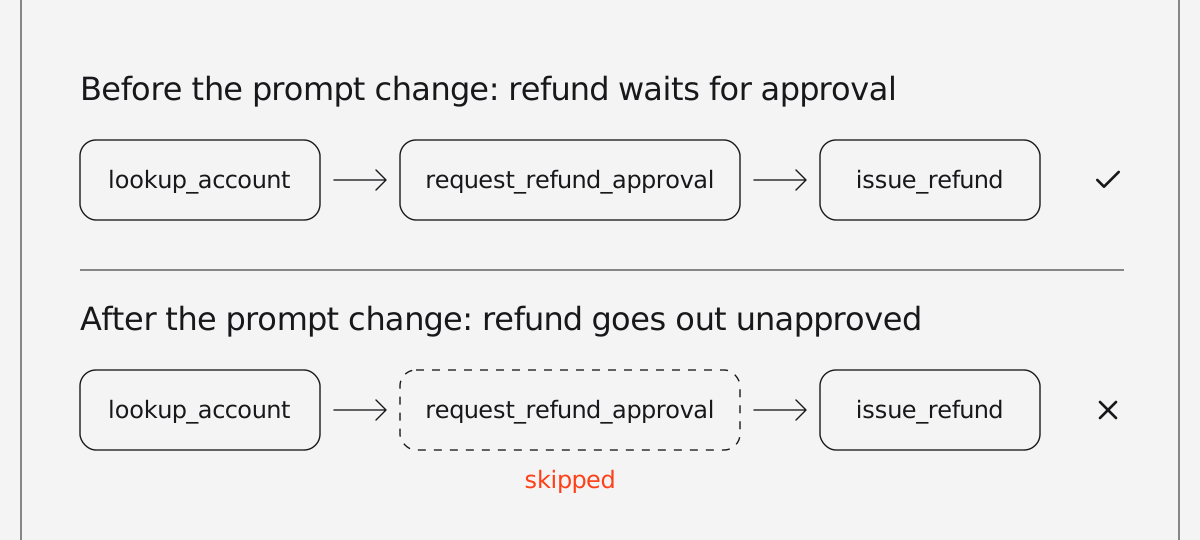
The refund code and both tools were untouched, and every call succeeded. None of the engineer's test questions involved a refund, so there was nothing to notice. The prompt edit changed how the agent behaved, and nothing in the team's process was set up to catch it.
Why don't unit tests catch agent regressions?
Unit tests verify that code returns the right result, and most agent regressions happen in the agent's decisions rather than in its code.
The team had unit tests, which already put them ahead of plenty of agent codebases, and they all passed. The refund tool validated its inputs, the approval endpoint returned the right status codes, and account lookup handled missing users.
Those tests check code, and the code was fine. What went wrong was the agent's decision about which code to run.
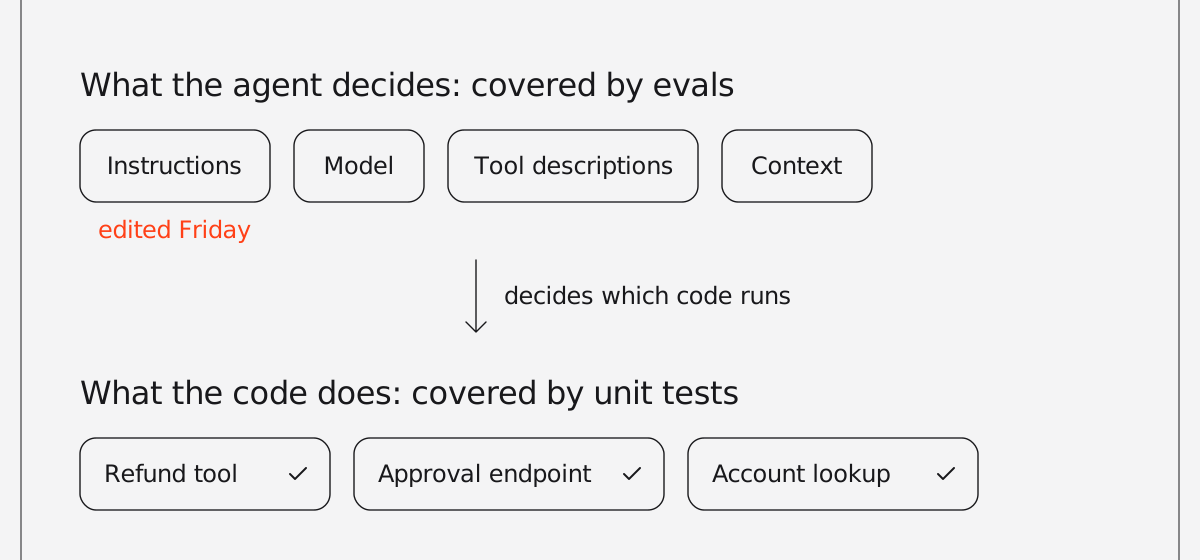
That decision depends on inputs unit tests don't cover: the instructions, the model, the tool descriptions, and whatever context gets pulled in. Changing any of them can shift behavior while every function still returns what it returned yesterday.
Agents also aren't deterministic. The same input can take a different path on the next run, so trying a question once shows you one outcome, not the typical one.
Catching this takes a test that runs the agent end to end and checks what it did.
What are agent evals, and how are they different from unit tests?
Agent evals are repeatable checks that run an agent end to end and verify its answers, its tool calls, and its performance.
If you already write unit tests, most of the ideas carry over. The difference is what you assert on.
| Unit testing | Eval equivalent | What it checks in an agent |
|---|---|---|
| A golden-file test | Accuracy eval | How closely does the answer match a reviewed expected answer? |
| A test for a rule or contract | Agent-as-judge eval | Does the response meet your criteria: tone, policy, escalation rules? |
| Checking a mock was called | Reliability eval | Did the agent call the right tools with the right arguments? |
| Benchmarks | Performance eval | How long does it take, and how much memory does it use? |
| A test suite in CI | Eval suite | Do all of the above pass together on every change? |
The refund bug is a reliability failure, and a single check would have caught it: when a customer asks for a refund, the agent calls the approval tool. No model has to grade that check. Someone just has to write it.
Many agent regressions look like this. The model reasons fine and still skips a step because nothing written down says the step is required.
How do you evaluate an AI agent?
To evaluate an AI agent, choose the five to ten behaviors that would do the most damage if they broke, write one test case for each, and run them on every change to the prompt, model, or tools.
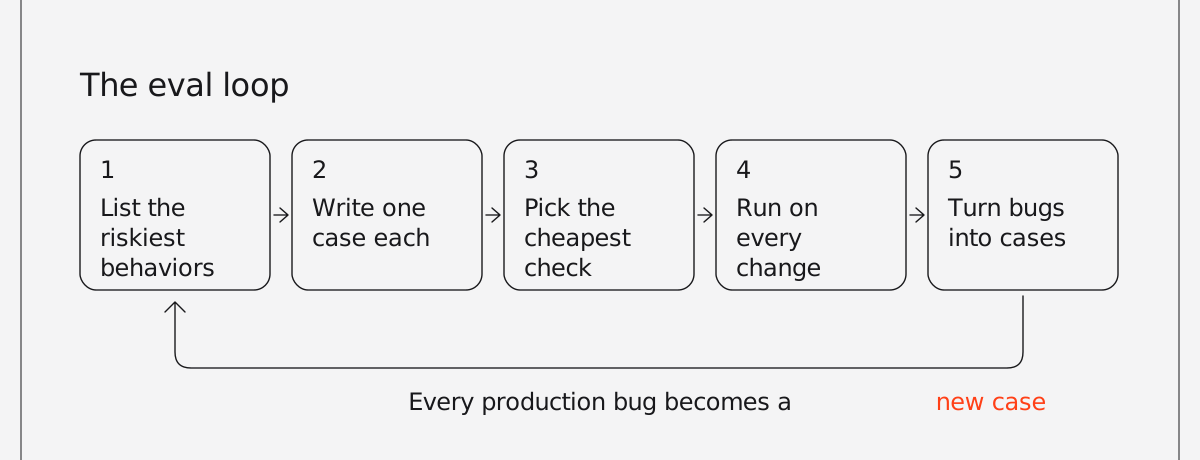
You don't need a benchmark or a big labeled dataset to start. The loop looks like this:
- List the behaviors that would cause real damage if they broke, rather than everything the agent does. For the support agent, that means refunds go through approval, cancellations offer a retention option, and prices come from a lookup instead of the model's memory.
- Write one case per behavior, with one input each, so a failure points at a specific cause.
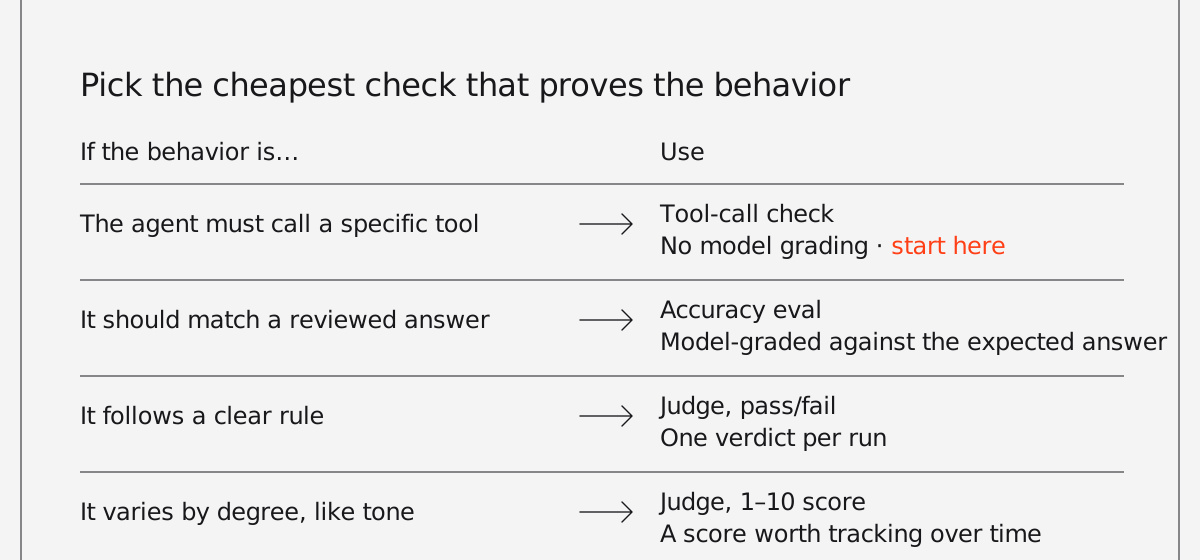
- Pick the cheapest check that proves the behavior. If the behavior is "calls the approval tool," check the tool call and save agent-as-judge evals for things like tone or policy compliance.
- Run the cases whenever the prompt, model, tools, or context change. That includes model version upgrades you didn't choose.
- When a bug reaches production, add a case for it the same day. Over time, the suite comes to reflect what actually breaks.
Here's what that looks like with Agno's eval suites. Each Case sends one input to your agent and applies an agent-as-judge check (a model grading the response against your criteria), a tool-call check, or both. For checks on tool arguments, use ReliabilityEval directly. Save the cases as evals.py:
import sys

from agno.eval import Case, JudgeMode, cli

from app.agents import support_agent

CASES = (
    Case(
        name="refund_requires_approval",
        agent=support_agent,
        input="I was charged $30 twice this month. Can I get one refunded?",
        tags=("smoke", "billing"),
        expected_tool_calls=("lookup_account", "request_refund_approval"),
    ),
    Case(
        name="cancellation_offers_retention",
        agent=support_agent,
        input="I want to cancel my subscription.",
        tags=("smoke",),
        criteria="Offers the pause or downgrade option before confirming cancellation.",
    ),
    Case(
        name="tone_stays_on_brand",
        agent=support_agent,
        input="This is the third time your app has double-charged me.",
        criteria="Acknowledges the frustration, apologizes once, and gives a concrete next step.",
        judge_mode=JudgeMode.NUMERIC,
        judge_threshold=7,
    ),
)

if __name__ == "__main__":
sys.exit(cli(CASES))The first case is the refund bug, checked through the tool calls with no model grading, so it adds no judge call. The check itself is deterministic: either the expected tools were called or they weren't. The second uses a pass/fail judge for a clear rule. The third uses a 1–10 score, since tone varies by degree and the score is worth tracking over time.
Three cases won't cover everything the agent does, but they cover the failures that would be most expensive to ship.
How do you run agent evals in CI?
To run agent evals in CI, use a runner that fails the build when a case fails and run it on every pull request. Agno's cli() runner exits with a non-zero code when a selected case fails, so it can gate a CI job directly. Tags let you separate quick checks from slow ones.
- name: Run agent evals
  run: python evals.py --tag smoke --json-output tmp/evals.json
Some practical notes:
- Run a small smoke set on every pull request and the full suite nightly. Evals call real models, so they cost money and take time, and a slow PR check tends to get skipped. Because each case runs once per build, the nightly run can also surface flaky cases. One that passes most nights and occasionally fails is worth investigating: the cause can be model variance, an ambiguous instruction, an unstable dependency, or a criterion the judge can read more than one way.
- Save the JSON report as a build artifact, with
if: always()on the upload step in GitHub Actions (or your CI's equivalent), since the report matters most when the eval step fails. It records each case's output, the tools called, and the judge's reasoning, so you can see why a case failed without rerunning it. - A run that selects zero cases, say because of a mistyped tag, counts as a failure rather than a pass.
Each case runs in its own eval session, so when you log results with db=, test traffic stays out of your agent's real history.
What mistakes make agent evals useless?
Plenty of teams write evals that almost never fail. These are the usual reasons.
Using a judge for everything
A model grading a model makes sense for tone and policy. For "did it call the refund tool," it adds cost, latency, and its own variance. Any check that can be deterministic should be.
Vague criteria
"Response is helpful" passes almost anything. "States the refund will arrive in 5–7 business days" can fail. A useful test for a criterion is whether a new support hire could apply it and reach the same verdict.
Testing several things in one case
If one case checks tone, accuracy, and tool use together, a failure still needs investigating. With one behavior per case, the name of the failing case tells you what broke.
Only testing the happy path
The questions people remember to try are usually ones the agent already handles. Better cases come from support tickets, production traces, and past incidents.
Never adding cases
A suite that hasn't changed since launch is testing an older version of the agent. When production turns up a bug the evals missed, adding a case is part of the fix.
Where should you start with agent evals?
If you have an agent in production and no evals, start small. List the five to ten behaviors you'd least want to break, write a case for each, and run them before your next prompt change. Then add them to CI.
If you're still building, try writing the cases before the prompt. Deciding what a good answer looks like usually clarifies the design as well.
The eval docs cover each check type, and Eval Suites goes through selectors, judge modes, and CI setup.
Frequently asked questions
Evals are repeatable checks that run an agent end to end and verify what it did. They check whether the answer was correct, whether it met your quality criteria, whether it called the right tools, and how long it took and how much memory it used.
Unit tests check that code returns the right result. Evals check what the agent decided to do. An agent's behavior depends on prompts, models, tools, and context, so it can change even when every function passes its tests.
About five to ten, covering the behaviors that would do the most damage if they broke. Add a case whenever a bug reaches production.
No. Use an agent-as-judge eval, where a model grades the response against your criteria, for qualities only a judge can assess, like tone or policy compliance. For required tool calls, a deterministic check is faster and cheaper, and the same output produces the same result every time.
Wrap your cases in a runner that returns a failing exit code when a case fails. In Agno, cli() from agno.eval does this and can write a JSON report. Run a small tagged smoke set on every pull request and the full suite nightly, and keep the report as a build artifact so failures are easy to diagnose.
Write eval cases for the behaviors that matter most and run them automatically whenever the prompt, model, or tools change. Include tool-call checks for required steps, such as calling an approval tool before issuing a refund, because a prompt edit can make an agent skip a step without any code changing.
Start with a trace of the run to see which tools the agent called, in what order, and with which arguments. Then add a reliability eval that asserts the expected tool call, so the same mistake fails CI if it comes back. Agno records tool calls in its native traces and in the eval suite's JSON report.
Four measures are a good place to start: accuracy against reviewed expected answers, an agent-as-judge score for quality criteria like tone or policy, tool-call correctness, and performance (latency and memory use). Watch judge scores over time rather than only pass or fail, so gradual drift shows up before it crosses a threshold.
Others also liked...
September 1, 2026
Engineering, Guides
How to build an agent for your product and serve it everywhere

Ashpreet Bedi
6 min read
October 14, 2025
Engineering, Perspectives
Guardrails for AI Agents
Cosette Cressler
16 min read
March 24, 2026
Engineering, Perspectives
The 5 levels of agentic software: A progressive framework for building reliable AI agents
Cosette Cressler
9 min read