
Agno keeps each ClaudeAgent or CodexAgent member's own conversation (the Claude session id or the Codex thread id) in a session named <team session id>:<member id>, while the team stores the member's runs in the team session with every other member's. Two harness members of one team never share a conversation, and the team's session row stays the team's.
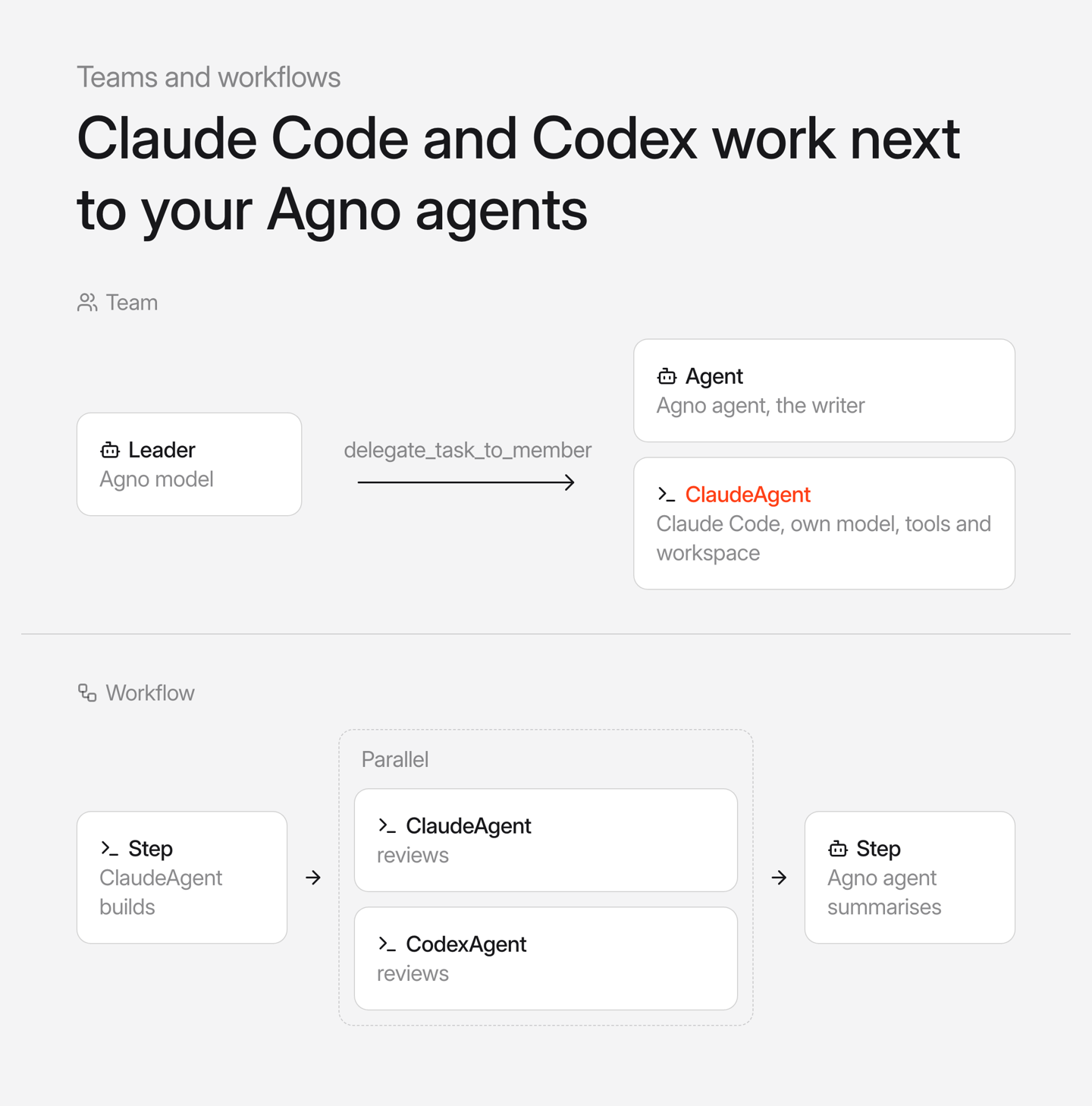
Say your leader plans a change. Claude Code writes and runs the test in the repo, Codex reviews it read-only, and an Agno agent writes the summary. Each harness works with its own model, tools and workspace, and role tells the leader what it is for.
from agno.agents.claude import ClaudeAgent
from agno.agents.codex import CodexAgent
from agno.team import Team
from agno.workflow import Parallel, Step, Workflow

engineer = ClaudeAgent(id="claude-engineer", name="Claude Engineer", role="Writes and runs code", cwd=project, db=db)
reviewer = CodexAgent(id="codex-reviewer", name="Codex Reviewer", role="Reviews code read-only", cwd=project, sandbox_mode="read-only", db=db)

team = Team(model=leader_model, members=[engineer, reviewer, writer], add_history_to_context=True, db=db)
team.run("Add a test for the 100 dollar boundary, run it and review it", session_id="review")

workflow = Workflow(
    steps=[Step(name="build", agent=engineer), Parallel(claude_reviewer, codex_reviewer), Step(name="summary", agent=writer)],
    db=db,
)
A later turn of the same team session resumes the member's conversation, so a follow-up can ask Claude about the file it wrote. Keep add_history_to_context=True on the team as well, or the leader may forget earlier turns and answer the follow-up itself.
We ran a two-turn team offline with two stand-ins. The leader is a scripted model that calls delegate_task_to_member, and Claude Code is the fake Claude Agent SDK client built from this release's own tests, which replies answer from <session>. The second turn resumed sdk-1, and the member session holds the Claude session id with no runs of its own:
team run: COMPLETED; member claude-engineer: 'answer from sdk-1'; parent_run_id matches: True
team run: COMPLETED; member claude-engineer: 'answer from sdk-1'; parent_run_id matches: True
sdk resume per turn: [None, 'sdk-1']
member session review:claude-engineer -> sdk-1 | runs stored there: 0
In a workflow, a harness agent can be a step's agent or sit directly in steps, Parallel, Loop, Condition or Router. One agent keeps one conversation per workflow session, so a later Loop iteration or a second step with the same agent picks up where it stopped. That conversation takes one turn at a time, and the workflow refuses the same agent in two Parallel branches when you build it:
ValueError: Harness agent 'claude-coder' is used in more than one Parallel branch. It keeps one conversation per workflow session, which takes one turn at a time; use a separate agent, with its own id, for each branch.A harness agent with sandbox= also works as a member or a step. It runs every turn on its own computer, and files it writes carry over to its next turn.
AgentOS lists harness members on the team page. Through FastAPI's TestClient, GET /teams/build-team returned the member with its role and SDK label:
[
  {
    "id": "claude-engineer",
    "name": "Claude Engineer",
    "role": "Writes and runs code",
    "metadata": { "sdk": "claude-agent-sdk" }
  }
]
On earlier releases the same script failed at each point. ClaudeAgent took no role, a team run stopped with 'ClaudeAgent' object has no attribute 'role', a workflow step retried on 'ClaudeAgent' object has no attribute 'store_media', Parallel raised Invalid step type: ClaudeAgent, and the team page listed no members.
See the team cookbooks and workflow cookbooks, and learn more about agent harnesses and teams in the documentation.
Frequently asked questions
Yes. Add it to Team(members=[...]) next to Agno agents. The leader sends it work through the delegate_task_to_member tool, it does the task with its own model, tools and working directory, and the team saves its run in the team session.
Yes. Agno saves the Claude session id or Codex thread id in a session named after the team session and the member id, and resumes it on the next turn of that team session. Set add_history_to_context=True on the team so the leader also remembers earlier turns and keeps delegating follow-ups.
No. A harness agent holds one conversation per workflow session, and that conversation takes one turn at a time, so Agno raises a ValueError when the Parallel is built. Give each branch its own agent with its own id.
Yes. GET /teams/{id} lists each harness member with its id, name, role and an sdk label in metadata, and the workflow page shows the agent behind each harness step.
Shipped around the same time
October 27, 2026
Changelog
v3.1.11Search AgentOS sessions with nested filters


Priti S, Sannya Singal, and 1 other
1 min read
October 27, 2026
Changelog
v3.1.11ReaderFactory builds a fresh reader on every call


Md. Fazlul Karim, Kaustubh Shukla, and 1 other
1 min read
October 27, 2026
Changelog
v3.1.11Workflow step content keeps 0 and False after a reload
Kaustubh Shukla
1 min read