
Agno vs. Vercel AI SDK: choosing a stack for your AI product
Agno is a Python framework with a runtime you self-host. The Vercel AI SDK is a set of TypeScript libraries. Explore how they compare on memory, durable execution, access controls, and harnesses.



November 5, 202611 min read
Checked against the Agno source and documentation and the Vercel AI SDK documentation on 5 November 2026. Both projects ship often, so check the linked docs for current features.
Agno is a Python framework for building agents, teams, and workflows, with AgentOS to serve and operate them in your own infrastructure. The Vercel AI SDK is a set of TypeScript libraries for building agents and AI interfaces. Choose Agno for an integrated agent backend with built-in memory, access controls, and operational tooling. Choose the Vercel AI SDK if your team prefers TypeScript. Agno SDK, Vercel AI SDK
The first version of an AI feature might be a conversation with a model. The production version often needs much more: access to application data, persistent memory, approval flows, background execution, and a way to understand what happened during each run. Agno and the Vercel AI SDK both help developers build agents that use tools and complete tasks, but they differ in how those capabilities fit into an application.
For teams choosing between them, the central question is how much of the agent backend they want provided together and how much they want to compose themselves.
What's the difference between Agno and the Vercel AI SDK?
| Area | Agno + AgentOS | Vercel AI SDK |
|---|---|---|
| Best for | Python teams that want an integrated agent backend and platform | Teams that prefer TypeScript |
| Language | Python agent framework; frontends connect through APIs | TypeScript agent and UI libraries |
| Agent orchestration | Agents, Teams, and Workflows as explicit abstractions | Agent loops, subagent delegation, and workflow patterns |
| External harnesses | AgentOS serves Claude and Codex agents, plus adapters for other runtimes | HarnessAgent runs Claude Code, Codex, and other adapted harnesses |
| Backend APIs | AgentOS provides execution and management endpoints | Application routes built around SDK primitives |
| Context and memory | Configurable history, memory, dependencies, compaction, and compression | Context hooks, pruning utilities, and memory integrations |
| Execution controls | Background runs, cancellation, approvals, and configurable durable execution | Cancellation and approvals; durable execution through Workflow SDK integration |
| Access controls | Configurable runtime authentication, authorization scopes, and user isolation | Authentication and authorization integrated through the application backend |
| User interfaces | Platform management UI, customizable Agent UI, and streaming APIs | UI hooks and streaming utilities for application interfaces |
| Deployment | Your cloud or on-premises infrastructure | Compatible JavaScript environments, including hosting outside Vercel |
How does Agno's architecture work?
Agno's architecture gives your agents a common runtime. You define behavior using the Agno framework, then register your agents, teams, and workflows with AgentOS. AgentOS exposes them through a FastAPI application and provides APIs for working with their execution and state.
Your frontend connects to those APIs. The AgentOS Control Plane connects to the same runtime for management and inspection. AgentOS architecture
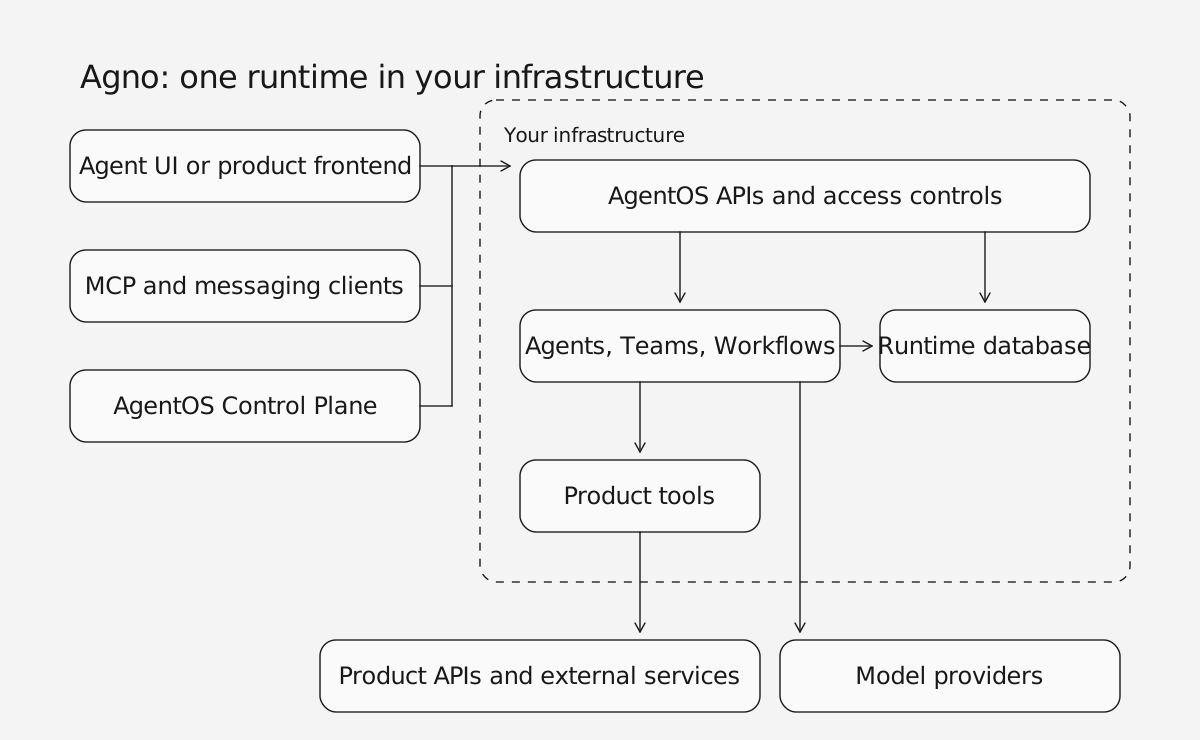
This architecture is useful when the agent backend needs to serve several experiences: a copilot inside your product, an internal operations interface, and external clients connecting through MCP.
You can operate AgentOS as a separate service or extend an existing FastAPI application. FastAPI integration
How does the Vercel AI SDK fit into an application?
The Vercel AI SDK fits agent execution into your application architecture. Your frontend commonly uses AI SDK UI, while server routes invoke ToolLoopAgent or functions such as streamText.
Your application connects the agent to authentication, conversation storage, product APIs, and operational tooling. For durable execution, WorkflowAgent integrates with the Workflow SDK. AI SDK agents, WorkflowAgent
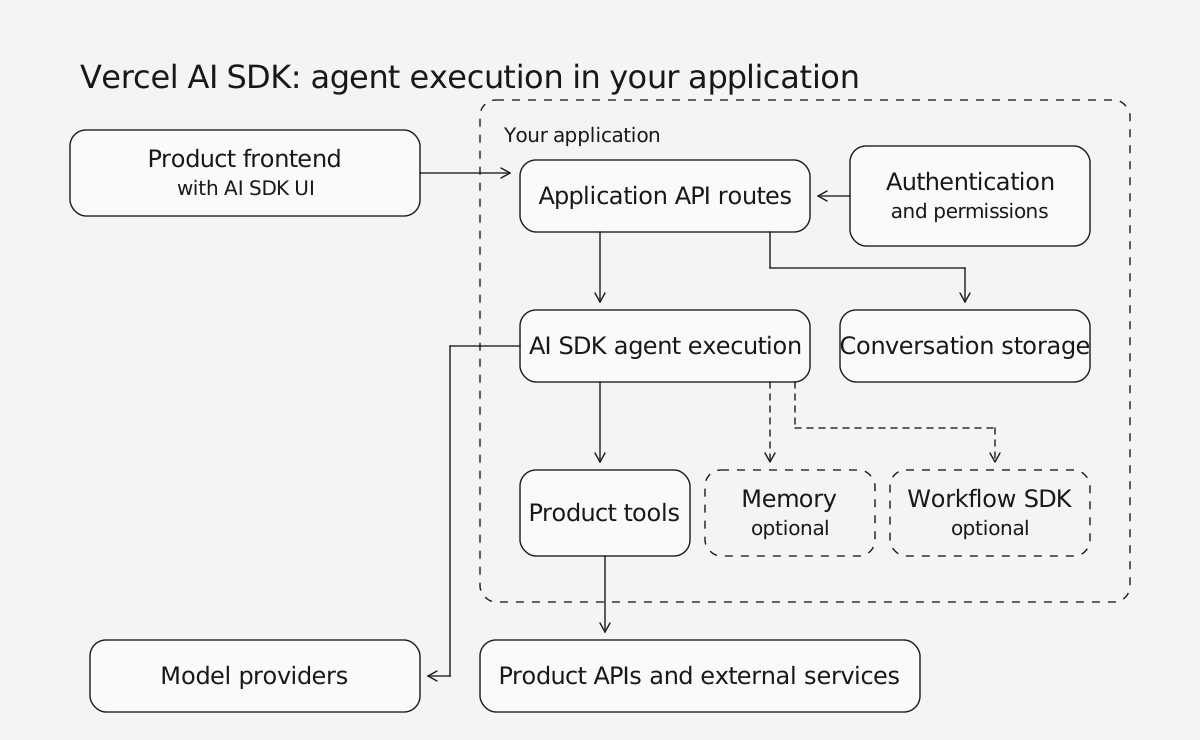
This is a natural fit for a team that prefers TypeScript and wants to own the surrounding backend.
Both diagrams show representative architectures; the exact deployment depends on the features your product needs.
How do you define an agent in each?
Consider a support agent that looks up an order. These examples use the same model and equivalent demonstration tools. Both omit persistence and authentication to keep the example focused on agent definition and serving.
With Agno, define the agent and register it with AgentOS:
# agent.py
from agno.agent import Agent
from agno.models.openai import OpenAIResponses
from agno.os import AgentOS


def lookup_order(order_id: str) -> dict:
    """Look up an order in the demo catalog."""
    return {
        "order_id": order_id,
        "status": "shipped" if order_id == "ORD-123" else "not_found",
    }


support = Agent(
    id="support",
    model=OpenAIResponses(id="gpt-5.6-luna"),
    instructions="Use lookup_order to answer order-status questions.",
    tools=[lookup_order],
)

agent_os = AgentOS(agents=[support])
app = agent_os.get_app()
Run the application with an ASGI server such as Uvicorn. AgentOS provides the run endpoint at /agents/support/runs, with streaming enabled through the request's stream parameter.
With the Vercel AI SDK, define the agent and expose it through an application route. This example uses Next.js:
// app/api/chat/route.ts
import { openai } from '@ai-sdk/openai'
import { ToolLoopAgent, createAgentUIStreamResponse, tool } from 'ai'
import { z } from 'zod'

const support = new ToolLoopAgent({
  model: openai.responses('gpt-5.6-luna'),
  instructions: 'Use lookupOrder to answer order-status questions.',
  tools: {
    lookupOrder: tool({
      description: 'Look up an order in the demo catalog.',
      inputSchema: z.object({ order_id: z.string() }),
      execute: async ({ order_id }) => ({
        order_id,
        status: order_id === 'ORD-123' ? 'shipped' : 'not_found'
      })
    })
  }
})

export async function POST(request: Request) {
  const { messages } = await request.json()

  return createAgentUIStreamResponse({
    agent: support,
    uiMessages: messages,
    abortSignal: request.signal
  })
}The route returns the AI SDK UI message stream for consumption by its frontend utilities. AI SDK agent streaming
Both approaches make a basic agent straightforward to define. As requirements expand, AgentOS supplies additional runtime endpoints, while the Vercel AI SDK remains integrated into your application's routes and services.
How does Agno handle multi-agent teams and workflows?
Agno gives you three ways to organize agent behavior.
An Agent handles a focused responsibility. A billing agent might retrieve invoices, explain charges, and prepare a refund request using your product's tools.
A Team coordinates specialists. A support coordinator could consult billing, shipping, and technical agents, then combine their findings. Agno provides explicit modes for coordination, routing, broadcasting, and executing a shared task list. Teams can also contain other teams. Agno Teams
A Workflow defines the execution path. A refund process might check eligibility, calculate an amount, request approval, and execute the transaction. Workflow steps can use agents, teams, Python functions, or nested workflows, with branches, loops, and parallel execution. Agno Workflows
These abstractions support different kinds of control. Teams let a model decide how to delegate; workflows let developers specify how a process proceeds. The same specialist agent can participate in both.
The Vercel AI SDK supports subagent delegation and workflow patterns too. Developers compose agents through tools and TypeScript control flow. In Agno, these orchestration models are first-class framework components that AgentOS serves and manages together. AI SDK subagents, workflow patterns
How do Agno and the Vercel AI SDK manage context and memory?
Context management becomes more important as conversations and tasks grow. An agent needs the relevant instructions, conversation history, application data, and tool results for its current task. Sending everything on every turn can make that context unnecessarily large.
Agno lets you configure which history, memory, and knowledge an agent receives, and resolves dependencies at runtime. Conversation compaction summarizes older turns, while tool-result compression reduces verbose outputs. Context management, compaction, compression
Dependency injection connects the reusable agent definition to the current request. For example, the same support agent can receive the current account's plan or relevant documents through static values or callable dependencies resolved at runtime. Agno dependencies
The Vercel AI SDK provides context controls through prepareCall, prepareStep, runtime context, and tool context. Developers can transform messages, apply pruning or summarization policies, and connect memory providers or custom memory tools. Call options, loop control, runtime context, memory
Agno provides these features built in; the Vercel AI SDK provides hooks to compose them yourself.
Which supports background and durable execution?
AgentOS provides controls for work that extends beyond one request. It supports background execution, result retrieval, resumable streaming, and run cancellation. For work that must survive server restarts, configure its durable job queue. Background execution
This supports experiences such as starting a research task, leaving the page, and returning to inspect its result. Approval checkpoints let a run pause before an action and continue after a decision. Agno approvals
In the Vercel AI SDK, ToolLoopAgent runs in memory. WorkflowAgent adds durable execution through the Workflow SDK, including approval flows that survive suspension. Cancellation can be propagated with AbortSignal. WorkflowAgent, AI SDK cancellation
For either stack, cancellation stops further work where supported; it does not reverse external actions already completed.
How do access controls compare?
Access controls belong in the agent architecture. AgentOS provides configurable authentication, authorization scopes, and user isolation for supported runtime data. These controls help determine who can run an agent, inspect a session, or access other runtime resources.
Configure those controls for your deployment, and enforce customer-data permissions in the product APIs and tools the agent calls. Runtime user isolation and your application's tenant authorization model serve related but different purposes. AgentOS security
With the Vercel AI SDK, authentication and application RBAC are integrated through your backend and authorization services. Its tool approval policies can then govern when execution needs a user decision. AI SDK tool approvals
AgentOS brings runtime access controls and execution management into the same platform.
Do Agno and the Vercel AI SDK support MCP?
Both support connecting agents to external MCP tools. AgentOS also includes MCP serving, so compatible clients can invoke your agents, teams, and workflows through the runtime. With the Vercel AI SDK, MCP serving uses additional tooling such as mcp-handler. AgentOS MCP, AI SDK MCP, Vercel server tooling
Can you run Claude or Codex agents on either stack?
Yes. Both support external harnesses, which are agent runtimes that manage their own model and tool loop. The stacks differ in what they put around the harness.
AgentOS serves Claude and Codex agents as an API and MCP server. It handles authentication, streaming, session storage, and background execution, and it keeps run history in your database. You provision the execution environment, and native conversation recovery differs between Claude and Codex, so test it before running several replicas. LangGraph and DSPy programs can run on AgentOS too, along with Google's Antigravity, through adapters whose behavior varies by runtime. Agent harnesses, deploy and operate, other integrations
In the Vercel AI SDK, HarnessAgent gives you one API for Claude Code and Codex, with adapters for Cursor, GitHub Copilot, OpenCode, and others. Its results work with AI SDK UI. Claude Code and Codex need a real network sandbox such as Vercel Sandbox, and your application creates and cleans up that session. A separate durable-harness package adds crash recovery. Vercel labels the harness packages experimental and warns of breaking changes between releases. AI SDK harnesses, HarnessAgent, durable-harness
What UI does each provide?
Agno provides interfaces for both operating agents and interacting with them. The AgentOS Control Plane lets your team inspect sessions and runs, review metrics, and explore configured traces. Agent UI provides a customizable starting point for a streaming chat experience. AgentOS platform, Agent UI
The Vercel AI SDK provides UI hooks and streaming utilities for building chat and generative interfaces inside your application. Monitoring is handled through telemetry integrations and your chosen operational tools; the SDK itself does not provide an equivalent AgentOS management console. AI SDK UI, telemetry
Agno brings the agent framework, serving runtime, and management interface together, reducing the application infrastructure your team needs to assemble.
Can you deploy either outside Vercel?
Yes. AgentOS runs in your cloud or on-premises infrastructure wherever its Python application and dependencies are supported. The Vercel AI SDK also works outside Vercel in compatible JavaScript environments. AgentOS deployment, AI SDK with Node.js
Evaluate the complete deployment: application runtime, database, workflow infrastructure, model access, and observability. Hosting choice alone does not distinguish the two stacks.
When should you choose Agno?
Choose Agno when you want an integrated agent backend and platform. Agno is a strong fit when your team works in Python and needs several capabilities together: persistent context, specialist teams, structured workflows, runtime APIs, access controls, and operational visibility.
It is particularly useful when the agent system will serve multiple products or channels. You can develop the behavior once and operate it through a common runtime.
When should you choose the Vercel AI SDK?
Choose the Vercel AI SDK when your team prefers TypeScript. You keep frontend and backend development in one language, and its agent and UI primitives follow your application's architecture and conventions.
It is a strong fit when you're comfortable connecting authentication, storage, deployment, and operational services yourself.
Can you use Agno and the Vercel AI SDK together?
Yes, when the frontend and backend benefit from different strengths. An application can use Agno and AgentOS for execution and state while using AI SDK UI in the frontend. Connect them through an adapter or compatible transport that translates AgentOS events into the AI SDK UI message protocol. AI SDK streaming protocol
Agno's strongest case is the combined system: build agents, coordinate teams, define workflows, and serve and manage them through AgentOS. For teams building a reusable agent backend, that combination provides a consistent foundation as the product grows.
Frequently asked questions
Agno agents, teams, and workflows are written in Python. Frontends in any language, including TypeScript, connect to them through the AgentOS APIs.
Agno includes configurable history, memory, conversation compaction, and tool-result compression. The Vercel AI SDK provides context hooks and connects to memory providers or custom memory tools.
Yes. AgentOS supports approval checkpoints that pause a run before an action. The Vercel AI SDK supports tool approval policies, and WorkflowAgent adds approval flows that survive suspension.
Yes. AgentOS serves Claude and Codex agents and handles authentication, streaming, sessions, and background execution around them. The Vercel AI SDK runs Claude Code, Codex, and other harnesses through HarnessAgent, in packages Vercel currently labels experimental.
Yes. Use an adapter or compatible transport that translates AgentOS events into the AI SDK UI message protocol.
No. You can run agents, teams, and workflows directly with the Agno framework. AgentOS adds runtime APIs, access controls, and the Control Plane for serving and operating them.