
Pass Agno's new DocumentationMarkdown to Knowledge.sync_pages as its transform, and it rewrites each page before Agno chunks and embeds it. Documentation sites serve their pages as MDX full of <Steps>, <Tabs> and <Warning> tags. Without the transform, those tags end up in your chunks and embeddings, and your agent quotes them back to users.
from agno.knowledge.page import DocumentationMarkdown

report = await knowledge.async_sync_pages(
    url="https://better-auth.com/docs/llms.txt",
    transform=DocumentationMarkdown(profile="fumadocs"),
    index_version="docs-v1",
)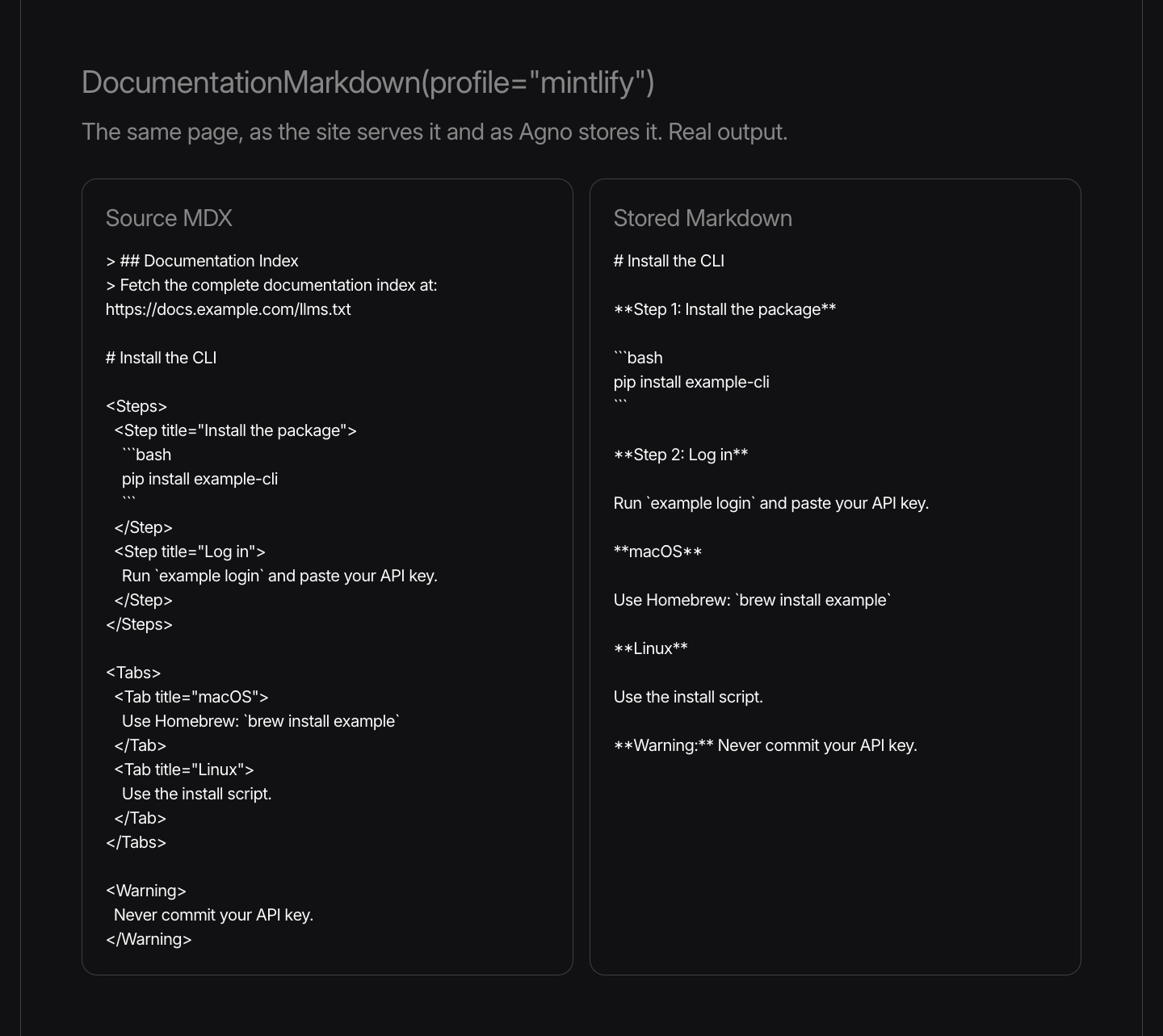
DocumentationMarkdown converts steps, tabs, callouts, cards, fields, media and wrapper components into Markdown. It unwraps components it doesn't know, keeps code fences and indentation exactly as written, and drops the "Documentation Index" preamble that these sites put at the top of every page.
Pick the profile that matches your docs site:
| Profile | What it does |
|---|---|
markdown | Returns the page unchanged. The default. |
mintlify | Converts components and drops the preamble. Keeps escapes as written. |
fumadocs | Does the same, and also decodes the HTML escapes that the Fumadocs serializer adds outside code fences. |
DocumentationMarkdown never runs JavaScript. It treats attribute expressions as literal strings and leaves inline JSX alone. You can map your own component names onto the built-in ones with component_aliases, or render them yourself with component_renderers. To convert a single string outside a sync, call normalize_mdx, which agno.knowledge.page also exports.
Changing the transform changes what you store, so bump index_version when you add it to an existing index.
See the cookbook, and learn more about synchronizing published Markdown in the documentation. For a production example, see how we built the Agno Docs Agent.
Frequently asked questions
Pass transform=DocumentationMarkdown(profile="mintlify"), or profile="fumadocs", to Knowledge.sync_pages along with the site's llms.txt URL. Agno converts each page's components into plain Markdown before it chunks and embeds the page.
Steps, tabs, callouts, cards, fields, media and wrapper components. DocumentationMarkdown unwraps components it doesn't know and leaves code fences exactly as written.
Both convert the same components and drop the Documentation Index preamble. The fumadocs profile also decodes the HTML escapes that its serializer adds outside code fences. The mintlify profile keeps escapes as written.
No. DocumentationMarkdown is a text transform. It never executes JavaScript and treats attribute expressions as literal strings.
Shipped around the same time
September 16, 2026
Changelog
v3.0.10Serve your MCP server at its own hostname


Ashpreet Bedi, Sannya Singal, and 1 other
1 min read
September 16, 2026
Changelog
v3.0.10Public MCP with JWT authorization now checks the host
Ashpreet Bedi, Sannya Singal
1 min read
September 16, 2026
Changelog
v3.0.10Slack now answers messages whose first delivery was lost


Himanshu Singh, Ray, and 2 others
1 min read